LifeOS example vault for Obsidian(Combining P.A.R.A with Periodic Notes)
See the codeEnglish | 简体中文 | 繁體中文 | 日本語 | Deutsch | Español | Français | Português | العربية | 한국어


This is the open-source LifeOS example vault, for the free LifeOS plugin. The current starter packages support ten languages: English, Simplified Chinese, Traditional Chinese, German, Spanish, French, Portuguese, Japanese, Korean, and Arabic.
Each language includes LifeOS Vault (with a small working example) and LifeOS Blank Vault (templates and folder structure for your own notes). Open one vault folder in Obsidian, install LifeOS and Dataview from Community plugins, then open the local starting guide. Folder names, templates, and plugin settings use the same language. No Pro resources or plugin binaries are bundled.
The older article-rich examples remain in the root and i18n/ for reference. New starter packages live under examples/.
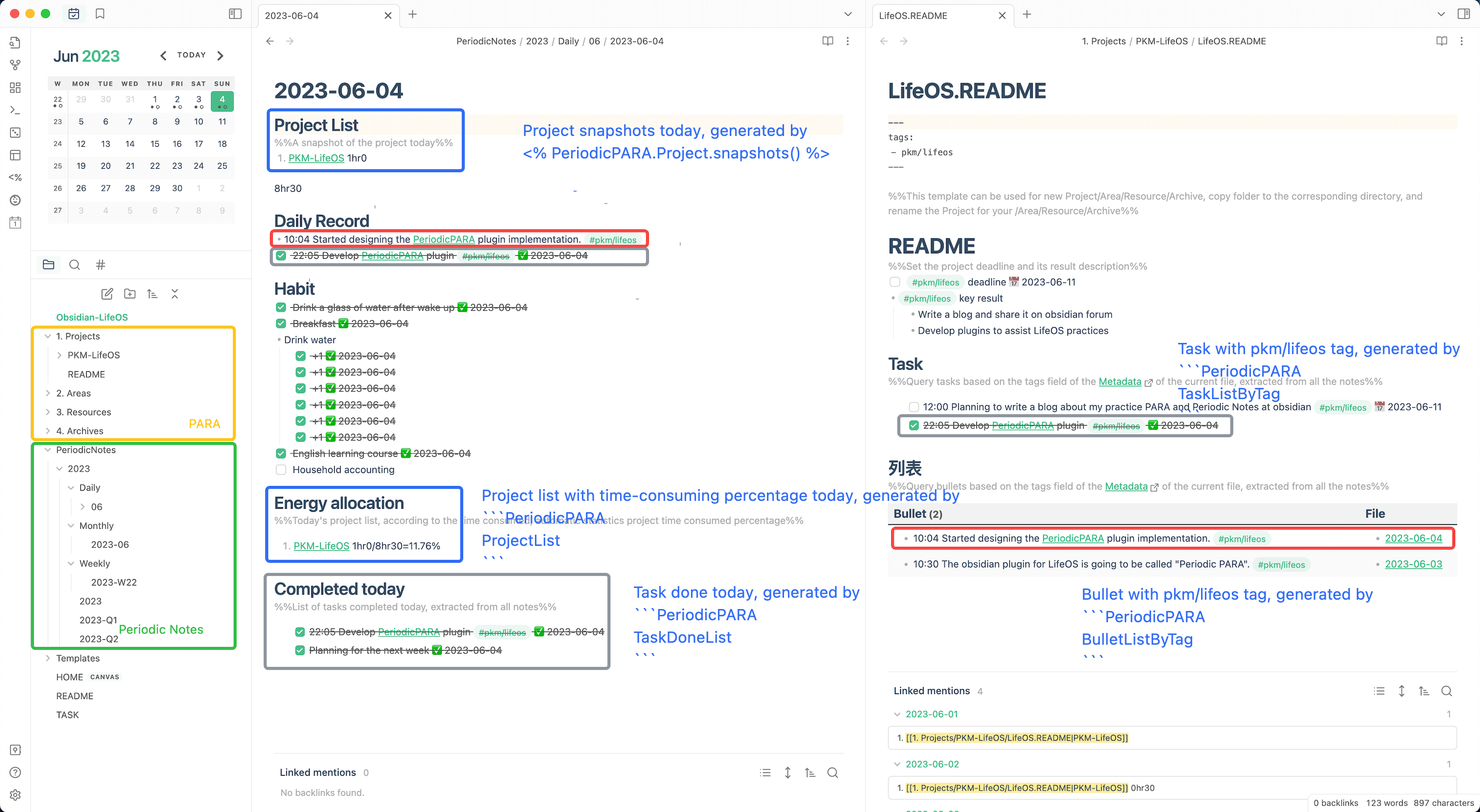
Release 1.21.0 provides ten language packages and requires LifeOS 1.29.2 or newer. Each ZIP includes PARA example and blank vaults plus plain-theme example and blank vaults. You can also open a vault directly under examples/<language>/.
Download the vault in your preferred language from the latest release:
Also, I relied on the code from these excellent plugins:
If this plugin do help you, please buy me a cup of coffee on buymeacoffee.
In addition, you can also support me in further developing a better LifeOS by purchasing the LifeOS Pro!
Or Alipay

Or WeChat

Each language now includes LifeOS Theme Vault and LifeOS Theme Blank Vault, alongside the existing PARA vaults. Theme mode uses a configurable theme directory with one folder and index note per topic; it does not create Projects, Areas, Resources or Archives folders.
Enable Theme notes and turn off Use PARA in the open-source LifeOS settings. Create a theme with a tag, folder and index filename, associate a quick capture, then open the theme to see tasks, records and files. Tagged habit entries in the sample diary are intentionally excluded from capture and theme task/record queries. The diary theme list is a snapshot at creation time.
普通主题示例库无需 PARA。每种语言提供 LifeOS Theme Vault(带示例)与 LifeOS Theme Blank Vault(空白库)。主题笔记、日记记录、任务及相关文件使用同一个关联标签;日记中的习惯条目用于验证过滤规则,不会进入快速记录或主题任务/记录查询。
Install the updated open-source LifeOS plugin and Dataview separately; the archives contain no plugin binaries. Native theme lists and quick capture work without Dataview. Task, record and file query blocks require Dataview. Local generation does not update public downloads.
280 followers · starred May 2026
19 followers · starred Apr 2026
34 followers · starred Mar 2024
16 followers · starred Aug 2024
LifeOS example vault for Obsidian(Combining P.A.R.A with Periodic Notes)
See the codeEnglish | 简体中文 | 繁體中文 | 日本語 | Deutsch | Español | Français | Português | العربية | 한국어
This is the open-source LifeOS example vault, for the free LifeOS plugin. The current starter packages support ten languages: English, Simplified Chinese, Traditional Chinese, German, Spanish, French, Portuguese, Japanese, Korean, and Arabic.
Each language includes LifeOS Vault (with a small working example) and LifeOS Blank Vault (templates and folder structure for your own notes). Open one vault folder in Obsidian, install LifeOS and Dataview from Community plugins, then open the local starting guide. Folder names, templates, and plugin settings use the same language. No Pro resources or plugin binaries are bundled.
The older article-rich examples remain in the root and i18n/ for reference. New starter packages live under examples/.
Release 1.21.0 provides ten language packages and requires LifeOS 1.29.2 or newer. Each ZIP includes PARA example and blank vaults plus plain-theme example and blank vaults. You can also open a vault directly under examples/<language>/.
Download the vault in your preferred language from the latest release:
Also, I relied on the code from these excellent plugins:
If this plugin do help you, please buy me a cup of coffee on buymeacoffee.
In addition, you can also support me in further developing a better LifeOS by purchasing the LifeOS Pro!
Or Alipay
Or WeChat
Each language now includes LifeOS Theme Vault and LifeOS Theme Blank Vault, alongside the existing PARA vaults. Theme mode uses a configurable theme directory with one folder and index note per topic; it does not create Projects, Areas, Resources or Archives folders.
Enable Theme notes and turn off Use PARA in the open-source LifeOS settings. Create a theme with a tag, folder and index filename, associate a quick capture, then open the theme to see tasks, records and files. Tagged habit entries in the sample diary are intentionally excluded from capture and theme task/record queries. The diary theme list is a snapshot at creation time.
普通主题示例库无需 PARA。每种语言提供 LifeOS Theme Vault(带示例)与 LifeOS Theme Blank Vault(空白库)。主题笔记、日记记录、任务及相关文件使用同一个关联标签;日记中的习惯条目用于验证过滤规则,不会进入快速记录或主题任务/记录查询。
Install the updated open-source LifeOS plugin and Dataview separately; the archives contain no plugin binaries. Native theme lists and quick capture work without Dataview. Task, record and file query blocks require Dataview. Local generation does not update public downloads.
280 followers · starred May 2026
19 followers · starred Apr 2026
34 followers · starred Mar 2024
16 followers · starred Aug 2024



