
See what people are saying
README
QontoFAQ: A Retrieval Benchmark
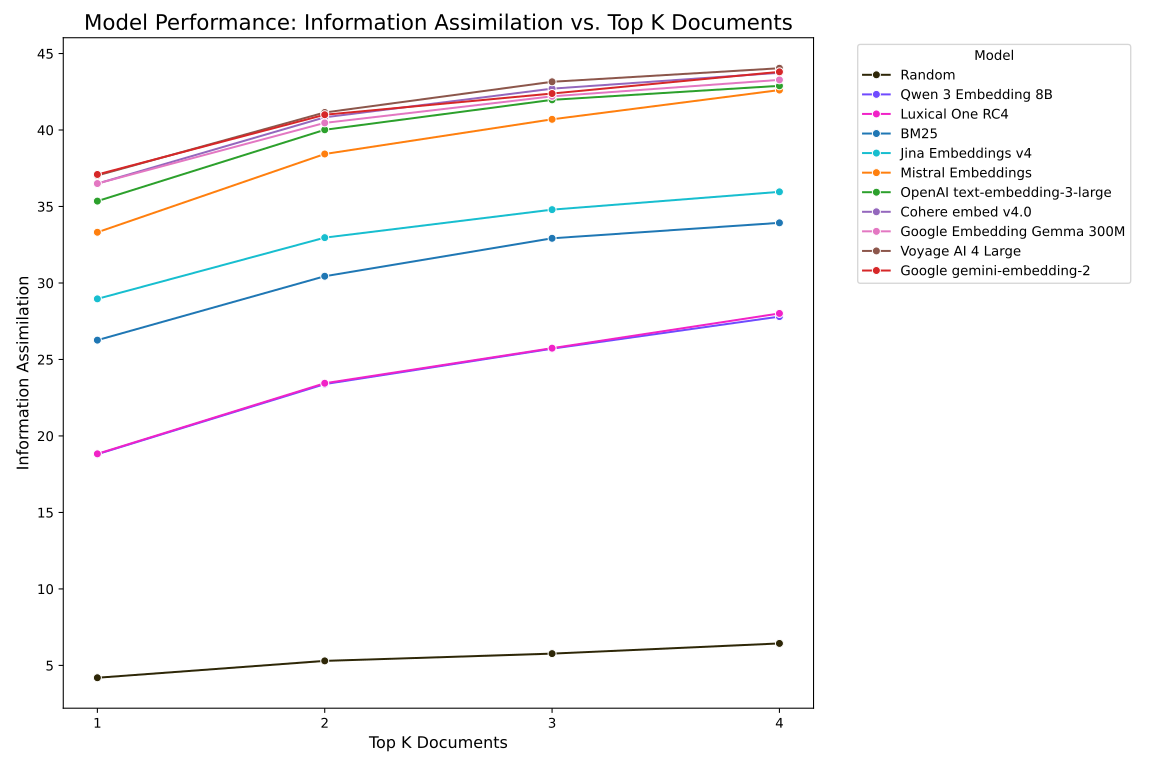
Benchmarking embedding models with a realistic dataset targeted at use-cases involving customer support chatbots using RAG pipelines.
Commands
make dataset/documentswill download the Qonto FAQ dataset into a local set of cleaned up files, layed out in this way:dataset/documents/metadata.jsonlcontains{id, path, url, title}.dataset/documents/markdown/<id>.mdcontains the Markdown content of the document.dataset/documents/raw/<id>.htmlcontains the raw content of the document.
make dataset/qawill build a training dataset with query / answer pairs based on the dataset/documents, and store it indataset/qa/benchmark.jsonlwith each line having{query, answer, relevant_docs: [{id}]}. If dataset/documents does not exist, it downloads the Qonto FAQ by default.make benchmarkwill run the benchmark defined in dataset/qa/ on all approaches, and output the comparative results inbenchmark/result.json.make benchmark/<approach>will run the benchmark on a given algorithm, and outputbenchmark/<approach>.json.python -m retriever.<approach>.index [documents] >index.jsonlwill index the dataset/documents and output the index in stdout. The documents must be a folder in the same format as dataset/documents. Format: for each document,{id, vector}. You may need tosource ./envto have the right environment variables.python -m retriever.<approach>.query --index [index.jsonl] [query] >result.jsonwill query the index with the given query and output a list of relevant documents as JSON through stdout. Format: list of documents[{id, score, snippet}].
Requirements
- huggingface-cli
- Have in your environment:
OPENAI_API_KEYfrom https://platform.openai.com/api-keysGEMINI_API_KEYfrom https://aistudio.google.com/apikeyMISTRAL_API_KEYfrom https://console.mistral.ai/api-keys/COHERE_API_KEYfrom https://dashboard.cohere.com/api-keysVOYAGE_API_KEYfrom https://dashboard.voyageai.com/api-keysJINA_API_KEYfrom https://jina.ai/api-dashboard/key-managerDOCUMENTS_FOLDER(if located at a non-default path)
- Using venv, run
source ./.venv/bin/activateto activate the environment - Preferentially, a GPU with CUDA support
Local Qwen3 Server
To run the Qwen3 benchmark with Huggingface’s TEI:
docker run --gpus all -p 8114:80 -v hf_cache:/data --pull always ghcr.io/huggingface/text-embeddings-inference:1.7.2 --model-id Qwen/Qwen3-Embedding-8B --dtype float16
We also tried running it with a local llama.cpp server, with worse results, following these steps:
-
Download the model:
huggingface-cli download Qwen/Qwen3-Embedding-8B-GGUF Qwen3-Embedding-8B-Q8_0.gguf -
Copy the model to your models directory:
cp --reflink /home/tyl/.cache/huggingface/hub/*/*/*/Qwen3-Embedding-8B-Q8_0.gguf /data/ml/models/gguf/Qwen3-Embedding-8B-Q8_0.gguf -
Run the llama.cpp server using Docker:
docker run --gpus all -v /data/ml/models/gguf:/models -p 8114:8080 ghcr.io/ggml-org/llama.cpp:full-cuda -s --host 0.0.0.0 -m /models/Qwen3-Embedding-8B-Q8_0.gguf --embedding --pooling last -c 32768 -ub 8192 --verbose-prompt --n-gpu-layers 999
The worse results may have been caused by incomplete llama.cpp support.
Contributors
29 commits
Similar repos


Languages
HTML
99.5%
See what people are saying
README
QontoFAQ: A Retrieval Benchmark
Benchmarking embedding models with a realistic dataset targeted at use-cases involving customer support chatbots using RAG pipelines.
Commands
make dataset/documentswill download the Qonto FAQ dataset into a local set of cleaned up files, layed out in this way:dataset/documents/metadata.jsonlcontains{id, path, url, title}.dataset/documents/markdown/<id>.mdcontains the Markdown content of the document.dataset/documents/raw/<id>.htmlcontains the raw content of the document.
make dataset/qawill build a training dataset with query / answer pairs based on the dataset/documents, and store it indataset/qa/benchmark.jsonlwith each line having{query, answer, relevant_docs: [{id}]}. If dataset/documents does not exist, it downloads the Qonto FAQ by default.make benchmarkwill run the benchmark defined in dataset/qa/ on all approaches, and output the comparative results inbenchmark/result.json.make benchmark/<approach>will run the benchmark on a given algorithm, and outputbenchmark/<approach>.json.python -m retriever.<approach>.index [documents] >index.jsonlwill index the dataset/documents and output the index in stdout. The documents must be a folder in the same format as dataset/documents. Format: for each document,{id, vector}. You may need tosource ./envto have the right environment variables.python -m retriever.<approach>.query --index [index.jsonl] [query] >result.jsonwill query the index with the given query and output a list of relevant documents as JSON through stdout. Format: list of documents[{id, score, snippet}].
Requirements
- huggingface-cli
- Have in your environment:
OPENAI_API_KEYfrom https://platform.openai.com/api-keysGEMINI_API_KEYfrom https://aistudio.google.com/apikeyMISTRAL_API_KEYfrom https://console.mistral.ai/api-keys/COHERE_API_KEYfrom https://dashboard.cohere.com/api-keysVOYAGE_API_KEYfrom https://dashboard.voyageai.com/api-keysJINA_API_KEYfrom https://jina.ai/api-dashboard/key-managerDOCUMENTS_FOLDER(if located at a non-default path)
- Using venv, run
source ./.venv/bin/activateto activate the environment - Preferentially, a GPU with CUDA support
Local Qwen3 Server
To run the Qwen3 benchmark with Huggingface’s TEI:
docker run --gpus all -p 8114:80 -v hf_cache:/data --pull always ghcr.io/huggingface/text-embeddings-inference:1.7.2 --model-id Qwen/Qwen3-Embedding-8B --dtype float16
We also tried running it with a local llama.cpp server, with worse results, following these steps:
-
Download the model:
huggingface-cli download Qwen/Qwen3-Embedding-8B-GGUF Qwen3-Embedding-8B-Q8_0.gguf -
Copy the model to your models directory:
cp --reflink /home/tyl/.cache/huggingface/hub/*/*/*/Qwen3-Embedding-8B-Q8_0.gguf /data/ml/models/gguf/Qwen3-Embedding-8B-Q8_0.gguf -
Run the llama.cpp server using Docker:
docker run --gpus all -v /data/ml/models/gguf:/models -p 8114:8080 ghcr.io/ggml-org/llama.cpp:full-cuda -s --host 0.0.0.0 -m /models/Qwen3-Embedding-8B-Q8_0.gguf --embedding --pooling last -c 32768 -ub 8192 --verbose-prompt --n-gpu-layers 999
The worse results may have been caused by incomplete llama.cpp support.
Similar repos
Contributors
29 commits
Languages
HTML
99.5%