A posix script to find and watch youtube videos from the terminal. (Without API)
Shell
4,157
1,341 commits
updated Sep 27, 2024
This project is no longer actively maintained, it should still work for the foreseeable future







A POSIX script that helps you find Youtube videos (without API) and opens/downloads them using mpv/youtube-dl
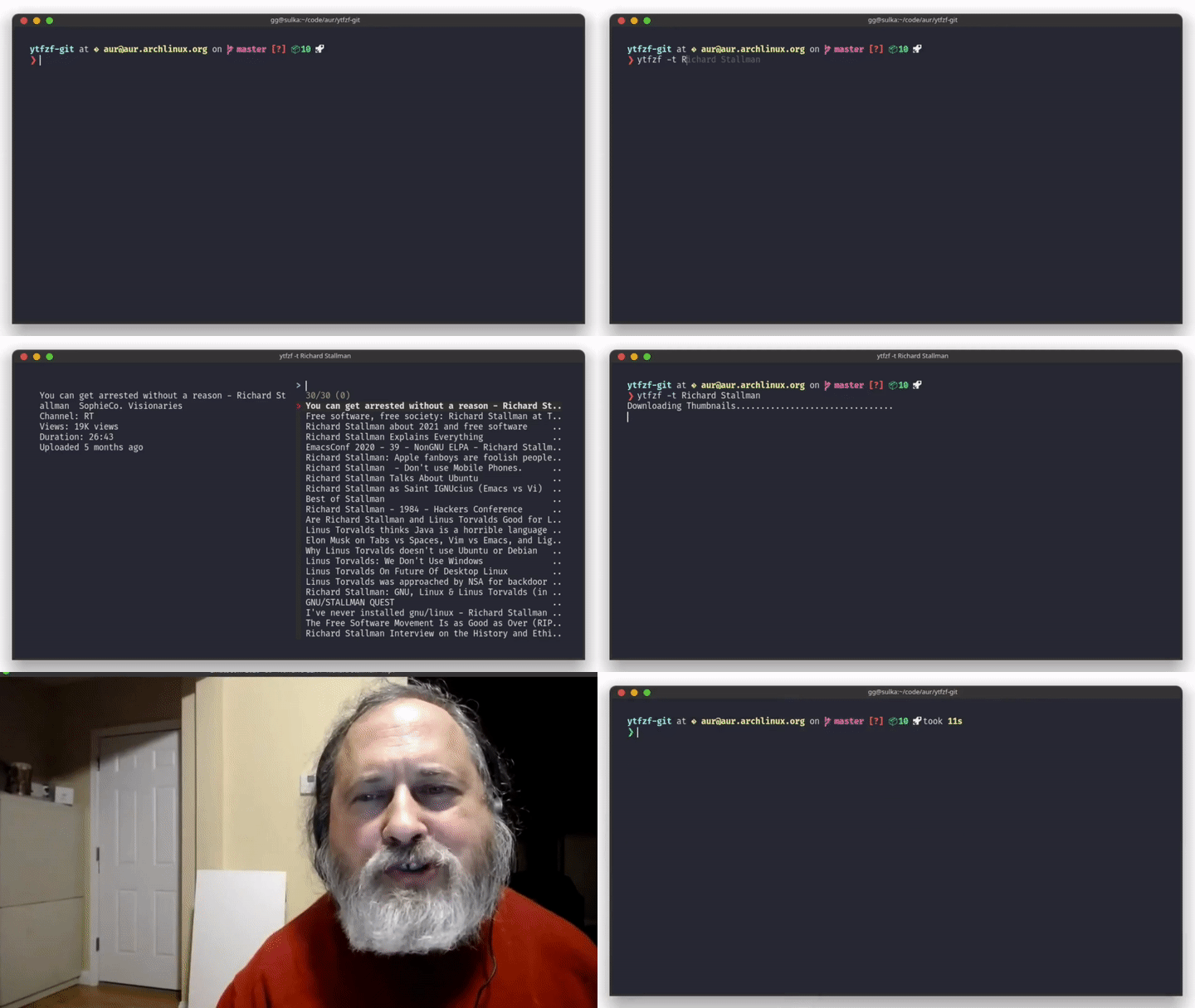
There are only 2 required dependencies, however the rest require some configuration before you can replace them.
yt-dlp (for downloading)dmenu (only if using the -D option)ueberzugpp
kitty, iterm2, sixel, and ueberzugueberzug or any fork may be used if you only want to use the ueberzug viewer.-T <viewer> in the command when running ytfzf| Program | Wayland Support |
|---|---|
kitty (requires ueberzugpp) | ✅ |
iterm2 (requires ueberzugpp) | ✅ |
sixel (requires ueberzugpp) | ✅ |
sway (requires ueberzugpp) | ✅ (only on sway) |
wayland (requires ueberzugpp) | ✅ |
chafa | ✅ |
catimg | ✅ |
imv | ✅ |
mpv | ✅ |
swayimg | only on sway |
swayimg (-T swayimg-hyprland) | only on hyprland |

if on linux and installed using make on version 2.0 or prior, run sudo make uninstall-old first
git clone https://github.com/pystardust/ytfzf
cd ytfzf
sudo make install doc
If you wish to not install documentation (highly unrecommended) run sudo make install instead.
If you wish to install addons, run sudo make addons
YTFZF_SYSTEM_ADDONS_DIR will point to /usr/local/share/ytfzf/addons even if you set PREFIX to something elseYTFZF_SYSTEM_ADDONS_DIR to $PREFIX/share/ytfzf/addons in a shell startup file.You may also install ytfzf through your package manager, as listed on the side.
Addons are extra features that will not be as supported as everything built into ytfzf itself.
Addons are located in addons, copy any addon to ~/.config/ytfzf/{addon-type}/{addon}, and give it execute permissions.
You may also just copy the entire addon folder type, eg: cp -r addons/thumbnail-viewers ~/.config/ytfzf/
To use a scraper addon run ytfzf -c <scraper> ...
To use a thumbnail-viewer addon run ytfzf -T <viewer> ...
To use a interface addon run ytfzf -i <interface> ...
To use a url-handler addon run ytfzf -u <handler> ...
To use a sort-name addon run ytfzf --sort-name=<sort-name> ...
To use an extension addon run ytfzf -e <extension> ...
Search with thumbnails
ytfzf -t <search>
Use
dmenuas the menu instead offzf
ytfzf -D <search>
Print the link of the selected video instead of playing it
ytfzf -L <search>
Search Odysee instead of youtube
ytfzf -cO <search>
Use the chafa thumbnail viewer, pass --vo=sixel, and --quiet to mpv, scrape odysee with the search odysee search, youtube with the search: youtube search, and also scrape subscriptions
ytfzf -t -T chafa --url-handler-opts='--vo=sixel --quiet' -cO,Y,SI --multi-search odysee search,youtube search
Everything that is an option can also be configured in ~/.config/ytfzf/conf.sh.
In addition, the video player and other things may be changed here
Here is a sample configuration (please dont use it)
For more information, see ytfzf(5) which should be installed, if it's not see the wiki.
-l).Xauthority might be causing it. Try deleting it and relogging into your computer.Feel free to contribute, and add your name to the credits, please use the development branch. For more information see contributing
| User | Contributions | Donate |
|---|---|---|
| Pystardust | contributions | |
| Euro20179 | contributions | |
| Simonhughxyz | contributions | |
| Jac-Zac | contributions | |
| Mudskipper875 | contributions | |
| Gardockt | contributions | |
| qoheniac | contributions | |
| mathisto | contributions |
112 followers · starred Mar 2021
8,746 followers · starred Mar 2021
47 followers · starred Feb 2026
264 followers · starred Apr 2022
A posix script to find and watch youtube videos from the terminal. (Without API)
Shell
4,157
1,341 commits
updated Sep 27, 2024
This project is no longer actively maintained, it should still work for the foreseeable future
A POSIX script that helps you find Youtube videos (without API) and opens/downloads them using mpv/youtube-dl
There are only 2 required dependencies, however the rest require some configuration before you can replace them.
yt-dlp (for downloading)dmenu (only if using the -D option)ueberzugpp
kitty, iterm2, sixel, and ueberzugueberzug or any fork may be used if you only want to use the ueberzug viewer.-T <viewer> in the command when running ytfzf| Program | Wayland Support |
|---|---|
kitty (requires ueberzugpp) | ✅ |
iterm2 (requires ueberzugpp) | ✅ |
sixel (requires ueberzugpp) | ✅ |
sway (requires ueberzugpp) | ✅ (only on sway) |
wayland (requires ueberzugpp) | ✅ |
chafa | ✅ |
catimg | ✅ |
imv | ✅ |
mpv | ✅ |
swayimg | only on sway |
swayimg (-T swayimg-hyprland) | only on hyprland |
if on linux and installed using make on version 2.0 or prior, run sudo make uninstall-old first
git clone https://github.com/pystardust/ytfzf
cd ytfzf
sudo make install doc
If you wish to not install documentation (highly unrecommended) run sudo make install instead.
If you wish to install addons, run sudo make addons
YTFZF_SYSTEM_ADDONS_DIR will point to /usr/local/share/ytfzf/addons even if you set PREFIX to something elseYTFZF_SYSTEM_ADDONS_DIR to $PREFIX/share/ytfzf/addons in a shell startup file.You may also install ytfzf through your package manager, as listed on the side.
Addons are extra features that will not be as supported as everything built into ytfzf itself.
Addons are located in addons, copy any addon to ~/.config/ytfzf/{addon-type}/{addon}, and give it execute permissions.
You may also just copy the entire addon folder type, eg: cp -r addons/thumbnail-viewers ~/.config/ytfzf/
To use a scraper addon run ytfzf -c <scraper> ...
To use a thumbnail-viewer addon run ytfzf -T <viewer> ...
To use a interface addon run ytfzf -i <interface> ...
To use a url-handler addon run ytfzf -u <handler> ...
To use a sort-name addon run ytfzf --sort-name=<sort-name> ...
To use an extension addon run ytfzf -e <extension> ...
Search with thumbnails
ytfzf -t <search>
Use
dmenuas the menu instead offzf
ytfzf -D <search>
Print the link of the selected video instead of playing it
ytfzf -L <search>
Search Odysee instead of youtube
ytfzf -cO <search>
Use the chafa thumbnail viewer, pass --vo=sixel, and --quiet to mpv, scrape odysee with the search odysee search, youtube with the search: youtube search, and also scrape subscriptions
ytfzf -t -T chafa --url-handler-opts='--vo=sixel --quiet' -cO,Y,SI --multi-search odysee search,youtube search
Everything that is an option can also be configured in ~/.config/ytfzf/conf.sh.
In addition, the video player and other things may be changed here
Here is a sample configuration (please dont use it)
For more information, see ytfzf(5) which should be installed, if it's not see the wiki.
-l).Xauthority might be causing it. Try deleting it and relogging into your computer.Feel free to contribute, and add your name to the credits, please use the development branch. For more information see contributing
| User | Contributions | Donate |
|---|---|---|
| Pystardust | contributions | |
| Euro20179 | contributions | |
| Simonhughxyz | contributions | |
| Jac-Zac | contributions | |
| Mudskipper875 | contributions | |
| Gardockt | contributions | |
| qoheniac | contributions | |
| mathisto | contributions |
112 followers · starred Mar 2021
8,746 followers · starred Mar 2021
47 followers · starred Feb 2026
264 followers · starred Apr 2022