A plugin tracks occurrences and numbers in your notes
TypeScript
1,958
844 commits
updated Apr 13, 2026
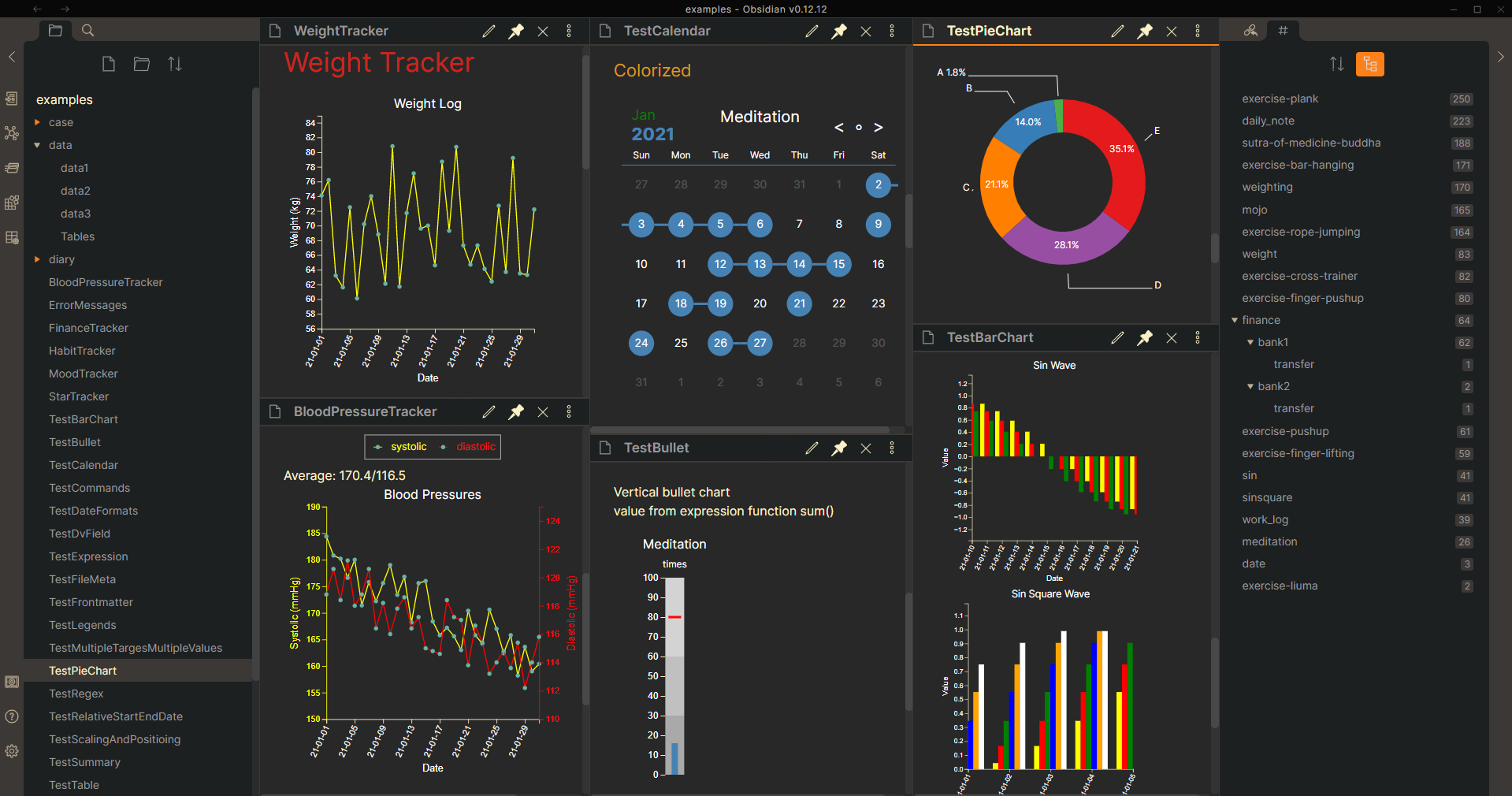
This is an Obsidian plugin that helps you collect data from notes and represent it comprehensively.
Here is a table containing simplified examples showing what you can track.
Version 1.19.0
searchType: frontmatter.exists for tracking field existenceVersion 1.18.0
Version 1.17.0
Version 1.16.0
Version 1.15.1
Version 1.15.0
Version 1.14.0
Version 1.13.3
Version 1.13.2
Version 1.13.1
Version 1.13.0
Version 1.12.0
Version 1.11.0
Version 1.10.9
Version 1.10.8
Version 1.10.7
Version 1.10.6
Version 1.10.5
initMonth in the month viewVersion 1.10.4
textValueMapshiftOnlyValueLargerThan to determine when to do valueShiftVersion 1.10.3
fitPanelWidth with the output type month and pieVersion 1.10.2
Version 1.10.1
Version 1.10.0
xAxisTickInterval, yAxisTickInterval, xAxisTickLabelFormat and yAxisTickLabelFormat for the line and bar chart (examples)dateFormatPrefix and dateFormatSuffix (examples)file, specifiedFilesOnly, fileContainsLinkedFiles, and fileMultiplierAfterLink to retrieve data from specified files (examples)textValueMap to convert texts or emojis to specified values (examples)From version 1.9.0, template variables, e.g. '{{sum}}', are deprecated. Instead, Tracker provide operators (+, -, *, /, %) and functions (dataset(), sum(), maxStreak(), ......etc) to help us do data processing. For users having code blocks from previous version, please replace '{{sum}}' by '{{sum()}}' or '{{sum(1)}}' by '{{sum(dataset(1))}}'. More information about the new expressions could be found here.
For more use cases, please download and open the examples folder in obsidian with this plugin installed and enabled.
The plugin includes automated unit tests. To run them:
npm test              # Run all tests
npm run test:watch    # Watch mode (re-runs on changes)
npm run test:coverage # Generate coverage report
See TESTING.md for detailed testing documentation.
npm run build  # Build for production
npm run dev    # Build in watch mode for development
106 followers · starred Sep 2026
761 followers · starred Aug 2022
108 followers · starred Mar 2025
1,427 followers · starred Sep 2023
A plugin tracks occurrences and numbers in your notes
TypeScript
1,958
844 commits
updated Apr 13, 2026
This is an Obsidian plugin that helps you collect data from notes and represent it comprehensively.
Here is a table containing simplified examples showing what you can track.
Version 1.19.0
searchType: frontmatter.exists for tracking field existenceVersion 1.18.0
Version 1.17.0
Version 1.16.0
Version 1.15.1
Version 1.15.0
Version 1.14.0
Version 1.13.3
Version 1.13.2
Version 1.13.1
Version 1.13.0
Version 1.12.0
Version 1.11.0
Version 1.10.9
Version 1.10.8
Version 1.10.7
Version 1.10.6
Version 1.10.5
initMonth in the month viewVersion 1.10.4
textValueMapshiftOnlyValueLargerThan to determine when to do valueShiftVersion 1.10.3
fitPanelWidth with the output type month and pieVersion 1.10.2
Version 1.10.1
Version 1.10.0
xAxisTickInterval, yAxisTickInterval, xAxisTickLabelFormat and yAxisTickLabelFormat for the line and bar chart (examples)dateFormatPrefix and dateFormatSuffix (examples)file, specifiedFilesOnly, fileContainsLinkedFiles, and fileMultiplierAfterLink to retrieve data from specified files (examples)textValueMap to convert texts or emojis to specified values (examples)From version 1.9.0, template variables, e.g. '{{sum}}', are deprecated. Instead, Tracker provide operators (+, -, *, /, %) and functions (dataset(), sum(), maxStreak(), ......etc) to help us do data processing. For users having code blocks from previous version, please replace '{{sum}}' by '{{sum()}}' or '{{sum(1)}}' by '{{sum(dataset(1))}}'. More information about the new expressions could be found here.
For more use cases, please download and open the examples folder in obsidian with this plugin installed and enabled.
The plugin includes automated unit tests. To run them:
npm test              # Run all tests
npm run test:watch    # Watch mode (re-runs on changes)
npm run test:coverage # Generate coverage report
See TESTING.md for detailed testing documentation.
npm run build  # Build for production
npm run dev    # Build in watch mode for development
106 followers · starred Sep 2026
761 followers · starred Aug 2022
108 followers · starred Mar 2025
1,427 followers · starred Sep 2023