build GUIs from type annotations
See the code







build GUIs from type annotations, using magic.
https://pyapp-kit.github.io/magicgui/
magicgui uses qtpy to support both pyqt and pyside backends. However, you
must have one of those installed for magicgui to work.
install with pip
pip install magicgui[pyqt6]
# or
pip install magicgui[pyside6]
or with conda:
conda install -c conda-forge magicgui pyqt # or pyside6 instead of pyqt
ℹ️ If you'd like to help us extend support to a different backend, please open an issue.
from magicgui import magicgui
from enum import Enum


class Medium(Enum):
    Glass = 1.520
    Oil = 1.515
    Water = 1.333
    Air = 1.0003


# decorate your function with the @magicgui decorator
@magicgui(call_button="calculate", result_widget=True)
def snells_law(aoi=30.0, n1=Medium.Glass, n2=Medium.Water, degrees=True):
    import math

    aoi = math.radians(aoi) if degrees else aoi
    try:
        result = math.asin(n1.value * math.sin(aoi) / n2.value)
        return math.degrees(result) if degrees else result
    except ValueError:
        return "Total internal reflection!"


# your function is now capable of showing a GUI
snells_law.show(run=True)
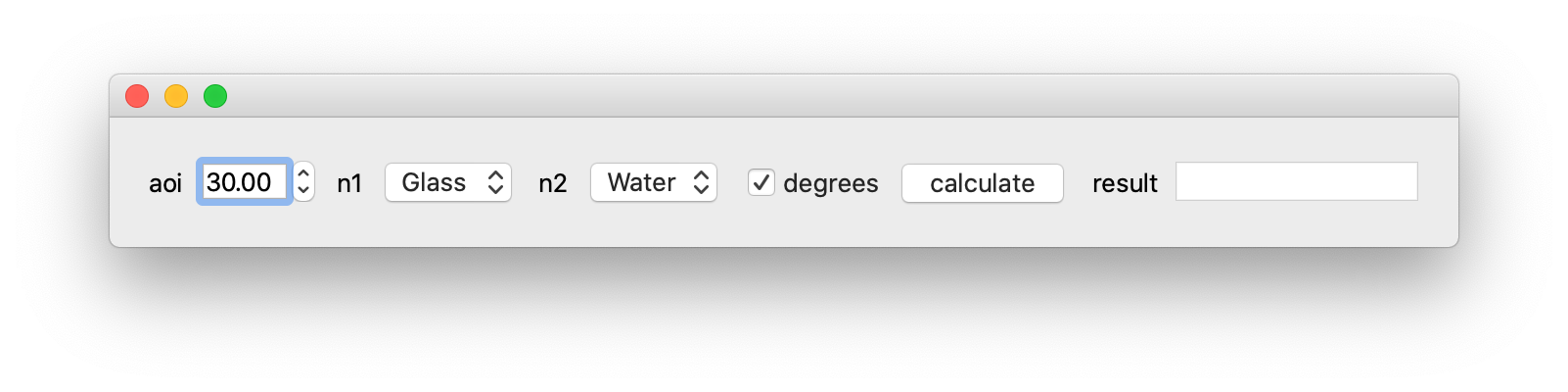
But that's just the beginning! Please see Documentation for many more details and usage examples.
Contributions are welcome!
See contributing guide here.
1,565 followers · starred Mar 2025
163 followers · starred Jul 2024
128 followers · starred Sep 2022
1,228 followers · starred Jun 2024
build GUIs from type annotations
See the code
build GUIs from type annotations, using magic.
https://pyapp-kit.github.io/magicgui/
magicgui uses qtpy to support both pyqt and pyside backends. However, you
must have one of those installed for magicgui to work.
install with pip
pip install magicgui[pyqt6]
# or
pip install magicgui[pyside6]
or with conda:
conda install -c conda-forge magicgui pyqt # or pyside6 instead of pyqt
ℹ️ If you'd like to help us extend support to a different backend, please open an issue.
from magicgui import magicgui
from enum import Enum


class Medium(Enum):
    Glass = 1.520
    Oil = 1.515
    Water = 1.333
    Air = 1.0003


# decorate your function with the @magicgui decorator
@magicgui(call_button="calculate", result_widget=True)
def snells_law(aoi=30.0, n1=Medium.Glass, n2=Medium.Water, degrees=True):
    import math

    aoi = math.radians(aoi) if degrees else aoi
    try:
        result = math.asin(n1.value * math.sin(aoi) / n2.value)
        return math.degrees(result) if degrees else result
    except ValueError:
        return "Total internal reflection!"


# your function is now capable of showing a GUI
snells_law.show(run=True)
But that's just the beginning! Please see Documentation for many more details and usage examples.
Contributions are welcome!
See contributing guide here.
1,565 followers · starred Mar 2025
163 followers · starred Jul 2024
128 followers · starred Sep 2022
1,228 followers · starred Jun 2024