Easily move your WSL distros VHDX file to a new location.
PowerShell
1,558
68 commits
updated Sep 11, 2026
PowerShell script to move WSL 1 and WSL 2 distros VHDX file to a different location.
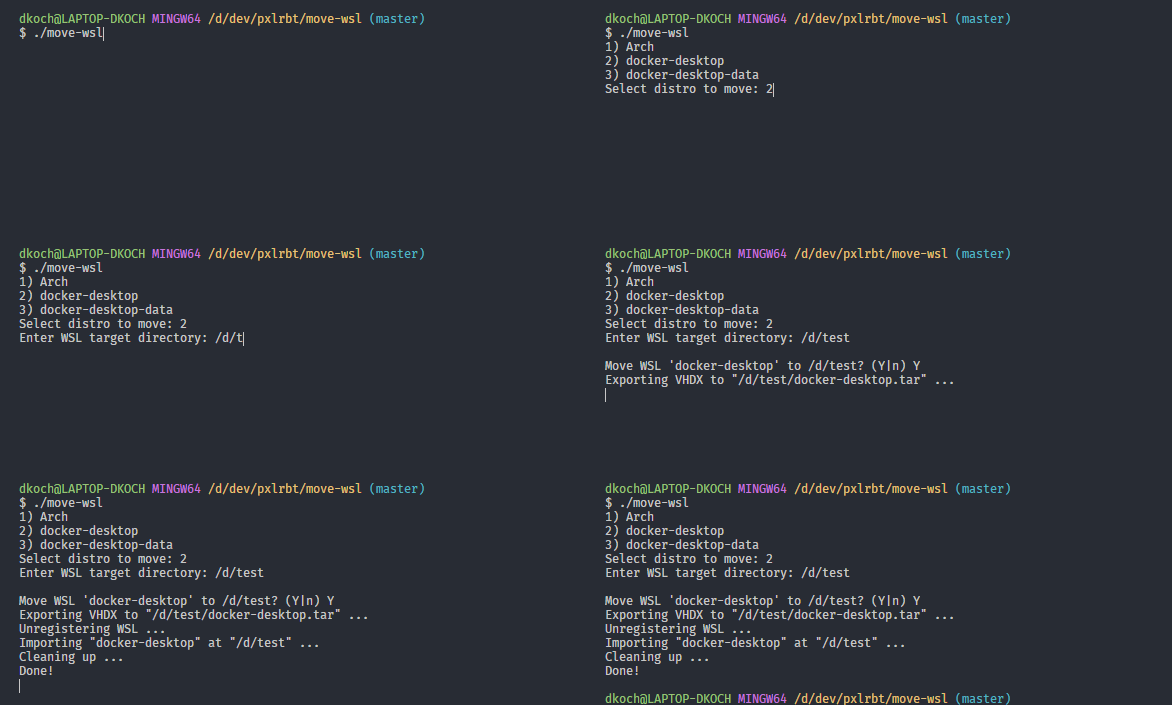
./move-wsl.ps1
D:\wsl\ubuntu)# Basic usage
./move-wsl.ps1 -Distro "Ubuntu" -Target "D:\wsl\ubuntu"
# Force mode (skip confirmations)
./move-wsl.ps1 -Distro "Ubuntu" -Target "D:\wsl\ubuntu" -Force
# Skip WSL shutdown (not recommended)
./move-wsl.ps1 -Distro "Ubuntu" -Target "D:\wsl\ubuntu" -NoShutdown
| Parameter | Description |
|---|---|
-Distro | Name of the WSL distro to move |
-Target | Destination folder path |
-Force | Skip confirmation prompts and NTFS compression warning |
-NoShutdown | Skip automatic WSL shutdown (not recommended) |
Warning
This script uses official
wslcommands and was used by many people. Make sure you have a backup of your data before proceeding.
The script will check if the target folder has NTFS compression enabled. Compressed folders can corrupt WSL images. If detected, disable compression:
Set your default user inside your distro by adding the following configuration to your /etc/wsl.conf:
[user]
default=YOUR_USERNAME
If the file doesn't exist, create it manually. Then exit your distro, terminate it (wsl -t YOUR_DISTRO) and start it again.
Some distributions also allow setting the default user via command line:
ubuntu config --default-user johndoe
The script now automatically preserves the default distro setting (v1.4.0+). If using an older version:
wsl -s YOUR_DISTRO
Run this command to allow the script:
Set-ExecutionPolicy -Scope Process -ExecutionPolicy Bypass
./move-wsl.ps1
On import, the distro will be registered with its original WSL version. If it changed:
wsl --set-version <Distro> <Version>
Before moving Docker WSL, make sure to:
This project is licensed under the GPL-3.0 License - see the LICENSE file for details.
559 followers · starred Dec 2021
982 followers · starred Nov 2024
3,683 followers · starred Sep 2022
10 followers · starred Jan 2021
Easily move your WSL distros VHDX file to a new location.
PowerShell
1,558
68 commits
updated Sep 11, 2026
PowerShell script to move WSL 1 and WSL 2 distros VHDX file to a different location.
./move-wsl.ps1
D:\wsl\ubuntu)# Basic usage
./move-wsl.ps1 -Distro "Ubuntu" -Target "D:\wsl\ubuntu"
# Force mode (skip confirmations)
./move-wsl.ps1 -Distro "Ubuntu" -Target "D:\wsl\ubuntu" -Force
# Skip WSL shutdown (not recommended)
./move-wsl.ps1 -Distro "Ubuntu" -Target "D:\wsl\ubuntu" -NoShutdown
| Parameter | Description |
|---|---|
-Distro | Name of the WSL distro to move |
-Target | Destination folder path |
-Force | Skip confirmation prompts and NTFS compression warning |
-NoShutdown | Skip automatic WSL shutdown (not recommended) |
Warning
This script uses official
wslcommands and was used by many people. Make sure you have a backup of your data before proceeding.
The script will check if the target folder has NTFS compression enabled. Compressed folders can corrupt WSL images. If detected, disable compression:
Set your default user inside your distro by adding the following configuration to your /etc/wsl.conf:
[user]
default=YOUR_USERNAME
If the file doesn't exist, create it manually. Then exit your distro, terminate it (wsl -t YOUR_DISTRO) and start it again.
Some distributions also allow setting the default user via command line:
ubuntu config --default-user johndoe
The script now automatically preserves the default distro setting (v1.4.0+). If using an older version:
wsl -s YOUR_DISTRO
Run this command to allow the script:
Set-ExecutionPolicy -Scope Process -ExecutionPolicy Bypass
./move-wsl.ps1
On import, the distro will be registered with its original WSL version. If it changed:
wsl --set-version <Distro> <Version>
Before moving Docker WSL, make sure to:
This project is licensed under the GPL-3.0 License - see the LICENSE file for details.
559 followers · starred Dec 2021
982 followers · starred Nov 2024
3,683 followers · starred Sep 2022
10 followers · starred Jan 2021



