
Desktop audio toolkit with on device noise reduction
TypeScript
3
38 commits
updated Oct 6, 2026
See what people are saying
README
Ampliflare Audio

Studio-quality voice, without the studio.
On-device machine learning strips background noise from speech, so podcasts, voiceovers and audiobooks sound studio-clean.
Everything runs on your computer, so nothing is ever uploaded. It works on macOS, Windows and Linux.
Website · Docs · Release notes
What it does
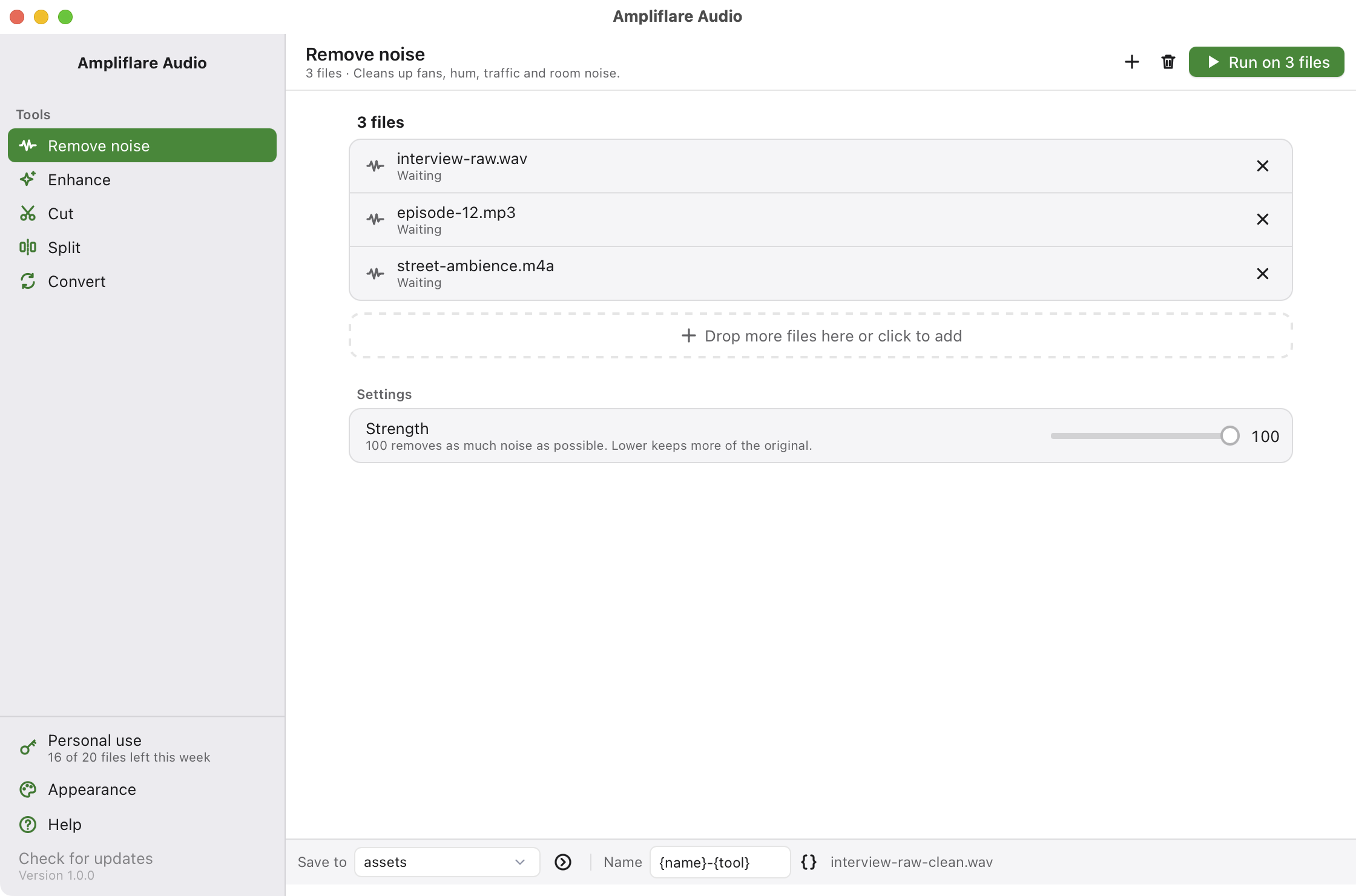
- Remove noise with DeepFilterNet3, a speech noise reduction model that runs on device, with a Strength slider
- Enhance by evening out loudness for music, podcasts, audiobooks or broadcast, and cutting low rumble
- Cut a file down to a start and end point, picked on a picture of the sound
- Split a file into parts at points you mark, or into equal parts
- Convert between wav, mp3, m4a, flac, ogg and opus
Every tool but Cut and Split runs on a whole list of files at once. A bar at the bottom says where results go and how they are named, and your originals are never changed.
Install
Download the app for your computer from the website. Everything it needs comes inside, so there is nothing else to install.
| System | How |
|---|---|
| macOS | Open the disk image and drag the app to Applications. It is signed and notarized. |
| Windows | Run the setup file. It is not code-signed yet, so SmartScreen asks once: More info, then Run anyway. |
| Linux | Run the command below, or use the AppImage, .deb or .rpm. |
On Linux this installs the AppImage for your user, checks it against the release's checksums, and adds it to your app menu:
curl -fsSL https://static.purplecandy.dev/ampliflare-audio/releases/latest/download/install.sh | bash
The app updates itself. When a new version is out, a bar at the top offers to install it.
The downloaded app is free for personal use, up to 20 files a week. A license, at a price you pick, adds commercial use and removes the limit. A build from this source is free for any use. See License.
How it is built
- Tauri v2 shell. The window is a system webview showing a React app.
- Pico CSS for styling. Plain HTML tags look right, so there is very little custom CSS.
- The spectrogram is computed in Rust with
rustfftand drawn on a canvas. Seesrc-tauri/src/analyze.rsandsrc/components/Spectrogram.tsx. - The Rust side is thin. It builds command lines, runs two outside programs and reports progress.
deep-filterdoes the noise reduction. It ships inside the app as a sidecar binary.ffmpegdoes decode, encode, cut and loudness. It ships inside the app too, asampliflare-ffmpeg, a prebuilt GPLv3 build. Its source is next to the binaries in the R2 bucket, underampliflare-audio/ffmpeg/.
src/            React + TypeScript UI
src-tauri/src/  Rust. lib.rs wires plugins, jobs.rs runs the work, analyze.rs makes the spectrogram
src-tauri/binaries/  sidecar binaries, not committed, fetched by a script
scripts/        helper scripts
Run it
You need Node 22, pnpm and Rust. The fetch script downloads deep-filter and ffmpeg.
curl --proto '=https' --tlsv1.2 -sSf https://sh.rustup.rs | sh
pnpm install
./scripts/fetch-sidecars.sh
pnpm tauri dev
Test it faster
Debug builds can start with files already loaded and a tab already open:
AMPLIFLARE_DEV_FILES="/path/a.wav:/path/b.mp3" AMPLIFLARE_DEV_ACTION=cut pnpm tauri dev
A build from source has no weekly limit. To try the limit and the license key,
add AMPLIFLARE_OFFICIAL_BUILD=1, which CI sets for the downloadable app.
Rust tests need ffmpeg installed:
cd src-tauri && cargo test
Build a release
pnpm tauri build
The result lands in src-tauri/target/release/bundle/.
CI builds, signs and notarizes every pull request. Pushing a v* tag publishes a
release with an in-app updater feed. See docs/releasing.md.
Not done yet
- Dereverb. Needs a second model and a real inference runtime.
- Windows testing. CI builds it, but nobody has run it yet. It is not Authenticode signed.
Contributing
Bug fixes are welcome. Open an issue before starting anything bigger. CONTRIBUTING.md has the terms a pull request is accepted under.
License
The source is AGPL licensed and can be built and run for free, for both personal and commercial use.
The prebuilt binaries follow Ampliflare Audio's pricing terms: free for personal use, license required for commercial use.
Similar repos


Desktop audio toolkit with on device noise reduction
TypeScript
3
38 commits
updated Oct 6, 2026
See what people are saying
README
Ampliflare Audio
Studio-quality voice, without the studio.
On-device machine learning strips background noise from speech, so podcasts, voiceovers and audiobooks sound studio-clean.
Everything runs on your computer, so nothing is ever uploaded. It works on macOS, Windows and Linux.
Website · Docs · Release notes
What it does
- Remove noise with DeepFilterNet3, a speech noise reduction model that runs on device, with a Strength slider
- Enhance by evening out loudness for music, podcasts, audiobooks or broadcast, and cutting low rumble
- Cut a file down to a start and end point, picked on a picture of the sound
- Split a file into parts at points you mark, or into equal parts
- Convert between wav, mp3, m4a, flac, ogg and opus
Every tool but Cut and Split runs on a whole list of files at once. A bar at the bottom says where results go and how they are named, and your originals are never changed.
Install
Download the app for your computer from the website. Everything it needs comes inside, so there is nothing else to install.
| System | How |
|---|---|
| macOS | Open the disk image and drag the app to Applications. It is signed and notarized. |
| Windows | Run the setup file. It is not code-signed yet, so SmartScreen asks once: More info, then Run anyway. |
| Linux | Run the command below, or use the AppImage, .deb or .rpm. |
On Linux this installs the AppImage for your user, checks it against the release's checksums, and adds it to your app menu:
curl -fsSL https://static.purplecandy.dev/ampliflare-audio/releases/latest/download/install.sh | bash
The app updates itself. When a new version is out, a bar at the top offers to install it.
The downloaded app is free for personal use, up to 20 files a week. A license, at a price you pick, adds commercial use and removes the limit. A build from this source is free for any use. See License.
How it is built
- Tauri v2 shell. The window is a system webview showing a React app.
- Pico CSS for styling. Plain HTML tags look right, so there is very little custom CSS.
- The spectrogram is computed in Rust with
rustfftand drawn on a canvas. Seesrc-tauri/src/analyze.rsandsrc/components/Spectrogram.tsx. - The Rust side is thin. It builds command lines, runs two outside programs and reports progress.
deep-filterdoes the noise reduction. It ships inside the app as a sidecar binary.ffmpegdoes decode, encode, cut and loudness. It ships inside the app too, asampliflare-ffmpeg, a prebuilt GPLv3 build. Its source is next to the binaries in the R2 bucket, underampliflare-audio/ffmpeg/.
src/            React + TypeScript UI
src-tauri/src/  Rust. lib.rs wires plugins, jobs.rs runs the work, analyze.rs makes the spectrogram
src-tauri/binaries/  sidecar binaries, not committed, fetched by a script
scripts/        helper scripts
Run it
You need Node 22, pnpm and Rust. The fetch script downloads deep-filter and ffmpeg.
curl --proto '=https' --tlsv1.2 -sSf https://sh.rustup.rs | sh
pnpm install
./scripts/fetch-sidecars.sh
pnpm tauri dev
Test it faster
Debug builds can start with files already loaded and a tab already open:
AMPLIFLARE_DEV_FILES="/path/a.wav:/path/b.mp3" AMPLIFLARE_DEV_ACTION=cut pnpm tauri dev
A build from source has no weekly limit. To try the limit and the license key,
add AMPLIFLARE_OFFICIAL_BUILD=1, which CI sets for the downloadable app.
Rust tests need ffmpeg installed:
cd src-tauri && cargo test
Build a release
pnpm tauri build
The result lands in src-tauri/target/release/bundle/.
CI builds, signs and notarizes every pull request. Pushing a v* tag publishes a
release with an in-app updater feed. See docs/releasing.md.
Not done yet
- Dereverb. Needs a second model and a real inference runtime.
- Windows testing. CI builds it, but nobody has run it yet. It is not Authenticode signed.
Contributing
Bug fixes are welcome. Open an issue before starting anything bigger. CONTRIBUTING.md has the terms a pull request is accepted under.
License
The source is AGPL licensed and can be built and run for free, for both personal and commercial use.
The prebuilt binaries follow Ampliflare Audio's pricing terms: free for personal use, license required for commercial use.