The Javascript document scanning library.
See the code



Powered with opencv.js
Supports the web, NodeJS, React, and others.
Available on npm or via cdn
Features:
[!IMPORTANT]
🎉 jscanify v1.3.0+ has just been released! Same API, better results. See the release to see the difference! 🎉
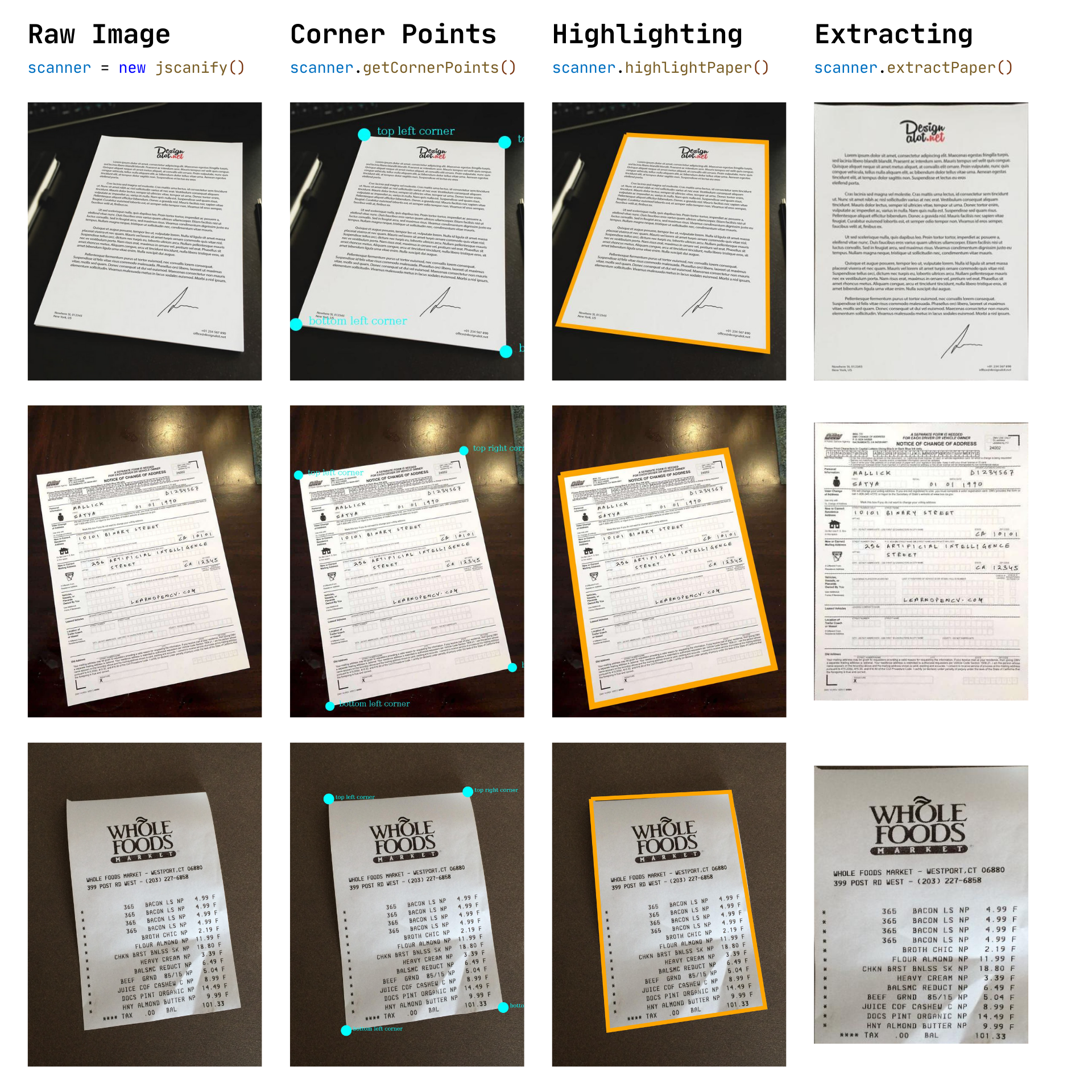
Developers Note: you can now use the jscanify debugging tool to observe the result (highlighting, extraction) on test images.
npm:
$ npm i jscanify
import jscanify from 'jscanify'
cdn:
<script src="https://docs.opencv.org/4.7.0/opencv.js" async></script>
<!-- warning: loading OpenCV can take some time. Load asynchronously -->
<script src="https://cdn.jsdelivr.net/gh/ColonelParrot/jscanify@master/src/jscanify.min.js"></script>
Note: jscanify on NodeJS is slightly different. See wiki: use on NodeJS.
<img src="/path/to/your/image.png" id="image" />
const scanner = new jscanify();
image.onload = function () {
  const highlightedCanvas = scanner.highlightPaper(image);
  document.body.appendChild(highlightedCanvas);
};
const scanner = new jscanify();
const paperWidth = 500;
const paperHeight = 1000;
image.onload = function () {
  const resultCanvas = scanner.extractPaper(image, paperWidth, paperHeight);
  document.body.appendChild(resultCanvas);
};
The following code continuously reads from the user's camera and highlights the paper:
<video id="video"></video> <canvas id="canvas"></canvas>
<!-- original video -->
<canvas id="result"></canvas>
<!-- highlighted video -->
const scanner = new jscanify();
const canvasCtx = canvas.getContext("2d");
const resultCtx = result.getContext("2d");
navigator.mediaDevices.getUserMedia({ video: true }).then((stream) => {
  video.srcObject = stream;
  video.onloadedmetadata = () => {
    video.play();

    setInterval(() => {
      canvasCtx.drawImage(video, 0, 0);
      const resultCanvas = scanner.highlightPaper(canvas);
      resultCtx.drawImage(resultCanvas, 0, 0);
    }, 10);
  };
});
To export the paper to a PDF, see here
jscanify in a window load event listener to ensure OpenCV is loaded1,480 followers · starred Apr 2023
1,389 followers · starred Oct 2026
247 followers · starred May 2023
1,135 followers · starred Jan 2025
The Javascript document scanning library.
See the code
Powered with opencv.js
Supports the web, NodeJS, React, and others.
Available on npm or via cdn
Features:
[!IMPORTANT]
🎉 jscanify v1.3.0+ has just been released! Same API, better results. See the release to see the difference! 🎉
Developers Note: you can now use the jscanify debugging tool to observe the result (highlighting, extraction) on test images.
npm:
$ npm i jscanify
import jscanify from 'jscanify'
cdn:
<script src="https://docs.opencv.org/4.7.0/opencv.js" async></script>
<!-- warning: loading OpenCV can take some time. Load asynchronously -->
<script src="https://cdn.jsdelivr.net/gh/ColonelParrot/jscanify@master/src/jscanify.min.js"></script>
Note: jscanify on NodeJS is slightly different. See wiki: use on NodeJS.
<img src="/path/to/your/image.png" id="image" />
const scanner = new jscanify();
image.onload = function () {
  const highlightedCanvas = scanner.highlightPaper(image);
  document.body.appendChild(highlightedCanvas);
};
const scanner = new jscanify();
const paperWidth = 500;
const paperHeight = 1000;
image.onload = function () {
  const resultCanvas = scanner.extractPaper(image, paperWidth, paperHeight);
  document.body.appendChild(resultCanvas);
};
The following code continuously reads from the user's camera and highlights the paper:
<video id="video"></video> <canvas id="canvas"></canvas>
<!-- original video -->
<canvas id="result"></canvas>
<!-- highlighted video -->
const scanner = new jscanify();
const canvasCtx = canvas.getContext("2d");
const resultCtx = result.getContext("2d");
navigator.mediaDevices.getUserMedia({ video: true }).then((stream) => {
  video.srcObject = stream;
  video.onloadedmetadata = () => {
    video.play();

    setInterval(() => {
      canvasCtx.drawImage(video, 0, 0);
      const resultCanvas = scanner.highlightPaper(canvas);
      resultCtx.drawImage(resultCanvas, 0, 0);
    }, 10);
  };
});
To export the paper to a PDF, see here
jscanify in a window load event listener to ensure OpenCV is loaded1,480 followers · starred Apr 2023
1,389 followers · starred Oct 2026
247 followers · starred May 2023
1,135 followers · starred Jan 2025



