A lightweight tool for deploying and managing containerised applications across a network of Docker hosts. Bridging the gap between Docker and Kubernetes ✨
See the code

▸ Deploy and scale containerised apps across servers without Swarm or Kubernetes overhead ◂




Uncloud is a lightweight clustering and container orchestration tool that lets you deploy and manage web apps across cloud VMs and bare metal with minimised cluster management overhead. It creates a secure WireGuard mesh network between your Docker hosts and provides automatic service discovery, load balancing, ingress with HTTPS, and simple CLI commands to manage your apps.
Unlike traditional orchestrators, there's no central control plane and quorum to maintain. Each machine maintains a synchronised copy of the cluster state through peer-to-peer communication, keeping cluster operations functional even if some machines go offline.
Uncloud is the solution for developers who want the flexibility of self-hosted infrastructure without the operational complexity of Kubernetes.
*.xxxxxx.uncld.dev for services with public access via managed
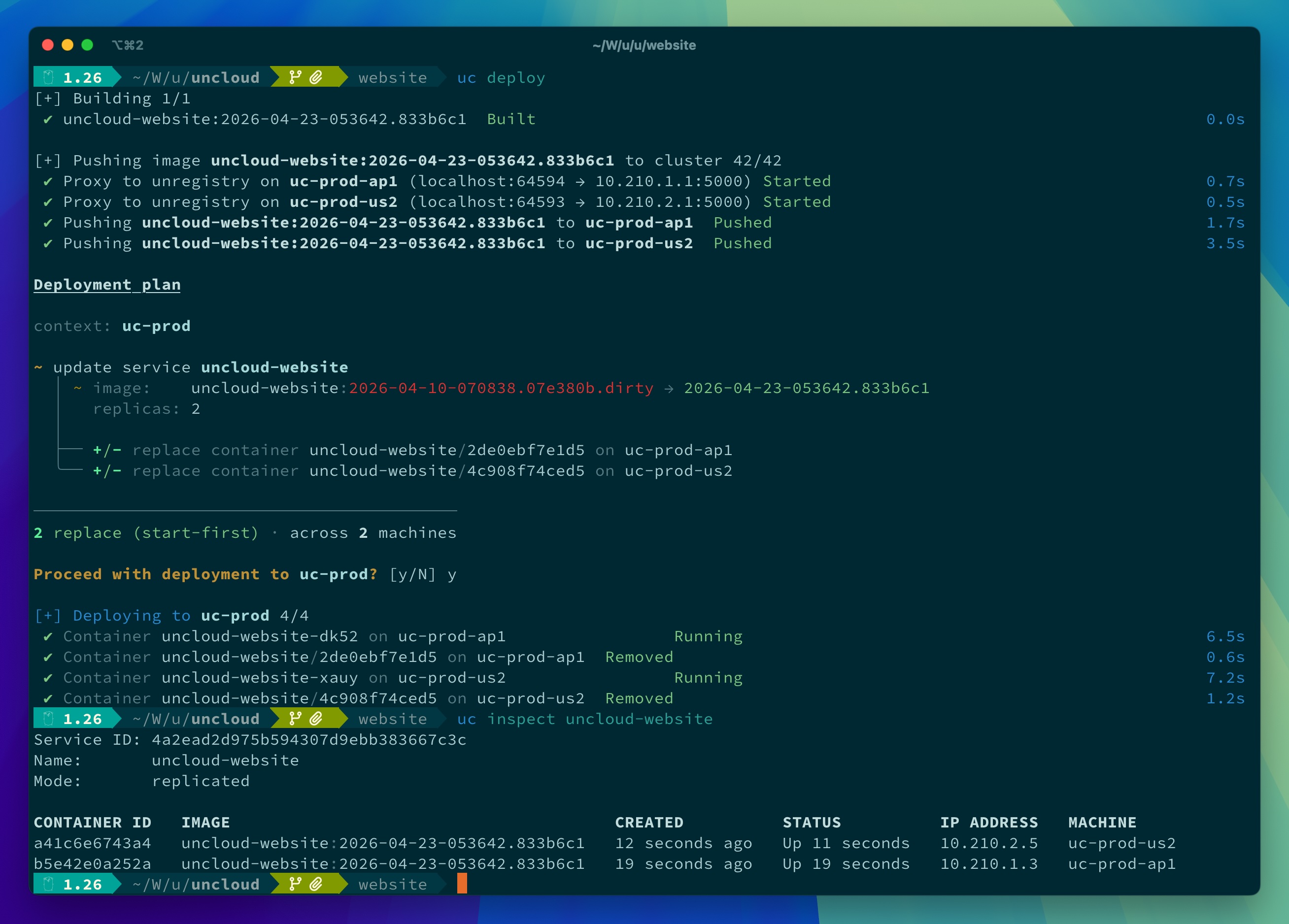
Uncloud DNS service.The screenshot below demonstrates how we use Uncloud to deploy https://uncloud.run website to 2 remote machines from
the compose.yaml file on the local machine.
It exposes the container port 8000/tcp as HTTPS on uncloud.run domain, served by the Caddy reverse proxy on the
remote machines. All managed by Uncloud.
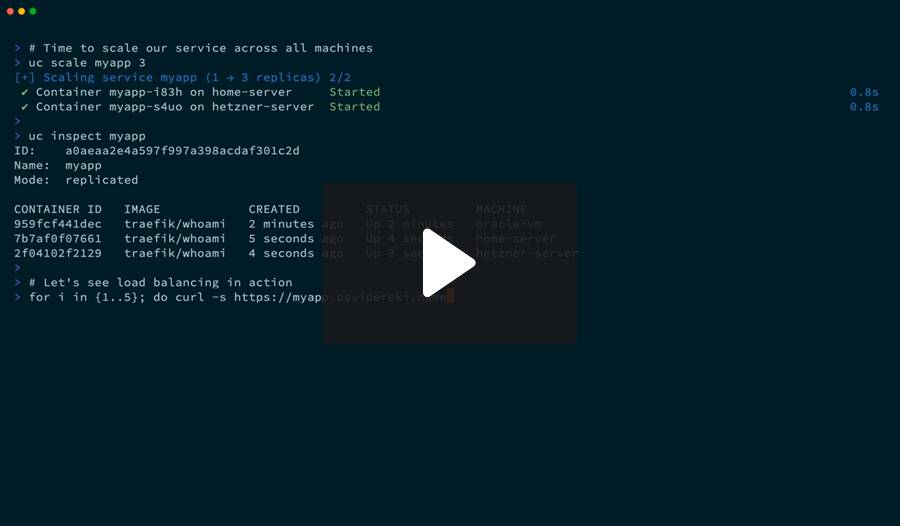
Here is a more advanced use case. Deploy a highly available web app with automatic HTTPS across multiple regions and on-premises in just a couple minutes.
📚 Want more examples? Check out the uncloud-recipes repository for community recipes and templates for deploying popular services on Uncloud.
Modern cloud platforms like Heroku and Render offer amazing developer experiences but at a premium price. Traditional container orchestrators like Kubernetes provide power and flexibility but require significant operational expertise. I believe there's a sweet spot in between — a pragmatic solution for the majority of us who aren't running at Google scale. You should be able to:
Uncloud's goal is to make deployment and management of containerised applications feel as seamless as using a cloud platform, whether you're running on a $5 VPS, a spare Mac mini, or a rack of bare metal servers.
Install Uncloud CLI:
brew install psviderski/tap/uncloud

# or using curl (macOS/Linux)
curl -fsS https://get.uncloud.run/install.sh | sh
See Installation for more options.
There's also a nightly rolling release available if you want to try the latest features and fixes before they're included in an official release.
Initialise your first machine:
uc machine init root@your-server-ip
Deploy your app from a Docker image and publish its container port 8000 as HTTPS using app.example.com domain:
uc run -p app.example.com:8000/https image/my-app
Create a DNS A record in your DNS provider (Cloudflare, Namecheap, etc.) that points app.example.com to your
server's IP address. Allow a few minutes for DNS propagation.
That's it! Your app is now running and accessible at https://app.example.com ✨
Clean up when you're done:
uc ls
# Copy the service name from the output and run the rm command:
uc rm my-app-name
If you want to fully uninstall Uncloud on a machine, run:
uncloud-uninstall
View the Documentation for more information.
Check out the design document to understand Uncloud's design philosophy and goals.
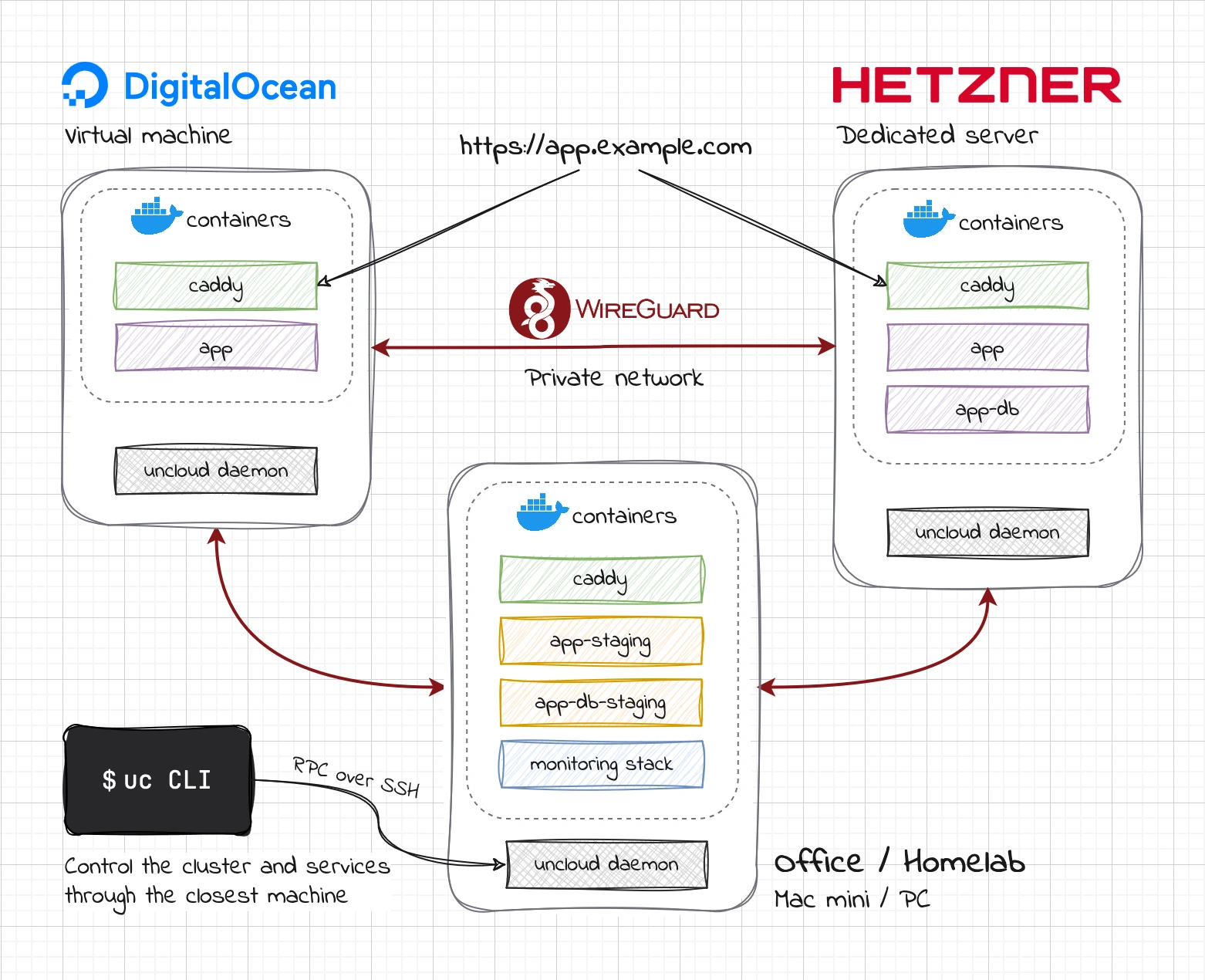
Here is a diagram of an Uncloud multi-provider cluster of 3 machines:
When you initialise a new cluster on a machine:
$ uc machine init --name oracle-vm ubuntu@152.67.101.197

⏳ Running Uncloud install script...
✓ Docker is already installed.
⏳ Installing Docker...
...
✓ Docker installed successfully.
✓ Linux user and group 'uncloud' created.
✓ Linux user 'ubuntu' added to group 'uncloud'.
⏳ Installing Uncloud binaries...
⏳ Downloading uncloudd binary: https://github.com/psviderski/uncloud/releases/latest/download/uncloudd_linux_arm64.tar.gz
✓ uncloudd binary installed: /usr/local/bin/uncloudd
⏳ Downloading uninstall script: https://raw.githubusercontent.com/psviderski/uncloud/refs/heads/main/scripts/uninstall.sh
✓ uncloud-uninstall script installed: /usr/local/bin/uncloud-uninstall
✓ Systemd unit file created: /etc/systemd/system/uncloud.socket
✓ Systemd unit file created: /etc/systemd/system/uncloud.service
Created symlink /etc/systemd/system/sockets.target.wants/uncloud.socket → /etc/systemd/system/uncloud.socket.
Created symlink /etc/systemd/system/multi-user.target.wants/uncloud.service → /etc/systemd/system/uncloud.service.
⏳ Starting Uncloud machine daemon (uncloud.service)...
✓ Uncloud machine daemon started.
✓ Uncloud installed on the machine successfully! 🎉
Cluster "default" initialised with machine "oracle-vm"
Waiting for the machine to be ready...

Reserved cluster domain: xuw3xd.cluster.uncloud.run
[+] Deploying service caddy 1/1
 ✔ Container caddy-c47x on oracle-vm  Started                                                                                                                                          0.9s

Updating cluster domain records in Uncloud DNS to point to machines running caddy service...
[+] Verifying internet access to caddy service 1/1
 ✔ Machine oracle-vm (152.67.101.197)  Reachable                                                                                                                                       0.1s

DNS records updated to use only the internet-reachable machines running caddy service:
  *.xuw3xd.cluster.uncloud.run  A → 152.67.101.197
uncloudd machine daemon, managed by systemd.10.210.0.0/24 for the machine and its
containers, and configures uncloudd accordingly. All subsequent communication happens with uncloudd
through its gRPC API over SSH.uncloudd.~/.config/uncloud/config.yaml on your local machine.When you add another machine:
$ uc machine add --name hetzner-server root@5.223.45.199
⏳ Running Uncloud install script...
✓ Docker is already installed.
✓ Linux user and group 'uncloud' created.
⏳ Installing Uncloud binaries...
⏳ Downloading uncloudd binary: https://github.com/psviderski/uncloud/releases/latest/download/uncloudd_linux_amd64.tar.gz
✓ uncloudd binary installed: /usr/local/bin/uncloudd
⏳ Downloading uninstall script: https://raw.githubusercontent.com/psviderski/uncloud/refs/heads/main/scripts/uninstall.sh
✓ uncloud-uninstall script installed: /usr/local/bin/uncloud-uninstall
✓ Systemd unit file created: /etc/systemd/system/uncloud.socket
✓ Systemd unit file created: /etc/systemd/system/uncloud.service
Created symlink /etc/systemd/system/sockets.target.wants/uncloud.socket → /etc/systemd/system/uncloud.socket.
Created symlink /etc/systemd/system/multi-user.target.wants/uncloud.service → /etc/systemd/system/uncloud.service.
⏳ Starting Uncloud machine daemon (uncloud.service)...
✓ Uncloud machine daemon started.
✓ Uncloud installed on the machine successfully! 🎉
Machine "hetzner-server" added to cluster
Waiting for the machine to be ready...

[+] Deploying service caddy 1/1
 ✔ Container caddy-d36c on hetzner-server  Started                                                                                                                                     1.0s

Updating cluster domain records in Uncloud DNS to point to machines running caddy service...
[+] Verifying internet access to caddy service 2/2
 ✔ Machine hetzner-server (5.223.45.199)  Reachable                                                                                                                                    0.2s
 ✔ Machine oracle-vm (152.67.101.197)     Reachable                                                                                                                                    0.1s

DNS records updated to use only the internet-reachable machines running caddy service:
  *.xuw3xd.cluster.uncloud.run  A → 152.67.101.197, 5.223.45.199

$ uc machine ls
NAME             STATE   ADDRESS         PUBLIC IP        WIREGUARD ENDPOINTS
oracle-vm        Up      10.210.0.1/24   152.67.101.197   10.0.0.95:51820, 152.67.101.197:51820
hetzner-server   Up      10.210.1.1/24   5.223.45.199     5.223.45.199:51820, [2a01:4ff:2f0:128b::1]:51820
sudo access.10.210.1.0/24 for the second machine and its containers.uncloud-corrosion container on the second machine to sync the cluster state.uc to connect and run cluster
operations.If one more machine is added, the process repeats with a new subnet. The new machine needs to establish a WireGuard connection with only one of the existing machines. Other machines will learn about it through the shared cluster state and automatically establish a WireGuard tunnel with it.
When you run a service:
$ uc run -p app.example.com:8000/https image/my-app

[+] Running service my-app-1b3b (replicated mode) 1/1
 ✔ Container my-app-1b3b-tcex on oracle-vm  Started

my-app-1b3b endpoints:
 • https://app.example.com → :8000
 • https://my-app-1b3b.xuw3xd.cluster.uncloud.run → :8000
uncloudd that the CLI communicates with uses grpc-proxy to forward
the request to the target machine to launch a container there.uncloudd on the target machine starts the Docker container in the bridge network and stores its info in the
cluster's distributed state.10.210.X.2-254 range) and becomes
accessible from other machines in the cluster.global
mode on each machine watches the cluster state for new services and updates its configuration to route traffic to the
new container.Look ma, no control plane or master nodes to maintain! Just a simple overlay network and eventually consistent state sync that lets machines work together. Want to check on things or make changes? Connect to any machine either implicitly using the CLI or directly over SSH. They all have the complete cluster state and can control everything. It's like each machine is a full backup of your control plane.
To give you a chance to play with Uncloud without even leaving your browser, we're providing interactive tutorials and playgrounds on the iximiuz Labs platform.
Available tutorials:
You can also launch the Uncloud playground where you can play with an already initialized Uncloud cluster.
Uncloud is under active development and pre-1.0, so expect occasional breaking changes between releases. The core build, push, and deploy workflows are stable, and much of the runtime relies on battle-tested projects: Docker, Caddy, WireGuard, and Corrosion.
We'd love your input! Here's how you can contribute:
I'm grateful to the following projects that inspired Uncloud's design and implementation:
Special thanks to the Corrosion project by Fly.io for providing the distributed SQLite database used to share Uncloud's cluster state.
These companies and projects are helping Uncloud with their generous sponsorship and/or services:
(top 24 of 135)
26,405 followers · starred Sep 2025
134 followers · starred Jul 2025
552 followers · starred Aug 2026
603 followers · starred Jul 2026
A lightweight tool for deploying and managing containerised applications across a network of Docker hosts. Bridging the gap between Docker and Kubernetes ✨
See the code
▸ Deploy and scale containerised apps across servers without Swarm or Kubernetes overhead ◂
Uncloud is a lightweight clustering and container orchestration tool that lets you deploy and manage web apps across cloud VMs and bare metal with minimised cluster management overhead. It creates a secure WireGuard mesh network between your Docker hosts and provides automatic service discovery, load balancing, ingress with HTTPS, and simple CLI commands to manage your apps.
Unlike traditional orchestrators, there's no central control plane and quorum to maintain. Each machine maintains a synchronised copy of the cluster state through peer-to-peer communication, keeping cluster operations functional even if some machines go offline.
Uncloud is the solution for developers who want the flexibility of self-hosted infrastructure without the operational complexity of Kubernetes.
*.xxxxxx.uncld.dev for services with public access via managed
Uncloud DNS service.The screenshot below demonstrates how we use Uncloud to deploy https://uncloud.run website to 2 remote machines from
the compose.yaml file on the local machine.
It exposes the container port 8000/tcp as HTTPS on uncloud.run domain, served by the Caddy reverse proxy on the
remote machines. All managed by Uncloud.
Here is a more advanced use case. Deploy a highly available web app with automatic HTTPS across multiple regions and on-premises in just a couple minutes.
📚 Want more examples? Check out the uncloud-recipes repository for community recipes and templates for deploying popular services on Uncloud.
Modern cloud platforms like Heroku and Render offer amazing developer experiences but at a premium price. Traditional container orchestrators like Kubernetes provide power and flexibility but require significant operational expertise. I believe there's a sweet spot in between — a pragmatic solution for the majority of us who aren't running at Google scale. You should be able to:
Uncloud's goal is to make deployment and management of containerised applications feel as seamless as using a cloud platform, whether you're running on a $5 VPS, a spare Mac mini, or a rack of bare metal servers.
Install Uncloud CLI:
brew install psviderski/tap/uncloud

# or using curl (macOS/Linux)
curl -fsS https://get.uncloud.run/install.sh | sh
See Installation for more options.
There's also a nightly rolling release available if you want to try the latest features and fixes before they're included in an official release.
Initialise your first machine:
uc machine init root@your-server-ip
Deploy your app from a Docker image and publish its container port 8000 as HTTPS using app.example.com domain:
uc run -p app.example.com:8000/https image/my-app
Create a DNS A record in your DNS provider (Cloudflare, Namecheap, etc.) that points app.example.com to your
server's IP address. Allow a few minutes for DNS propagation.
That's it! Your app is now running and accessible at https://app.example.com ✨
Clean up when you're done:
uc ls
# Copy the service name from the output and run the rm command:
uc rm my-app-name
If you want to fully uninstall Uncloud on a machine, run:
uncloud-uninstall
View the Documentation for more information.
Check out the design document to understand Uncloud's design philosophy and goals.
Here is a diagram of an Uncloud multi-provider cluster of 3 machines:
When you initialise a new cluster on a machine:
$ uc machine init --name oracle-vm ubuntu@152.67.101.197

⏳ Running Uncloud install script...
✓ Docker is already installed.
⏳ Installing Docker...
...
✓ Docker installed successfully.
✓ Linux user and group 'uncloud' created.
✓ Linux user 'ubuntu' added to group 'uncloud'.
⏳ Installing Uncloud binaries...
⏳ Downloading uncloudd binary: https://github.com/psviderski/uncloud/releases/latest/download/uncloudd_linux_arm64.tar.gz
✓ uncloudd binary installed: /usr/local/bin/uncloudd
⏳ Downloading uninstall script: https://raw.githubusercontent.com/psviderski/uncloud/refs/heads/main/scripts/uninstall.sh
✓ uncloud-uninstall script installed: /usr/local/bin/uncloud-uninstall
✓ Systemd unit file created: /etc/systemd/system/uncloud.socket
✓ Systemd unit file created: /etc/systemd/system/uncloud.service
Created symlink /etc/systemd/system/sockets.target.wants/uncloud.socket → /etc/systemd/system/uncloud.socket.
Created symlink /etc/systemd/system/multi-user.target.wants/uncloud.service → /etc/systemd/system/uncloud.service.
⏳ Starting Uncloud machine daemon (uncloud.service)...
✓ Uncloud machine daemon started.
✓ Uncloud installed on the machine successfully! 🎉
Cluster "default" initialised with machine "oracle-vm"
Waiting for the machine to be ready...

Reserved cluster domain: xuw3xd.cluster.uncloud.run
[+] Deploying service caddy 1/1
 ✔ Container caddy-c47x on oracle-vm  Started                                                                                                                                          0.9s

Updating cluster domain records in Uncloud DNS to point to machines running caddy service...
[+] Verifying internet access to caddy service 1/1
 ✔ Machine oracle-vm (152.67.101.197)  Reachable                                                                                                                                       0.1s

DNS records updated to use only the internet-reachable machines running caddy service:
  *.xuw3xd.cluster.uncloud.run  A → 152.67.101.197
uncloudd machine daemon, managed by systemd.10.210.0.0/24 for the machine and its
containers, and configures uncloudd accordingly. All subsequent communication happens with uncloudd
through its gRPC API over SSH.uncloudd.~/.config/uncloud/config.yaml on your local machine.When you add another machine:
$ uc machine add --name hetzner-server root@5.223.45.199
⏳ Running Uncloud install script...
✓ Docker is already installed.
✓ Linux user and group 'uncloud' created.
⏳ Installing Uncloud binaries...
⏳ Downloading uncloudd binary: https://github.com/psviderski/uncloud/releases/latest/download/uncloudd_linux_amd64.tar.gz
✓ uncloudd binary installed: /usr/local/bin/uncloudd
⏳ Downloading uninstall script: https://raw.githubusercontent.com/psviderski/uncloud/refs/heads/main/scripts/uninstall.sh
✓ uncloud-uninstall script installed: /usr/local/bin/uncloud-uninstall
✓ Systemd unit file created: /etc/systemd/system/uncloud.socket
✓ Systemd unit file created: /etc/systemd/system/uncloud.service
Created symlink /etc/systemd/system/sockets.target.wants/uncloud.socket → /etc/systemd/system/uncloud.socket.
Created symlink /etc/systemd/system/multi-user.target.wants/uncloud.service → /etc/systemd/system/uncloud.service.
⏳ Starting Uncloud machine daemon (uncloud.service)...
✓ Uncloud machine daemon started.
✓ Uncloud installed on the machine successfully! 🎉
Machine "hetzner-server" added to cluster
Waiting for the machine to be ready...

[+] Deploying service caddy 1/1
 ✔ Container caddy-d36c on hetzner-server  Started                                                                                                                                     1.0s

Updating cluster domain records in Uncloud DNS to point to machines running caddy service...
[+] Verifying internet access to caddy service 2/2
 ✔ Machine hetzner-server (5.223.45.199)  Reachable                                                                                                                                    0.2s
 ✔ Machine oracle-vm (152.67.101.197)     Reachable                                                                                                                                    0.1s

DNS records updated to use only the internet-reachable machines running caddy service:
  *.xuw3xd.cluster.uncloud.run  A → 152.67.101.197, 5.223.45.199

$ uc machine ls
NAME             STATE   ADDRESS         PUBLIC IP        WIREGUARD ENDPOINTS
oracle-vm        Up      10.210.0.1/24   152.67.101.197   10.0.0.95:51820, 152.67.101.197:51820
hetzner-server   Up      10.210.1.1/24   5.223.45.199     5.223.45.199:51820, [2a01:4ff:2f0:128b::1]:51820
sudo access.10.210.1.0/24 for the second machine and its containers.uncloud-corrosion container on the second machine to sync the cluster state.uc to connect and run cluster
operations.If one more machine is added, the process repeats with a new subnet. The new machine needs to establish a WireGuard connection with only one of the existing machines. Other machines will learn about it through the shared cluster state and automatically establish a WireGuard tunnel with it.
When you run a service:
$ uc run -p app.example.com:8000/https image/my-app

[+] Running service my-app-1b3b (replicated mode) 1/1
 ✔ Container my-app-1b3b-tcex on oracle-vm  Started

my-app-1b3b endpoints:
 • https://app.example.com → :8000
 • https://my-app-1b3b.xuw3xd.cluster.uncloud.run → :8000
uncloudd that the CLI communicates with uses grpc-proxy to forward
the request to the target machine to launch a container there.uncloudd on the target machine starts the Docker container in the bridge network and stores its info in the
cluster's distributed state.10.210.X.2-254 range) and becomes
accessible from other machines in the cluster.global
mode on each machine watches the cluster state for new services and updates its configuration to route traffic to the
new container.Look ma, no control plane or master nodes to maintain! Just a simple overlay network and eventually consistent state sync that lets machines work together. Want to check on things or make changes? Connect to any machine either implicitly using the CLI or directly over SSH. They all have the complete cluster state and can control everything. It's like each machine is a full backup of your control plane.
To give you a chance to play with Uncloud without even leaving your browser, we're providing interactive tutorials and playgrounds on the iximiuz Labs platform.
Available tutorials:
You can also launch the Uncloud playground where you can play with an already initialized Uncloud cluster.
Uncloud is under active development and pre-1.0, so expect occasional breaking changes between releases. The core build, push, and deploy workflows are stable, and much of the runtime relies on battle-tested projects: Docker, Caddy, WireGuard, and Corrosion.
We'd love your input! Here's how you can contribute:
I'm grateful to the following projects that inspired Uncloud's design and implementation:
Special thanks to the Corrosion project by Fly.io for providing the distributed SQLite database used to share Uncloud's cluster state.
These companies and projects are helping Uncloud with their generous sponsorship and/or services:
(top 24 of 135)
26,405 followers · starred Sep 2025
134 followers · starred Jul 2025
552 followers · starred Aug 2026
603 followers · starred Jul 2026





