
⛓️ Hash-chained P2P distributed cron and remote execution engine. End-to-end encrypted, time-locked, and partition-tolerant.
C
14
487 commits
updated Sep 20, 2026
See what people are saying (1)
README






Gorgona Chain. Decentralized P2P Cron & Remote Execution Engine. End-to-End Encrypted, Time-Locked, and Resilient.
- Introduction
- Project Overview & Deep Dive (DeepWiki) ↗
- Features
- Plugins
- Advantages
- Quick Start Gorgona Stheno
- Quick Start
- Installation
- Configuration
- Usage
- Configuration
- Flowchart of Server Operation
- Advanced Use Case: The Dead Man's Switch (DMS)
- Monitoring & Observability
- Future Plans & Evolution
- Testing
- More examples

Introduction
gorgona is a secure messaging system for sending encrypted messages that unlock at a specific time and expire after a set period. Using RSA for key exchange and AES-GCM for content encryption, gorgona ensures end-to-end privacy. The server stores only encrypted messages, unable to access their content, making it ideal for sensitive communications, scheduled notifications, or delayed message releases (e.g., time capsules or emergency data sharing, telemetry transport.).
The project includes an Autonomous Intelligent Client (gorgona) that features self-healing connectivity, parallel peer probing (Happy Eyeballs), and a local execution history to guarantee exactly-once processing across a distributed mesh.
The project includes a client (gorgona) for key generation, sending messages, and listening for alerts, and a server (gorgonad) for securely storing and delivering them.
Features
- Immutable Hash Chaining ↗: Every alert is cryptographically linked to its predecessor using the XXH3-64 algorithm. This creates a verifiable ledger of messages where any alteration of historical data (even directly in the
mmapfiles) is immediately detected and rejected by the mesh. - Dual-Layer Cryptography: Total security isolation.
- Layer 1 (Command Plane): End-to-End security using RSA-OAEP for key transport and AES-256-GCM for content. The server acts as a "blind carrier" and never sees raw data.
- Layer 2 (Management Plane): Administrative traffic (PEX, Sync, Heartbeats) is encapsulated in a secondary AES-256-GCM layer keyed by a cluster-wide PSK.
- Intelligent Mesh Networking: High-speed P2P backbone with automated Peer Exchange (PEX). Nodes dynamically discover the cluster topology via gossip protocol, allowing the mesh to expand without manual configuration.
- Hybrid Operation Modes:
- Smart Mesh Mode: Enabled by providing a
sync_pskin the client config. The client uses the Layer 2 Management Plane to discover the full cluster topology via PEX, monitors peer health (Gorgona Score), and automatically switches to the fastest available node. - Legacy Mode: Active when
sync_pskis omitted or commented out. The client acts as a traditional point-to-point utility, connecting strictly to the single IP/Port defined in the configuration.
- Smart Mesh Mode: Enabled by providing a
- Execution Sovereignty: Uses a memory-mapped persistent history log (
<data_dir>/history.log, default:/var/lib/gorgona/history.log) to ensure that even if the client jumps between different servers, a unique Snowflake command is executed exactly once. - Performance-Based Routing (Gorgona Score): Real-time health monitoring using RTT latency and rolling-average throughput. The system autonomously prioritizes high-performance paths and suppresses "toxic" (slow or unstable) nodes.
- Continuous Anti-Entropy (Exponential Tail Sampling): Nodes don't just sync by MaxID; they perform a recursive "Common Ancestor" search using hash samples. This allows the system to autonomously "heal" gaps in history and reconcile divergent branches (forks) with minimal network traffic.
- Time-Locked Execution: A decentralized "crypto-cron" with 1ms precision. Encrypted payloads are strictly time-bound: they unlock exactly at
unlock_atand are automatically purged afterexpire_at. - Autonomous Self-Healing: Built-in persistence for active peers via
<data_dir>/peers.cache(default:/var/lib/gorgona/peers.cache). Nodes can bootstrap themselves and rebuild the entire mesh map even if the primary seed nodes are permanently unavailable. - Anti-Replay Protection: Integrated defense against network packet re-injection using cryptographic Proof-of-Knowledge handshakes, staleness filters, and sliding-window deduplication.
- Hybrid Protocol Sniffer: A versatile engine that detects and handles binary length-prefixed packets (for high-speed data) and plain-text commands (for interactive diagnostics and health checks).
- Flexible & Efficient Storage: High-speed In-Memory mode or
mmap-backed disk persistence. Features automatic ring-buffer management and "Vacuum" auto-compaction to keep the database lean and fast.- Resilient Mmap Persistence: Uses a robust 88-byte header format to store metadata and XXH3 hashes. Features automatic Re-chaining logic: if an alert is "backfilled" from the past, the system automatically recalculates and re-signs all subsequent hashes to maintain ledger continuity.
- Fast & Lightweight: Zero-dependency implementation in pure C99/C11 with OpenSSL. Engineered for high concurrency, low latency, and a minimal resource footprint in critical infrastructure.
- XXH3-64 Integration: Chaining logic uses the ultra-fast XXH3 hashing algorithm (30+ GB/s), ensuring that mathematical integrity checks add zero measurable latency to alert ingestion and replication.
- Authorized Message Revocation: Scheduled tasks can be cancelled before they unlock. The revocation process uses RSA digital signatures to prove ownership to the mesh nodes. Since servers are "blind carriers", only the holder of the private key can authorized the deletion of a message across the entire P2P network.
plugins
proxmox bridge
- Proxmox VE (8.2+) integration: A lightweight bridge that receives Webhook notifications and forwards them to the Gorgona P2P Mesh Network -> View Setup Guide
prom_push plugin for gorgona
Gorgona stheno bridge http
Distributed PostgreSQL High-Availability manager with LSN-based consensus and automated self-healing.
Advantages
- High Availability: If one server goes down, messages are preserved and accessible via other replicated nodes.
- Uncompromised Security: Messages remain confidential even if the server is breached.
- Versatile Use Cases: Ideal for personal reminders, corporate alerts, whistleblower tools, or automated data releases.
- Scalable Architecture: P2P replication allows building a fault-tolerant network without a single point of failure.
- No Third-Party Reliance: Operates locally or via direct client-server communication.
- Flexible Storage Options: Run in memory-only mode for high-speed, ephemeral operations or enable disk persistence for durability without losing alerts on server restarts.
Resilience & Bootstrapping
Gorgona is designed to survive total infrastructure failures:
- Peer Caching: Discovered nodes are persisted to
<data_dir>/peers.cache(default:/var/lib/gorgona/peers.cache). If the primary server in the config is down, the client will attempt to reach the mesh using all known historical addresses. - Execution Idempotency: he client tracks processed Alert IDs in a high-performance text-based log at
<data_dir>/history.log(default:/var/lib/gorgona/history.log). This log prevents command re-runs when transitioning between mesh nodes. - Penalty Box: If a node misbehaves or drops the connection during handshake, the client applies a temporary 5-minute "penalty," automatically excluding it from the connection race to favor stable providers.
Multi-Platform support (Embedded Friendly)
Gorgona is engineered for standard Linux servers and restricted embedded systems:
- Native OpenWrt support: Cross-compiled binaries available for
x86_64andaarch64(OpenWrt 23.05/24.10). - OpenBMC ready: Extremely low footprint and zero-dependency C implementation make it ideal for Baseboard Management Controllers (BMC).
- Storage longevity: Optimized
mmapI/O significantly reduces Flash memory wear-leveling cycles on routers and IoT devices.
Quick Start Gorgona Stheno
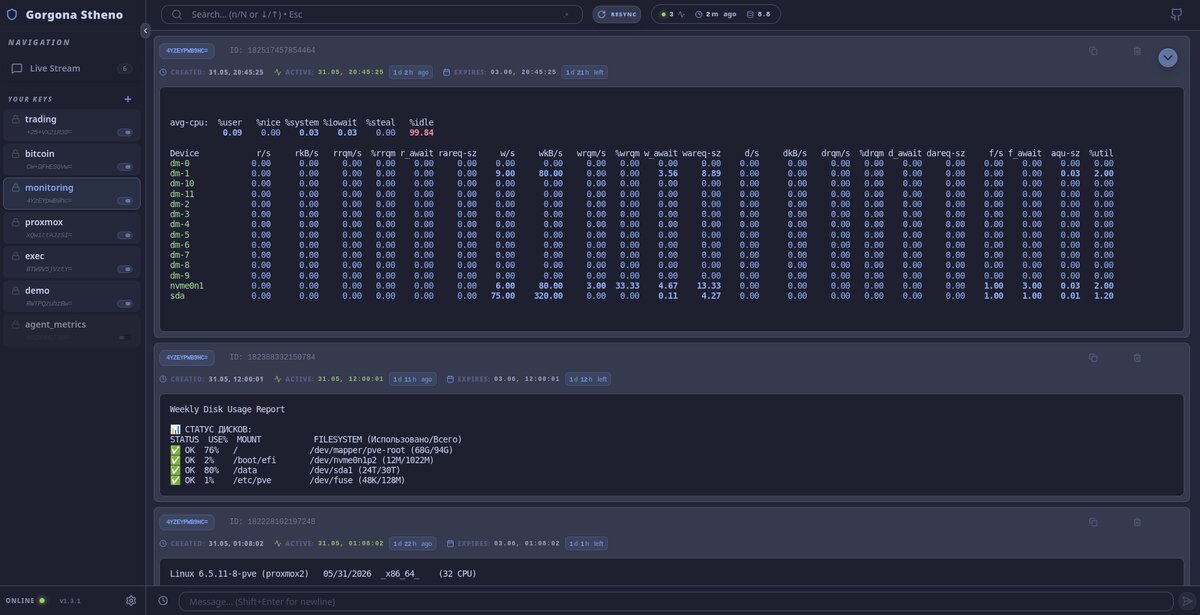
Note: Use the following credentials for demo access:
- Username:
demo- Password:
demo
- Run the following command to create and start the container:
- Use the same command to update, it your personal settings will not be deleted.
sudo docker pull perynfr/gorgona_stheno:latest && \
sudo docker rm -f gorgona_stheno || true && \
sudo docker run -d \
  --name gorgona_stheno \
  -p 8000:8000 -p 7777:7777 \
  --restart unless-stopped \
  -v /etc/gorgona:/etc/gorgona \
  -v /var/lib/gorgona:/var/lib/gorgona \
  perynfr/gorgona_stheno:latest && \
sudo docker image prune -f && \
sleep 2 && sudo docker logs gorgona_stheno 2>&1 | grep "#"
- Accessing the Dashboard
-
Open your browser and go to:
https://<your-server-ip>:8000/Note: Make sure to use HTTPS, as it is required for modern browser features like Desktop Notifications and the Clipboard API.
-
Handling the SSL Warning: Since the system uses a self-signed certificate generated during installation, your browser will display a security warning (e.g., "Your connection is not private").
- In Chrome/Edge: Click Advanced and then click Proceed to (unsafe).
- In Firefox: Click Advanced, then click Accept the Risk and Continue.
-
Login Credentials:
- Default Login:
admin - Default Password:
admin(It is highly recommended to change your password in the Preferences menu after the first login.)
- Default Login:
-
Enable Features: Once logged in, the browser may ask for permission to Show Notifications. Click Allow to receive real-time desktop alerts.
Quick Start
sudo apt update && sudo apt install -y libssl-dev git gcc make && \
git clone --depth 1 https://github.com/psqlmaster/gorgona.git && \
cd gorgona && make clean && make && sudo mkdir -p /etc/gorgona /var/lib/gorgona && \
printf "[server]\nip = 64.188.70.158\nport = 7777\nsync_psk = BQQCyN8zo4La2lRSIQ2jLp5imEa0JzdXp2PKogP3\n" | sudo tee /etc/gorgona/gorgona.conf >/dev/null && \
sudo mv RWTPQzuhzBw=.pub RWTPQzuhzBw=.key /etc/gorgona/ && sudo cp ./gorgona /usr/bin && sudo mkdir -p /var/lib/gorgona && \
sudo gorgona listen last 4 RWTPQzuhzBw=
Installation
Clone the repository:
git clone https://github.com/psqlmaster/gorgona.git
cd gorgona
Install dependencies (OpenSSL required):
- On Debian/Ubuntu:
sudo apt update && sudo apt install -y libssl-dev git gcc make - On Fedora:
sudo dnf install openssl-devel - On REDOS:
sudo yum install openssl11 openssl11-devel - On centos:
sudo yum install -y git gcc make pkgconfig check check-devel openssl-devel - On macOS:
brew install openssl
Note: Tested on Debian, Fedora, Centos and RED OS. Binary Compatibility Official
.debpackages are built on Debian 13 (Trixie). While they are compatible with most modern Linux distributions, for older systems or non-Debian distros, it is recommended to build from source.
Build the project:
make clean && make
Builds gorgona (client) and gorgonad (server). Clean: make clean. Rebuild: make rebuild.
Install Client and Server
releases 📦
sudo dpkg -i ./gorgona_<version>_amd64.deb
sudo dpkg -i ./gorgonad_<version>_amd64.deb
Configuration
All configuration files are located in /etc/gorgona/.
Server Configuration (gorgonad.conf)
Controls the gorgonad daemon behavior.
# vim /etc/gorgona/gorgonad.conf
[server]
port = 7777                                            # Listen port
max_alerts = 1000                                      # Max alerts stored per key
max_alert_ttl = 7776000                                # (90 days) lifetime in seconds
max_clients = 100                                      # Concurrent client connections
max_log_size = 10                                      # Log rotation size in MB
log_level = info                                       # info, error, or debug (systemctl reload gorgonad)
max_message_size = 5                                   # Max message size in MB
use_disk_db = true                                     # Enable persistent storage (true - tested for production, false - experimental, requires debugging)
vacuum_threshold_percent = 50                          # Auto-cleanup threshold for deleted records

# paths (optional — defaults shown below)
data_dir = /var/lib/gorgona                            # Base directory for DB, cache, and logs
conf_dir = /etc/gorgona                                # Directory for config files and TLS certs
log_level = error                                      # info, error, or debug
# log_file = /var/log/gorgona/gorgonad.log             # Optional: override default log path (<data_dir>/gorgonad.log)

[replication]
# If sync_psk is set, the client joins the Layer 2 Mesh:
# 1. Automatically discovers new nodes and updates <data_dir>/peers.cache
# 2. Uses parallel probes (Happy Eyeballs) to find the fastest entry point
# 3. Prioritizes 127.0.0.1 if a local sidecar daemon is running
sync_psk = BQQCyN8zo4La2lRSIQ2jLp5imEa0JzdXp2PKogP3    # P2P cluster authentication key
sync_interval = 60                                     # Mesh maintenance frequency (sec). Controls PEX gossip, RTT heartbeats, and Anti-Entropy checks.
peer = 64.188.70.158:7777                              # Remote peer address(seed) to sync with
#peer = node-beta.gorgona.local:7777                   #Remote peer address(seed) to sync with
Client Configuration (gorgona.conf)
Controls the gorgona client and Remote Command Execution (RCE) mappings.
[server]
ip = 64.188.70.158
port = 7777
sync_psk = BQQCyN8zo4La2lRSIQ2jLp5imEa0JzdXp2PKogP3    # P2P cluster authentication key (optionally)

# paths (optional — defaults shown below)
data_dir = /var/lib/gorgona                            # Base directory for history.log, peers.cache, sticky_node
conf_dir = /etc/gorgona                                # Directory for *.pub, *.key files
# log_file = /var/log/gorgona/gorgona.log              # Optional: output for daemon-exec (default: /dev/null)
# log_level = info                                     # info, error, or debug

# Per-key command sections (Recommended)
[exec_commands:RWTPQzuhzBw=]
<key> = <script_path> time_limit = <sec>
start_app = /usr/local/bin/app_start.sh time_limit = 60

# Global commands (Available to all keys)
[exec_commands]
sysadmin = /usr/local/bin/gorgona_sysadmin.sh time_limit = 10
status = /usr/bin/uptime
- Create dir for file
/var/lib/gorgona/peers.cache
sudo mkdir -p /var/lib/gorgona
Service Installation (systemd)
If not using the .deb package, install manually:
Manual Service Installation (without .deb package)
sudo mkdir -p /etc/gorgona /var/lib/gorgona/alerts
# Optional: create separate log directory if you plan to use log_file = /var/log/gorgona/gorgonad.log
# sudo mkdir -p /var/log/gorgona
- server service configuration
vim /etc/systemd/system/gorgonad.service
[Unit]
Description=Gorgona Distributed Alert Server
After=network.target

[Service]
Type=simple
User=root
Group=root
WorkingDirectory=/var/lib/gorgona
ExecStart=/usr/bin/gorgonad
ExecReload=/bin/kill -HUP $MAINPID
KillSignal=SIGTERM
TimeoutStopSec=20
StandardOutput=journal
StandardError=journal
Restart=on-failure
LimitNOFILE=65535

[Install]
WantedBy=multi-user.target
systemctl daemon-reload
systemctl enable gorgonad
systemctl start gorgonad
Verify:
systemctl status gorgonad
tail -f /var/log/gorgona/gorgonad.log
- client service configuration
vim /etc/systemd/system/gorgona.service
[Unit]
Description=Gorgona Message Listener
After=network-online.target
Wants=network-online.target

[Service]
Type=simple
# Basic startup (with the default configuration in /etc/gorgona/gorgona.conf)
ExecStart=/usr/bin/gorgona -e listen new BTW9V5jVztY=
# Running with a custom configuration:
#ExecStart=/usr/bin/gorgona -c /etc/gorgona/gorgona-node2.conf -e listen new BTW9V5jVztY=
# Debug mode:
#ExecStart=/usr/bin/gorgona -ve listen new

Restart=always
RestartSec=5
StartLimitBurst=10
StartLimitIntervalSec=300
User=root

# stdout/stderr (verbose logs, connection errors)
StandardOutput=journal
StandardError=journal

KillMode=mixed
TimeoutStopSec=30

# The output of daemon-exec commands (the -d flag) is controlled via the log_file setting in the configuration:
# [server]
# log_file = /var/log/gorgona/gorgona_service.log

[Install]
WantedBy=multi-user.target
Usage
gorgona [-v|--verbose] [-e|--exec] [-d|--daemon-exec] [-c|--conf <path>] [-h|--help] [-V|--version] <command> [arguments]
Anti-Replay Protection
Gorgona includes a dual-layer defense mechanism to prevent attackers from capturing and re-sending encrypted command packets:
- Staleness Filter: The server rejects any message where the
unlock_attimestamp is older than 120 seconds from the current server time. This prevents the re-injection of old captured traffic. - Binary Deduplication: The server maintains a sliding window of the last 50 payloads per recipient. Since AES-GCM ensures a unique ciphertext for every legitimate encryption (due to unique IVs), any identical binary payload is instantly flagged as a replay attack and rejected.
If an attack is detected, the server logs the event as a WARN (including client IP) and returns a specific error to the sender:
Error: Replay attack detected (duplicate payload)
Flags
-v, --verbose: Enables verbose output for debugging.-e, --exec: For 'listen' command: execute messages as system commands (requirespubkey_hash_b64).- If the
[exec_commands]section in/etc/gorgona/gorgona.confis empty, all decrypted messages are executed. - If
[exec_commands]contains entries (e.g.,app start = /path/to/script.sh), only messages matching a key are executed by running the corresponding script. - Execution Limits: You can specify an optional
time_limit = N(in seconds) in the config file. If the command exceeds this time, it will be forcefully terminated (requires thetimeoututility). Example:app start = /usr/local/bin/script.sh time_limit = 10 -d, --daemon-exec: Used with-e/--execfor 'listen' command: executes messages as background daemons (viafork()+setsid()). Output from executed commands is written to the file specified by thelog_filekey in the configuration (e.g.,log_file = /var/log/gorgona.login[server]section ofgorgona.conf). Iflog_fileis not set, command output is discarded (/dev/null).- The
time_limitalso applies to background processes, preventing "zombie" or frozen scripts from accumulating.
- If the
-c, --conf <path>: Path to configuration file (default:/etc/gorgona/gorgona.conf). Allows running multiple client instances with isolated state directories and separate execution mappings. Example:gorgona -c /etc/gorgona/gorgona-node2.conf -ed listen new KEY=-h, --help: Displays help message.-V, --version: Current version.
Note: Flags
-vand-ecan be combined (e.g.,-ve) for verbose output during command execution.
Generate Keys
sudo gorgona genkeys
Generates an RSA key pair in <conf_dir>/ (default: /etc/gorgona/), creating hash.pub (public key) and hash.key (private key), where hash is the base64-encoded hash of the public key.
The hash in name file hash.pub is used to specify the sender in the listen command; if omitted, messages for all *.pub keys in /etc/gorgona/ are retrieved.
To decrypt messages, the recipient must have the sender’s hash.key private key in /etc/gorgona/, which must be securely shared by the user.
Key Permissions: Private keys (*.key) should be readable only by the owner (chmod 600). Public keys (*.pub) can be world-readable (chmod 644). Check permissions with:
ls -la /etc/gorgona
Send Message
- (datetime UTC) or date -u '+%Y-%m-%d %H:%M:%S'
# gorgona send <data unlock message> <data expired> "Your message" "recipient.pub"
gorgona send "YYYY-MM-DD HH:MM:SS" "YYYY-MM-DD HH:MM:SS" "Your message" "recipient.pub"
Use - for <message> to read from stdin.
The public key file is the filename in <conf_dir>/ (default: /etc/gorgona/), e.g., RWTPQzuhzBw=.pub.
Examples:
gorgona send "$(date -u '+%Y-%m-%d %H:%M:%S')" "$(date -u -d '+30 days' '+%Y-%m-%d %H:%M:%S')" "hello world" "RWTPQzuhzBw=.pub"
gorgona send "$(date -u -d '+30 seconds' '+%Y-%m-%d %H:%M:%S')" "$(date -u -d '+30 days' '+%Y-%m-%d %H:%M:%S')" "Message in the future for you my dear friend RWTPQzuhzBw=" "RWTPQzuhzBw=.pub"
cat message.txt | gorgona send "$(date -u '+%Y-%m-%d %H:%M:%S')" "$(date -u -d '+30 days' '+%Y-%m-%d %H:%M:%S')" - "RWTPQzuhzBw=.pub"
Listen for Messages
gorgona listen <mode> [<count>] [pubkey_hash_b64]
Modes:
live: Only active messages (unlock_at <= now).all: All non-expired messages, including locked.lock: Only locked messages (unlock_at > now).single: Only active messages for the givenpubkey_hash_b64.last: the most recent [] message(s), (count defaults to 1), optionally filtered by pubkey_hash_b64new: Only new messages received after connection, optionally filtered bypubkey_hash_b64.
If pubkey_hash_b64 is provided, filters by it (mandatory for single and last).
Revoke (Cancel) Message
gorgona revoke <alert_id> <pubkey_hash_b64>
Cancels a previously sent time-locked message.
- The client signs the alert_id using the private key associated with the pubkey_hash_b64.
- The server verifies the signature and, if valid, deactivates the message in its database and propagates a REVOKE_PUSH command to all other nodes in the mesh.
- Any active listeners will instantly remove the task from their pending execution queue.
Examples:
# Examples: Listen modes
gorgona listen single RWTPQzuhzBw=     # Gets the message from single key
gorgona listen last RWTPQzuhzBw=       # Gets the last 1 message
gorgona listen last 3 RWTPQzuhzBw=     # Gets the last 3 messages
gorgona listen new RWTPQzuhzBw=        # Receives only new messages from the moment of connection
gorgona listen new                     # Receives only new messages for all keys since connection
# Time-Locked Command Execution (cron-like)
# Start listener in lock mode - it will execute the command exactly at unlock time
gorgona -e listen lock RWTPQzuhzBw=
# In another terminal: send a command that unlocks in 10 seconds
gorgona send "$(date -u -d '+10 seconds' '+%Y-%m-%d %H:%M:%S')" "$(date -u -d '+30 days' '+%Y-%m-%d %H:%M:%S')" "{ date; uptime; }" "RWTPQzuhzBw=.pub"
# After ~10s the listener with -e executes the decrypted command at unlock_at
# Same lock mode but without execution: decrypt & display at unlock time
# Start listener (no -e) - message is queued and shown when unlocked
gorgona listen lock RWTPQzuhzBw=
# Send the same message (unlocks in 10s) from another terminal
gorgona send "$(date -u -d '+10 seconds' '+%Y-%m-%d %H:%M:%S')" "$(date -u -d '+30 days' '+%Y-%m-%d %H:%M:%S')" "test message" "RWTPQzuhzBw=.pub"
# After ~10s the listener without -e prints: "Unlocked pending message ID=..." and the decrypted text
gorgona -ed listen new RWTPQzuhzBw=     # Listens for new messages and executes them as background daemons
gorgona -edv listen lock RWTPQzuhzBw=  # Executes locked commands in background (log_file must be set in gorgona.conf)
# 1. Send a command to reboot the server in 1 hour
# Output will provide the Alert ID, e.g., 170112816685056
gorgona send "$(date -u -d '+1 hour' '+%Y-%m-%d %H:%M:%S')" "$(date -u -d '+2 days' '+%Y-%m-%d %H:%M:%S')" "sudo reboot" "RWTPQzuhzBw=.pub"
# 2. If the maintenance was successful and reboot is no longer needed, cancel it:
gorgona revoke 170112816685056 RWTPQzuhzBw=
- You can check server status from any device using standard telnet/nc
echo "help" | nc localhost 7777
--- Gorgona Node Help ---
Commands available:
  help           - Show this list
  info           - Show node uptime
  status <psk>   - Show detailed node metrics (requires authentication)
-------------------------
- Get cluster status
cmd="status BQQCyN8zo4La2lRSIQ2jLp5imEa0JzdXp2PKogP3"; echo "$cmd" | nc 64.188.70.158 7777; echo "$cmd" | nc 46.138.247.148 7777
Output:
--- Gorgona Node [64.188.70.158 7777] Detailed Status ---
Version: 2.9.6
Uptime: 0d 0h 1m
Connections:
  - Active Clients: 1 / 100
  - Authenticated Peers: 3 / 1 (connected)
Storage Metrics:
  - DB Storage Mode: Persistent (Disk)
  - Unique Recipients (Keys): 4
  - Active Alerts (Live): 3202
  - Cluster Pulse (MaxID): 167001095340032
  - Database Size: 2.45 MB
  - Disk Waste (Awaiting Vacuum): 1
  - Vacuum Threshold: 50%
  - History Starts From:  [2026-04-05 12:51:59 UTC]
  - Last Data Ingest:     [2026-04-17 21:29:11 UTC]
Operational Configuration:
  - Max Alerts per Key: 1000
  - Max Message Size: 2 MB
  - Logging Level: info
--- L2 Cluster Topology (Known nodes: 2) ---
  [46.138.247.148 :7777 ] Score: 0.56 | RTT:  183.0 ms | Spd: 9724.7 KB/s | SEED [UP]
  [192.168.1.10   :7777 ] Score: 0.00 | RTT:    0.0 ms | Spd:    0.0 KB/s | PEX  [DEAD]
-----------------------------------------------------
--- Gorgona Node [192.168.1.200 7777] Detailed Status ---
Version: 2.9.6
Uptime: 0d 0h 1m
Connections:
  - Active Clients: 3 / 100
  - Authenticated Peers: 6 / 1 (connected)
Storage Metrics:
  - DB Storage Mode: Persistent (Disk)
  - Unique Recipients (Keys): 4
  - Active Alerts (Live): 3202
  - Cluster Pulse (MaxID): 167001095340032
  - Database Size: 2.45 MB
  - Disk Waste (Awaiting Vacuum): 1
  - Vacuum Threshold: 50%
  - History Starts From:  [2026-04-05 12:51:59 UTC]
  - Last Data Ingest:     [2026-04-17 21:29:11 UTC]
Operational Configuration:
  - Max Alerts per Key: 1000
  - Max Message Size: 2 MB
  - Logging Level: info
--- L2 Cluster Topology (Known nodes: 3) ---
  [64.188.70.158  :7777 ] Score: 0.58 | RTT:  189.0 ms | Spd: 10392.2 KB/s | SEED [UP]
  [46.138.247.148 :7777 ] Score: 0.32 | RTT:   46.0 ms | Spd:    0.0 KB/s | CACHE [UP]
  [192.168.1.10   :7777 ] Score: 0.32 | RTT:   45.0 ms | Spd:    0.0 KB/s | PEX  [UP]
Run Server
gorgonad [-v|--verbose] [-h|--help] [-V|--version] [-c|--conf <path>]
The server reads settings from /etc/gorgona/gorgonad.conf by default, or from a custom path specified via -c/--conf. If the config file is missing, built-in defaults are used (port = 5555, max alerts = 1000, max clients = 100, log_level = "info", use_disk_db = false, data_dir = /var/lib/gorgona, conf_dir = /etc/gorgona).
Use -h or --help for configuration help.
Configuration paths
| Key | Default | Description |
|---|---|---|
data_dir | /var/lib/gorgona | Base directory for DB, cache (peers.cache), and logs |
conf_dir | /etc/gorgona | Directory for TLS certificates (server.crt, server.key) |
log_file | <data_dir>/gorgonad.log | Optional: override default log path |
Example: run a second instance with a separate config:
sudo gorgonad -c /etc/gorgona/gorgonad-node2.conf

- Use `-v` for verbose mode, example:

```bash
strace -e network gorgona -v listen new RWTPQzuhzBw=
Notes:
- A header
[exec_commands:KEY]binds all key/value lines inside torequired_key=KEY. Only messages decrypted with the matching private key (i.e., whosepubkey_hash_b64equalsKEY) may execute those commands when-e/--execis used. [exec_commands](without suffix) is the global section — commands there are available to messages from any key.- This format is both human-editable and easy to generate with configuration management tools (Ansible, Chef, etc.).
Backward compatibility:
- The parser also accepts the older minimal form
key = <value>inside[exec_commands](legacy), but using per-key sections is recommended.
Wrapper Script Support for Complex Commands
- For complex shell commands with pipes, variables, or dynamic content, use wrapper scripts instead of inline commands.
- This avoids shell escaping issues and provides better maintainability. Arguments from gorgona messages are passed to the script as $1, $2, $3...
Example: Remote Service & Log Manager
- /usr/local/bin/gorgona_sysadmin.sh
#!/bin/bash

# Arguments: $1=action, $2=service, $3=parameter (optional)
# Usage examples:
#   sysadmin restart nginx
#   sysadmin logs postgres 100
#   sysadmin status sshd
#   sysadmin kill zombie 5

export PATH="/usr/local/sbin:/usr/local/bin:/usr/sbin:/usr/bin:/sbin:/bin"

ACTION="${1:-help}"
SERVICE="${2:-}"
PARAM="${3:-}"

TIMESTAMP=$(date -u '+%Y-%m-%d %H:%M:%S')
PUBKEY="RWTPQzuhzBw=.pub"

case "$ACTION" in
    restart)
        RESULT=$(systemctl restart "$SERVICE" 2>&1 && echo "✓ $SERVICE restarted" || echo "✗ Failed to restart $SERVICE")
        ;;
    status)
        RESULT=$(systemctl status "$SERVICE" --no-pager 2>&1 | head -10)
        ;;
    logs)
        LINES="${PARAM:-50}"
        RESULT=$(journalctl -u "$SERVICE" --no-pager -n "$LINES" 2>&1)
        ;;
    kill)
        PATTERN="${PARAM:-$SERVICE}"
        RESULT=$(pkill -9 -f "$PATTERN" 2>&1 && echo "✓ Processes killed" || echo "✗ No processes found")
        ;;
    disk)
        # ИСПРАВЛЕНО: PATH -> CHECK_PATH (не перезаписывать системную переменную!)
        CHECK_PATH="${SERVICE:-/}"
        RESULT=$(du -sh "$CHECK_PATH" 2>&1 && df -h "$CHECK_PATH" 2>&1 | tail -1)
        ;;
    help|*)
        RESULT="Available: restart|status|logs|kill|disk <service> [param]"
        ;;
esac

echo "[$TIMESTAMP] $ACTION $SERVICE $PARAM
$RESULT" | /usr/bin/gorgona send "$TIMESTAMP" "$(date -u -d '+1 day' '+%Y-%m-%d %H:%M:%S')" - "$PUBKEY"
Make it executable:
chmod +x /usr/local/bin/gorgona_sysadmin.sh
Configure exec_commands
- Edit /etc/gorgona/gorgona.conf:
[server]
ip = 64.188.70.158
port = 7777

[exec_commands]
sysadmin = /usr/local/bin/gorgona_sysadmin.sh
Usage Examples
# Terminal 1: Start listener to execute commands at the exact 'unlock' moment
gorgona -e listen lock RWTPQzuhzBw=

# Terminal 2: Send a command to unlock exactly in 60 seconds
gorgona send "$(date -u -d '+60 seconds' '+%Y-%m-%d %H:%M:%S')" \
             "$(date -u -d '+1 day' '+%Y-%m-%d %H:%M:%S')" \
             "systemctl restart nginx" "RWTPQzuhzBw=.pub"
# example output:
# Decrypted message:
# [2026-03-01 14:49:48] restart nginx
# ✓ nginx restarted

# Get last 100 lines of postgres logs
gorgona send "$(date -u '+%Y-%m-%d %H:%M:%S')" "$(date -u -d '+1 hour' '+%Y-%m-%d %H:%M:%S')" \
"sysadmin logs nginx 3" "RWTPQzuhzBw=.pub" && gorgona listen new
# example output:
# Decrypted message:
# [2026-03-01 14:49:21] logs nginx 3
# Feb 27 16:34:09 hostname nginx[1738727]: 2026/02/27 16:34:09 [warn] 1738727#1738727: conflicting server name "hostname.org" on 0.0.0.0:443, ignored
# Feb 27 16:34:09 hostname nginx[1738735]: 2026/02/27 16:34:09 [warn] 1738735#1738735: conflicting server name "hostname.org" on 0.0.0.0:80, ignored
# Feb 27 16:34:09 hostname nginx[1738735]: 2026/02/27 16:34:09 [warn] 1738735#1738735: conflicting server name "hostname.org" on 0.0.0.0:443, ignored

# Check sshd service status
gorgona send "$(date -u '+%Y-%m-%d %H:%M:%S')" "$(date -u -d '+1 hour' '+%Y-%m-%d %H:%M:%S')" \
"sysadmin status sshd" "RWTPQzuhzBw=.pub" && gorgona listen new
# example output:
# Decrypted message:
# sysadmin status sshd
# Received message: Pubkey_Hash=RWTPQzuhzBw=
# ID: 150268099387392
# Metadata (local): Create=2026-03-01 17:42:27, Unlock=2026-03-01 17:42:27, Expire=2026-03-02 17:42:27
# Decrypted message:
# [2026-03-01 14:42:27] status sshd
# ● ssh.service - OpenBSD Secure Shell server
#      Loaded: loaded (/lib/systemd/system/ssh.service; enabled; preset: enabled)
#      Active: active (running) since Fri 2026-02-27 16:34:11 MSK; 2 days ago
#        Docs: man:sshd(8)
#              man:sshd_config(5)
#     Process: 1738962 ExecStartPre=/usr/sbin/sshd -t (code=exited, status=0/SUCCESS)
#    Main PID: 1738963 (sshd)
#       Tasks: 1 (limit: 153344)
#      Memory: 3.3M
#         CPU: 91ms

# Kill all zombie processes
gorgona send "$(date -u '+%Y-%m-%d %H:%M:%S')" "$(date -u -d '+1 hour' '+%Y-%m-%d %H:%M:%S')" \
"sysadmin kill zombie" "RWTPQzuhzBw=.pub" && gorgona listen new

# Check disk usage of /var/log
gorgona send "$(date -u '+%Y-%m-%d %H:%M:%S')" "$(date -u -d '+1 hour' '+%Y-%m-%d %H:%M:%S')" \
"sysadmin disk /var/log" "RWTPQzuhzBw=.pub" && gorgona listen new
# example output:
# Decrypted message:
# [2026-03-01 14:36:04] disk /var/log
# 2.1G	/var/log
# /dev/mapper/pve-root   94G   63G   27G  71% /

# Listen and execute automatically
gorgona -ed listen new RWTPQzuhzBw=
Pro Tip: Debugging Running
gorgonad -v(verbose) will print all levels (including DEBUG) to your terminal in real-time, regardless of thelog_levelset in the config file. This is ideal for troubleshooting without bloating yourgorgonad.log.
Flowchart of Server Operation
The server uses a high-performance select()-based multiplexing loop to handle binary and text protocols simultaneously.
graph TD
    A[("Start Server")] --> B{Incoming Event}
    B -->|New Connection| C["Accept & Non-blocking Setup"]
    B -->|Data Received| D{Protocol Sniffer}
    B -->|Timer: 10s| REPL_MGR["Peer Connection Manager"]

    D -->|First Byte < 32| E["Binary Mode: Parse Header & Payload"]
    D -->|First Byte >= 32| F["Text Mode: Handle Interactive Commands"]

    E --> G{Command Dispatcher}
    F --> G

    G -->|AUTH / SYNC| REPL_LOGIC["P2P Reconciliation"]
    G -->|SEND / REPL| H{Security & Anti-Replay}
    G -->|LISTEN / SUBSCRIBE| I["Filter & Fetch Alerts"]
    G -->|REVOKE| REV["Verify Signature & Deactivate"]
        REV -->|Propagate| FORWARD

    H -->|Valid| K["Add to DB & Notify Subscribers"]
    K -->|If new local| FORWARD["Broadcast to Peers"]

    REPL_LOGIC --> REPL_SYNC["Mutual History Reconciliation"]
    REPL_MGR -->|Reconnect| C

    I --> L["Queue Data/Success Msg"]
    K --> L

    L --> M{Close After Send?}
    M -->|Yes| N["Set Graceful Shutdown Flag"]

    B -->|Socket Writable| O["Process Outbound Queue"]
    O --> P{Flag Set & Queue Empty?}
    P -->|Yes| Q["Graceful Socket Close"]

    %% Styles
    classDef startEnd fill:#2b5b84,stroke:#1a3f5c,stroke-width:2px,color:#fff,font-weight:bold
    classDef process fill:#4a90c4,stroke:#2c5a7a,stroke-width:2px,color:#fff
    classDef decision fill:#e67e22,stroke:#b45f1b,stroke-width:2px,color:#fff
    classDef special fill:#27ae60,stroke:#1e8449,stroke-width:2px,color:#fff

    class A,Q startEnd
    class C,E,F,I,K,FORWARD,REPL_SYNC,L,N,O process
    class B,D,G,H,M,P decision
    class REPL_MGR,REPL_LOGIC special
Click to view detailed internal logic (Packet parsing, State machine, DB Sync)
[Server Start]
   |
   v
[Initialization]
   - Read configuration (default: /etc/gorgona/gorgonad.conf, or path from -c/--conf)
   - Initialize Global Data: client_sockets[MAX_CLIENTS], subscribers[MAX_CLIENTS]
   - Setup Logging: Open <log_file> or <data_dir>/gorgonad.log (Supports: error, info, debug)
   - If use_disk_db == true:
   |  - Load Recipients from <data_dir>/alerts/
   |  - mmap() existing .alerts files into memory
   |  - Scan files for active records -> Set used_size & recipient_count
   |
   v
[Socket Creation]
   - socket(), setsockopt(SO_REUSEADDR), bind(), listen()
   - Set server_fd to O_NONBLOCK
   - Register Signal Handlers (SIGINT/SIGTERM for shutdown, SIGPIPE ignore)
   |
   v
[Main Loop (run_server)]
   |
   |--[1] Prepare select() FD Sets:
   |      - Add server_fd to readfds
   |      - For each active client:
   |         - Add to readfds (only if close_after_send is false)
   |         - Add to writefds (if has_pending_data is true: out_head != NULL)
   |
   |--[2] select(max_sd + 1, &readfds, &writefds, NULL, NULL)
   |
   |--[3] Handle NEW CONNECTION (FD_ISSET server_fd):
   |      - accept() -> check max_clients limit
   |      - If OK: fcntl(O_NONBLOCK) -> Initialize Subscriber struct
   |         - Set read_state = READ_LEN, in_pos = 0, close_after_send = false
   |
   |--[4] Handle WRITABLE Client (FD_ISSET in writefds):
   |      - Call process_out(sub_index, sd):
   |         - Loop through OutBuffer queue -> send() payload chunks
   |         - If sent < len: Update pos -> Break (wait for next select)
   |         - If sent == len: Free buffer -> Move to next OutBuffer
   |         - If queue empty AND close_after_send == true:
   |            - Close socket -> Reset Subscriber struct -> Log "Task completed"
   |
   |--[5] Handle READABLE Client (FD_ISSET in readfds):
   |      |
   |      |----> [State: READ_LEN (Protocol Sniffer)]
   |      |         - Read 1 byte into in_buffer
   |      |         - If byte < 32 AND not (\n, \r, \t): BINARY PROTOCOL
   |      |            - Collect 4 bytes -> ntohl() -> expected_msg_len
   |      |            - If length > max_message_size:
   |      |               - Enqueue Error Msg -> Set close_after_send = true -> continue
   |      |            - Allocate in_buffer -> Set read_state = READ_MSG
   |      |         - Else: TEXT PROTOCOL (Interactive/Telnet)
   |      |            - Buffer bytes until '\n' -> trim_string()
   |      |            - If "info"/"version"/"?":
   |      |               - Format response -> enqueue_text_only() -> Set close_after_send = true
   |      |            - Else: Log "Unknown text command" -> Set close_after_send = true
   |      |
   |      |----> [State: READ_MSG (Data Collection)]
   |      |         - Read up to expected_msg_len into in_buffer
   |      |         - If complete:
   |      |            - handle_command(sub_index, in_buffer) -> See [Dispatcher]
   |      |            - Free in_buffer -> Reset in_pos -> Set read_state = READ_LEN
   |
   v
[Command Dispatcher (handle_command)]
   |
   |----> [SEND|...]
   |         - Parse fields: hash, unlock_at, expire_at, payload, key, iv, tag
   |         - add_alert() -> Security Checks:
   |            - Layer 1: Staleness Check (Reject if unlock_at is > 120s in the past)
   |            - Layer 2: Binary Deduplication (Compare payload with last 50 alerts)
   |            - If Security Check Fails: Enqueue Error (Stale/Replay) -> return
   |            - If Valid: Save to DB (mmap if enabled) -> Log success
   |         - notify_subscribers():
   |            - Filter active clients by mode (LIVE/ALL/LOCK/NEW) and hash match
   |            - Format ALERT|... message -> enqueue_message() for each match
   |
   |----> [LISTEN|... / SUBSCRIBE ]
   |         - Parse: mode, hash, count
   |         - Update Subscriber mode/pubkey_hash
   |         - send_current_alerts():
   |            - Sort & Filter alerts by ID/mode/timestamps
   |            - For each match: base64_encode() -> enqueue_message()
   |         - If mode == LAST: Set close_after_send = true
   |
   v
[Background Maintenance]
   - Log Rotation: If size > max_log_size -> rename gorgonad.log to .log.1
   - DB Vacuum: If use_disk_db AND waste_count exceeds threshold:
   |  - alert_db_sync(): Rebuild .alerts file (compact) -> remap mmap
   - Logging: log_event(level, ...)
      - If verbose (-v): Always print to stdout (ignore config filters)
      - If log_level matches config (debug/info/error): Write to file
Client Architecture
graph TD
    CL_START[("Start Client")] --> CL_CONF{PSK set?}
    CL_CONF -->|No| CL_LEGACY["Legacy Mode: Connect to Config IP"]
    CL_CONF -->|Yes| CL_SMART["Mesh Mode: Parallel Probes to Top-3 Nodes"]
    CL_SMART --> CL_AUTH["L2 Handshake"]
    CL_AUTH --> CL_PEX["Receive & Cache Topology"]

    CL_LEGACY --> RECV
    CL_PEX --> RECV

    RECV["Receive Packet from Mesh"] --> CMD_TYPE{Is ALERT or REVOKE?}

    %% Revocation Flow
    CMD_TYPE -->|REVOKE| REV_PROC["Scan Memory Queue"]
    REV_PROC --> REV_DONE["Remove Task from RAM"]

    %% Alert Flow
    CMD_TYPE -->|ALERT| IDEM{ID in history.log?}
    IDEM -->|Yes| DROP["Discard Duplicate"]
    IDEM -->|No| TL_CHECK{Is Time-Locked?}

    TL_CHECK -->|Yes| PENDING[("RAM Pending Queue")]
    TL_CHECK -->|No| DECRYPT["Decrypt & Record ID"]

    DECRYPT --> EXEC["Run Command / Display"]
    PENDING -.->|Timer: unlock_at| DECRYPT

    %% Styles
    classDef startEnd fill:#2b5b84,stroke:#1a3f5c,stroke-width:2px,color:#fff,font-weight:bold
    classDef process fill:#4a90c4,stroke:#2c5a7a,stroke-width:2px,color:#fff
    classDef decision fill:#e67e22,stroke:#b45f1b,stroke-width:2px,color:#fff
    classDef storage fill:#9b59b6,stroke:#8e44ad,stroke-width:2px,color:#fff

    class CL_START startEnd
    class CL_LEGACY,CL_SMART,CL_AUTH,CL_PEX,RECV,REV_PROC,REV_DONE,DROP,DECRYPT,EXEC process
    class CL_CONF,IDEM,CMD_TYPE,TL_CHECK decision
    class PENDING storage
Advanced Use Case: The Dead Man's Switch (DMS)
Gorgona’s combination of Time-Locking, P2P replication, and Revocation allows you to build a resilient "Dead Man's Switch" for infrastructure and personal security.
Scenario: Infrastructure "Self-Healing" Insurance
Imagine a critical service where, if the management console or the administrator becomes unavailable (e.g., due to a network partition, kidnapping, or total system failure), an emergency script must be executed.
- Arming the Switch: A cron job on your secure admin node sends a time-locked execution command to the Gorgona mesh every hour with a lock time of
Now + 4 hours.# Task: Restore from backup if not cancelled gorgona send "$(date -u -d '+4 hours' '+%Y-%m-%d %H:%M:%S')" "$(date -u -d '+1 days' '+%Y-%m-%d %H:%M:%S')" "sysadmin restore_emergency" "key.pub" - The Heartbeat: Every hour, the cron job also sends a
revokecommand for the previous Alert ID. - The Drop: If the admin node goes offline, the
revokecommand is never sent. - Autonomous Execution: After 4 hours, the Gorgona mesh (which has replicated the task across all nodes) reaches the
unlock_attime. The target servers, listening viagorgona -e listen lock, receive and execute the emergency script simultaneously.
Why this is unique: Unlike centralized DMS services, Gorgona is mathematically honest. No single server admin can "peek" at your emergency script or prevent its execution once it's in the mesh, unless they have your private key to sign a revocation.
Monitoring & Observability
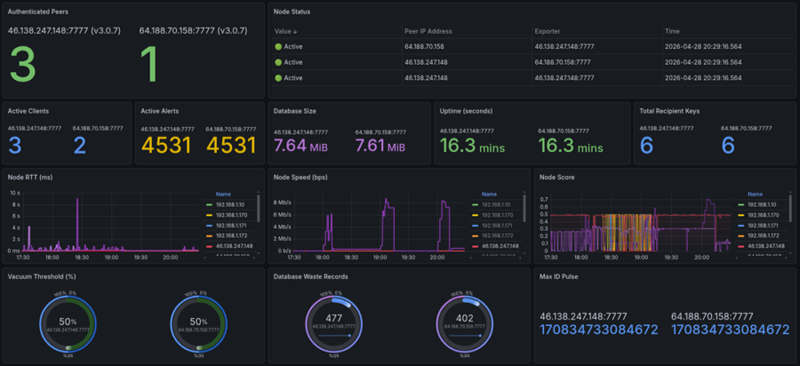
gorgona features an integrated metrics exporter compatible with Prometheus. This allows for real-time tracking of the P2P network state, node load, and message distribution intensity.
Key Metrics Tracked:
- Active Alerts: Total count of live and locked messages.
- P2P Synchronization: MaxID tracking across the cluster to ensure data consistency.
- Node Health (Gorgona Score): Real-time RTT, throughput, and penalty status for all peers.
- Resource Usage: Memory-mapped storage size and disk waste (vacuum status).
Secure Access to Metrics
The metrics endpoint operates over HTTPS. Before starting the server, you must generate the required certificates:
bash server/gen_server_certs.sh
Access to metrics is protected by HTTP Basic Auth. Use gorgona as the username and your sync_psk as the password:
curl -k -u gorgona:BQQCyN8zo4La2lRSIQ2jLp5imEa0JzdXp2PKogP3 https://64.188.70.158:7777/metrics
Grafana Dashboard
| Gorgonad cluster visualization | Gorgona Bridge |
|---|---|
 | 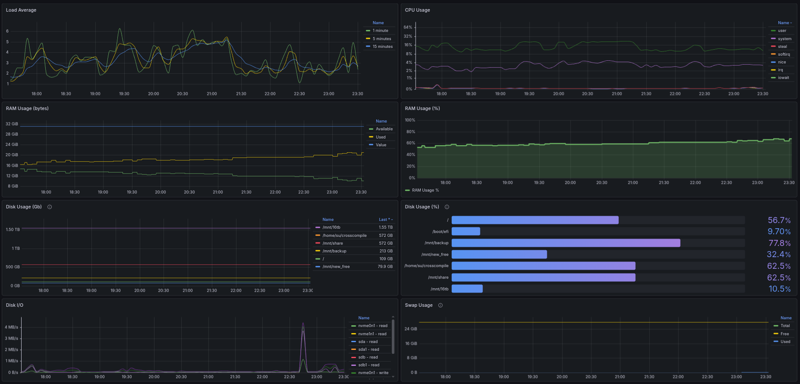 |
| gorgona/plugins/prom_push |
The dashboard provides insights into:
- Cluster Pulse: The propagation speed of data between nodes.
- Network Topology: Visual status of "UP", "DEAD", and "PENALIZED" peers.
- Throughput Metrics: Real-time I/O performance of the distributed database.
Future Plans & Evolution
gorgona has evolved from a standalone server into a fully decentralized, distributed system. The current version features a custom, zero-dependency Active-Active P2P replication engine with mutual state reconciliation and automatic self-healing connections.
Current Milestones Achieved:
- Decentralized Sync: Multi-node synchronization without external databases (Zero external dependencies).
- Mutual History Reconciliation: Automatic "catch-up" logic for nodes returning from offline state.
- Idempotent Data Flow: Collision-free alert propagation using Snowflake IDs.
- Self-Optimizing Mesh: Implementing Peer Exchange (PEX) and automated Service Discovery. This eliminates manual
/etc/peer updates, allowing nodes and clients to dynamically learn the full cluster topology from a single entry point. See p2p mash. - Performance-Driven Routing: Real-time monitoring of Effective Throughput (Bytes/sec). Moving beyond simple Pings to intelligent traffic steering that prioritizes peers based on actual hardware performance (Disk/CPU) and network health.
- Authorized Revocation: Implemented RSA-signed cancellation of scheduled tasks with global mesh propagation (Tombstones logic).
- Symmetric Sidecar Mesh: Achieving ultimate resilience by deploying Gorgonad on every node as a local proxy. See prom_push.
Next Frontiers:
- Snowflake Oracle Protocol: Implementing pairing-based threshold cryptography (BLS) to ensure time-locked payloads remain mathematically undecryptable until a verifiable P2P consensus of $K$-of-$N$ nodes reconstructs the decryption key upon reaching a target Snowflake ID. White Paper: The Snowflake Oracle Protocol
- High-Concurrency Engine: Migration from
select()toepoll()(Linux) orio_uringto support thousands of simultaneous P2P connections per node with zero overhead. - Consensus Hardening: Exploring lightweight Raft or Paxos implementations for atomic cluster-wide configuration changes and state synchronization.
Suggestions and contributions are welcome!
Testing
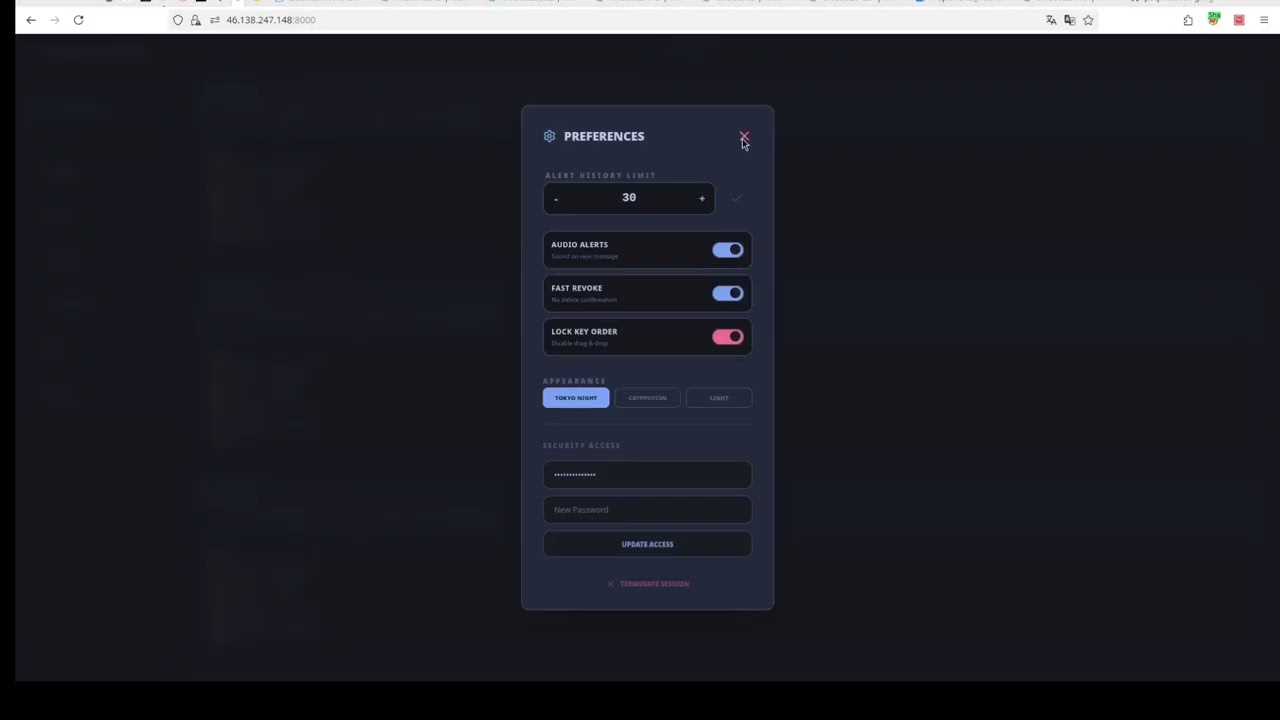
Watch the quick demo on YouTube:
| Gorgona Stheno, part1 | Gorgona Stheno, part2 |
|---|---|
 | 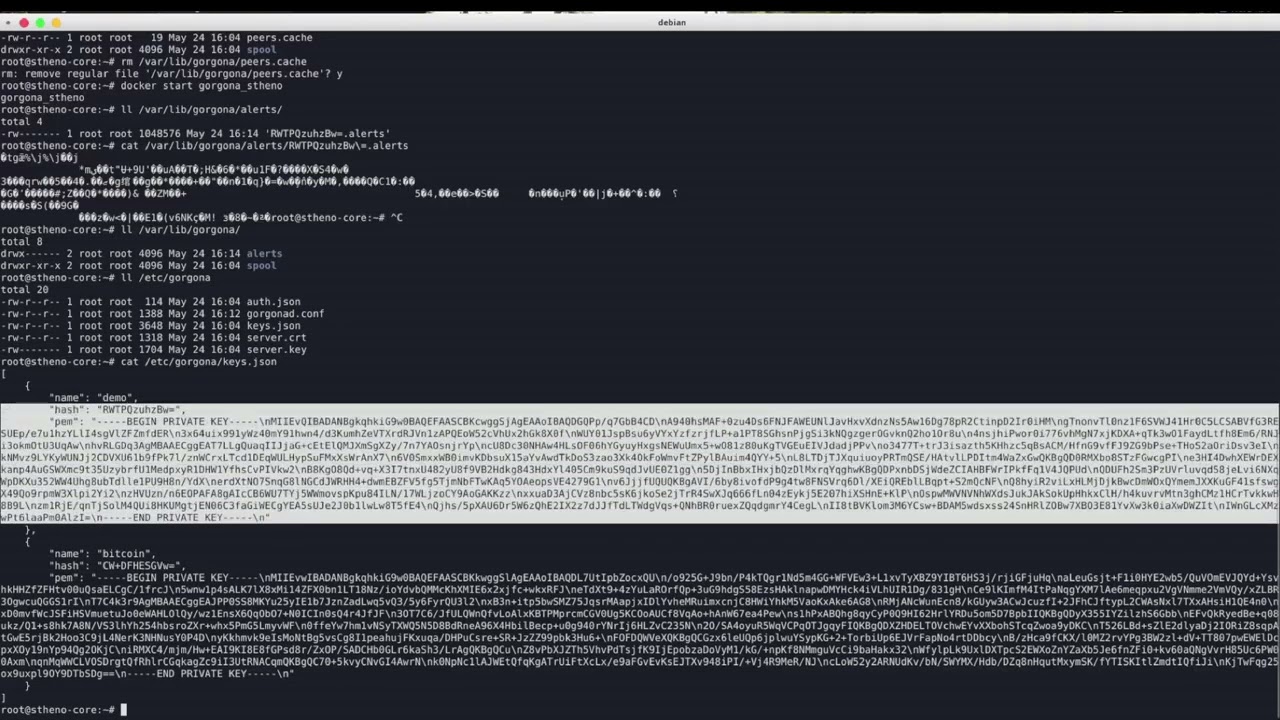 |
# To run the test suite, use the following command:
make clean && make test
More examples
# send
lsblk | gorgona send "$(date -u '+%Y-%m-%d %H:%M:%S')" "$(date -u -d '+30 days' '+%Y-%m-%d %H:%M:%S')" - "RWTPQzuhzBw=.pub"
# Server response: Alert added successfully

# get
gorgona listen last RWTPQzuhzBw=
# Received message: Pubkey_Hash=RWTPQzuhzBw=
# Metadata: Create=2025-10-08 08:39:52, Unlock=2025-09-28 18:44:00, Expire=2025-12-30 09:00:00
# Decrypted message: [output of lsblk]

# send command message
gorgona send "$(date -u '+%Y-%m-%d %H:%M:%S')" "$(date -u -d '+30 days' '+%Y-%m-%d %H:%M:%S')" "echo \$(date)" "RWTPQzuhzBw=.pub"

# listen execute command message
gorgona -e listen new RWTPQzuhzBw=
# Server response: Subscribed to new for the specified key
# Received message: ...
# Executing command: echo $(date)
# Sat Oct 11 10:32:49 PM MSK 2025
# Command return code: 0
Hack for the most patient - if you want not only to run a command on a remote host but also to receive its output, do it like this:
gorgona send "$(date -u '+%Y-%m-%d %H:%M:%S')" "$(date -u -d '+30 days' '+%Y-%m-%d %H:%M:%S')" "iostat -d | \
gorgona send \"2025-09-28 21:44:00\" \"2030-12-30 12:00:00\" - \"RWTPQzuhzBw=.pub\"" "IcUimbs6LZY=.pub"
- If we listen on that channel:
gorgona listen new RWTPQzuhzBw=
gorgona listen last RWTPQzuhzBw=
- we immediately get a reply with the output of
iostat. Added service for listen messages in mode--exec:
sudo tee /tmp/mkdir.sh  /dev/null << 'EOF'
mkdir -p /tmp/test/test1/test2/test3 && cd /tmp/test/test1/test2/test3 && pwd | \
gorgona send "2025-10-05 18:42:00" "2030-10-09 09:00:00" - "RWTPQzuhzBw=.pub"
EOF

chmod +x /tmp/mkdir.sh

sudo tee /etc/gorgona/gorgona.conf  /dev/null << 'EOF'
[server]
ip = 64.188.70.158
port = 7777
[exec_commands]
mkdir testdir = /tmp/mkdir.sh
EOF

sudo tee /etc/systemd/system/gorgona.service  /dev/null << 'EOF'
[Unit]
Description=gorgona Message Listener
After=network-online.target
Wants=network-online.target

[Service]
Type=simple
ExecStart=/usr/bin/gorgona -ed listen new RWTPQzuhzBw=  ##### -d process is daemon #####
Restart=always
RestartSec=5
StartLimitBurst=10
StartLimitIntervalSec=300
User=root
StandardOutput=journal
StandardError=journal
KillMode=mixed
TimeoutStopSec=30
# Output of daemon-exec commands is controlled via log_file in gorgona.conf:
# [server]
# log_file = /var/log/gorgona_service.log

[Install]
WantedBy=multi-user.target
EOF

sudo chmod 644 /etc/systemd/system/gorgona.service && \
sudo systemctl daemon-reload && \
sudo systemctl enable gorgona && \
sudo systemctl start gorgona
# in new terminal, only mkdir
gorgona send "$(date -u '+%Y-%m-%d %H:%M:%S')" "$(date -u -d '+30 days' '+%Y-%m-%d %H:%M:%S')" "mkdir testdir" "RWTPQzuhzBw=.pub"

# mkdir & output message
gorgona listen new RWTPQzuhzBw= & pid=$!; gorgona send "$(date -u '+%Y-%m-%d %H:%M:%S')" "$(date -u -d '+30 days' '+%Y-%m-%d %H:%M:%S')" "mkdir testdir" "RWTPQzuhzBw=.pub"; sleep 2; kill $pid
- Time-Locked Command Execution (Cron-like)
# Start listener in lock mode - it will execute the command exactly at unlock time (v - verbose mode)
gorgona -ev listen lock RWTPQzuhzBw=
# In another terminal Send a command that unlocks alert in 10 seconds
gorgona send "$(date -u -d '+10 seconds' '+%Y-%m-%d %H:%M:%S')" "$(date -u -d '+30 days' '+%Y-%m-%d %H:%M:%S')" "{ date; uptime; }" "RWTPQzuhzBw=.pub"
# Check and compare the time after 10 seconds.
- Server Status via Telnet
❯ telnet 64.188.70.158 7777
Trying 64.188.70.158...
Connected to 64.188.70.158.
Escape character is '^]'.
info
Gorgona Node | Uptime: 0d 1h 29m
Goodbye Sir.
Connection closed by foreign host.
Note: Server status, metrics, and logs are now tied to
data_dirandconf_dirfrom the configuration file. Usegorgonad -c <path>to run multiple instances with isolated state directories.
- example starting service
# vim /etc/systemd/system/greenplum.service
[Unit]
Description=Greenplum Database Cluster
After=network.target
Wants=network-online.target

[Service]
Type=forking
User=gpadmin
Group=gpadmin
Environment=GPHOME=/usr/lib/gpdb
Environment=MASTER_DATA_DIRECTORY=/data1/master/gpseg-1
Environment=PATH=/usr/lib/gpdb/bin:/usr/local/bin:/usr/bin:/bin
Environment=LD_LIBRARY_PATH=/usr/lib/gpdb/lib
Environment=LC_ALL=en_US.UTF-8
ExecStart=/usr/lib/gpdb/bin/gpstart -a
ExecStop=/usr/lib/gpdb/bin/gpstop -aM fast
PIDFile=/data1/master/gpseg-1/postmaster.pid
TimeoutSec=300

[Install]
WantedBy=multi-user.target
# vim /etc/gorgona/gorgona.conf
[exec_commands]
start greenplum = /bin/systemctl start greenplum
stop greenplum  = /bin/systemctl stop greenplum
The end
Contributors


Similar repos


Languages
C
48.9%
C++
37.1%
Python
6.4%
Shell
5.7%
Makefile
1.8%
⛓️ Hash-chained P2P distributed cron and remote execution engine. End-to-end encrypted, time-locked, and partition-tolerant.
C
14
487 commits
updated Sep 20, 2026
See what people are saying (1)
README
Gorgona Chain. Decentralized P2P Cron & Remote Execution Engine. End-to-End Encrypted, Time-Locked, and Resilient.
- Introduction
- Project Overview & Deep Dive (DeepWiki) ↗
- Features
- Plugins
- Advantages
- Quick Start Gorgona Stheno
- Quick Start
- Installation
- Configuration
- Usage
- Configuration
- Flowchart of Server Operation
- Advanced Use Case: The Dead Man's Switch (DMS)
- Monitoring & Observability
- Future Plans & Evolution
- Testing
- More examples
Introduction
gorgona is a secure messaging system for sending encrypted messages that unlock at a specific time and expire after a set period. Using RSA for key exchange and AES-GCM for content encryption, gorgona ensures end-to-end privacy. The server stores only encrypted messages, unable to access their content, making it ideal for sensitive communications, scheduled notifications, or delayed message releases (e.g., time capsules or emergency data sharing, telemetry transport.).
The project includes an Autonomous Intelligent Client (gorgona) that features self-healing connectivity, parallel peer probing (Happy Eyeballs), and a local execution history to guarantee exactly-once processing across a distributed mesh.
The project includes a client (gorgona) for key generation, sending messages, and listening for alerts, and a server (gorgonad) for securely storing and delivering them.
Features
- Immutable Hash Chaining ↗: Every alert is cryptographically linked to its predecessor using the XXH3-64 algorithm. This creates a verifiable ledger of messages where any alteration of historical data (even directly in the
mmapfiles) is immediately detected and rejected by the mesh. - Dual-Layer Cryptography: Total security isolation.
- Layer 1 (Command Plane): End-to-End security using RSA-OAEP for key transport and AES-256-GCM for content. The server acts as a "blind carrier" and never sees raw data.
- Layer 2 (Management Plane): Administrative traffic (PEX, Sync, Heartbeats) is encapsulated in a secondary AES-256-GCM layer keyed by a cluster-wide PSK.
- Intelligent Mesh Networking: High-speed P2P backbone with automated Peer Exchange (PEX). Nodes dynamically discover the cluster topology via gossip protocol, allowing the mesh to expand without manual configuration.
- Hybrid Operation Modes:
- Smart Mesh Mode: Enabled by providing a
sync_pskin the client config. The client uses the Layer 2 Management Plane to discover the full cluster topology via PEX, monitors peer health (Gorgona Score), and automatically switches to the fastest available node. - Legacy Mode: Active when
sync_pskis omitted or commented out. The client acts as a traditional point-to-point utility, connecting strictly to the single IP/Port defined in the configuration.
- Smart Mesh Mode: Enabled by providing a
- Execution Sovereignty: Uses a memory-mapped persistent history log (
<data_dir>/history.log, default:/var/lib/gorgona/history.log) to ensure that even if the client jumps between different servers, a unique Snowflake command is executed exactly once. - Performance-Based Routing (Gorgona Score): Real-time health monitoring using RTT latency and rolling-average throughput. The system autonomously prioritizes high-performance paths and suppresses "toxic" (slow or unstable) nodes.
- Continuous Anti-Entropy (Exponential Tail Sampling): Nodes don't just sync by MaxID; they perform a recursive "Common Ancestor" search using hash samples. This allows the system to autonomously "heal" gaps in history and reconcile divergent branches (forks) with minimal network traffic.
- Time-Locked Execution: A decentralized "crypto-cron" with 1ms precision. Encrypted payloads are strictly time-bound: they unlock exactly at
unlock_atand are automatically purged afterexpire_at. - Autonomous Self-Healing: Built-in persistence for active peers via
<data_dir>/peers.cache(default:/var/lib/gorgona/peers.cache). Nodes can bootstrap themselves and rebuild the entire mesh map even if the primary seed nodes are permanently unavailable. - Anti-Replay Protection: Integrated defense against network packet re-injection using cryptographic Proof-of-Knowledge handshakes, staleness filters, and sliding-window deduplication.
- Hybrid Protocol Sniffer: A versatile engine that detects and handles binary length-prefixed packets (for high-speed data) and plain-text commands (for interactive diagnostics and health checks).
- Flexible & Efficient Storage: High-speed In-Memory mode or
mmap-backed disk persistence. Features automatic ring-buffer management and "Vacuum" auto-compaction to keep the database lean and fast.- Resilient Mmap Persistence: Uses a robust 88-byte header format to store metadata and XXH3 hashes. Features automatic Re-chaining logic: if an alert is "backfilled" from the past, the system automatically recalculates and re-signs all subsequent hashes to maintain ledger continuity.
- Fast & Lightweight: Zero-dependency implementation in pure C99/C11 with OpenSSL. Engineered for high concurrency, low latency, and a minimal resource footprint in critical infrastructure.
- XXH3-64 Integration: Chaining logic uses the ultra-fast XXH3 hashing algorithm (30+ GB/s), ensuring that mathematical integrity checks add zero measurable latency to alert ingestion and replication.
- Authorized Message Revocation: Scheduled tasks can be cancelled before they unlock. The revocation process uses RSA digital signatures to prove ownership to the mesh nodes. Since servers are "blind carriers", only the holder of the private key can authorized the deletion of a message across the entire P2P network.
plugins
proxmox bridge
- Proxmox VE (8.2+) integration: A lightweight bridge that receives Webhook notifications and forwards them to the Gorgona P2P Mesh Network -> View Setup Guide
prom_push plugin for gorgona
Gorgona stheno bridge http
Distributed PostgreSQL High-Availability manager with LSN-based consensus and automated self-healing.
Advantages
- High Availability: If one server goes down, messages are preserved and accessible via other replicated nodes.
- Uncompromised Security: Messages remain confidential even if the server is breached.
- Versatile Use Cases: Ideal for personal reminders, corporate alerts, whistleblower tools, or automated data releases.
- Scalable Architecture: P2P replication allows building a fault-tolerant network without a single point of failure.
- No Third-Party Reliance: Operates locally or via direct client-server communication.
- Flexible Storage Options: Run in memory-only mode for high-speed, ephemeral operations or enable disk persistence for durability without losing alerts on server restarts.
Resilience & Bootstrapping
Gorgona is designed to survive total infrastructure failures:
- Peer Caching: Discovered nodes are persisted to
<data_dir>/peers.cache(default:/var/lib/gorgona/peers.cache). If the primary server in the config is down, the client will attempt to reach the mesh using all known historical addresses. - Execution Idempotency: he client tracks processed Alert IDs in a high-performance text-based log at
<data_dir>/history.log(default:/var/lib/gorgona/history.log). This log prevents command re-runs when transitioning between mesh nodes. - Penalty Box: If a node misbehaves or drops the connection during handshake, the client applies a temporary 5-minute "penalty," automatically excluding it from the connection race to favor stable providers.
Multi-Platform support (Embedded Friendly)
Gorgona is engineered for standard Linux servers and restricted embedded systems:
- Native OpenWrt support: Cross-compiled binaries available for
x86_64andaarch64(OpenWrt 23.05/24.10). - OpenBMC ready: Extremely low footprint and zero-dependency C implementation make it ideal for Baseboard Management Controllers (BMC).
- Storage longevity: Optimized
mmapI/O significantly reduces Flash memory wear-leveling cycles on routers and IoT devices.
Quick Start Gorgona Stheno
Note: Use the following credentials for demo access:
- Username:
demo- Password:
demo
- Run the following command to create and start the container:
- Use the same command to update, it your personal settings will not be deleted.
sudo docker pull perynfr/gorgona_stheno:latest && \
sudo docker rm -f gorgona_stheno || true && \
sudo docker run -d \
  --name gorgona_stheno \
  -p 8000:8000 -p 7777:7777 \
  --restart unless-stopped \
  -v /etc/gorgona:/etc/gorgona \
  -v /var/lib/gorgona:/var/lib/gorgona \
  perynfr/gorgona_stheno:latest && \
sudo docker image prune -f && \
sleep 2 && sudo docker logs gorgona_stheno 2>&1 | grep "#"
- Accessing the Dashboard
-
Open your browser and go to:
https://<your-server-ip>:8000/Note: Make sure to use HTTPS, as it is required for modern browser features like Desktop Notifications and the Clipboard API.
-
Handling the SSL Warning: Since the system uses a self-signed certificate generated during installation, your browser will display a security warning (e.g., "Your connection is not private").
- In Chrome/Edge: Click Advanced and then click Proceed to (unsafe).
- In Firefox: Click Advanced, then click Accept the Risk and Continue.
-
Login Credentials:
- Default Login:
admin - Default Password:
admin(It is highly recommended to change your password in the Preferences menu after the first login.)
- Default Login:
-
Enable Features: Once logged in, the browser may ask for permission to Show Notifications. Click Allow to receive real-time desktop alerts.
Quick Start
sudo apt update && sudo apt install -y libssl-dev git gcc make && \
git clone --depth 1 https://github.com/psqlmaster/gorgona.git && \
cd gorgona && make clean && make && sudo mkdir -p /etc/gorgona /var/lib/gorgona && \
printf "[server]\nip = 64.188.70.158\nport = 7777\nsync_psk = BQQCyN8zo4La2lRSIQ2jLp5imEa0JzdXp2PKogP3\n" | sudo tee /etc/gorgona/gorgona.conf >/dev/null && \
sudo mv RWTPQzuhzBw=.pub RWTPQzuhzBw=.key /etc/gorgona/ && sudo cp ./gorgona /usr/bin && sudo mkdir -p /var/lib/gorgona && \
sudo gorgona listen last 4 RWTPQzuhzBw=
Installation
Clone the repository:
git clone https://github.com/psqlmaster/gorgona.git
cd gorgona
Install dependencies (OpenSSL required):
- On Debian/Ubuntu:
sudo apt update && sudo apt install -y libssl-dev git gcc make - On Fedora:
sudo dnf install openssl-devel - On REDOS:
sudo yum install openssl11 openssl11-devel - On centos:
sudo yum install -y git gcc make pkgconfig check check-devel openssl-devel - On macOS:
brew install openssl
Note: Tested on Debian, Fedora, Centos and RED OS. Binary Compatibility Official
.debpackages are built on Debian 13 (Trixie). While they are compatible with most modern Linux distributions, for older systems or non-Debian distros, it is recommended to build from source.
Build the project:
make clean && make
Builds gorgona (client) and gorgonad (server). Clean: make clean. Rebuild: make rebuild.
Install Client and Server
releases 📦
sudo dpkg -i ./gorgona_<version>_amd64.deb
sudo dpkg -i ./gorgonad_<version>_amd64.deb
Configuration
All configuration files are located in /etc/gorgona/.
Server Configuration (gorgonad.conf)
Controls the gorgonad daemon behavior.
# vim /etc/gorgona/gorgonad.conf
[server]
port = 7777                                            # Listen port
max_alerts = 1000                                      # Max alerts stored per key
max_alert_ttl = 7776000                                # (90 days) lifetime in seconds
max_clients = 100                                      # Concurrent client connections
max_log_size = 10                                      # Log rotation size in MB
log_level = info                                       # info, error, or debug (systemctl reload gorgonad)
max_message_size = 5                                   # Max message size in MB
use_disk_db = true                                     # Enable persistent storage (true - tested for production, false - experimental, requires debugging)
vacuum_threshold_percent = 50                          # Auto-cleanup threshold for deleted records

# paths (optional — defaults shown below)
data_dir = /var/lib/gorgona                            # Base directory for DB, cache, and logs
conf_dir = /etc/gorgona                                # Directory for config files and TLS certs
log_level = error                                      # info, error, or debug
# log_file = /var/log/gorgona/gorgonad.log             # Optional: override default log path (<data_dir>/gorgonad.log)

[replication]
# If sync_psk is set, the client joins the Layer 2 Mesh:
# 1. Automatically discovers new nodes and updates <data_dir>/peers.cache
# 2. Uses parallel probes (Happy Eyeballs) to find the fastest entry point
# 3. Prioritizes 127.0.0.1 if a local sidecar daemon is running
sync_psk = BQQCyN8zo4La2lRSIQ2jLp5imEa0JzdXp2PKogP3    # P2P cluster authentication key
sync_interval = 60                                     # Mesh maintenance frequency (sec). Controls PEX gossip, RTT heartbeats, and Anti-Entropy checks.
peer = 64.188.70.158:7777                              # Remote peer address(seed) to sync with
#peer = node-beta.gorgona.local:7777                   #Remote peer address(seed) to sync with
Client Configuration (gorgona.conf)
Controls the gorgona client and Remote Command Execution (RCE) mappings.
[server]
ip = 64.188.70.158
port = 7777
sync_psk = BQQCyN8zo4La2lRSIQ2jLp5imEa0JzdXp2PKogP3    # P2P cluster authentication key (optionally)

# paths (optional — defaults shown below)
data_dir = /var/lib/gorgona                            # Base directory for history.log, peers.cache, sticky_node
conf_dir = /etc/gorgona                                # Directory for *.pub, *.key files
# log_file = /var/log/gorgona/gorgona.log              # Optional: output for daemon-exec (default: /dev/null)
# log_level = info                                     # info, error, or debug

# Per-key command sections (Recommended)
[exec_commands:RWTPQzuhzBw=]
<key> = <script_path> time_limit = <sec>
start_app = /usr/local/bin/app_start.sh time_limit = 60

# Global commands (Available to all keys)
[exec_commands]
sysadmin = /usr/local/bin/gorgona_sysadmin.sh time_limit = 10
status = /usr/bin/uptime
- Create dir for file
/var/lib/gorgona/peers.cache
sudo mkdir -p /var/lib/gorgona
Service Installation (systemd)
If not using the .deb package, install manually:
Manual Service Installation (without .deb package)
sudo mkdir -p /etc/gorgona /var/lib/gorgona/alerts
# Optional: create separate log directory if you plan to use log_file = /var/log/gorgona/gorgonad.log
# sudo mkdir -p /var/log/gorgona
- server service configuration
vim /etc/systemd/system/gorgonad.service
[Unit]
Description=Gorgona Distributed Alert Server
After=network.target

[Service]
Type=simple
User=root
Group=root
WorkingDirectory=/var/lib/gorgona
ExecStart=/usr/bin/gorgonad
ExecReload=/bin/kill -HUP $MAINPID
KillSignal=SIGTERM
TimeoutStopSec=20
StandardOutput=journal
StandardError=journal
Restart=on-failure
LimitNOFILE=65535

[Install]
WantedBy=multi-user.target
systemctl daemon-reload
systemctl enable gorgonad
systemctl start gorgonad
Verify:
systemctl status gorgonad
tail -f /var/log/gorgona/gorgonad.log
- client service configuration
vim /etc/systemd/system/gorgona.service
[Unit]
Description=Gorgona Message Listener
After=network-online.target
Wants=network-online.target

[Service]
Type=simple
# Basic startup (with the default configuration in /etc/gorgona/gorgona.conf)
ExecStart=/usr/bin/gorgona -e listen new BTW9V5jVztY=
# Running with a custom configuration:
#ExecStart=/usr/bin/gorgona -c /etc/gorgona/gorgona-node2.conf -e listen new BTW9V5jVztY=
# Debug mode:
#ExecStart=/usr/bin/gorgona -ve listen new

Restart=always
RestartSec=5
StartLimitBurst=10
StartLimitIntervalSec=300
User=root

# stdout/stderr (verbose logs, connection errors)
StandardOutput=journal
StandardError=journal

KillMode=mixed
TimeoutStopSec=30

# The output of daemon-exec commands (the -d flag) is controlled via the log_file setting in the configuration:
# [server]
# log_file = /var/log/gorgona/gorgona_service.log

[Install]
WantedBy=multi-user.target
Usage
gorgona [-v|--verbose] [-e|--exec] [-d|--daemon-exec] [-c|--conf <path>] [-h|--help] [-V|--version] <command> [arguments]
Anti-Replay Protection
Gorgona includes a dual-layer defense mechanism to prevent attackers from capturing and re-sending encrypted command packets:
- Staleness Filter: The server rejects any message where the
unlock_attimestamp is older than 120 seconds from the current server time. This prevents the re-injection of old captured traffic. - Binary Deduplication: The server maintains a sliding window of the last 50 payloads per recipient. Since AES-GCM ensures a unique ciphertext for every legitimate encryption (due to unique IVs), any identical binary payload is instantly flagged as a replay attack and rejected.
If an attack is detected, the server logs the event as a WARN (including client IP) and returns a specific error to the sender:
Error: Replay attack detected (duplicate payload)
Flags
-v, --verbose: Enables verbose output for debugging.-e, --exec: For 'listen' command: execute messages as system commands (requirespubkey_hash_b64).- If the
[exec_commands]section in/etc/gorgona/gorgona.confis empty, all decrypted messages are executed. - If
[exec_commands]contains entries (e.g.,app start = /path/to/script.sh), only messages matching a key are executed by running the corresponding script. - Execution Limits: You can specify an optional
time_limit = N(in seconds) in the config file. If the command exceeds this time, it will be forcefully terminated (requires thetimeoututility). Example:app start = /usr/local/bin/script.sh time_limit = 10 -d, --daemon-exec: Used with-e/--execfor 'listen' command: executes messages as background daemons (viafork()+setsid()). Output from executed commands is written to the file specified by thelog_filekey in the configuration (e.g.,log_file = /var/log/gorgona.login[server]section ofgorgona.conf). Iflog_fileis not set, command output is discarded (/dev/null).- The
time_limitalso applies to background processes, preventing "zombie" or frozen scripts from accumulating.
- If the
-c, --conf <path>: Path to configuration file (default:/etc/gorgona/gorgona.conf). Allows running multiple client instances with isolated state directories and separate execution mappings. Example:gorgona -c /etc/gorgona/gorgona-node2.conf -ed listen new KEY=-h, --help: Displays help message.-V, --version: Current version.
Note: Flags
-vand-ecan be combined (e.g.,-ve) for verbose output during command execution.
Generate Keys
sudo gorgona genkeys
Generates an RSA key pair in <conf_dir>/ (default: /etc/gorgona/), creating hash.pub (public key) and hash.key (private key), where hash is the base64-encoded hash of the public key.
The hash in name file hash.pub is used to specify the sender in the listen command; if omitted, messages for all *.pub keys in /etc/gorgona/ are retrieved.
To decrypt messages, the recipient must have the sender’s hash.key private key in /etc/gorgona/, which must be securely shared by the user.
Key Permissions: Private keys (*.key) should be readable only by the owner (chmod 600). Public keys (*.pub) can be world-readable (chmod 644). Check permissions with:
ls -la /etc/gorgona
Send Message
- (datetime UTC) or date -u '+%Y-%m-%d %H:%M:%S'
# gorgona send <data unlock message> <data expired> "Your message" "recipient.pub"
gorgona send "YYYY-MM-DD HH:MM:SS" "YYYY-MM-DD HH:MM:SS" "Your message" "recipient.pub"
Use - for <message> to read from stdin.
The public key file is the filename in <conf_dir>/ (default: /etc/gorgona/), e.g., RWTPQzuhzBw=.pub.
Examples:
gorgona send "$(date -u '+%Y-%m-%d %H:%M:%S')" "$(date -u -d '+30 days' '+%Y-%m-%d %H:%M:%S')" "hello world" "RWTPQzuhzBw=.pub"
gorgona send "$(date -u -d '+30 seconds' '+%Y-%m-%d %H:%M:%S')" "$(date -u -d '+30 days' '+%Y-%m-%d %H:%M:%S')" "Message in the future for you my dear friend RWTPQzuhzBw=" "RWTPQzuhzBw=.pub"
cat message.txt | gorgona send "$(date -u '+%Y-%m-%d %H:%M:%S')" "$(date -u -d '+30 days' '+%Y-%m-%d %H:%M:%S')" - "RWTPQzuhzBw=.pub"
Listen for Messages
gorgona listen <mode> [<count>] [pubkey_hash_b64]
Modes:
live: Only active messages (unlock_at <= now).all: All non-expired messages, including locked.lock: Only locked messages (unlock_at > now).single: Only active messages for the givenpubkey_hash_b64.last: the most recent [] message(s), (count defaults to 1), optionally filtered by pubkey_hash_b64new: Only new messages received after connection, optionally filtered bypubkey_hash_b64.
If pubkey_hash_b64 is provided, filters by it (mandatory for single and last).
Revoke (Cancel) Message
gorgona revoke <alert_id> <pubkey_hash_b64>
Cancels a previously sent time-locked message.
- The client signs the alert_id using the private key associated with the pubkey_hash_b64.
- The server verifies the signature and, if valid, deactivates the message in its database and propagates a REVOKE_PUSH command to all other nodes in the mesh.
- Any active listeners will instantly remove the task from their pending execution queue.
Examples:
# Examples: Listen modes
gorgona listen single RWTPQzuhzBw=     # Gets the message from single key
gorgona listen last RWTPQzuhzBw=       # Gets the last 1 message
gorgona listen last 3 RWTPQzuhzBw=     # Gets the last 3 messages
gorgona listen new RWTPQzuhzBw=        # Receives only new messages from the moment of connection
gorgona listen new                     # Receives only new messages for all keys since connection
# Time-Locked Command Execution (cron-like)
# Start listener in lock mode - it will execute the command exactly at unlock time
gorgona -e listen lock RWTPQzuhzBw=
# In another terminal: send a command that unlocks in 10 seconds
gorgona send "$(date -u -d '+10 seconds' '+%Y-%m-%d %H:%M:%S')" "$(date -u -d '+30 days' '+%Y-%m-%d %H:%M:%S')" "{ date; uptime; }" "RWTPQzuhzBw=.pub"
# After ~10s the listener with -e executes the decrypted command at unlock_at
# Same lock mode but without execution: decrypt & display at unlock time
# Start listener (no -e) - message is queued and shown when unlocked
gorgona listen lock RWTPQzuhzBw=
# Send the same message (unlocks in 10s) from another terminal
gorgona send "$(date -u -d '+10 seconds' '+%Y-%m-%d %H:%M:%S')" "$(date -u -d '+30 days' '+%Y-%m-%d %H:%M:%S')" "test message" "RWTPQzuhzBw=.pub"
# After ~10s the listener without -e prints: "Unlocked pending message ID=..." and the decrypted text
gorgona -ed listen new RWTPQzuhzBw=     # Listens for new messages and executes them as background daemons
gorgona -edv listen lock RWTPQzuhzBw=  # Executes locked commands in background (log_file must be set in gorgona.conf)
# 1. Send a command to reboot the server in 1 hour
# Output will provide the Alert ID, e.g., 170112816685056
gorgona send "$(date -u -d '+1 hour' '+%Y-%m-%d %H:%M:%S')" "$(date -u -d '+2 days' '+%Y-%m-%d %H:%M:%S')" "sudo reboot" "RWTPQzuhzBw=.pub"
# 2. If the maintenance was successful and reboot is no longer needed, cancel it:
gorgona revoke 170112816685056 RWTPQzuhzBw=
- You can check server status from any device using standard telnet/nc
echo "help" | nc localhost 7777
--- Gorgona Node Help ---
Commands available:
  help           - Show this list
  info           - Show node uptime
  status <psk>   - Show detailed node metrics (requires authentication)
-------------------------
- Get cluster status
cmd="status BQQCyN8zo4La2lRSIQ2jLp5imEa0JzdXp2PKogP3"; echo "$cmd" | nc 64.188.70.158 7777; echo "$cmd" | nc 46.138.247.148 7777
Output:
--- Gorgona Node [64.188.70.158 7777] Detailed Status ---
Version: 2.9.6
Uptime: 0d 0h 1m
Connections:
  - Active Clients: 1 / 100
  - Authenticated Peers: 3 / 1 (connected)
Storage Metrics:
  - DB Storage Mode: Persistent (Disk)
  - Unique Recipients (Keys): 4
  - Active Alerts (Live): 3202
  - Cluster Pulse (MaxID): 167001095340032
  - Database Size: 2.45 MB
  - Disk Waste (Awaiting Vacuum): 1
  - Vacuum Threshold: 50%
  - History Starts From:  [2026-04-05 12:51:59 UTC]
  - Last Data Ingest:     [2026-04-17 21:29:11 UTC]
Operational Configuration:
  - Max Alerts per Key: 1000
  - Max Message Size: 2 MB
  - Logging Level: info
--- L2 Cluster Topology (Known nodes: 2) ---
  [46.138.247.148 :7777 ] Score: 0.56 | RTT:  183.0 ms | Spd: 9724.7 KB/s | SEED [UP]
  [192.168.1.10   :7777 ] Score: 0.00 | RTT:    0.0 ms | Spd:    0.0 KB/s | PEX  [DEAD]
-----------------------------------------------------
--- Gorgona Node [192.168.1.200 7777] Detailed Status ---
Version: 2.9.6
Uptime: 0d 0h 1m
Connections:
  - Active Clients: 3 / 100
  - Authenticated Peers: 6 / 1 (connected)
Storage Metrics:
  - DB Storage Mode: Persistent (Disk)
  - Unique Recipients (Keys): 4
  - Active Alerts (Live): 3202
  - Cluster Pulse (MaxID): 167001095340032
  - Database Size: 2.45 MB
  - Disk Waste (Awaiting Vacuum): 1
  - Vacuum Threshold: 50%
  - History Starts From:  [2026-04-05 12:51:59 UTC]
  - Last Data Ingest:     [2026-04-17 21:29:11 UTC]
Operational Configuration:
  - Max Alerts per Key: 1000
  - Max Message Size: 2 MB
  - Logging Level: info
--- L2 Cluster Topology (Known nodes: 3) ---
  [64.188.70.158  :7777 ] Score: 0.58 | RTT:  189.0 ms | Spd: 10392.2 KB/s | SEED [UP]
  [46.138.247.148 :7777 ] Score: 0.32 | RTT:   46.0 ms | Spd:    0.0 KB/s | CACHE [UP]
  [192.168.1.10   :7777 ] Score: 0.32 | RTT:   45.0 ms | Spd:    0.0 KB/s | PEX  [UP]
Run Server
gorgonad [-v|--verbose] [-h|--help] [-V|--version] [-c|--conf <path>]
The server reads settings from /etc/gorgona/gorgonad.conf by default, or from a custom path specified via -c/--conf. If the config file is missing, built-in defaults are used (port = 5555, max alerts = 1000, max clients = 100, log_level = "info", use_disk_db = false, data_dir = /var/lib/gorgona, conf_dir = /etc/gorgona).
Use -h or --help for configuration help.
Configuration paths
| Key | Default | Description |
|---|---|---|
data_dir | /var/lib/gorgona | Base directory for DB, cache (peers.cache), and logs |
conf_dir | /etc/gorgona | Directory for TLS certificates (server.crt, server.key) |
log_file | <data_dir>/gorgonad.log | Optional: override default log path |
Example: run a second instance with a separate config:
sudo gorgonad -c /etc/gorgona/gorgonad-node2.conf

- Use `-v` for verbose mode, example:

```bash
strace -e network gorgona -v listen new RWTPQzuhzBw=
Notes:
- A header
[exec_commands:KEY]binds all key/value lines inside torequired_key=KEY. Only messages decrypted with the matching private key (i.e., whosepubkey_hash_b64equalsKEY) may execute those commands when-e/--execis used. [exec_commands](without suffix) is the global section — commands there are available to messages from any key.- This format is both human-editable and easy to generate with configuration management tools (Ansible, Chef, etc.).
Backward compatibility:
- The parser also accepts the older minimal form
key = <value>inside[exec_commands](legacy), but using per-key sections is recommended.
Wrapper Script Support for Complex Commands
- For complex shell commands with pipes, variables, or dynamic content, use wrapper scripts instead of inline commands.
- This avoids shell escaping issues and provides better maintainability. Arguments from gorgona messages are passed to the script as $1, $2, $3...
Example: Remote Service & Log Manager
- /usr/local/bin/gorgona_sysadmin.sh
#!/bin/bash

# Arguments: $1=action, $2=service, $3=parameter (optional)
# Usage examples:
#   sysadmin restart nginx
#   sysadmin logs postgres 100
#   sysadmin status sshd
#   sysadmin kill zombie 5

export PATH="/usr/local/sbin:/usr/local/bin:/usr/sbin:/usr/bin:/sbin:/bin"

ACTION="${1:-help}"
SERVICE="${2:-}"
PARAM="${3:-}"

TIMESTAMP=$(date -u '+%Y-%m-%d %H:%M:%S')
PUBKEY="RWTPQzuhzBw=.pub"

case "$ACTION" in
    restart)
        RESULT=$(systemctl restart "$SERVICE" 2>&1 && echo "✓ $SERVICE restarted" || echo "✗ Failed to restart $SERVICE")
        ;;
    status)
        RESULT=$(systemctl status "$SERVICE" --no-pager 2>&1 | head -10)
        ;;
    logs)
        LINES="${PARAM:-50}"
        RESULT=$(journalctl -u "$SERVICE" --no-pager -n "$LINES" 2>&1)
        ;;
    kill)
        PATTERN="${PARAM:-$SERVICE}"
        RESULT=$(pkill -9 -f "$PATTERN" 2>&1 && echo "✓ Processes killed" || echo "✗ No processes found")
        ;;
    disk)
        # ИСПРАВЛЕНО: PATH -> CHECK_PATH (не перезаписывать системную переменную!)
        CHECK_PATH="${SERVICE:-/}"
        RESULT=$(du -sh "$CHECK_PATH" 2>&1 && df -h "$CHECK_PATH" 2>&1 | tail -1)
        ;;
    help|*)
        RESULT="Available: restart|status|logs|kill|disk <service> [param]"
        ;;
esac

echo "[$TIMESTAMP] $ACTION $SERVICE $PARAM
$RESULT" | /usr/bin/gorgona send "$TIMESTAMP" "$(date -u -d '+1 day' '+%Y-%m-%d %H:%M:%S')" - "$PUBKEY"
Make it executable:
chmod +x /usr/local/bin/gorgona_sysadmin.sh
Configure exec_commands
- Edit /etc/gorgona/gorgona.conf:
[server]
ip = 64.188.70.158
port = 7777

[exec_commands]
sysadmin = /usr/local/bin/gorgona_sysadmin.sh
Usage Examples
# Terminal 1: Start listener to execute commands at the exact 'unlock' moment
gorgona -e listen lock RWTPQzuhzBw=

# Terminal 2: Send a command to unlock exactly in 60 seconds
gorgona send "$(date -u -d '+60 seconds' '+%Y-%m-%d %H:%M:%S')" \
             "$(date -u -d '+1 day' '+%Y-%m-%d %H:%M:%S')" \
             "systemctl restart nginx" "RWTPQzuhzBw=.pub"
# example output:
# Decrypted message:
# [2026-03-01 14:49:48] restart nginx
# ✓ nginx restarted

# Get last 100 lines of postgres logs
gorgona send "$(date -u '+%Y-%m-%d %H:%M:%S')" "$(date -u -d '+1 hour' '+%Y-%m-%d %H:%M:%S')" \
"sysadmin logs nginx 3" "RWTPQzuhzBw=.pub" && gorgona listen new
# example output:
# Decrypted message:
# [2026-03-01 14:49:21] logs nginx 3
# Feb 27 16:34:09 hostname nginx[1738727]: 2026/02/27 16:34:09 [warn] 1738727#1738727: conflicting server name "hostname.org" on 0.0.0.0:443, ignored
# Feb 27 16:34:09 hostname nginx[1738735]: 2026/02/27 16:34:09 [warn] 1738735#1738735: conflicting server name "hostname.org" on 0.0.0.0:80, ignored
# Feb 27 16:34:09 hostname nginx[1738735]: 2026/02/27 16:34:09 [warn] 1738735#1738735: conflicting server name "hostname.org" on 0.0.0.0:443, ignored

# Check sshd service status
gorgona send "$(date -u '+%Y-%m-%d %H:%M:%S')" "$(date -u -d '+1 hour' '+%Y-%m-%d %H:%M:%S')" \
"sysadmin status sshd" "RWTPQzuhzBw=.pub" && gorgona listen new
# example output:
# Decrypted message:
# sysadmin status sshd
# Received message: Pubkey_Hash=RWTPQzuhzBw=
# ID: 150268099387392
# Metadata (local): Create=2026-03-01 17:42:27, Unlock=2026-03-01 17:42:27, Expire=2026-03-02 17:42:27
# Decrypted message:
# [2026-03-01 14:42:27] status sshd
# ● ssh.service - OpenBSD Secure Shell server
#      Loaded: loaded (/lib/systemd/system/ssh.service; enabled; preset: enabled)
#      Active: active (running) since Fri 2026-02-27 16:34:11 MSK; 2 days ago
#        Docs: man:sshd(8)
#              man:sshd_config(5)
#     Process: 1738962 ExecStartPre=/usr/sbin/sshd -t (code=exited, status=0/SUCCESS)
#    Main PID: 1738963 (sshd)
#       Tasks: 1 (limit: 153344)
#      Memory: 3.3M
#         CPU: 91ms

# Kill all zombie processes
gorgona send "$(date -u '+%Y-%m-%d %H:%M:%S')" "$(date -u -d '+1 hour' '+%Y-%m-%d %H:%M:%S')" \
"sysadmin kill zombie" "RWTPQzuhzBw=.pub" && gorgona listen new

# Check disk usage of /var/log
gorgona send "$(date -u '+%Y-%m-%d %H:%M:%S')" "$(date -u -d '+1 hour' '+%Y-%m-%d %H:%M:%S')" \
"sysadmin disk /var/log" "RWTPQzuhzBw=.pub" && gorgona listen new
# example output:
# Decrypted message:
# [2026-03-01 14:36:04] disk /var/log
# 2.1G	/var/log
# /dev/mapper/pve-root   94G   63G   27G  71% /

# Listen and execute automatically
gorgona -ed listen new RWTPQzuhzBw=
Pro Tip: Debugging Running
gorgonad -v(verbose) will print all levels (including DEBUG) to your terminal in real-time, regardless of thelog_levelset in the config file. This is ideal for troubleshooting without bloating yourgorgonad.log.
Flowchart of Server Operation
The server uses a high-performance select()-based multiplexing loop to handle binary and text protocols simultaneously.
graph TD
    A[("Start Server")] --> B{Incoming Event}
    B -->|New Connection| C["Accept & Non-blocking Setup"]
    B -->|Data Received| D{Protocol Sniffer}
    B -->|Timer: 10s| REPL_MGR["Peer Connection Manager"]

    D -->|First Byte < 32| E["Binary Mode: Parse Header & Payload"]
    D -->|First Byte >= 32| F["Text Mode: Handle Interactive Commands"]

    E --> G{Command Dispatcher}
    F --> G

    G -->|AUTH / SYNC| REPL_LOGIC["P2P Reconciliation"]
    G -->|SEND / REPL| H{Security & Anti-Replay}
    G -->|LISTEN / SUBSCRIBE| I["Filter & Fetch Alerts"]
    G -->|REVOKE| REV["Verify Signature & Deactivate"]
        REV -->|Propagate| FORWARD

    H -->|Valid| K["Add to DB & Notify Subscribers"]
    K -->|If new local| FORWARD["Broadcast to Peers"]

    REPL_LOGIC --> REPL_SYNC["Mutual History Reconciliation"]
    REPL_MGR -->|Reconnect| C

    I --> L["Queue Data/Success Msg"]
    K --> L

    L --> M{Close After Send?}
    M -->|Yes| N["Set Graceful Shutdown Flag"]

    B -->|Socket Writable| O["Process Outbound Queue"]
    O --> P{Flag Set & Queue Empty?}
    P -->|Yes| Q["Graceful Socket Close"]

    %% Styles
    classDef startEnd fill:#2b5b84,stroke:#1a3f5c,stroke-width:2px,color:#fff,font-weight:bold
    classDef process fill:#4a90c4,stroke:#2c5a7a,stroke-width:2px,color:#fff
    classDef decision fill:#e67e22,stroke:#b45f1b,stroke-width:2px,color:#fff
    classDef special fill:#27ae60,stroke:#1e8449,stroke-width:2px,color:#fff

    class A,Q startEnd
    class C,E,F,I,K,FORWARD,REPL_SYNC,L,N,O process
    class B,D,G,H,M,P decision
    class REPL_MGR,REPL_LOGIC special
Click to view detailed internal logic (Packet parsing, State machine, DB Sync)
[Server Start]
   |
   v
[Initialization]
   - Read configuration (default: /etc/gorgona/gorgonad.conf, or path from -c/--conf)
   - Initialize Global Data: client_sockets[MAX_CLIENTS], subscribers[MAX_CLIENTS]
   - Setup Logging: Open <log_file> or <data_dir>/gorgonad.log (Supports: error, info, debug)
   - If use_disk_db == true:
   |  - Load Recipients from <data_dir>/alerts/
   |  - mmap() existing .alerts files into memory
   |  - Scan files for active records -> Set used_size & recipient_count
   |
   v
[Socket Creation]
   - socket(), setsockopt(SO_REUSEADDR), bind(), listen()
   - Set server_fd to O_NONBLOCK
   - Register Signal Handlers (SIGINT/SIGTERM for shutdown, SIGPIPE ignore)
   |
   v
[Main Loop (run_server)]
   |
   |--[1] Prepare select() FD Sets:
   |      - Add server_fd to readfds
   |      - For each active client:
   |         - Add to readfds (only if close_after_send is false)
   |         - Add to writefds (if has_pending_data is true: out_head != NULL)
   |
   |--[2] select(max_sd + 1, &readfds, &writefds, NULL, NULL)
   |
   |--[3] Handle NEW CONNECTION (FD_ISSET server_fd):
   |      - accept() -> check max_clients limit
   |      - If OK: fcntl(O_NONBLOCK) -> Initialize Subscriber struct
   |         - Set read_state = READ_LEN, in_pos = 0, close_after_send = false
   |
   |--[4] Handle WRITABLE Client (FD_ISSET in writefds):
   |      - Call process_out(sub_index, sd):
   |         - Loop through OutBuffer queue -> send() payload chunks
   |         - If sent < len: Update pos -> Break (wait for next select)
   |         - If sent == len: Free buffer -> Move to next OutBuffer
   |         - If queue empty AND close_after_send == true:
   |            - Close socket -> Reset Subscriber struct -> Log "Task completed"
   |
   |--[5] Handle READABLE Client (FD_ISSET in readfds):
   |      |
   |      |----> [State: READ_LEN (Protocol Sniffer)]
   |      |         - Read 1 byte into in_buffer
   |      |         - If byte < 32 AND not (\n, \r, \t): BINARY PROTOCOL
   |      |            - Collect 4 bytes -> ntohl() -> expected_msg_len
   |      |            - If length > max_message_size:
   |      |               - Enqueue Error Msg -> Set close_after_send = true -> continue
   |      |            - Allocate in_buffer -> Set read_state = READ_MSG
   |      |         - Else: TEXT PROTOCOL (Interactive/Telnet)
   |      |            - Buffer bytes until '\n' -> trim_string()
   |      |            - If "info"/"version"/"?":
   |      |               - Format response -> enqueue_text_only() -> Set close_after_send = true
   |      |            - Else: Log "Unknown text command" -> Set close_after_send = true
   |      |
   |      |----> [State: READ_MSG (Data Collection)]
   |      |         - Read up to expected_msg_len into in_buffer
   |      |         - If complete:
   |      |            - handle_command(sub_index, in_buffer) -> See [Dispatcher]
   |      |            - Free in_buffer -> Reset in_pos -> Set read_state = READ_LEN
   |
   v
[Command Dispatcher (handle_command)]
   |
   |----> [SEND|...]
   |         - Parse fields: hash, unlock_at, expire_at, payload, key, iv, tag
   |         - add_alert() -> Security Checks:
   |            - Layer 1: Staleness Check (Reject if unlock_at is > 120s in the past)
   |            - Layer 2: Binary Deduplication (Compare payload with last 50 alerts)
   |            - If Security Check Fails: Enqueue Error (Stale/Replay) -> return
   |            - If Valid: Save to DB (mmap if enabled) -> Log success
   |         - notify_subscribers():
   |            - Filter active clients by mode (LIVE/ALL/LOCK/NEW) and hash match
   |            - Format ALERT|... message -> enqueue_message() for each match
   |
   |----> [LISTEN|... / SUBSCRIBE ]
   |         - Parse: mode, hash, count
   |         - Update Subscriber mode/pubkey_hash
   |         - send_current_alerts():
   |            - Sort & Filter alerts by ID/mode/timestamps
   |            - For each match: base64_encode() -> enqueue_message()
   |         - If mode == LAST: Set close_after_send = true
   |
   v
[Background Maintenance]
   - Log Rotation: If size > max_log_size -> rename gorgonad.log to .log.1
   - DB Vacuum: If use_disk_db AND waste_count exceeds threshold:
   |  - alert_db_sync(): Rebuild .alerts file (compact) -> remap mmap
   - Logging: log_event(level, ...)
      - If verbose (-v): Always print to stdout (ignore config filters)
      - If log_level matches config (debug/info/error): Write to file
Client Architecture
graph TD
    CL_START[("Start Client")] --> CL_CONF{PSK set?}
    CL_CONF -->|No| CL_LEGACY["Legacy Mode: Connect to Config IP"]
    CL_CONF -->|Yes| CL_SMART["Mesh Mode: Parallel Probes to Top-3 Nodes"]
    CL_SMART --> CL_AUTH["L2 Handshake"]
    CL_AUTH --> CL_PEX["Receive & Cache Topology"]

    CL_LEGACY --> RECV
    CL_PEX --> RECV

    RECV["Receive Packet from Mesh"] --> CMD_TYPE{Is ALERT or REVOKE?}

    %% Revocation Flow
    CMD_TYPE -->|REVOKE| REV_PROC["Scan Memory Queue"]
    REV_PROC --> REV_DONE["Remove Task from RAM"]

    %% Alert Flow
    CMD_TYPE -->|ALERT| IDEM{ID in history.log?}
    IDEM -->|Yes| DROP["Discard Duplicate"]
    IDEM -->|No| TL_CHECK{Is Time-Locked?}

    TL_CHECK -->|Yes| PENDING[("RAM Pending Queue")]
    TL_CHECK -->|No| DECRYPT["Decrypt & Record ID"]

    DECRYPT --> EXEC["Run Command / Display"]
    PENDING -.->|Timer: unlock_at| DECRYPT

    %% Styles
    classDef startEnd fill:#2b5b84,stroke:#1a3f5c,stroke-width:2px,color:#fff,font-weight:bold
    classDef process fill:#4a90c4,stroke:#2c5a7a,stroke-width:2px,color:#fff
    classDef decision fill:#e67e22,stroke:#b45f1b,stroke-width:2px,color:#fff
    classDef storage fill:#9b59b6,stroke:#8e44ad,stroke-width:2px,color:#fff

    class CL_START startEnd
    class CL_LEGACY,CL_SMART,CL_AUTH,CL_PEX,RECV,REV_PROC,REV_DONE,DROP,DECRYPT,EXEC process
    class CL_CONF,IDEM,CMD_TYPE,TL_CHECK decision
    class PENDING storage
Advanced Use Case: The Dead Man's Switch (DMS)
Gorgona’s combination of Time-Locking, P2P replication, and Revocation allows you to build a resilient "Dead Man's Switch" for infrastructure and personal security.
Scenario: Infrastructure "Self-Healing" Insurance
Imagine a critical service where, if the management console or the administrator becomes unavailable (e.g., due to a network partition, kidnapping, or total system failure), an emergency script must be executed.
- Arming the Switch: A cron job on your secure admin node sends a time-locked execution command to the Gorgona mesh every hour with a lock time of
Now + 4 hours.# Task: Restore from backup if not cancelled gorgona send "$(date -u -d '+4 hours' '+%Y-%m-%d %H:%M:%S')" "$(date -u -d '+1 days' '+%Y-%m-%d %H:%M:%S')" "sysadmin restore_emergency" "key.pub" - The Heartbeat: Every hour, the cron job also sends a
revokecommand for the previous Alert ID. - The Drop: If the admin node goes offline, the
revokecommand is never sent. - Autonomous Execution: After 4 hours, the Gorgona mesh (which has replicated the task across all nodes) reaches the
unlock_attime. The target servers, listening viagorgona -e listen lock, receive and execute the emergency script simultaneously.
Why this is unique: Unlike centralized DMS services, Gorgona is mathematically honest. No single server admin can "peek" at your emergency script or prevent its execution once it's in the mesh, unless they have your private key to sign a revocation.
Monitoring & Observability
gorgona features an integrated metrics exporter compatible with Prometheus. This allows for real-time tracking of the P2P network state, node load, and message distribution intensity.
Key Metrics Tracked:
- Active Alerts: Total count of live and locked messages.
- P2P Synchronization: MaxID tracking across the cluster to ensure data consistency.
- Node Health (Gorgona Score): Real-time RTT, throughput, and penalty status for all peers.
- Resource Usage: Memory-mapped storage size and disk waste (vacuum status).
Secure Access to Metrics
The metrics endpoint operates over HTTPS. Before starting the server, you must generate the required certificates:
bash server/gen_server_certs.sh
Access to metrics is protected by HTTP Basic Auth. Use gorgona as the username and your sync_psk as the password:
curl -k -u gorgona:BQQCyN8zo4La2lRSIQ2jLp5imEa0JzdXp2PKogP3 https://64.188.70.158:7777/metrics
Grafana Dashboard
| Gorgonad cluster visualization | Gorgona Bridge |
|---|---|
| |
| gorgona/plugins/prom_push |
The dashboard provides insights into:
- Cluster Pulse: The propagation speed of data between nodes.
- Network Topology: Visual status of "UP", "DEAD", and "PENALIZED" peers.
- Throughput Metrics: Real-time I/O performance of the distributed database.
Future Plans & Evolution
gorgona has evolved from a standalone server into a fully decentralized, distributed system. The current version features a custom, zero-dependency Active-Active P2P replication engine with mutual state reconciliation and automatic self-healing connections.
Current Milestones Achieved:
- Decentralized Sync: Multi-node synchronization without external databases (Zero external dependencies).
- Mutual History Reconciliation: Automatic "catch-up" logic for nodes returning from offline state.
- Idempotent Data Flow: Collision-free alert propagation using Snowflake IDs.
- Self-Optimizing Mesh: Implementing Peer Exchange (PEX) and automated Service Discovery. This eliminates manual
/etc/peer updates, allowing nodes and clients to dynamically learn the full cluster topology from a single entry point. See p2p mash. - Performance-Driven Routing: Real-time monitoring of Effective Throughput (Bytes/sec). Moving beyond simple Pings to intelligent traffic steering that prioritizes peers based on actual hardware performance (Disk/CPU) and network health.
- Authorized Revocation: Implemented RSA-signed cancellation of scheduled tasks with global mesh propagation (Tombstones logic).
- Symmetric Sidecar Mesh: Achieving ultimate resilience by deploying Gorgonad on every node as a local proxy. See prom_push.
Next Frontiers:
- Snowflake Oracle Protocol: Implementing pairing-based threshold cryptography (BLS) to ensure time-locked payloads remain mathematically undecryptable until a verifiable P2P consensus of $K$-of-$N$ nodes reconstructs the decryption key upon reaching a target Snowflake ID. White Paper: The Snowflake Oracle Protocol
- High-Concurrency Engine: Migration from
select()toepoll()(Linux) orio_uringto support thousands of simultaneous P2P connections per node with zero overhead. - Consensus Hardening: Exploring lightweight Raft or Paxos implementations for atomic cluster-wide configuration changes and state synchronization.
Suggestions and contributions are welcome!
Testing
Watch the quick demo on YouTube:
| Gorgona Stheno, part1 | Gorgona Stheno, part2 |
|---|---|
| |
# To run the test suite, use the following command:
make clean && make test
More examples
# send
lsblk | gorgona send "$(date -u '+%Y-%m-%d %H:%M:%S')" "$(date -u -d '+30 days' '+%Y-%m-%d %H:%M:%S')" - "RWTPQzuhzBw=.pub"
# Server response: Alert added successfully

# get
gorgona listen last RWTPQzuhzBw=
# Received message: Pubkey_Hash=RWTPQzuhzBw=
# Metadata: Create=2025-10-08 08:39:52, Unlock=2025-09-28 18:44:00, Expire=2025-12-30 09:00:00
# Decrypted message: [output of lsblk]

# send command message
gorgona send "$(date -u '+%Y-%m-%d %H:%M:%S')" "$(date -u -d '+30 days' '+%Y-%m-%d %H:%M:%S')" "echo \$(date)" "RWTPQzuhzBw=.pub"

# listen execute command message
gorgona -e listen new RWTPQzuhzBw=
# Server response: Subscribed to new for the specified key
# Received message: ...
# Executing command: echo $(date)
# Sat Oct 11 10:32:49 PM MSK 2025
# Command return code: 0
Hack for the most patient - if you want not only to run a command on a remote host but also to receive its output, do it like this:
gorgona send "$(date -u '+%Y-%m-%d %H:%M:%S')" "$(date -u -d '+30 days' '+%Y-%m-%d %H:%M:%S')" "iostat -d | \
gorgona send \"2025-09-28 21:44:00\" \"2030-12-30 12:00:00\" - \"RWTPQzuhzBw=.pub\"" "IcUimbs6LZY=.pub"
- If we listen on that channel:
gorgona listen new RWTPQzuhzBw=
gorgona listen last RWTPQzuhzBw=
- we immediately get a reply with the output of
iostat. Added service for listen messages in mode--exec:
sudo tee /tmp/mkdir.sh  /dev/null << 'EOF'
mkdir -p /tmp/test/test1/test2/test3 && cd /tmp/test/test1/test2/test3 && pwd | \
gorgona send "2025-10-05 18:42:00" "2030-10-09 09:00:00" - "RWTPQzuhzBw=.pub"
EOF

chmod +x /tmp/mkdir.sh

sudo tee /etc/gorgona/gorgona.conf  /dev/null << 'EOF'
[server]
ip = 64.188.70.158
port = 7777
[exec_commands]
mkdir testdir = /tmp/mkdir.sh
EOF

sudo tee /etc/systemd/system/gorgona.service  /dev/null << 'EOF'
[Unit]
Description=gorgona Message Listener
After=network-online.target
Wants=network-online.target

[Service]
Type=simple
ExecStart=/usr/bin/gorgona -ed listen new RWTPQzuhzBw=  ##### -d process is daemon #####
Restart=always
RestartSec=5
StartLimitBurst=10
StartLimitIntervalSec=300
User=root
StandardOutput=journal
StandardError=journal
KillMode=mixed
TimeoutStopSec=30
# Output of daemon-exec commands is controlled via log_file in gorgona.conf:
# [server]
# log_file = /var/log/gorgona_service.log

[Install]
WantedBy=multi-user.target
EOF

sudo chmod 644 /etc/systemd/system/gorgona.service && \
sudo systemctl daemon-reload && \
sudo systemctl enable gorgona && \
sudo systemctl start gorgona
# in new terminal, only mkdir
gorgona send "$(date -u '+%Y-%m-%d %H:%M:%S')" "$(date -u -d '+30 days' '+%Y-%m-%d %H:%M:%S')" "mkdir testdir" "RWTPQzuhzBw=.pub"

# mkdir & output message
gorgona listen new RWTPQzuhzBw= & pid=$!; gorgona send "$(date -u '+%Y-%m-%d %H:%M:%S')" "$(date -u -d '+30 days' '+%Y-%m-%d %H:%M:%S')" "mkdir testdir" "RWTPQzuhzBw=.pub"; sleep 2; kill $pid
- Time-Locked Command Execution (Cron-like)
# Start listener in lock mode - it will execute the command exactly at unlock time (v - verbose mode)
gorgona -ev listen lock RWTPQzuhzBw=
# In another terminal Send a command that unlocks alert in 10 seconds
gorgona send "$(date -u -d '+10 seconds' '+%Y-%m-%d %H:%M:%S')" "$(date -u -d '+30 days' '+%Y-%m-%d %H:%M:%S')" "{ date; uptime; }" "RWTPQzuhzBw=.pub"
# Check and compare the time after 10 seconds.
- Server Status via Telnet
❯ telnet 64.188.70.158 7777
Trying 64.188.70.158...
Connected to 64.188.70.158.
Escape character is '^]'.
info
Gorgona Node | Uptime: 0d 1h 29m
Goodbye Sir.
Connection closed by foreign host.
Note: Server status, metrics, and logs are now tied to
data_dirandconf_dirfrom the configuration file. Usegorgonad -c <path>to run multiple instances with isolated state directories.
- example starting service
# vim /etc/systemd/system/greenplum.service
[Unit]
Description=Greenplum Database Cluster
After=network.target
Wants=network-online.target

[Service]
Type=forking
User=gpadmin
Group=gpadmin
Environment=GPHOME=/usr/lib/gpdb
Environment=MASTER_DATA_DIRECTORY=/data1/master/gpseg-1
Environment=PATH=/usr/lib/gpdb/bin:/usr/local/bin:/usr/bin:/bin
Environment=LD_LIBRARY_PATH=/usr/lib/gpdb/lib
Environment=LC_ALL=en_US.UTF-8
ExecStart=/usr/lib/gpdb/bin/gpstart -a
ExecStop=/usr/lib/gpdb/bin/gpstop -aM fast
PIDFile=/data1/master/gpseg-1/postmaster.pid
TimeoutSec=300

[Install]
WantedBy=multi-user.target
# vim /etc/gorgona/gorgona.conf
[exec_commands]
start greenplum = /bin/systemctl start greenplum
stop greenplum  = /bin/systemctl stop greenplum
The end
Similar repos
Contributors
Languages
C
48.9%
C++
37.1%
Python
6.4%
Shell
5.7%
Makefile
1.8%