
README
Mycel Web Browser
Basic portable Web browser; only needs a Go compiler to compile. Optimized for use on 9front and 9legacy, supports plan9port and 9pi as well.
The UI is built with https://github.com/mjl-/duit
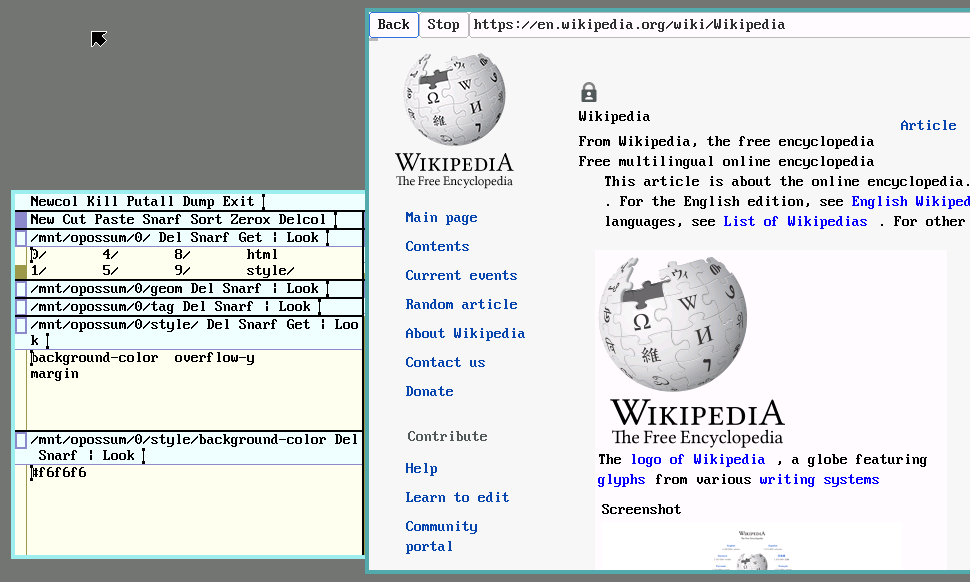
Still experimental and a lot of features are missing.
Supported features:
- rudimentary HTML5 and CSS support, large parts like float/flex layout are just stub implementations
- Server-side rendered websites
- Images (pre-loaded all at once though)
- TLS
- experimental JS/DOM can be activated (very basic jQuery examples work)
- file downloads
Install
Plan 9
# Setup TLS
hget https://curl.haxx.se/ca/cacert.pem > /sys/lib/tls/ca.pem
# Create mountpoints (needed on 9legacy)
mkdir /mnt/mycel
mkdir /mnt/sparkle
Binary
Binaries for amd64 and 386 can be downloaded from https://psilva.sdf.org/mycel.html
Compile from Source
Set $GOPROXY to https://proxy.golang.org and then:
go install ./cmd/mycel
Command line options:
-h                   help
-v                   verbose
-vv                  print debug messages
-jsinsecure          activate js
-cpuprofile filename create cpuprofile
(-v and -vv produce a lot of output, consider turning on scroll since processing waits for that...)
$font is used to select the font. Very large fonts will set dpi to 200.
macOS
Requirements:
- Go
- Plan9Port
go install ./cmd/mycel
JS support
It's more like a demo and it's not really clear right now how much sandboxing is really needed. A rudimentary AJAX implementation is there though.
Use on your own Risk!
JS implementation forked from goja (and thus otto). Since the implementation is very limited anyway, DOM changes are only computed initially and during click events. A handful of jQuery UI widgets work though, e.g. jQuery UI Tab view https://jqueryui.com/resources/demos/tabs/default.html. There is also highly experimental ES6 support with Babel. (https://github.com/psilva261/6to5)
Install the js engine:
cd ..
git/clone https://github.com/psilva261/sparklefs
cd sparklefs
go install ./cmd/sparklefs
On 9legacy also the folders /mnt/mycel and /mnt/sparkle need to exist.
Then it can be tested with:
mycel -jsinsecure https://jqueryui.com/resources/demos/tabs/default.html
TODO
- load images on the fly
- implement more parts of HTML5 and CSS
- create a widget for div/span
- clean up code, support webfs, snarf
Contributors

278 commits
Similar repos


Languages
Go
100.0%
README
Mycel Web Browser
Basic portable Web browser; only needs a Go compiler to compile. Optimized for use on 9front and 9legacy, supports plan9port and 9pi as well.
The UI is built with https://github.com/mjl-/duit
Still experimental and a lot of features are missing.
Supported features:
- rudimentary HTML5 and CSS support, large parts like float/flex layout are just stub implementations
- Server-side rendered websites
- Images (pre-loaded all at once though)
- TLS
- experimental JS/DOM can be activated (very basic jQuery examples work)
- file downloads
Install
Plan 9
# Setup TLS
hget https://curl.haxx.se/ca/cacert.pem > /sys/lib/tls/ca.pem
# Create mountpoints (needed on 9legacy)
mkdir /mnt/mycel
mkdir /mnt/sparkle
Binary
Binaries for amd64 and 386 can be downloaded from https://psilva.sdf.org/mycel.html
Compile from Source
Set $GOPROXY to https://proxy.golang.org and then:
go install ./cmd/mycel
Command line options:
-h                   help
-v                   verbose
-vv                  print debug messages
-jsinsecure          activate js
-cpuprofile filename create cpuprofile
(-v and -vv produce a lot of output, consider turning on scroll since processing waits for that...)
$font is used to select the font. Very large fonts will set dpi to 200.
macOS
Requirements:
- Go
- Plan9Port
go install ./cmd/mycel
JS support
It's more like a demo and it's not really clear right now how much sandboxing is really needed. A rudimentary AJAX implementation is there though.
Use on your own Risk!
JS implementation forked from goja (and thus otto). Since the implementation is very limited anyway, DOM changes are only computed initially and during click events. A handful of jQuery UI widgets work though, e.g. jQuery UI Tab view https://jqueryui.com/resources/demos/tabs/default.html. There is also highly experimental ES6 support with Babel. (https://github.com/psilva261/6to5)
Install the js engine:
cd ..
git/clone https://github.com/psilva261/sparklefs
cd sparklefs
go install ./cmd/sparklefs
On 9legacy also the folders /mnt/mycel and /mnt/sparkle need to exist.
Then it can be tested with:
mycel -jsinsecure https://jqueryui.com/resources/demos/tabs/default.html
TODO
- load images on the fly
- implement more parts of HTML5 and CSS
- create a widget for div/span
- clean up code, support webfs, snarf
Similar repos
Contributors
278 commits
Languages
Go
100.0%