
Build and regression-test conversational state machines powered by Jev. Inspect decisions, capture failing conversations as tests, and export runnable TypeScript for your app.
See the codeSee what people are saying
README
Jev State
Build and regression-test conversational decisions powered by Jev. Leave with runnable code.


Try the studio · Five-minute walkthrough · Runtime & API · Self-host · Contribute
Jev State helps developers answer: “Does my agent change state when it should, and did my latest change break another conversation?” Define the allowed behavior, reproduce a conversation, fix the wrong decision, and protect it with regression tests. Download the workflow as a runnable TypeScript project for your own app.
MIT licensed. No account, subscription, project paywall, or database required. Your workspace is saved in your browser. Live model usage is billed separately by your model providers.
Why Jev State?
An AI conversation needs more than a prompt: it needs explicit states, allowed transitions, a policy for uncertainty, and evidence that it behaves as intended.
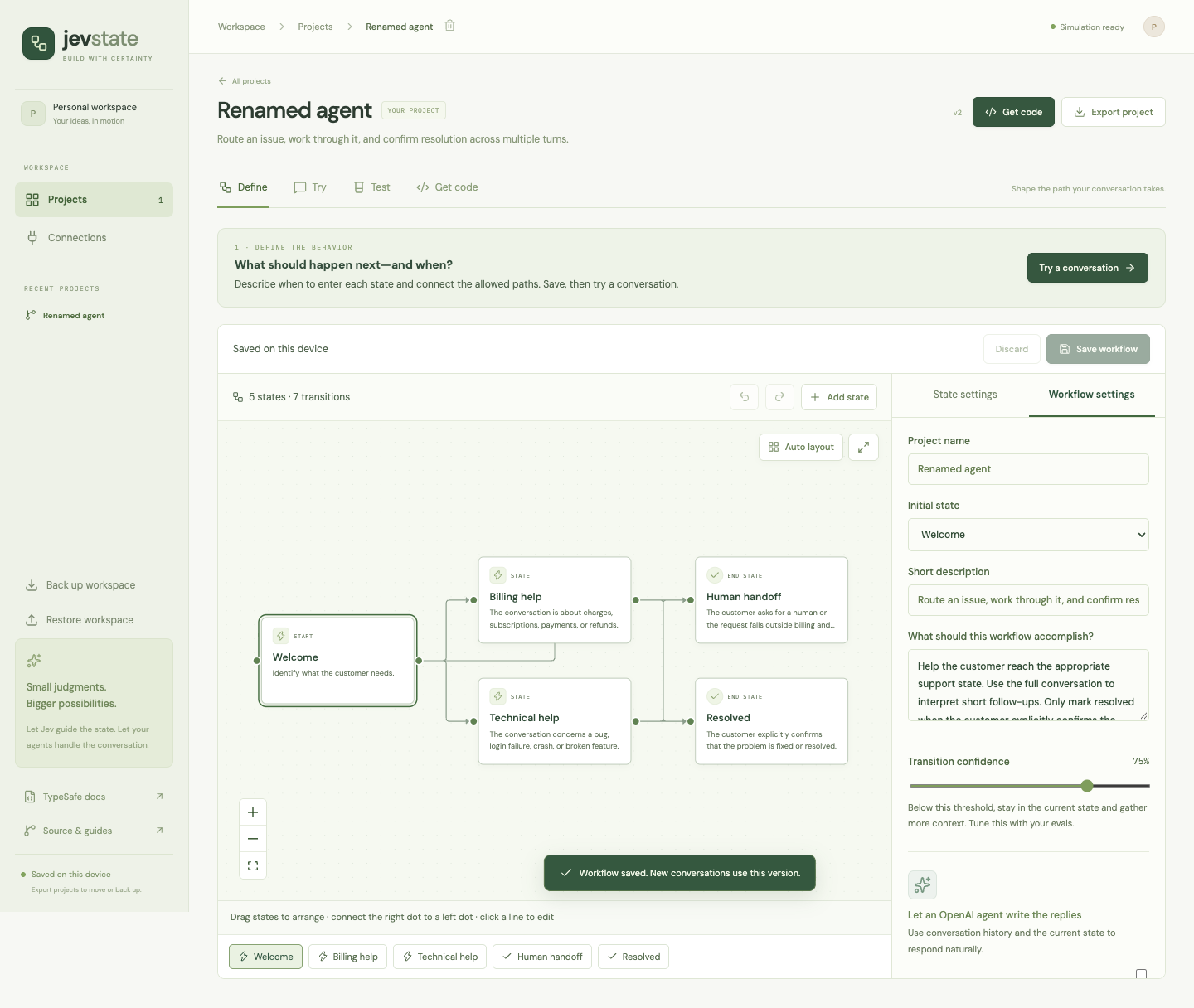
- Build visually. Drag states, connect handles, inspect edges, auto-layout, expand the canvas, and undo changes. A state list provides another way to navigate the graph.
- Keep control in code. Jev proposes a typed next-state choice. Validation, your confidence threshold, and the declared XState transitions determine whether it moves.
- Test real conversations. Each turn includes the conversation history. Use state-specific replies or optionally generate replies through OpenAI's Responses API.
- Understand decisions. Inspect the actual input, question, probabilities, threshold decision, resolved model, latency, and token usage.
- Evaluate repeatably. Run multi-turn cases with expected final states and reply assertions in the studio or from the command line. Inspect failures and path coverage.
- Take runnable code into your app. Download your workflow, shared execution engine, regression runner, and a copyable TypeScript example. No Jev State deployment is needed at runtime.
- Keep your work portable. Export individual projects or back up and restore an entire workspace, including conversations and reports.
This project uses XState; it is an opinionated studio for Jev workflows, not an implementation of all XState features. Current workflows are flat state machines. Nested states, parallel regions, arbitrary executable guards, and XState machine import are not supported.
Quickstart
Requires Node.js 22 and npm. No provider account is needed for simulation.
git clone https://github.com/priyankark/jev-state.git
cd jev-state
npm ci
cp .env.example .env.local
npm run dev
Open localhost:5173.
- Choose Use this example on the support workflow and create your editable copy.
- In Define, select a state to edit its entry criteria, reply, keywords, and outgoing transitions.
- Open Try, leave Simulation selected, and send
I was charged twice. - Send
It is fixed nowto reach the end state. - Choose Save as regression test and confirm the outcome you expected. This works for successful and failing conversations.
- In Test, run the cases and inspect failures. Review state criteria takes you straight to the relevant state.
- Open Get code to download a runnable project and copy its server integration example.
The home-screen workflows are examples, not pre-existing projects. Copying a template creates your own project. You can also start with a blank workflow or import one of the example JSON files.
From a tested conversation to your app
The product follows Define → Try → Test → Get code. Each step explains its purpose and offers the next action. Start by describing what the agent should do, then edit states and their entry criteria. A conversation can become a regression test without retyping it; choose the outcome you wanted, including when the run went wrong.
Get code → Download runnable project gives you a ZIP containing:
workflow.json: your states, allowed transitions, confidence threshold, agent settings, and regression cases..github/workflows/check.yml: runs typechecking and simulation regressions on GitHub pushes and pull requests, with no provider secrets.workflow.tsandlib/: a server-side integration API and the same execution engine used in the studio.example.ts: a copyable multi-turn integration example.evaluate.ts: a regression runner with meaningful exit codes for CI.package.json, TypeScript configuration,.env.example, README, and license.validation.json: separate simulation and live validation status, including stale or incomplete runs.
Unzip and run these commands inside the downloaded folder, using Node.js 22+:
npm install
npm run typecheck
npm test
npm start
These commands use simulation and need no keys. For real model behavior, set server credentials in .env and deliberately run npm run test:live. A simulation pass never marks live behavior as validated. Changed criteria or cases invalidate earlier evidence; passing live tests describe your dataset rather than guarantee correctness.
For integration, keep workflow.ts, workflow.json, and lib/ in your server project, install the dependencies from the generated package.json, and copy the example:
import { startConversation, sendMessage } from "./workflow.js";

let session = startConversation({ mode: "live" }); // uses your server's keys
const result = await sendMessage(session, "I was charged twice");
session = result.session;
// result.decision.to / reply / confidence / probabilities
// Persist session per user and pass it to the next sendMessage call.
The generated code calls TypeSafe/OpenAI directly from your server. It does not depend on this repo checkout, unpublished packages, or the hosted studio. You own authentication, per-user persistence, request serialization, and authorization for business actions. Credentials and saved conversation history are excluded; regression-test messages are included. See the handoff guide.
Simulation and live models
| Mode | Routing | Replies | Provider requests |
|---|---|---|---|
| Simulation | First matching destination keyword in transition order; otherwise stay | State reply text | None |
| Live Jev | TypeSafe Choice over allowed destinations plus stay | State reply text | TypeSafe |
| Live Jev + generated replies | Same Jev routing | OpenAI Responses using the history and resulting state | TypeSafe and OpenAI |
Simulation is deterministic and useful for testing the wiring. Its confidence values are fixtures, not estimates of model accuracy. Simulation requests still go to the installation's server; on the public demo, that is the hosted server. The public studio starts in simulation and also supports your own provider keys.
On the hosted studio, open Connections → Connect Jev, paste your TypeSafe API key, and accept the provider-usage notice. Verification checks account access without generating a reply. Then explicitly choose Live Jev in Try or Test. Add an OpenAI key in Connections only if you want generated replies.
Personal keys stay in this tab’s memory. Reloading, closing the tab, or choosing Disconnect and forget keys clears them. They are never saved in localStorage, sessionStorage, cookies, exports, or a server database. Checks and live requests send keys through the same-origin server to the relevant provider; trust that installation's operator or run your own copy. Keys are not sent with simulation requests. Live usage is billed to the connected provider account. No Upstash, hosted key store, or subscription is needed.
For local development or CLI live decisions, put your key in the ignored .env.local file:
TYPESAFE_API_KEY=your-typesafe-key
TYPESAFE_DEFAULT_MODEL=jev-latest
Restart the server, open Connections, and test Jev. Then choose Live Jev in a conversation or evaluation. To verify from the terminal:
npm run check:env  # authenticate and list available models
npm run smoke:jev  # one small inference request; consumes provider usage
Optional generated replies need OPENAI_API_KEY in the same server environment. In Define → Workflow settings, enable generated replies and choose the model and instructions. The model must be available to your OpenAI account. The connector calls the Responses API with store: false; it does not run tools, remote Agents SDK services, or MCP connectors.
Provider credentials never belong in VITE_* variables, project JSON, workflow instructions, screenshots, or browser storage. On Vercel, operator-supplied server keys require STUDIO_ACCESS_TOKEN. Personal keys can be enabled separately with STUDIO_BYOK=1; STUDIO_PUBLIC_DEMO=1 disables all live calls. See deployment and configuration.
How a turn works
flowchart LR
    A[Conversation + current state] --> B[Jev Choice]
    B --> V{Valid answer?}
    V -->|No| H[Fail turn; preserve conversation]
    V -->|Yes| C{Sufficient confidence?}
    C -->|Yes| D[Allowed XState transition]
    C -->|No confidence / stay| E[Remain in current state]
    D --> F[State reply or OpenAI reply]
    E --> F
    F --> G[Saved turn and inspection]
Each outgoing destination contributes its label and description as a Choice criterion. Jev sees the full conversation and workflow instructions. A stay option handles ambiguity and missing information. The runtime validates the returned choice and distribution before applying a transition; malformed provider output fails the turn instead of advancing it.
The transition passes when confidence >= threshold. Below the threshold, the machine stays in place and replies from the current state. Confidence describes how concentrated a Choice distribution is; it is not proof that the workflow decision is correct. Tune thresholds against representative examples. See TypeSafe's Choice and confidence documentation.
An end state finishes the conversation after its reply. The studio never issues refunds, sends messages to third parties, or executes external actions because a state was selected.
Evaluations in the studio and CI
A case contains one to five user messages, an expected final state, optional expected states after intermediate turns, and an optional case-insensitive substring that must appear in the final reply. The runtime inserts each assistant response into the history before the next user message. Each case starts from the initial state with fresh history.
Each message has its own editor, so multiline text stays within one user turn. Enable Check intermediate states to catch a wrong route even when the final state is correct. In JSON, expectedPath: ["billing", "resolved"] checks both turns; null skips a particular turn. If provided, the path must have one entry per user message and its final entry, when non-null must agree with expectedState.
The studio shows pass rate, latency, usage, readable user/assistant traces, decision criteria, and the states/transitions exercised. Reruns compare unchanged cases with the preceding run in the same mode and highlight regressions and fixes. Changed expectations are labeled Test changed; service errors and incomplete results are excluded from behavior comparisons. Editing workflow behavior or cases marks old reports as stale. Moving nodes does not change the workflow version or invalidate active conversations.
Run the same evaluation engine without a browser:
# Validate a workflow and print advisory graph diagnostics.
npm run evaluate -- --project examples/workflows/example-support.json --validate

# Run deterministic cases and write a machine-readable report.
npm run evaluate -- --project examples/workflows/example-support.json --out report.json

# Opt into real Jev inference and provider usage.
npm run evaluate -- --project examples/workflows/example-support.json --mode live --out live-report.json
Use your own Export project file in place of the example. Exit codes are 0 for all cases passing, 1 for failed expectations, and 2 for invalid input, an empty suite, or execution errors. Diagnostics are advisory, not validation failures. Use npm run --silent evaluate -- ... if you need JSON-only stdout. Reports include transcripts: keep private reports out of public commits.
CI can run a simulation suite with no secrets:
- run: npm ci
- run: npm run evaluate -- --project examples/workflows/example-support.json --out report.json
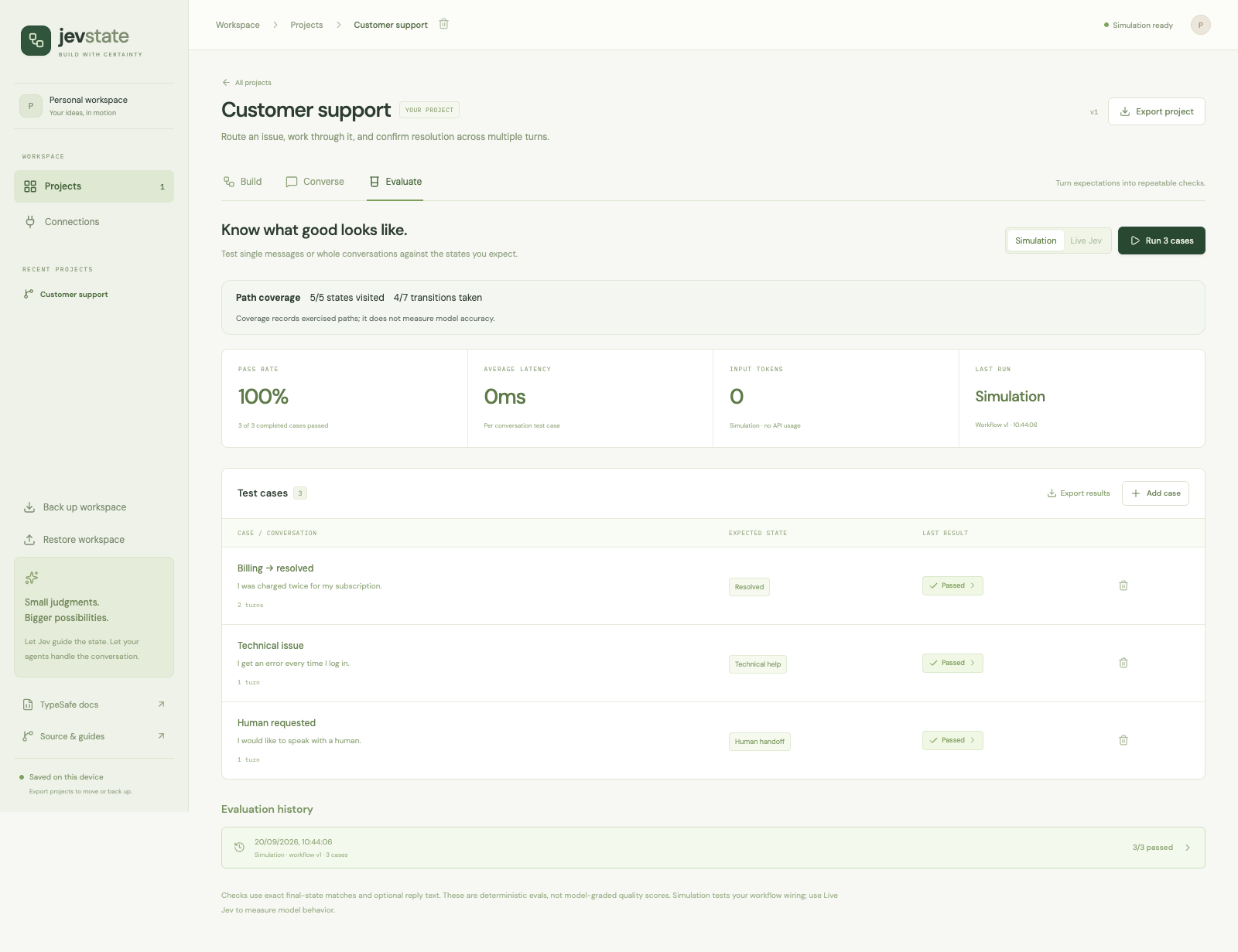
Path coverage is not accuracy. A passing small example suite does not establish performance on your domain. Add ambiguous, adversarial, no-match, recovery, and multi-turn cases. A case that reaches an end state before consuming all its messages fails its expectations (exit 1), with the completed trace retained and the missing turns explained.
Using the runtime from TypeScript
The repository contains two related surfaces:
| Surface | Purpose | Example |
|---|---|---|
Studio project schema + executeTurn | Editable, multi-turn conversation workflows | JSON examples, API guide |
defineDecision + defineMachine | Typed, code-authored single-decision actors with Choice, Noul, and Score | Support routing |
npm run example
# idle → evaluating → billing, followed by the policy result
The code-first example batches multiple judgments in one Jev request and applies an ordinary TypeScript policy. Its XState actor supports cancellation and ignores stale provider results. See the runtime guide for server-side Jev wiring.
@jev-state/core and @jev-state/typesafe are currently private npm workspaces in this repository, not published npm packages. Clone the repository to use these examples; do not expect npm install @jev-state/core to work.
Storage, editing, and limits
- Projects, conversations, and reports are stored in browser
localStorage, scoped to the site's origin. There is no account sync or server database. - Workflow edits require Save workflow; switching to Try, Test, or Get code saves valid edits. Undo/redo applies to the current editing session.
⌘/Ctrl+Ssaves;⌘/Ctrl+Zand⌘/Ctrl+Shift+Zundo/redo outside text inputs. - Back up workspace exports saved projects, conversations, and reports. Restore workspace validates the file and replaces this device's workspace after confirmation. A project import instead creates a new copy without history.
- Corrupt stored data is preserved for recovery. Storage failures are visible. Changes from another tab pause saving until you back up/reload, avoiding silent overwrites.
- The studio retains the latest 60 conversations and 40 evaluation reports across the workspace. Export important runs before they age out. There is no automatic remote backup.
- Current bounds: 2–12 states, 20 conversation turns, 30 cases per project, 1–5 turns per case, 500 KB project imports, and 10 MB workspace imports. Browser storage capacity may be lower than the import limit.
- Server requests have a 192 KB JSON limit and a 50-second execution deadline. Large histories can hit the request limit before the turn limit. Evaluation cases run sequentially; stopping preserves completed cases.
Development and testing
npm run build                         # strict TypeScript checks + production build
npm test                              # runtime, schema, API, connector and CLI tests
npx playwright install chrome         # first-time browser setup
npm run test:e2e                       # real Chrome interactions, desktop and mobile viewport
The default tests do not call paid model services. Connector tests exercise SDK requests against controlled HTTP responses. Browser tests drag nodes and connect handles, save/reload, undo, inspect conversations, run evaluations, restore backups, and test storage failures, keyboard focus, personal-key isolation, reload/disconnect, and credential-free exports.
The live checks are explicit opt-ins. An actual Jev run and a mocked OpenAI contract test cover different things; the latter does not verify account access or model response quality. See validation notes.
apps/studio/                 React application and React Flow canvas
packages/core/src/           Schemas, graph diagnostics, backup validation, typed actors
packages/typesafe/src/       Server-only TypeSafe adapter
server/                     Express API, turn/evaluation engine, provider connections
api/index.ts                Vercel serverless entrypoint
examples/                   Importable projects and runnable TypeScript example
scripts/evaluate.ts          Evaluation/validation CLI
tests/                      Unit/API tests and Playwright browser coverage
docs/                       Tutorials, architecture, deployment, validation notes
The original single-decision inspector remains at /legacy on the local server. It demonstrates typed judgments, SSE traces, replay, and cancellation; its process-local trace API is not deployed to Vercel.
Roadmap and contributing
Useful next steps include per-edge criteria, richer assertions and dataset comparison, IndexedDB storage, a published runtime package, nested statecharts, and explicit tool/agent adapters. These are future work, not current capabilities. See the roadmap, contribution guide, and security policy.
Built with TypeSafe, XState, React Flow, React, TypeScript, and Zod. This is an independent community project, not an official TypeSafe or Stately product.
License
MIT. Use, modify, and self-host it. External model services have their own pricing and terms.
Contributors

8 commits
Similar repos


Languages
TypeScript
79.2%
CSS
20.6%
Build and regression-test conversational state machines powered by Jev. Inspect decisions, capture failing conversations as tests, and export runnable TypeScript for your app.
See the codeSee what people are saying
README
Jev State
Build and regression-test conversational decisions powered by Jev. Leave with runnable code.
Try the studio · Five-minute walkthrough · Runtime & API · Self-host · Contribute
Jev State helps developers answer: “Does my agent change state when it should, and did my latest change break another conversation?” Define the allowed behavior, reproduce a conversation, fix the wrong decision, and protect it with regression tests. Download the workflow as a runnable TypeScript project for your own app.
MIT licensed. No account, subscription, project paywall, or database required. Your workspace is saved in your browser. Live model usage is billed separately by your model providers.
Why Jev State?
An AI conversation needs more than a prompt: it needs explicit states, allowed transitions, a policy for uncertainty, and evidence that it behaves as intended.
- Build visually. Drag states, connect handles, inspect edges, auto-layout, expand the canvas, and undo changes. A state list provides another way to navigate the graph.
- Keep control in code. Jev proposes a typed next-state choice. Validation, your confidence threshold, and the declared XState transitions determine whether it moves.
- Test real conversations. Each turn includes the conversation history. Use state-specific replies or optionally generate replies through OpenAI's Responses API.
- Understand decisions. Inspect the actual input, question, probabilities, threshold decision, resolved model, latency, and token usage.
- Evaluate repeatably. Run multi-turn cases with expected final states and reply assertions in the studio or from the command line. Inspect failures and path coverage.
- Take runnable code into your app. Download your workflow, shared execution engine, regression runner, and a copyable TypeScript example. No Jev State deployment is needed at runtime.
- Keep your work portable. Export individual projects or back up and restore an entire workspace, including conversations and reports.
This project uses XState; it is an opinionated studio for Jev workflows, not an implementation of all XState features. Current workflows are flat state machines. Nested states, parallel regions, arbitrary executable guards, and XState machine import are not supported.
Quickstart
Requires Node.js 22 and npm. No provider account is needed for simulation.
git clone https://github.com/priyankark/jev-state.git
cd jev-state
npm ci
cp .env.example .env.local
npm run dev
Open localhost:5173.
- Choose Use this example on the support workflow and create your editable copy.
- In Define, select a state to edit its entry criteria, reply, keywords, and outgoing transitions.
- Open Try, leave Simulation selected, and send
I was charged twice. - Send
It is fixed nowto reach the end state. - Choose Save as regression test and confirm the outcome you expected. This works for successful and failing conversations.
- In Test, run the cases and inspect failures. Review state criteria takes you straight to the relevant state.
- Open Get code to download a runnable project and copy its server integration example.
The home-screen workflows are examples, not pre-existing projects. Copying a template creates your own project. You can also start with a blank workflow or import one of the example JSON files.
From a tested conversation to your app
The product follows Define → Try → Test → Get code. Each step explains its purpose and offers the next action. Start by describing what the agent should do, then edit states and their entry criteria. A conversation can become a regression test without retyping it; choose the outcome you wanted, including when the run went wrong.
Get code → Download runnable project gives you a ZIP containing:
workflow.json: your states, allowed transitions, confidence threshold, agent settings, and regression cases..github/workflows/check.yml: runs typechecking and simulation regressions on GitHub pushes and pull requests, with no provider secrets.workflow.tsandlib/: a server-side integration API and the same execution engine used in the studio.example.ts: a copyable multi-turn integration example.evaluate.ts: a regression runner with meaningful exit codes for CI.package.json, TypeScript configuration,.env.example, README, and license.validation.json: separate simulation and live validation status, including stale or incomplete runs.
Unzip and run these commands inside the downloaded folder, using Node.js 22+:
npm install
npm run typecheck
npm test
npm start
These commands use simulation and need no keys. For real model behavior, set server credentials in .env and deliberately run npm run test:live. A simulation pass never marks live behavior as validated. Changed criteria or cases invalidate earlier evidence; passing live tests describe your dataset rather than guarantee correctness.
For integration, keep workflow.ts, workflow.json, and lib/ in your server project, install the dependencies from the generated package.json, and copy the example:
import { startConversation, sendMessage } from "./workflow.js";

let session = startConversation({ mode: "live" }); // uses your server's keys
const result = await sendMessage(session, "I was charged twice");
session = result.session;
// result.decision.to / reply / confidence / probabilities
// Persist session per user and pass it to the next sendMessage call.
The generated code calls TypeSafe/OpenAI directly from your server. It does not depend on this repo checkout, unpublished packages, or the hosted studio. You own authentication, per-user persistence, request serialization, and authorization for business actions. Credentials and saved conversation history are excluded; regression-test messages are included. See the handoff guide.
Simulation and live models
| Mode | Routing | Replies | Provider requests |
|---|---|---|---|
| Simulation | First matching destination keyword in transition order; otherwise stay | State reply text | None |
| Live Jev | TypeSafe Choice over allowed destinations plus stay | State reply text | TypeSafe |
| Live Jev + generated replies | Same Jev routing | OpenAI Responses using the history and resulting state | TypeSafe and OpenAI |
Simulation is deterministic and useful for testing the wiring. Its confidence values are fixtures, not estimates of model accuracy. Simulation requests still go to the installation's server; on the public demo, that is the hosted server. The public studio starts in simulation and also supports your own provider keys.
On the hosted studio, open Connections → Connect Jev, paste your TypeSafe API key, and accept the provider-usage notice. Verification checks account access without generating a reply. Then explicitly choose Live Jev in Try or Test. Add an OpenAI key in Connections only if you want generated replies.
Personal keys stay in this tab’s memory. Reloading, closing the tab, or choosing Disconnect and forget keys clears them. They are never saved in localStorage, sessionStorage, cookies, exports, or a server database. Checks and live requests send keys through the same-origin server to the relevant provider; trust that installation's operator or run your own copy. Keys are not sent with simulation requests. Live usage is billed to the connected provider account. No Upstash, hosted key store, or subscription is needed.
For local development or CLI live decisions, put your key in the ignored .env.local file:
TYPESAFE_API_KEY=your-typesafe-key
TYPESAFE_DEFAULT_MODEL=jev-latest
Restart the server, open Connections, and test Jev. Then choose Live Jev in a conversation or evaluation. To verify from the terminal:
npm run check:env  # authenticate and list available models
npm run smoke:jev  # one small inference request; consumes provider usage
Optional generated replies need OPENAI_API_KEY in the same server environment. In Define → Workflow settings, enable generated replies and choose the model and instructions. The model must be available to your OpenAI account. The connector calls the Responses API with store: false; it does not run tools, remote Agents SDK services, or MCP connectors.
Provider credentials never belong in VITE_* variables, project JSON, workflow instructions, screenshots, or browser storage. On Vercel, operator-supplied server keys require STUDIO_ACCESS_TOKEN. Personal keys can be enabled separately with STUDIO_BYOK=1; STUDIO_PUBLIC_DEMO=1 disables all live calls. See deployment and configuration.
How a turn works
flowchart LR
    A[Conversation + current state] --> B[Jev Choice]
    B --> V{Valid answer?}
    V -->|No| H[Fail turn; preserve conversation]
    V -->|Yes| C{Sufficient confidence?}
    C -->|Yes| D[Allowed XState transition]
    C -->|No confidence / stay| E[Remain in current state]
    D --> F[State reply or OpenAI reply]
    E --> F
    F --> G[Saved turn and inspection]
Each outgoing destination contributes its label and description as a Choice criterion. Jev sees the full conversation and workflow instructions. A stay option handles ambiguity and missing information. The runtime validates the returned choice and distribution before applying a transition; malformed provider output fails the turn instead of advancing it.
The transition passes when confidence >= threshold. Below the threshold, the machine stays in place and replies from the current state. Confidence describes how concentrated a Choice distribution is; it is not proof that the workflow decision is correct. Tune thresholds against representative examples. See TypeSafe's Choice and confidence documentation.
An end state finishes the conversation after its reply. The studio never issues refunds, sends messages to third parties, or executes external actions because a state was selected.
Evaluations in the studio and CI
A case contains one to five user messages, an expected final state, optional expected states after intermediate turns, and an optional case-insensitive substring that must appear in the final reply. The runtime inserts each assistant response into the history before the next user message. Each case starts from the initial state with fresh history.
Each message has its own editor, so multiline text stays within one user turn. Enable Check intermediate states to catch a wrong route even when the final state is correct. In JSON, expectedPath: ["billing", "resolved"] checks both turns; null skips a particular turn. If provided, the path must have one entry per user message and its final entry, when non-null must agree with expectedState.
The studio shows pass rate, latency, usage, readable user/assistant traces, decision criteria, and the states/transitions exercised. Reruns compare unchanged cases with the preceding run in the same mode and highlight regressions and fixes. Changed expectations are labeled Test changed; service errors and incomplete results are excluded from behavior comparisons. Editing workflow behavior or cases marks old reports as stale. Moving nodes does not change the workflow version or invalidate active conversations.
Run the same evaluation engine without a browser:
# Validate a workflow and print advisory graph diagnostics.
npm run evaluate -- --project examples/workflows/example-support.json --validate

# Run deterministic cases and write a machine-readable report.
npm run evaluate -- --project examples/workflows/example-support.json --out report.json

# Opt into real Jev inference and provider usage.
npm run evaluate -- --project examples/workflows/example-support.json --mode live --out live-report.json
Use your own Export project file in place of the example. Exit codes are 0 for all cases passing, 1 for failed expectations, and 2 for invalid input, an empty suite, or execution errors. Diagnostics are advisory, not validation failures. Use npm run --silent evaluate -- ... if you need JSON-only stdout. Reports include transcripts: keep private reports out of public commits.
CI can run a simulation suite with no secrets:
- run: npm ci
- run: npm run evaluate -- --project examples/workflows/example-support.json --out report.json
Path coverage is not accuracy. A passing small example suite does not establish performance on your domain. Add ambiguous, adversarial, no-match, recovery, and multi-turn cases. A case that reaches an end state before consuming all its messages fails its expectations (exit 1), with the completed trace retained and the missing turns explained.
Using the runtime from TypeScript
The repository contains two related surfaces:
| Surface | Purpose | Example |
|---|---|---|
Studio project schema + executeTurn | Editable, multi-turn conversation workflows | JSON examples, API guide |
defineDecision + defineMachine | Typed, code-authored single-decision actors with Choice, Noul, and Score | Support routing |
npm run example
# idle → evaluating → billing, followed by the policy result
The code-first example batches multiple judgments in one Jev request and applies an ordinary TypeScript policy. Its XState actor supports cancellation and ignores stale provider results. See the runtime guide for server-side Jev wiring.
@jev-state/core and @jev-state/typesafe are currently private npm workspaces in this repository, not published npm packages. Clone the repository to use these examples; do not expect npm install @jev-state/core to work.
Storage, editing, and limits
- Projects, conversations, and reports are stored in browser
localStorage, scoped to the site's origin. There is no account sync or server database. - Workflow edits require Save workflow; switching to Try, Test, or Get code saves valid edits. Undo/redo applies to the current editing session.
⌘/Ctrl+Ssaves;⌘/Ctrl+Zand⌘/Ctrl+Shift+Zundo/redo outside text inputs. - Back up workspace exports saved projects, conversations, and reports. Restore workspace validates the file and replaces this device's workspace after confirmation. A project import instead creates a new copy without history.
- Corrupt stored data is preserved for recovery. Storage failures are visible. Changes from another tab pause saving until you back up/reload, avoiding silent overwrites.
- The studio retains the latest 60 conversations and 40 evaluation reports across the workspace. Export important runs before they age out. There is no automatic remote backup.
- Current bounds: 2–12 states, 20 conversation turns, 30 cases per project, 1–5 turns per case, 500 KB project imports, and 10 MB workspace imports. Browser storage capacity may be lower than the import limit.
- Server requests have a 192 KB JSON limit and a 50-second execution deadline. Large histories can hit the request limit before the turn limit. Evaluation cases run sequentially; stopping preserves completed cases.
Development and testing
npm run build                         # strict TypeScript checks + production build
npm test                              # runtime, schema, API, connector and CLI tests
npx playwright install chrome         # first-time browser setup
npm run test:e2e                       # real Chrome interactions, desktop and mobile viewport
The default tests do not call paid model services. Connector tests exercise SDK requests against controlled HTTP responses. Browser tests drag nodes and connect handles, save/reload, undo, inspect conversations, run evaluations, restore backups, and test storage failures, keyboard focus, personal-key isolation, reload/disconnect, and credential-free exports.
The live checks are explicit opt-ins. An actual Jev run and a mocked OpenAI contract test cover different things; the latter does not verify account access or model response quality. See validation notes.
apps/studio/                 React application and React Flow canvas
packages/core/src/           Schemas, graph diagnostics, backup validation, typed actors
packages/typesafe/src/       Server-only TypeSafe adapter
server/                     Express API, turn/evaluation engine, provider connections
api/index.ts                Vercel serverless entrypoint
examples/                   Importable projects and runnable TypeScript example
scripts/evaluate.ts          Evaluation/validation CLI
tests/                      Unit/API tests and Playwright browser coverage
docs/                       Tutorials, architecture, deployment, validation notes
The original single-decision inspector remains at /legacy on the local server. It demonstrates typed judgments, SSE traces, replay, and cancellation; its process-local trace API is not deployed to Vercel.
Roadmap and contributing
Useful next steps include per-edge criteria, richer assertions and dataset comparison, IndexedDB storage, a published runtime package, nested statecharts, and explicit tool/agent adapters. These are future work, not current capabilities. See the roadmap, contribution guide, and security policy.
Built with TypeSafe, XState, React Flow, React, TypeScript, and Zod. This is an independent community project, not an official TypeSafe or Stately product.
License
MIT. Use, modify, and self-host it. External model services have their own pricing and terms.
Similar repos
Contributors
8 commits
Languages
TypeScript
79.2%
CSS
20.6%