Are you publishing a TypeScript project where consumers encounter type-checking errors like:
Cannot find module 'some-package' or its corresponding type declarations.
When you compile with tsc, the emitted declaration files (.d.ts files) preserve imports exactly as written. So if your published types import from a devDependency or a private package (e.g. an internal monorepo package), those imports cannot be resolved by the consumer.
// dist/index.d.ts (generated by tsc)
import type { SomeType } from 'my-private-dependency' // ❌ consumers can't resolve this

export declare function myUtility(): SomeType
If you can't move the dependency to dependencies, or you just want its types pulled directly into your published declarations, dtsroll is for you.
dtsroll is a TypeScript declaration (.d.ts) file bundler. It's zero-config and reads your package.json to determine how your types should be bundled.
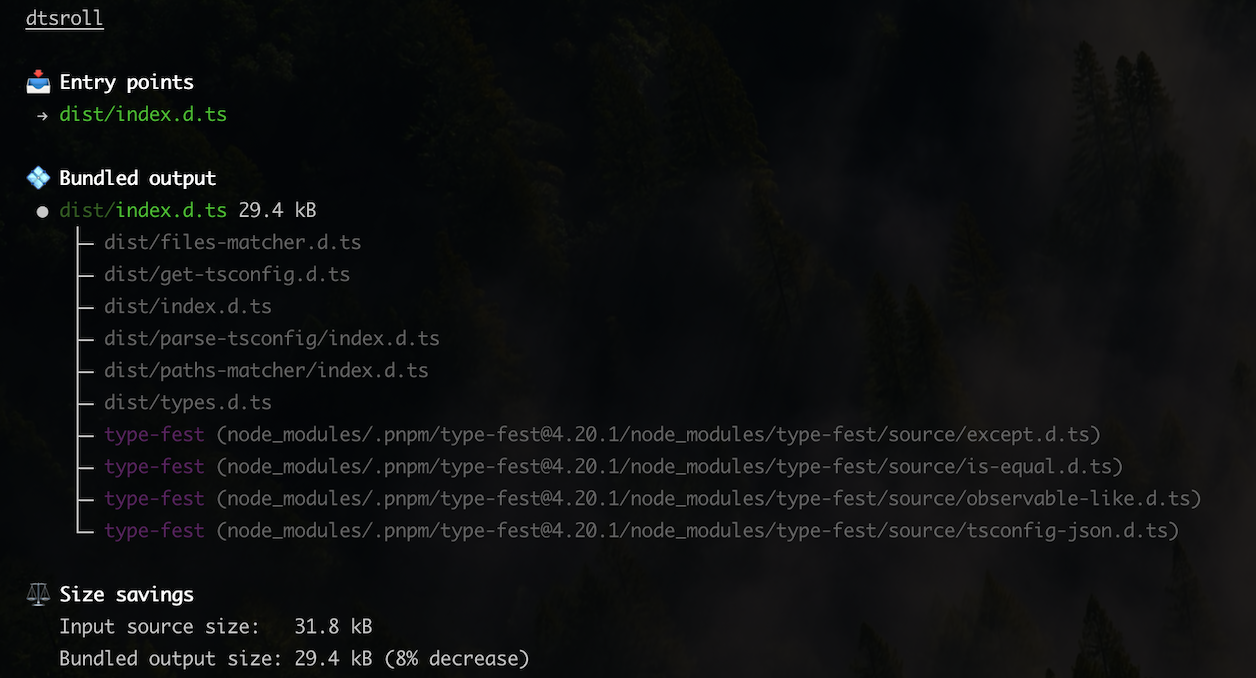
dtsroll runs after your build when .d.ts files have been emitted, and works in-place to bundle them to their entry points.
Since packages declared in devDependencies are not installed for the consumer, dtsroll assumes any imports referencing them should be bundled, as they would otherwise be unresolvable.
The result is a single, clean .d.ts output that works for consumers without extra installs.
// dist/index.d.ts (after dtsroll)
type SomeType = {
    value: string
}

export declare function myUtility(): SomeType
package.json.devDependencies so consumers don't need them installed.dist folder after compilation.
npm install --save-dev dtsroll
package.jsonPoint your types or exports to the final .d.ts file you want to publish.
{
	"name": "my-package",
	"exports": {
		"types": "./dist/index.d.ts", // dtsroll targets this
		"default": "./dist/index.js",
	},
	"scripts": {
		"build": "tsc && dtsroll",
	},
}
npm run build
That's it.
[!WARNING] dtsroll modifies files in-place—bundled source files are removed and entry files are overwritten with bundled output. Use
--dry-runfirst to see what it would change:dtsroll --dry-run
By default, dtsroll reads your package.json to determine which imports should be bundled and which should remain external. The recommended setup is to run dtsroll without any configuration and let it infer the correct behavior based on your dependency declarations.
| Dependency type | Action | Reason |
|---|---|---|
devDependencies | Bundle | Consumers don't install these |
dependencies | Externalize | Consumers already have them |
optionalDependencies | Externalize | Consumers already have them |
peerDependencies | Externalize | Provided by the consumer |
If you have a @types/* package in devDependencies but the corresponding runtime package in dependencies, dtsroll will recommend moving the types package to dependencies, as this can otherwise result in missing types for consumers.
If your project doesn't have a package.json file, you can still manually specify the input files (which entry files to collapse the imports into), and which packages to externalize.
[!WARNING] Currently, dtsroll mistakenly resolves and bundles subpath imports. Subpath imports are intended to be dynamic aliases controlled by the consumer. In a future breaking release, dtsroll will likely externalize them to preserve this behavior.
dtsroll can be used in several ways.
dtsroll [flags] [...entry .d.ts files]
If no entry files are provided, dtsroll reads package.json to determine them.
| Flag | Alias | Description |
|---|---|---|
--dry-run | -d | Show what would be bundled without writing files |
--sourcemap | -s | Generate source maps (.d.ts.map files) |
--conditions | -C | Resolution conditions for subpath exports (e.g. production) |
--external | -e | (Only when no package.json) Packages to externalize |
--sourcemap?Without source maps, "Go to Definition" in VS Code lands you in bundled .d.ts files—often a flattened wall of generated types that's hard to navigate.
With --sourcemap, dtsroll generates .d.ts.map files that map positions in the bundled output back to your original source files. This lets VS Code jump directly to the actual TypeScript implementation instead of the generated declarations.
This is especially useful for:
[!NOTE] For source navigation to work, the original
.tssource files must be available (either shipped with your package or present locally). If they're not, VS Code falls back to the.d.tsfile.
If you use unplugin-dts, dtsroll will automatically bundle the emitted types immediately after generation:
import { defineConfig } from 'vitest/config'
import dts from 'unplugin-dts/vite'
import { dtsroll } from 'dtsroll/vite'

export default defineConfig({
    plugins: [
        dts(),
        dtsroll()
    ]
})
import { dtsroll } from 'dtsroll'

const result = await dtsroll({
    cwd: process.cwd(),
    dryRun: false,
    sourcemap: true // generates .d.ts.map files
})

if ('error' in result) {
    console.error(result.error)
} else {
    // Warnings about non-portable shared chunk types (TS2742)
    for (const warning of result.warnings) {
        console.warn(warning)
    }
}
769 followers · starred Jan 2025
569 followers · starred Jan 2025
422 followers · starred Jan 2025
427 followers · starred Jan 2025
Are you publishing a TypeScript project where consumers encounter type-checking errors like:
Cannot find module 'some-package' or its corresponding type declarations.
When you compile with tsc, the emitted declaration files (.d.ts files) preserve imports exactly as written. So if your published types import from a devDependency or a private package (e.g. an internal monorepo package), those imports cannot be resolved by the consumer.
// dist/index.d.ts (generated by tsc)
import type { SomeType } from 'my-private-dependency' // ❌ consumers can't resolve this

export declare function myUtility(): SomeType
If you can't move the dependency to dependencies, or you just want its types pulled directly into your published declarations, dtsroll is for you.
dtsroll is a TypeScript declaration (.d.ts) file bundler. It's zero-config and reads your package.json to determine how your types should be bundled.
dtsroll runs after your build when .d.ts files have been emitted, and works in-place to bundle them to their entry points.
Since packages declared in devDependencies are not installed for the consumer, dtsroll assumes any imports referencing them should be bundled, as they would otherwise be unresolvable.
The result is a single, clean .d.ts output that works for consumers without extra installs.
// dist/index.d.ts (after dtsroll)
type SomeType = {
    value: string
}

export declare function myUtility(): SomeType
package.json.devDependencies so consumers don't need them installed.dist folder after compilation.
npm install --save-dev dtsroll
package.jsonPoint your types or exports to the final .d.ts file you want to publish.
{
	"name": "my-package",
	"exports": {
		"types": "./dist/index.d.ts", // dtsroll targets this
		"default": "./dist/index.js",
	},
	"scripts": {
		"build": "tsc && dtsroll",
	},
}
npm run build
That's it.
[!WARNING] dtsroll modifies files in-place—bundled source files are removed and entry files are overwritten with bundled output. Use
--dry-runfirst to see what it would change:dtsroll --dry-run
By default, dtsroll reads your package.json to determine which imports should be bundled and which should remain external. The recommended setup is to run dtsroll without any configuration and let it infer the correct behavior based on your dependency declarations.
| Dependency type | Action | Reason |
|---|---|---|
devDependencies | Bundle | Consumers don't install these |
dependencies | Externalize | Consumers already have them |
optionalDependencies | Externalize | Consumers already have them |
peerDependencies | Externalize | Provided by the consumer |
If you have a @types/* package in devDependencies but the corresponding runtime package in dependencies, dtsroll will recommend moving the types package to dependencies, as this can otherwise result in missing types for consumers.
If your project doesn't have a package.json file, you can still manually specify the input files (which entry files to collapse the imports into), and which packages to externalize.
[!WARNING] Currently, dtsroll mistakenly resolves and bundles subpath imports. Subpath imports are intended to be dynamic aliases controlled by the consumer. In a future breaking release, dtsroll will likely externalize them to preserve this behavior.
dtsroll can be used in several ways.
dtsroll [flags] [...entry .d.ts files]
If no entry files are provided, dtsroll reads package.json to determine them.
| Flag | Alias | Description |
|---|---|---|
--dry-run | -d | Show what would be bundled without writing files |
--sourcemap | -s | Generate source maps (.d.ts.map files) |
--conditions | -C | Resolution conditions for subpath exports (e.g. production) |
--external | -e | (Only when no package.json) Packages to externalize |
--sourcemap?Without source maps, "Go to Definition" in VS Code lands you in bundled .d.ts files—often a flattened wall of generated types that's hard to navigate.
With --sourcemap, dtsroll generates .d.ts.map files that map positions in the bundled output back to your original source files. This lets VS Code jump directly to the actual TypeScript implementation instead of the generated declarations.
This is especially useful for:
[!NOTE] For source navigation to work, the original
.tssource files must be available (either shipped with your package or present locally). If they're not, VS Code falls back to the.d.tsfile.
If you use unplugin-dts, dtsroll will automatically bundle the emitted types immediately after generation:
import { defineConfig } from 'vitest/config'
import dts from 'unplugin-dts/vite'
import { dtsroll } from 'dtsroll/vite'

export default defineConfig({
    plugins: [
        dts(),
        dtsroll()
    ]
})
import { dtsroll } from 'dtsroll'

const result = await dtsroll({
    cwd: process.cwd(),
    dryRun: false,
    sourcemap: true // generates .d.ts.map files
})

if ('error' in result) {
    console.error(result.error)
} else {
    // Warnings about non-portable shared chunk types (TS2742)
    for (const warning of result.warnings) {
        console.warn(warning)
    }
}
769 followers · starred Jan 2025
569 followers · starred Jan 2025
422 followers · starred Jan 2025
427 followers · starred Jan 2025