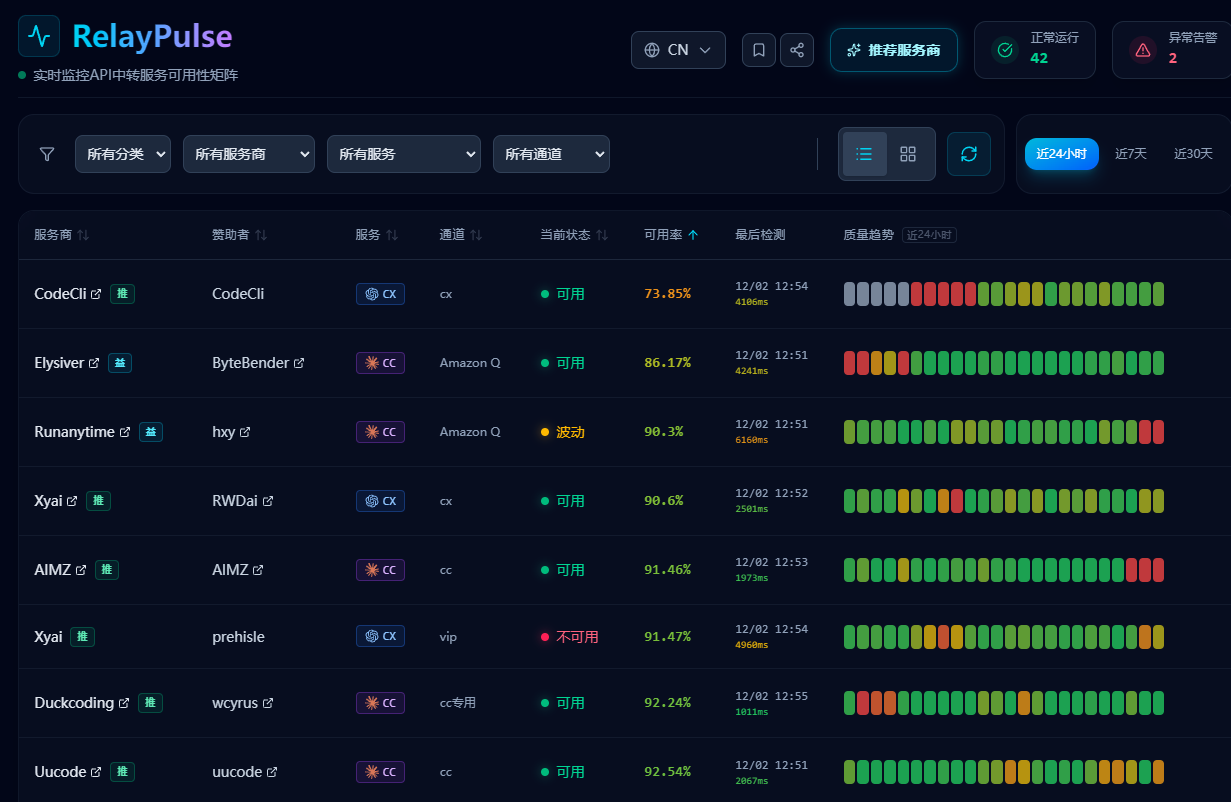
企业级 LLM 中转服务可用性监控系统,实时追踪服务状态并提供可视化仪表板。
See the code传统监测工具(如 Uptime Kuma)监测的是 HTTP 连通性——但在 LLM 中转场景下,"HTTP 200 却返回空内容或错误码" 的"假活"现象屡见不鲜。
RelayPulse 通过消耗真实 Token 定时发起 API 请求,并校验响应内容。只有 LLM 真的"吐字"了,才算可用。
max_tokens: 1,每次约 20 input + 1 output tokens;默认每分钟一次,约 3 万 tokens/天/服务# 1. 下载配置文件
curl -O https://raw.githubusercontent.com/prehisle/relay-pulse/main/docker-compose.yaml
curl -O https://raw.githubusercontent.com/prehisle/relay-pulse/main/config.yaml.example
# 2. 准备配置
mkdir -p config && cp config.yaml.example config/config.yaml
vi config/config.yaml # 填入你的 API Key
# 3. 启动服务
docker compose up -d
# 4. 访问 Web 界面
open http://localhost:8080
🎬 完整安装教程:QUICKSTART.md
# 一键 setup(构建前端 + 复制 embed 资源 + 初始化 config.yaml)
./scripts/setup-dev.sh

# 整理 Go 依赖
go mod tidy

# 启动开发服务(带热重载)
make dev

# 或直接运行
go run cmd/server/main.go
⚠️ 首次构建或前端更新后必须先跑
./scripts/setup-dev.sh,它会把frontend/dist复制到internal/api/frontend/dist(//go:embed需要的路径,不支持符号链接)。跳过会报pattern frontend/dist: no matching files found。详见 CONTRIBUTING.md。
👨💻 开发者指南:CONTRIBUTING.md
| 我要... | 看这个文档 |
|---|---|
| 🚀 5 分钟内跑起来 | QUICKSTART.md |
| 💻 本地开发/调试 | 本文档的「本地开发」章节 |
| ⚙️ 配置监测项 | 配置手册 |
| 🔔 配置通知推送 | notifier/README.md(Telegram/QQ Bot) |
| 📡 多模型监测 | 配置手册 - 多模型(parent-child 继承) |
| 🤝 参与贡献 | CONTRIBUTING.md |
README.md(本文件):项目总览、特性介绍、快速开始、本地开发说明QUICKSTART.md:面向用户的快速部署与常见问题docs/user/config.md:配置项说明、环境变量规则、安全实践CONTRIBUTING.md:贡献流程、代码规范、提交与 PR 约定# config.yaml
interval: "1m" # 检查频率
slow_latency: "5s" # 慢请求阈值
monitors:
- provider: "88code"
service: "cc"
category: "commercial"
sponsor: "团队自有"
sponsor_level: "beacon" # 可选:public/signal/pulse/beacon/backbone/core
base_url: "https://api.88code.com"
template: "cc-haiku-arith" # 引用 templates/ 目录下的模板
api_key: "sk-xxx" # 或通过环境变量 MONITOR_88CODE_CC_API_KEY
# model 和 request_model 由模板预设
详细配置说明:docs/user/config.md
| 后端 | 适用场景 | 优点 |
|---|---|---|
| SQLite | 单机部署、开发环境 | 零配置,开箱即用 |
| PostgreSQL | K8s、多副本部署 | 高可用、水平扩展 |
# SQLite(默认)
docker compose up -d monitor

# PostgreSQL
docker compose up -d postgres monitor-pg
# 获取监测状态(24小时)
curl http://localhost:8080/api/status

# 获取 7 天历史
curl http://localhost:8080/api/status?period=7d

# 按板块过滤(hot/secondary/cold/all)
curl http://localhost:8080/api/status?board=hot

# 健康检查
curl http://localhost:8080/health

# 版本信息
curl http://localhost:8080/api/version

# 状态变更事件(需 Bearer Token 鉴权,token 通过 events.api_token 或 EVENTS_API_TOKEN 配置)
curl -H "Authorization: Bearer <token>" http://localhost:8080/api/events
curl -H "Authorization: Bearer <token>" http://localhost:8080/api/events/latest

# 收录内联探测
curl -X POST http://localhost:8080/api/onboarding/test  # 内联探测测试
时间窗口说明:API 使用滑动窗口设计,period=24h 返回"从当前时刻倒推 24 小时"的数据。这意味着:
用于快速查询特定 provider/service/channel 的当前状态,适合订阅校验、告警集成等场景。
# 单查:查询 provider 的所有 service/channel
curl "http://localhost:8080/api/status/query?provider=88code"

# 单查:查询特定 service
curl "http://localhost:8080/api/status/query?provider=88code&service=cc"

# 单查:查询特定 channel
curl "http://localhost:8080/api/status/query?provider=88code&service=cc&channel=vip"

# 多查:紧凑格式(最多 20 组)
curl "http://localhost:8080/api/status/query?q=88code/cc/vip&q=anthropic/cc"

# 批量查询(POST,最多 50 组)
curl -X POST http://localhost:8080/api/status/batch \
  -H "Content-Type: application/json" \
  -d '{
    "queries": [
      {"provider": "88code", "service": "cc", "channel": "vip"},
      {"provider": "anthropic", "service": "cc"}
    ]
  }'
响应格式:
{
  "as_of": "2024-01-15T10:30:00Z",
  "results": [
    {
      "query": {"provider": "88code", "service": "cc", "channel": "vip"},
      "provider": "88code",
      "services": [
        {
          "name": "cc",
          "channels": [
            {
              "name": "vip",
              "status": "up",
              "latency_ms": 234,
              "updated_at": "2024-01-15T10:29:45Z",
              "board": "hot"
            }
          ]
        }
      ]
    }
  ]
}
Board 字段说明:
board 是 channel 级别的活跃性折叠结果(仅二值:hot 或 cold)hot:该 channel 仍有活跃监测项(包含配置为 hot 或 secondary 的项)cold:该 channel 下(排除 disabled)全部为 cold/api/status 中逐监测项返回的 board (hot|secondary|cold) 不同🔧 API 参考章节正在整理,以上端点示例即当前权威来源。
后端
前端
查看 GitHub Releases 了解版本历史和最新变更。
欢迎提交 Issue 和 Pull Request!请先阅读 CONTRIBUTING.md。
本项目是基于 MIT 许可证发布的技术监测工具。
数据性质说明:RelayPulse 展示的状态与趋势来源于自动化技术探测,可能因网络波动、地域差异、缓存延迟等原因产生误差。展示结果仅供参考,不构成对任何服务的合规性、合法性、资质或商业信誉的判断。详见 监测方法论说明。
运营免责:作者不对任何使用本软件搭建的站点(包括 relaypulse.top)上展示的第三方服务商的内容、可靠性、信誉或资金安全负责。用户与第三方服务商的交互风险自负。
纠错机制:如您认为数据存在错误,可通过 GitHub Issue 提交纠错申诉,我们的目标是在 48 小时内响应(节假日或高峰期可能延迟)。
MIT License © 2025
ghcr.io/prehisle/relay-pulse:latest215 followers · starred Jan 2026
5 followers · starred Jan 2026
32 followers · starred Feb 2026
11 followers · starred Dec 2025
企业级 LLM 中转服务可用性监控系统,实时追踪服务状态并提供可视化仪表板。
See the code传统监测工具(如 Uptime Kuma)监测的是 HTTP 连通性——但在 LLM 中转场景下,"HTTP 200 却返回空内容或错误码" 的"假活"现象屡见不鲜。
RelayPulse 通过消耗真实 Token 定时发起 API 请求,并校验响应内容。只有 LLM 真的"吐字"了,才算可用。
max_tokens: 1,每次约 20 input + 1 output tokens;默认每分钟一次,约 3 万 tokens/天/服务# 1. 下载配置文件
curl -O https://raw.githubusercontent.com/prehisle/relay-pulse/main/docker-compose.yaml
curl -O https://raw.githubusercontent.com/prehisle/relay-pulse/main/config.yaml.example
# 2. 准备配置
mkdir -p config && cp config.yaml.example config/config.yaml
vi config/config.yaml # 填入你的 API Key
# 3. 启动服务
docker compose up -d
# 4. 访问 Web 界面
open http://localhost:8080
🎬 完整安装教程:QUICKSTART.md
# 一键 setup(构建前端 + 复制 embed 资源 + 初始化 config.yaml)
./scripts/setup-dev.sh

# 整理 Go 依赖
go mod tidy

# 启动开发服务(带热重载)
make dev

# 或直接运行
go run cmd/server/main.go
⚠️ 首次构建或前端更新后必须先跑
./scripts/setup-dev.sh,它会把frontend/dist复制到internal/api/frontend/dist(//go:embed需要的路径,不支持符号链接)。跳过会报pattern frontend/dist: no matching files found。详见 CONTRIBUTING.md。
👨💻 开发者指南:CONTRIBUTING.md
| 我要... | 看这个文档 |
|---|---|
| 🚀 5 分钟内跑起来 | QUICKSTART.md |
| 💻 本地开发/调试 | 本文档的「本地开发」章节 |
| ⚙️ 配置监测项 | 配置手册 |
| 🔔 配置通知推送 | notifier/README.md(Telegram/QQ Bot) |
| 📡 多模型监测 | 配置手册 - 多模型(parent-child 继承) |
| 🤝 参与贡献 | CONTRIBUTING.md |
README.md(本文件):项目总览、特性介绍、快速开始、本地开发说明QUICKSTART.md:面向用户的快速部署与常见问题docs/user/config.md:配置项说明、环境变量规则、安全实践CONTRIBUTING.md:贡献流程、代码规范、提交与 PR 约定# config.yaml
interval: "1m" # 检查频率
slow_latency: "5s" # 慢请求阈值
monitors:
- provider: "88code"
service: "cc"
category: "commercial"
sponsor: "团队自有"
sponsor_level: "beacon" # 可选:public/signal/pulse/beacon/backbone/core
base_url: "https://api.88code.com"
template: "cc-haiku-arith" # 引用 templates/ 目录下的模板
api_key: "sk-xxx" # 或通过环境变量 MONITOR_88CODE_CC_API_KEY
# model 和 request_model 由模板预设
详细配置说明:docs/user/config.md
| 后端 | 适用场景 | 优点 |
|---|---|---|
| SQLite | 单机部署、开发环境 | 零配置,开箱即用 |
| PostgreSQL | K8s、多副本部署 | 高可用、水平扩展 |
# SQLite(默认)
docker compose up -d monitor

# PostgreSQL
docker compose up -d postgres monitor-pg
# 获取监测状态(24小时)
curl http://localhost:8080/api/status

# 获取 7 天历史
curl http://localhost:8080/api/status?period=7d

# 按板块过滤(hot/secondary/cold/all)
curl http://localhost:8080/api/status?board=hot

# 健康检查
curl http://localhost:8080/health

# 版本信息
curl http://localhost:8080/api/version

# 状态变更事件(需 Bearer Token 鉴权,token 通过 events.api_token 或 EVENTS_API_TOKEN 配置)
curl -H "Authorization: Bearer <token>" http://localhost:8080/api/events
curl -H "Authorization: Bearer <token>" http://localhost:8080/api/events/latest

# 收录内联探测
curl -X POST http://localhost:8080/api/onboarding/test  # 内联探测测试
时间窗口说明:API 使用滑动窗口设计,period=24h 返回"从当前时刻倒推 24 小时"的数据。这意味着:
用于快速查询特定 provider/service/channel 的当前状态,适合订阅校验、告警集成等场景。
# 单查:查询 provider 的所有 service/channel
curl "http://localhost:8080/api/status/query?provider=88code"

# 单查:查询特定 service
curl "http://localhost:8080/api/status/query?provider=88code&service=cc"

# 单查:查询特定 channel
curl "http://localhost:8080/api/status/query?provider=88code&service=cc&channel=vip"

# 多查:紧凑格式(最多 20 组)
curl "http://localhost:8080/api/status/query?q=88code/cc/vip&q=anthropic/cc"

# 批量查询(POST,最多 50 组)
curl -X POST http://localhost:8080/api/status/batch \
  -H "Content-Type: application/json" \
  -d '{
    "queries": [
      {"provider": "88code", "service": "cc", "channel": "vip"},
      {"provider": "anthropic", "service": "cc"}
    ]
  }'
响应格式:
{
  "as_of": "2024-01-15T10:30:00Z",
  "results": [
    {
      "query": {"provider": "88code", "service": "cc", "channel": "vip"},
      "provider": "88code",
      "services": [
        {
          "name": "cc",
          "channels": [
            {
              "name": "vip",
              "status": "up",
              "latency_ms": 234,
              "updated_at": "2024-01-15T10:29:45Z",
              "board": "hot"
            }
          ]
        }
      ]
    }
  ]
}
Board 字段说明:
board 是 channel 级别的活跃性折叠结果(仅二值:hot 或 cold)hot:该 channel 仍有活跃监测项(包含配置为 hot 或 secondary 的项)cold:该 channel 下(排除 disabled)全部为 cold/api/status 中逐监测项返回的 board (hot|secondary|cold) 不同🔧 API 参考章节正在整理,以上端点示例即当前权威来源。
后端
前端
查看 GitHub Releases 了解版本历史和最新变更。
欢迎提交 Issue 和 Pull Request!请先阅读 CONTRIBUTING.md。
本项目是基于 MIT 许可证发布的技术监测工具。
数据性质说明:RelayPulse 展示的状态与趋势来源于自动化技术探测,可能因网络波动、地域差异、缓存延迟等原因产生误差。展示结果仅供参考,不构成对任何服务的合规性、合法性、资质或商业信誉的判断。详见 监测方法论说明。
运营免责:作者不对任何使用本软件搭建的站点(包括 relaypulse.top)上展示的第三方服务商的内容、可靠性、信誉或资金安全负责。用户与第三方服务商的交互风险自负。
纠错机制:如您认为数据存在错误,可通过 GitHub Issue 提交纠错申诉,我们的目标是在 48 小时内响应(节假日或高峰期可能延迟)。
MIT License © 2025
ghcr.io/prehisle/relay-pulse:latest215 followers · starred Jan 2026
5 followers · starred Jan 2026
32 followers · starred Feb 2026
11 followers · starred Dec 2025