Three-node HA Kubernetes homelab on Talos Linux: Cilium, Gateway API, cert-manager, Cloudflare Tunnel, Tailscale. Companion repo for the blog series.
See the code





Commands and manifests for Cybertron, a three-node Talos Linux Kubernetes cluster on refurbished mini PCs, as built in the blog series. Each folder matches one part.
It's a cluster to break on purpose: networking, storage, observability, GitOps, upgrades and node failures on real machines, real Ethernet and real disks, without paying for cloud resources or breaking an environment someone else depends on.
| Part | Post | Folder |
|---|---|---|
| 1. A highly available cluster with Talos Linux | Building a 3-Node Highly Available Kubernetes Homelab with Talos Linux | talos/ |
| 2. Networking: Cilium, Gateway API, cert-manager, Cloudflare Tunnel | Networking a 3-Node Kubernetes Homelab with Cilium, Gateway API and Cloudflare Tunnel | networking/ |
| 3. Remote access with Tailscale | Tailscale on Talos Linux: Secure Remote Access to a Kubernetes Homelab | tailscale/ |
| 4. Storage | planned |
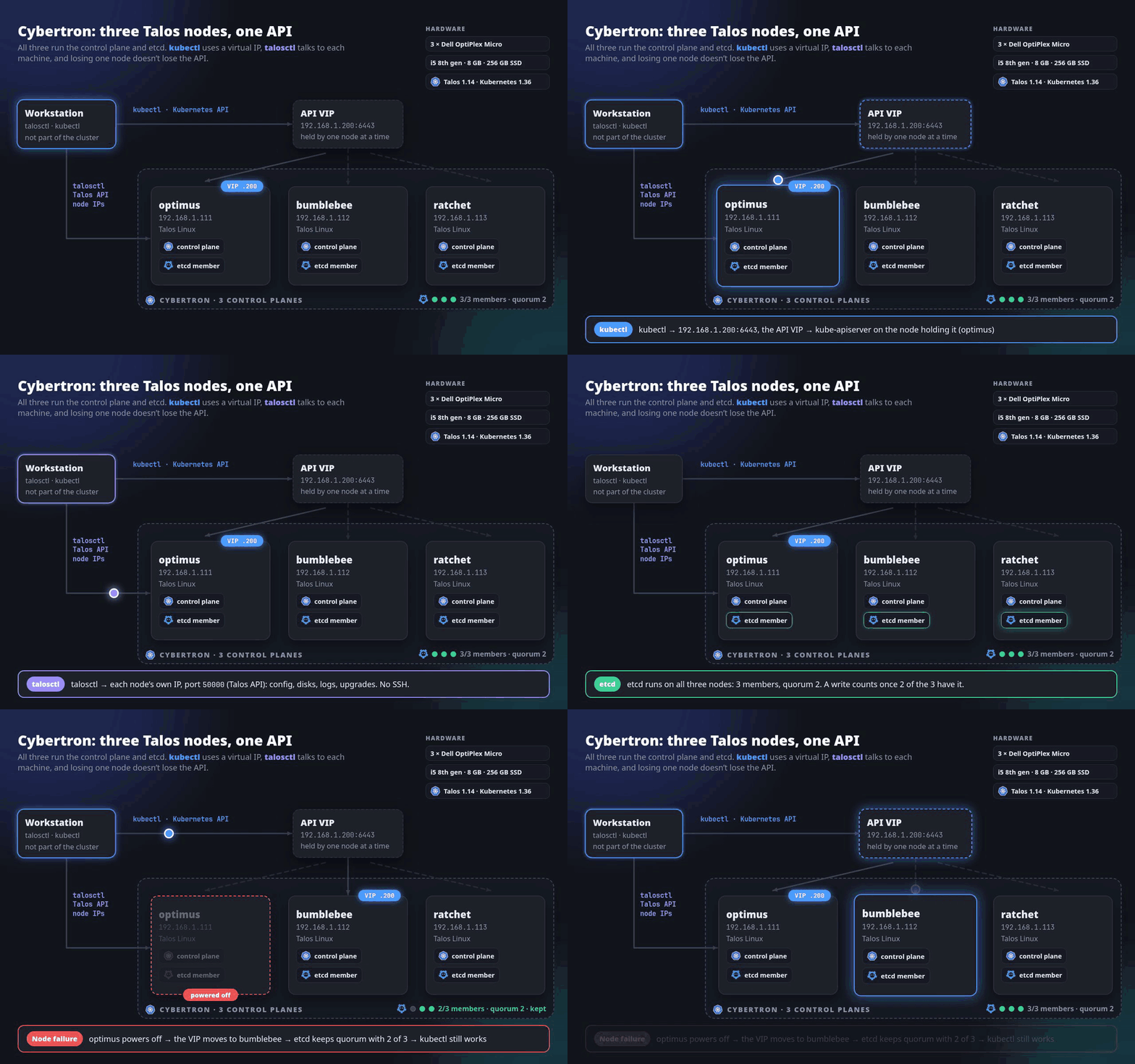
Three identical machines, all control planes, all running workloads:
| Node | Address | Role |
|---|---|---|
| optimus | 192.168.1.111 | Control plane, etcd, workloads |
| bumblebee | 192.168.1.112 | Control plane, etcd, workloads |
| ratchet | 192.168.1.113 | Control plane, etcd, workloads |
https://192.168.1.200:6443. Talos moves it to a
healthy control plane, so kubectl doesn't depend on any one machine.talosctl talks
to each node's own IP (machine: config, disks, logs, upgrades); kubectl
talks to the Kubernetes API through the VIP.| Each node | |
|---|---|
| Machine | Dell OptiPlex Micro (refurbished) |
| CPU | Intel Core i5, 8th gen |
| Memory | 8 GB DDR4 |
| Disk | 256 GB SATA SSD |
| Network | Wired Ethernet to the home router |
Lenovo ThinkCentre Tiny or HP EliteDesk/ProDesk Mini machines work the same way; nothing here depends on Dell.
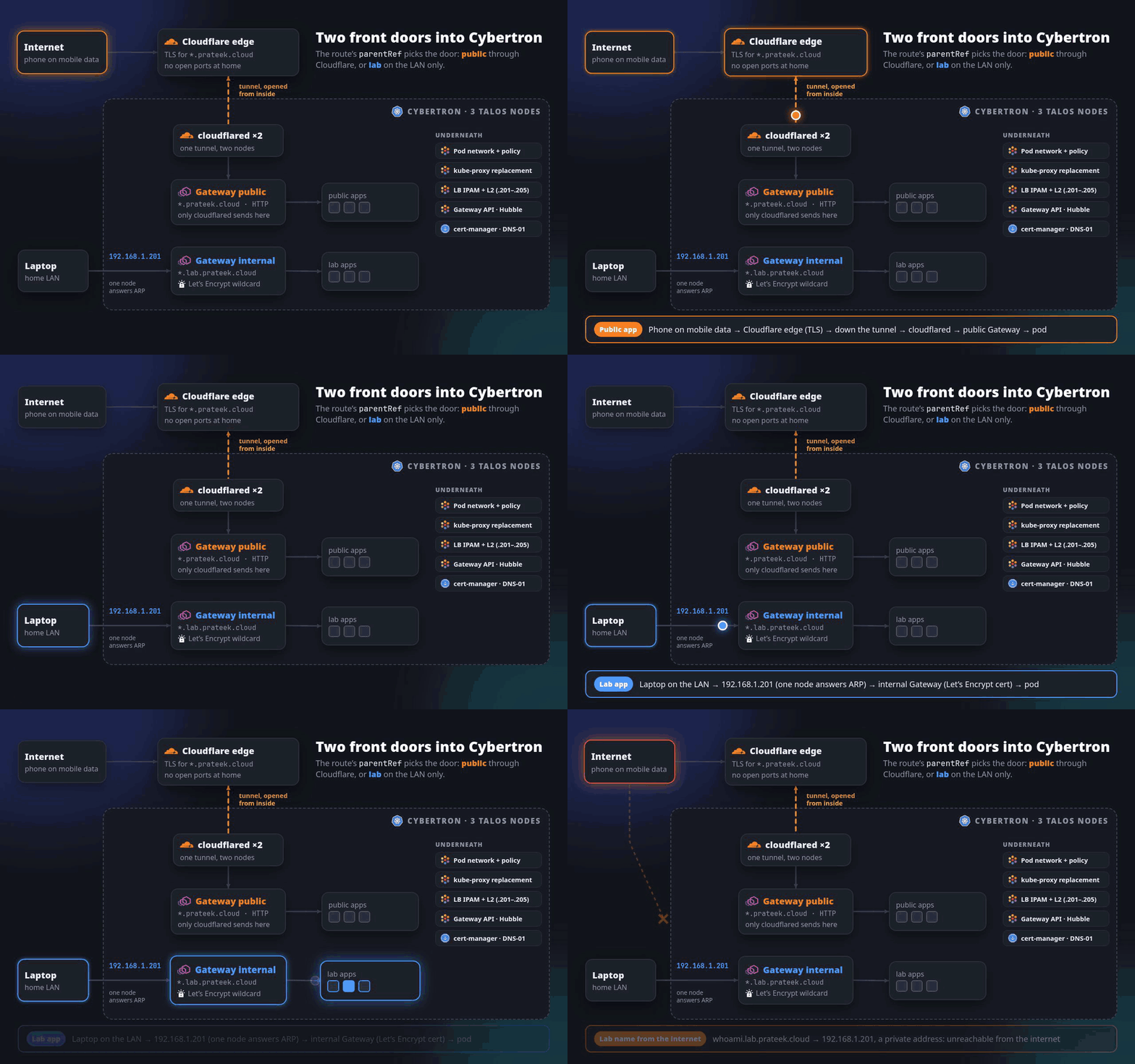
Cilium is the CNI and replaces kube-proxy. Apps are reached through one of two
Gateways, and the route's parentRef decides which:
| Lab apps | Public apps | |
|---|---|---|
| Names | <app>.lab.prateek.cloud | <app>.prateek.cloud |
| Reached from | The home LAN only | The internet |
| Path | LAN → 192.168.1.201 → Gateway internal → pods | Cloudflare edge → tunnel → cloudflared ×2 → Gateway public → pods |
| TLS | Let's Encrypt wildcard from cert-manager (DNS-01, so no inbound access needed) | Cloudflare's edge certificate |
192.168.1.201–205, and L2
announcements make one node answer ARP for each IP (it moves if that node goes
down).Details and the full migration from Flannel: networking/.
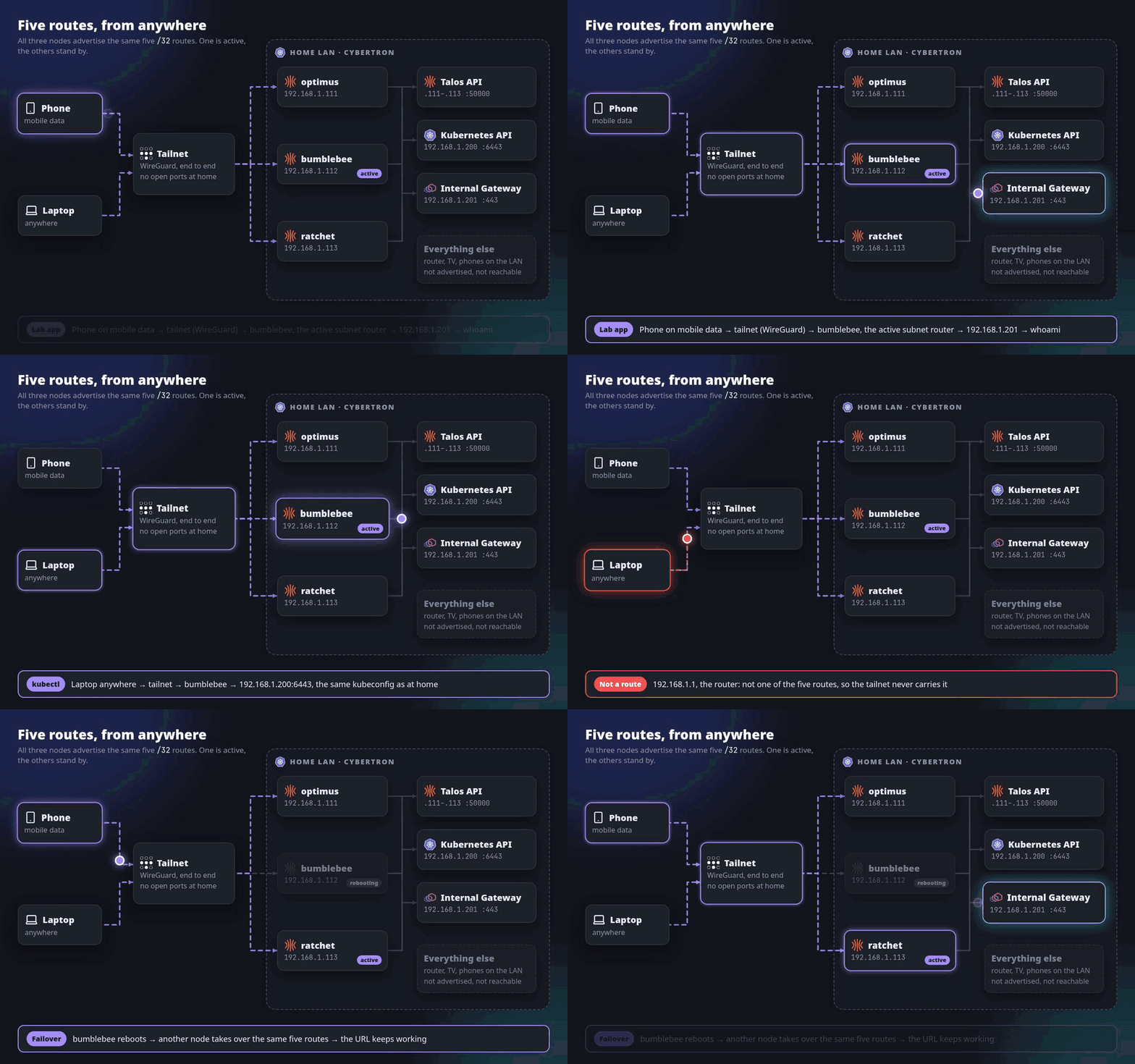
Tailscale runs on all three nodes as a Talos system extension, so kubectl,
talosctl and the lab apps work from anywhere with the same addresses,
certificates, kubeconfig and talosconfig as at home.
192.168.1.200 and the internal Gateway 192.168.1.201. The router,
phones and everything else on the network stay unreachable.Details, the gotchas (node IPs, Cilium MTU, extension config before the
upgrade) and the failover test: tailscale/.
| Component | Version |
|---|---|
| Talos Linux | 1.14.0 |
| Kubernetes | 1.36.3 |
| Cilium | 1.20.2 |
| Gateway API CRDs | v1.6.1 |
| cert-manager | v1.21.2 |
| cloudflared | 2026.10.0 |
| Tailscale (Talos extension) | 1.102.2 |
| Path | What |
|---|---|
talos/ | Part 1: install, bootstrap and validate the Talos cluster |
networking/ | Part 2: Cilium, LB IPAM, Gateways, cert-manager, Cloudflare Tunnel, demo app and tests |
tailscale/ | Part 3: Tailscale extension, subnet routes, access policy, failover |
assets/ | Diagrams used in this README |
.github/workflows/ | CI on every push: yamllint, kubeconform (Kubernetes 1.36 and the CRDs used), gitleaks, link check |
Replace the domain and 192.168.1.x addresses with your own. Credentials never
go in this repository: generated Talos configuration, talosconfig,
kubeconfig, API tokens and tunnel credentials stay local (see .gitignore)
or in Kubernetes Secrets created by hand.
MIT. Use, copy and adapt anything here for your own lab.
For the next parts, follow along on blog.prateekjain.dev, X (@PrateekJainDev) or LinkedIn (in/prateekjaindev).
Three-node HA Kubernetes homelab on Talos Linux: Cilium, Gateway API, cert-manager, Cloudflare Tunnel, Tailscale. Companion repo for the blog series.
See the code
Commands and manifests for Cybertron, a three-node Talos Linux Kubernetes cluster on refurbished mini PCs, as built in the blog series. Each folder matches one part.
It's a cluster to break on purpose: networking, storage, observability, GitOps, upgrades and node failures on real machines, real Ethernet and real disks, without paying for cloud resources or breaking an environment someone else depends on.
| Part | Post | Folder |
|---|---|---|
| 1. A highly available cluster with Talos Linux | Building a 3-Node Highly Available Kubernetes Homelab with Talos Linux | talos/ |
| 2. Networking: Cilium, Gateway API, cert-manager, Cloudflare Tunnel | Networking a 3-Node Kubernetes Homelab with Cilium, Gateway API and Cloudflare Tunnel | networking/ |
| 3. Remote access with Tailscale | Tailscale on Talos Linux: Secure Remote Access to a Kubernetes Homelab | tailscale/ |
| 4. Storage | planned |
Three identical machines, all control planes, all running workloads:
| Node | Address | Role |
|---|---|---|
| optimus | 192.168.1.111 | Control plane, etcd, workloads |
| bumblebee | 192.168.1.112 | Control plane, etcd, workloads |
| ratchet | 192.168.1.113 | Control plane, etcd, workloads |
https://192.168.1.200:6443. Talos moves it to a
healthy control plane, so kubectl doesn't depend on any one machine.talosctl talks
to each node's own IP (machine: config, disks, logs, upgrades); kubectl
talks to the Kubernetes API through the VIP.| Each node | |
|---|---|
| Machine | Dell OptiPlex Micro (refurbished) |
| CPU | Intel Core i5, 8th gen |
| Memory | 8 GB DDR4 |
| Disk | 256 GB SATA SSD |
| Network | Wired Ethernet to the home router |
Lenovo ThinkCentre Tiny or HP EliteDesk/ProDesk Mini machines work the same way; nothing here depends on Dell.
Cilium is the CNI and replaces kube-proxy. Apps are reached through one of two
Gateways, and the route's parentRef decides which:
| Lab apps | Public apps | |
|---|---|---|
| Names | <app>.lab.prateek.cloud | <app>.prateek.cloud |
| Reached from | The home LAN only | The internet |
| Path | LAN → 192.168.1.201 → Gateway internal → pods | Cloudflare edge → tunnel → cloudflared ×2 → Gateway public → pods |
| TLS | Let's Encrypt wildcard from cert-manager (DNS-01, so no inbound access needed) | Cloudflare's edge certificate |
192.168.1.201–205, and L2
announcements make one node answer ARP for each IP (it moves if that node goes
down).Details and the full migration from Flannel: networking/.
Tailscale runs on all three nodes as a Talos system extension, so kubectl,
talosctl and the lab apps work from anywhere with the same addresses,
certificates, kubeconfig and talosconfig as at home.
192.168.1.200 and the internal Gateway 192.168.1.201. The router,
phones and everything else on the network stay unreachable.Details, the gotchas (node IPs, Cilium MTU, extension config before the
upgrade) and the failover test: tailscale/.
| Component | Version |
|---|---|
| Talos Linux | 1.14.0 |
| Kubernetes | 1.36.3 |
| Cilium | 1.20.2 |
| Gateway API CRDs | v1.6.1 |
| cert-manager | v1.21.2 |
| cloudflared | 2026.10.0 |
| Tailscale (Talos extension) | 1.102.2 |
| Path | What |
|---|---|
talos/ | Part 1: install, bootstrap and validate the Talos cluster |
networking/ | Part 2: Cilium, LB IPAM, Gateways, cert-manager, Cloudflare Tunnel, demo app and tests |
tailscale/ | Part 3: Tailscale extension, subnet routes, access policy, failover |
assets/ | Diagrams used in this README |
.github/workflows/ | CI on every push: yamllint, kubeconform (Kubernetes 1.36 and the CRDs used), gitleaks, link check |
Replace the domain and 192.168.1.x addresses with your own. Credentials never
go in this repository: generated Talos configuration, talosconfig,
kubeconfig, API tokens and tunnel credentials stay local (see .gitignore)
or in Kubernetes Secrets created by hand.
MIT. Use, copy and adapt anything here for your own lab.
For the next parts, follow along on blog.prateekjain.dev, X (@PrateekJainDev) or LinkedIn (in/prateekjaindev).





