[CVPR 2026 Highlight] MatAnyone 2: Scaling Video Matting via a Learned Quality Evaluator
Python
913
13 commits
updated Jul 28, 2026





MatAnyone 2 is a practical human video matting framework that preserves fine details by avoiding segmentation-like boundaries, while also shows enhanced robustness under challenging real-world conditions.
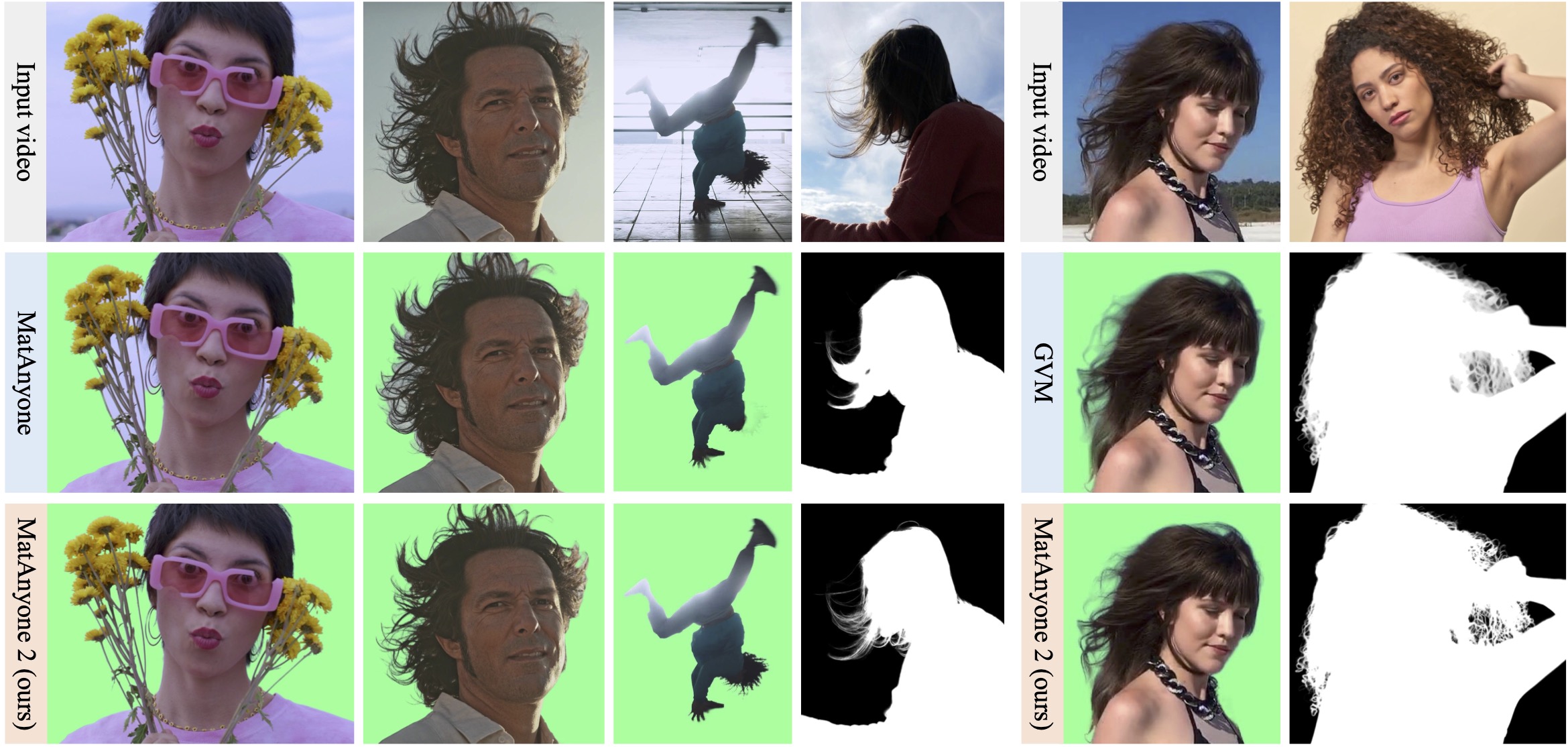
🎥 For more visual results, go checkout our project page
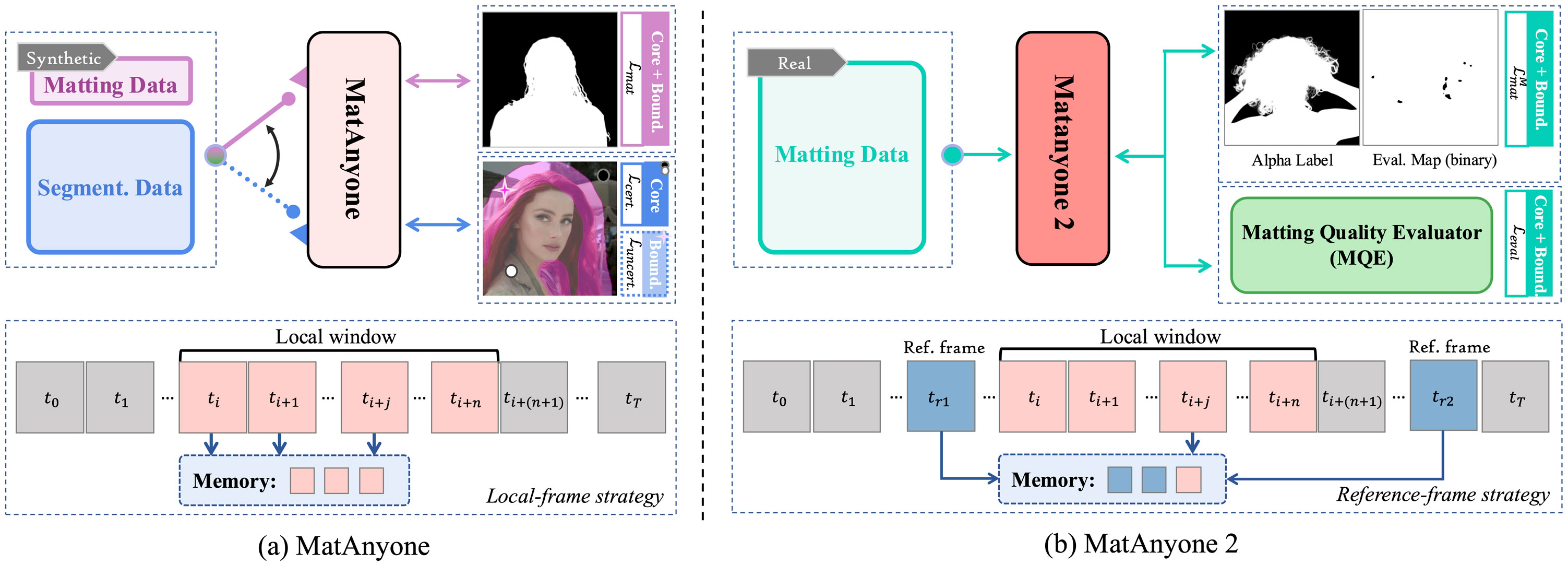
Clone Repo
git clone https://github.com/pq-yang/MatAnyone2
cd MatAnyone2
Create Conda Environment and Install Dependencies
# create new conda env
conda create -n matanyone2 python=3.10 -y
conda activate matanyone2

# install python dependencies
pip install -e .
# [optional] install python dependencies for gradio demo
pip3 install -r hugging_face/requirements.txt
You may also install via uv:
# create a new project and add matanyone2
uv init my-matting-project && cd my-matting-project
uv add matanyone2@git+https://github.com/pq-yang/MatAnyone2.git
Download our pretrained model from MatAnyone 2 to the pretrained_models folder (pretrained model can also be automatically downloaded during the first inference).
The directory structure will be arranged as:
pretrained_models
   |- matanyone2.pth
We provide some examples in the inputs folder. For each run, we take a video and its first-frame segmenatation mask as input. The segmenation mask could be obtained from interactive segmentation models such as SAM2 demo. For example, the directory structure can be arranged as:
inputs
   |- video
      |- test-sample1          # folder containing all frames
      |- test-sample2.mp4      # .mp4, .mov, .avi
   |- mask
      |- test-sample1.png      # mask for targer person(s)
      |- test-sample2.png
Run the following command to try it out:
# intput format: video folder
python inference_matanyone2.py -i inputs/video/test-sample1 -m inputs/mask/test-sample1.png

# intput format: mp4
python inference_matanyone2.py -i inputs/video/test-sample2.mp4 -m inputs/mask/test-sample2.png
results folder, including the foreground output video and the alpha output video.--save-image.--max-size, and the video will be downsampled if min(w, h) exceeds. By default, we don't set the limit.Or you may directly run via CLI command:
matanyone2 -i inputs/video/test-sample1 -m inputs/mask/test-sample1.png
matanyone2 --help for a full list of options.You can load the model directly from Hugging Face using from_pretrained and run inference programmatically:
from matanyone2 import MatAnyone2, InferenceCore

model = MatAnyone2.from_pretrained("PeiqingYang/MatAnyone2")
processor = InferenceCore(model, device="cuda:0")
processor.process_video(
    input_path="inputs/video/test-sample2.mp4",
    mask_path="inputs/mask/test-sample2.png",
    output_path="results",
)
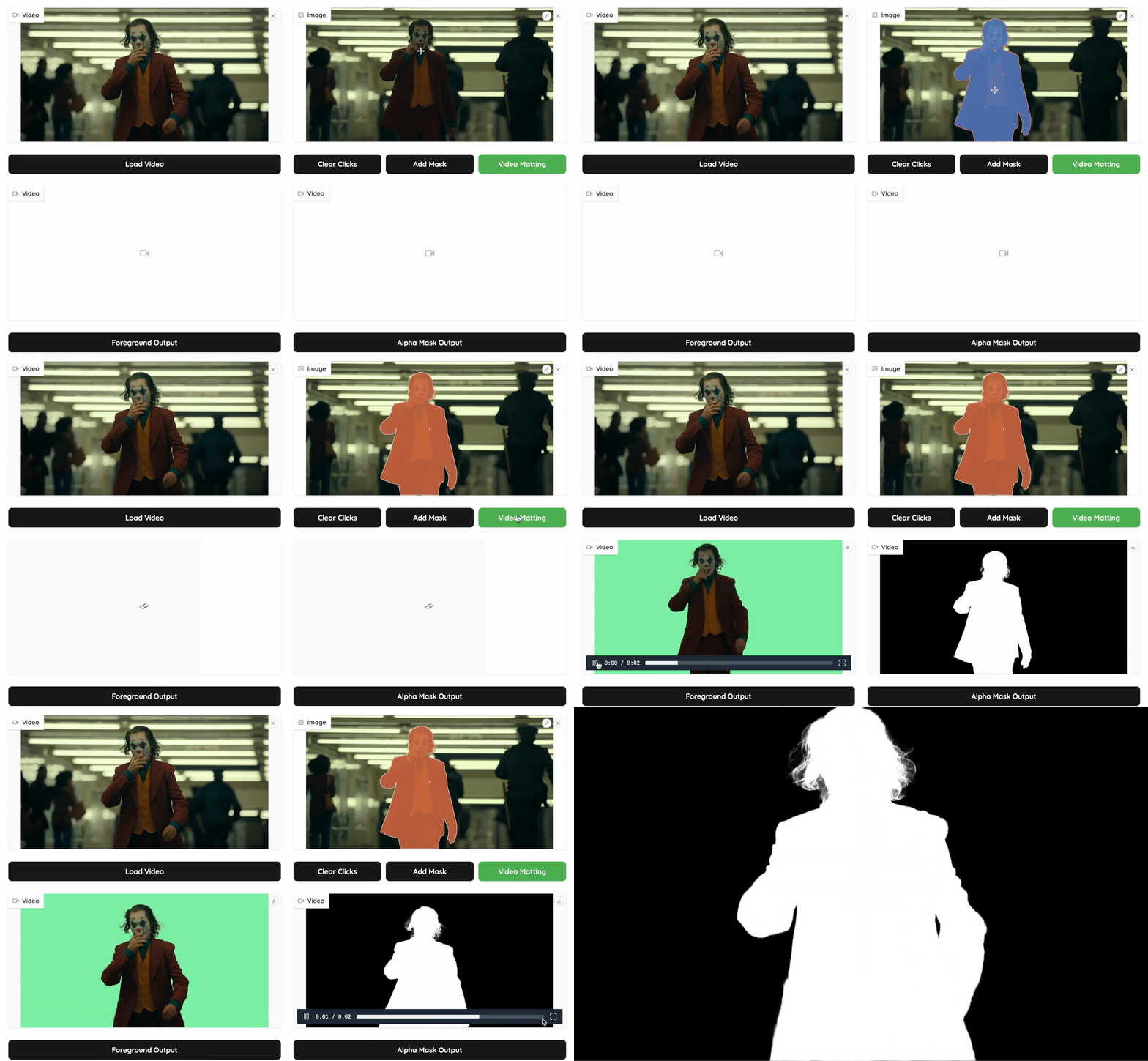
To get rid of the preparation for first-frame segmentation mask, we prepare a gradio demo on hugging face and could also launch locally. Just drop your video/image, assign the target masks with a few clicks, and get the the matting results!
We integrate MatAnyone Series in the demo. MatAnyone 2 is the default model. You can also choose MatAnyone as your processing model in "Model Selection".
cd hugging_face

# install GUI dependencies
pip3 install -r requirements.txt # FFmpeg required

# launch the demo
python app.py
By launching, an interactive interface will appear as follow.
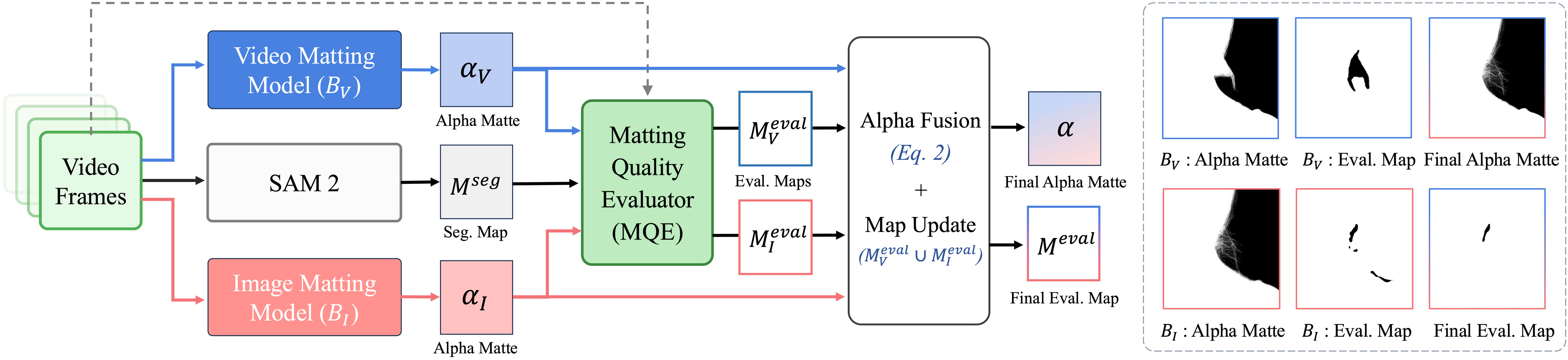
Please refer to the evaluation documentation for details.
If you find our repo useful for your research, please consider citing our paper:
@InProceedings{yang2026matanyone2,
   title     = {{MatAnyone 2}: Scaling Video Matting via a Learned Quality Evaluator},
   author    = {Yang, Peiqing and Zhou, Shangchen and Hao, Kai and Tao, Qingyi},
   booktitle = {CVPR},
   year      = {2026}
   }

@inProceedings{yang2025matanyone,
   title     = {{MatAnyone}: Stable Video Matting with Consistent Memory Propagation},
   author    = {Yang, Peiqing and Zhou, Shangchen and Zhao, Jixin and Tao, Qingyi and Loy, Chen Change},
   booktitle = {CVPR},
   year      = {2025}
   }
This project is licensed under NTU S-Lab License 1.0. Redistribution and use should follow this license.
This project is built upon MatAnyone and Cutie, with matting dataset files adapted from RVM. The interactive demo is adapted from ProPainter, leveraging segmentation capabilities from Segment Anything Model and Segment Anything Model 2. Thanks for their awesome works!
If you have any questions, please feel free to reach us at [email protected].
[CVPR 2026 Highlight] MatAnyone 2: Scaling Video Matting via a Learned Quality Evaluator
Python
913
13 commits
updated Jul 28, 2026
MatAnyone 2 is a practical human video matting framework that preserves fine details by avoiding segmentation-like boundaries, while also shows enhanced robustness under challenging real-world conditions.
🎥 For more visual results, go checkout our project page
Clone Repo
git clone https://github.com/pq-yang/MatAnyone2
cd MatAnyone2
Create Conda Environment and Install Dependencies
# create new conda env
conda create -n matanyone2 python=3.10 -y
conda activate matanyone2

# install python dependencies
pip install -e .
# [optional] install python dependencies for gradio demo
pip3 install -r hugging_face/requirements.txt
You may also install via uv:
# create a new project and add matanyone2
uv init my-matting-project && cd my-matting-project
uv add matanyone2@git+https://github.com/pq-yang/MatAnyone2.git
Download our pretrained model from MatAnyone 2 to the pretrained_models folder (pretrained model can also be automatically downloaded during the first inference).
The directory structure will be arranged as:
pretrained_models
   |- matanyone2.pth
We provide some examples in the inputs folder. For each run, we take a video and its first-frame segmenatation mask as input. The segmenation mask could be obtained from interactive segmentation models such as SAM2 demo. For example, the directory structure can be arranged as:
inputs
   |- video
      |- test-sample1          # folder containing all frames
      |- test-sample2.mp4      # .mp4, .mov, .avi
   |- mask
      |- test-sample1.png      # mask for targer person(s)
      |- test-sample2.png
Run the following command to try it out:
# intput format: video folder
python inference_matanyone2.py -i inputs/video/test-sample1 -m inputs/mask/test-sample1.png

# intput format: mp4
python inference_matanyone2.py -i inputs/video/test-sample2.mp4 -m inputs/mask/test-sample2.png
results folder, including the foreground output video and the alpha output video.--save-image.--max-size, and the video will be downsampled if min(w, h) exceeds. By default, we don't set the limit.Or you may directly run via CLI command:
matanyone2 -i inputs/video/test-sample1 -m inputs/mask/test-sample1.png
matanyone2 --help for a full list of options.You can load the model directly from Hugging Face using from_pretrained and run inference programmatically:
from matanyone2 import MatAnyone2, InferenceCore

model = MatAnyone2.from_pretrained("PeiqingYang/MatAnyone2")
processor = InferenceCore(model, device="cuda:0")
processor.process_video(
    input_path="inputs/video/test-sample2.mp4",
    mask_path="inputs/mask/test-sample2.png",
    output_path="results",
)
To get rid of the preparation for first-frame segmentation mask, we prepare a gradio demo on hugging face and could also launch locally. Just drop your video/image, assign the target masks with a few clicks, and get the the matting results!
We integrate MatAnyone Series in the demo. MatAnyone 2 is the default model. You can also choose MatAnyone as your processing model in "Model Selection".
cd hugging_face

# install GUI dependencies
pip3 install -r requirements.txt # FFmpeg required

# launch the demo
python app.py
By launching, an interactive interface will appear as follow.
Please refer to the evaluation documentation for details.
If you find our repo useful for your research, please consider citing our paper:
@InProceedings{yang2026matanyone2,
   title     = {{MatAnyone 2}: Scaling Video Matting via a Learned Quality Evaluator},
   author    = {Yang, Peiqing and Zhou, Shangchen and Hao, Kai and Tao, Qingyi},
   booktitle = {CVPR},
   year      = {2026}
   }

@inProceedings{yang2025matanyone,
   title     = {{MatAnyone}: Stable Video Matting with Consistent Memory Propagation},
   author    = {Yang, Peiqing and Zhou, Shangchen and Zhao, Jixin and Tao, Qingyi and Loy, Chen Change},
   booktitle = {CVPR},
   year      = {2025}
   }
This project is licensed under NTU S-Lab License 1.0. Redistribution and use should follow this license.
This project is built upon MatAnyone and Cutie, with matting dataset files adapted from RVM. The interactive demo is adapted from ProPainter, leveraging segmentation capabilities from Segment Anything Model and Segment Anything Model 2. Thanks for their awesome works!
If you have any questions, please feel free to reach us at [email protected].