
Data validation toolkit for assessing and monitoring data quality.
See the codeREADME
[!TIP] 📖 Pointblank: The Complete Guide: A comprehensive (and free!) book on data validation with Pointblank is now being written. Follow along and learn everything from first steps to advanced validation patterns and AI-assisted workflows.
📊 Book chapter progress
Overall: 12% complete — 6 of 37 chapters have content
Foundations
Intro: ███████░░░░░░░░ 49%
Getting Started: █████████████░░ 89%
Inspecting Data: ███████████████ 100%
Validation Workflow: ███████████████ 100%
Analysis Loop: ██████████░░░░░ 65%
Building Validation Plans
Column Validations: █░░░░░░░░░░░░░░ 3%
Aggregate Validations: █░░░░░░░░░░░░░░ 8%
Row Validations: ░░░░░░░░░░░░░░░ 0%
Table Validations: ░░░░░░░░░░░░░░░ 0%
Missing Data: ░░░░░░░░░░░░░░░ 0%
Segmented Validation: ░░░░░░░░░░░░░░░ 0%
Advanced Validation: ░░░░░░░░░░░░░░░ 0%
Responding to Results
Thresholds & Actions: ░░░░░░░░░░░░░░░ 0%
Reports & Extracts: ░░░░░░░░░░░░░░░ 0%
Quality Scoring: ░░░░░░░░░░░░░░░ 0%
Notifications & Observability: ░░░░░░░░░░░░░░░ 0%
AI-Assisted Validation
Semantic Validation: ░░░░░░░░░░░░░░░ 0%
AI Authoring: ░░░░░░░░░░░░░░░ 0%
Data Sources, Interfaces & Automation
Data Sources: ░░░░░░░░░░░░░░░ 0%
YAML Workflows: ░░░░░░░░░░░░░░░ 0%
Command Line: ░░░░░░░░░░░░░░░ 0%
MCP Server: ░░░░░░░░░░░░░░░ 0%
Data Contracts & Pipelines
Data Contracts: ░░░░░░░░░░░░░░░ 0%
Pipelines: ░░░░░░░░░░░░░░░ 0%
Test Data Generation
Test Data Generation: ░░░░░░░░░░░░░░░ 0%
Clinical & Regulated Data
Clinical & CDISC: ░░░░░░░░░░░░░░░ 0%
CDISC Conformance: ░░░░░░░░░░░░░░░ 0%
Industry Playbooks
Financial: ░░░░░░░░░░░░░░░ 0%
Ecommerce: ░░░░░░░░░░░░░░░ 0%
Data Engineering: ░░░░░░░░░░░░░░░ 0%
Healthcare: ░░░░░░░░░░░░░░░ 0%
Real-World Evidence: ░░░░░░░░░░░░░░░ 0%
ML Monitoring: ░░░░░░░░░░░░░░░ 0%
IoT Sensors: ░░░░░░░░░░░░░░░ 0%
Insurance: ░░░░░░░░░░░░░░░ 0%
Public Sector: ░░░░░░░░░░░░░░░ 0%
Marketing: ░░░░░░░░░░░░░░░ 0%
Data validation toolkit for assessing and monitoring data quality.












Pointblank takes a different approach to data quality. It doesn't have to be a tedious technical task. Rather, it can become a process focused on clear communication between team members. While other validation libraries focus solely on catching errors, Pointblank is great at both finding issues and sharing insights. Our beautiful, customizable reports turn validation results into conversations with stakeholders, making data quality issues immediately understandable and actionable for everyone on your team.
Get started in minutes, not hours. Pointblank's AI-powered DraftValidation feature analyzes your data and suggests intelligent validation rules automatically. So there's no need to stare at an empty validation script wondering where to begin. Pointblank can kickstart your data quality journey so you can focus on what matters most.
Whether you're a data scientist who needs to quickly communicate data quality findings, a data engineer building robust pipelines, or an analyst presenting data quality results to business stakeholders, Pointblank helps you to turn data quality from an afterthought into a competitive advantage.
Getting Started with AI-Powered Validation Drafting
The DraftValidation class uses LLMs to analyze your data and generate a complete validation plan with intelligent suggestions. This helps you quickly get started with data validation or jumpstart a new project.
import pointblank as pb

# Load your data
data = pb.load_dataset("game_revenue")              # A sample dataset

# Use DraftValidation to generate a validation plan
pb.DraftValidation(data=data, model="anthropic:claude-opus-4-6")
The output is a complete validation plan with intelligent suggestions based on your data:
import pointblank as pb

# The validation plan
validation = (
    pb.Validate(
        data=data,
        label="Draft Validation",
        thresholds=pb.Thresholds(warning=0.10, error=0.25, critical=0.35)
    )
    .col_vals_in_set(columns="item_type", set=["iap", "ad"])
    .col_vals_gt(columns="item_revenue", value=0)
    .col_vals_between(columns="session_duration", left=3.2, right=41.0)
    .col_count_match(count=11)
    .row_count_match(count=2000)
    .rows_distinct()
    .interrogate()
)

validation
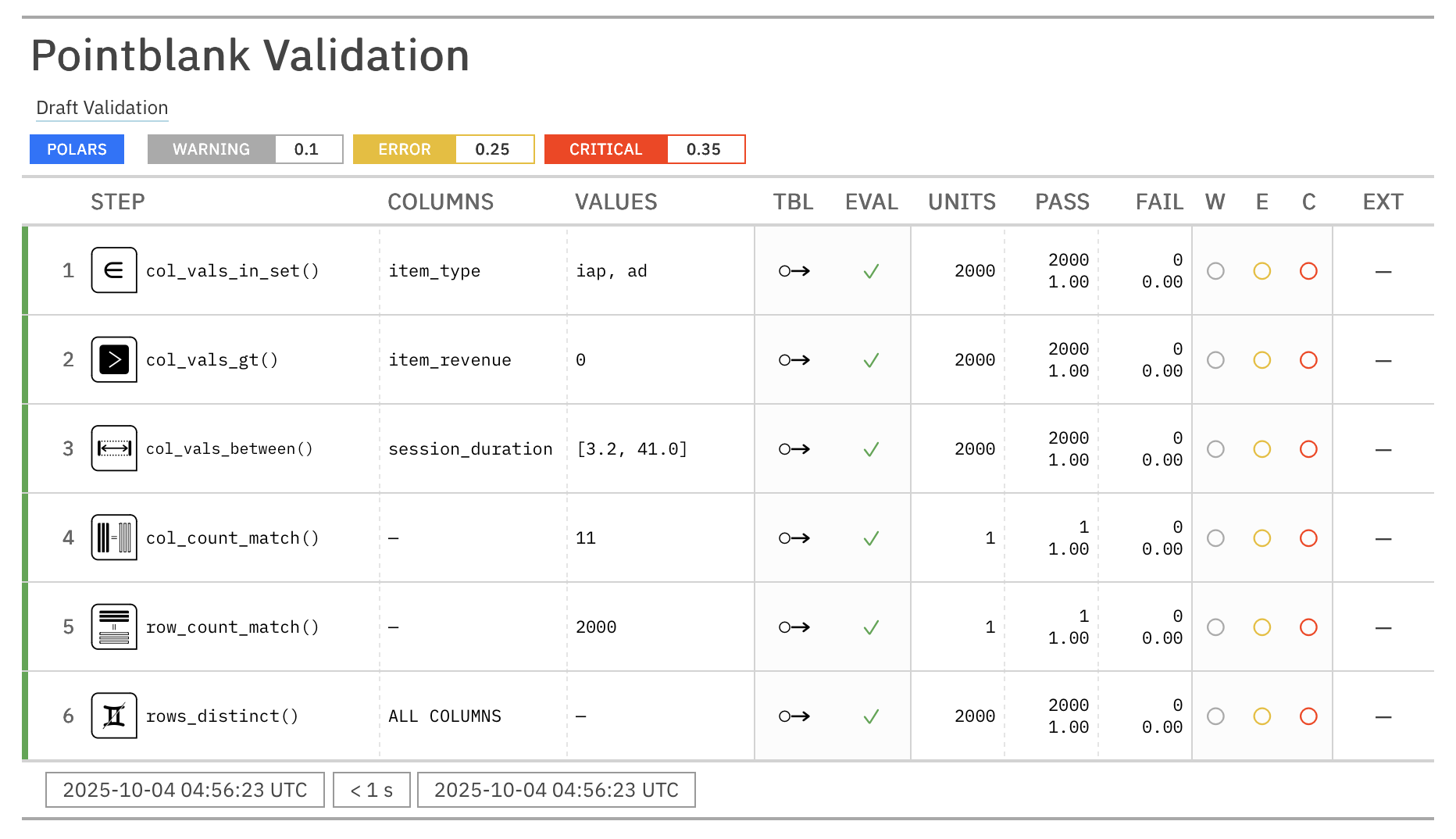
Copy, paste, and customize the generated validation plan for your needs.
Chainable Validation API
Pointblank's chainable API makes validation simple and readable. The same pattern always applies: (1) start with Validate, (2) add validation steps, and (3) finish with interrogate().
import pointblank as pb

validation = (
   pb.Validate(data=pb.load_dataset(dataset="small_table"))
   .col_vals_gt(columns="d", value=100)             # Validate values > 100
   .col_vals_le(columns="c", value=5)               # Validate values <= 5
   .col_exists(columns=["date", "date_time"])       # Check columns exist
   .interrogate()                                   # Execute and collect results
)

# Get the validation report from the REPL with:
validation.get_tabular_report().show()

# From a notebook simply use:
validation
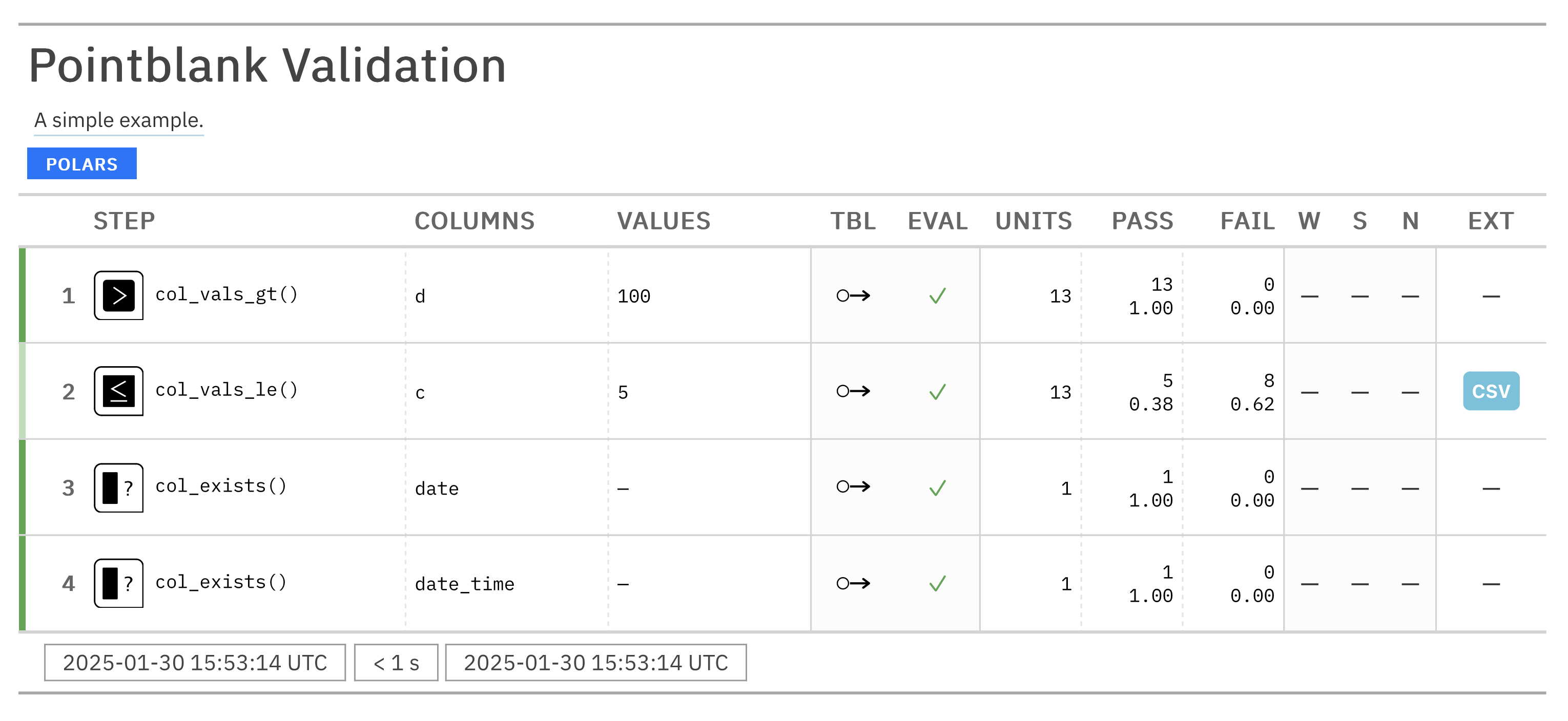
Once you have an interrogated validation object, you can leverage a variety of methods to extract insights like:
- getting detailed reports for single steps to see what went wrong
- filtering tables based on validation results
- extracting problematic data for debugging
Why Choose Pointblank?
- Works with your existing stack: Seamlessly integrates with Polars, Pandas, DuckDB, MySQL, PostgreSQL, SQLite, Parquet, PySpark, Snowflake, and more!
- Beautiful, interactive reports: Crystal-clear validation results that highlight issues and help communicate data quality
- Composable validation pipeline: Chain validation steps into a complete data quality workflow
- Threshold-based alerts: Set 'warning', 'error', and 'critical' thresholds with custom actions
- Practical outputs: Use validation results to filter tables, extract problematic data, or trigger downstream processes
Production-Ready Validation Pipeline
Here's how Pointblank handles complex, real-world scenarios with advanced features like threshold management, automated alerts, and comprehensive business rule validation:
import pointblank as pb
import polars as pl

# Load your data
sales_data = pl.read_csv("sales_data.csv")

# Create a comprehensive validation
validation = (
   pb.Validate(
      data=sales_data,
      tbl_name="sales_data",           # Name of the table for reporting
      label="Real-world example.",     # Label for the validation, appears in reports
      thresholds=(0.01, 0.02, 0.05),   # Set thresholds for warnings, errors, and critical issues
      actions=pb.Actions(              # Define actions for any threshold exceedance
         critical="Major data quality issue found in step {step} ({time})."
      ),
      final_actions=pb.FinalActions(   # Define final actions for the entire validation
         pb.send_slack_notification(
            webhook_url="https://hooks.slack.com/services/your/webhook/url"
         )
      ),
      brief=True,                      # Add automatically-generated briefs for each step
   )
   .col_vals_between(            # Check numeric ranges with precision
      columns=["price", "quantity"],
      left=0, right=1000
   )
   .col_vals_not_null(           # Ensure that columns ending with '_id' don't have null values
      columns=pb.ends_with("_id")
   )
   .col_vals_regex(              # Validate patterns with regex
      columns="email",
      pattern="^[a-zA-Z0-9._%+-]+@[a-zA-Z0-9.-]+\\.[a-zA-Z]{2,}$"
   )
   .col_vals_in_set(             # Check categorical values
      columns="status",
      set=["pending", "shipped", "delivered", "returned"]
   )
   .conjointly(                  # Combine multiple conditions
      lambda df: pb.expr_col("revenue") == pb.expr_col("price") * pb.expr_col("quantity"),
      lambda df: pb.expr_col("tax") >= pb.expr_col("revenue") * 0.05
   )
   .interrogate()
)
Major data quality issue found in step 7 (2025-04-16 15:03:04.685612+00:00).
# Get an HTML report you can share with your team
validation.get_tabular_report().show("browser")
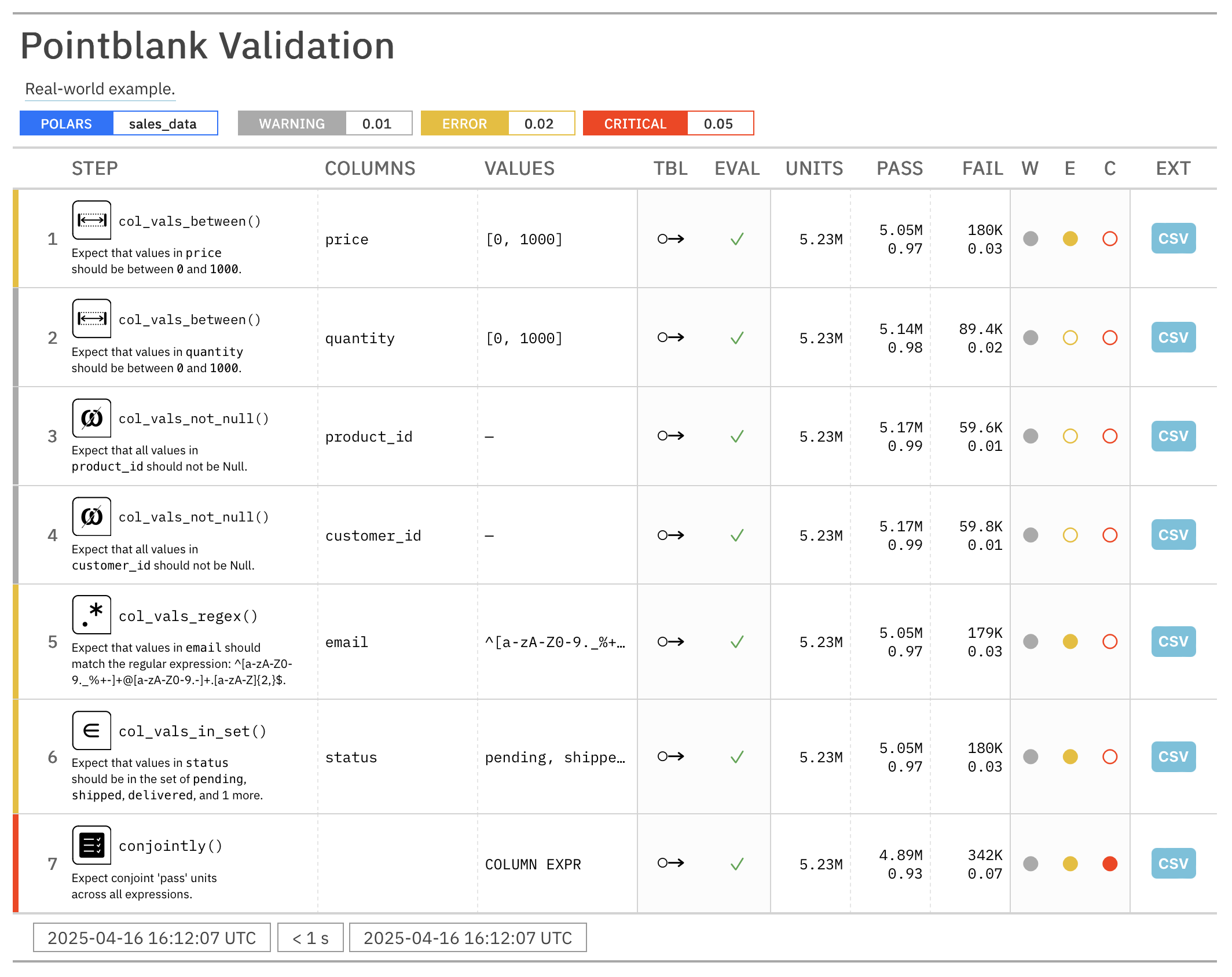
# Get a report of failing records from a specific step
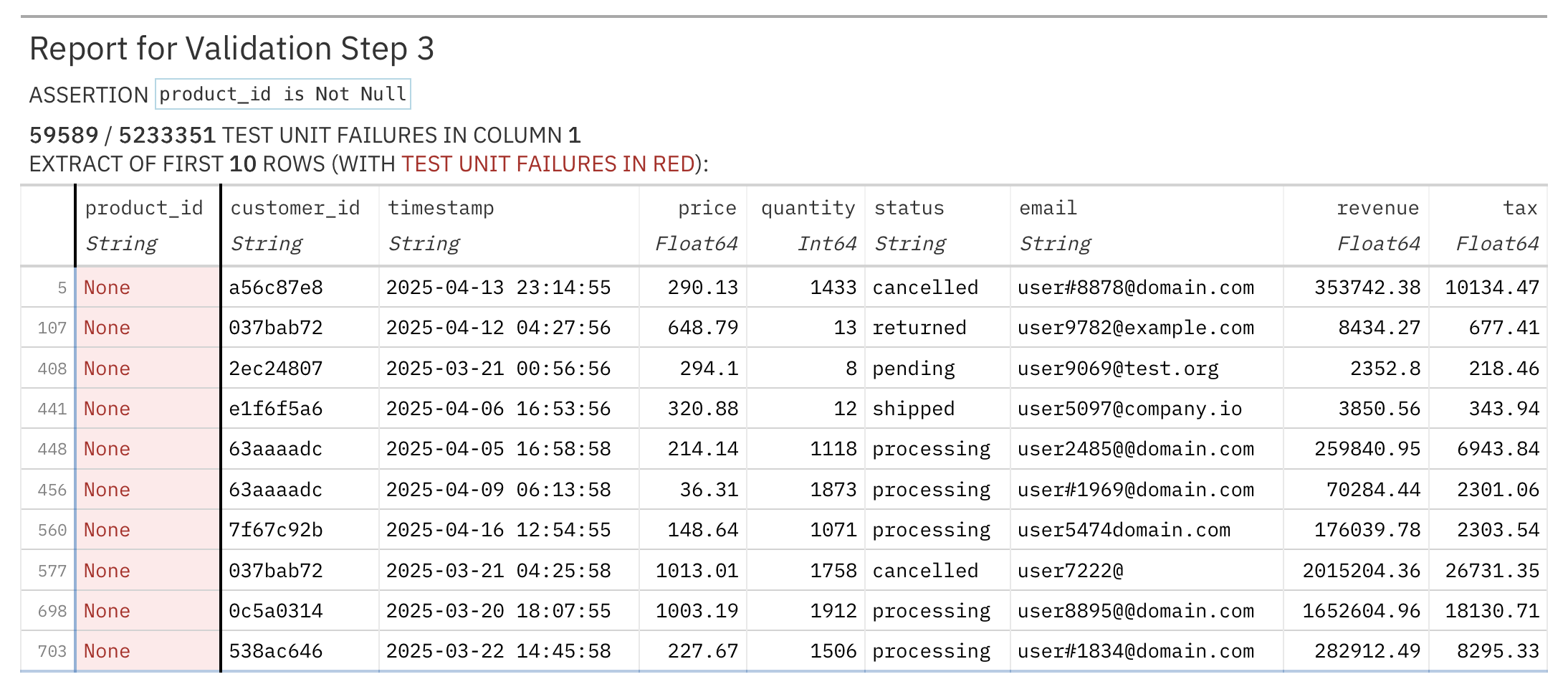
validation.get_step_report(i=3).show("browser")  # Get failing records from step 3
YAML Configuration
For teams that need portable, version-controlled validation workflows, Pointblank supports YAML configuration files. This makes it easy to share validation logic across different environments and team members, ensuring everyone is on the same page.
validation.yaml
validate:
  data: small_table
  tbl_name: "small_table"
  label: "Getting started validation"

steps:
  - col_vals_gt:
      columns: "d"
      value: 100
  - col_vals_le:
      columns: "c"
      value: 5
  - col_exists:
      columns: ["date", "date_time"]
Execute the YAML validation
import pointblank as pb

# Run validation from YAML configuration
validation = pb.yaml_interrogate("validation.yaml")

# Get the results just like any other validation
validation.get_tabular_report().show()
This approach is suitable for:
- CI/CD pipelines: Store validation rules alongside your code
- Team collaboration: Share validation logic in a readable format
- Environment consistency: Use the same validation across dev, staging, and production
- Documentation: YAML files serve as living documentation of your data quality requirements
Command Line Interface (CLI)
Pointblank includes a powerful CLI utility called pb that lets you run data validation workflows directly from the command line. Perfect for CI/CD pipelines, scheduled data quality checks, or quick validation tasks.

Explore Your Data
# Get a quick preview of your data
pb preview small_table

# Preview data from GitHub URLs
pb preview "https://github.com/user/repo/blob/main/data.csv"

# Check for missing values in Parquet files
pb missing data.parquet

# Generate column summaries from database connections
pb scan "duckdb:///data/sales.ddb::customers"
Run Essential Validations
# Run validation from YAML configuration file
pb run validation.yaml

# Run validation from Python file
pb run validation.py

# Check for duplicate rows
pb validate small_table --check rows-distinct

# Validate data directly from GitHub
pb validate "https://github.com/user/repo/blob/main/sales.csv" --check col-vals-not-null --column customer_id

# Verify no null values in Parquet datasets
pb validate "data/*.parquet" --check col-vals-not-null --column a

# Extract failing data for debugging
pb validate small_table --check col-vals-gt --column a --value 5 --show-extract
Integrate with CI/CD
# Use exit codes for automation in one-liner validations (0 = pass, 1 = fail)
pb validate small_table --check rows-distinct --exit-code

# Run validation workflows with exit codes
pb run validation.yaml --exit-code
pb run validation.py --exit-code
Click the following headings to see some video demonstrations of the CLI:
Getting Started with the Pointblank CLI

Doing Some Data Exploration

Validating Data with the CLI

Using Polars in the CLI

Integrating Pointblank with CI/CD

Generate Realistic Test Data
Need test data for your validation workflows? The generate_dataset() function creates realistic, locale-aware synthetic data based on schema definitions. It's very useful for developing pipelines without production data, running CI/CD tests with reproducible scenarios, or prototyping workflows before production data is available.
import pointblank as pb

# Define a schema with field constraints
schema = pb.Schema(
    user_id=pb.int_field(min_val=1, unique=True),
    name=pb.string_field(preset="name"),
    email=pb.string_field(preset="email"),
    age=pb.int_field(min_val=18, max_val=100),
    status=pb.string_field(allowed=["active", "pending", "inactive"]),
)

# Generate 10 rows of realistic test data
data = pb.generate_dataset(schema, n=10, seed=23)

pb.preview(data)
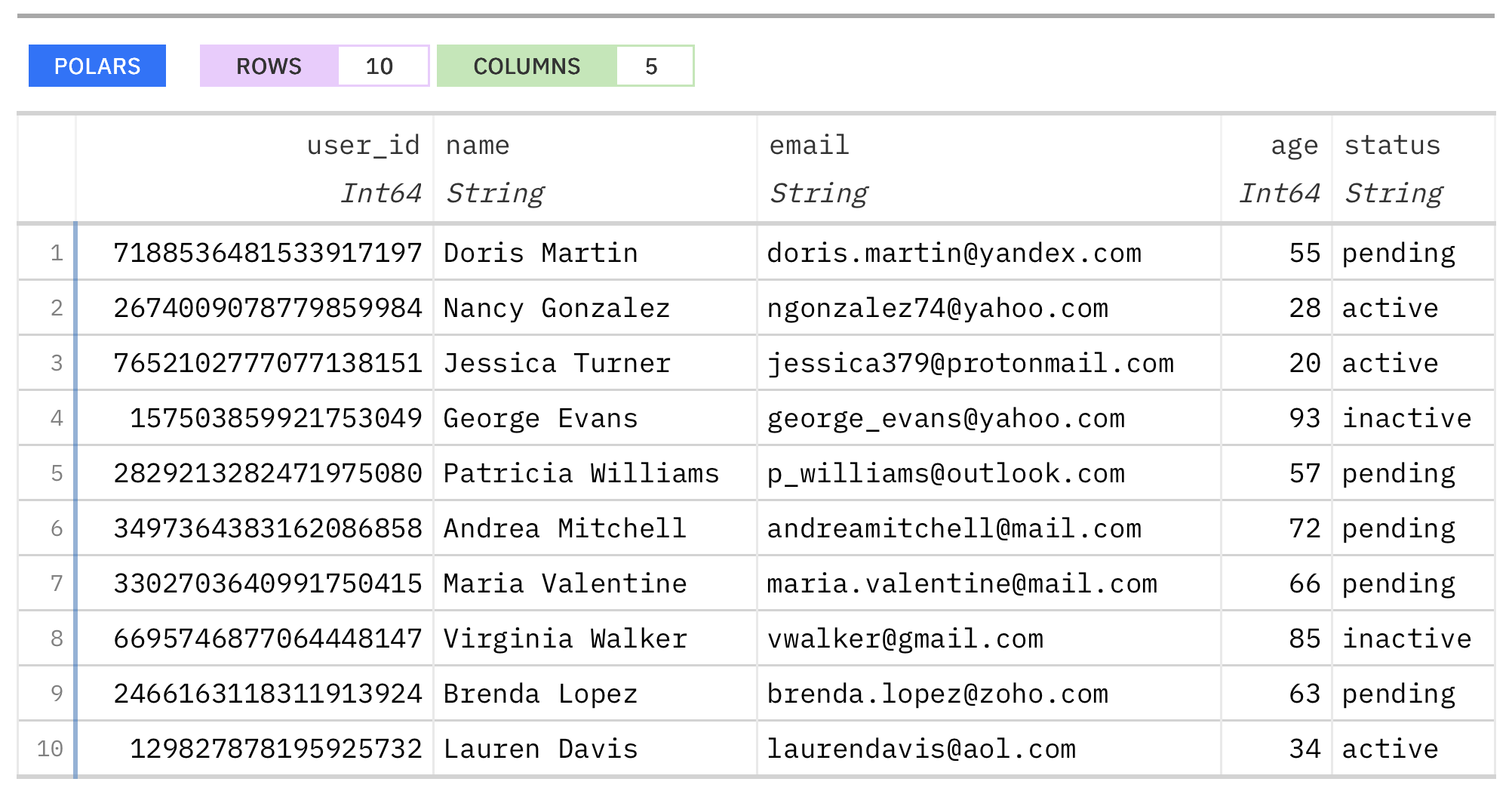
The generator supports sophisticated data generation with these capabilities:
- Realistic data with presets: Use built-in presets like
"name","email","address","phone", etc. - User agent strings: Generate highly varied, realistic browser user agent strings from 17 browser categories with over 42,000 unique combinations
- 100 country support: Generate locale-specific data (e.g.,
country="DE"for German addresses) - Field constraints: Control ranges, patterns, uniqueness, and allowed values
- Multiple output formats: Returns Polars DataFrames by default, but also supports Pandas (
output="pandas") or dictionaries (output="dict")
This makes it easy to generate test data that matches your validation rules, helping you develop and test data quality workflows without relying on real data.
Features That Set Pointblank Apart
- Complete validation workflow: From data access to validation to reporting in a single pipeline
- Built for collaboration: Share results with colleagues through beautiful interactive reports
- Practical outputs: Get exactly what you need: counts, extracts, summaries, or full reports
- Flexible deployment: Use in notebooks, scripts, or data pipelines
- Synthetic data generation: Create realistic test data with 30+ presets, user agent strings, locale-aware formatting, and 100 country support
- Customizable: Tailor validation steps and reporting to your specific needs
- Internationalization: Reports can be generated in 40 languages, including English, Spanish, French, and German
Documentation and Examples
Visit our documentation site for:
Join the Community
We'd love to hear from you! Connect with us:
- GitHub Issues for bug reports and feature requests
- Discord server for discussions and help
- Contributing guidelines if you'd like to help improve Pointblank
Installation
You can install Pointblank using pip:
pip install pointblank
You can also install Pointblank from Conda-Forge by using:
conda install conda-forge::pointblank
If you don't have Polars or Pandas installed, you'll need to install one of them to use Pointblank.
pip install "pointblank[pl]" # Install Pointblank with Polars
pip install "pointblank[pd]" # Install Pointblank with Pandas
To use Pointblank with DuckDB, MySQL, PostgreSQL, or SQLite, install Ibis with the appropriate backend:
pip install "pointblank[duckdb]"   # Install Pointblank with Ibis + DuckDB
pip install "pointblank[mysql]"    # Install Pointblank with Ibis + MySQL
pip install "pointblank[postgres]" # Install Pointblank with Ibis + PostgreSQL
pip install "pointblank[sqlite]"   # Install Pointblank with Ibis + SQLite
Technical Details
Pointblank uses Narwhals to work with Polars and Pandas DataFrames, and integrates with Ibis for database and file format support. This architecture provides a consistent API for validating tabular data from various sources.
Contributing to Pointblank
There are many ways to contribute to the ongoing development of Pointblank. Some contributions can be simple (like fixing typos, improving documentation, filing issues for feature requests or problems, etc.) and others might take more time and care (like answering questions and submitting PRs with code changes). Just know that anything you can do to help would be very much appreciated!
Please read over the contributing guidelines for information on how to get started.
Pointblank for R
There's also a version of Pointblank for R, which has been around since 2017 and is widely used in the R community. You can find it at https://github.com/rstudio/pointblank.
Roadmap
We're actively working on enhancing Pointblank with:
- Additional validation methods for comprehensive data quality checks
- Advanced logging capabilities
- Messaging actions (Slack, email) for threshold exceedances
- LLM-powered validation suggestions and data dictionary generation
- JSON/YAML configuration for pipeline portability
- CLI utility for validation from the command line
- Expanded backend support and certification
- High-quality documentation and examples
If you have any ideas for features or improvements, don't hesitate to share them with us! We are always looking for ways to make Pointblank better.
Code of Conduct
Please note that the Pointblank project is released with a contributor code of conduct.
By participating in this project you agree to abide by its terms.
📄 License
Pointblank is licensed under the MIT license.
© Posit Software, PBC.
🏛️ Governance
This project is primarily maintained by Rich Iannone. Other authors may occasionally assist with some of these duties.
Contributors



Similar repos


Languages
Python
84.0%
HTML
15.9%
Data validation toolkit for assessing and monitoring data quality.
See the codeREADME
[!TIP] 📖 Pointblank: The Complete Guide: A comprehensive (and free!) book on data validation with Pointblank is now being written. Follow along and learn everything from first steps to advanced validation patterns and AI-assisted workflows.
📊 Book chapter progress
Overall: 12% complete — 6 of 37 chapters have content
Foundations
Intro: ███████░░░░░░░░ 49%
Getting Started: █████████████░░ 89%
Inspecting Data: ███████████████ 100%
Validation Workflow: ███████████████ 100%
Analysis Loop: ██████████░░░░░ 65%
Building Validation Plans
Column Validations: █░░░░░░░░░░░░░░ 3%
Aggregate Validations: █░░░░░░░░░░░░░░ 8%
Row Validations: ░░░░░░░░░░░░░░░ 0%
Table Validations: ░░░░░░░░░░░░░░░ 0%
Missing Data: ░░░░░░░░░░░░░░░ 0%
Segmented Validation: ░░░░░░░░░░░░░░░ 0%
Advanced Validation: ░░░░░░░░░░░░░░░ 0%
Responding to Results
Thresholds & Actions: ░░░░░░░░░░░░░░░ 0%
Reports & Extracts: ░░░░░░░░░░░░░░░ 0%
Quality Scoring: ░░░░░░░░░░░░░░░ 0%
Notifications & Observability: ░░░░░░░░░░░░░░░ 0%
AI-Assisted Validation
Semantic Validation: ░░░░░░░░░░░░░░░ 0%
AI Authoring: ░░░░░░░░░░░░░░░ 0%
Data Sources, Interfaces & Automation
Data Sources: ░░░░░░░░░░░░░░░ 0%
YAML Workflows: ░░░░░░░░░░░░░░░ 0%
Command Line: ░░░░░░░░░░░░░░░ 0%
MCP Server: ░░░░░░░░░░░░░░░ 0%
Data Contracts & Pipelines
Data Contracts: ░░░░░░░░░░░░░░░ 0%
Pipelines: ░░░░░░░░░░░░░░░ 0%
Test Data Generation
Test Data Generation: ░░░░░░░░░░░░░░░ 0%
Clinical & Regulated Data
Clinical & CDISC: ░░░░░░░░░░░░░░░ 0%
CDISC Conformance: ░░░░░░░░░░░░░░░ 0%
Industry Playbooks
Financial: ░░░░░░░░░░░░░░░ 0%
Ecommerce: ░░░░░░░░░░░░░░░ 0%
Data Engineering: ░░░░░░░░░░░░░░░ 0%
Healthcare: ░░░░░░░░░░░░░░░ 0%
Real-World Evidence: ░░░░░░░░░░░░░░░ 0%
ML Monitoring: ░░░░░░░░░░░░░░░ 0%
IoT Sensors: ░░░░░░░░░░░░░░░ 0%
Insurance: ░░░░░░░░░░░░░░░ 0%
Public Sector: ░░░░░░░░░░░░░░░ 0%
Marketing: ░░░░░░░░░░░░░░░ 0%
Data validation toolkit for assessing and monitoring data quality.
Pointblank takes a different approach to data quality. It doesn't have to be a tedious technical task. Rather, it can become a process focused on clear communication between team members. While other validation libraries focus solely on catching errors, Pointblank is great at both finding issues and sharing insights. Our beautiful, customizable reports turn validation results into conversations with stakeholders, making data quality issues immediately understandable and actionable for everyone on your team.
Get started in minutes, not hours. Pointblank's AI-powered DraftValidation feature analyzes your data and suggests intelligent validation rules automatically. So there's no need to stare at an empty validation script wondering where to begin. Pointblank can kickstart your data quality journey so you can focus on what matters most.
Whether you're a data scientist who needs to quickly communicate data quality findings, a data engineer building robust pipelines, or an analyst presenting data quality results to business stakeholders, Pointblank helps you to turn data quality from an afterthought into a competitive advantage.
Getting Started with AI-Powered Validation Drafting
The DraftValidation class uses LLMs to analyze your data and generate a complete validation plan with intelligent suggestions. This helps you quickly get started with data validation or jumpstart a new project.
import pointblank as pb

# Load your data
data = pb.load_dataset("game_revenue")              # A sample dataset

# Use DraftValidation to generate a validation plan
pb.DraftValidation(data=data, model="anthropic:claude-opus-4-6")
The output is a complete validation plan with intelligent suggestions based on your data:
import pointblank as pb

# The validation plan
validation = (
    pb.Validate(
        data=data,
        label="Draft Validation",
        thresholds=pb.Thresholds(warning=0.10, error=0.25, critical=0.35)
    )
    .col_vals_in_set(columns="item_type", set=["iap", "ad"])
    .col_vals_gt(columns="item_revenue", value=0)
    .col_vals_between(columns="session_duration", left=3.2, right=41.0)
    .col_count_match(count=11)
    .row_count_match(count=2000)
    .rows_distinct()
    .interrogate()
)

validation
Copy, paste, and customize the generated validation plan for your needs.
Chainable Validation API
Pointblank's chainable API makes validation simple and readable. The same pattern always applies: (1) start with Validate, (2) add validation steps, and (3) finish with interrogate().
import pointblank as pb

validation = (
   pb.Validate(data=pb.load_dataset(dataset="small_table"))
   .col_vals_gt(columns="d", value=100)             # Validate values > 100
   .col_vals_le(columns="c", value=5)               # Validate values <= 5
   .col_exists(columns=["date", "date_time"])       # Check columns exist
   .interrogate()                                   # Execute and collect results
)

# Get the validation report from the REPL with:
validation.get_tabular_report().show()

# From a notebook simply use:
validation
Once you have an interrogated validation object, you can leverage a variety of methods to extract insights like:
- getting detailed reports for single steps to see what went wrong
- filtering tables based on validation results
- extracting problematic data for debugging
Why Choose Pointblank?
- Works with your existing stack: Seamlessly integrates with Polars, Pandas, DuckDB, MySQL, PostgreSQL, SQLite, Parquet, PySpark, Snowflake, and more!
- Beautiful, interactive reports: Crystal-clear validation results that highlight issues and help communicate data quality
- Composable validation pipeline: Chain validation steps into a complete data quality workflow
- Threshold-based alerts: Set 'warning', 'error', and 'critical' thresholds with custom actions
- Practical outputs: Use validation results to filter tables, extract problematic data, or trigger downstream processes
Production-Ready Validation Pipeline
Here's how Pointblank handles complex, real-world scenarios with advanced features like threshold management, automated alerts, and comprehensive business rule validation:
import pointblank as pb
import polars as pl

# Load your data
sales_data = pl.read_csv("sales_data.csv")

# Create a comprehensive validation
validation = (
   pb.Validate(
      data=sales_data,
      tbl_name="sales_data",           # Name of the table for reporting
      label="Real-world example.",     # Label for the validation, appears in reports
      thresholds=(0.01, 0.02, 0.05),   # Set thresholds for warnings, errors, and critical issues
      actions=pb.Actions(              # Define actions for any threshold exceedance
         critical="Major data quality issue found in step {step} ({time})."
      ),
      final_actions=pb.FinalActions(   # Define final actions for the entire validation
         pb.send_slack_notification(
            webhook_url="https://hooks.slack.com/services/your/webhook/url"
         )
      ),
      brief=True,                      # Add automatically-generated briefs for each step
   )
   .col_vals_between(            # Check numeric ranges with precision
      columns=["price", "quantity"],
      left=0, right=1000
   )
   .col_vals_not_null(           # Ensure that columns ending with '_id' don't have null values
      columns=pb.ends_with("_id")
   )
   .col_vals_regex(              # Validate patterns with regex
      columns="email",
      pattern="^[a-zA-Z0-9._%+-]+@[a-zA-Z0-9.-]+\\.[a-zA-Z]{2,}$"
   )
   .col_vals_in_set(             # Check categorical values
      columns="status",
      set=["pending", "shipped", "delivered", "returned"]
   )
   .conjointly(                  # Combine multiple conditions
      lambda df: pb.expr_col("revenue") == pb.expr_col("price") * pb.expr_col("quantity"),
      lambda df: pb.expr_col("tax") >= pb.expr_col("revenue") * 0.05
   )
   .interrogate()
)
Major data quality issue found in step 7 (2025-04-16 15:03:04.685612+00:00).
# Get an HTML report you can share with your team
validation.get_tabular_report().show("browser")
# Get a report of failing records from a specific step
validation.get_step_report(i=3).show("browser")  # Get failing records from step 3
YAML Configuration
For teams that need portable, version-controlled validation workflows, Pointblank supports YAML configuration files. This makes it easy to share validation logic across different environments and team members, ensuring everyone is on the same page.
validation.yaml
validate:
  data: small_table
  tbl_name: "small_table"
  label: "Getting started validation"

steps:
  - col_vals_gt:
      columns: "d"
      value: 100
  - col_vals_le:
      columns: "c"
      value: 5
  - col_exists:
      columns: ["date", "date_time"]
Execute the YAML validation
import pointblank as pb

# Run validation from YAML configuration
validation = pb.yaml_interrogate("validation.yaml")

# Get the results just like any other validation
validation.get_tabular_report().show()
This approach is suitable for:
- CI/CD pipelines: Store validation rules alongside your code
- Team collaboration: Share validation logic in a readable format
- Environment consistency: Use the same validation across dev, staging, and production
- Documentation: YAML files serve as living documentation of your data quality requirements
Command Line Interface (CLI)
Pointblank includes a powerful CLI utility called pb that lets you run data validation workflows directly from the command line. Perfect for CI/CD pipelines, scheduled data quality checks, or quick validation tasks.
Explore Your Data
# Get a quick preview of your data
pb preview small_table

# Preview data from GitHub URLs
pb preview "https://github.com/user/repo/blob/main/data.csv"

# Check for missing values in Parquet files
pb missing data.parquet

# Generate column summaries from database connections
pb scan "duckdb:///data/sales.ddb::customers"
Run Essential Validations
# Run validation from YAML configuration file
pb run validation.yaml

# Run validation from Python file
pb run validation.py

# Check for duplicate rows
pb validate small_table --check rows-distinct

# Validate data directly from GitHub
pb validate "https://github.com/user/repo/blob/main/sales.csv" --check col-vals-not-null --column customer_id

# Verify no null values in Parquet datasets
pb validate "data/*.parquet" --check col-vals-not-null --column a

# Extract failing data for debugging
pb validate small_table --check col-vals-gt --column a --value 5 --show-extract
Integrate with CI/CD
# Use exit codes for automation in one-liner validations (0 = pass, 1 = fail)
pb validate small_table --check rows-distinct --exit-code

# Run validation workflows with exit codes
pb run validation.yaml --exit-code
pb run validation.py --exit-code
Click the following headings to see some video demonstrations of the CLI:
Getting Started with the Pointblank CLI
Doing Some Data Exploration
Validating Data with the CLI
Using Polars in the CLI
Integrating Pointblank with CI/CD
Generate Realistic Test Data
Need test data for your validation workflows? The generate_dataset() function creates realistic, locale-aware synthetic data based on schema definitions. It's very useful for developing pipelines without production data, running CI/CD tests with reproducible scenarios, or prototyping workflows before production data is available.
import pointblank as pb

# Define a schema with field constraints
schema = pb.Schema(
    user_id=pb.int_field(min_val=1, unique=True),
    name=pb.string_field(preset="name"),
    email=pb.string_field(preset="email"),
    age=pb.int_field(min_val=18, max_val=100),
    status=pb.string_field(allowed=["active", "pending", "inactive"]),
)

# Generate 10 rows of realistic test data
data = pb.generate_dataset(schema, n=10, seed=23)

pb.preview(data)
The generator supports sophisticated data generation with these capabilities:
- Realistic data with presets: Use built-in presets like
"name","email","address","phone", etc. - User agent strings: Generate highly varied, realistic browser user agent strings from 17 browser categories with over 42,000 unique combinations
- 100 country support: Generate locale-specific data (e.g.,
country="DE"for German addresses) - Field constraints: Control ranges, patterns, uniqueness, and allowed values
- Multiple output formats: Returns Polars DataFrames by default, but also supports Pandas (
output="pandas") or dictionaries (output="dict")
This makes it easy to generate test data that matches your validation rules, helping you develop and test data quality workflows without relying on real data.
Features That Set Pointblank Apart
- Complete validation workflow: From data access to validation to reporting in a single pipeline
- Built for collaboration: Share results with colleagues through beautiful interactive reports
- Practical outputs: Get exactly what you need: counts, extracts, summaries, or full reports
- Flexible deployment: Use in notebooks, scripts, or data pipelines
- Synthetic data generation: Create realistic test data with 30+ presets, user agent strings, locale-aware formatting, and 100 country support
- Customizable: Tailor validation steps and reporting to your specific needs
- Internationalization: Reports can be generated in 40 languages, including English, Spanish, French, and German
Documentation and Examples
Visit our documentation site for:
Join the Community
We'd love to hear from you! Connect with us:
- GitHub Issues for bug reports and feature requests
- Discord server for discussions and help
- Contributing guidelines if you'd like to help improve Pointblank
Installation
You can install Pointblank using pip:
pip install pointblank
You can also install Pointblank from Conda-Forge by using:
conda install conda-forge::pointblank
If you don't have Polars or Pandas installed, you'll need to install one of them to use Pointblank.
pip install "pointblank[pl]" # Install Pointblank with Polars
pip install "pointblank[pd]" # Install Pointblank with Pandas
To use Pointblank with DuckDB, MySQL, PostgreSQL, or SQLite, install Ibis with the appropriate backend:
pip install "pointblank[duckdb]"   # Install Pointblank with Ibis + DuckDB
pip install "pointblank[mysql]"    # Install Pointblank with Ibis + MySQL
pip install "pointblank[postgres]" # Install Pointblank with Ibis + PostgreSQL
pip install "pointblank[sqlite]"   # Install Pointblank with Ibis + SQLite
Technical Details
Pointblank uses Narwhals to work with Polars and Pandas DataFrames, and integrates with Ibis for database and file format support. This architecture provides a consistent API for validating tabular data from various sources.
Contributing to Pointblank
There are many ways to contribute to the ongoing development of Pointblank. Some contributions can be simple (like fixing typos, improving documentation, filing issues for feature requests or problems, etc.) and others might take more time and care (like answering questions and submitting PRs with code changes). Just know that anything you can do to help would be very much appreciated!
Please read over the contributing guidelines for information on how to get started.
Pointblank for R
There's also a version of Pointblank for R, which has been around since 2017 and is widely used in the R community. You can find it at https://github.com/rstudio/pointblank.
Roadmap
We're actively working on enhancing Pointblank with:
- Additional validation methods for comprehensive data quality checks
- Advanced logging capabilities
- Messaging actions (Slack, email) for threshold exceedances
- LLM-powered validation suggestions and data dictionary generation
- JSON/YAML configuration for pipeline portability
- CLI utility for validation from the command line
- Expanded backend support and certification
- High-quality documentation and examples
If you have any ideas for features or improvements, don't hesitate to share them with us! We are always looking for ways to make Pointblank better.
Code of Conduct
Please note that the Pointblank project is released with a contributor code of conduct.
By participating in this project you agree to abide by its terms.
📄 License
Pointblank is licensed under the MIT license.
© Posit Software, PBC.
🏛️ Governance
This project is primarily maintained by Rich Iannone. Other authors may occasionally assist with some of these duties.
Similar repos
Contributors
Languages
Python
84.0%
HTML
15.9%