CLI & MCP server for searching Facebook Marketplace via Chrome session cookies + Slack push
See the codeAn MCP server that provides access to Facebook Marketplace using your existing Chrome Facebook session. Location lookup uses Facebook's GraphQL API. Listing search reads the Marketplace search page for that session.
cd server
python3.12 -m venv .venv
source .venv/bin/activate
pip install -e .
python3 on macOS is often older than 3.11. Use python3.12 or any Python 3.11+ binary.
facebook-marketplace-mcp
Or point an MCP client at the module:
{
  "mcpServers": {
    "facebook-marketplace": {
      "command": "python",
      "args": ["-m", "facebook_marketplace_mcp"],
      "env": {
        "CHROME_PROFILE": "Default"
      }
    }
  }
}
Use the virtualenv's python if the package is not on the default PATH.
facebook-marketplace calls Marketplace directly, without an MCP client or a model turn. Every command accepts --json (print records instead of a table) and --chrome-profile (Chrome profile directory; default CHROME_PROFILE or Default).
Mileage is never required and is not printed. The search page uses the Marketplace city on the logged-in Chrome account. --latitude, --longitude, and --radius-km are stored with a monitor but do not move that search. Omit them and they are saved as 0, 0, and 50.
searchSearch listings and print slug, price, title, location, seller, and url.
facebook-marketplace search "cr-v 2023" --min-price 20000 --max-price 26000
facebook-marketplace search "cr-v 2023" --province quebec
facebook-marketplace search "crv 2023" "cr-v 2023" --province quebec
The first command looks up cr-v 2023 and keeps listings from CA$20,000 through CA$26,000. The second searches the province of Quebec. Facebook is queried from Quebec City with a 650 km radius, then listings outside Quebec are dropped. --province also accepts QC and the other provinces and territories.
Sellers use different wording for the same car. Pass several names, or separate them with commas, and the command searches each name and keeps one row per listing:
facebook-marketplace search "crv 2023, cr-v 2023" --province quebec
Each name returns up to --limit listings. While Facebook reports another page, the search reads at most 10 pages. An empty page is skipped and the next page is still requested. The combined rows are saved in one folder, runs/crv 2023, cr-v 2023/.
| Flag | Default | Meaning |
|---|---|---|
--min-price | none | Lowest price in dollars |
--max-price | none | Highest price in dollars |
--limit | 20 | Maximum rows |
--category | none | Marketplace category ID |
--latitude | 0 | Stored only; not sent as the search center |
--longitude | 0 | Stored only; not sent as the search center |
--radius-km | 50 | Stored only, unless --province is set |
--province | none | Canadian province or territory (quebec, QC). Searches that province and drops listings from outside it |
An empty result prints No listings found and exits 0. A Keychain, cookie, or HTTP failure prints to stderr and exits 1.
Each found item gets a stable slug, slugified-title-<listing id>. The first time a listing id is seen, that slug is kept in ~/.fb-marketplace/catalog.json and reused even if the title changes later. One search name is one folder. Several names share one folder named with those names joined by commas:
server/runs/cr-v 2023/<slug>.json
server/runs/crv 2023, cr-v 2023/<slug>.json
Each item stores created_at, updated_at, original_price, and price. The photo shown when the listing link is opened is saved once, as <slug>.png, and that same file is the thumbnail and the opened image in runs/index.html. The first search sets created_at and updated_at to the same time, and original_price to the price found then. A later search that finds the listing again sets updated_at to that time. A lower price keeps original_price, writes the lower price into price, and sets price_dropped.
Open the saved listings with facebook-marketplace serve, then go to http://127.0.0.1:8767/index.html. The page reads each item JSON, and checks again every 15 seconds. A search updates runs/index.json, the list of those files. listing and monitor check update the same item file.
The list shows each search folder, then the photo, price, title, place, and seller. Listings are cheapest first.
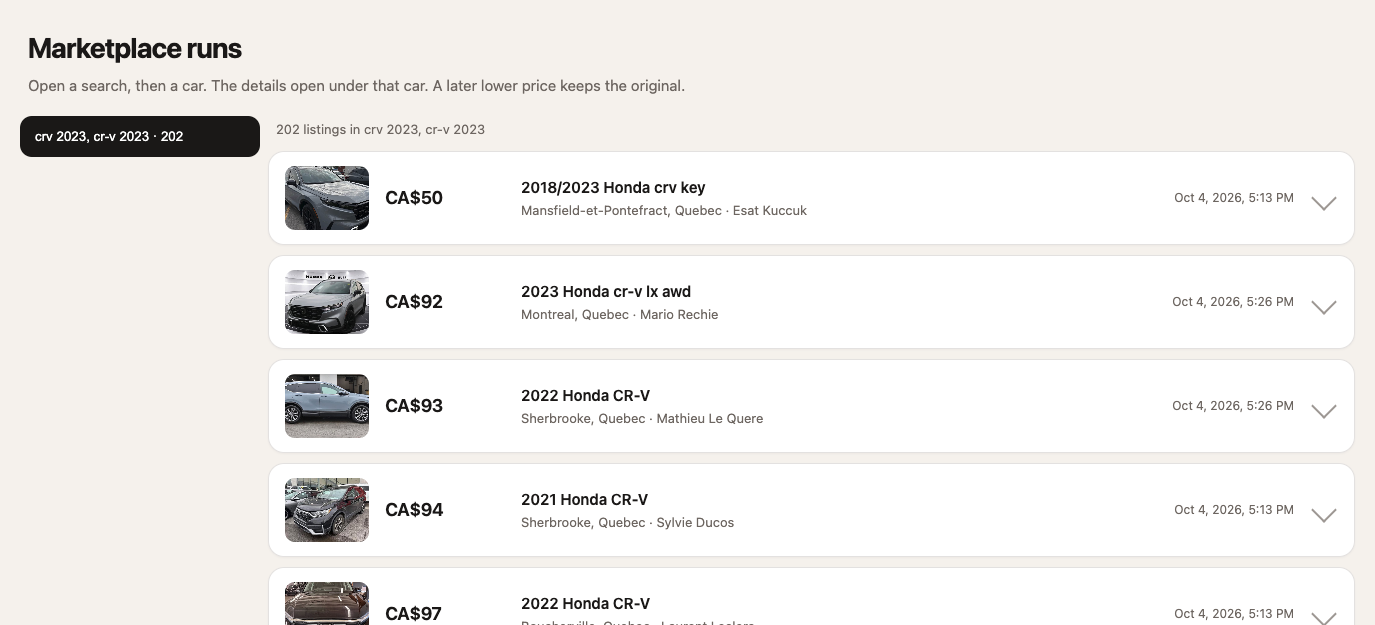
Click a row and the saved Marketplace page opens under that row. Click it again to close it. Only one row stays open.
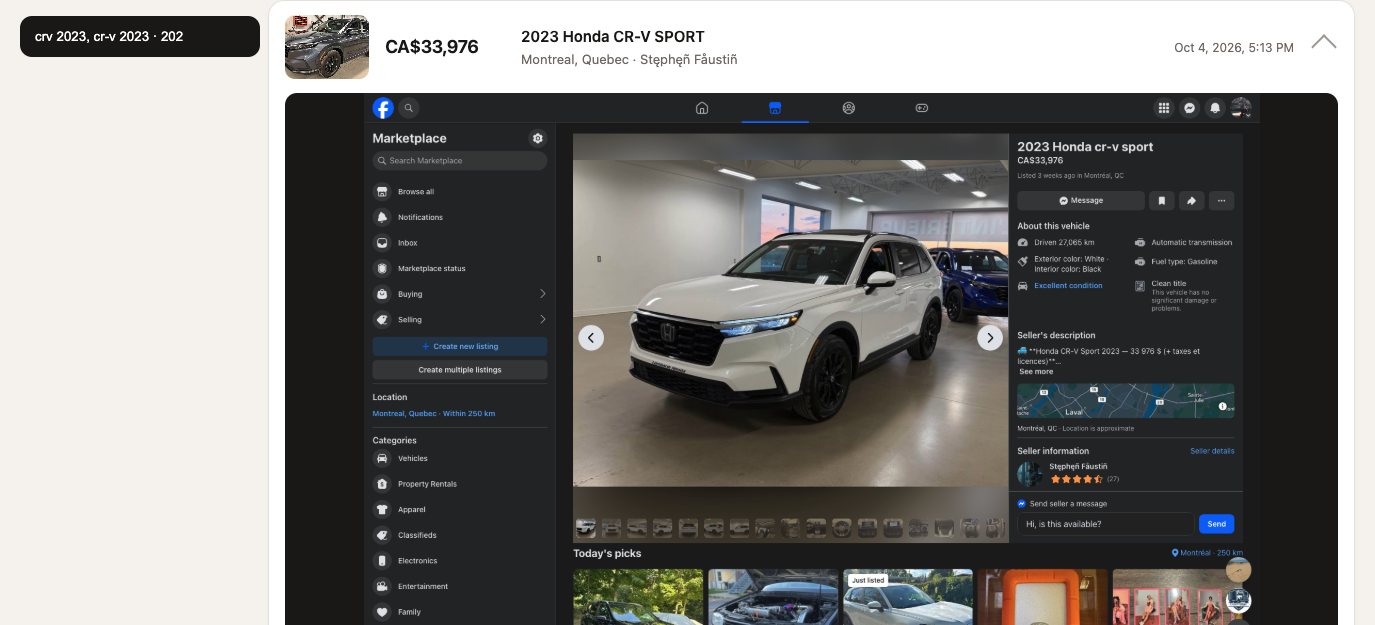
serveServe runs/ on this machine so the listings page can read the JSON files.
facebook-marketplace serve
Open http://127.0.0.1:8767/index.html. --port chooses another port. The process keeps running until it is stopped.
locationResolve a city or town to coordinates.
facebook-marketplace location "Montreal"
Prints name, latitude, and longitude for each match, including Montreal, Quebec. Use a city name such as Montreal. Montreal QC can return no rows.
listingOpen one listing by the id in a search URL (/marketplace/item/<id>/).
facebook-marketplace listing 29168184989452025
Prints the title, price, condition, location, seller, description, and URL.
monitor addSave a search in ~/.fb-marketplace/monitors.json so later checks can show only new ids. Each --query value is stored as its own keyword. The same monitor name updates those keywords instead of creating a second monitor.
facebook-marketplace monitor add crv --query "crv 2023" --query "cr-v 2023" --min-price 20000 --max-price 26000
This saves a monitor named crv that tracks both crv 2023 and cr-v 2023, then combines the rows. --query is required and can be repeated. Running add again with the same name updates those keywords and price bounds. --limit defaults to 250. --category, --latitude, --longitude, and --radius-km match search. The command prints the monitor name, id, and each keyword. It does not search yet.
monitor checkRun each saved search and print listings whose ids were not seen before. Newly seen ids are stored, up to the last 500.
facebook-marketplace monitor check
Checks every monitor. Pass a name to check one:
facebook-marketplace monitor check crv
facebook-marketplace monitor check "hrv, hr-v"
Each block starts with <name>: <count> new, then the same columns as search. A missing name, or no monitors at all, exits 1.
When that check finds new listings, it also sends a Slack message. A plain search does not. A check with nothing new does not. The message is the monitor name, the new count, up to five lines of price, title, and place, and a link to the runs page.
scripts/daily-monitors.sh runs monitor check for every saved monitor. The check rewrites runs/index.json. The script then commits runs/, including runs/index.html, and pushes that folder to fb-marketplace main. index.html loads index.json. A push to main creates a short-lived branch and merges it into gh-pages. GitHub Pages builds the site from gh-pages, so Settings → Pages must use Deploy from a branch, gh-pages, / (root). A day with no listing changes does not commit. A day with nothing new does not send Slack.
The user crontab runs it at 9:00 in the Mac’s local timezone:
0 9 * * * /Users/poboisvert/Desktop/GIT/mrk-agent/server/scripts/daily-monitors.sh
The Mac has to be on and logged in at that time. The check reads Chrome’s Facebook cookies from the Keychain, and cron does not wake a sleeping Mac. Output is appended to ~/Library/Logs/fb-marketplace-daily.log.
Create a Slack app at api.slack.com/apps. Under OAuth & Permissions, add the bot scope chat:write, then install the app to the workspace. Copy the Bot User OAuth Token (xoxb-...). Invite that bot to the channel that should receive alerts, and copy the channel ID from the channel details.
Export the values in the shell that runs facebook-marketplace monitor check or facebook-marketplace-mcp:
export SLACK_BOT_TOKEN="xoxb-your-bot-token"
export SLACK_CHANNEL="C0123456789"
SLACK_BOT_TOKEN and SLACK_CHANNEL are required. SLACK_CHANNEL is the channel ID. A name such as #marketplace also works when the bot is in that channel.
The same names can be written in server/.env. Copy server/.env.example to start. That file is ignored by git. Values already set in the shell are kept. Do not put the token in the repo or in ~/.fb-marketplace/monitors.json. If either value is missing, the check prints Slack skipped: set SLACK_BOT_TOKEN and SLACK_CHANNEL. and still finishes. A Slack error is printed the same way. not_in_channel means the bot has not been invited to that channel.
Confirm the token and channel with:
pytest tests/test_slack_setup.py
The test checks the bot with Slack, then posts one message to SLACK_CHANNEL. It skips when either value is missing.
monitor listShow saved searches without contacting Facebook.
facebook-marketplace monitor list
Each monitor prints its name, price bounds when set, how many listing ids have been seen, and the last check time. Each keyword is printed on its own line under the name:
crv	20000.0-26000.0 seen 0
  crv 2023
  cr-v 2023
monitor deleteRemove one saved search. Seen ids for that name are deleted with it.
facebook-marketplace monitor delete crv
Prints a confirmation. If crv does not exist, the error goes to stderr and the command exits 1.
search_listingsSearch Marketplace by one or more names and price filters.
| Parameter | Type | Required | Description |
|---|---|---|---|
query | string | yes | One or more names, separated by commas (crv 2023, cr-v 2023). Each name is searched and the rows are combined |
latitude | number | yes | Latitude of search center |
longitude | number | yes | Longitude of search center |
radius_km | number | no | Search radius (default: 50). Kept for callers; the search page uses the Chrome account's Marketplace city |
min_price | number | no | Min price in dollars |
max_price | number | no | Max price in dollars |
category | string | no | Category ID |
limit | number | no | Max results per name (default: 20) |
province | string | no | Canadian province or territory (quebec, QC). Drops listings from outside it |
Mileage may be missing on a listing and is not required. A comma-separated query runs one Marketplace search per name and keeps one row per listing id.
get_listingGet full details for a specific listing.
| Parameter | Type | Required | Description |
|---|---|---|---|
listing_id | string | yes | Marketplace listing ID |
search_locationLook up a city or town and return coordinates.
| Parameter | Type | Required | Description |
|---|---|---|---|
query | string | yes | City or town name |
monitor_searchSave a search as a monitor. Commas in query are separate keywords, stored on the monitor and combined on check. Saving the same name again replaces those keywords.
| Parameter | Type | Required | Description |
|---|---|---|---|
name | string | yes | Monitor name |
query | string | yes | One or more names, separated by commas. Checked and combined the same way as search_listings |
latitude | number | yes | Search center lat |
longitude | number | yes | Search center lng |
radius_km | number | no | Radius (default: 50) |
min_price | number | no | Min price |
max_price | number | no | Max price |
province | string | no | Canadian province or territory (quebec, QC) |
check_monitorsCheck monitors for new listings since last check.
| Parameter | Type | Required | Description |
|---|---|---|---|
monitor_name | string | no | Check a specific monitor, or omit for all |
list_monitorsList saved monitors with the keywords stored for each name.
delete_monitorDelete a saved monitor.
Monitors are stored in ~/.fb-marketplace/monitors.json.
| Env Variable | Default | Description |
|---|---|---|
CHROME_PROFILE | Default | Chrome profile directory name |
SLACK_BOT_TOKEN | Slack bot token (xoxb-...). Required to notify on new monitor listings | |
SLACK_CHANNEL | Slack channel ID, or a name such as #marketplace. Required with SLACK_BOT_TOKEN |
The server self-rate-limits to 3 requests/minute with random jitter. Searches take a few seconds.
CLI & MCP server for searching Facebook Marketplace via Chrome session cookies + Slack push
See the codeAn MCP server that provides access to Facebook Marketplace using your existing Chrome Facebook session. Location lookup uses Facebook's GraphQL API. Listing search reads the Marketplace search page for that session.
cd server
python3.12 -m venv .venv
source .venv/bin/activate
pip install -e .
python3 on macOS is often older than 3.11. Use python3.12 or any Python 3.11+ binary.
facebook-marketplace-mcp
Or point an MCP client at the module:
{
  "mcpServers": {
    "facebook-marketplace": {
      "command": "python",
      "args": ["-m", "facebook_marketplace_mcp"],
      "env": {
        "CHROME_PROFILE": "Default"
      }
    }
  }
}
Use the virtualenv's python if the package is not on the default PATH.
facebook-marketplace calls Marketplace directly, without an MCP client or a model turn. Every command accepts --json (print records instead of a table) and --chrome-profile (Chrome profile directory; default CHROME_PROFILE or Default).
Mileage is never required and is not printed. The search page uses the Marketplace city on the logged-in Chrome account. --latitude, --longitude, and --radius-km are stored with a monitor but do not move that search. Omit them and they are saved as 0, 0, and 50.
searchSearch listings and print slug, price, title, location, seller, and url.
facebook-marketplace search "cr-v 2023" --min-price 20000 --max-price 26000
facebook-marketplace search "cr-v 2023" --province quebec
facebook-marketplace search "crv 2023" "cr-v 2023" --province quebec
The first command looks up cr-v 2023 and keeps listings from CA$20,000 through CA$26,000. The second searches the province of Quebec. Facebook is queried from Quebec City with a 650 km radius, then listings outside Quebec are dropped. --province also accepts QC and the other provinces and territories.
Sellers use different wording for the same car. Pass several names, or separate them with commas, and the command searches each name and keeps one row per listing:
facebook-marketplace search "crv 2023, cr-v 2023" --province quebec
Each name returns up to --limit listings. While Facebook reports another page, the search reads at most 10 pages. An empty page is skipped and the next page is still requested. The combined rows are saved in one folder, runs/crv 2023, cr-v 2023/.
| Flag | Default | Meaning |
|---|---|---|
--min-price | none | Lowest price in dollars |
--max-price | none | Highest price in dollars |
--limit | 20 | Maximum rows |
--category | none | Marketplace category ID |
--latitude | 0 | Stored only; not sent as the search center |
--longitude | 0 | Stored only; not sent as the search center |
--radius-km | 50 | Stored only, unless --province is set |
--province | none | Canadian province or territory (quebec, QC). Searches that province and drops listings from outside it |
An empty result prints No listings found and exits 0. A Keychain, cookie, or HTTP failure prints to stderr and exits 1.
Each found item gets a stable slug, slugified-title-<listing id>. The first time a listing id is seen, that slug is kept in ~/.fb-marketplace/catalog.json and reused even if the title changes later. One search name is one folder. Several names share one folder named with those names joined by commas:
server/runs/cr-v 2023/<slug>.json
server/runs/crv 2023, cr-v 2023/<slug>.json
Each item stores created_at, updated_at, original_price, and price. The photo shown when the listing link is opened is saved once, as <slug>.png, and that same file is the thumbnail and the opened image in runs/index.html. The first search sets created_at and updated_at to the same time, and original_price to the price found then. A later search that finds the listing again sets updated_at to that time. A lower price keeps original_price, writes the lower price into price, and sets price_dropped.
Open the saved listings with facebook-marketplace serve, then go to http://127.0.0.1:8767/index.html. The page reads each item JSON, and checks again every 15 seconds. A search updates runs/index.json, the list of those files. listing and monitor check update the same item file.
The list shows each search folder, then the photo, price, title, place, and seller. Listings are cheapest first.
Click a row and the saved Marketplace page opens under that row. Click it again to close it. Only one row stays open.
serveServe runs/ on this machine so the listings page can read the JSON files.
facebook-marketplace serve
Open http://127.0.0.1:8767/index.html. --port chooses another port. The process keeps running until it is stopped.
locationResolve a city or town to coordinates.
facebook-marketplace location "Montreal"
Prints name, latitude, and longitude for each match, including Montreal, Quebec. Use a city name such as Montreal. Montreal QC can return no rows.
listingOpen one listing by the id in a search URL (/marketplace/item/<id>/).
facebook-marketplace listing 29168184989452025
Prints the title, price, condition, location, seller, description, and URL.
monitor addSave a search in ~/.fb-marketplace/monitors.json so later checks can show only new ids. Each --query value is stored as its own keyword. The same monitor name updates those keywords instead of creating a second monitor.
facebook-marketplace monitor add crv --query "crv 2023" --query "cr-v 2023" --min-price 20000 --max-price 26000
This saves a monitor named crv that tracks both crv 2023 and cr-v 2023, then combines the rows. --query is required and can be repeated. Running add again with the same name updates those keywords and price bounds. --limit defaults to 250. --category, --latitude, --longitude, and --radius-km match search. The command prints the monitor name, id, and each keyword. It does not search yet.
monitor checkRun each saved search and print listings whose ids were not seen before. Newly seen ids are stored, up to the last 500.
facebook-marketplace monitor check
Checks every monitor. Pass a name to check one:
facebook-marketplace monitor check crv
facebook-marketplace monitor check "hrv, hr-v"
Each block starts with <name>: <count> new, then the same columns as search. A missing name, or no monitors at all, exits 1.
When that check finds new listings, it also sends a Slack message. A plain search does not. A check with nothing new does not. The message is the monitor name, the new count, up to five lines of price, title, and place, and a link to the runs page.
scripts/daily-monitors.sh runs monitor check for every saved monitor. The check rewrites runs/index.json. The script then commits runs/, including runs/index.html, and pushes that folder to fb-marketplace main. index.html loads index.json. A push to main creates a short-lived branch and merges it into gh-pages. GitHub Pages builds the site from gh-pages, so Settings → Pages must use Deploy from a branch, gh-pages, / (root). A day with no listing changes does not commit. A day with nothing new does not send Slack.
The user crontab runs it at 9:00 in the Mac’s local timezone:
0 9 * * * /Users/poboisvert/Desktop/GIT/mrk-agent/server/scripts/daily-monitors.sh
The Mac has to be on and logged in at that time. The check reads Chrome’s Facebook cookies from the Keychain, and cron does not wake a sleeping Mac. Output is appended to ~/Library/Logs/fb-marketplace-daily.log.
Create a Slack app at api.slack.com/apps. Under OAuth & Permissions, add the bot scope chat:write, then install the app to the workspace. Copy the Bot User OAuth Token (xoxb-...). Invite that bot to the channel that should receive alerts, and copy the channel ID from the channel details.
Export the values in the shell that runs facebook-marketplace monitor check or facebook-marketplace-mcp:
export SLACK_BOT_TOKEN="xoxb-your-bot-token"
export SLACK_CHANNEL="C0123456789"
SLACK_BOT_TOKEN and SLACK_CHANNEL are required. SLACK_CHANNEL is the channel ID. A name such as #marketplace also works when the bot is in that channel.
The same names can be written in server/.env. Copy server/.env.example to start. That file is ignored by git. Values already set in the shell are kept. Do not put the token in the repo or in ~/.fb-marketplace/monitors.json. If either value is missing, the check prints Slack skipped: set SLACK_BOT_TOKEN and SLACK_CHANNEL. and still finishes. A Slack error is printed the same way. not_in_channel means the bot has not been invited to that channel.
Confirm the token and channel with:
pytest tests/test_slack_setup.py
The test checks the bot with Slack, then posts one message to SLACK_CHANNEL. It skips when either value is missing.
monitor listShow saved searches without contacting Facebook.
facebook-marketplace monitor list
Each monitor prints its name, price bounds when set, how many listing ids have been seen, and the last check time. Each keyword is printed on its own line under the name:
crv	20000.0-26000.0 seen 0
  crv 2023
  cr-v 2023
monitor deleteRemove one saved search. Seen ids for that name are deleted with it.
facebook-marketplace monitor delete crv
Prints a confirmation. If crv does not exist, the error goes to stderr and the command exits 1.
search_listingsSearch Marketplace by one or more names and price filters.
| Parameter | Type | Required | Description |
|---|---|---|---|
query | string | yes | One or more names, separated by commas (crv 2023, cr-v 2023). Each name is searched and the rows are combined |
latitude | number | yes | Latitude of search center |
longitude | number | yes | Longitude of search center |
radius_km | number | no | Search radius (default: 50). Kept for callers; the search page uses the Chrome account's Marketplace city |
min_price | number | no | Min price in dollars |
max_price | number | no | Max price in dollars |
category | string | no | Category ID |
limit | number | no | Max results per name (default: 20) |
province | string | no | Canadian province or territory (quebec, QC). Drops listings from outside it |
Mileage may be missing on a listing and is not required. A comma-separated query runs one Marketplace search per name and keeps one row per listing id.
get_listingGet full details for a specific listing.
| Parameter | Type | Required | Description |
|---|---|---|---|
listing_id | string | yes | Marketplace listing ID |
search_locationLook up a city or town and return coordinates.
| Parameter | Type | Required | Description |
|---|---|---|---|
query | string | yes | City or town name |
monitor_searchSave a search as a monitor. Commas in query are separate keywords, stored on the monitor and combined on check. Saving the same name again replaces those keywords.
| Parameter | Type | Required | Description |
|---|---|---|---|
name | string | yes | Monitor name |
query | string | yes | One or more names, separated by commas. Checked and combined the same way as search_listings |
latitude | number | yes | Search center lat |
longitude | number | yes | Search center lng |
radius_km | number | no | Radius (default: 50) |
min_price | number | no | Min price |
max_price | number | no | Max price |
province | string | no | Canadian province or territory (quebec, QC) |
check_monitorsCheck monitors for new listings since last check.
| Parameter | Type | Required | Description |
|---|---|---|---|
monitor_name | string | no | Check a specific monitor, or omit for all |
list_monitorsList saved monitors with the keywords stored for each name.
delete_monitorDelete a saved monitor.
Monitors are stored in ~/.fb-marketplace/monitors.json.
| Env Variable | Default | Description |
|---|---|---|
CHROME_PROFILE | Default | Chrome profile directory name |
SLACK_BOT_TOKEN | Slack bot token (xoxb-...). Required to notify on new monitor listings | |
SLACK_CHANNEL | Slack channel ID, or a name such as #marketplace. Required with SLACK_BOT_TOKEN |
The server self-rate-limits to 3 requests/minute with random jitter. Searches take a few seconds.



