
An ESP32 smart bedside clock with tactile rotary controls, Spotify connect streaming, sunrise lighting, and school calendar sync—100% microphone-free.
C++
4
21 commits
updated Sep 25, 2026
See what people are saying
README
⏰ Reclaim The Day - Spotify Alarm Clock
A distraction-free ESP32-S3 smart bedside clock built for kids and teens. Features physical rotary controls, Spotify Connect streaming, gradual sunrise lighting via Philips Hue, local weather, and school calendar sync—with 100% zero microphones, cameras, or ad screens.


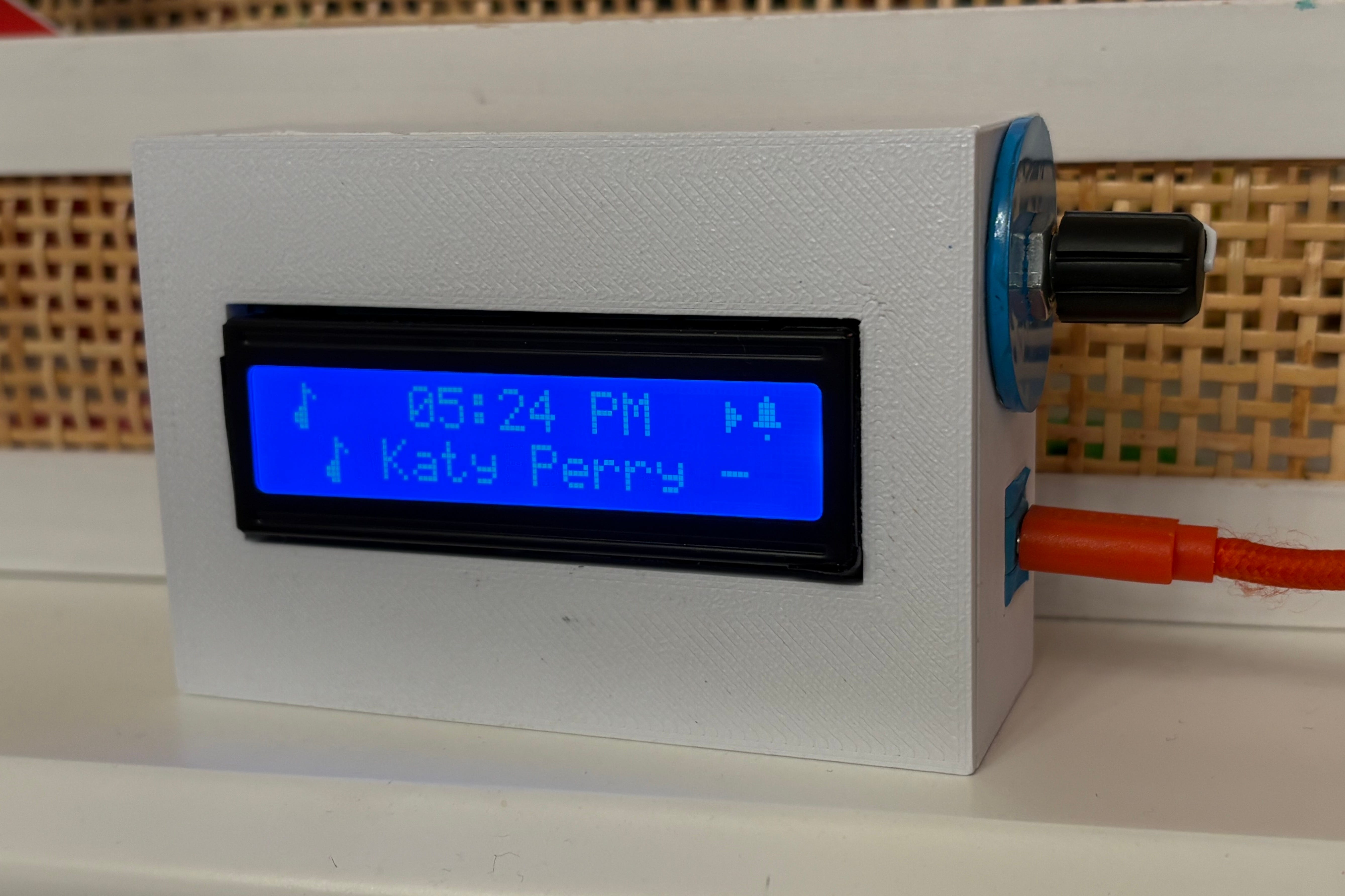
🌟 Story & Overview
Modern bedside gadgets fall into two extremes: cheap plastic that jolt you out of bed, or big-tech smart screens (Echo Show, Nest Hub) with always-listening microphones sitting next to where your child sleeps.
This project offers a sane alternative:
- Tactile Rotary Dial: Turn to scroll screens or volume, tap to play/pause/snooze, double-tap to skip tracks.
- Blue LCD (16x2): Retro-blue backlight that automatically dims at night.
- Privacy by Design: No microphones or cameras.
- Hue Integration: Slowly ramps up soft amber light on bedroom light before the alarm rings.
- Spotify: Connect to Spotify as a music controller and see the Artist and track scroll on the screen.
- Weather & Calendar: Displays Current and Upcoming Weather (+Alerts) and integrate custom ICS Calendars.
- School Calendar Aware: Automatically suppresses alarms on teacher workdays, holidays, and snow delays.
👉 Read the full backstory, kitchen-table build photos, and full parts list at reclaimthe.day/spotify-clock.
🛠️ Hardware Bill of Materials (BOM)
Built using standard off-the-shelf hobbyist components from Adafruit and a pre-made desktop enclosure:
| Component | Part Name | Details | Approx. Price |
|---|---|---|---|
| Microcontroller | Adafruit QT Py ESP32-S3 | Dual-Core 240MHz Wi-Fi/BLE (PID 5426) | $12.50 |
| Audio Amp | Adafruit I2S Amplifier BFF | MAX98357A I2S Class-D Amp (PID 5770) | $4.95 |
| Speaker | 40mm 4-Ohm 3W Speaker | Compact internal speaker (PID 3968) | $4.95 |
| Display | 16x2 Character LCD (Blue) | Retro white-on-blue display (PID 181) | $9.95 |
| LCD Adapter | Adafruit I2C LCD Backpack | 4-wire STEMMA QT adapter (PID 292) | $9.95 |
| Dial Control | Adafruit Rotary Encoder Breakout | I2C Seesaw encoder board (PID 5880) | $7.95 |
| Dial Knob | Soft-Grip Rubber Knob | Tactile rubber knob cap (PID 5093) | $0.75 |
| Cables | STEMMA QT Cables 100mm | Plug-and-play jumper cables (PID 4210) | $1.90 |
| Enclosure | Wezhape 16x2 Desktop Case | Molded desktop case (or 3D print) | $14.00 |
Total Hardware Cost: ~$67.85 ($53.85 if 3D printing your case)
⚡ Hardware Pinout & Architecture
               +----------------------------------+
               |    Adafruit QT Py ESP32-S3       |
               +----------------------------------+
                                 |
           +---------------------+---------------------+
           | STEMMA QT I2C Bus   | I2S Audio Bus       |
           | (SCL: 40 / SDA: 41) | (DIN: 18 / LRC: 17  |
           |                     |  BCLK: 9)           |
           +----------+----------+----------+----------+
                      |                     |
              +-------v-------+     +-------v-------+
              | 1602 LCD      |     | I2S Amp BFF   |
              | Backpack 0x27 |     | (MAX98357A)   |
              +-------+-------+     +-------+-------+
                      |                     |
              +-------v-------+     +-------v-------+
              | Rotary Dial   |     | 40mm Bedside  |
              | Seesaw 0x36   |     | Speaker       |
              +---------------+     +---------------+
🚀 Getting Started & Setup
1. Clone & Setup Configuration
git clone https://github.com/pneedleman/reclaim-spotify-clock.git
cd reclaim-spotify-clock
cp src/secrets.h.example src/secrets.h
2. Configure Your Settings (src/secrets.h & src/config.h)
A. Private Credentials (src/secrets.h)
Edit src/secrets.h with your Wi-Fi and Spotify API keys:
#define SECRET_WIFI_SSID "Your_Home_WiFi"
#define SECRET_WIFI_PASSWORD "Your_WiFi_Password"

#define SECRET_SPOTIFY_CLIENT_ID "your_spotify_client_id"
#define SECRET_SPOTIFY_CLIENT_SECRET "your_spotify_client_secret"
#define SECRET_SPOTIFY_REFRESH_TOKEN "your_spotify_refresh_token"
B. Clock Settings (src/config.h)
Edit src/config.h to set your target playback speaker, timezone, and optional calendar URL:
// Target Spotify playback speaker name
#define DEFAULT_SPOTIFY_DEVICE_NAME "Bedroom Echo"

// Optional: Raw GitHub URL for school calendar JSON sync
#define SCHOOL_CALENDAR_JSON_URL "https://raw.githubusercontent.com/your-user/your-repo/main/school_calendar.json"
3. Build & Flash via PlatformIO
Open the project folder in VSCode with PlatformIO installed, then build and flash:
# Upload Firmware
pio run -t upload

# Upload SPIFFS Audio & Data Assets
pio run -t uploadfs
🔌 Optional Integrations & School Calendar
The clock works out-of-the-box with just Wi-Fi & Spotify credentials. You can optionally enable these integrations:
- School District Calendar Auto-Suppress: The clock automatically suppresses morning alarms on holidays and teacher workdays using
data/school_calendar.json. To convert your school district's.icslink into a clock-ready JSON file, run our 1-line script:python3 scripts/ics_to_json.py <YOUR_SCHOOL_ICS_URL>. See scripts/README.md for details. - Philips Hue Sunrise Lighting: Set
SECRET_HUE_BRIDGE_USERNAMEinsrc/secrets.hto automatically fade up bedroom lights 15 minutes before wake time. - Sinric Pro (Alexa Control): Uncomment the optional Sinric Pro lines in
src/secrets.hif you want to trigger clock alarms via Alexa routines.
🌐 Zero-App Web Dashboard
Access the local web dashboard from any browser on your home network at http://spotify-alarm.local (or via the clock's IP address):
- Live Alarm Configuration: Adjust wake times, gradual volume ramp rates, and school calendar sync.
- Sunrise Simulation: Configure Philips Hue bridge connection and light brightness curves.
- API Config Tab: Update credentials wirelessly over Wi-Fi without re-flashing.
📄 License & Acknowledgments
Distributed under the Creative Commons Attribution-NonCommercial 4.0 International (CC BY-NC 4.0) License. See LICENSE for details. Non-commercial personal builds, home use, and tinkering are warmly welcomed; commercial distribution, manufacturing, and sales are prohibited without prior written permission.
Created by Paul Needleman & daughter at Reclaim The Day. Special thanks to the open-source community behind ESP32-audioI2S, LiquidCrystal_I2C, Adafruit Seesaw, and ArduinoJson.
Contributors

21 commits
Similar repos


Languages
C++
62.9%
HTML
32.5%
C
3.4%
Python
1.2%
An ESP32 smart bedside clock with tactile rotary controls, Spotify connect streaming, sunrise lighting, and school calendar sync—100% microphone-free.
C++
4
21 commits
updated Sep 25, 2026
See what people are saying
README
⏰ Reclaim The Day - Spotify Alarm Clock
A distraction-free ESP32-S3 smart bedside clock built for kids and teens. Features physical rotary controls, Spotify Connect streaming, gradual sunrise lighting via Philips Hue, local weather, and school calendar sync—with 100% zero microphones, cameras, or ad screens.
🌟 Story & Overview
Modern bedside gadgets fall into two extremes: cheap plastic that jolt you out of bed, or big-tech smart screens (Echo Show, Nest Hub) with always-listening microphones sitting next to where your child sleeps.
This project offers a sane alternative:
- Tactile Rotary Dial: Turn to scroll screens or volume, tap to play/pause/snooze, double-tap to skip tracks.
- Blue LCD (16x2): Retro-blue backlight that automatically dims at night.
- Privacy by Design: No microphones or cameras.
- Hue Integration: Slowly ramps up soft amber light on bedroom light before the alarm rings.
- Spotify: Connect to Spotify as a music controller and see the Artist and track scroll on the screen.
- Weather & Calendar: Displays Current and Upcoming Weather (+Alerts) and integrate custom ICS Calendars.
- School Calendar Aware: Automatically suppresses alarms on teacher workdays, holidays, and snow delays.
👉 Read the full backstory, kitchen-table build photos, and full parts list at reclaimthe.day/spotify-clock.
🛠️ Hardware Bill of Materials (BOM)
Built using standard off-the-shelf hobbyist components from Adafruit and a pre-made desktop enclosure:
| Component | Part Name | Details | Approx. Price |
|---|---|---|---|
| Microcontroller | Adafruit QT Py ESP32-S3 | Dual-Core 240MHz Wi-Fi/BLE (PID 5426) | $12.50 |
| Audio Amp | Adafruit I2S Amplifier BFF | MAX98357A I2S Class-D Amp (PID 5770) | $4.95 |
| Speaker | 40mm 4-Ohm 3W Speaker | Compact internal speaker (PID 3968) | $4.95 |
| Display | 16x2 Character LCD (Blue) | Retro white-on-blue display (PID 181) | $9.95 |
| LCD Adapter | Adafruit I2C LCD Backpack | 4-wire STEMMA QT adapter (PID 292) | $9.95 |
| Dial Control | Adafruit Rotary Encoder Breakout | I2C Seesaw encoder board (PID 5880) | $7.95 |
| Dial Knob | Soft-Grip Rubber Knob | Tactile rubber knob cap (PID 5093) | $0.75 |
| Cables | STEMMA QT Cables 100mm | Plug-and-play jumper cables (PID 4210) | $1.90 |
| Enclosure | Wezhape 16x2 Desktop Case | Molded desktop case (or 3D print) | $14.00 |
Total Hardware Cost: ~$67.85 ($53.85 if 3D printing your case)
⚡ Hardware Pinout & Architecture
               +----------------------------------+
               |    Adafruit QT Py ESP32-S3       |
               +----------------------------------+
                                 |
           +---------------------+---------------------+
           | STEMMA QT I2C Bus   | I2S Audio Bus       |
           | (SCL: 40 / SDA: 41) | (DIN: 18 / LRC: 17  |
           |                     |  BCLK: 9)           |
           +----------+----------+----------+----------+
                      |                     |
              +-------v-------+     +-------v-------+
              | 1602 LCD      |     | I2S Amp BFF   |
              | Backpack 0x27 |     | (MAX98357A)   |
              +-------+-------+     +-------+-------+
                      |                     |
              +-------v-------+     +-------v-------+
              | Rotary Dial   |     | 40mm Bedside  |
              | Seesaw 0x36   |     | Speaker       |
              +---------------+     +---------------+
🚀 Getting Started & Setup
1. Clone & Setup Configuration
git clone https://github.com/pneedleman/reclaim-spotify-clock.git
cd reclaim-spotify-clock
cp src/secrets.h.example src/secrets.h
2. Configure Your Settings (src/secrets.h & src/config.h)
A. Private Credentials (src/secrets.h)
Edit src/secrets.h with your Wi-Fi and Spotify API keys:
#define SECRET_WIFI_SSID "Your_Home_WiFi"
#define SECRET_WIFI_PASSWORD "Your_WiFi_Password"

#define SECRET_SPOTIFY_CLIENT_ID "your_spotify_client_id"
#define SECRET_SPOTIFY_CLIENT_SECRET "your_spotify_client_secret"
#define SECRET_SPOTIFY_REFRESH_TOKEN "your_spotify_refresh_token"
B. Clock Settings (src/config.h)
Edit src/config.h to set your target playback speaker, timezone, and optional calendar URL:
// Target Spotify playback speaker name
#define DEFAULT_SPOTIFY_DEVICE_NAME "Bedroom Echo"

// Optional: Raw GitHub URL for school calendar JSON sync
#define SCHOOL_CALENDAR_JSON_URL "https://raw.githubusercontent.com/your-user/your-repo/main/school_calendar.json"
3. Build & Flash via PlatformIO
Open the project folder in VSCode with PlatformIO installed, then build and flash:
# Upload Firmware
pio run -t upload

# Upload SPIFFS Audio & Data Assets
pio run -t uploadfs
🔌 Optional Integrations & School Calendar
The clock works out-of-the-box with just Wi-Fi & Spotify credentials. You can optionally enable these integrations:
- School District Calendar Auto-Suppress: The clock automatically suppresses morning alarms on holidays and teacher workdays using
data/school_calendar.json. To convert your school district's.icslink into a clock-ready JSON file, run our 1-line script:python3 scripts/ics_to_json.py <YOUR_SCHOOL_ICS_URL>. See scripts/README.md for details. - Philips Hue Sunrise Lighting: Set
SECRET_HUE_BRIDGE_USERNAMEinsrc/secrets.hto automatically fade up bedroom lights 15 minutes before wake time. - Sinric Pro (Alexa Control): Uncomment the optional Sinric Pro lines in
src/secrets.hif you want to trigger clock alarms via Alexa routines.
🌐 Zero-App Web Dashboard
Access the local web dashboard from any browser on your home network at http://spotify-alarm.local (or via the clock's IP address):
- Live Alarm Configuration: Adjust wake times, gradual volume ramp rates, and school calendar sync.
- Sunrise Simulation: Configure Philips Hue bridge connection and light brightness curves.
- API Config Tab: Update credentials wirelessly over Wi-Fi without re-flashing.
📄 License & Acknowledgments
Distributed under the Creative Commons Attribution-NonCommercial 4.0 International (CC BY-NC 4.0) License. See LICENSE for details. Non-commercial personal builds, home use, and tinkering are warmly welcomed; commercial distribution, manufacturing, and sales are prohibited without prior written permission.
Created by Paul Needleman & daughter at Reclaim The Day. Special thanks to the open-source community behind ESP32-audioI2S, LiquidCrystal_I2C, Adafruit Seesaw, and ArduinoJson.
Similar repos
Contributors
21 commits
Languages
C++
62.9%
HTML
32.5%
C
3.4%
Python
1.2%