



Start debugging iOS network calls like a wizard, without extra code! Wormholy makes debugging quick and reliable.
Features:
NSURLSession.Alamofire & AFNetworking.ignoredHosts.shakeEnabled property.
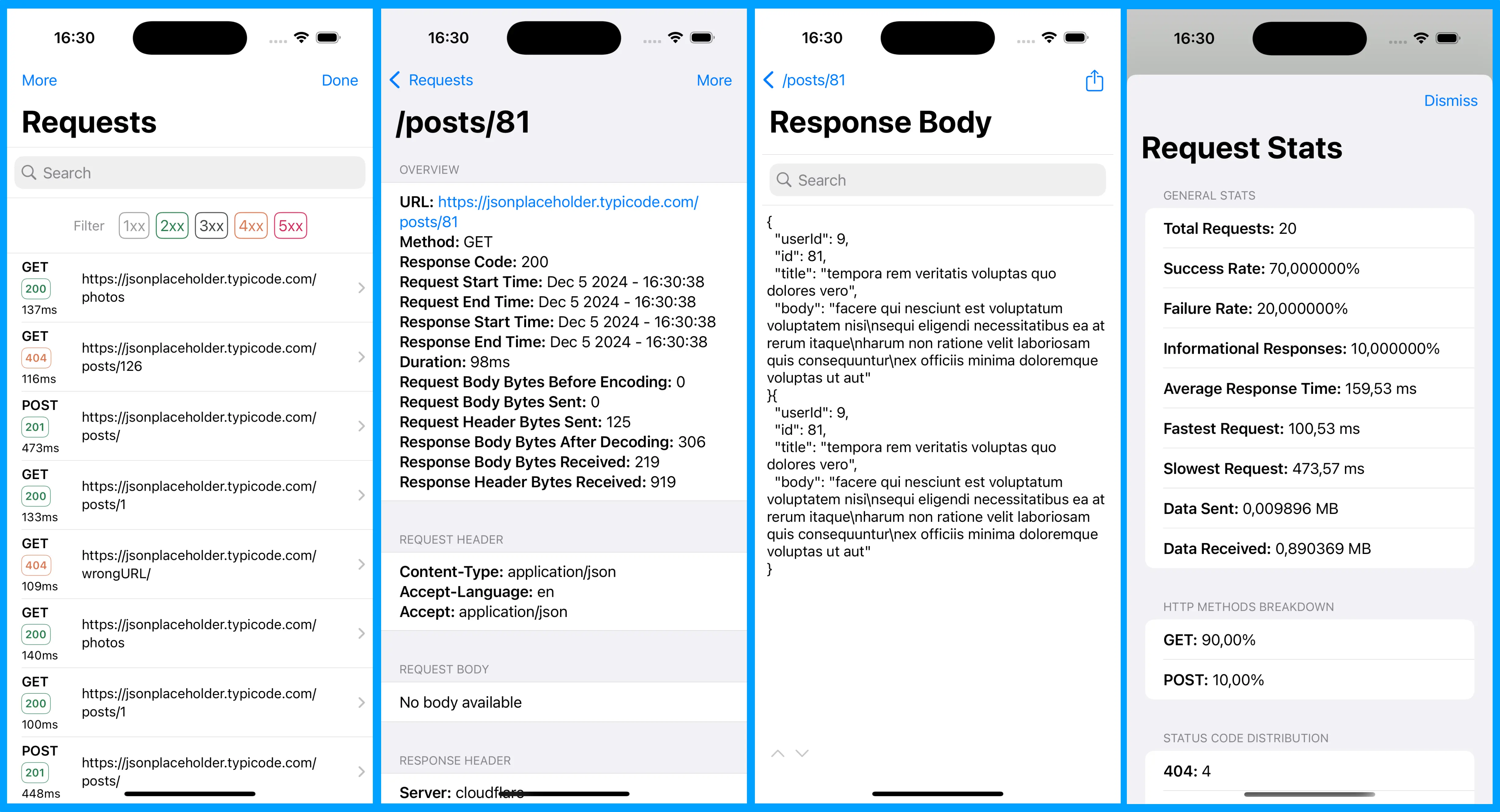
Integrating Wormholy into your project is simple, and it works like magic! Shake your device or simulator to access Wormholy. There's no need to import the library into your code.
It is recommended to install it only in debug mode and not integrate it into production. Please remove it before sending your apps to production. The easiest way to do this is with CocoaPods:
pod 'Wormholy', :configurations => ['Debug']
You can also integrate Wormholy using the Swift Package Manager!
Wormholy.ignoredHosts. This is useful for ignoring traffic to certain domains.Wormholy.limit. This helps manage memory usage by limiting the amount of data stored.Wormholy.defaultFilter to streamline your debugging process.Wormholy.setEnabled(_:) to toggle request tracking globally. You can also enable or disable it for specific URLSessionConfiguration instances using Wormholy.setEnabled(_:sessionConfiguration:).Wormholy.shakeEnabled.Wormholy.isWormholyEnabled() to inspect whether global Wormholy tracking is currently enabled.Wormholy.clearRequests { } to remove all captured network requests from Wormholy's storage. The completion handler is called on the main actor when the clear is done. Objective-C: clearRequestsWithCompletion:.func configureWormholy() {
Wormholy.ignoredHosts = ["example.com", "analytics.internal"]
Wormholy.limit = 200
Wormholy.defaultFilter = "status:500"
Wormholy.shakeEnabled = true
// Global tracking for URLSession traffic.
Wormholy.setEnabled(true)
// Use the session-specific API when you want to override behavior
// for a particular configuration instance.
let configuration = URLSessionConfiguration.default
Wormholy.setEnabled(false, sessionConfiguration: configuration)
let session = URLSession(configuration: configuration)
// Wormholy.clearRequests { // Remove all captured requests at any time
// // requests are now cleared
// }
_ = session
}
Wormholy automatically hooks URLSessionConfiguration.default and URLSessionConfiguration.ephemeral.
Use Wormholy.setEnabled(_:sessionConfiguration:) when you want to explicitly enable or disable Wormholy for a specific configuration instance before creating the URLSession:
let configuration = URLSessionConfiguration.ephemeral
Wormholy.setEnabled(false, sessionConfiguration: configuration)
let session = URLSession(configuration: configuration)
Background sessions are a separate case: Apple does not support custom URLProtocol classes with background URLSessionConfiguration, so Wormholy cannot be injected there via protocolClasses.
Wormholy.ignoredHosts uses suffix matching on the request host.
For example, if you set:
Wormholy.ignoredHosts = ["example.com"]
Wormholy will ignore requests to both example.com and subdomains such as api.example.com.
If you prefer not to use the shake gesture, you can disable it using the environment variable WORMHOLY_SHAKE_ENABLED = NO.
To trigger Wormholy manually from another point in your app without using the shake gesture, post the wormholy_fire notification:
NotificationCenter.default.post(name: NSNotification.Name(rawValue: "wormholy_fire"), object: nil)
By following these steps and configurations, you can effectively integrate Wormholy into your development workflow, enhancing your ability to debug network requests efficiently.
Made with ❤️ by Paolo Musolino.
Follow me on:
Wormholy is available under the MIT license. See the LICENSE file for more information.
(top 24 of 25)
789 followers · starred Oct 2021
207 followers · starred Mar 2019
129 followers · starred Feb 2025
7,873 followers · starred Jul 2018
Start debugging iOS network calls like a wizard, without extra code! Wormholy makes debugging quick and reliable.
Features:
NSURLSession.Alamofire & AFNetworking.ignoredHosts.shakeEnabled property.
Integrating Wormholy into your project is simple, and it works like magic! Shake your device or simulator to access Wormholy. There's no need to import the library into your code.
It is recommended to install it only in debug mode and not integrate it into production. Please remove it before sending your apps to production. The easiest way to do this is with CocoaPods:
pod 'Wormholy', :configurations => ['Debug']
You can also integrate Wormholy using the Swift Package Manager!
Wormholy.ignoredHosts. This is useful for ignoring traffic to certain domains.Wormholy.limit. This helps manage memory usage by limiting the amount of data stored.Wormholy.defaultFilter to streamline your debugging process.Wormholy.setEnabled(_:) to toggle request tracking globally. You can also enable or disable it for specific URLSessionConfiguration instances using Wormholy.setEnabled(_:sessionConfiguration:).Wormholy.shakeEnabled.Wormholy.isWormholyEnabled() to inspect whether global Wormholy tracking is currently enabled.Wormholy.clearRequests { } to remove all captured network requests from Wormholy's storage. The completion handler is called on the main actor when the clear is done. Objective-C: clearRequestsWithCompletion:.func configureWormholy() {
Wormholy.ignoredHosts = ["example.com", "analytics.internal"]
Wormholy.limit = 200
Wormholy.defaultFilter = "status:500"
Wormholy.shakeEnabled = true
// Global tracking for URLSession traffic.
Wormholy.setEnabled(true)
// Use the session-specific API when you want to override behavior
// for a particular configuration instance.
let configuration = URLSessionConfiguration.default
Wormholy.setEnabled(false, sessionConfiguration: configuration)
let session = URLSession(configuration: configuration)
// Wormholy.clearRequests { // Remove all captured requests at any time
// // requests are now cleared
// }
_ = session
}
Wormholy automatically hooks URLSessionConfiguration.default and URLSessionConfiguration.ephemeral.
Use Wormholy.setEnabled(_:sessionConfiguration:) when you want to explicitly enable or disable Wormholy for a specific configuration instance before creating the URLSession:
let configuration = URLSessionConfiguration.ephemeral
Wormholy.setEnabled(false, sessionConfiguration: configuration)
let session = URLSession(configuration: configuration)
Background sessions are a separate case: Apple does not support custom URLProtocol classes with background URLSessionConfiguration, so Wormholy cannot be injected there via protocolClasses.
Wormholy.ignoredHosts uses suffix matching on the request host.
For example, if you set:
Wormholy.ignoredHosts = ["example.com"]
Wormholy will ignore requests to both example.com and subdomains such as api.example.com.
If you prefer not to use the shake gesture, you can disable it using the environment variable WORMHOLY_SHAKE_ENABLED = NO.
To trigger Wormholy manually from another point in your app without using the shake gesture, post the wormholy_fire notification:
NotificationCenter.default.post(name: NSNotification.Name(rawValue: "wormholy_fire"), object: nil)
By following these steps and configurations, you can effectively integrate Wormholy into your development workflow, enhancing your ability to debug network requests efficiently.
Made with ❤️ by Paolo Musolino.
Follow me on:
Wormholy is available under the MIT license. See the LICENSE file for more information.
(top 24 of 25)
789 followers · starred Oct 2021
207 followers · starred Mar 2019
129 followers · starred Feb 2025
7,873 followers · starred Jul 2018