
AWS Cloud Security Posture & Misconfiguration Assessment Engine
See the codeSee what people are saying
README





See your cloud. Secure what matters.
Turn AWS configuration data into clear, actionable security intelligence.

[!NOTE] Plexavo is built around a simple idea: security tooling should tell you what is wrong, why it matters, and what to do next, without requiring a dedicated security team.
Plexavo is an open-source cloud security tool that audits AWS accounts
for real-world misconfigurations, using your own local AWS credentials
the same way aws s3 ls does, so nothing about your account ever
leaves your machine.
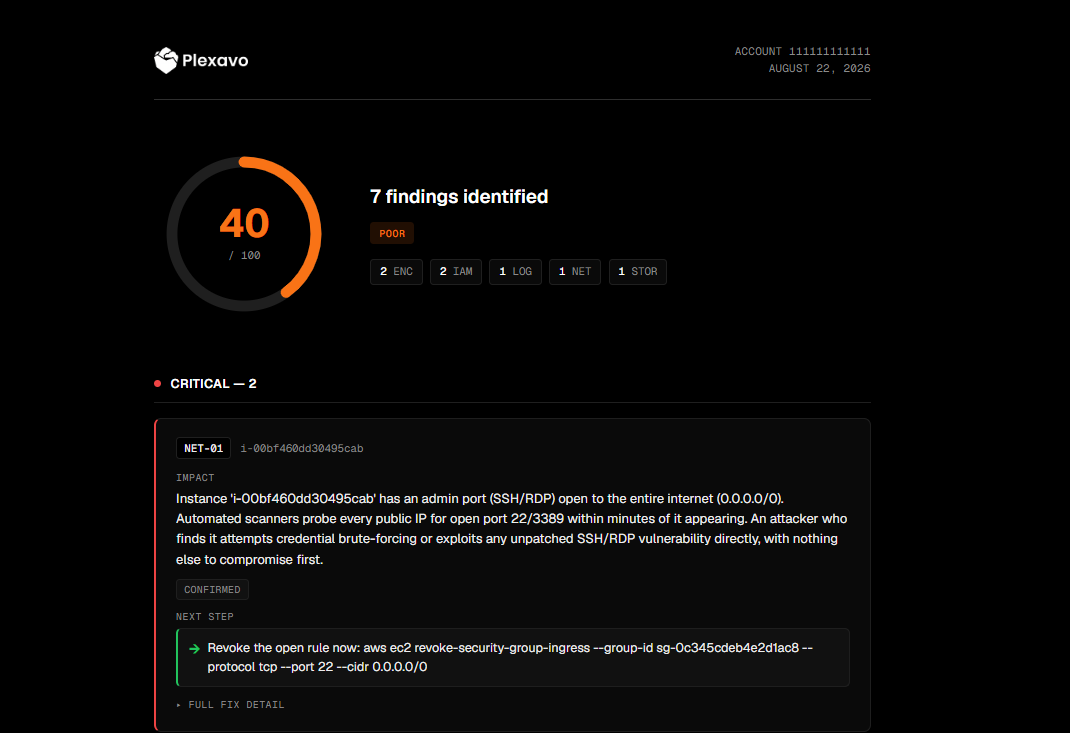
Each scan produces a 0-100 security score and a plain-English report: what's wrong, what an attacker would actually do with it, and the exact command to fix it.
[!IMPORTANT] Detection is not AI. Plexavo's detections are pure Python/boto3; Claude only rewrites already-found findings for readability, and narration is fully optional. See Cost.
[!TIP] 🤖 New: talk to Plexavo through Claude Code. No CLI flags, just ask "scan my AWS account with Plexavo" in a Claude Code session and get a conversational security briefing. See Using it from Claude Code.
What it checks
33 checks across 7 categories, run against real AWS accounts:
| Category | What Plexavo looks for |
|---|---|
| IAM | Privilege escalation paths, wildcard admin, cross-account trust, root usage, dormant credentials |
| Network | Security groups and RDS instances exposed to the internet |
| EC2 Hardening | Instance metadata service (IMDS) not requiring IMDSv2 - the setting behind the 2019 Capital One breach |
| Storage | Public S3 buckets via ACLs, bucket policies, or missing Block Public Access; buckets with no access logging |
| Encryption | Unencrypted EBS volumes, RDS instances, S3 buckets |
| Logging | CloudTrail coverage and encryption, GuardDuty status |
| Usage | Permissions granted but never used, roles nobody has assumed in 90+ days |
See docs/*-TEST-MATRIX.md for how each check was verified.
[!TIP] Don't just trust the number. Plexavo keeps severity, confidence, and evidence as separate signals, so a low-confidence Critical does not read the same as a high-confidence Medium.
How Plexavo works
AWS account
     ↓
Plexavo deterministic checks
     ↓
Evidence + findings
     ↓
Severity / confidence / remediation
     ↓
HTML / PDF report
     ↓
Optional AI narration
The checks alone decide what counts as a finding. AI is optional and only helps explain results that already exist.
Installation
Every path below installs Plexavo into its own isolated environment.
macOS & Linux
curl -LsSf https://astral.sh/uv/install.sh | sh   # skip if you have uv
uv tool install plexavo
Prefer pipx? pipx install plexavo works the
same way.
Windows
uv/pipx still work, but the PATH launcher is unsigned and Windows
Smart App Control blocks it. Run Plexavo through Python instead:
Option 1, uv (recommended)
uv tool install plexavo
Set-ExecutionPolicy -Scope CurrentUser RemoteSigned
if (!(Test-Path $PROFILE)) { New-Item -ItemType File -Path $PROFILE -Force }
Add-Content $PROFILE 'function plexavo { & "$env:APPDATA\uv\tools\plexavo\Scripts\python.exe" -m plexavo @args }'
Open a new terminal. plexavo now works like it does on macOS/Linux,
routed through uv's signed Python instead of the blocked launcher.
Option 2, plain venv
py -m venv plexavo-venv
.\plexavo-venv\Scripts\Activate.ps1
python -m pip install plexavo
python -m plexavo
Use python -m for everything here too. The venv's own pip.exe and
plexavo.exe are unsigned as well, only python.exe is signed.
AI narration (optional)
Want each finding rewritten as a full narrative? Install "plexavo[ai]"
instead of plexavo, and set ANTHROPIC_API_KEY. See Cost.
Using Plexavo
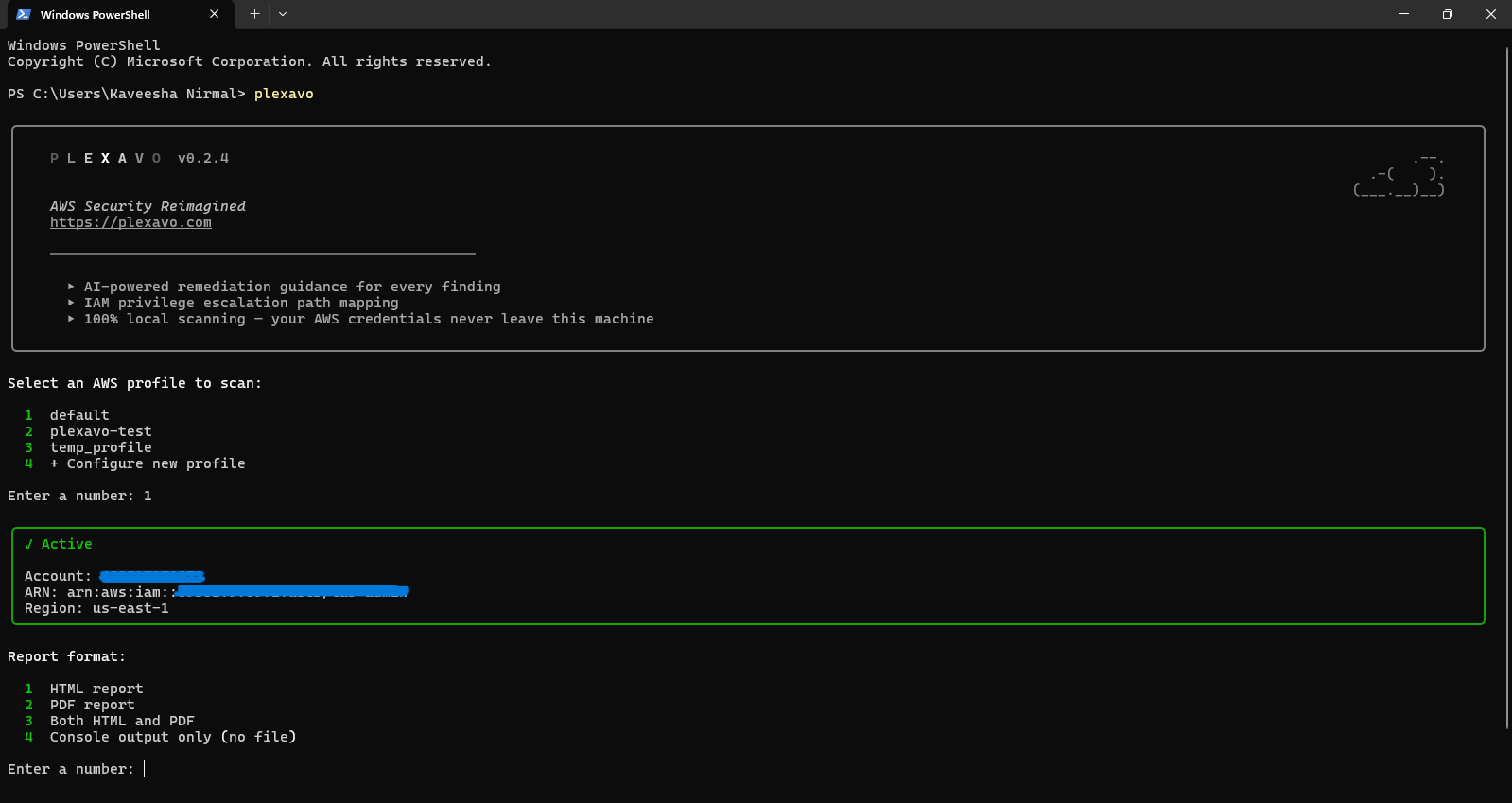
Run it with no arguments and it walks you through everything: picking an AWS profile, choosing HTML or PDF, then scanning and showing your score with every finding.
plexavo             # macOS/Linux, and Windows Option 1
python -m plexavo   # Windows Option 2
The report
Reports are generated as HTML, PDF, or both. Every finding gets a free,
template-based fix by default, no key, no cost. Full AI-written
narration kicks in automatically once an ANTHROPIC_API_KEY is
detected, see Cost.
Cost
Detection and the free templates always cost nothing. Live AI only runs
with --explain, using your own ANTHROPIC_API_KEY in your own
Anthropic account.
Plexavo never sees your key and never calls the API without it. A full
scan with --explain typically costs a few cents.
[!IMPORTANT] No hidden AI bill. If you don't provide an Anthropic API key, Plexavo does not make an AI API call.
Using it from Claude Code
Using Claude Code? Install the
plexavo-scan plugin, then just ask: "scan my AWS account for security
issues using Plexavo." It relays exactly what Plexavo found, shows
Plexavo's own fix commands word for word, and never runs one itself: you
do. It only reads your AWS profile names, never your credentials. Don't
have Plexavo installed yet? It notices, and with a click on a yes/no
choice at each step installs uv and Plexavo for you, including the Windows
Smart App Control workaround.
/plugin marketplace add plexavo/Plexavo
/plugin install plexavo-scan@plexavo
Prefer not to add a marketplace? Save
plexavo-scan/SKILL.md
to ~/.claude/skills/plexavo-scan/SKILL.md
(%USERPROFILE%\.claude\skills\plexavo-scan\SKILL.md on Windows) instead,
same skill, just without automatic updates.
Running it on a schedule
Plexavo can also run unattended from cron or a GitHub Actions workflow,
and flag a run when something regresses so you get notified without
opening a report. See docs/automation.md.
[!NOTE] Think of a scan as a snapshot, not a finish line. Run it repeatedly to catch regressions as your infrastructure changes.
Want to help?
You don't need to understand the whole codebase to contribute.
There are several ways to help:
- Break Plexavo: find a security blind spot or confusing result
- Add a security check: extend Plexavo's AWS coverage
- Improve test coverage: add or strengthen a test
- Improve documentation: make Plexavo easier to understand
- Suggest an improvement: tell us what would make a scan more useful
[!TIP] First contribution? Start with issues labeled
good first issue. Not sure where to start? Open an issue or comment on an existing one. You don't need to figure out the codebase alone.
Pick a way to contribute
| If you are... | You can... |
|---|---|
| A security researcher | Break Plexavo / report a blind spot |
| A Python developer | Add a check or improve existing logic |
| A cloud engineer | Test Plexavo against real AWS setups |
| A tester | Reproduce bugs and improve test coverage |
| A technical writer | Improve docs and examples |
| Just curious | Run a scan and tell us what was confusing |
You don't need to be a Plexavo expert.
Break Plexavo
Security tools should be challenged.
Run Plexavo and tell us if you find:
- a security issue Plexavo misses
- a false positive
- a misleading severity
- incorrect remediation
- confusing report output
- an AWS resource Plexavo doesn't understand
- a case where the evidence isn't clear
You don't need to write code. If you find something useful, open an issue and explain what happened.
Every confirmed, genuinely new finding gets fixed and shipped, and you get a permanent credit in the Hall of Bugs. Check the "what doesn't count" list there first, since some gaps are already documented.
No bounty. Public credit only.
[!TIP] The best security tool is one that gets challenged. If you find a blind spot, break it, report it, and help make the next scan better.
Contributing code
Ready to write code? CONTRIBUTING.md covers setup,
the pattern for adding a new check, and how to run the tests.
Security
Found a vulnerability in the tool itself, not a misconfiguration in your own AWS account (that's the tool working correctly)?
See SECURITY.md for a private reporting path.
License
AGPL-3.0, see LICENSE.
Use, run, and modify it freely. If you run a modified version as a hosted service, you're required to publish those modifications too.
Plexavo · Open-source cloud security, built to be understood.
Scan. Understand. Fix. Repeat.
Similar repos


Languages
Python
61.9%
Jinja
38.1%
AWS Cloud Security Posture & Misconfiguration Assessment Engine
See the codeSee what people are saying
README
See your cloud. Secure what matters.
Turn AWS configuration data into clear, actionable security intelligence.
[!NOTE] Plexavo is built around a simple idea: security tooling should tell you what is wrong, why it matters, and what to do next, without requiring a dedicated security team.
Plexavo is an open-source cloud security tool that audits AWS accounts
for real-world misconfigurations, using your own local AWS credentials
the same way aws s3 ls does, so nothing about your account ever
leaves your machine.
Each scan produces a 0-100 security score and a plain-English report: what's wrong, what an attacker would actually do with it, and the exact command to fix it.
[!IMPORTANT] Detection is not AI. Plexavo's detections are pure Python/boto3; Claude only rewrites already-found findings for readability, and narration is fully optional. See Cost.
[!TIP] 🤖 New: talk to Plexavo through Claude Code. No CLI flags, just ask "scan my AWS account with Plexavo" in a Claude Code session and get a conversational security briefing. See Using it from Claude Code.
What it checks
33 checks across 7 categories, run against real AWS accounts:
| Category | What Plexavo looks for |
|---|---|
| IAM | Privilege escalation paths, wildcard admin, cross-account trust, root usage, dormant credentials |
| Network | Security groups and RDS instances exposed to the internet |
| EC2 Hardening | Instance metadata service (IMDS) not requiring IMDSv2 - the setting behind the 2019 Capital One breach |
| Storage | Public S3 buckets via ACLs, bucket policies, or missing Block Public Access; buckets with no access logging |
| Encryption | Unencrypted EBS volumes, RDS instances, S3 buckets |
| Logging | CloudTrail coverage and encryption, GuardDuty status |
| Usage | Permissions granted but never used, roles nobody has assumed in 90+ days |
See docs/*-TEST-MATRIX.md for how each check was verified.
[!TIP] Don't just trust the number. Plexavo keeps severity, confidence, and evidence as separate signals, so a low-confidence Critical does not read the same as a high-confidence Medium.
How Plexavo works
AWS account
     ↓
Plexavo deterministic checks
     ↓
Evidence + findings
     ↓
Severity / confidence / remediation
     ↓
HTML / PDF report
     ↓
Optional AI narration
The checks alone decide what counts as a finding. AI is optional and only helps explain results that already exist.
Installation
Every path below installs Plexavo into its own isolated environment.
macOS & Linux
curl -LsSf https://astral.sh/uv/install.sh | sh   # skip if you have uv
uv tool install plexavo
Prefer pipx? pipx install plexavo works the
same way.
Windows
uv/pipx still work, but the PATH launcher is unsigned and Windows
Smart App Control blocks it. Run Plexavo through Python instead:
Option 1, uv (recommended)
uv tool install plexavo
Set-ExecutionPolicy -Scope CurrentUser RemoteSigned
if (!(Test-Path $PROFILE)) { New-Item -ItemType File -Path $PROFILE -Force }
Add-Content $PROFILE 'function plexavo { & "$env:APPDATA\uv\tools\plexavo\Scripts\python.exe" -m plexavo @args }'
Open a new terminal. plexavo now works like it does on macOS/Linux,
routed through uv's signed Python instead of the blocked launcher.
Option 2, plain venv
py -m venv plexavo-venv
.\plexavo-venv\Scripts\Activate.ps1
python -m pip install plexavo
python -m plexavo
Use python -m for everything here too. The venv's own pip.exe and
plexavo.exe are unsigned as well, only python.exe is signed.
AI narration (optional)
Want each finding rewritten as a full narrative? Install "plexavo[ai]"
instead of plexavo, and set ANTHROPIC_API_KEY. See Cost.
Using Plexavo
Run it with no arguments and it walks you through everything: picking an AWS profile, choosing HTML or PDF, then scanning and showing your score with every finding.
plexavo             # macOS/Linux, and Windows Option 1
python -m plexavo   # Windows Option 2
The report
Reports are generated as HTML, PDF, or both. Every finding gets a free,
template-based fix by default, no key, no cost. Full AI-written
narration kicks in automatically once an ANTHROPIC_API_KEY is
detected, see Cost.
Cost
Detection and the free templates always cost nothing. Live AI only runs
with --explain, using your own ANTHROPIC_API_KEY in your own
Anthropic account.
Plexavo never sees your key and never calls the API without it. A full
scan with --explain typically costs a few cents.
[!IMPORTANT] No hidden AI bill. If you don't provide an Anthropic API key, Plexavo does not make an AI API call.
Using it from Claude Code
Using Claude Code? Install the
plexavo-scan plugin, then just ask: "scan my AWS account for security
issues using Plexavo." It relays exactly what Plexavo found, shows
Plexavo's own fix commands word for word, and never runs one itself: you
do. It only reads your AWS profile names, never your credentials. Don't
have Plexavo installed yet? It notices, and with a click on a yes/no
choice at each step installs uv and Plexavo for you, including the Windows
Smart App Control workaround.
/plugin marketplace add plexavo/Plexavo
/plugin install plexavo-scan@plexavo
Prefer not to add a marketplace? Save
plexavo-scan/SKILL.md
to ~/.claude/skills/plexavo-scan/SKILL.md
(%USERPROFILE%\.claude\skills\plexavo-scan\SKILL.md on Windows) instead,
same skill, just without automatic updates.
Running it on a schedule
Plexavo can also run unattended from cron or a GitHub Actions workflow,
and flag a run when something regresses so you get notified without
opening a report. See docs/automation.md.
[!NOTE] Think of a scan as a snapshot, not a finish line. Run it repeatedly to catch regressions as your infrastructure changes.
Want to help?
You don't need to understand the whole codebase to contribute.
There are several ways to help:
- Break Plexavo: find a security blind spot or confusing result
- Add a security check: extend Plexavo's AWS coverage
- Improve test coverage: add or strengthen a test
- Improve documentation: make Plexavo easier to understand
- Suggest an improvement: tell us what would make a scan more useful
[!TIP] First contribution? Start with issues labeled
good first issue. Not sure where to start? Open an issue or comment on an existing one. You don't need to figure out the codebase alone.
Pick a way to contribute
| If you are... | You can... |
|---|---|
| A security researcher | Break Plexavo / report a blind spot |
| A Python developer | Add a check or improve existing logic |
| A cloud engineer | Test Plexavo against real AWS setups |
| A tester | Reproduce bugs and improve test coverage |
| A technical writer | Improve docs and examples |
| Just curious | Run a scan and tell us what was confusing |
You don't need to be a Plexavo expert.
Break Plexavo
Security tools should be challenged.
Run Plexavo and tell us if you find:
- a security issue Plexavo misses
- a false positive
- a misleading severity
- incorrect remediation
- confusing report output
- an AWS resource Plexavo doesn't understand
- a case where the evidence isn't clear
You don't need to write code. If you find something useful, open an issue and explain what happened.
Every confirmed, genuinely new finding gets fixed and shipped, and you get a permanent credit in the Hall of Bugs. Check the "what doesn't count" list there first, since some gaps are already documented.
No bounty. Public credit only.
[!TIP] The best security tool is one that gets challenged. If you find a blind spot, break it, report it, and help make the next scan better.
Contributing code
Ready to write code? CONTRIBUTING.md covers setup,
the pattern for adding a new check, and how to run the tests.
Security
Found a vulnerability in the tool itself, not a misconfiguration in your own AWS account (that's the tool working correctly)?
See SECURITY.md for a private reporting path.
License
AGPL-3.0, see LICENSE.
Use, run, and modify it freely. If you run a modified version as a hosted service, you're required to publish those modifications too.
Plexavo · Open-source cloud security, built to be understood.
Scan. Understand. Fix. Repeat.
Similar repos
Languages
Python
61.9%
Jinja
38.1%