
A small desktop pet built with Godot that chills on your screen and doubles as a Spotify player.
C#
0
12 commits
updated Sep 18, 2026
See what people are saying (1)
README
BelPet
Bel is a small desktop pet that just chills and plays spotify songs for you :D
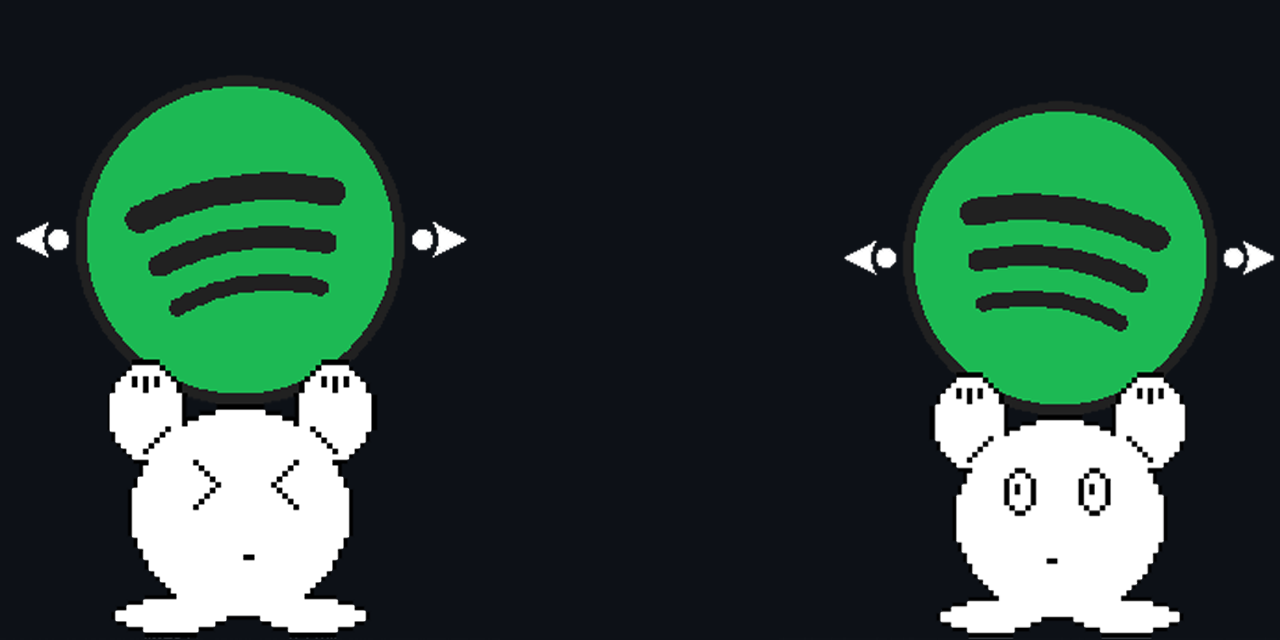
Features
- Spotify playback integration
- Play and pause music
- Skip and return to tracks
- Scroll on Bel to control Spotify volume
- Skip to different parts of the song
- Drag Bel around your desktop
Built With
- Godot 4 (C#)
- Spotify Web API
- Spotify Web Playback SDK
- godot_wry
Spotify Limitations
Spotify Premium is required to use BelPet. This is required regardless of whether BelPet or another device is the active Spotify player.
BelPet has been tested with multiple Spotify Premium accounts. All Spotify functionality works when BelPet is selected as the active Spotify playback device.
However, due to Spotify's API development restrictions, BelPet will not be able to access or control playback when another Spotify device is active.
If you want BelPet to work while another device, such as your phone, desktop app, or Web Player, is the active player, you can create your own Spotify application and use your own Client ID.
BelPet was designed to support this and can monitor and control playback even when it is not the active player. However, this functionality uses the Spotify Web API, which means the Spotify account must be added as an authorized user of my developer application. Since I cannot manually authorize every person who downloads BelPet, the public build cannot provide this functionality for everyone.
Using your own Spotify application and Client ID avoids this issue, as you can authorize your own Spotify account for your application.
Note: BelPet has only been tested with a very small number of Spotify accounts. Spotify also imposes limits on applications in Development Mode, so I cannot guarantee that the pre-built version will work for every account.
Using Your Own Client ID
If BelPet does not work with your account, or you want to use BelPet while another Spotify device is the active player:
- Create your own application through the Spotify Developer Dashboard at https://developer.spotify.com.
- Copy the Client ID provided by Spotify.
- Open
SpotifyAuth.cs. - Replace the existing
clientIdwith your own Client ID. - Build and run the project.
BelPet will then authenticate using your own Spotify application instead.
Download
Pre-built versions of BelPet are available under Releases.
For the simplest setup, use BelPet as your active Spotify playback device. Using BelPet to monitor or control playback from another active Spotify device may require your own Spotify Client ID.
Getting Started
To start using BelPet, first open Spotify on another device, such as the desktop app, mobile app, or Web Player.
Start playing a song, then open Spotify's device selection menu and transfer playback to BelPet.
Once BelPet is the active playback device, BelPet will be able to access all of its functionalities.
BelPet cannot start playback on its own if there is no active Spotify session, so make sure Spotify is already active on another device first.
Controls
| Action | Control |
|---|---|
| Move Bel | Click and drag Bel |
| Volume | Scroll over Bel |
| Play / Pause | Click album artwork |
| Seek | Click around the progress ring |
| Previous Track | Left side button |
| Next Track | Right side button |
How It Works
BelPet combines Spotify's Web API with the Web Playback SDK to act as a Spotify Connect playback device.
When BelPet is the active Spotify player, playback state and controls are handled directly through the Web Playback SDK.
When another Spotify device is active instead, BelPet switches to a polling system that periodically calls the Spotify Web API to retrieve the current track, playback progress, volume, and playback state. This allows BelPet's UI to stay mostly synchronized even when music is playing from another device.
License
This project is licensed under the MIT License. See the LICENSE file for details.
Contributors

12 commits
Similar repos


Languages
C#
49.3%
HTML
26.1%
Svelte
11.9%
GDScript
5.1%
GDShader
3.8%
JavaScript
2.3%
A small desktop pet built with Godot that chills on your screen and doubles as a Spotify player.
C#
0
12 commits
updated Sep 18, 2026
See what people are saying (1)
README
BelPet
Bel is a small desktop pet that just chills and plays spotify songs for you :D
Features
- Spotify playback integration
- Play and pause music
- Skip and return to tracks
- Scroll on Bel to control Spotify volume
- Skip to different parts of the song
- Drag Bel around your desktop
Built With
- Godot 4 (C#)
- Spotify Web API
- Spotify Web Playback SDK
- godot_wry
Spotify Limitations
Spotify Premium is required to use BelPet. This is required regardless of whether BelPet or another device is the active Spotify player.
BelPet has been tested with multiple Spotify Premium accounts. All Spotify functionality works when BelPet is selected as the active Spotify playback device.
However, due to Spotify's API development restrictions, BelPet will not be able to access or control playback when another Spotify device is active.
If you want BelPet to work while another device, such as your phone, desktop app, or Web Player, is the active player, you can create your own Spotify application and use your own Client ID.
BelPet was designed to support this and can monitor and control playback even when it is not the active player. However, this functionality uses the Spotify Web API, which means the Spotify account must be added as an authorized user of my developer application. Since I cannot manually authorize every person who downloads BelPet, the public build cannot provide this functionality for everyone.
Using your own Spotify application and Client ID avoids this issue, as you can authorize your own Spotify account for your application.
Note: BelPet has only been tested with a very small number of Spotify accounts. Spotify also imposes limits on applications in Development Mode, so I cannot guarantee that the pre-built version will work for every account.
Using Your Own Client ID
If BelPet does not work with your account, or you want to use BelPet while another Spotify device is the active player:
- Create your own application through the Spotify Developer Dashboard at https://developer.spotify.com.
- Copy the Client ID provided by Spotify.
- Open
SpotifyAuth.cs. - Replace the existing
clientIdwith your own Client ID. - Build and run the project.
BelPet will then authenticate using your own Spotify application instead.
Download
Pre-built versions of BelPet are available under Releases.
For the simplest setup, use BelPet as your active Spotify playback device. Using BelPet to monitor or control playback from another active Spotify device may require your own Spotify Client ID.
Getting Started
To start using BelPet, first open Spotify on another device, such as the desktop app, mobile app, or Web Player.
Start playing a song, then open Spotify's device selection menu and transfer playback to BelPet.
Once BelPet is the active playback device, BelPet will be able to access all of its functionalities.
BelPet cannot start playback on its own if there is no active Spotify session, so make sure Spotify is already active on another device first.
Controls
| Action | Control |
|---|---|
| Move Bel | Click and drag Bel |
| Volume | Scroll over Bel |
| Play / Pause | Click album artwork |
| Seek | Click around the progress ring |
| Previous Track | Left side button |
| Next Track | Right side button |
How It Works
BelPet combines Spotify's Web API with the Web Playback SDK to act as a Spotify Connect playback device.
When BelPet is the active Spotify player, playback state and controls are handled directly through the Web Playback SDK.
When another Spotify device is active instead, BelPet switches to a polling system that periodically calls the Spotify Web API to retrieve the current track, playback progress, volume, and playback state. This allows BelPet's UI to stay mostly synchronized even when music is playing from another device.
License
This project is licensed under the MIT License. See the LICENSE file for details.
Similar repos
Contributors
12 commits
Languages
C#
49.3%
HTML
26.1%
Svelte
11.9%
GDScript
5.1%
GDShader
3.8%
JavaScript
2.3%