
:question: Git hook to catch placeholders and temporary changes (TODO / @ignore) before you commit or push them.
400
stars
44
commits
Shell
primary language
Feb 24, 2026
updated
README
git-confirm 
Git hooks to catch placeholders and temporary changes before you commit or push them.
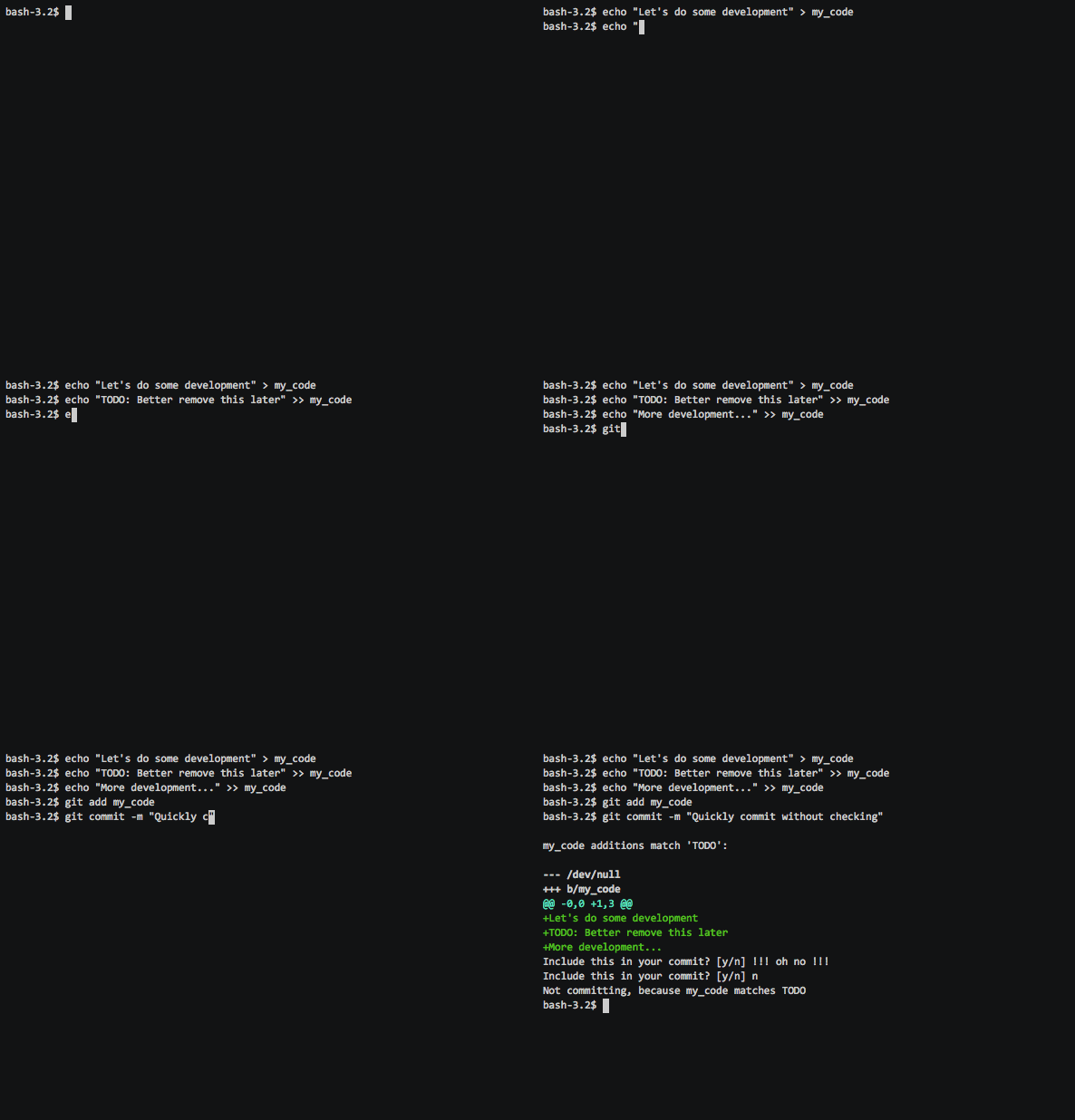
Git Confirm:
- Stops you accidentally committing bad temporary changes (TODOs, debug logs, skipped tests) by checking the diff on commit.
- Stops you accidentally pushing temporary commits (WIP/fixup messages) by checking each commit message individually.
- Is interactive, checking each match with you so you can't miss it (and can still commit/push it regardless, if you're sure).
- Pre-commit hook: only checks new lines, so no false positives, with diff-colorized context in the output.
- Pre-push hook: scans all commit messages between the remote & local branches before each push.
- Installs in any project with a single command
- Is configurable to match any number of strings, through standard git config
- Is well tested. See tests/test-hook.bats.
- Works on Linux, OSX and Windows (in Powershell at least), with no dependencies.
To Install
Pre-commit hook
Catches patterns in staged file diffs before you commit. In the root of your Git repository, run:
curl -sSfL https://raw.githubusercontent.com/pimterry/git-confirm/v0.3.0/hook.sh > .git/hooks/pre-commit && chmod +x .git/hooks/pre-commit
All done. If you want to check it's installed correctly you can run:
echo "TODO" > ./test-git-confirm
git add ./test-git-confirm

# Should prompt you to confirm added 'TODO'. Press 'n' to cancel commit.
git commit -m "Testing git confirm"
Pre-push hook
Catches temporary commits (WIP, fixup, squash) before you push. In the root of your Git repository, run:
curl -sSfL https://raw.githubusercontent.com/pimterry/git-confirm/v0.3.0/push-hook.sh > .git/hooks/pre-push && chmod +x .git/hooks/pre-push
You can install either or both hooks independently.
To Configure
Pre-commit hook
By default, the pre-commit hook will catch and warn about lines including 'TODO' only.
If you want to match a different pattern, you can override this default and set your own patterns:
git config --add hooks.confirm.match "TODO"
Matches are passed verbatim to your local grep, and are treated as regular expressions. Note that all matches are case-sensitive.
You can repeatedly add patterns, and each of them will be matched in turn. To get, remove or totally clear your config, use the standard Git Config commands:
git config --get-all hooks.confirm.match
git config --unset hooks.confirm.match 'TODO'
git config --unset-all hooks.confirm.match
Pre-push hook
By default, the pre-push hook catches commit messages matching ^WIP, ^fixup, and ^squash. All matches are case-insensitive.
To set your own patterns (replacing the defaults):
git config --add hooks.confirm-push.match "^WIP"
git config --add hooks.confirm-push.match "^fixup"
git config --add hooks.confirm-push.match "DONOTPUSH"
Manage patterns with standard Git Config commands:
git config --get-all hooks.confirm-push.match
git config --unset hooks.confirm-push.match '^WIP'
git config --unset-all hooks.confirm-push.match
Protected branches
By default, the pre-push hook checks all branches. If you only want to check specific branches (e.g. to allow pushing WIP commits to feature branches for CI), you can configure protected branches:
git config --add hooks.confirm-push.protected-branch "main"
git config --add hooks.confirm-push.protected-branch "master"
When protected branches are configured, only pushes to those branches are checked. Tag pushes are always checked regardless of this setting.
Contributing
Want to file a bug? That's great! Please search issues first though to check it hasn't already been filed, and provide as much information as you can (your OS, terminal and Git-Confirm version as a minimum).
Want to help improve Git-Confirm?
-
Check out the project:
git clone --recursive https://github.com/pimterry/git-confirm.git(Note 'recursive' - this ensures submodules are included)
-
Check the tests pass locally:
./test.sh -
Add tests for your change in test/test-hook.bats
Check out the BATS documentation if you're not familiar with it, or just crib from the existing tests.
-
Add any documentation required to this README.
-
Commit and push your changes
-
Open a PR!
Need any ideas? Take a look at the Git Confirm issues to quickly see the next features to look at.
Release process
- Make changes
- Update Curl version number and hash (
md5 ./hook.sh) in README. - Commit everything
- Tag with new version numbers (
git tag vX.Y.Z) - Push including tags (
git push origin --tags)
Contributors


Similar repos


Languages
Shell
100.0%
:question: Git hook to catch placeholders and temporary changes (TODO / @ignore) before you commit or push them.
400
stars
44
commits
Shell
primary language
Feb 24, 2026
updated
README
git-confirm
Git hooks to catch placeholders and temporary changes before you commit or push them.
Git Confirm:
- Stops you accidentally committing bad temporary changes (TODOs, debug logs, skipped tests) by checking the diff on commit.
- Stops you accidentally pushing temporary commits (WIP/fixup messages) by checking each commit message individually.
- Is interactive, checking each match with you so you can't miss it (and can still commit/push it regardless, if you're sure).
- Pre-commit hook: only checks new lines, so no false positives, with diff-colorized context in the output.
- Pre-push hook: scans all commit messages between the remote & local branches before each push.
- Installs in any project with a single command
- Is configurable to match any number of strings, through standard git config
- Is well tested. See tests/test-hook.bats.
- Works on Linux, OSX and Windows (in Powershell at least), with no dependencies.
To Install
Pre-commit hook
Catches patterns in staged file diffs before you commit. In the root of your Git repository, run:
curl -sSfL https://raw.githubusercontent.com/pimterry/git-confirm/v0.3.0/hook.sh > .git/hooks/pre-commit && chmod +x .git/hooks/pre-commit
All done. If you want to check it's installed correctly you can run:
echo "TODO" > ./test-git-confirm
git add ./test-git-confirm

# Should prompt you to confirm added 'TODO'. Press 'n' to cancel commit.
git commit -m "Testing git confirm"
Pre-push hook
Catches temporary commits (WIP, fixup, squash) before you push. In the root of your Git repository, run:
curl -sSfL https://raw.githubusercontent.com/pimterry/git-confirm/v0.3.0/push-hook.sh > .git/hooks/pre-push && chmod +x .git/hooks/pre-push
You can install either or both hooks independently.
To Configure
Pre-commit hook
By default, the pre-commit hook will catch and warn about lines including 'TODO' only.
If you want to match a different pattern, you can override this default and set your own patterns:
git config --add hooks.confirm.match "TODO"
Matches are passed verbatim to your local grep, and are treated as regular expressions. Note that all matches are case-sensitive.
You can repeatedly add patterns, and each of them will be matched in turn. To get, remove or totally clear your config, use the standard Git Config commands:
git config --get-all hooks.confirm.match
git config --unset hooks.confirm.match 'TODO'
git config --unset-all hooks.confirm.match
Pre-push hook
By default, the pre-push hook catches commit messages matching ^WIP, ^fixup, and ^squash. All matches are case-insensitive.
To set your own patterns (replacing the defaults):
git config --add hooks.confirm-push.match "^WIP"
git config --add hooks.confirm-push.match "^fixup"
git config --add hooks.confirm-push.match "DONOTPUSH"
Manage patterns with standard Git Config commands:
git config --get-all hooks.confirm-push.match
git config --unset hooks.confirm-push.match '^WIP'
git config --unset-all hooks.confirm-push.match
Protected branches
By default, the pre-push hook checks all branches. If you only want to check specific branches (e.g. to allow pushing WIP commits to feature branches for CI), you can configure protected branches:
git config --add hooks.confirm-push.protected-branch "main"
git config --add hooks.confirm-push.protected-branch "master"
When protected branches are configured, only pushes to those branches are checked. Tag pushes are always checked regardless of this setting.
Contributing
Want to file a bug? That's great! Please search issues first though to check it hasn't already been filed, and provide as much information as you can (your OS, terminal and Git-Confirm version as a minimum).
Want to help improve Git-Confirm?
-
Check out the project:
git clone --recursive https://github.com/pimterry/git-confirm.git(Note 'recursive' - this ensures submodules are included)
-
Check the tests pass locally:
./test.sh -
Add tests for your change in test/test-hook.bats
Check out the BATS documentation if you're not familiar with it, or just crib from the existing tests.
-
Add any documentation required to this README.
-
Commit and push your changes
-
Open a PR!
Need any ideas? Take a look at the Git Confirm issues to quickly see the next features to look at.
Release process
- Make changes
- Update Curl version number and hash (
md5 ./hook.sh) in README. - Commit everything
- Tag with new version numbers (
git tag vX.Y.Z) - Push including tags (
git push origin --tags)
Similar repos
Contributors
Languages
Shell
100.0%