
Browser TTS with zero cloud. Kokoro, Kitten, SpeechT5, MMS — 9 languages, runs offline once loaded.
See the codeREADME
Yapper 🔊


Browser text-to-speech with zero cloud. Kokoro, Kitten, SpeechT5, and MMS-TTS run entirely in your browser. No cloud processing. No data sent anywhere. Models load once, then everything runs locally on your device via WebGPU (or WASM fallback).
Note on performance: Kokoro and Kitten are registered through
WorkerBackedEngine(src/engines/worker-bridge.ts→inference-worker.ts), so load/generate for those models run off the main thread and the UI stays responsive while a job is in progress. SpeechT5 and MMS-TTS still run on the main thread via Transformers.js — selecting one shows an in-app warning that generation may briefly freeze the page, and a liveness indicator runs in the queue while any job generates. The non-blocking queue lets you stack multiple jobs either way.
Quick start
- Open the live demo (or run
npm run devlocally). - Pick a model:
- Kokoro-82M (q8f16) — best quality, 28 selectable English voices (US + British, male + female), ~86 MB
- Kokoro-82M (fp16) — same voices, higher fidelity, ~163 MB
- Kitten TTS Mini — balanced quality, 8 voices, ~78 MB
- Kitten TTS Nano — fastest / smallest, 8 voices, ~24 MB
- SpeechT5 — ~330 MB, multi-voice via xvector embeddings
- MMS-TTS — ~50 MB each, 9 languages (see Features)
- Click Download & Load Model (one-time per model; cached after).
- Type or paste text, adjust speed, hit Add to queue (or
Ctrl/Cmd+Enter). - Drop a PDF, DOCX, DOC, ODT, RTF, EPUB, XLSX, PPTX, CSV, HTML, TXT, or Markdown file into the document reader to listen hands-free. For scanned PDFs, enable the OCR toggle (Tesseract or Florence-2 LLM).
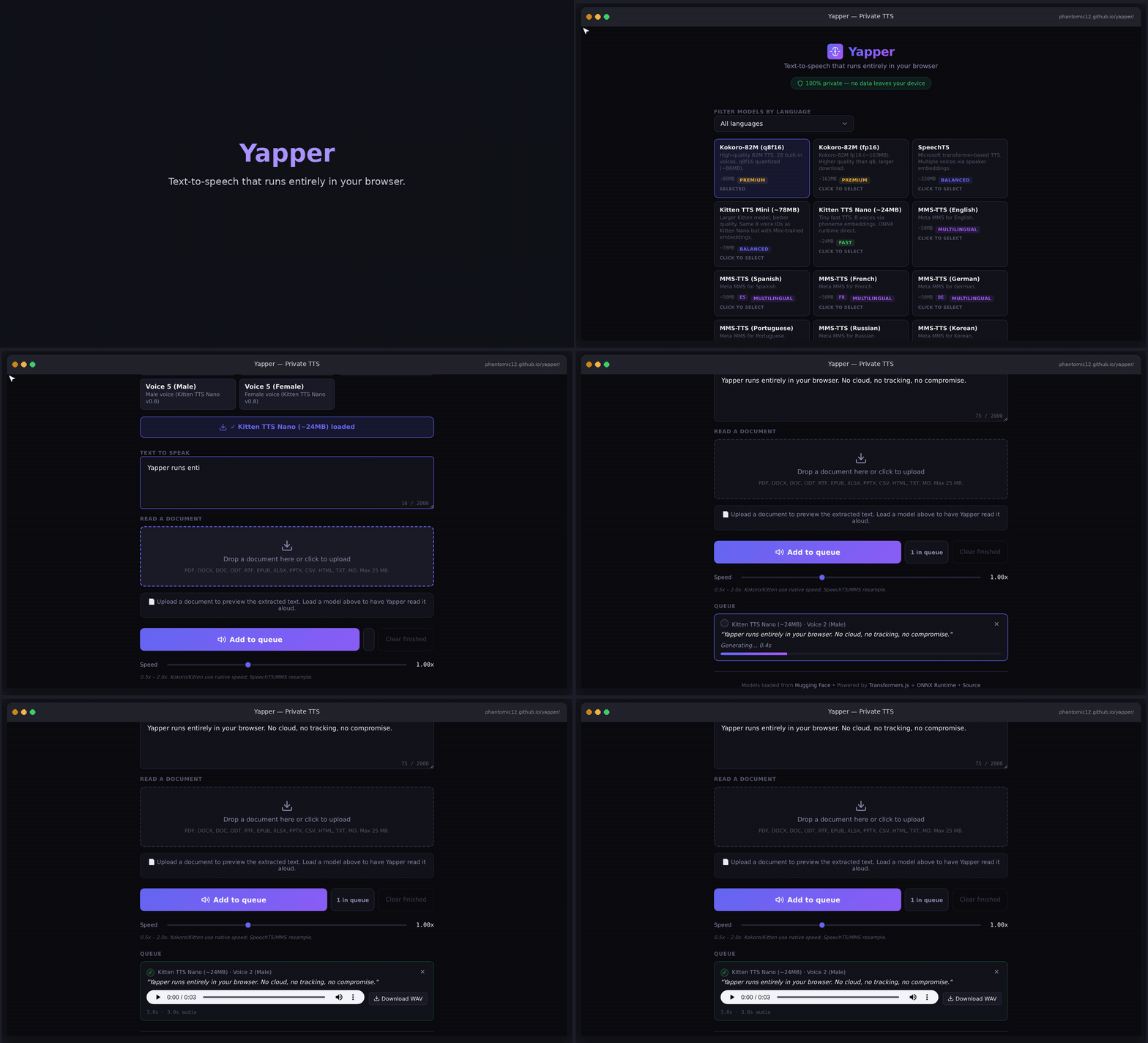
A live demo (pick a model → load → queue a sample → audio plays):
MP4 version: docs/demo.mp4 (1080p, better quality). Static stills: landing · audio playing.
To regenerate the animated demo (
docs/demo.gif+docs/demo.mp4):python3 scripts/capture_demo_v3.pyfrom the project root (needsplaywright install chromium,numpy,pillow, andffmpegonPATH). The script drives the live demo site, animates a real TTS flow, wraps frames in a fake browser chrome, and writes GIF/MP4 underOUT_DIR(default./out— copy intodocs/). The "loaded" state may be synthesized in headless capture because large ONNX downloads + CORS can fail there; the real flow works in a normal browser.Still screenshots only:
npm run demo:capturerunsscripts/capture_demo.pyand writes PNGs toscripts/demo-shots/.
Features
- 100% local inference — text never leaves your browser
- WebGPU acceleration — GPU-accelerated when available, WASM fallback otherwise
- Models
- Kokoro-82M in q8f16 (~86 MB) and fp16 (~163 MB) — shared HF repo, different
modelFile/ dtype; 28 voices exposed in the picker - Kitten TTS Mini (~78 MB) and Nano (~24 MB) — 8 voices, ONNX Runtime Web
- SpeechT5 (~330 MB, fp32) — multi-voice via 512-dim xvector speaker embeddings
- MMS-TTS (~50 MB each) — Meta's multilingual model for 9 languages (English, Spanish, French, German, Portuguese, Russian, Korean, Hindi, Arabic)
- Kokoro-82M in q8f16 (~86 MB) and fp16 (~163 MB) — shared HF repo, different
- Off-thread Kokoro / Kitten —
WorkerBackedEnginekeeps the page usable during those generations - Read documents aloud — drop PDF / DOCX / ODT / EPUB / TXT / MD; text is extracted locally and fed to the reader session + TTS queue
- Optional PDF OCR — toggle OCR for scanned/layout pages (Tesseract.js). Self-hosted worker, WASM core, and English traineddata live under
public/lib/tesseract/ - Non-blocking queue — stack multiple generations
- Voice selection — built-in voices per model, or a custom xvector for SpeechT5
- Keyboard accessible controls — skip links, focus indicators, ARIA live regions
- Models from Hugging Face — loaded on demand, cached by the browser
- WAV download — save generated audio as standard WAV files
- Dark mode UI — minimal, fast, no frameworks
Supported document formats
Active path: src/document-reader.ts → src/reader.ts (DocumentReaderSession).
| Format | Support | Notes |
|---|---|---|
| text + optional OCR | Text layer first; enable Use OCR for scanned PDFs for layout/OCR blocks | |
| DOCX | text | word/document.xml via JSZip |
| DOC | text | Legacy Word format via binary text extraction (UTF-16LE/Latin-1 scan) |
| ODT | text | Zipped ODF text extraction |
| RTF | text | RTF control-word stripping to plain text |
| EPUB | text | HTML spine text extraction |
| XLSX | text | Spreadsheet cell text via JSZip |
| PPTX | text | Presentation slide text via JSZip |
| CSV | text | Comma-separated values parsed to rows |
| HTML | text | HTML tag-stripped body text |
| TXT | text | Plain UTF-8 |
| MD | text | Read as text (markup left for the reader to handle lightly) |
PDF extraction is capped at 500 pages by default (MAX_PDF_PAGES) to avoid tab OOMs.
Supported browsers
Verified in the automated cross-browser QA pass (2026-08-23) — see docs/qa-matrix.md for the full matrix, timings, and raw results.
| Browser | Backend | Result | Notes |
|---|---|---|---|
| Chromium 151 / Chrome 124+ | WebGPU | ✅ all checks | Model load + generation in single-digit seconds |
| Microsoft Edge 151 | WebGPU | ✅ all checks | |
| Firefox 153 | WASM fallback | ✅ all checks | First generation slower; later ones comparable |
| WebKitGTK 2.48 | WASM fallback | ✅ all checks | Closest available stand-in for Safari |
| Chromium, mobile viewport | WebGPU | ✅ all checks | 390×844 (iPhone 13-class) viewport |
Every column passes the same 7-step checklist: app loads, model select, download & load, generate + audio, WAV download, document reader (TXT + PDF), clean console. Real Safari (macOS/iOS) wasn't reachable from the QA host — WebKitGTK is the proxy; other mobile viewports were not tested.
PDF extraction (pdfjs 6) additionally requires Promise.try — Chrome/Edge
128+, Firefox 134+, Safari 18.3+. Older engines can still use every other
format; the reader panel shows an explanatory message instead of a broken
spinner.
Tech Stack
- Transformers.js — SpeechT5 + MMS-TTS in the browser
- ONNX Runtime Web — WebGPU/WASM backend (Kitten; also used under Kokoro)
- kokoro-js — Kokoro-82M integration
- pdfjs-dist, epubjs, jszip — document parsing
- tesseract.js — client-side OCR (assets under
public/lib/tesseract/) - Vite — build tooling
- TypeScript, vanilla CSS — no framework overhead
Architecture (short)
| Module | Role |
|---|---|
src/main.ts | UI wiring, model registration, document upload |
src/engine.ts | TTSEngine, MODELS, queue, WAV encode, speed |
src/engines/ | Kokoro, Kitten, WorkerBackedEngine, inference worker |
src/document-reader.ts | File → plain text (+ optional PDF OCR layout blocks) |
src/reader.ts | Reading session, chunking, sentence/word highlight |
src/events.ts | Typed engine.on() lifecycle events |
public/sw.js | App-shell PWA cache (not model weights) |
See docs/architecture.md for a one-screen map.
Development
npm install
npm run dev
Useful scripts: npm test, npm run test:links, npm run lint, npm run typecheck, npm run build.
GPU testing
Unit tests + build + link-health (npm test, npm run test:links) run in CI on GitHub-hosted runners. The GPU smoke test goes further: on Kaggle's free GPU tier it launches headed Chromium over Xvfb and verifies real WebGPU inference end-to-end — navigator.gpu adapter available, model downloaded and loaded, and a full generate() round-trip that produces playable audio.
The workflow (.github/workflows/gpu-smoke.yml) pushes the kernel script to Kaggle via the official kaggle CLI, polls until the kernel finishes, downloads its output, and gates the run on gpu-smoke-report.json: green requires WebGPU available + model load done + generation done with positive audio duration. Anything else — including missing or broken credentials, or a skipped generation — fails loudly. The kernel always tests the ref that triggered the run (PR merge commit, release tag, or branch).
- Schedule: weekly, Sunday 06:00 UTC; also on release publish and manual dispatch
- Credentials: repo secret
KAGGLE_API_TOKEN= raw contents ofkaggle.json({"username": ..., "key": ...}) - Manual dispatch has a
break_tokeninput that corrupts the token on purpose, proving the run still fails loudly instead of skipping green - Every run attaches its report JSON + probe screenshots as the
gpu-smoke-kaggle-outputartifact - Kernel script:
.github/scripts/gpu_smoke_kaggle.py
Local equivalent:
bash scripts/capture-gif.sh                                          # docker demo capture helper
docker run --rm --gpus all -v $(pwd)/out:/capture/out \
    --entrypoint python3 yapper-gif-capture \
    /capture/gpu_smoke_test.py --model kitten-nano                   # GPU probe
Build
npm run build
# Output in dist/
Privacy
- All text-to-speech inference and document parsing run in your browser
- Model files download from Hugging Face and are cached locally
- OCR assets (worker, WASM core,
eng.traineddata) ship underpublic/lib/tesseract/for on-device use - No analytics, no tracking, no server-side processing of your text
- Uploaded files are read locally in the tab; they are not uploaded to a Yapper backend
Document reading
- Drop a file on the upload zone (or click to browse). Max 25 MB in the UI.
- Optionally enable Use OCR for scanned PDFs before extract.
- Review extracted text in the reader view.
- Read document queues chunks through the loaded model; the active sentence is highlighted as audio plays.
Unsupported types error clearly: PDF, DOCX, DOC, ODT, RTF, EPUB, XLSX, PPTX, CSV, HTML, TXT, MD only on the active path.
License
MIT
Contributors


Similar repos


Languages
TypeScript
58.2%
Python
27.3%
JavaScript
6.1%
CSS
6.0%
Shell
1.3%
Browser TTS with zero cloud. Kokoro, Kitten, SpeechT5, MMS — 9 languages, runs offline once loaded.
See the codeREADME
Yapper 🔊
Browser text-to-speech with zero cloud. Kokoro, Kitten, SpeechT5, and MMS-TTS run entirely in your browser. No cloud processing. No data sent anywhere. Models load once, then everything runs locally on your device via WebGPU (or WASM fallback).
Note on performance: Kokoro and Kitten are registered through
WorkerBackedEngine(src/engines/worker-bridge.ts→inference-worker.ts), so load/generate for those models run off the main thread and the UI stays responsive while a job is in progress. SpeechT5 and MMS-TTS still run on the main thread via Transformers.js — selecting one shows an in-app warning that generation may briefly freeze the page, and a liveness indicator runs in the queue while any job generates. The non-blocking queue lets you stack multiple jobs either way.
Quick start
- Open the live demo (or run
npm run devlocally). - Pick a model:
- Kokoro-82M (q8f16) — best quality, 28 selectable English voices (US + British, male + female), ~86 MB
- Kokoro-82M (fp16) — same voices, higher fidelity, ~163 MB
- Kitten TTS Mini — balanced quality, 8 voices, ~78 MB
- Kitten TTS Nano — fastest / smallest, 8 voices, ~24 MB
- SpeechT5 — ~330 MB, multi-voice via xvector embeddings
- MMS-TTS — ~50 MB each, 9 languages (see Features)
- Click Download & Load Model (one-time per model; cached after).
- Type or paste text, adjust speed, hit Add to queue (or
Ctrl/Cmd+Enter). - Drop a PDF, DOCX, DOC, ODT, RTF, EPUB, XLSX, PPTX, CSV, HTML, TXT, or Markdown file into the document reader to listen hands-free. For scanned PDFs, enable the OCR toggle (Tesseract or Florence-2 LLM).
A live demo (pick a model → load → queue a sample → audio plays):
MP4 version: docs/demo.mp4 (1080p, better quality). Static stills: landing · audio playing.
To regenerate the animated demo (
docs/demo.gif+docs/demo.mp4):python3 scripts/capture_demo_v3.pyfrom the project root (needsplaywright install chromium,numpy,pillow, andffmpegonPATH). The script drives the live demo site, animates a real TTS flow, wraps frames in a fake browser chrome, and writes GIF/MP4 underOUT_DIR(default./out— copy intodocs/). The "loaded" state may be synthesized in headless capture because large ONNX downloads + CORS can fail there; the real flow works in a normal browser.Still screenshots only:
npm run demo:capturerunsscripts/capture_demo.pyand writes PNGs toscripts/demo-shots/.
Features
- 100% local inference — text never leaves your browser
- WebGPU acceleration — GPU-accelerated when available, WASM fallback otherwise
- Models
- Kokoro-82M in q8f16 (~86 MB) and fp16 (~163 MB) — shared HF repo, different
modelFile/ dtype; 28 voices exposed in the picker - Kitten TTS Mini (~78 MB) and Nano (~24 MB) — 8 voices, ONNX Runtime Web
- SpeechT5 (~330 MB, fp32) — multi-voice via 512-dim xvector speaker embeddings
- MMS-TTS (~50 MB each) — Meta's multilingual model for 9 languages (English, Spanish, French, German, Portuguese, Russian, Korean, Hindi, Arabic)
- Kokoro-82M in q8f16 (~86 MB) and fp16 (~163 MB) — shared HF repo, different
- Off-thread Kokoro / Kitten —
WorkerBackedEnginekeeps the page usable during those generations - Read documents aloud — drop PDF / DOCX / ODT / EPUB / TXT / MD; text is extracted locally and fed to the reader session + TTS queue
- Optional PDF OCR — toggle OCR for scanned/layout pages (Tesseract.js). Self-hosted worker, WASM core, and English traineddata live under
public/lib/tesseract/ - Non-blocking queue — stack multiple generations
- Voice selection — built-in voices per model, or a custom xvector for SpeechT5
- Keyboard accessible controls — skip links, focus indicators, ARIA live regions
- Models from Hugging Face — loaded on demand, cached by the browser
- WAV download — save generated audio as standard WAV files
- Dark mode UI — minimal, fast, no frameworks
Supported document formats
Active path: src/document-reader.ts → src/reader.ts (DocumentReaderSession).
| Format | Support | Notes |
|---|---|---|
| text + optional OCR | Text layer first; enable Use OCR for scanned PDFs for layout/OCR blocks | |
| DOCX | text | word/document.xml via JSZip |
| DOC | text | Legacy Word format via binary text extraction (UTF-16LE/Latin-1 scan) |
| ODT | text | Zipped ODF text extraction |
| RTF | text | RTF control-word stripping to plain text |
| EPUB | text | HTML spine text extraction |
| XLSX | text | Spreadsheet cell text via JSZip |
| PPTX | text | Presentation slide text via JSZip |
| CSV | text | Comma-separated values parsed to rows |
| HTML | text | HTML tag-stripped body text |
| TXT | text | Plain UTF-8 |
| MD | text | Read as text (markup left for the reader to handle lightly) |
PDF extraction is capped at 500 pages by default (MAX_PDF_PAGES) to avoid tab OOMs.
Supported browsers
Verified in the automated cross-browser QA pass (2026-08-23) — see docs/qa-matrix.md for the full matrix, timings, and raw results.
| Browser | Backend | Result | Notes |
|---|---|---|---|
| Chromium 151 / Chrome 124+ | WebGPU | ✅ all checks | Model load + generation in single-digit seconds |
| Microsoft Edge 151 | WebGPU | ✅ all checks | |
| Firefox 153 | WASM fallback | ✅ all checks | First generation slower; later ones comparable |
| WebKitGTK 2.48 | WASM fallback | ✅ all checks | Closest available stand-in for Safari |
| Chromium, mobile viewport | WebGPU | ✅ all checks | 390×844 (iPhone 13-class) viewport |
Every column passes the same 7-step checklist: app loads, model select, download & load, generate + audio, WAV download, document reader (TXT + PDF), clean console. Real Safari (macOS/iOS) wasn't reachable from the QA host — WebKitGTK is the proxy; other mobile viewports were not tested.
PDF extraction (pdfjs 6) additionally requires Promise.try — Chrome/Edge
128+, Firefox 134+, Safari 18.3+. Older engines can still use every other
format; the reader panel shows an explanatory message instead of a broken
spinner.
Tech Stack
- Transformers.js — SpeechT5 + MMS-TTS in the browser
- ONNX Runtime Web — WebGPU/WASM backend (Kitten; also used under Kokoro)
- kokoro-js — Kokoro-82M integration
- pdfjs-dist, epubjs, jszip — document parsing
- tesseract.js — client-side OCR (assets under
public/lib/tesseract/) - Vite — build tooling
- TypeScript, vanilla CSS — no framework overhead
Architecture (short)
| Module | Role |
|---|---|
src/main.ts | UI wiring, model registration, document upload |
src/engine.ts | TTSEngine, MODELS, queue, WAV encode, speed |
src/engines/ | Kokoro, Kitten, WorkerBackedEngine, inference worker |
src/document-reader.ts | File → plain text (+ optional PDF OCR layout blocks) |
src/reader.ts | Reading session, chunking, sentence/word highlight |
src/events.ts | Typed engine.on() lifecycle events |
public/sw.js | App-shell PWA cache (not model weights) |
See docs/architecture.md for a one-screen map.
Development
npm install
npm run dev
Useful scripts: npm test, npm run test:links, npm run lint, npm run typecheck, npm run build.
GPU testing
Unit tests + build + link-health (npm test, npm run test:links) run in CI on GitHub-hosted runners. The GPU smoke test goes further: on Kaggle's free GPU tier it launches headed Chromium over Xvfb and verifies real WebGPU inference end-to-end — navigator.gpu adapter available, model downloaded and loaded, and a full generate() round-trip that produces playable audio.
The workflow (.github/workflows/gpu-smoke.yml) pushes the kernel script to Kaggle via the official kaggle CLI, polls until the kernel finishes, downloads its output, and gates the run on gpu-smoke-report.json: green requires WebGPU available + model load done + generation done with positive audio duration. Anything else — including missing or broken credentials, or a skipped generation — fails loudly. The kernel always tests the ref that triggered the run (PR merge commit, release tag, or branch).
- Schedule: weekly, Sunday 06:00 UTC; also on release publish and manual dispatch
- Credentials: repo secret
KAGGLE_API_TOKEN= raw contents ofkaggle.json({"username": ..., "key": ...}) - Manual dispatch has a
break_tokeninput that corrupts the token on purpose, proving the run still fails loudly instead of skipping green - Every run attaches its report JSON + probe screenshots as the
gpu-smoke-kaggle-outputartifact - Kernel script:
.github/scripts/gpu_smoke_kaggle.py
Local equivalent:
bash scripts/capture-gif.sh                                          # docker demo capture helper
docker run --rm --gpus all -v $(pwd)/out:/capture/out \
    --entrypoint python3 yapper-gif-capture \
    /capture/gpu_smoke_test.py --model kitten-nano                   # GPU probe
Build
npm run build
# Output in dist/
Privacy
- All text-to-speech inference and document parsing run in your browser
- Model files download from Hugging Face and are cached locally
- OCR assets (worker, WASM core,
eng.traineddata) ship underpublic/lib/tesseract/for on-device use - No analytics, no tracking, no server-side processing of your text
- Uploaded files are read locally in the tab; they are not uploaded to a Yapper backend
Document reading
- Drop a file on the upload zone (or click to browse). Max 25 MB in the UI.
- Optionally enable Use OCR for scanned PDFs before extract.
- Review extracted text in the reader view.
- Read document queues chunks through the loaded model; the active sentence is highlighted as audio plays.
Unsupported types error clearly: PDF, DOCX, DOC, ODT, RTF, EPUB, XLSX, PPTX, CSV, HTML, TXT, MD only on the active path.
License
MIT
Similar repos
Contributors
Languages
TypeScript
58.2%
Python
27.3%
JavaScript
6.1%
CSS
6.0%
Shell
1.3%