
IoT-ready, neutral platform for project & resource management with NFC, MQTT and BPMN process orchestration (Flowable) — Spring Boot REST backend + Vaadin admin GUI.
Java
1
315 commits
updated Sep 18, 2026
See what people are saying (1)
README
Prioritize
Open-source framework for organizing companies, employees, devices (IoT), and their tasks — Spring Boot 4 / Java 21.
Find the right people — and things — for the right job. Prioritize models organizational structures (companies, departments, users, roles), manages documents with versioning, represents skills for people and devices, controls IoT resources over MQTT and REST, and organizes work as projects, tasks and goals with NFC-driven time tracking. It exposes a REST API throughout, against which arbitrary clients can be built.
Status
Released and self-hostable — a Spring Boot platform you can get running in one command (see Quickstart). The runnable Spring Boot core covers: company/user management, documents with versioning, skills for people and devices, resource control (MQTT/REST), telemetry state-transition rules, recurring (cron) task schedules, BPMN orchestration via Flowable, and the project subsystem — projects, blackboards, tasks, goal-driven progress, task time tracking, and NFC tags as physical triggers (including broadcasting scans over MQTT). A Vaadin admin GUI covering the org/security, resource, document, skill, scheduling and process subsystems is merged and functional. A few concepts (action board, message inbox) are planned but not yet implemented.
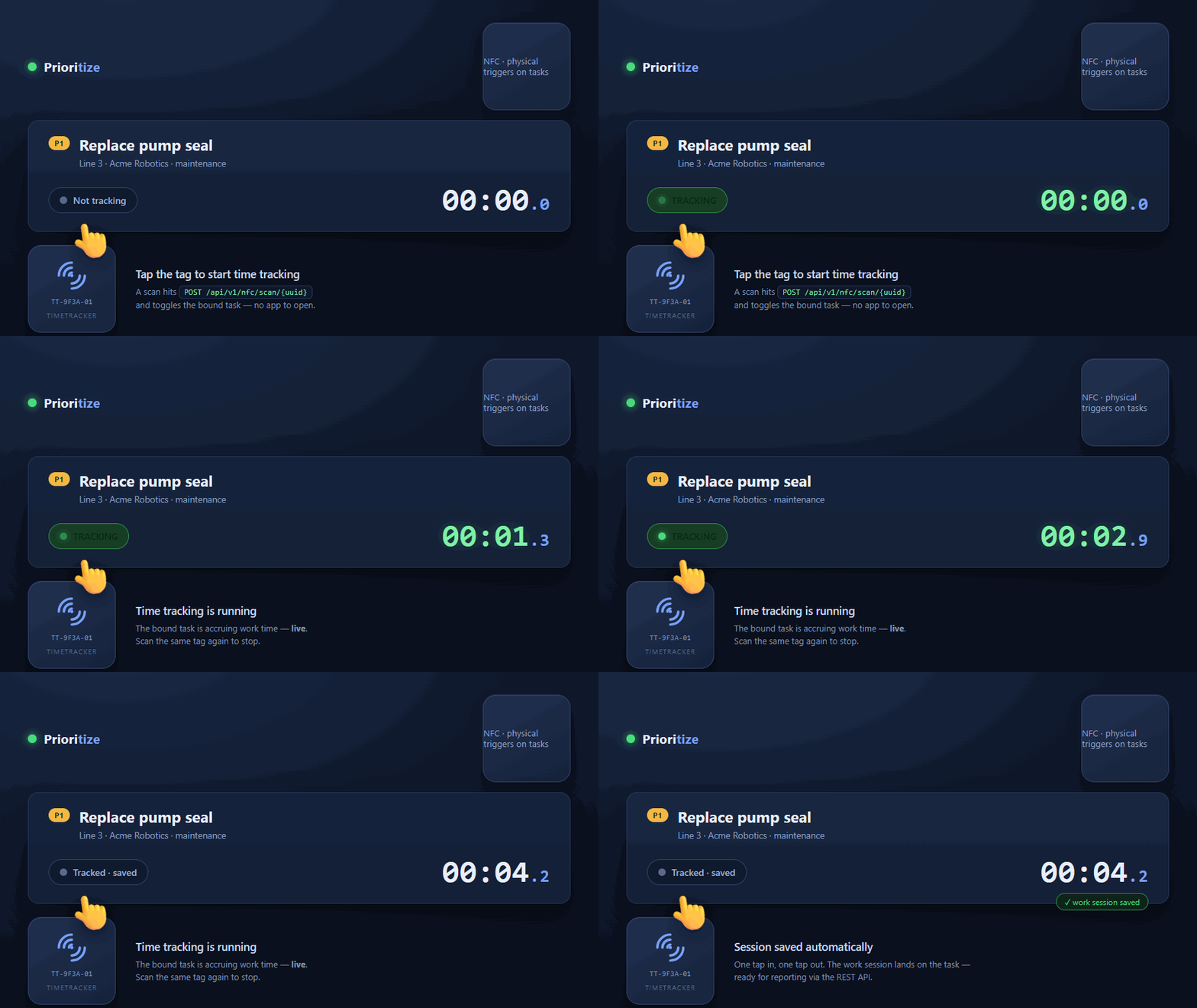
Scan a TIMETRACKER NFC tag to start and stop a task's time tracking — one physical tap, no screens, no logins. Driven entirely through the REST API.
Prioritize is the backend — you bring the reader. A scan is just one REST call,
POST /api/v1/nfc/scan/{uuid}. Whatever reads the tag and fires that call — an NFC-capable phone app, a fixed reader, an ESP32/Raspberry Pi, or a shell script — is up to you. Prioritize provides the endpoint (and can broadcast scans over MQTT); it does not ship a reader app.
Technology stack
| Area | Technology |
|---|---|
| Runtime | Java 21 |
| Framework | Spring Boot 4.0.5 (Web, Data JPA, Security, Integration) |
| Persistence | PostgreSQL (production), H2 (local/tests) |
| Authentication | HTTP Basic Auth or OAuth2 Resource Server (Keycloak, JWT) |
| IoT transport | MQTT (Spring Integration + Eclipse Paho v3) and REST |
| Process engine | Flowable (BPMN) |
| Admin GUI | Vaadin 25 (Flow) |
| Document parsing | Apache Tika |
| API docs | springdoc-openapi (Swagger UI) |
| Build | Maven |
| Boilerplate | Lombok |
Architecture
Layers
The application follows a clear layering with a fixed convention for authorization:
- Controllers accept
Authentication, resolve thePUserfrom it, and pass it explicitly to the service layer. Controllers contain no authorization logic. - Services hold all business logic including authorization. Permission checks happen exclusively here and are enforced via exceptions (not via return values).
- Repositories (Spring Data JPA) encapsulate data access.
Further conventions: constructor injection via Lombok @RequiredArgsConstructor; IDs consistently typed as Long; CurrentUserResolver as the central bridge between Spring Security's Authentication and the PUser model.
Resource control (hexagonal)
Control of IoT resources is modeled as a hexagonal port. The rest of the system only knows the ResourceControlAdapter interface, not the concrete transport:
- REST (
RestResourceControlAdapter) is the always-active base transport. Any resource with an IP set is controllable via REST (POST http://<ip>:<port>/command). - MQTT (
MqttResourceControlAdapter) is an optional, additional capability. The entire MQTT branch is active only whenprioritize.mqtt.enabled=true(@ConditionalOnProperty); otherwise it stays dormant.
The ResourceControlService selects the transport per command following a capability-set strategy with fallback:
- MQTT capability present and online → MQTT
- MQTT capability present but offline + REST endpoint (IP) set → REST fallback
- No MQTT capability → REST
- No reachable transport →
ResourceOfflineException(HTTP 503)
The inbound and outbound directions are deliberately separated: outbound commands go through the port; inbound device events (status, discovery, telemetry) are handled by a separate inbound path (InboundResourceEventHandler). The wire format is JSON (ResourceCommandMessage with command / param / slot).
Slot-bound control via reservations
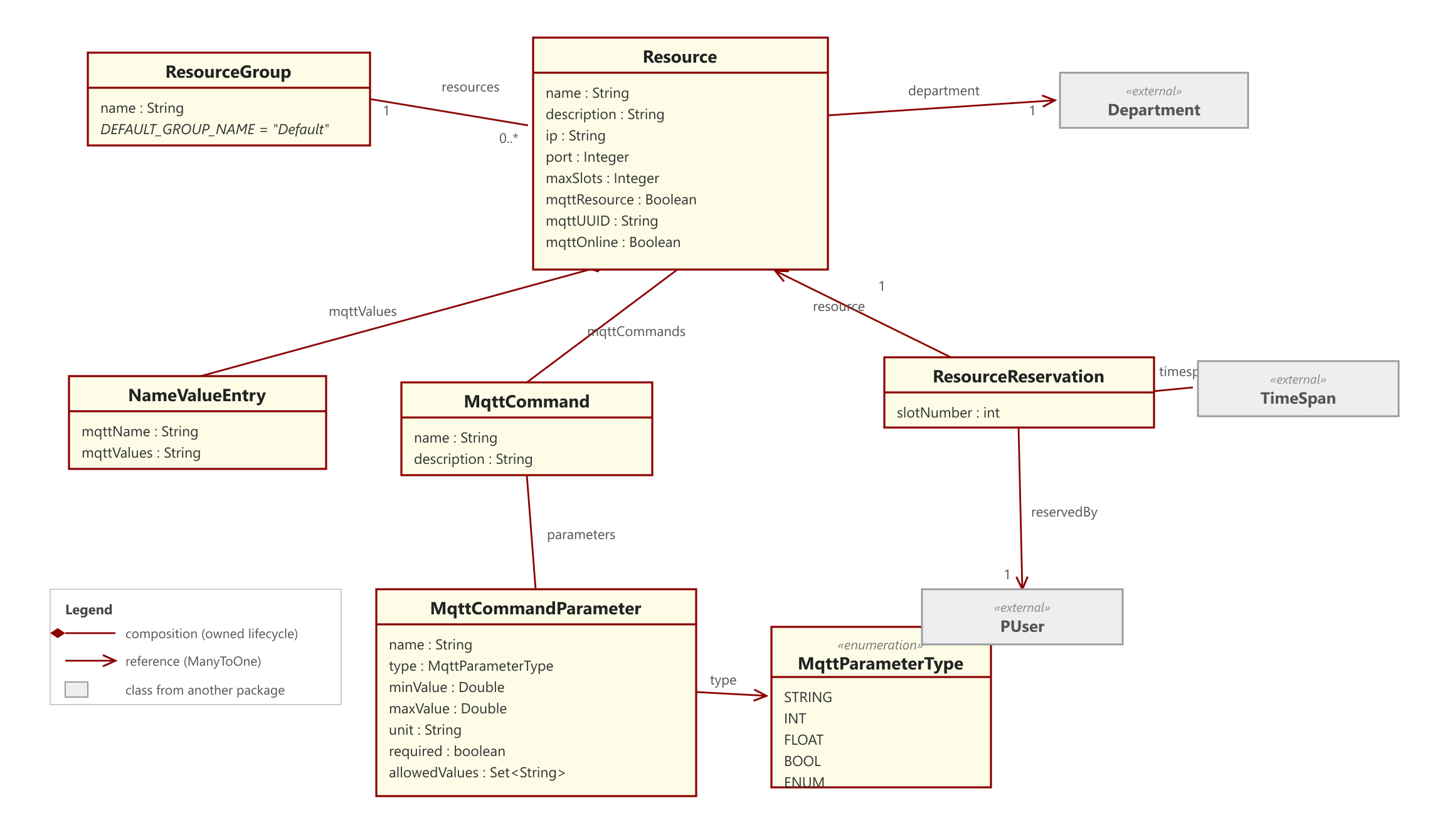
Resources can have multiple slots (maxSlots). A control command always addresses a specific slot — this slot is not supplied by the client but derived server-side from the calling user's active reservation:
- Exactly one active reservation by the user → its slot is used.
- No active reservation →
SlotNotReservedException(HTTP 409). A command requires an ongoing reservation. - Multiple active reservations → slot is ambiguous →
SlotNotReservedException(HTTP 409).
"Active" means the current point in time lies within the reserved window (dateFrom <= now < dateUntil). An expired reservation implicitly releases the slot; a command sent afterwards runs into the 409 case.
Projects, tasks and goal-driven progress
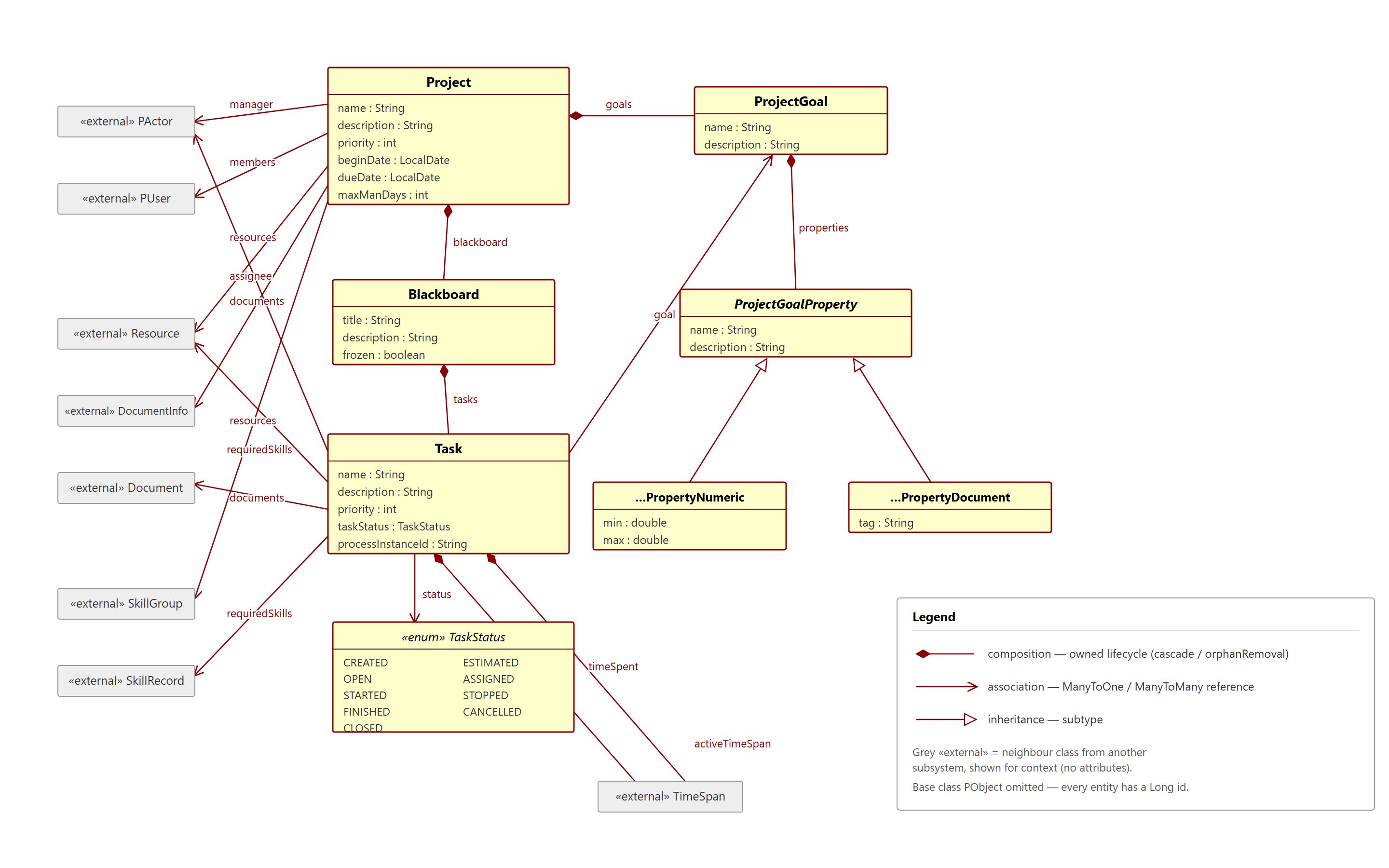
Projects own a blackboard carrying tasks. Authorization in this subsystem is membership-based (project manager or member), orthogonal to the role/permission system used elsewhere; a task's assignee/manager is a PActor (either a PUser or a Resource). Progress is goal-driven, not task-driven: a Task carries no percentage, only an optional link to a ProjectGoal. A goal's completion is the share of its non-cancelled tasks that reached a done status; a project's progress is the average over its counting goals, and null (n/a) when undefined. Progress is always computed, never stored.
Task time tracking and NFC
Time tracking lives on the Task (a running span plus a history of completed spans), so it works with or without NFC. GET /tasks/{id}/tracking returns the aggregated total (the running span counted live up to now); GET /tasks/{id}/tracking/sessions lists the individual work sessions.
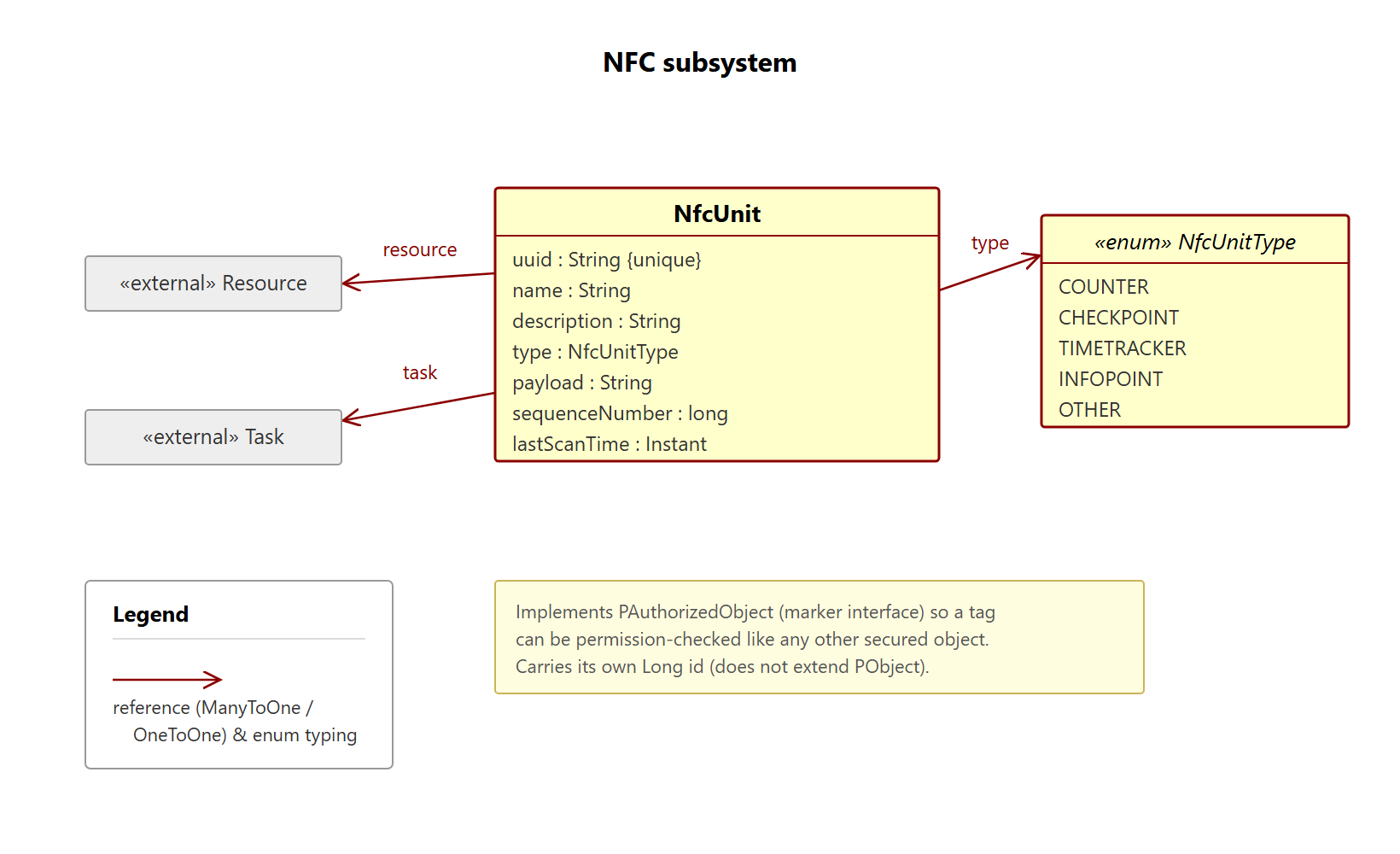
An NfcUnit is a physical NFC tag mounted on a resource (a resource may carry several tags of different types: COUNTER, CHECKPOINT, TIMETRACKER, INFOPOINT, OTHER). Scanning a tag resolves it by UUID and triggers a type-specific action — a TIMETRACKER tag toggles the time tracking of the single task it is bound to. When the MQTT profile is active, each scan is additionally broadcast on the topic nfc/scan/<tag-uuid> so devices and dashboards can observe it live; without MQTT, scanning works unchanged.
Telemetry state-transition rules
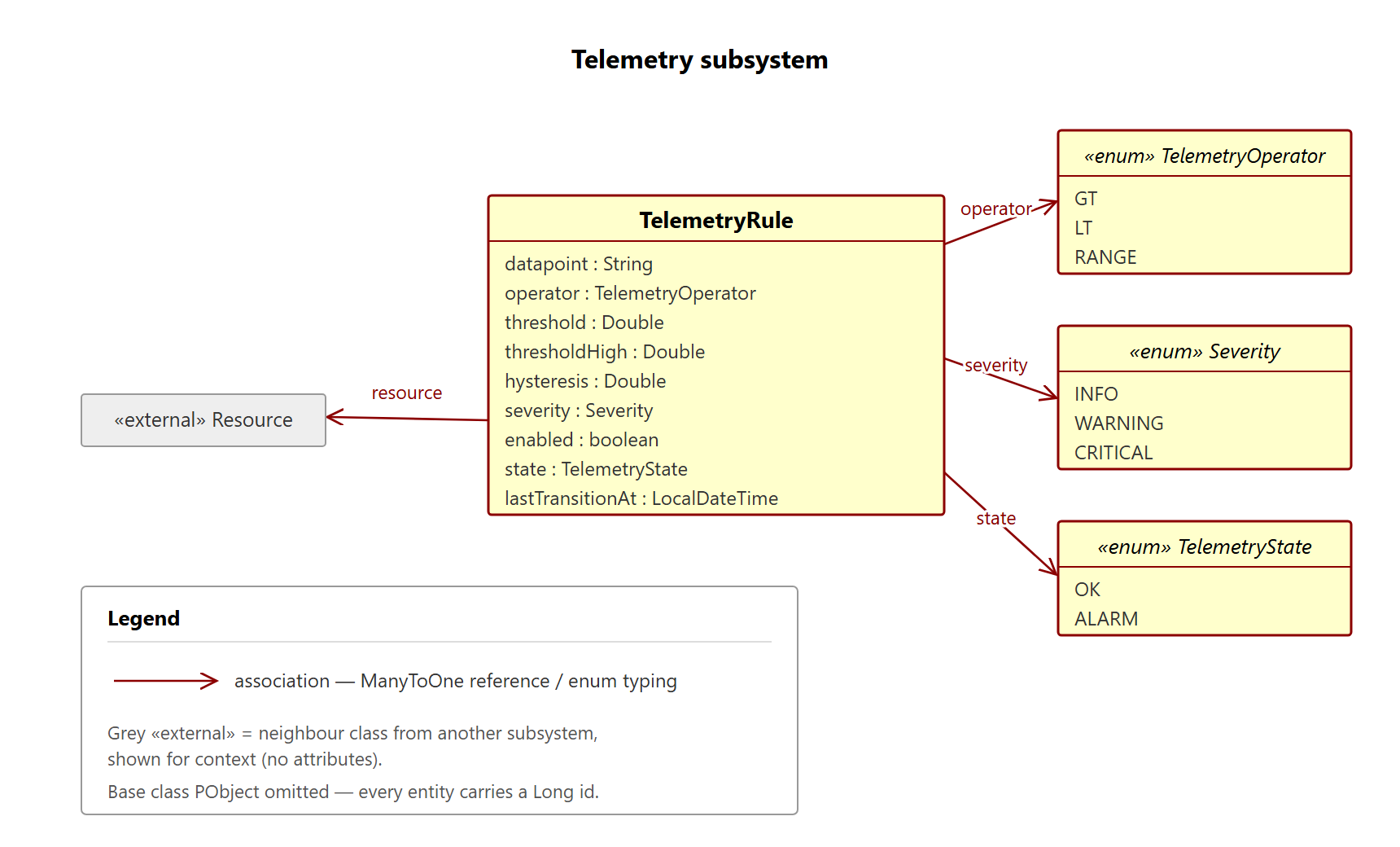
A resource can carry telemetry rules that turn a stream of numeric readings into a persisted OK/ALARM state. A rule defines an operator (GT, LT, RANGE), one or two thresholds, a hysteresis dead-band, and a severity. Both ingest paths (REST POST /resources/{id}/values and MQTT) evaluate the resource's enabled rules after each save; the breach uses the raw threshold, the clear only triggers once the value crosses back past threshold ± hysteresis (edge logic, so a value hovering at the boundary does not flap). On a state change the rule is persisted and a TelemetryThresholdEvent is fired; with the MQTT profile a telemetry/alarm/<resourceId> message is broadcast (type: "TELEMETRY_ALARM"). Resources without any rule cost zero extra database work (an in-memory guard is checked before any query).
Recurring task schedules
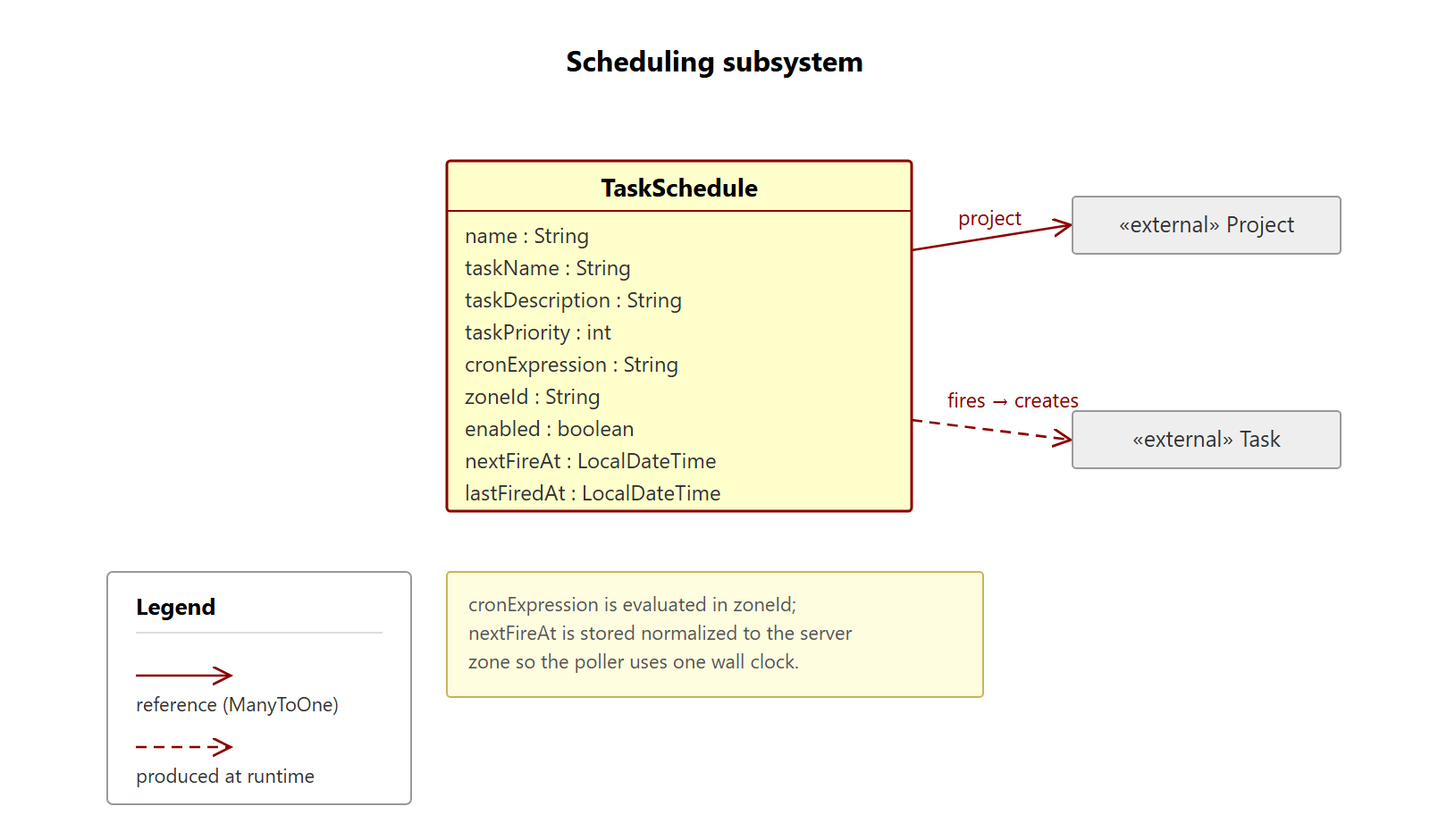
A TaskSchedule fires a task template onto a project's blackboard on a cron cadence. Each schedule carries the target project, the task template (name/description/priority), a cronExpression, a zoneId, an enabled flag, and nextFireAt/lastFiredAt. A gated poller (@Scheduled, enabled by default, disable with prioritize.scheduling.enabled=false) runs due schedules through a trusted user-less create path, stamps lastFiredAt, and advances nextFireAt. The cron is evaluated in the schedule's own zone but nextFireAt is stored normalized to the server zone, so the poller compares every schedule against a single wall clock. Failures are isolated per schedule.
BPMN orchestration (Flowable)
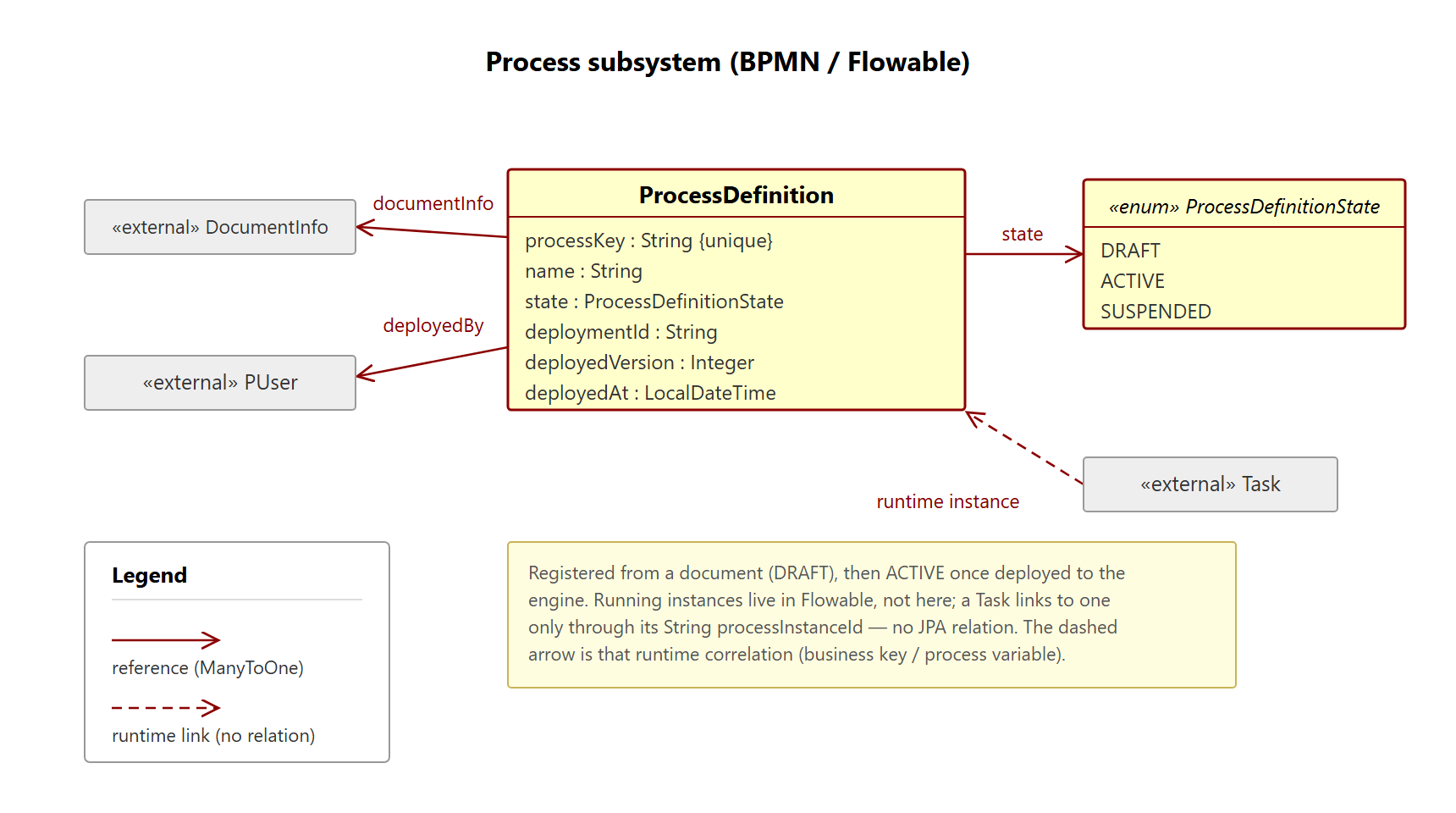
Flowable is used for orchestration, not lifecycle ownership: it describes order, waiting and responsibility, never computation. BPMN definitions are managed as versioned documents that require an explicit activation step before they can run (the classpath stays as a trusted root/break-glass source). Running processes link generically to a project or task (business key project:<id> / task:<id>). Two bridges connect processes to the platform: an inbound trusted facade (PlatformGateway) lets a process create tasks, store documents or control resources under a seeded system principal, and an outbound event bridge wakes waiting processes from platform events (NFC scans, telemetry thresholds) correlated by a single rule — the pair of message name and an awaitedResourceId process variable.
Configuration (profiles)
Behavior is controlled via Spring profiles. The default profile is h2 (see application.yaml), so a fresh checkout runs with no external setup.
| Profile | Purpose |
|---|---|
h2 | Local H2 file database including H2 console at /h2-console. Default. |
postgres | PostgreSQL data source (shared/production/NAS setup). |
keycloak | Switches security from Basic Auth to OAuth2 Resource Server (JWT). |
mqtt | Enables the MQTT transport (prioritize.mqtt.enabled=true). |
Profiles are combinable, e.g. spring.profiles.active=postgres,keycloak,mqtt.
Authentication
The security configuration is profile-dependent and mutually exclusive:
- Without the
keycloakprofile,SecurityConfig(@Profile("!keycloak")) applies with HTTP Basic Auth for the REST API plus form login for the admin GUI. - With the
keycloakprofile,KeycloakSecurityConfig(@Profile("keycloak")) applies as an OAuth2 Resource Server (JWT / Bearer). Theissuer-uriis set inapplication-keycloak.yaml; it must exactly match theissclaim of the tokens.
Bearer auth is a REST-API story only. Under the
keycloakprofile the app is a pure resource server with no login page — the Vaadin admin GUI is not reachable (every browser page returns401, because the browser sends noAuthorization: Bearerheader). Use the admin GUI without thekeycloakprofile (Basic/form login); use Keycloak/Bearer tokens against/api/v1/**. Running the GUI under Keycloak (OAuth2 login + JIT user provisioning) is a planned post-1.0 feature.
A default administrator (admin / p@ssword) is seeded on first start by InitializationService (BCrypt-hashed in the database). Change it before any non-local deployment.
Database credentials
The PostgreSQL data source reads its password from the DB_PASSWORD environment variable, defaulting to prioritize for local development (see application-postgres.yaml). Set DB_PASSWORD in any shared or production environment.
MQTT
Bound to the prefix prioritize.mqtt (MqttProperties):
prioritize:
  mqtt:
    enabled: true
    broker-url: tcp://memoryalpha:1883   # TLS later: ssl://...:8883
    client-id: prioritize-backend
    # username: prioritize
    # password: ${MQTT_PASSWORD:}
    qos: 1
    subscribe-topics:
      - DISCOVERY
      - "+/status"
Quickstart
The fastest way to try Prioritize is Docker. You can also run it from source with a JDK.
With Docker (recommended for self-hosting)
Requires Docker with the Compose plugin. This builds the app image and starts it together with a PostgreSQL database:
docker compose up --build
Then open http://localhost:8080 and log in with admin / p@ssword. The REST API lives under /api/v1 and Swagger UI is at /swagger-ui.html.
Just want a quick look with no database to manage? A single self-contained container backed by an embedded H2 file DB is enough:
docker build -t prioritize .
docker run --rm -m 1g -p 8080:8080 prioritize
-m 1g is not decoration: without a limit the JVM sizes its heap against the host's RAM, so on a large machine the ceiling ends up in the tens of gigabytes. Compose sets the limit for you; a plain docker run does not. See Memory.
The optional stacks are opt-in via Compose profiles (copy .env.example to .env and add the profile to SPRING_PROFILES_ACTIVE, e.g. postgres,mqtt):
docker compose --profile mqtt up        # + Mosquitto broker (device telemetry / NFC)
docker compose --profile keycloak up    # + Keycloak (OIDC bearer-token auth)
Data persists in the db-data volume (PostgreSQL) or the container's /app/data volume (H2). Stop with docker compose down to keep the data, or docker compose down -v to drop it.
Memory
Give the app container 1 GB. Compose does that by default (mem_limit, override with MEM_LIMIT in .env); for a plain docker run, pass -m 1g. Measured on 1.4.0: about 480 MiB idle at that limit, plus roughly 90 MiB for the PostgreSQL container. It starts in around 30 seconds.
The limit matters more than it looks. The JVM is container-aware and sizes its heap from the container's limit — but with no limit it falls back to a share of the host's RAM, which on a 32 GB machine means a heap ceiling of 8.4 GB. The image sets -XX:MaxRAMPercentage=60 rather than a fixed -Xmx, so it adapts to whatever limit you give it. 60 and not the usual 75 because this application's non-heap footprint — metaspace, code cache, threads, natives — measures around 310 MiB: at a 1 GB limit, 75% would place the heap ceiling beyond the limit and a heap that filled up would be OOM-killed instead of collected. If you want 75%, give the container 2 GB:
docker run -m 2g -e JDK_JAVA_OPTIONS="-XX:MaxRAMPercentage=75" -p 8080:8080 prioritize
It does fit in 512 MB — verified, no OOM kill under a few hundred API calls — but at ~92% of the limit there is no headroom, so that is a demo size rather than one to run on.
From source (JDK 21 + Maven)
Prerequisites: JDK 21 and Maven. No database setup is needed for the default h2 profile.
# Default: local H2 file DB, no external services (just run it)
mvn spring-boot:run

# Against a shared/production PostgreSQL
mvn spring-boot:run -Dspring-boot.run.profiles=postgres

# PostgreSQL with Keycloak and MQTT
mvn spring-boot:run -Dspring-boot.run.profiles=postgres,keycloak,mqtt
Tests:
mvn test
With the h2 profile, the H2 console is available at http://localhost:8080/h2-console.
API documentation
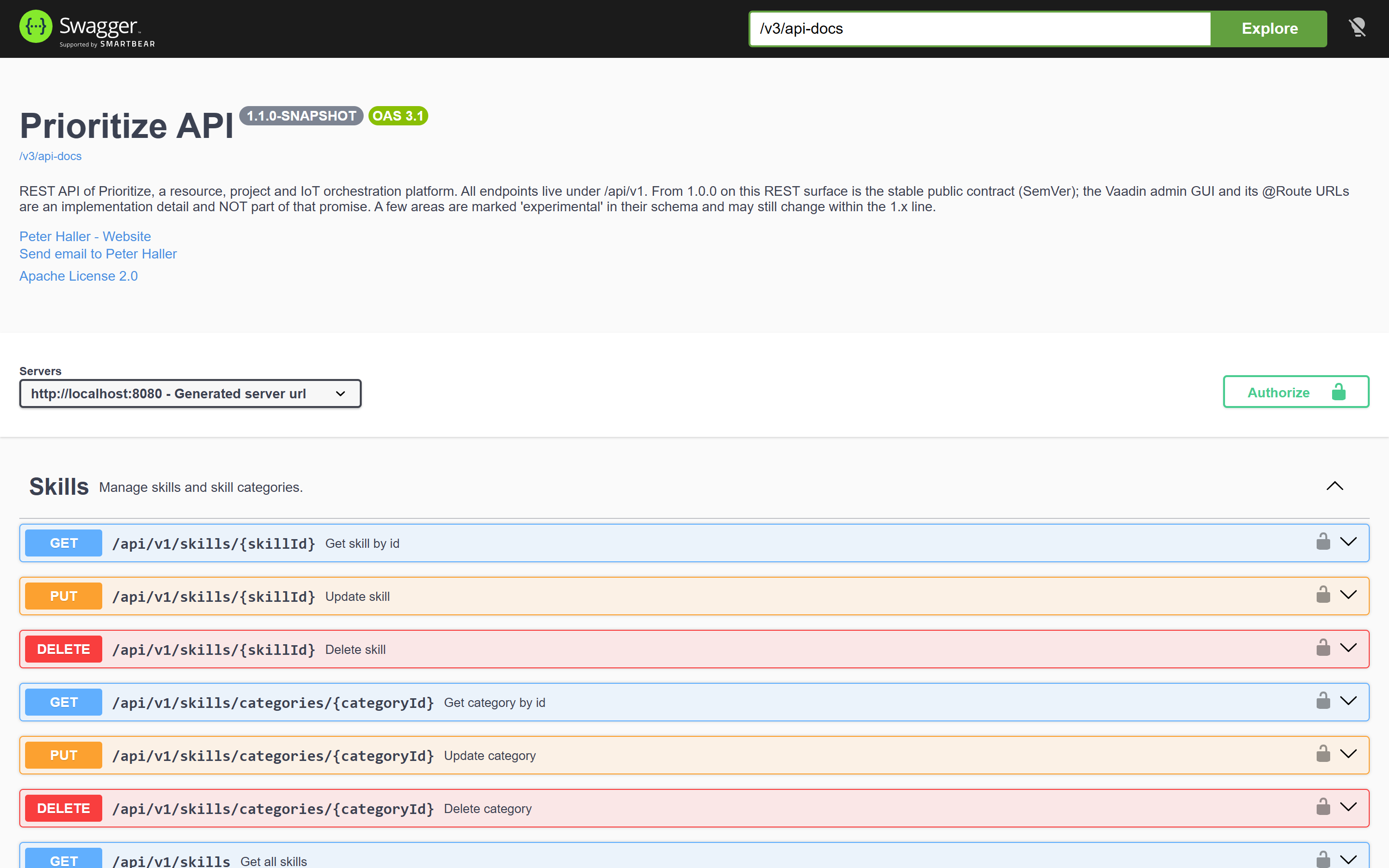
While the application is running, interactive OpenAPI documentation is served via springdoc (Swagger UI, typically at /swagger-ui.html). The basicAuth and bearerAuth security schemes are registered, so endpoints can be tested authenticated directly from the UI.
Admin GUI (Vaadin)
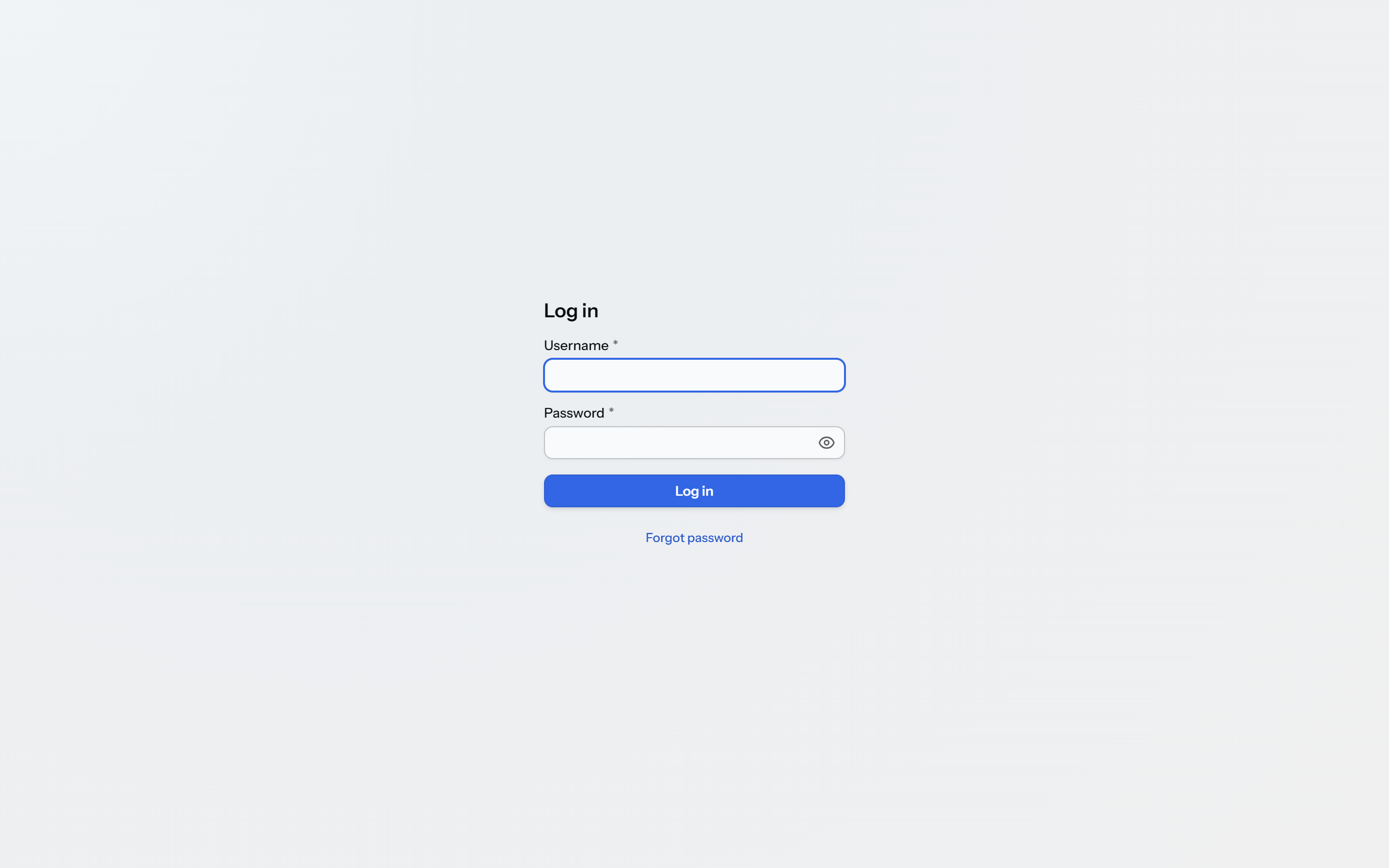
A Vaadin admin GUI ships in-process and is served from the application root (http://localhost:8080/). Log in with a local user (default admin / p@ssword); it uses form login and is available only without the keycloak profile (see Authentication). It is an operator tool for the platform, not the primary API — arbitrary clients are expected to build on the REST API instead.
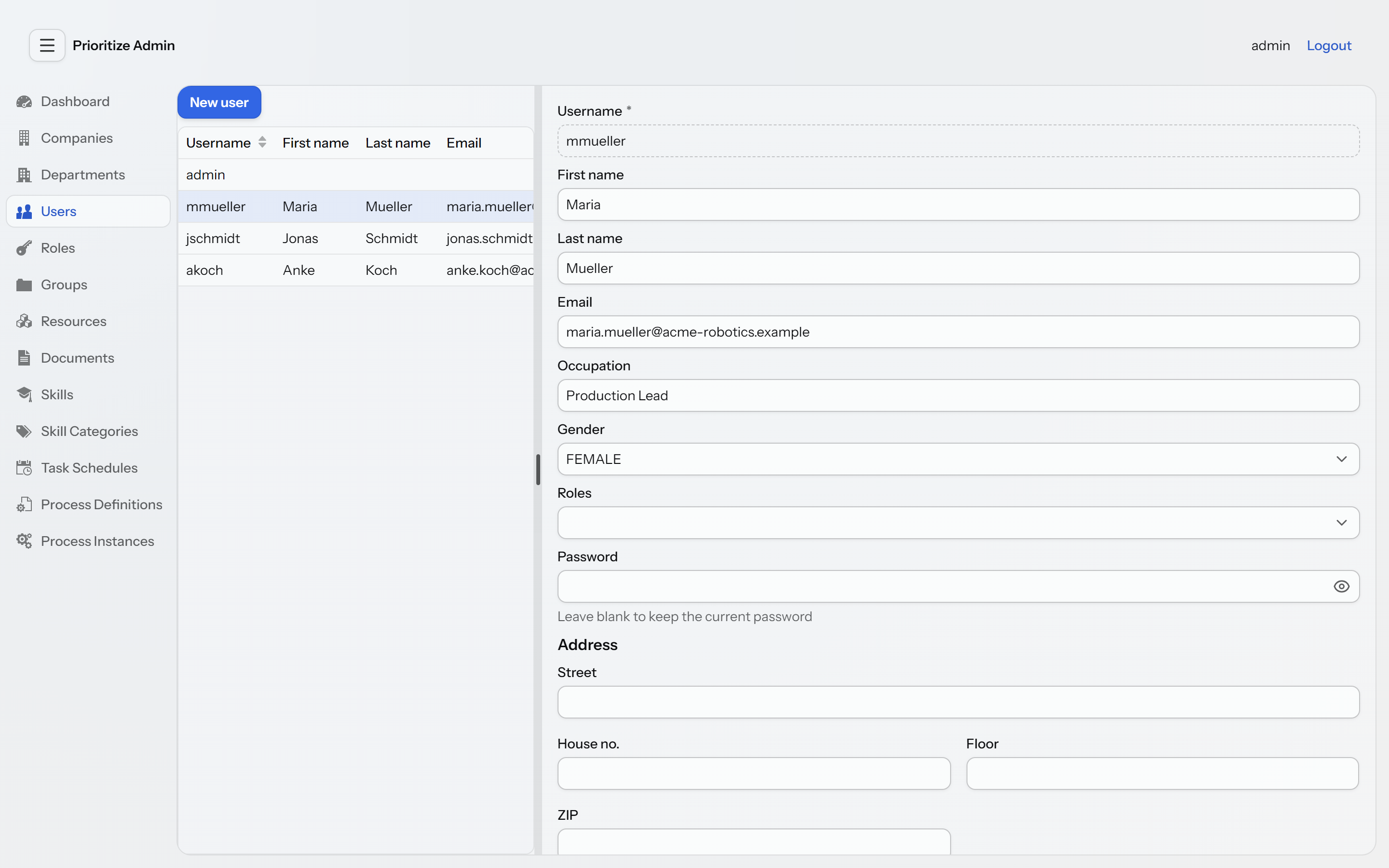
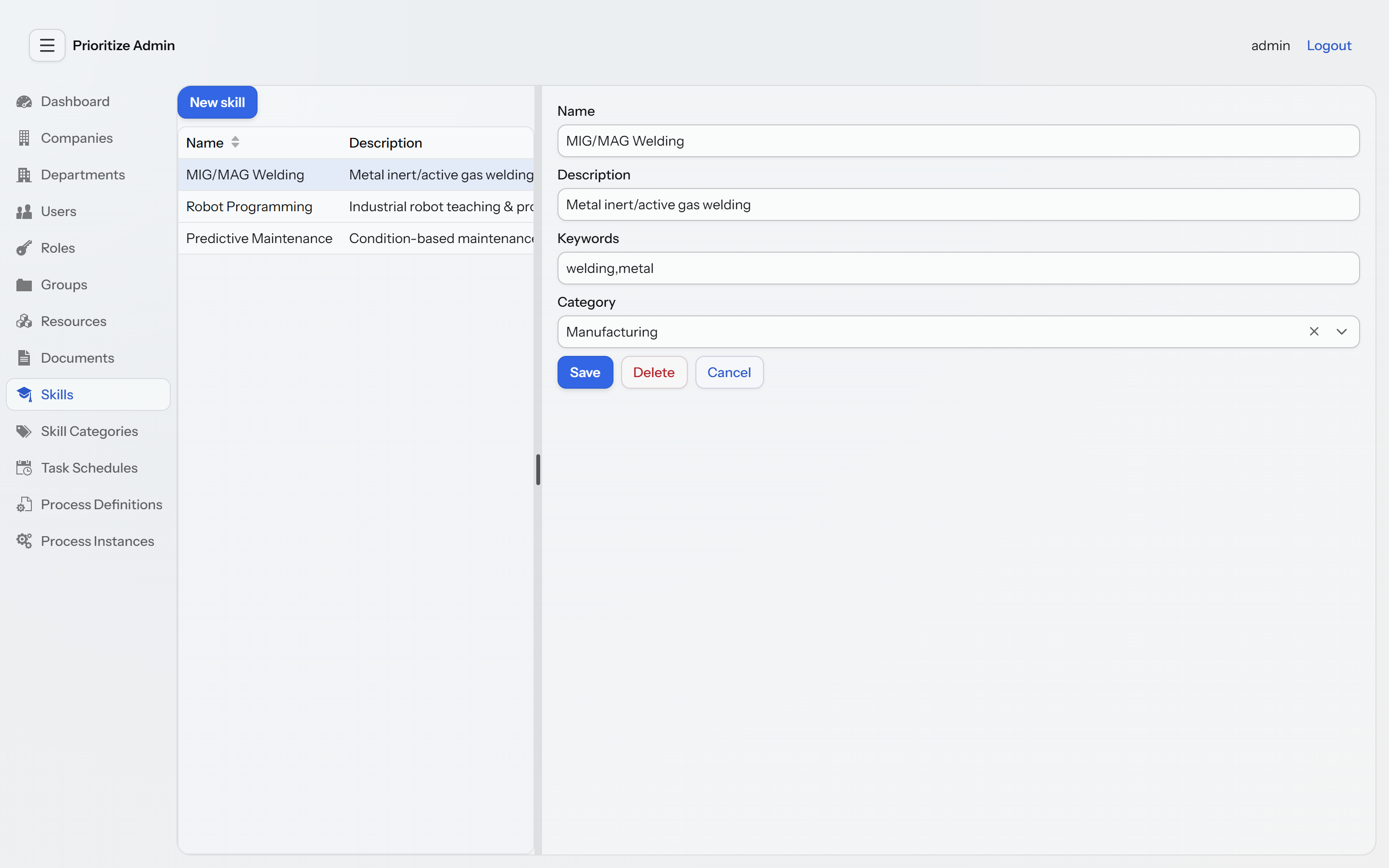
Covered subsystems (one navigation entry each): Dashboard, Companies, Departments, Users, Roles, Groups, Resources (with live online status and reservations), Documents (list/download/delete), Skills, Skill Categories, Task Schedules, Process Definitions, and Process Instances. GUI routes are an implementation detail and are not part of the public API contract (see API stability).
📸 Screenshots (click to expand)
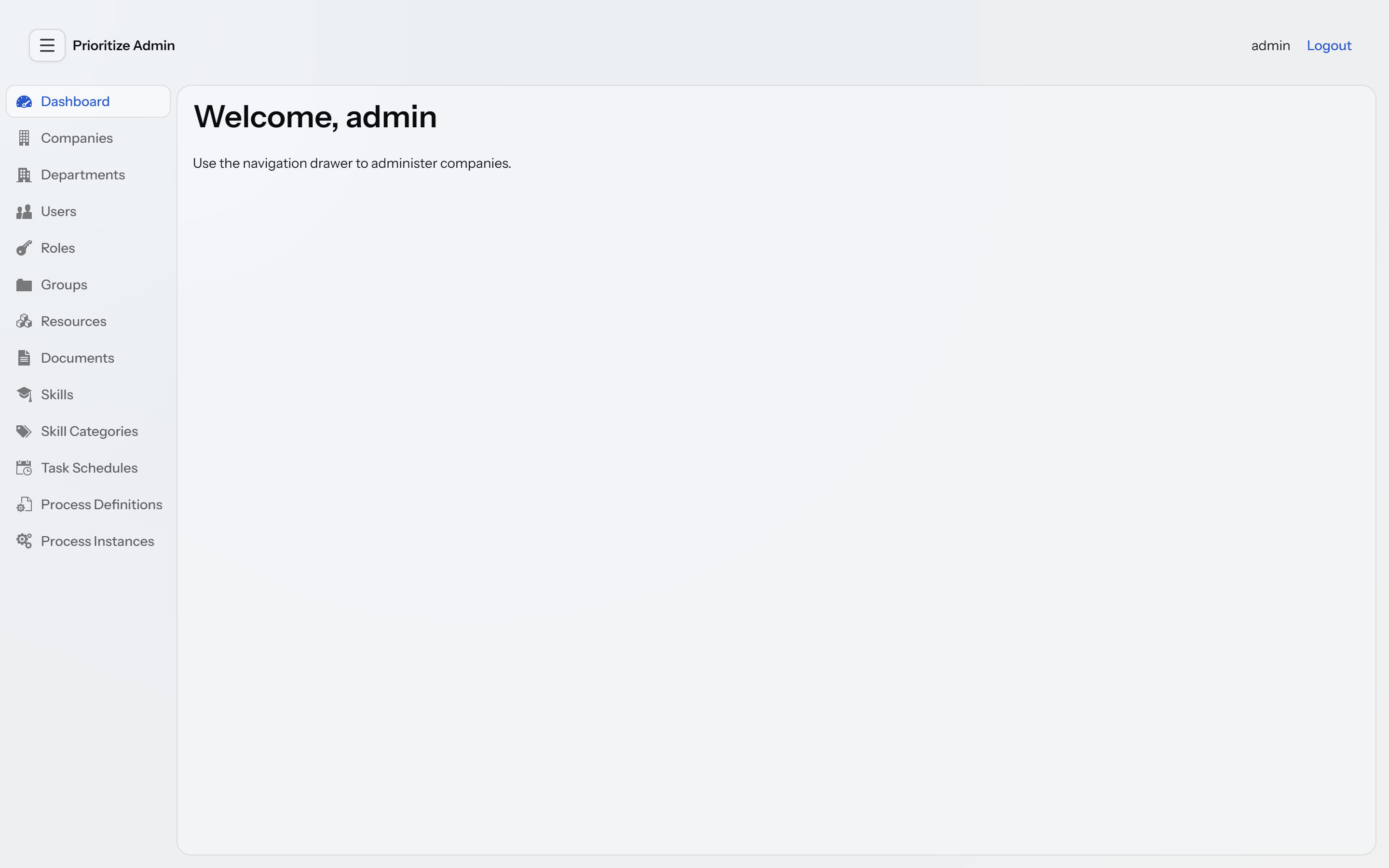
Dashboard — the Vaadin admin GUI home:
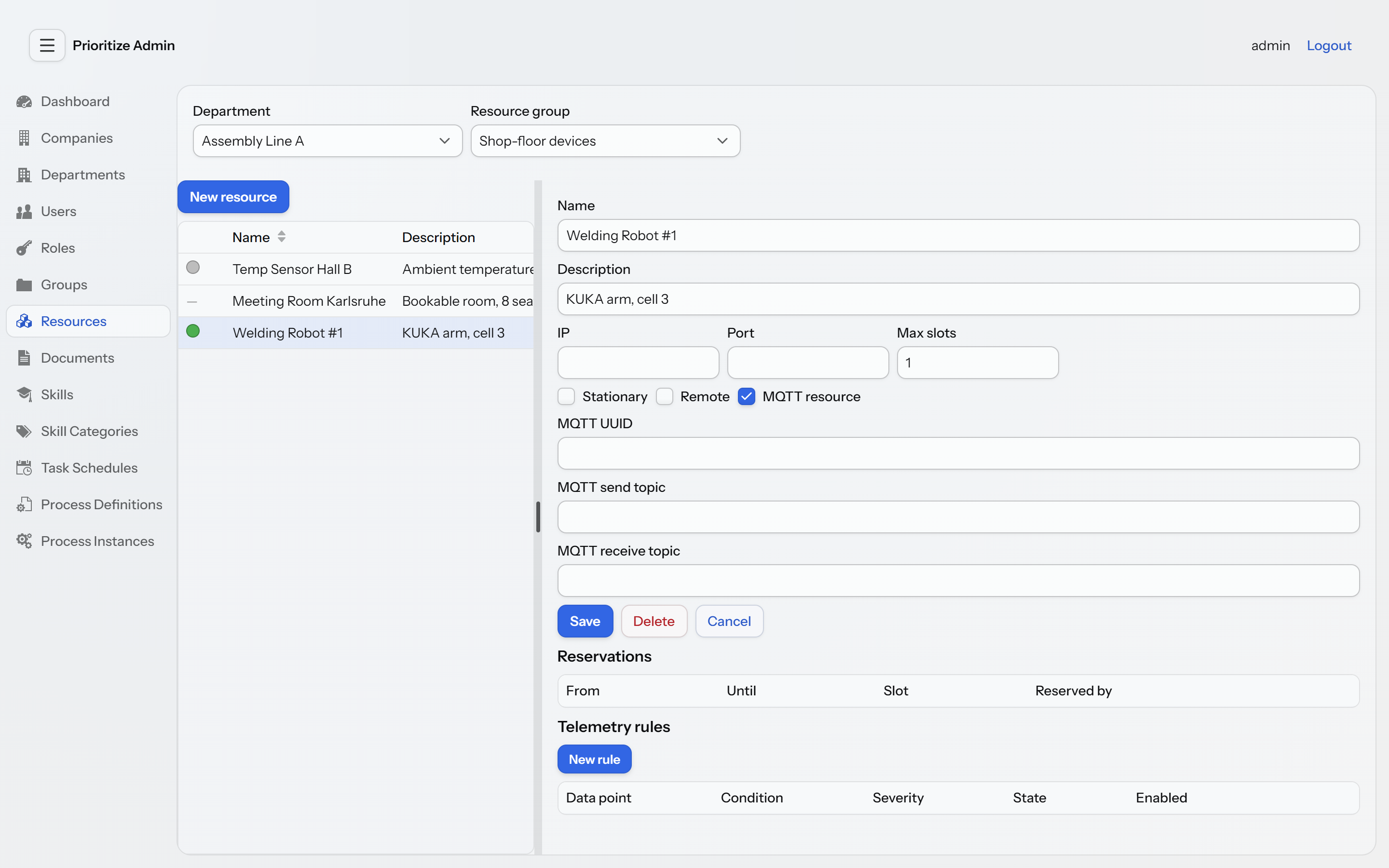
Resources — networked machines and sensors with live online-status indicators:
Users — org-wide user administration:
Skills — competencies for people and devices:
Login:
REST API (overview)
All core endpoints live under /api/v1. The table below is an overview, not a complete reference — the authoritative, always-current description is provided by the OpenAPI docs.
Resources & control
| Method | Path | Purpose |
|---|---|---|
GET | /api/v1/resourcegroups/{groupId}/resources | Resources of a group |
POST | /api/v1/resourcegroups/{groupId}/resources | Create resource |
GET | /api/v1/resources/{id} | Get resource |
PATCH | /api/v1/resources/{id} | Partial update (null = unchanged) |
DELETE | /api/v1/resources/{id} | Delete resource |
POST | /api/v1/resources/{id}/command | Send control command (slot derived from reservation) |
POST | /api/v1/resources/{id}/reserve | Reserve resource for a time window |
GET | /api/v1/resources/{id}/reservations | All reservations of the resource |
GET | /api/v1/resources/{id}/reservations/mine | Own active reservations (slot preview) |
DELETE | /api/v1/reservations/{reservationId} | Cancel reservation / release slot |
POST | /api/v1/resources/{id}/values | Ingest a telemetry reading |
GET | /api/v1/resources/{resourceId}/skills | Skills of a resource |
POST | /api/v1/resources/{resourceId}/skills | Assign skill |
Projects, tasks & goals
| Method | Path | Purpose |
|---|---|---|
POST | /api/v1/projects | Create project |
GET | /api/v1/projects/mine | Projects I manage or am a member of |
GET / PUT / DELETE | /api/v1/projects/{id} | Get / update / delete project |
POST / DELETE | /api/v1/projects/{id}/members | Add / remove member |
GET | /api/v1/projects/{id}/tasks | Tasks on the project's blackboard |
GET / POST | /api/v1/projects/{id}/goals | List / create goals |
GET | /api/v1/projects/{id}/progress | Computed goal-driven progress |
POST | /api/v1/projects/{projectId}/tasks | Create task |
GET / PUT / DELETE | /api/v1/tasks/{id} | Get / update / delete task |
POST | /api/v1/tasks/{id}/assign | Assign a PActor |
PUT | /api/v1/tasks/{id}/status | Change task status |
PUT / DELETE | /api/v1/tasks/{id}/goal | Assign / unassign a goal |
Time tracking & NFC
| Method | Path | Purpose |
|---|---|---|
POST | /api/v1/tasks/{id}/tracking/{start|stop|toggle} | Start / stop / toggle time tracking |
GET | /api/v1/tasks/{id}/tracking | Aggregated tracked total (running span live) |
GET | /api/v1/tasks/{id}/tracking/sessions | Individual tracked work sessions |
GET / POST | /api/v1/resources/{id}/nfc-units | List / register NFC tags on a resource |
PUT / DELETE | /api/v1/nfc-units/{id}/task/{taskId} | Bind / unbind a TIMETRACKER tag to a task |
POST | /api/v1/nfc/scan/{uuid} | Process a tag scan (type-specific action) |
Companies & departments
| Method | Path | Purpose |
|---|---|---|
GET | /api/v1/companies/{id} | Get company |
POST | /api/v1/companies/filter | Filter companies |
PUT | /api/v1/companies/{id} | Update company |
DELETE | /api/v1/companies/{id} | Delete company |
POST | /api/v1/companies/{companyId}/departments | Create department |
GET | /api/v1/companies/{companyId}/departments | Departments of a company |
GET | /api/v1/departments/{id} | Get department |
PUT | /api/v1/departments/{id} | Update department |
DELETE | /api/v1/departments/{id} | Delete department |
Users
| Method | Path | Purpose |
|---|---|---|
GET | /api/v1/users/{id} | Get user |
PUT | /api/v1/users/{id} | Update user |
PATCH | /api/v1/users/{id} | Partial update |
DELETE | /api/v1/users/{id} | Delete user |
GET | /api/v1/users/{userId}/skills | Skills of a user |
POST | /api/v1/users/{userId}/skills | Assign skill |
Skills
| Method | Path | Purpose |
|---|---|---|
GET / POST | /api/v1/skills | List / create skills |
GET / PUT / DELETE | /api/v1/skills/{skillId} | Get / update / delete skill |
GET / POST | /api/v1/skills/categories | List / create categories |
GET / PUT / DELETE | /api/v1/skills/categories/{categoryId} | Get / update / delete category |
Documents
| Method | Path | Purpose |
|---|---|---|
GET | /api/v1/documents/download/{documentInfoId} | Download document |
GET | /api/v1/documents/{id}/version/{versionNumber} | Get a specific version |
GET | /api/v1/documents/{id}/history | Version history |
POST | /api/v1/documents/{id}/check-out | Check out (lock) |
POST | /api/v1/documents/{id}/check-in | Check in (new version) |
POST | /api/v1/documents/{id}/cancel-check-out | Cancel check-out |
GET | /api/v1/documents/search | Full-text / metadata search |
GET | /api/v1/documents/recent | Recently changed documents |
DELETE | /api/v1/documents/{id} | Delete document |
GET | /api/v1/document-groups/{groupId}/documents | Documents of a group |
DELETE | /api/v1/document-groups/{groupId} | Delete group |
Telemetry rules
| Method | Path | Purpose |
|---|---|---|
GET / POST | /api/v1/resources/{resourceId}/telemetry-rules | List / create rules for a resource |
GET / PATCH / DELETE | /api/v1/telemetry-rules/{id} | Get / update / delete a rule |
Task schedules
| Method | Path | Purpose |
|---|---|---|
GET / POST | /api/v1/projects/{projectId}/task-schedules | List / create schedules for a project |
GET / PATCH / DELETE | /api/v1/task-schedules/{id} | Get / update / delete a schedule |
Processes (Flowable)
| Method | Path | Purpose |
|---|---|---|
GET | /api/v1/process-definitions | List registered process definitions |
POST | /api/v1/documents/{documentInfoId}/process-definition | Register a BPMN document as a definition |
GET | /api/v1/process-definitions/{id} | Get a definition |
POST | /api/v1/process-definitions/{id}/activate | Activate (deploy to the engine) |
POST | /api/v1/process-definitions/{id}/deactivate | Deactivate |
DELETE | /api/v1/process-definitions/{id} | Remove a definition (?force=true to also drop a deployment) |
GET / POST | /api/v1/projects/{projectId}/process-instances | List / start instances linked to a project |
POST | /api/v1/tasks/{taskId}/process-instances | Start an instance linked to a task |
GET | /api/v1/tasks/{taskId}/process-instance | The instance linked to a task |
GET | /api/v1/process-instances/{id} | Get an instance |
POST | /api/v1/process-instances/{id}/cancel | Cancel an instance (manager only) |
API stability
From 1.0.0 onward the project follows semantic versioning: the version number communicates what a consumer can rely on.
-
The REST API under
/api/v1is the stable contract. These endpoints — their paths, methods, request/response shapes and documented status codes — are the public surface that external clients build against. Backward-incompatible changes to them will not happen within the1.xline; they would come with a new major version (and, where practical, a new path prefix such as/api/v2). Additive changes (new endpoints, new optional fields) are minor releases and are safe to adopt. The authoritative, always-current description is the OpenAPI document served by the running application (see API documentation); the tables above are only an overview. -
The Vaadin admin GUI and its routes are an implementation detail — not part of the contract. The
@RouteURLs (/process-definitions,/task-schedules, …) exist for the browser UI and may change at any time without a major bump. Do not script or link against them; drive automation through/api/v1instead. -
SkillPropertyis experimental. The skill property model (typed key/value attributes on a skill) is exposed for early feedback and is markedEXPERIMENTALin the OpenAPI schema. It has no admin GUI yet and its shape may change in a minor release without the usual stability guarantee. Everything else in the skill subsystem (skills, categories, assignments) is stable. -
POST /api/v1/userscreates users without a password, by design. In production the identity provider (Keycloak) owns credentials, so the local account is provisioned password-less;PUser.passwordcarries@JsonIgnoreand is never accepted or returned over REST. A REST-created user therefore cannot log in via Basic auth — that is intended for the Keycloak deployment model, not a missing feature. To create a login-capable local user (for a Basic-auth / development setup), use the admin GUI's user view, which has a password field. Just-in-time provisioning of local users on first Keycloak login is a planned post-1.0 addition.
Client libraries
Official REST clients build against the stable /api/v1 contract. They are spec-first: every API and
model class is generated from the released OpenAPI document (see API documentation)
and never hand-written, so the client version tracks the API version (a 1.x client targets the 1.x API).
| Language | Repository | Install |
|---|---|---|
| Java | prioritize-java-client | Maven Central: de.hallerweb:prioritize-java-client:1.3.1 |
| PHP | prioritize-php-client | Composer: composer require hallerweb/prioritize-php-client |
| Python | prioritize-python-client | PyPI: pip install prioritize-client |
| TypeScript | prioritize-typescript-client | npm: npm install prioritize-client |
<dependency>
    <groupId>de.hallerweb</groupId>
    <artifactId>prioritize-java-client</artifactId>
    <version>1.3.1</version>
</dependency>
All four support HTTP Basic (default profile) and Bearer/Keycloak authentication.
Java only: build the client with
new PrioritizeApiClient(), notnew ApiClient(). The generated client transports overHttpURLConnection, which rejectsPATCH, so every partial-update call would fail before leaving the JVM.PrioritizeApiClientis the same client on aPATCH-capable transport.
Error semantics (HTTP status)
Centralized in GlobalExceptionHandler:
| Status | Trigger |
|---|---|
400 Bad Request | IllegalArgumentException (e.g. invalid date format, end before start date); HttpMessageNotReadableException (malformed / unreadable request body) |
403 Forbidden | AccessDeniedException (missing permission) |
404 Not Found | NoSuchElementException / EntityNotFoundException |
409 Conflict | IllegalStateException, SlotNotReservedException (no / ambiguous active reservation), SlotOccupiedException (slot already taken), DataIntegrityViolationException (constraint violation) |
500 Internal Server Error | IncorrectResultSizeDataAccessException and any otherwise unmapped exception |
502 Bad Gateway | ResourceCommandFailedException (device rejected the command) |
503 Service Unavailable | ResourceOfflineException (no reachable control channel) |
Domain model (brief overview)
- Company / Department — organizational base structure. The hierarchy provides a foundation for tenant separation, but enforced multi-tenant isolation is not yet implemented (projects are membership-scoped,
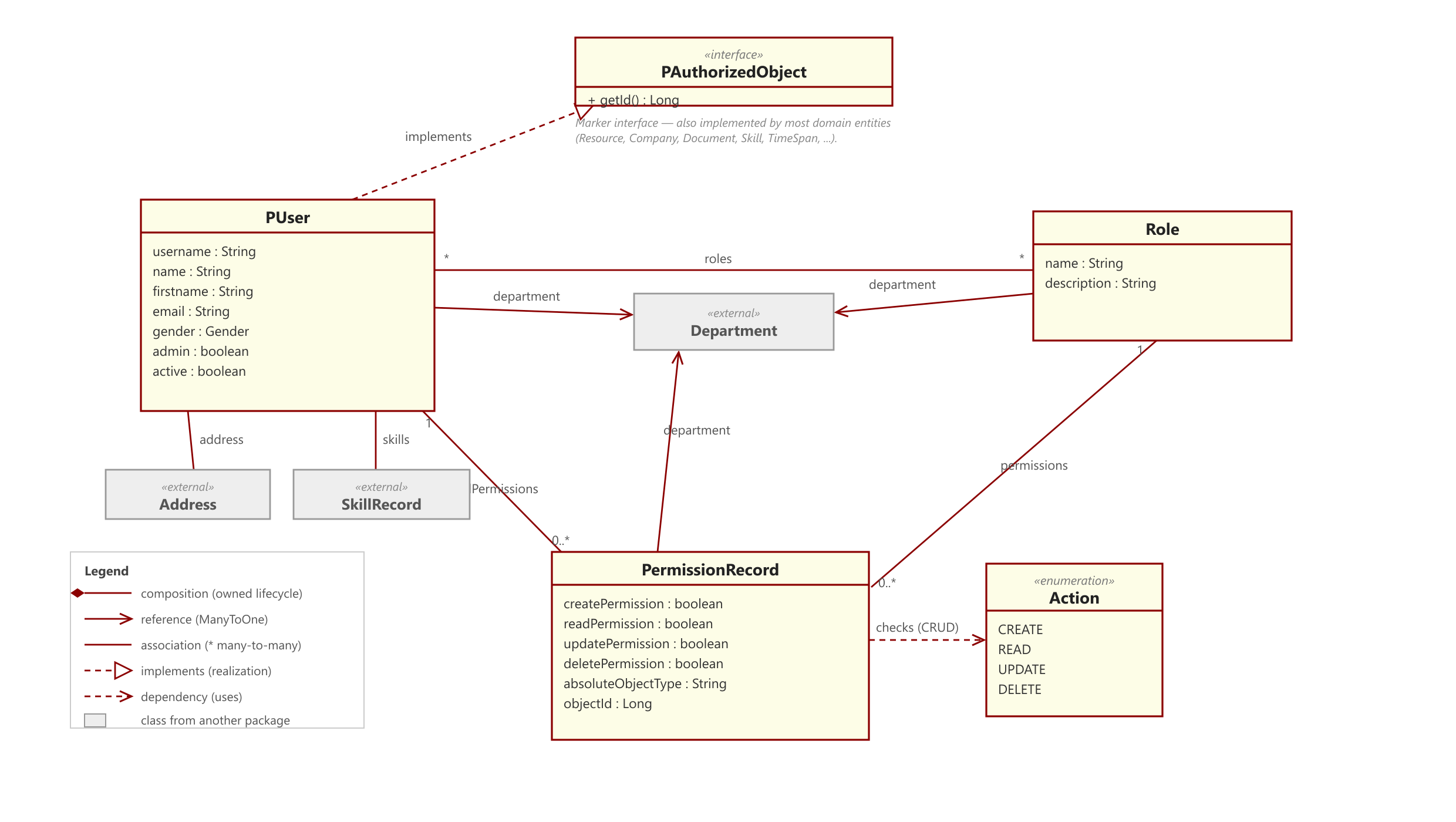
adminis a global superuser). - PUser / Role / PermissionRecord — users, roles, and the fine-grained permission model.
- Resource — a device / resource; can represent an IoT device and communicate externally (REST/MQTT). Has slots and reservations.
- ResourceReservation — time-bound occupancy of a resource slot by a user.
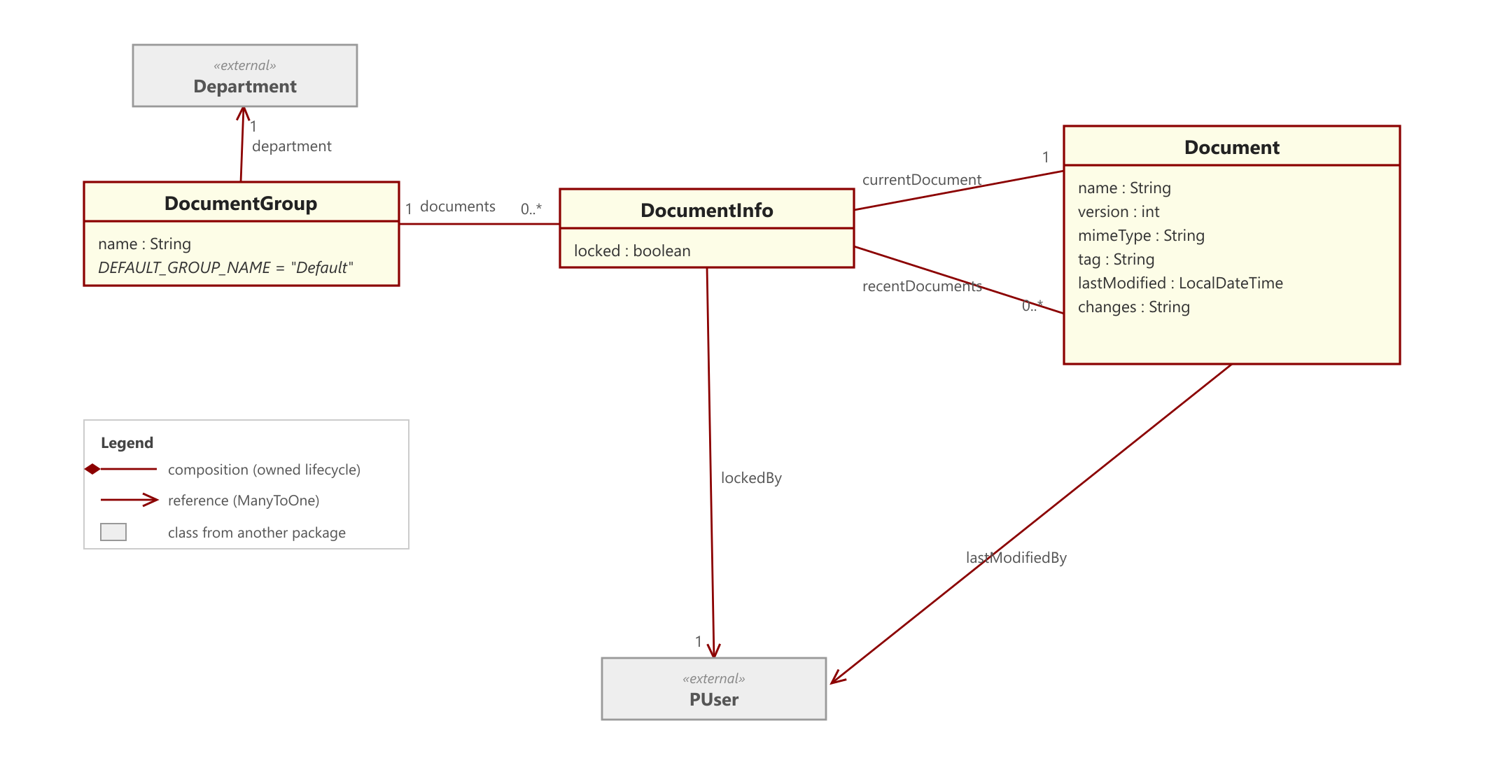
- Document / DocumentInfo / DocumentGroup — documents with versioning and check-in/check-out.
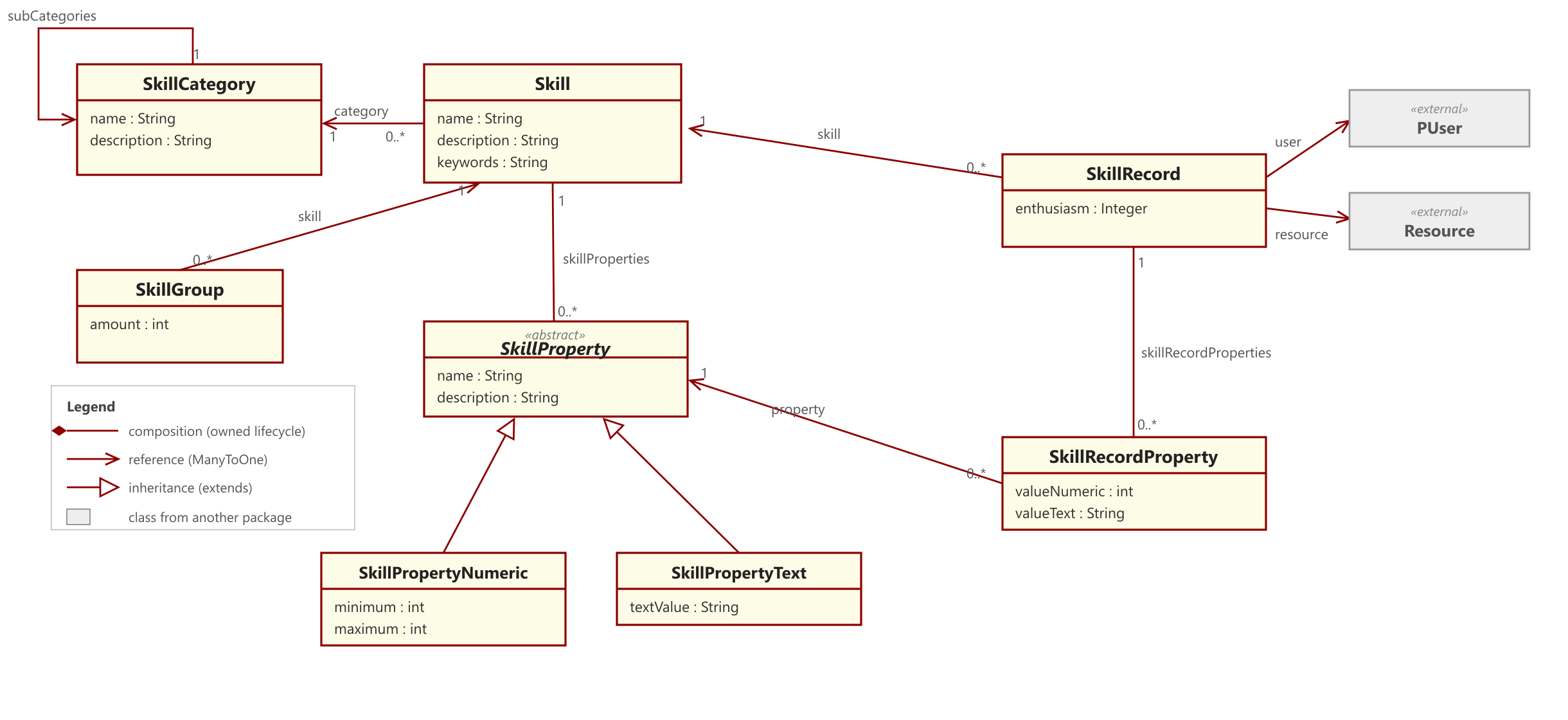
- Skill / SkillCategory / SkillRecord — capabilities; assignable to users and resources.
- Project / Blackboard / Task / ProjectGoal — projects own a blackboard of tasks; goals drive computed progress; a task's assignee/manager is a
PActor. - NfcUnit — a physical NFC tag mounted on a resource; a scan triggers a type-specific action (e.g. toggling a task's time tracking).
- TelemetryRule — a per-resource rule turning numeric readings into a persisted
OK/ALARMstate with hysteresis. - TaskSchedule — a cron-driven schedule that fires a task template onto a project's blackboard.
- ProcessDefinition / ProcessInstance — a registered, explicitly activated BPMN definition and its running orchestration, linked generically to a project or task.
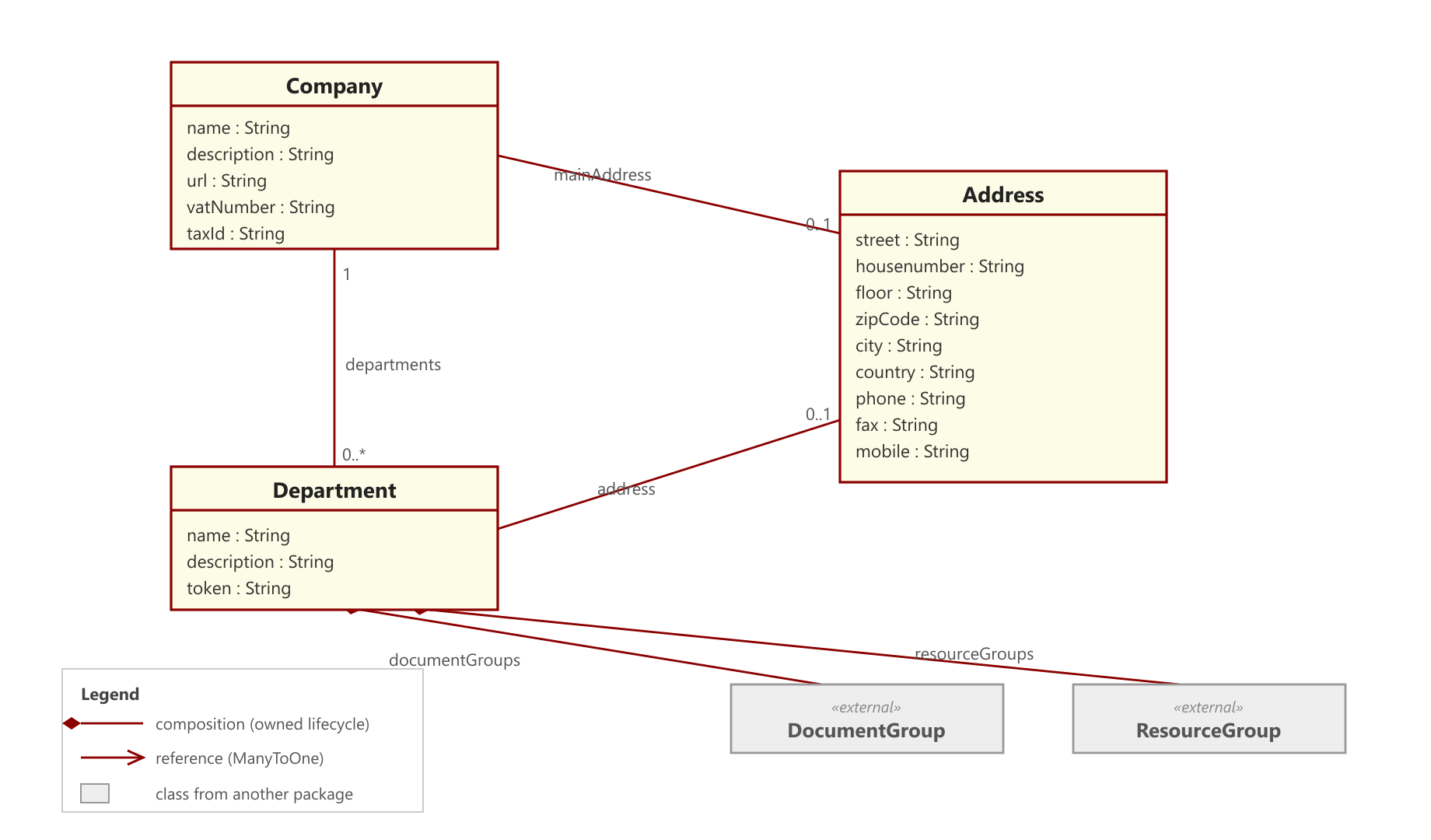
- Address — embedded value object, managed exclusively through its owners (Company, Department, PUser).
🗂️ Class diagrams per subsystem (click to expand)
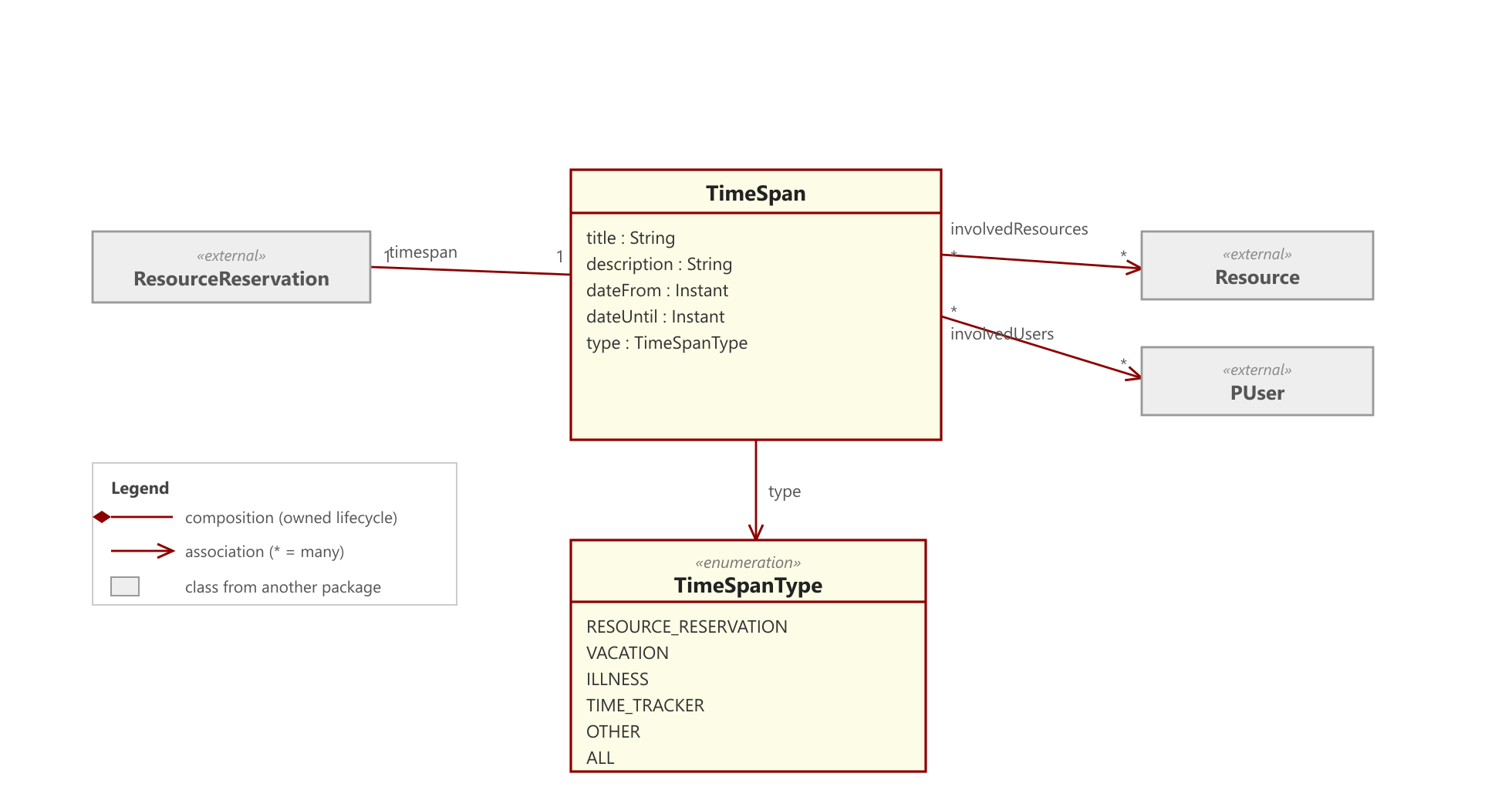
Each subsystem is documented as a focused UML class diagram — curated, entities only, with
cross-package neighbours shown as «external» for context. PlantUML sources live under
docs/diagrams/uml; the rendered PNGs under
docs/diagrams/images.
Organization & security
Companies & departments
Users, roles & permissions
Content & knowledge
Documents (versioning, check-in/out)
Skills (for people and devices)
Work & operations
Projects, blackboards, tasks & goals
Resources, reservations & control
Time spans (reservations & time tracking)
Platform, IoT & automation
Telemetry monitoring rules
Recurring task schedules
BPMN process orchestration (Flowable)
NFC tags as physical triggers
Contributing
Pull requests are welcome. For major changes, please open an issue first to discuss the direction.
See CONTRIBUTING.md for how to build, test and submit changes (branch model, commit conventions, code style, API-stability rules). Please also read our Code of Conduct. For security issues, follow the Security Policy — do not open a public issue.
License
Apache License 2.0 — see LICENSE. Source files carry the corresponding Apache 2.0 headers.
Contributors

315 commits
Similar repos


Languages
Java
99.8%
IoT-ready, neutral platform for project & resource management with NFC, MQTT and BPMN process orchestration (Flowable) — Spring Boot REST backend + Vaadin admin GUI.
Java
1
315 commits
updated Sep 18, 2026
See what people are saying (1)
README
Prioritize
Open-source framework for organizing companies, employees, devices (IoT), and their tasks — Spring Boot 4 / Java 21.
Find the right people — and things — for the right job. Prioritize models organizational structures (companies, departments, users, roles), manages documents with versioning, represents skills for people and devices, controls IoT resources over MQTT and REST, and organizes work as projects, tasks and goals with NFC-driven time tracking. It exposes a REST API throughout, against which arbitrary clients can be built.
Status
Released and self-hostable — a Spring Boot platform you can get running in one command (see Quickstart). The runnable Spring Boot core covers: company/user management, documents with versioning, skills for people and devices, resource control (MQTT/REST), telemetry state-transition rules, recurring (cron) task schedules, BPMN orchestration via Flowable, and the project subsystem — projects, blackboards, tasks, goal-driven progress, task time tracking, and NFC tags as physical triggers (including broadcasting scans over MQTT). A Vaadin admin GUI covering the org/security, resource, document, skill, scheduling and process subsystems is merged and functional. A few concepts (action board, message inbox) are planned but not yet implemented.
Scan a TIMETRACKER NFC tag to start and stop a task's time tracking — one physical tap, no screens, no logins. Driven entirely through the REST API.
Prioritize is the backend — you bring the reader. A scan is just one REST call,
POST /api/v1/nfc/scan/{uuid}. Whatever reads the tag and fires that call — an NFC-capable phone app, a fixed reader, an ESP32/Raspberry Pi, or a shell script — is up to you. Prioritize provides the endpoint (and can broadcast scans over MQTT); it does not ship a reader app.
Technology stack
| Area | Technology |
|---|---|
| Runtime | Java 21 |
| Framework | Spring Boot 4.0.5 (Web, Data JPA, Security, Integration) |
| Persistence | PostgreSQL (production), H2 (local/tests) |
| Authentication | HTTP Basic Auth or OAuth2 Resource Server (Keycloak, JWT) |
| IoT transport | MQTT (Spring Integration + Eclipse Paho v3) and REST |
| Process engine | Flowable (BPMN) |
| Admin GUI | Vaadin 25 (Flow) |
| Document parsing | Apache Tika |
| API docs | springdoc-openapi (Swagger UI) |
| Build | Maven |
| Boilerplate | Lombok |
Architecture
Layers
The application follows a clear layering with a fixed convention for authorization:
- Controllers accept
Authentication, resolve thePUserfrom it, and pass it explicitly to the service layer. Controllers contain no authorization logic. - Services hold all business logic including authorization. Permission checks happen exclusively here and are enforced via exceptions (not via return values).
- Repositories (Spring Data JPA) encapsulate data access.
Further conventions: constructor injection via Lombok @RequiredArgsConstructor; IDs consistently typed as Long; CurrentUserResolver as the central bridge between Spring Security's Authentication and the PUser model.
Resource control (hexagonal)
Control of IoT resources is modeled as a hexagonal port. The rest of the system only knows the ResourceControlAdapter interface, not the concrete transport:
- REST (
RestResourceControlAdapter) is the always-active base transport. Any resource with an IP set is controllable via REST (POST http://<ip>:<port>/command). - MQTT (
MqttResourceControlAdapter) is an optional, additional capability. The entire MQTT branch is active only whenprioritize.mqtt.enabled=true(@ConditionalOnProperty); otherwise it stays dormant.
The ResourceControlService selects the transport per command following a capability-set strategy with fallback:
- MQTT capability present and online → MQTT
- MQTT capability present but offline + REST endpoint (IP) set → REST fallback
- No MQTT capability → REST
- No reachable transport →
ResourceOfflineException(HTTP 503)
The inbound and outbound directions are deliberately separated: outbound commands go through the port; inbound device events (status, discovery, telemetry) are handled by a separate inbound path (InboundResourceEventHandler). The wire format is JSON (ResourceCommandMessage with command / param / slot).
Slot-bound control via reservations
Resources can have multiple slots (maxSlots). A control command always addresses a specific slot — this slot is not supplied by the client but derived server-side from the calling user's active reservation:
- Exactly one active reservation by the user → its slot is used.
- No active reservation →
SlotNotReservedException(HTTP 409). A command requires an ongoing reservation. - Multiple active reservations → slot is ambiguous →
SlotNotReservedException(HTTP 409).
"Active" means the current point in time lies within the reserved window (dateFrom <= now < dateUntil). An expired reservation implicitly releases the slot; a command sent afterwards runs into the 409 case.
Projects, tasks and goal-driven progress
Projects own a blackboard carrying tasks. Authorization in this subsystem is membership-based (project manager or member), orthogonal to the role/permission system used elsewhere; a task's assignee/manager is a PActor (either a PUser or a Resource). Progress is goal-driven, not task-driven: a Task carries no percentage, only an optional link to a ProjectGoal. A goal's completion is the share of its non-cancelled tasks that reached a done status; a project's progress is the average over its counting goals, and null (n/a) when undefined. Progress is always computed, never stored.
Task time tracking and NFC
Time tracking lives on the Task (a running span plus a history of completed spans), so it works with or without NFC. GET /tasks/{id}/tracking returns the aggregated total (the running span counted live up to now); GET /tasks/{id}/tracking/sessions lists the individual work sessions.
An NfcUnit is a physical NFC tag mounted on a resource (a resource may carry several tags of different types: COUNTER, CHECKPOINT, TIMETRACKER, INFOPOINT, OTHER). Scanning a tag resolves it by UUID and triggers a type-specific action — a TIMETRACKER tag toggles the time tracking of the single task it is bound to. When the MQTT profile is active, each scan is additionally broadcast on the topic nfc/scan/<tag-uuid> so devices and dashboards can observe it live; without MQTT, scanning works unchanged.
Telemetry state-transition rules
A resource can carry telemetry rules that turn a stream of numeric readings into a persisted OK/ALARM state. A rule defines an operator (GT, LT, RANGE), one or two thresholds, a hysteresis dead-band, and a severity. Both ingest paths (REST POST /resources/{id}/values and MQTT) evaluate the resource's enabled rules after each save; the breach uses the raw threshold, the clear only triggers once the value crosses back past threshold ± hysteresis (edge logic, so a value hovering at the boundary does not flap). On a state change the rule is persisted and a TelemetryThresholdEvent is fired; with the MQTT profile a telemetry/alarm/<resourceId> message is broadcast (type: "TELEMETRY_ALARM"). Resources without any rule cost zero extra database work (an in-memory guard is checked before any query).
Recurring task schedules
A TaskSchedule fires a task template onto a project's blackboard on a cron cadence. Each schedule carries the target project, the task template (name/description/priority), a cronExpression, a zoneId, an enabled flag, and nextFireAt/lastFiredAt. A gated poller (@Scheduled, enabled by default, disable with prioritize.scheduling.enabled=false) runs due schedules through a trusted user-less create path, stamps lastFiredAt, and advances nextFireAt. The cron is evaluated in the schedule's own zone but nextFireAt is stored normalized to the server zone, so the poller compares every schedule against a single wall clock. Failures are isolated per schedule.
BPMN orchestration (Flowable)
Flowable is used for orchestration, not lifecycle ownership: it describes order, waiting and responsibility, never computation. BPMN definitions are managed as versioned documents that require an explicit activation step before they can run (the classpath stays as a trusted root/break-glass source). Running processes link generically to a project or task (business key project:<id> / task:<id>). Two bridges connect processes to the platform: an inbound trusted facade (PlatformGateway) lets a process create tasks, store documents or control resources under a seeded system principal, and an outbound event bridge wakes waiting processes from platform events (NFC scans, telemetry thresholds) correlated by a single rule — the pair of message name and an awaitedResourceId process variable.
Configuration (profiles)
Behavior is controlled via Spring profiles. The default profile is h2 (see application.yaml), so a fresh checkout runs with no external setup.
| Profile | Purpose |
|---|---|
h2 | Local H2 file database including H2 console at /h2-console. Default. |
postgres | PostgreSQL data source (shared/production/NAS setup). |
keycloak | Switches security from Basic Auth to OAuth2 Resource Server (JWT). |
mqtt | Enables the MQTT transport (prioritize.mqtt.enabled=true). |
Profiles are combinable, e.g. spring.profiles.active=postgres,keycloak,mqtt.
Authentication
The security configuration is profile-dependent and mutually exclusive:
- Without the
keycloakprofile,SecurityConfig(@Profile("!keycloak")) applies with HTTP Basic Auth for the REST API plus form login for the admin GUI. - With the
keycloakprofile,KeycloakSecurityConfig(@Profile("keycloak")) applies as an OAuth2 Resource Server (JWT / Bearer). Theissuer-uriis set inapplication-keycloak.yaml; it must exactly match theissclaim of the tokens.
Bearer auth is a REST-API story only. Under the
keycloakprofile the app is a pure resource server with no login page — the Vaadin admin GUI is not reachable (every browser page returns401, because the browser sends noAuthorization: Bearerheader). Use the admin GUI without thekeycloakprofile (Basic/form login); use Keycloak/Bearer tokens against/api/v1/**. Running the GUI under Keycloak (OAuth2 login + JIT user provisioning) is a planned post-1.0 feature.
A default administrator (admin / p@ssword) is seeded on first start by InitializationService (BCrypt-hashed in the database). Change it before any non-local deployment.
Database credentials
The PostgreSQL data source reads its password from the DB_PASSWORD environment variable, defaulting to prioritize for local development (see application-postgres.yaml). Set DB_PASSWORD in any shared or production environment.
MQTT
Bound to the prefix prioritize.mqtt (MqttProperties):
prioritize:
  mqtt:
    enabled: true
    broker-url: tcp://memoryalpha:1883   # TLS later: ssl://...:8883
    client-id: prioritize-backend
    # username: prioritize
    # password: ${MQTT_PASSWORD:}
    qos: 1
    subscribe-topics:
      - DISCOVERY
      - "+/status"
Quickstart
The fastest way to try Prioritize is Docker. You can also run it from source with a JDK.
With Docker (recommended for self-hosting)
Requires Docker with the Compose plugin. This builds the app image and starts it together with a PostgreSQL database:
docker compose up --build
Then open http://localhost:8080 and log in with admin / p@ssword. The REST API lives under /api/v1 and Swagger UI is at /swagger-ui.html.
Just want a quick look with no database to manage? A single self-contained container backed by an embedded H2 file DB is enough:
docker build -t prioritize .
docker run --rm -m 1g -p 8080:8080 prioritize
-m 1g is not decoration: without a limit the JVM sizes its heap against the host's RAM, so on a large machine the ceiling ends up in the tens of gigabytes. Compose sets the limit for you; a plain docker run does not. See Memory.
The optional stacks are opt-in via Compose profiles (copy .env.example to .env and add the profile to SPRING_PROFILES_ACTIVE, e.g. postgres,mqtt):
docker compose --profile mqtt up        # + Mosquitto broker (device telemetry / NFC)
docker compose --profile keycloak up    # + Keycloak (OIDC bearer-token auth)
Data persists in the db-data volume (PostgreSQL) or the container's /app/data volume (H2). Stop with docker compose down to keep the data, or docker compose down -v to drop it.
Memory
Give the app container 1 GB. Compose does that by default (mem_limit, override with MEM_LIMIT in .env); for a plain docker run, pass -m 1g. Measured on 1.4.0: about 480 MiB idle at that limit, plus roughly 90 MiB for the PostgreSQL container. It starts in around 30 seconds.
The limit matters more than it looks. The JVM is container-aware and sizes its heap from the container's limit — but with no limit it falls back to a share of the host's RAM, which on a 32 GB machine means a heap ceiling of 8.4 GB. The image sets -XX:MaxRAMPercentage=60 rather than a fixed -Xmx, so it adapts to whatever limit you give it. 60 and not the usual 75 because this application's non-heap footprint — metaspace, code cache, threads, natives — measures around 310 MiB: at a 1 GB limit, 75% would place the heap ceiling beyond the limit and a heap that filled up would be OOM-killed instead of collected. If you want 75%, give the container 2 GB:
docker run -m 2g -e JDK_JAVA_OPTIONS="-XX:MaxRAMPercentage=75" -p 8080:8080 prioritize
It does fit in 512 MB — verified, no OOM kill under a few hundred API calls — but at ~92% of the limit there is no headroom, so that is a demo size rather than one to run on.
From source (JDK 21 + Maven)
Prerequisites: JDK 21 and Maven. No database setup is needed for the default h2 profile.
# Default: local H2 file DB, no external services (just run it)
mvn spring-boot:run

# Against a shared/production PostgreSQL
mvn spring-boot:run -Dspring-boot.run.profiles=postgres

# PostgreSQL with Keycloak and MQTT
mvn spring-boot:run -Dspring-boot.run.profiles=postgres,keycloak,mqtt
Tests:
mvn test
With the h2 profile, the H2 console is available at http://localhost:8080/h2-console.
API documentation
While the application is running, interactive OpenAPI documentation is served via springdoc (Swagger UI, typically at /swagger-ui.html). The basicAuth and bearerAuth security schemes are registered, so endpoints can be tested authenticated directly from the UI.
Admin GUI (Vaadin)
A Vaadin admin GUI ships in-process and is served from the application root (http://localhost:8080/). Log in with a local user (default admin / p@ssword); it uses form login and is available only without the keycloak profile (see Authentication). It is an operator tool for the platform, not the primary API — arbitrary clients are expected to build on the REST API instead.
Covered subsystems (one navigation entry each): Dashboard, Companies, Departments, Users, Roles, Groups, Resources (with live online status and reservations), Documents (list/download/delete), Skills, Skill Categories, Task Schedules, Process Definitions, and Process Instances. GUI routes are an implementation detail and are not part of the public API contract (see API stability).
📸 Screenshots (click to expand)
Dashboard — the Vaadin admin GUI home:
Resources — networked machines and sensors with live online-status indicators:
Users — org-wide user administration:
Skills — competencies for people and devices:
Login:
REST API (overview)
All core endpoints live under /api/v1. The table below is an overview, not a complete reference — the authoritative, always-current description is provided by the OpenAPI docs.
Resources & control
| Method | Path | Purpose |
|---|---|---|
GET | /api/v1/resourcegroups/{groupId}/resources | Resources of a group |
POST | /api/v1/resourcegroups/{groupId}/resources | Create resource |
GET | /api/v1/resources/{id} | Get resource |
PATCH | /api/v1/resources/{id} | Partial update (null = unchanged) |
DELETE | /api/v1/resources/{id} | Delete resource |
POST | /api/v1/resources/{id}/command | Send control command (slot derived from reservation) |
POST | /api/v1/resources/{id}/reserve | Reserve resource for a time window |
GET | /api/v1/resources/{id}/reservations | All reservations of the resource |
GET | /api/v1/resources/{id}/reservations/mine | Own active reservations (slot preview) |
DELETE | /api/v1/reservations/{reservationId} | Cancel reservation / release slot |
POST | /api/v1/resources/{id}/values | Ingest a telemetry reading |
GET | /api/v1/resources/{resourceId}/skills | Skills of a resource |
POST | /api/v1/resources/{resourceId}/skills | Assign skill |
Projects, tasks & goals
| Method | Path | Purpose |
|---|---|---|
POST | /api/v1/projects | Create project |
GET | /api/v1/projects/mine | Projects I manage or am a member of |
GET / PUT / DELETE | /api/v1/projects/{id} | Get / update / delete project |
POST / DELETE | /api/v1/projects/{id}/members | Add / remove member |
GET | /api/v1/projects/{id}/tasks | Tasks on the project's blackboard |
GET / POST | /api/v1/projects/{id}/goals | List / create goals |
GET | /api/v1/projects/{id}/progress | Computed goal-driven progress |
POST | /api/v1/projects/{projectId}/tasks | Create task |
GET / PUT / DELETE | /api/v1/tasks/{id} | Get / update / delete task |
POST | /api/v1/tasks/{id}/assign | Assign a PActor |
PUT | /api/v1/tasks/{id}/status | Change task status |
PUT / DELETE | /api/v1/tasks/{id}/goal | Assign / unassign a goal |
Time tracking & NFC
| Method | Path | Purpose |
|---|---|---|
POST | /api/v1/tasks/{id}/tracking/{start|stop|toggle} | Start / stop / toggle time tracking |
GET | /api/v1/tasks/{id}/tracking | Aggregated tracked total (running span live) |
GET | /api/v1/tasks/{id}/tracking/sessions | Individual tracked work sessions |
GET / POST | /api/v1/resources/{id}/nfc-units | List / register NFC tags on a resource |
PUT / DELETE | /api/v1/nfc-units/{id}/task/{taskId} | Bind / unbind a TIMETRACKER tag to a task |
POST | /api/v1/nfc/scan/{uuid} | Process a tag scan (type-specific action) |
Companies & departments
| Method | Path | Purpose |
|---|---|---|
GET | /api/v1/companies/{id} | Get company |
POST | /api/v1/companies/filter | Filter companies |
PUT | /api/v1/companies/{id} | Update company |
DELETE | /api/v1/companies/{id} | Delete company |
POST | /api/v1/companies/{companyId}/departments | Create department |
GET | /api/v1/companies/{companyId}/departments | Departments of a company |
GET | /api/v1/departments/{id} | Get department |
PUT | /api/v1/departments/{id} | Update department |
DELETE | /api/v1/departments/{id} | Delete department |
Users
| Method | Path | Purpose |
|---|---|---|
GET | /api/v1/users/{id} | Get user |
PUT | /api/v1/users/{id} | Update user |
PATCH | /api/v1/users/{id} | Partial update |
DELETE | /api/v1/users/{id} | Delete user |
GET | /api/v1/users/{userId}/skills | Skills of a user |
POST | /api/v1/users/{userId}/skills | Assign skill |
Skills
| Method | Path | Purpose |
|---|---|---|
GET / POST | /api/v1/skills | List / create skills |
GET / PUT / DELETE | /api/v1/skills/{skillId} | Get / update / delete skill |
GET / POST | /api/v1/skills/categories | List / create categories |
GET / PUT / DELETE | /api/v1/skills/categories/{categoryId} | Get / update / delete category |
Documents
| Method | Path | Purpose |
|---|---|---|
GET | /api/v1/documents/download/{documentInfoId} | Download document |
GET | /api/v1/documents/{id}/version/{versionNumber} | Get a specific version |
GET | /api/v1/documents/{id}/history | Version history |
POST | /api/v1/documents/{id}/check-out | Check out (lock) |
POST | /api/v1/documents/{id}/check-in | Check in (new version) |
POST | /api/v1/documents/{id}/cancel-check-out | Cancel check-out |
GET | /api/v1/documents/search | Full-text / metadata search |
GET | /api/v1/documents/recent | Recently changed documents |
DELETE | /api/v1/documents/{id} | Delete document |
GET | /api/v1/document-groups/{groupId}/documents | Documents of a group |
DELETE | /api/v1/document-groups/{groupId} | Delete group |
Telemetry rules
| Method | Path | Purpose |
|---|---|---|
GET / POST | /api/v1/resources/{resourceId}/telemetry-rules | List / create rules for a resource |
GET / PATCH / DELETE | /api/v1/telemetry-rules/{id} | Get / update / delete a rule |
Task schedules
| Method | Path | Purpose |
|---|---|---|
GET / POST | /api/v1/projects/{projectId}/task-schedules | List / create schedules for a project |
GET / PATCH / DELETE | /api/v1/task-schedules/{id} | Get / update / delete a schedule |
Processes (Flowable)
| Method | Path | Purpose |
|---|---|---|
GET | /api/v1/process-definitions | List registered process definitions |
POST | /api/v1/documents/{documentInfoId}/process-definition | Register a BPMN document as a definition |
GET | /api/v1/process-definitions/{id} | Get a definition |
POST | /api/v1/process-definitions/{id}/activate | Activate (deploy to the engine) |
POST | /api/v1/process-definitions/{id}/deactivate | Deactivate |
DELETE | /api/v1/process-definitions/{id} | Remove a definition (?force=true to also drop a deployment) |
GET / POST | /api/v1/projects/{projectId}/process-instances | List / start instances linked to a project |
POST | /api/v1/tasks/{taskId}/process-instances | Start an instance linked to a task |
GET | /api/v1/tasks/{taskId}/process-instance | The instance linked to a task |
GET | /api/v1/process-instances/{id} | Get an instance |
POST | /api/v1/process-instances/{id}/cancel | Cancel an instance (manager only) |
API stability
From 1.0.0 onward the project follows semantic versioning: the version number communicates what a consumer can rely on.
-
The REST API under
/api/v1is the stable contract. These endpoints — their paths, methods, request/response shapes and documented status codes — are the public surface that external clients build against. Backward-incompatible changes to them will not happen within the1.xline; they would come with a new major version (and, where practical, a new path prefix such as/api/v2). Additive changes (new endpoints, new optional fields) are minor releases and are safe to adopt. The authoritative, always-current description is the OpenAPI document served by the running application (see API documentation); the tables above are only an overview. -
The Vaadin admin GUI and its routes are an implementation detail — not part of the contract. The
@RouteURLs (/process-definitions,/task-schedules, …) exist for the browser UI and may change at any time without a major bump. Do not script or link against them; drive automation through/api/v1instead. -
SkillPropertyis experimental. The skill property model (typed key/value attributes on a skill) is exposed for early feedback and is markedEXPERIMENTALin the OpenAPI schema. It has no admin GUI yet and its shape may change in a minor release without the usual stability guarantee. Everything else in the skill subsystem (skills, categories, assignments) is stable. -
POST /api/v1/userscreates users without a password, by design. In production the identity provider (Keycloak) owns credentials, so the local account is provisioned password-less;PUser.passwordcarries@JsonIgnoreand is never accepted or returned over REST. A REST-created user therefore cannot log in via Basic auth — that is intended for the Keycloak deployment model, not a missing feature. To create a login-capable local user (for a Basic-auth / development setup), use the admin GUI's user view, which has a password field. Just-in-time provisioning of local users on first Keycloak login is a planned post-1.0 addition.
Client libraries
Official REST clients build against the stable /api/v1 contract. They are spec-first: every API and
model class is generated from the released OpenAPI document (see API documentation)
and never hand-written, so the client version tracks the API version (a 1.x client targets the 1.x API).
| Language | Repository | Install |
|---|---|---|
| Java | prioritize-java-client | Maven Central: de.hallerweb:prioritize-java-client:1.3.1 |
| PHP | prioritize-php-client | Composer: composer require hallerweb/prioritize-php-client |
| Python | prioritize-python-client | PyPI: pip install prioritize-client |
| TypeScript | prioritize-typescript-client | npm: npm install prioritize-client |
<dependency>
    <groupId>de.hallerweb</groupId>
    <artifactId>prioritize-java-client</artifactId>
    <version>1.3.1</version>
</dependency>
All four support HTTP Basic (default profile) and Bearer/Keycloak authentication.
Java only: build the client with
new PrioritizeApiClient(), notnew ApiClient(). The generated client transports overHttpURLConnection, which rejectsPATCH, so every partial-update call would fail before leaving the JVM.PrioritizeApiClientis the same client on aPATCH-capable transport.
Error semantics (HTTP status)
Centralized in GlobalExceptionHandler:
| Status | Trigger |
|---|---|
400 Bad Request | IllegalArgumentException (e.g. invalid date format, end before start date); HttpMessageNotReadableException (malformed / unreadable request body) |
403 Forbidden | AccessDeniedException (missing permission) |
404 Not Found | NoSuchElementException / EntityNotFoundException |
409 Conflict | IllegalStateException, SlotNotReservedException (no / ambiguous active reservation), SlotOccupiedException (slot already taken), DataIntegrityViolationException (constraint violation) |
500 Internal Server Error | IncorrectResultSizeDataAccessException and any otherwise unmapped exception |
502 Bad Gateway | ResourceCommandFailedException (device rejected the command) |
503 Service Unavailable | ResourceOfflineException (no reachable control channel) |
Domain model (brief overview)
- Company / Department — organizational base structure. The hierarchy provides a foundation for tenant separation, but enforced multi-tenant isolation is not yet implemented (projects are membership-scoped,
adminis a global superuser). - PUser / Role / PermissionRecord — users, roles, and the fine-grained permission model.
- Resource — a device / resource; can represent an IoT device and communicate externally (REST/MQTT). Has slots and reservations.
- ResourceReservation — time-bound occupancy of a resource slot by a user.
- Document / DocumentInfo / DocumentGroup — documents with versioning and check-in/check-out.
- Skill / SkillCategory / SkillRecord — capabilities; assignable to users and resources.
- Project / Blackboard / Task / ProjectGoal — projects own a blackboard of tasks; goals drive computed progress; a task's assignee/manager is a
PActor. - NfcUnit — a physical NFC tag mounted on a resource; a scan triggers a type-specific action (e.g. toggling a task's time tracking).
- TelemetryRule — a per-resource rule turning numeric readings into a persisted
OK/ALARMstate with hysteresis. - TaskSchedule — a cron-driven schedule that fires a task template onto a project's blackboard.
- ProcessDefinition / ProcessInstance — a registered, explicitly activated BPMN definition and its running orchestration, linked generically to a project or task.
- Address — embedded value object, managed exclusively through its owners (Company, Department, PUser).
🗂️ Class diagrams per subsystem (click to expand)
Each subsystem is documented as a focused UML class diagram — curated, entities only, with
cross-package neighbours shown as «external» for context. PlantUML sources live under
docs/diagrams/uml; the rendered PNGs under
docs/diagrams/images.
Organization & security
Companies & departments
Users, roles & permissions
Content & knowledge
Documents (versioning, check-in/out)
Skills (for people and devices)
Work & operations
Projects, blackboards, tasks & goals
Resources, reservations & control
Time spans (reservations & time tracking)
Platform, IoT & automation
Telemetry monitoring rules
Recurring task schedules
BPMN process orchestration (Flowable)
NFC tags as physical triggers
Contributing
Pull requests are welcome. For major changes, please open an issue first to discuss the direction.
See CONTRIBUTING.md for how to build, test and submit changes (branch model, commit conventions, code style, API-stability rules). Please also read our Code of Conduct. For security issues, follow the Security Policy — do not open a public issue.
License
Apache License 2.0 — see LICENSE. Source files carry the corresponding Apache 2.0 headers.
Similar repos
Contributors
315 commits
Languages
Java
99.8%