LeafWiki - Self-hosted wiki. Single Go binary, SQLite, Markdown on disk. No external database required.
See the code



Self-hosted wiki. Single Go binary. SQLite + Markdown stored on disk.
For engineers and self-hosters who want structured, long-lived documentation. No Node.js, no Redis, no Postgres — just a binary and a data directory.
If you've looked at Wiki.js or Outline and thought "this is too much to operate for what I need" — this could fit for you.
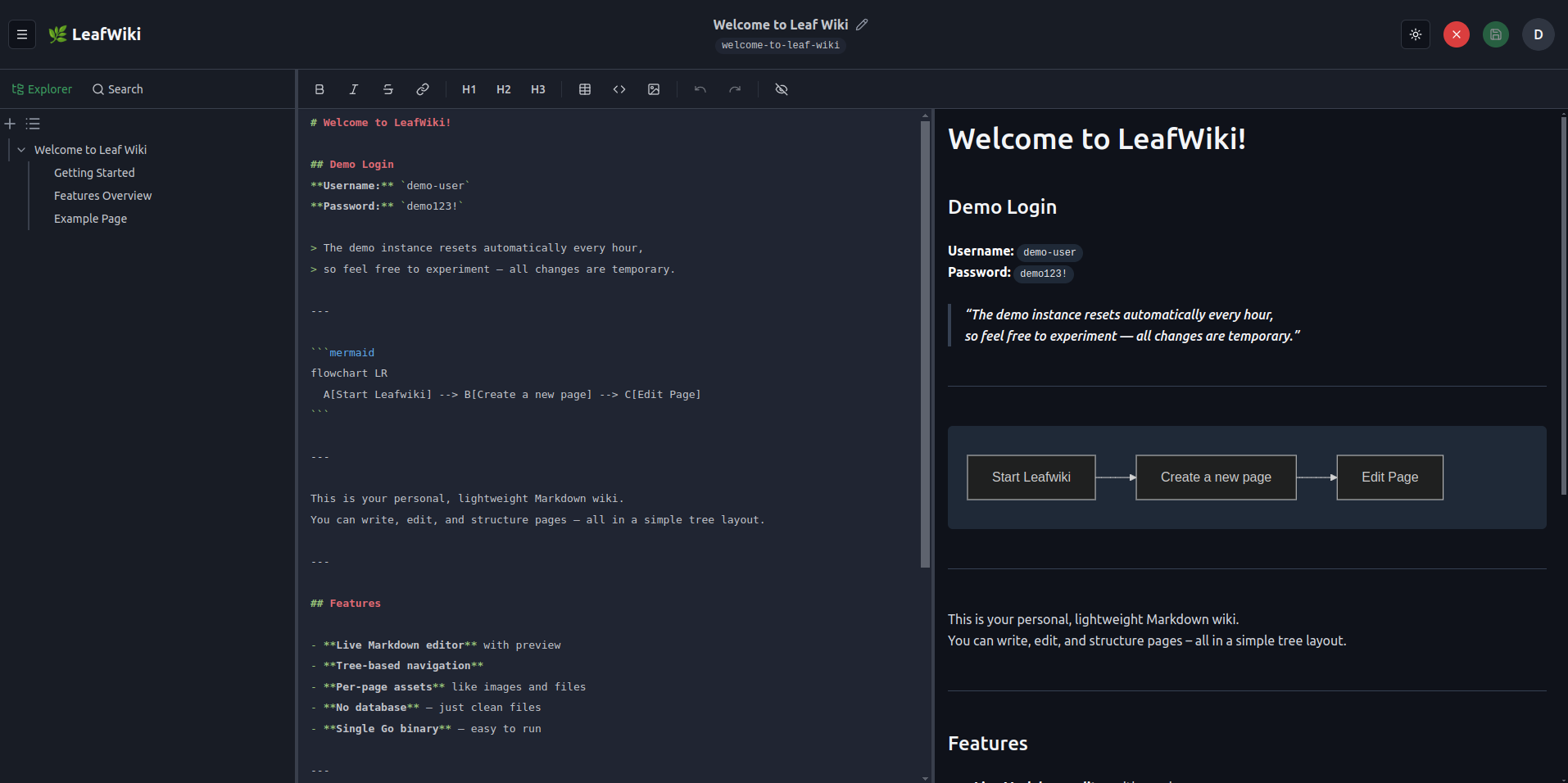
→ Try it without installing: demo.leafwiki.com · Ctrl+E edit · Ctrl+S save · resets hourly
→ If it fits, a star helps others find it.
→ Useful to you? Sponsor on GitHub · Buy a coffee on Ko-fi
docker run -p 8080:8080 -v ~/leafwiki-data:/app/data \
  ghcr.io/perber/leafwiki:latest \
  --jwt-secret=yoursecret --admin-password=yourpassword --allow-insecure=true
→ All install options (Docker Compose, Linux installer, binary)
Operations:
cp -r (stop the app first)--base-pathCore functionality:
:::info / :::warning), collapsible blocks (:::collapsible / :::collapsed), Mermaid diagrams, KaTeX math blocks ($$...$$, inline $...$ not supported), sanitized inline HTML, embedded PDFs (, optionally opened on a specific page with )Customization:
--custom-stylesheet, v0.8.5+)<head> for analytics or custom CSS--default-language picks the default. Contributions of other languages are very welcome — see docs/i18n.mdOpt-in via feature flags:
--enable-revision)--enable-link-refactor)--smtp-host, v0.13.0)--git-backup, v0.11.3, experimental)Markdown import:
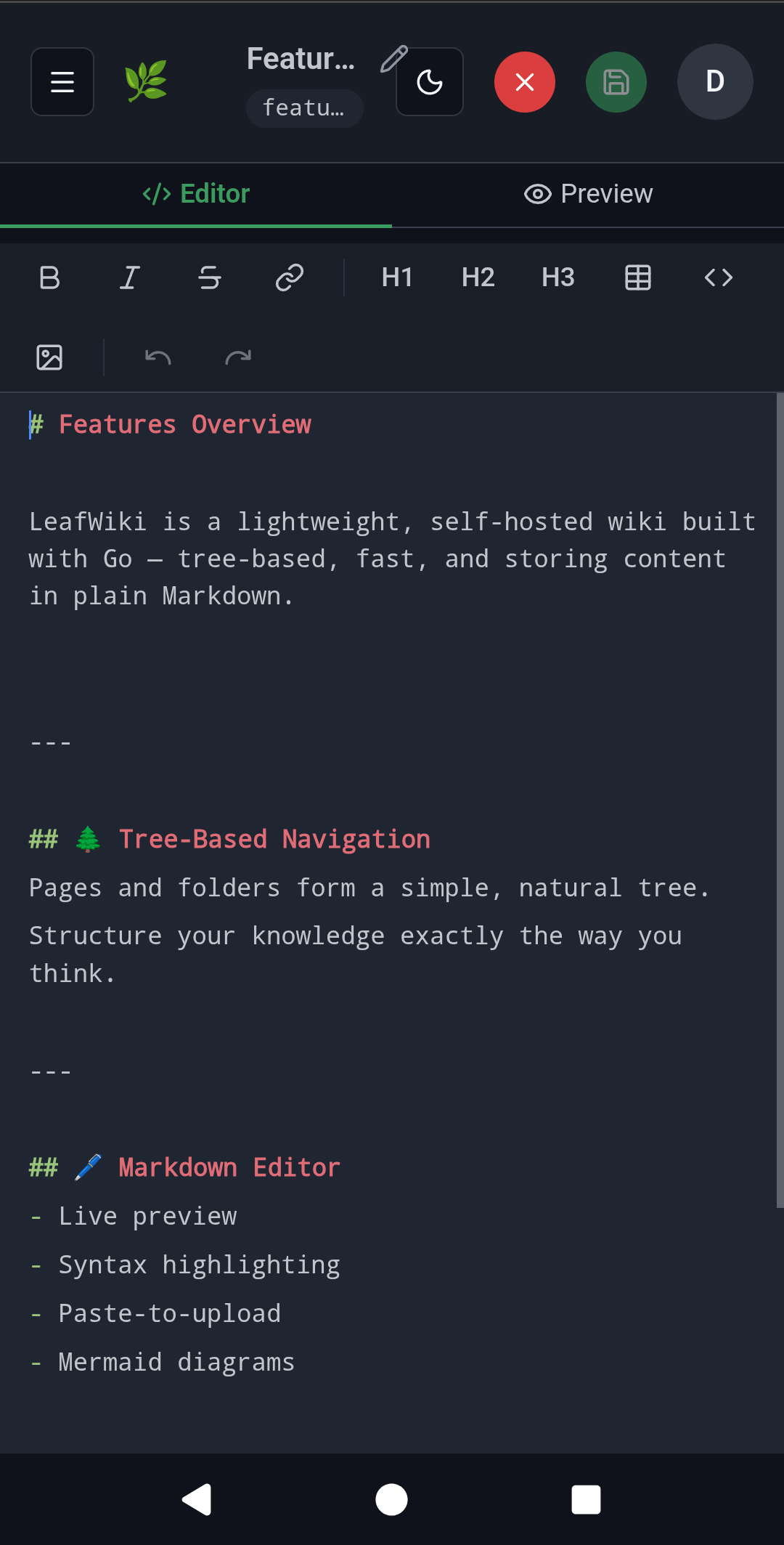
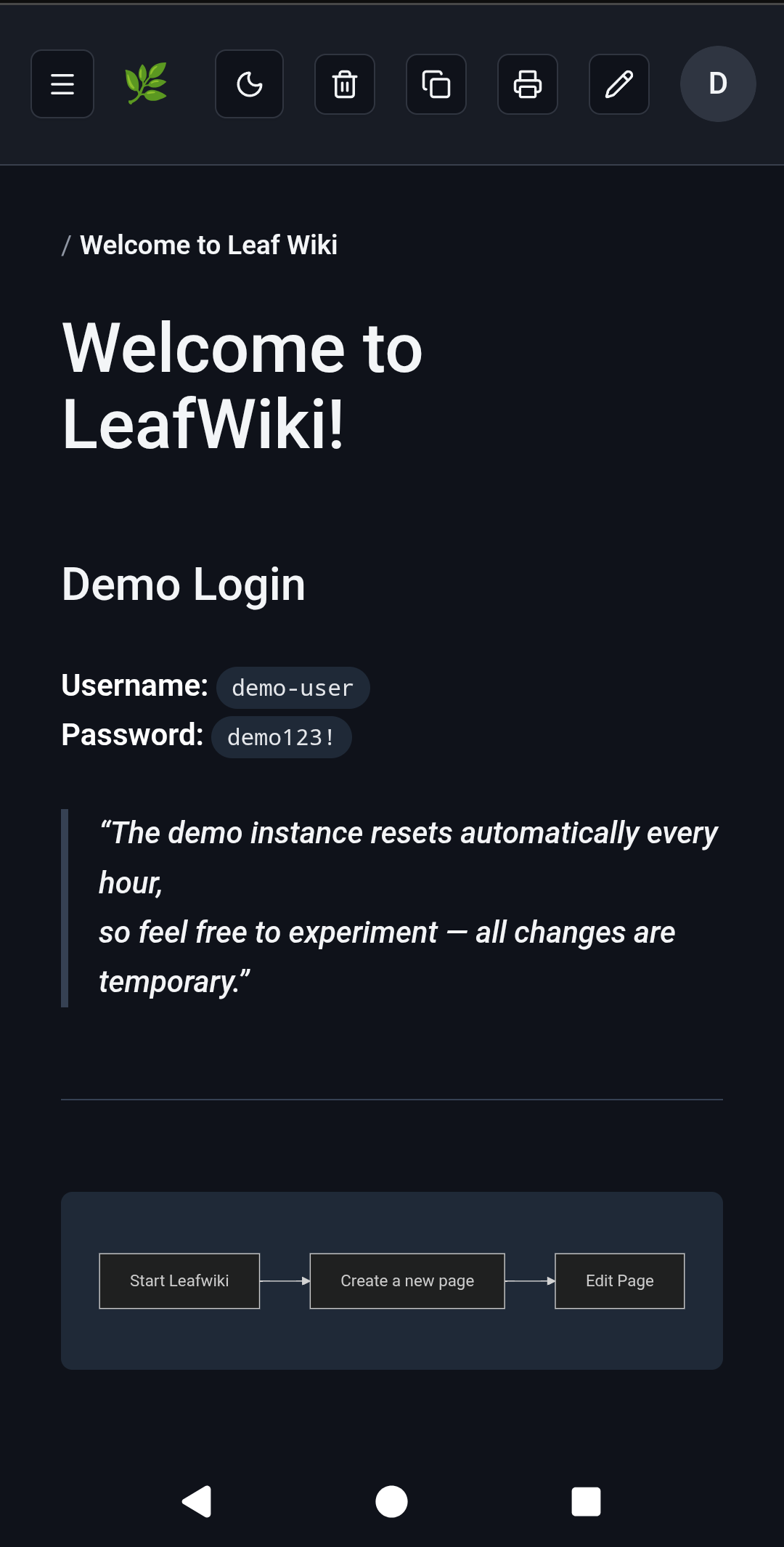
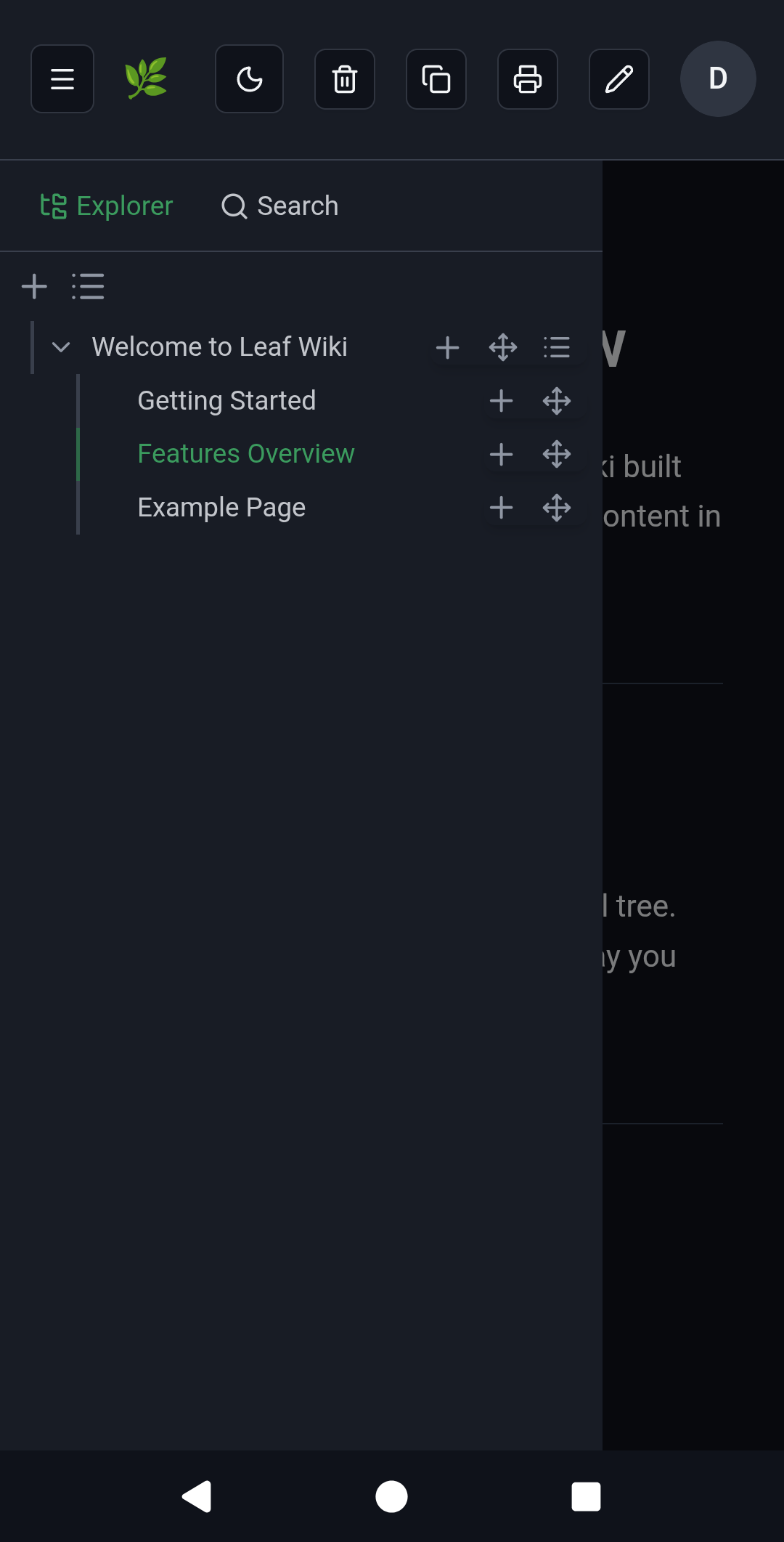
Mobile:
Good fit:
Probably not a fit:
LeafWiki is intentionally narrower than those systems. That focus is part of the value.
Prefer not to run your own server? Free hosted beta — 10 spots, starting September 2026. Get a beta spot → and help shape the hosted version.
docker run -p 8080:8080 \
    -v ~/leafwiki-data:/app/data \
    ghcr.io/perber/leafwiki:latest \
    --jwt-secret=yoursecret \
    --admin-password=yourpassword \
    --allow-insecure=true
--allow-insecure=true is required for plain HTTP. Omit it when serving over HTTPS (make sure your reverse proxy forwards X-Forwarded-Proto: https).
Non-root:
docker run -p 8080:8080 \
    -u 1000:1000 \
    -v ~/leafwiki-data:/app/data \
    ghcr.io/perber/leafwiki:latest \
    --jwt-secret=yoursecret \
    --admin-password=yourpassword \
    --allow-insecure=true
The data directory must be writable by the specified user.
services:
  leafwiki:
    image: ghcr.io/perber/leafwiki:latest
    container_name: leafwiki
    user: 1000:1000
    ports:
      - "8080:8080"
    environment:
      - LEAFWIKI_JWT_SECRET=yourSecret
      - LEAFWIKI_ADMIN_PASSWORD=yourPassword
      - LEAFWIKI_ALLOW_INSECURE=true  # Required for plain HTTP. Omit for HTTPS (ensure `X-Forwarded-Proto: https` is forwarded).
    volumes:
      - ${HOME}/leafwiki-data:/app/data
    restart: unless-stopped
See docs/install/kubernetes.md for a Deployment + PersistentVolumeClaim + Service + Ingress example (Gateway API alternative included).
sudo /bin/bash -c "$(curl -fsSL https://raw.githubusercontent.com/perber/leafwiki/main/install.sh)"
Installs LeafWiki as a system service. Tested on Ubuntu, Debian, and Raspbian.
Update:
sudo /bin/bash -c "$(curl -fsSL https://raw.githubusercontent.com/perber/leafwiki/main/update.sh)"
Only works if you installed with the script above. Not compatible with Docker or binary installs.
Non-interactive mode:
cp .env.example .env
# Edit .env with your configuration
sudo ./install.sh --non-interactive --env-file ./.env
Security: in interactive mode, environment variables are written in plain text to
/etc/leafwiki/.env. Restrict access to that file.
Deployment examples:
Download leafwiki-<version>-<os>-<arch> and its .sha256 file from
GitHub Releases
(linux-amd64, linux-arm64, linux-386, darwin-amd64, darwin-arm64,
windows-amd64), check that the hash matches the one in the .sha256 file,
and rename it to leafwiki:
sha256sum leafwiki-<version>-<os>-<arch>
cat leafwiki-<version>-<os>-<arch>.sha256
mv leafwiki-<version>-<os>-<arch> leafwiki
chmod +x leafwiki
./leafwiki --jwt-secret=yoursecret --admin-password=yourpassword --allow-insecure=true
The server binds to 127.0.0.1:8080 by default. To expose it on the network:
./leafwiki --jwt-secret=yoursecret --admin-password=yourpassword --host=0.0.0.0 --allow-insecure=true
Default data directory is ./data. Change with --data-dir.
32-bit x86 Linux (i686, e.g. Alpine on an Intel Atom) is supported on a best-effort basis: use the
linux-386binary. It is built without CGO, so it doesn't need glibc and runs on musl-based distros. The systemd installer and Docker images only cover amd64/arm64, so the binary is the only install path on 32-bit x86 (that includesupdate.sh, which expects the systemd setup).
Requires Go and Node.js. make build compiles the UI, embeds it, and produces a self-contained leafwiki binary (same as release/Docker builds). Use HTTP (http://localhost:8080/), not HTTPS, unless you terminate TLS in front of LeafWiki.
git clone https://github.com/perber/leafwiki.git
cd leafwiki
git switch --detach v0.13.0   # or any tag / main
make build
./leafwiki --disable-auth --host=127.0.0.1 --data-dir ./data --allow-insecure=true
For API-only local development with Vite, use make build-api (or make run) instead — see Dev Setup.
./leafwiki reset-admin-password
For disaster recovery or migrating to a fresh instance, restore a snapshot ZIP into the data directory while the server is stopped:
./leafwiki --data-dir ./data restore-snapshot ./data/snapshots/leafwiki-snapshot-2026-01-01.zip
When --snapshot is enabled, a live restore is also available from the admin UI (Settings → Full Backup). Use this offline command when the server can't start or you're seeding a new data directory. The --snapshot* flags are in CLI Flags.
LeafWiki supports three access modes. Pick the one that matches your environment:
All access requires authentication. Nobody can read or edit without a valid account. This is the default behavior when no access flags are set.
./leafwiki --jwt-secret=yoursecret --admin-password=yourpassword
Use this for team-internal wikis or homelab setups where content should stay private.
Anyone can browse the wiki without logging in. Only authenticated users with an editor or admin role can make changes.
./leafwiki --jwt-secret=yoursecret --admin-password=yourpassword --public-access=true
Use this for open documentation or project wikis where readers don't need accounts, but you still want to control who can edit.
--disable-auth)Authentication is completely disabled. Anyone who can reach the server can read and edit all pages.
./leafwiki --disable-auth --host=127.0.0.1
⚠️ Only use this on trusted internal networks or local setups. Never expose a
--disable-authinstance to the public internet.
Stack: Go · React (Vite) · SQLite
git clone https://github.com/perber/leafwiki.git
cd leafwiki
Terminal 1 — Frontend:
cd ui/leafwiki-ui
npm install
npm run dev
Terminal 2 — Backend:
cd cmd/leafwiki
go run . --jwt-secret=yoursecret --allow-insecure=true --admin-password=yourpassword
Vite starts on http://localhost:5173. The backend binds to 127.0.0.1 by default.
See CONTRIBUTING.md for contribution guidelines.
| Flag | Description |
|---|---|
--jwt-secret | Secret for signing JWTs. Keep it secure. |
--admin-password | Initial admin password (only applied if no admin exists yet). |
| Flag | Description | Default |
|---|---|---|
--admin-username | Initial admin username (only applied if no admin exists yet). | admin |
--admin-email | Initial admin email (only applied if no admin exists yet). | admin@localhost |
For plain HTTP: add --allow-insecure=true so login and CSRF cookies work.
| Flag | Description | Default | Since |
|---|---|---|---|
--host | Host/IP the server binds to | 127.0.0.1 | – |
--port | Port the server listens on | 8080 | – |
--unix-socket | Unix domain socket path; overrides --host and --port | "" | v0.11.3 |
--data-dir | Directory where data is stored | ./data | – |
--admin-username | Initial admin username (only applied if no admin exists yet) | admin | v0.12.0 |
--admin-email | Initial admin email (only applied if no admin exists yet) | admin@localhost | v0.12.0 |
--public-access | Allow public read-only access | false | – |
--base-path | URL prefix for reverse proxy setups (e.g. /wiki) | "" | v0.8.2 |
--allow-insecure | ⚠️ Enables HTTP for auth cookies (required for plain HTTP) | false | v0.7.0 |
--disable-auth | ⚠️ Disable all authentication (internal networks only) | false | v0.7.0 |
--access-token-timeout | Access token duration (e.g. 24h, 15m) | 15m | v0.7.0 |
--refresh-token-timeout | Refresh token duration (e.g. 168h) | 168h | v0.7.0 |
--max-asset-upload-size | Max upload size (e.g. 50MiB, 52428800) | 50MiB | v0.8.5 |
--custom-stylesheet | Path to a .css file inside the data dir | "" | v0.8.5 |
--default-language | Default UI language code (en, de, es) | "" | v0.13.0 |
--inject-code-in-header | Raw HTML/JS injected into <head> | "" | v0.6.0 |
--hide-link-metadata-section | Hide backlinks and link status panel | false | – |
--enable-revision | Enable revision history | false | v0.9.0 |
--enable-link-refactor | Enable link rewriting on rename/move | false | v0.9.0 |
--max-revision-history | Max revisions per page; 0 = unlimited | 100 | v0.9.0 |
--revision-coalesce-window | Window for coalescing rapid successive auto-save revisions by the same author; 0 = disabled | 5m | v0.11.0 |
--enable-http-remote-user | Enable reverse-proxy auth via HTTP header | false | v0.10.0 |
--http-remote-user-header-name | Header name carrying the username or email from the proxy | Remote-User | v0.10.0 |
--enable-http-remote-user-auto-create | Auto-provision users the proxy asserts but LeafWiki doesn't know | false | v0.12.1 |
--http-remote-user-email-header-name | Header name carrying the email for auto-created users | "" | v0.12.1 |
--http-remote-user-default-role | Role assigned to auto-created users; must not be admin | viewer | v0.12.1 |
--trusted-proxy-ips | Trusted proxy IPs/CIDRs for remote-user header | "" | v0.10.0 |
--login-url | Redirect to an external URL instead of the built-in login form | "" | v0.12.0 |
--logout-url | Redirect to an external URL after logout | "" | v0.12.0 |
--http-remote-user-logout-url | ⚠️ Deprecated, use --logout-url instead | "" | v0.10.0 |
--user-management-url | Replace the built-in User Management UI with a link to an external page | "" | v0.11.4 |
--disable-request-log | Suppress per-request HTTP access log lines | false | v0.10.1 |
--log-format | Log output format: text or json | text | v0.12.0 |
--totp-encryption-key | Key to encrypt per-user TOTP secrets at rest (min 32 bytes); required only once a user enables TOTP | "" | v0.12.0 |
--enable-metrics | Enable the Prometheus /metrics endpoint on a separate listener | false | v0.12.0 |
--metrics-host | Host/IP for the metrics listener | 127.0.0.1 | v0.12.0 |
--metrics-port | Port for the metrics listener | 9091 | v0.12.0 |
--snapshot | Enable full backup snapshots (ZIP incl. the SQLite database) | true | v0.12.0 |
--snapshot-interval | Snapshot interval (e.g. 24h, 6h); 0 = manual-only | 24h | v0.12.0 |
--snapshot-retention | Number of most recent snapshots to keep; <= 0 = keep all | 10 | v0.12.0 |
--snapshot-dir | Directory to store snapshot ZIPs in | <data-dir>/snapshots | v0.12.0 |
--restore-upload-max-size | Max size for an uploaded backup ZIP to restore from | 500MiB | v0.12.0 |
--git-backup | ⚗️ Enable git backup to a remote repository | false | v0.11.3 |
--git-backup-remote | ⚗️ SSH remote URL for git backup (e.g. git@github.com:user/repo.git) | "" | v0.11.3 |
--git-backup-branch | ⚗️ Branch to push to | main | v0.11.3 |
--git-backup-path | ⚗️ Directory holding root/ and assets/ (e.g. docs → docs/root); empty = top level | "" | v0.13.0 |
--git-backup-ssh-key | ⚗️ Raw SSH private key (prefer env var) | "" | v0.11.3 |
--git-backup-ssh-key-path | ⚗️ Path to SSH private key file | "" | v0.11.3 |
--git-backup-ssh-known-hosts | ⚗️ Path to known_hosts for MITM protection | "" | v0.11.3 |
--git-backup-http-username | ⚗️ Username for HTTP(S) basic auth on http(s):// remotes | "" | v0.13.0 |
--git-backup-http-password | ⚗️ Password or access token for HTTP(S) basic auth (prefer env var) | "" | v0.13.0 |
--git-backup-author-name | ⚗️ Git commit author name | LeafWiki Backup | v0.11.3 |
--git-backup-author-email | ⚗️ Git commit author email | backup@leafwiki.local | v0.11.3 |
--git-backup-interval | ⚗️ Backup interval (e.g. 60m, 2h); 0 = manual-only | 60m | v0.11.3 |
--smtp-host | SMTP host for password-reset and invite email; unset disables email | "" | v0.13.0 |
--smtp-port | SMTP server port | 587 | v0.13.0 |
--smtp-username | SMTP auth username | "" | v0.13.0 |
--smtp-password | SMTP auth password (prefer env var) | "" | v0.13.0 |
--smtp-from | From address for outgoing email (required when --smtp-host is set) | "" | v0.13.0 |
--smtp-from-name | From display name for outgoing email | LeafWiki | v0.13.0 |
--smtp-security | Transport security: none, starttls, or tls | starttls | v0.13.0 |
--smtp-insecure-skip-verify | Skip TLS certificate verification for SMTP (testing only) | false | v0.13.0 |
--smtp-timeout | Timeout for a single SMTP send (e.g. 10s) | 10s | v0.13.0 |
--public-url | Base URL for links in outgoing email (required when --smtp-host is set) | "" | v0.13.0 |
Docker image default:
LEAFWIKI_HOSTis set to0.0.0.0automatically by the container entrypoint if neither--hostnorLEAFWIKI_HOSTis provided.
| Variable | Description | Default | Since |
|---|---|---|---|
LEAFWIKI_HOST | Host/IP address | 127.0.0.1 | – |
LEAFWIKI_PORT | Port | 8080 | – |
LEAFWIKI_UNIX_SOCKET | Unix domain socket path; overrides host/port | "" | v0.11.3 |
LEAFWIKI_DATA_DIR | Data directory path | ./data | – |
LEAFWIKI_ADMIN_PASSWORD | Initial admin password (required) | – | – |
LEAFWIKI_ADMIN_USERNAME | Initial admin username (only applied if no admin exists yet) | admin | v0.12.0 |
LEAFWIKI_ADMIN_EMAIL | Initial admin email (only applied if no admin exists yet) | admin@localhost | v0.12.0 |
LEAFWIKI_JWT_SECRET | JWT signing secret (required) | – | – |
LEAFWIKI_PUBLIC_ACCESS | Allow public read-only access | false | – |
LEAFWIKI_BASE_PATH | URL prefix for reverse proxy | "" | v0.8.2 |
LEAFWIKI_ALLOW_INSECURE | ⚠️ HTTP auth cookies | false | v0.7.0 |
LEAFWIKI_DISABLE_AUTH | ⚠️ Disable authentication | false | v0.7.0 |
LEAFWIKI_ACCESS_TOKEN_TIMEOUT | Access token duration | 15m | v0.7.0 |
LEAFWIKI_REFRESH_TOKEN_TIMEOUT | Refresh token duration | 168h | v0.7.0 |
LEAFWIKI_MAX_ASSET_UPLOAD_SIZE | Max upload size | 50MiB | v0.8.5 |
LEAFWIKI_CUSTOM_STYLESHEET | Path to .css file inside data dir | "" | v0.8.5 |
LEAFWIKI_DEFAULT_LANGUAGE | Default UI language code (en, de, es) | "" | v0.13.0 |
LEAFWIKI_INJECT_CODE_IN_HEADER | HTML/JS injected into <head> | "" | v0.6.0 |
LEAFWIKI_HIDE_LINK_METADATA_SECTION | Hide backlinks and link status panel | false | – |
LEAFWIKI_ENABLE_REVISION | Revision history | false | v0.9.0 |
LEAFWIKI_ENABLE_LINK_REFACTOR | Link rewriting on rename/move | false | v0.9.0 |
LEAFWIKI_MAX_REVISION_HISTORY | Max revisions per page; 0 = unlimited | 100 | v0.9.0 |
LEAFWIKI_REVISION_COALESCE_WINDOW | Window for coalescing rapid successive auto-save revisions; 0 = disabled | 5m | v0.11.0 |
LEAFWIKI_ENABLE_HTTP_REMOTE_USER | Reverse-proxy auth via header | false | v0.10.0 |
LEAFWIKI_HTTP_REMOTE_USER_HEADER_NAME | Username or email header from proxy | Remote-User | v0.10.0 |
LEAFWIKI_ENABLE_HTTP_REMOTE_USER_AUTO_CREATE | Auto-provision users the proxy asserts but LeafWiki doesn't know | false | v0.12.1 |
LEAFWIKI_HTTP_REMOTE_USER_EMAIL_HEADER_NAME | Email header for auto-created users | "" | v0.12.1 |
LEAFWIKI_HTTP_REMOTE_USER_DEFAULT_ROLE | Role assigned to auto-created users; must not be admin | viewer | v0.12.1 |
LEAFWIKI_TRUSTED_PROXY_IPS | Trusted proxy IPs/CIDRs | "" | v0.10.0 |
LEAFWIKI_LOGIN_URL | Redirect to an external URL instead of the login form | "" | v0.12.0 |
LEAFWIKI_LOGOUT_URL | Redirect to an external URL after logout | "" | v0.12.0 |
LEAFWIKI_HTTP_REMOTE_USER_LOGOUT_URL | ⚠️ Deprecated, use LEAFWIKI_LOGOUT_URL instead | "" | v0.10.0 |
LEAFWIKI_USER_MANAGEMENT_URL | Replace the built-in User Management UI with an external link | "" | v0.11.4 |
LEAFWIKI_DISABLE_REQUEST_LOG | Suppress per-request HTTP access log lines | false | v0.10.1 |
LEAFWIKI_LOG_FORMAT | Log output format: text or json | text | v0.12.0 |
LEAFWIKI_LOG_LEVEL | Log level: debug, info, warn, error (env-var only, no CLI flag) | info | v0.8.0 |
LEAFWIKI_TOTP_ENCRYPTION_KEY | Key to encrypt per-user TOTP secrets at rest (min 32 bytes) | "" | v0.12.0 |
LEAFWIKI_ENABLE_METRICS | Enable the Prometheus /metrics endpoint | false | v0.12.0 |
LEAFWIKI_METRICS_HOST | Host/IP for the metrics listener | 127.0.0.1 | v0.12.0 |
LEAFWIKI_METRICS_PORT | Port for the metrics listener | 9091 | v0.12.0 |
LEAFWIKI_SNAPSHOT | Enable full backup snapshots | true | v0.12.0 |
LEAFWIKI_SNAPSHOT_INTERVAL | Snapshot interval; 0 = manual-only | 24h | v0.12.0 |
LEAFWIKI_SNAPSHOT_RETENTION | Number of most recent snapshots to keep; <= 0 = keep all | 10 | v0.12.0 |
LEAFWIKI_SNAPSHOT_DIR | Directory to store snapshot ZIPs in | <data-dir>/snapshots | v0.12.0 |
LEAFWIKI_RESTORE_UPLOAD_MAX_SIZE | Max size for an uploaded backup ZIP to restore from | 500MiB | v0.12.0 |
LEAFWIKI_GIT_BACKUP | ⚗️ Enable git backup | false | v0.11.3 |
LEAFWIKI_GIT_BACKUP_REMOTE | ⚗️ SSH remote URL | "" | v0.11.3 |
LEAFWIKI_GIT_BACKUP_BRANCH | ⚗️ Branch to push to | main | v0.11.3 |
LEAFWIKI_GIT_BACKUP_PATH | ⚗️ Directory holding root/ and assets/ (e.g. docs → docs/root); empty = top level | "" | v0.13.0 |
LEAFWIKI_GIT_BACKUP_SSH_KEY | ⚗️ Raw SSH private key (preferred over path) | "" | v0.11.3 |
LEAFWIKI_GIT_BACKUP_SSH_KEY_PATH | ⚗️ Path to SSH private key file | "" | v0.11.3 |
LEAFWIKI_GIT_BACKUP_SSH_KNOWN_HOSTS | ⚗️ Path to known_hosts file | "" | v0.11.3 |
LEAFWIKI_GIT_BACKUP_HTTP_USERNAME | ⚗️ Username for HTTP(S) basic auth | "" | v0.13.0 |
LEAFWIKI_GIT_BACKUP_HTTP_PASSWORD | ⚗️ Password or access token for HTTP(S) basic auth | "" | v0.13.0 |
LEAFWIKI_GIT_BACKUP_AUTHOR_NAME | ⚗️ Git commit author name | LeafWiki Backup | v0.11.3 |
LEAFWIKI_GIT_BACKUP_AUTHOR_EMAIL | ⚗️ Git commit author email | backup@leafwiki.local | v0.11.3 |
LEAFWIKI_GIT_BACKUP_INTERVAL | ⚗️ Backup interval (e.g. 60m); 0 = manual-only | 60m | v0.11.3 |
LEAFWIKI_SMTP_HOST | SMTP host for password-reset/invite email; unset disables email | "" | v0.13.0 |
LEAFWIKI_SMTP_PORT | SMTP server port | 587 | v0.13.0 |
LEAFWIKI_SMTP_USERNAME | SMTP auth username | "" | v0.13.0 |
LEAFWIKI_SMTP_PASSWORD | SMTP auth password | "" | v0.13.0 |
LEAFWIKI_SMTP_FROM | From address (required with LEAFWIKI_SMTP_HOST) | "" | v0.13.0 |
LEAFWIKI_SMTP_FROM_NAME | From display name | LeafWiki | v0.13.0 |
LEAFWIKI_SMTP_SECURITY | Transport security: none, starttls, or tls | starttls | v0.13.0 |
LEAFWIKI_SMTP_INSECURE_SKIP_VERIFY | Skip TLS certificate verification for SMTP | false | v0.13.0 |
LEAFWIKI_SMTP_TIMEOUT | Timeout for a single SMTP send | 10s | v0.13.0 |
LEAFWIKI_PUBLIC_URL | Base URL for links in outgoing email (required with LEAFWIKI_SMTP_HOST) | "" | v0.13.0 |
Place a .css file inside your data directory and pass its path:
./leafwiki \
  --data-dir=./data \
  --custom-stylesheet=custom.css \
  --jwt-secret=yoursecret \
  --admin-password=yourpassword
./data/custom.css/custom.css (or ${base-path}/custom.css with --base-path)Available since v0.10.0. Use when an upstream proxy authenticates users and forwards the username or email via HTTP header.
./leafwiki \
  --jwt-secret=yoursecret \
  --admin-password=yourpassword \
  --enable-http-remote-user=true \
  --http-remote-user-header-name=X-Forwarded-User \
  --trusted-proxy-ips=127.0.0.1,172.18.0.0/16 \
  --login-url=https://auth.example.com/login \
  --logout-url=https://auth.example.com/logout
--trusted-proxy-ips--enable-http-remote-user-auto-create is set (see below)--trusted-proxy-ips--login-url and --logout-url are independent, optional redirect targets — set either or both to send users to an external IdP instead of the built-in login form / to redirect after logout--login-url, --logout-url, and --user-management-url must all start with http:// or https://; the server refuses to start otherwise (relative paths are not accepted for any of them)--login-url takes effect regardless of --enable-http-remote-user and has no in-app bypass: once set, every unauthenticated visit (including /login itself) redirects to it immediately. Double-check the URL before setting it — a wrong or unreachable value locks all users, including admins, out of the built-in login form--http-remote-user-logout-url (v0.10.0) is deprecated; use --logout-url instead. It still works as a fallback when --logout-url/LEAFWIKI_LOGOUT_URL isn't set, but a deprecation warning is loggedBy default, a proxy-asserted identity with no matching LeafWiki account is rejected (401). Set --enable-http-remote-user-auto-create=true to provision one automatically instead:
./leafwiki \
  --jwt-secret=yoursecret \
  --admin-password=yourpassword \
  --enable-http-remote-user=true \
  --http-remote-user-header-name=X-Forwarded-User \
  --trusted-proxy-ips=127.0.0.1,172.18.0.0/16 \
  --enable-http-remote-user-auto-create=true \
  --http-remote-user-email-header-name=X-Forwarded-Email \
  --http-remote-user-default-role=viewer
--enable-http-remote-user to also be set; the server refuses to start otherwise--http-remote-user-header-name becomes the new account's username verbatim, even if it looks like an email address — if your proxy sends an email in that header and you want a distinct, readable username, point --http-remote-user-email-header-name at a separate proxy header--http-remote-user-email-header-name isn't set or the header is empty, a non-deliverable placeholder email (<username>@remote-user.invalid) is used instead--http-remote-user-default-role must not be admin — the server refuses to start otherwise. A forged or misrouted header must not be able to mint an admin account by itself; promote an auto-created user to admin manually if neededUse --unix-socket when LeafWiki should listen on a local unix domain socket instead of TCP.
./leafwiki \
  --unix-socket=/run/leafwiki/leafwiki.sock \
  --data-dir=./data \
  --jwt-secret=yoursecret \
  --admin-password=yourpassword
--unix-socket overrides --host and --port0660Experimental — This feature is new and may change in future releases. Test it thoroughly before relying on it for critical data.
Git Backup pushes wiki content to a remote Git repository on a configurable interval, via SSH or HTTP(S). Only the root/ (pages) and assets/ directories are committed, so database files (.db, .db-wal, etc.) and other runtime files are never included; .gitignore rules are still honoured. By default the content is committed at the repository top level — set --git-backup-path to nest it under a directory (useful for a monorepo).
Backups run automatically on a configurable interval and can also be triggered manually from the Git Content Backup page.
CLI flags (v0.11.3+):
| Flag | Description | Default |
|---|---|---|
--git-backup | Enable git backup | false |
--git-backup-remote | SSH or HTTP(S) remote URL (e.g. git@github.com:user/repo.git, https://github.com/user/repo.git) | "" |
--git-backup-branch | Branch to push to | main |
--git-backup-path | Directory holding root/ and assets/, e.g. docs → docs/root + docs/assets; empty = repository top level (v0.13.0+) | "" |
--git-backup-ssh-key | Raw SSH private key (prefer env var) | "" |
--git-backup-ssh-key-path | Path to SSH private key file | "" |
--git-backup-ssh-known-hosts | Path to known_hosts for MITM protection | "" |
--git-backup-http-username | Username for HTTP(S) basic auth (v0.13.0+) | "" |
--git-backup-http-password | Password or access token for HTTP(S) basic auth (prefer env var, v0.13.0+) | "" |
--git-backup-author-name | Git commit author name | LeafWiki Backup |
--git-backup-author-email | Git commit author email | backup@leafwiki.local |
--git-backup-interval | Backup interval (e.g. 60m, 2h); 0 = manual-only | 60m |
Environment variables:
| Variable | Description |
|---|---|
LEAFWIKI_GIT_BACKUP | Enable git backup |
LEAFWIKI_GIT_BACKUP_REMOTE | SSH or HTTP(S) remote URL |
LEAFWIKI_GIT_BACKUP_BRANCH | Branch to push to |
LEAFWIKI_GIT_BACKUP_PATH | Directory holding root/ and assets/, e.g. docs → docs/root + docs/assets |
LEAFWIKI_GIT_BACKUP_SSH_KEY | Raw SSH private key |
LEAFWIKI_GIT_BACKUP_SSH_KEY_PATH | Path to SSH private key file |
LEAFWIKI_GIT_BACKUP_SSH_KNOWN_HOSTS | Path to known_hosts file |
LEAFWIKI_GIT_BACKUP_HTTP_USERNAME | Username for HTTP(S) basic auth |
LEAFWIKI_GIT_BACKUP_HTTP_PASSWORD | Password or access token for HTTP(S) basic auth |
LEAFWIKI_GIT_BACKUP_AUTHOR_NAME | Git commit author name |
LEAFWIKI_GIT_BACKUP_AUTHOR_EMAIL | Git commit author email |
LEAFWIKI_GIT_BACKUP_INTERVAL | Backup interval |
Example — SSH (Docker Compose):
environment:
  - LEAFWIKI_GIT_BACKUP=true
  - LEAFWIKI_GIT_BACKUP_REMOTE=git@github.com:youruser/yourwiki-backup.git
  - LEAFWIKI_GIT_BACKUP_BRANCH=main
  - LEAFWIKI_GIT_BACKUP_SSH_KEY=${LEAFWIKI_GIT_BACKUP_SSH_KEY}  # from .env file
  - LEAFWIKI_GIT_BACKUP_INTERVAL=60m
Example — HTTPS with an access token (Docker Compose, v0.13.0+):
environment:
  - LEAFWIKI_GIT_BACKUP=true
  - LEAFWIKI_GIT_BACKUP_REMOTE=https://github.com/youruser/yourwiki-backup.git
  - LEAFWIKI_GIT_BACKUP_BRANCH=main
  - LEAFWIKI_GIT_BACKUP_HTTP_USERNAME=youruser
  - LEAFWIKI_GIT_BACKUP_HTTP_PASSWORD=${LEAFWIKI_GIT_BACKUP_HTTP_PASSWORD}  # from .env file
  - LEAFWIKI_GIT_BACKUP_INTERVAL=60m
On GitHub, create a fine-grained personal access token limited to the backup repository with Contents: Read and write permission, and use it as the password. The username can be your GitHub username.
Notes:
--git-backup-remote is required when pushing to a remote. It must be an SSH URL (git@... or ssh://...) or an HTTP(S) URL (https://..., http://...). Leave it unset for local-only backups.--git-backup-ssh-key or --git-backup-ssh-key-path is required. Prefer the environment variable to avoid the key appearing in process listings.--git-backup-http-username and --git-backup-http-password are required. Prefer LEAFWIKI_GIT_BACKUP_HTTP_PASSWORD over the flag — LeafWiki warns at startup when the password is passed as a flag, since flags are visible in process listings. Credentials embedded directly in the remote URL (https://user:token@host/repo.git) also work and are masked in logs and in the UI.https:// over http://: with plain http:// the credentials and your wiki content travel unencrypted, and LeafWiki logs a warning at startup.--git-backup-ssh-known-hosts is optional but recommended for SSH remotes. If not set, LeafWiki falls back to ~/.ssh/known_hosts. If that file does not exist either (common in containers), SSH host key verification is disabled — leaving connections open to MITM attacks. Set this flag explicitly in production. It has no effect on HTTP(S) remotes, which are verified via TLS.cp -r with the app stopped).--git-backup-path (e.g. docs) commits root/ and assets/ under that directory instead of the top level — docs produces docs/root/ and docs/assets/ — and pulls external edits back from there. This is handy when the backup remote is a monorepo: files outside the configured directory are left untouched. LeafWiki's live content still lives in <data-dir>/root and <data-dir>/assets; nothing is copied into the repository working tree. Leave it empty to keep the historical top-level layout.Available since v0.13.0. Configure an SMTP server to enable the forgot-password flow and email-based user invitations. Without --smtp-host, both features stay off and the login form shows no password-reset link.
./leafwiki \
  --jwt-secret=yoursecret \
  --admin-password=yourpassword \
  --smtp-host=smtp.example.com \
  --smtp-port=587 \
  --smtp-security=starttls \
  --smtp-username=leafwiki@example.com \
  --smtp-password=yourpassword \
  --smtp-from=leafwiki@example.com \
  --public-url=https://wiki.example.com
--smtp-from and --public-url are required once --smtp-host is set — the server refuses to start otherwise--public-url must be an absolute http(s):// URL; it is the base for links in outgoing email--smtp-security is one of none, starttls (default), or tlsLEAFWIKI_SMTP_PASSWORD over the flag to keep the password out of process listings--smtp-insecure-skip-verify disables TLS certificate verification — for testing onlyEnabled by default since v0.7.0:
--disable-auth removes all authentication. Only use for local development, trusted internal networks, or isolated environments.
# Safe local-only example:
./leafwiki --disable-auth --host=127.0.0.1
For most setups, prefer --public-access for read-only public access and the viewer role for restricted accounts.
127.0.0.1 (binary) / 0.0.0.0 (Docker image)./data (binary) / /app/data (container)| Action | Shortcut |
|---|---|
| Shortcuts help | Ctrl + / / Cmd + / |
| Edit mode | Ctrl + E / Cmd + E |
| Save | Ctrl + S / Cmd + S |
| Search | Ctrl + Shift + F / Cmd + Shift + F |
| Navigation pane | Ctrl + Shift + E / Cmd + Shift + E |
| Go to page | Ctrl + Alt + P / Cmd + Option + P |
| Toggle TOC | Ctrl + Shift + O / Cmd + Shift + O |
| Copy page link | Ctrl + Shift + S / Cmd + Shift + S |
| Share / permalink | Ctrl + Shift + L / Cmd + Shift + L |
| Page history | Ctrl + H / Cmd + H |
| Print page | Ctrl + P / Cmd + P |
| Delete page | Ctrl + Delete / Cmd + Delete |
| Bold | Ctrl + B / Cmd + B |
| Italic | Ctrl + I / Cmd + I |
| Insert link | Ctrl + K / Cmd + K |
| Headline 1–3 | Ctrl + Alt + 1–3 / Cmd + Alt + 1–3 |
Ctrl+V / Cmd+V for pasting images and files works in the editor.
Esc closes modals, dialogs, and edit mode.
Press Ctrl+/ / Cmd+/ in the app for the full in-product shortcuts list.
LeafWiki resolves relative page links with page-as-folder semantics: the current page path is treated as a folder, so [Setup](setup) on /docs/guide resolves to /docs/guide/setup, not a sibling /docs/setup.
A trailing .md suffix in a link target is ignored for page lookup (for example setup.md → setup), which matches common filesystem / Obsidian-style Markdown.
LeafWiki is intended to be the primary writer for a workspace. However, Markdown files may still be changed outside LeafWiki — for example through a text editor, Git, a script, or a bulk import.
LeafWiki does not continuously watch the filesystem for these changes. To make externally modified files visible to LeafWiki, trigger a resync in one of two ways:
SIGUSR1 or SIGHUP to the running process — no restart required. This can be useful when an external workflow needs to explicitly tell LeafWiki that files have changed.Both paths run the same resync job and produce the same result. A resync should be considered an explicit reconciliation of the workspace rather than continuous bidirectional filesystem synchronization.
Changes to .leafwikiignore are separate and are only read at startup.
New files without a leafwiki_id: LeafWiki stores the identity of a page in the leafwiki_id field in its frontmatter rather than deriving it from the filename or path. This allows LeafWiki to retain the identity of a document when it is renamed or moved.
If a Markdown file created outside LeafWiki does not yet contain a leafwiki_id, the next resync generates one and writes it back to the file. No manual action is required, but the file will therefore change on disk during the resync.
If root/ is managed by a separate Git workflow outside LeafWiki's built-in Git Backup, this generated ID will appear as an additional diff.
Page order in LeafWiki is explicit and manual — it does not follow filename or alphabetical order automatically. By default, pages appear in the order they were created.
LeafWiki is not a file browser. The tree reflects the structure you define, and the order you set is the order your readers see.
To reorder the pages inside a section or under a parent page:
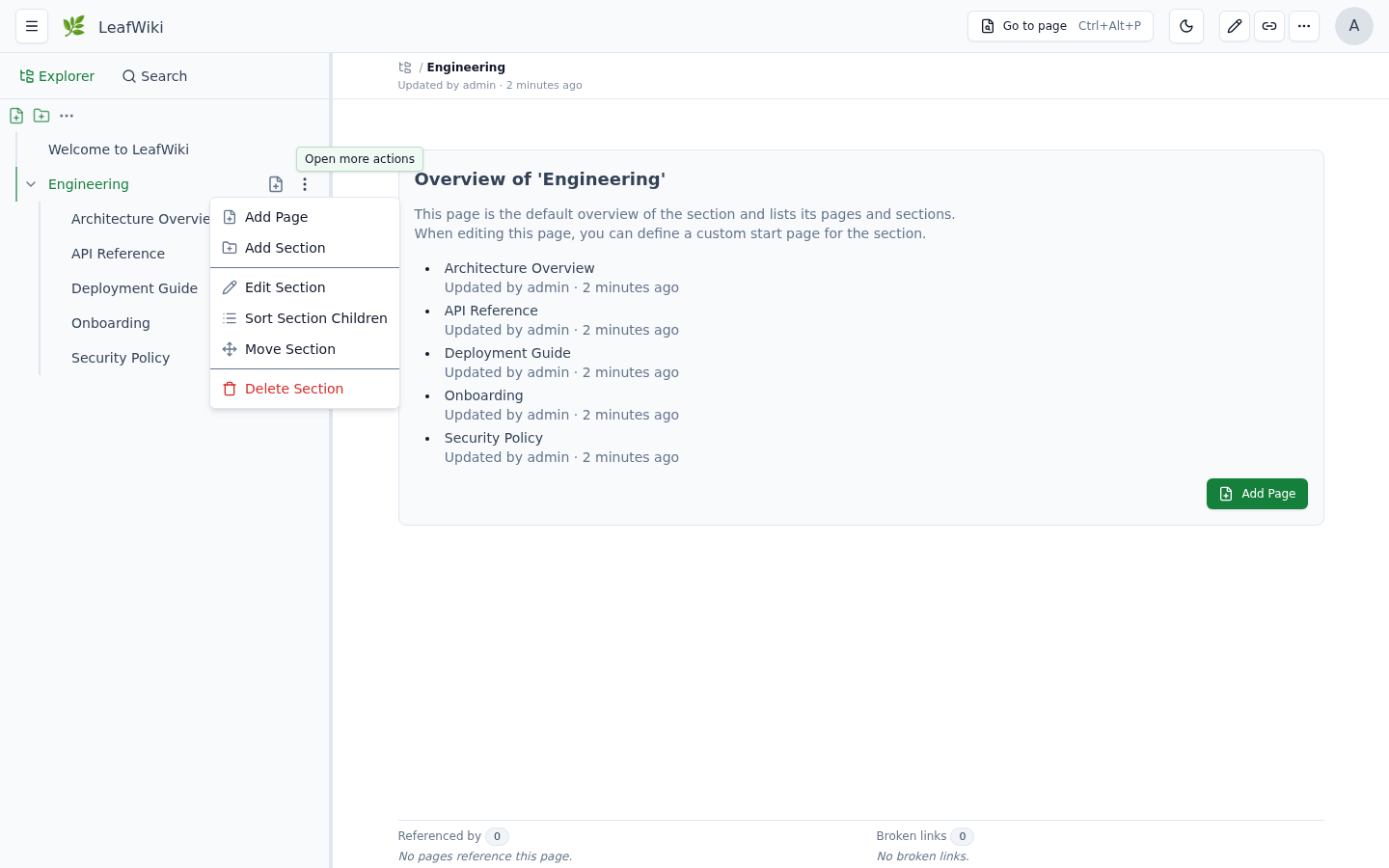
The sort dialog lets you drag items into position, use the ↑ ↓ arrow buttons, or jump to alphabetical order with A → Z / Z → A. Click Save to apply.
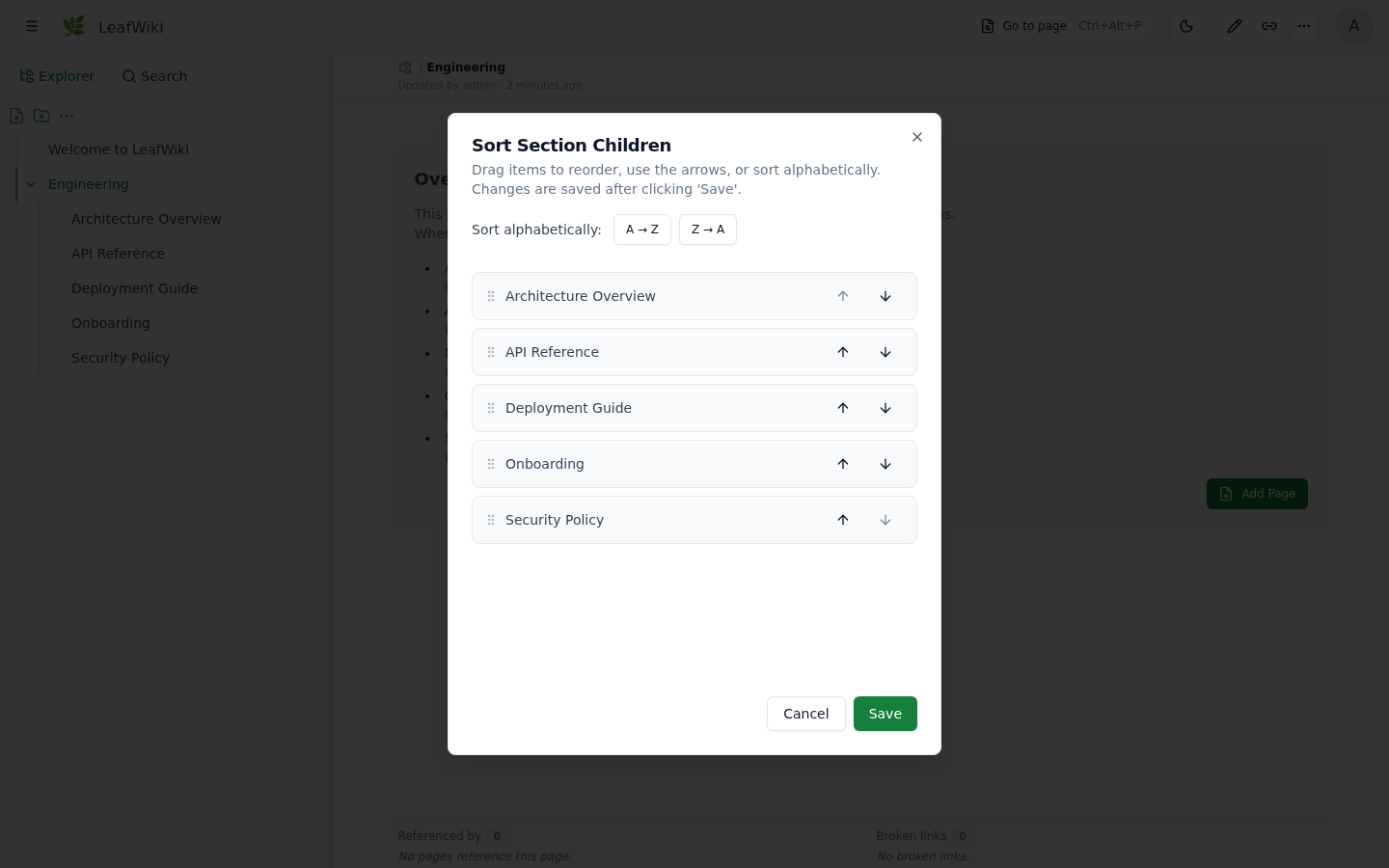
Sorting is per level — the order of a section's direct children is independent of deeper nested items.
If it's useful to you:
Need help deploying LeafWiki for your team? Business support & setup →
Contributions, discussions, and feedback are welcome.
Open an issue or start a discussion on GitHub. Follow the repository to get notified about new releases.
Translations: the UI currently ships in English, German, Spanish, French, and Simplified Chinese. Adding another language is a self-contained contribution — docs/i18n.md walks through it.
270 followers · starred Jun 2026
197 followers · starred Jul 2026
38 followers · starred May 2026
946 followers · starred Jul 2026
LeafWiki - Self-hosted wiki. Single Go binary, SQLite, Markdown on disk. No external database required.
See the code
Self-hosted wiki. Single Go binary. SQLite + Markdown stored on disk.
For engineers and self-hosters who want structured, long-lived documentation. No Node.js, no Redis, no Postgres — just a binary and a data directory.
If you've looked at Wiki.js or Outline and thought "this is too much to operate for what I need" — this could fit for you.
→ Try it without installing: demo.leafwiki.com · Ctrl+E edit · Ctrl+S save · resets hourly
→ If it fits, a star helps others find it.
→ Useful to you? Sponsor on GitHub · Buy a coffee on Ko-fi
docker run -p 8080:8080 -v ~/leafwiki-data:/app/data \
  ghcr.io/perber/leafwiki:latest \
  --jwt-secret=yoursecret --admin-password=yourpassword --allow-insecure=true
→ All install options (Docker Compose, Linux installer, binary)
Operations:
cp -r (stop the app first)--base-pathCore functionality:
:::info / :::warning), collapsible blocks (:::collapsible / :::collapsed), Mermaid diagrams, KaTeX math blocks ($$...$$, inline $...$ not supported), sanitized inline HTML, embedded PDFs (, optionally opened on a specific page with )Customization:
--custom-stylesheet, v0.8.5+)<head> for analytics or custom CSS--default-language picks the default. Contributions of other languages are very welcome — see docs/i18n.mdOpt-in via feature flags:
--enable-revision)--enable-link-refactor)--smtp-host, v0.13.0)--git-backup, v0.11.3, experimental)Markdown import:
Mobile:
Good fit:
Probably not a fit:
LeafWiki is intentionally narrower than those systems. That focus is part of the value.
Prefer not to run your own server? Free hosted beta — 10 spots, starting September 2026. Get a beta spot → and help shape the hosted version.
docker run -p 8080:8080 \
    -v ~/leafwiki-data:/app/data \
    ghcr.io/perber/leafwiki:latest \
    --jwt-secret=yoursecret \
    --admin-password=yourpassword \
    --allow-insecure=true
--allow-insecure=true is required for plain HTTP. Omit it when serving over HTTPS (make sure your reverse proxy forwards X-Forwarded-Proto: https).
Non-root:
docker run -p 8080:8080 \
    -u 1000:1000 \
    -v ~/leafwiki-data:/app/data \
    ghcr.io/perber/leafwiki:latest \
    --jwt-secret=yoursecret \
    --admin-password=yourpassword \
    --allow-insecure=true
The data directory must be writable by the specified user.
services:
  leafwiki:
    image: ghcr.io/perber/leafwiki:latest
    container_name: leafwiki
    user: 1000:1000
    ports:
      - "8080:8080"
    environment:
      - LEAFWIKI_JWT_SECRET=yourSecret
      - LEAFWIKI_ADMIN_PASSWORD=yourPassword
      - LEAFWIKI_ALLOW_INSECURE=true  # Required for plain HTTP. Omit for HTTPS (ensure `X-Forwarded-Proto: https` is forwarded).
    volumes:
      - ${HOME}/leafwiki-data:/app/data
    restart: unless-stopped
See docs/install/kubernetes.md for a Deployment + PersistentVolumeClaim + Service + Ingress example (Gateway API alternative included).
sudo /bin/bash -c "$(curl -fsSL https://raw.githubusercontent.com/perber/leafwiki/main/install.sh)"
Installs LeafWiki as a system service. Tested on Ubuntu, Debian, and Raspbian.
Update:
sudo /bin/bash -c "$(curl -fsSL https://raw.githubusercontent.com/perber/leafwiki/main/update.sh)"
Only works if you installed with the script above. Not compatible with Docker or binary installs.
Non-interactive mode:
cp .env.example .env
# Edit .env with your configuration
sudo ./install.sh --non-interactive --env-file ./.env
Security: in interactive mode, environment variables are written in plain text to
/etc/leafwiki/.env. Restrict access to that file.
Deployment examples:
Download leafwiki-<version>-<os>-<arch> and its .sha256 file from
GitHub Releases
(linux-amd64, linux-arm64, linux-386, darwin-amd64, darwin-arm64,
windows-amd64), check that the hash matches the one in the .sha256 file,
and rename it to leafwiki:
sha256sum leafwiki-<version>-<os>-<arch>
cat leafwiki-<version>-<os>-<arch>.sha256
mv leafwiki-<version>-<os>-<arch> leafwiki
chmod +x leafwiki
./leafwiki --jwt-secret=yoursecret --admin-password=yourpassword --allow-insecure=true
The server binds to 127.0.0.1:8080 by default. To expose it on the network:
./leafwiki --jwt-secret=yoursecret --admin-password=yourpassword --host=0.0.0.0 --allow-insecure=true
Default data directory is ./data. Change with --data-dir.
32-bit x86 Linux (i686, e.g. Alpine on an Intel Atom) is supported on a best-effort basis: use the
linux-386binary. It is built without CGO, so it doesn't need glibc and runs on musl-based distros. The systemd installer and Docker images only cover amd64/arm64, so the binary is the only install path on 32-bit x86 (that includesupdate.sh, which expects the systemd setup).
Requires Go and Node.js. make build compiles the UI, embeds it, and produces a self-contained leafwiki binary (same as release/Docker builds). Use HTTP (http://localhost:8080/), not HTTPS, unless you terminate TLS in front of LeafWiki.
git clone https://github.com/perber/leafwiki.git
cd leafwiki
git switch --detach v0.13.0   # or any tag / main
make build
./leafwiki --disable-auth --host=127.0.0.1 --data-dir ./data --allow-insecure=true
For API-only local development with Vite, use make build-api (or make run) instead — see Dev Setup.
./leafwiki reset-admin-password
For disaster recovery or migrating to a fresh instance, restore a snapshot ZIP into the data directory while the server is stopped:
./leafwiki --data-dir ./data restore-snapshot ./data/snapshots/leafwiki-snapshot-2026-01-01.zip
When --snapshot is enabled, a live restore is also available from the admin UI (Settings → Full Backup). Use this offline command when the server can't start or you're seeding a new data directory. The --snapshot* flags are in CLI Flags.
LeafWiki supports three access modes. Pick the one that matches your environment:
All access requires authentication. Nobody can read or edit without a valid account. This is the default behavior when no access flags are set.
./leafwiki --jwt-secret=yoursecret --admin-password=yourpassword
Use this for team-internal wikis or homelab setups where content should stay private.
Anyone can browse the wiki without logging in. Only authenticated users with an editor or admin role can make changes.
./leafwiki --jwt-secret=yoursecret --admin-password=yourpassword --public-access=true
Use this for open documentation or project wikis where readers don't need accounts, but you still want to control who can edit.
--disable-auth)Authentication is completely disabled. Anyone who can reach the server can read and edit all pages.
./leafwiki --disable-auth --host=127.0.0.1
⚠️ Only use this on trusted internal networks or local setups. Never expose a
--disable-authinstance to the public internet.
Stack: Go · React (Vite) · SQLite
git clone https://github.com/perber/leafwiki.git
cd leafwiki
Terminal 1 — Frontend:
cd ui/leafwiki-ui
npm install
npm run dev
Terminal 2 — Backend:
cd cmd/leafwiki
go run . --jwt-secret=yoursecret --allow-insecure=true --admin-password=yourpassword
Vite starts on http://localhost:5173. The backend binds to 127.0.0.1 by default.
See CONTRIBUTING.md for contribution guidelines.
| Flag | Description |
|---|---|
--jwt-secret | Secret for signing JWTs. Keep it secure. |
--admin-password | Initial admin password (only applied if no admin exists yet). |
| Flag | Description | Default |
|---|---|---|
--admin-username | Initial admin username (only applied if no admin exists yet). | admin |
--admin-email | Initial admin email (only applied if no admin exists yet). | admin@localhost |
For plain HTTP: add --allow-insecure=true so login and CSRF cookies work.
| Flag | Description | Default | Since |
|---|---|---|---|
--host | Host/IP the server binds to | 127.0.0.1 | – |
--port | Port the server listens on | 8080 | – |
--unix-socket | Unix domain socket path; overrides --host and --port | "" | v0.11.3 |
--data-dir | Directory where data is stored | ./data | – |
--admin-username | Initial admin username (only applied if no admin exists yet) | admin | v0.12.0 |
--admin-email | Initial admin email (only applied if no admin exists yet) | admin@localhost | v0.12.0 |
--public-access | Allow public read-only access | false | – |
--base-path | URL prefix for reverse proxy setups (e.g. /wiki) | "" | v0.8.2 |
--allow-insecure | ⚠️ Enables HTTP for auth cookies (required for plain HTTP) | false | v0.7.0 |
--disable-auth | ⚠️ Disable all authentication (internal networks only) | false | v0.7.0 |
--access-token-timeout | Access token duration (e.g. 24h, 15m) | 15m | v0.7.0 |
--refresh-token-timeout | Refresh token duration (e.g. 168h) | 168h | v0.7.0 |
--max-asset-upload-size | Max upload size (e.g. 50MiB, 52428800) | 50MiB | v0.8.5 |
--custom-stylesheet | Path to a .css file inside the data dir | "" | v0.8.5 |
--default-language | Default UI language code (en, de, es) | "" | v0.13.0 |
--inject-code-in-header | Raw HTML/JS injected into <head> | "" | v0.6.0 |
--hide-link-metadata-section | Hide backlinks and link status panel | false | – |
--enable-revision | Enable revision history | false | v0.9.0 |
--enable-link-refactor | Enable link rewriting on rename/move | false | v0.9.0 |
--max-revision-history | Max revisions per page; 0 = unlimited | 100 | v0.9.0 |
--revision-coalesce-window | Window for coalescing rapid successive auto-save revisions by the same author; 0 = disabled | 5m | v0.11.0 |
--enable-http-remote-user | Enable reverse-proxy auth via HTTP header | false | v0.10.0 |
--http-remote-user-header-name | Header name carrying the username or email from the proxy | Remote-User | v0.10.0 |
--enable-http-remote-user-auto-create | Auto-provision users the proxy asserts but LeafWiki doesn't know | false | v0.12.1 |
--http-remote-user-email-header-name | Header name carrying the email for auto-created users | "" | v0.12.1 |
--http-remote-user-default-role | Role assigned to auto-created users; must not be admin | viewer | v0.12.1 |
--trusted-proxy-ips | Trusted proxy IPs/CIDRs for remote-user header | "" | v0.10.0 |
--login-url | Redirect to an external URL instead of the built-in login form | "" | v0.12.0 |
--logout-url | Redirect to an external URL after logout | "" | v0.12.0 |
--http-remote-user-logout-url | ⚠️ Deprecated, use --logout-url instead | "" | v0.10.0 |
--user-management-url | Replace the built-in User Management UI with a link to an external page | "" | v0.11.4 |
--disable-request-log | Suppress per-request HTTP access log lines | false | v0.10.1 |
--log-format | Log output format: text or json | text | v0.12.0 |
--totp-encryption-key | Key to encrypt per-user TOTP secrets at rest (min 32 bytes); required only once a user enables TOTP | "" | v0.12.0 |
--enable-metrics | Enable the Prometheus /metrics endpoint on a separate listener | false | v0.12.0 |
--metrics-host | Host/IP for the metrics listener | 127.0.0.1 | v0.12.0 |
--metrics-port | Port for the metrics listener | 9091 | v0.12.0 |
--snapshot | Enable full backup snapshots (ZIP incl. the SQLite database) | true | v0.12.0 |
--snapshot-interval | Snapshot interval (e.g. 24h, 6h); 0 = manual-only | 24h | v0.12.0 |
--snapshot-retention | Number of most recent snapshots to keep; <= 0 = keep all | 10 | v0.12.0 |
--snapshot-dir | Directory to store snapshot ZIPs in | <data-dir>/snapshots | v0.12.0 |
--restore-upload-max-size | Max size for an uploaded backup ZIP to restore from | 500MiB | v0.12.0 |
--git-backup | ⚗️ Enable git backup to a remote repository | false | v0.11.3 |
--git-backup-remote | ⚗️ SSH remote URL for git backup (e.g. git@github.com:user/repo.git) | "" | v0.11.3 |
--git-backup-branch | ⚗️ Branch to push to | main | v0.11.3 |
--git-backup-path | ⚗️ Directory holding root/ and assets/ (e.g. docs → docs/root); empty = top level | "" | v0.13.0 |
--git-backup-ssh-key | ⚗️ Raw SSH private key (prefer env var) | "" | v0.11.3 |
--git-backup-ssh-key-path | ⚗️ Path to SSH private key file | "" | v0.11.3 |
--git-backup-ssh-known-hosts | ⚗️ Path to known_hosts for MITM protection | "" | v0.11.3 |
--git-backup-http-username | ⚗️ Username for HTTP(S) basic auth on http(s):// remotes | "" | v0.13.0 |
--git-backup-http-password | ⚗️ Password or access token for HTTP(S) basic auth (prefer env var) | "" | v0.13.0 |
--git-backup-author-name | ⚗️ Git commit author name | LeafWiki Backup | v0.11.3 |
--git-backup-author-email | ⚗️ Git commit author email | backup@leafwiki.local | v0.11.3 |
--git-backup-interval | ⚗️ Backup interval (e.g. 60m, 2h); 0 = manual-only | 60m | v0.11.3 |
--smtp-host | SMTP host for password-reset and invite email; unset disables email | "" | v0.13.0 |
--smtp-port | SMTP server port | 587 | v0.13.0 |
--smtp-username | SMTP auth username | "" | v0.13.0 |
--smtp-password | SMTP auth password (prefer env var) | "" | v0.13.0 |
--smtp-from | From address for outgoing email (required when --smtp-host is set) | "" | v0.13.0 |
--smtp-from-name | From display name for outgoing email | LeafWiki | v0.13.0 |
--smtp-security | Transport security: none, starttls, or tls | starttls | v0.13.0 |
--smtp-insecure-skip-verify | Skip TLS certificate verification for SMTP (testing only) | false | v0.13.0 |
--smtp-timeout | Timeout for a single SMTP send (e.g. 10s) | 10s | v0.13.0 |
--public-url | Base URL for links in outgoing email (required when --smtp-host is set) | "" | v0.13.0 |
Docker image default:
LEAFWIKI_HOSTis set to0.0.0.0automatically by the container entrypoint if neither--hostnorLEAFWIKI_HOSTis provided.
| Variable | Description | Default | Since |
|---|---|---|---|
LEAFWIKI_HOST | Host/IP address | 127.0.0.1 | – |
LEAFWIKI_PORT | Port | 8080 | – |
LEAFWIKI_UNIX_SOCKET | Unix domain socket path; overrides host/port | "" | v0.11.3 |
LEAFWIKI_DATA_DIR | Data directory path | ./data | – |
LEAFWIKI_ADMIN_PASSWORD | Initial admin password (required) | – | – |
LEAFWIKI_ADMIN_USERNAME | Initial admin username (only applied if no admin exists yet) | admin | v0.12.0 |
LEAFWIKI_ADMIN_EMAIL | Initial admin email (only applied if no admin exists yet) | admin@localhost | v0.12.0 |
LEAFWIKI_JWT_SECRET | JWT signing secret (required) | – | – |
LEAFWIKI_PUBLIC_ACCESS | Allow public read-only access | false | – |
LEAFWIKI_BASE_PATH | URL prefix for reverse proxy | "" | v0.8.2 |
LEAFWIKI_ALLOW_INSECURE | ⚠️ HTTP auth cookies | false | v0.7.0 |
LEAFWIKI_DISABLE_AUTH | ⚠️ Disable authentication | false | v0.7.0 |
LEAFWIKI_ACCESS_TOKEN_TIMEOUT | Access token duration | 15m | v0.7.0 |
LEAFWIKI_REFRESH_TOKEN_TIMEOUT | Refresh token duration | 168h | v0.7.0 |
LEAFWIKI_MAX_ASSET_UPLOAD_SIZE | Max upload size | 50MiB | v0.8.5 |
LEAFWIKI_CUSTOM_STYLESHEET | Path to .css file inside data dir | "" | v0.8.5 |
LEAFWIKI_DEFAULT_LANGUAGE | Default UI language code (en, de, es) | "" | v0.13.0 |
LEAFWIKI_INJECT_CODE_IN_HEADER | HTML/JS injected into <head> | "" | v0.6.0 |
LEAFWIKI_HIDE_LINK_METADATA_SECTION | Hide backlinks and link status panel | false | – |
LEAFWIKI_ENABLE_REVISION | Revision history | false | v0.9.0 |
LEAFWIKI_ENABLE_LINK_REFACTOR | Link rewriting on rename/move | false | v0.9.0 |
LEAFWIKI_MAX_REVISION_HISTORY | Max revisions per page; 0 = unlimited | 100 | v0.9.0 |
LEAFWIKI_REVISION_COALESCE_WINDOW | Window for coalescing rapid successive auto-save revisions; 0 = disabled | 5m | v0.11.0 |
LEAFWIKI_ENABLE_HTTP_REMOTE_USER | Reverse-proxy auth via header | false | v0.10.0 |
LEAFWIKI_HTTP_REMOTE_USER_HEADER_NAME | Username or email header from proxy | Remote-User | v0.10.0 |
LEAFWIKI_ENABLE_HTTP_REMOTE_USER_AUTO_CREATE | Auto-provision users the proxy asserts but LeafWiki doesn't know | false | v0.12.1 |
LEAFWIKI_HTTP_REMOTE_USER_EMAIL_HEADER_NAME | Email header for auto-created users | "" | v0.12.1 |
LEAFWIKI_HTTP_REMOTE_USER_DEFAULT_ROLE | Role assigned to auto-created users; must not be admin | viewer | v0.12.1 |
LEAFWIKI_TRUSTED_PROXY_IPS | Trusted proxy IPs/CIDRs | "" | v0.10.0 |
LEAFWIKI_LOGIN_URL | Redirect to an external URL instead of the login form | "" | v0.12.0 |
LEAFWIKI_LOGOUT_URL | Redirect to an external URL after logout | "" | v0.12.0 |
LEAFWIKI_HTTP_REMOTE_USER_LOGOUT_URL | ⚠️ Deprecated, use LEAFWIKI_LOGOUT_URL instead | "" | v0.10.0 |
LEAFWIKI_USER_MANAGEMENT_URL | Replace the built-in User Management UI with an external link | "" | v0.11.4 |
LEAFWIKI_DISABLE_REQUEST_LOG | Suppress per-request HTTP access log lines | false | v0.10.1 |
LEAFWIKI_LOG_FORMAT | Log output format: text or json | text | v0.12.0 |
LEAFWIKI_LOG_LEVEL | Log level: debug, info, warn, error (env-var only, no CLI flag) | info | v0.8.0 |
LEAFWIKI_TOTP_ENCRYPTION_KEY | Key to encrypt per-user TOTP secrets at rest (min 32 bytes) | "" | v0.12.0 |
LEAFWIKI_ENABLE_METRICS | Enable the Prometheus /metrics endpoint | false | v0.12.0 |
LEAFWIKI_METRICS_HOST | Host/IP for the metrics listener | 127.0.0.1 | v0.12.0 |
LEAFWIKI_METRICS_PORT | Port for the metrics listener | 9091 | v0.12.0 |
LEAFWIKI_SNAPSHOT | Enable full backup snapshots | true | v0.12.0 |
LEAFWIKI_SNAPSHOT_INTERVAL | Snapshot interval; 0 = manual-only | 24h | v0.12.0 |
LEAFWIKI_SNAPSHOT_RETENTION | Number of most recent snapshots to keep; <= 0 = keep all | 10 | v0.12.0 |
LEAFWIKI_SNAPSHOT_DIR | Directory to store snapshot ZIPs in | <data-dir>/snapshots | v0.12.0 |
LEAFWIKI_RESTORE_UPLOAD_MAX_SIZE | Max size for an uploaded backup ZIP to restore from | 500MiB | v0.12.0 |
LEAFWIKI_GIT_BACKUP | ⚗️ Enable git backup | false | v0.11.3 |
LEAFWIKI_GIT_BACKUP_REMOTE | ⚗️ SSH remote URL | "" | v0.11.3 |
LEAFWIKI_GIT_BACKUP_BRANCH | ⚗️ Branch to push to | main | v0.11.3 |
LEAFWIKI_GIT_BACKUP_PATH | ⚗️ Directory holding root/ and assets/ (e.g. docs → docs/root); empty = top level | "" | v0.13.0 |
LEAFWIKI_GIT_BACKUP_SSH_KEY | ⚗️ Raw SSH private key (preferred over path) | "" | v0.11.3 |
LEAFWIKI_GIT_BACKUP_SSH_KEY_PATH | ⚗️ Path to SSH private key file | "" | v0.11.3 |
LEAFWIKI_GIT_BACKUP_SSH_KNOWN_HOSTS | ⚗️ Path to known_hosts file | "" | v0.11.3 |
LEAFWIKI_GIT_BACKUP_HTTP_USERNAME | ⚗️ Username for HTTP(S) basic auth | "" | v0.13.0 |
LEAFWIKI_GIT_BACKUP_HTTP_PASSWORD | ⚗️ Password or access token for HTTP(S) basic auth | "" | v0.13.0 |
LEAFWIKI_GIT_BACKUP_AUTHOR_NAME | ⚗️ Git commit author name | LeafWiki Backup | v0.11.3 |
LEAFWIKI_GIT_BACKUP_AUTHOR_EMAIL | ⚗️ Git commit author email | backup@leafwiki.local | v0.11.3 |
LEAFWIKI_GIT_BACKUP_INTERVAL | ⚗️ Backup interval (e.g. 60m); 0 = manual-only | 60m | v0.11.3 |
LEAFWIKI_SMTP_HOST | SMTP host for password-reset/invite email; unset disables email | "" | v0.13.0 |
LEAFWIKI_SMTP_PORT | SMTP server port | 587 | v0.13.0 |
LEAFWIKI_SMTP_USERNAME | SMTP auth username | "" | v0.13.0 |
LEAFWIKI_SMTP_PASSWORD | SMTP auth password | "" | v0.13.0 |
LEAFWIKI_SMTP_FROM | From address (required with LEAFWIKI_SMTP_HOST) | "" | v0.13.0 |
LEAFWIKI_SMTP_FROM_NAME | From display name | LeafWiki | v0.13.0 |
LEAFWIKI_SMTP_SECURITY | Transport security: none, starttls, or tls | starttls | v0.13.0 |
LEAFWIKI_SMTP_INSECURE_SKIP_VERIFY | Skip TLS certificate verification for SMTP | false | v0.13.0 |
LEAFWIKI_SMTP_TIMEOUT | Timeout for a single SMTP send | 10s | v0.13.0 |
LEAFWIKI_PUBLIC_URL | Base URL for links in outgoing email (required with LEAFWIKI_SMTP_HOST) | "" | v0.13.0 |
Place a .css file inside your data directory and pass its path:
./leafwiki \
  --data-dir=./data \
  --custom-stylesheet=custom.css \
  --jwt-secret=yoursecret \
  --admin-password=yourpassword
./data/custom.css/custom.css (or ${base-path}/custom.css with --base-path)Available since v0.10.0. Use when an upstream proxy authenticates users and forwards the username or email via HTTP header.
./leafwiki \
  --jwt-secret=yoursecret \
  --admin-password=yourpassword \
  --enable-http-remote-user=true \
  --http-remote-user-header-name=X-Forwarded-User \
  --trusted-proxy-ips=127.0.0.1,172.18.0.0/16 \
  --login-url=https://auth.example.com/login \
  --logout-url=https://auth.example.com/logout
--trusted-proxy-ips--enable-http-remote-user-auto-create is set (see below)--trusted-proxy-ips--login-url and --logout-url are independent, optional redirect targets — set either or both to send users to an external IdP instead of the built-in login form / to redirect after logout--login-url, --logout-url, and --user-management-url must all start with http:// or https://; the server refuses to start otherwise (relative paths are not accepted for any of them)--login-url takes effect regardless of --enable-http-remote-user and has no in-app bypass: once set, every unauthenticated visit (including /login itself) redirects to it immediately. Double-check the URL before setting it — a wrong or unreachable value locks all users, including admins, out of the built-in login form--http-remote-user-logout-url (v0.10.0) is deprecated; use --logout-url instead. It still works as a fallback when --logout-url/LEAFWIKI_LOGOUT_URL isn't set, but a deprecation warning is loggedBy default, a proxy-asserted identity with no matching LeafWiki account is rejected (401). Set --enable-http-remote-user-auto-create=true to provision one automatically instead:
./leafwiki \
  --jwt-secret=yoursecret \
  --admin-password=yourpassword \
  --enable-http-remote-user=true \
  --http-remote-user-header-name=X-Forwarded-User \
  --trusted-proxy-ips=127.0.0.1,172.18.0.0/16 \
  --enable-http-remote-user-auto-create=true \
  --http-remote-user-email-header-name=X-Forwarded-Email \
  --http-remote-user-default-role=viewer
--enable-http-remote-user to also be set; the server refuses to start otherwise--http-remote-user-header-name becomes the new account's username verbatim, even if it looks like an email address — if your proxy sends an email in that header and you want a distinct, readable username, point --http-remote-user-email-header-name at a separate proxy header--http-remote-user-email-header-name isn't set or the header is empty, a non-deliverable placeholder email (<username>@remote-user.invalid) is used instead--http-remote-user-default-role must not be admin — the server refuses to start otherwise. A forged or misrouted header must not be able to mint an admin account by itself; promote an auto-created user to admin manually if neededUse --unix-socket when LeafWiki should listen on a local unix domain socket instead of TCP.
./leafwiki \
  --unix-socket=/run/leafwiki/leafwiki.sock \
  --data-dir=./data \
  --jwt-secret=yoursecret \
  --admin-password=yourpassword
--unix-socket overrides --host and --port0660Experimental — This feature is new and may change in future releases. Test it thoroughly before relying on it for critical data.
Git Backup pushes wiki content to a remote Git repository on a configurable interval, via SSH or HTTP(S). Only the root/ (pages) and assets/ directories are committed, so database files (.db, .db-wal, etc.) and other runtime files are never included; .gitignore rules are still honoured. By default the content is committed at the repository top level — set --git-backup-path to nest it under a directory (useful for a monorepo).
Backups run automatically on a configurable interval and can also be triggered manually from the Git Content Backup page.
CLI flags (v0.11.3+):
| Flag | Description | Default |
|---|---|---|
--git-backup | Enable git backup | false |
--git-backup-remote | SSH or HTTP(S) remote URL (e.g. git@github.com:user/repo.git, https://github.com/user/repo.git) | "" |
--git-backup-branch | Branch to push to | main |
--git-backup-path | Directory holding root/ and assets/, e.g. docs → docs/root + docs/assets; empty = repository top level (v0.13.0+) | "" |
--git-backup-ssh-key | Raw SSH private key (prefer env var) | "" |
--git-backup-ssh-key-path | Path to SSH private key file | "" |
--git-backup-ssh-known-hosts | Path to known_hosts for MITM protection | "" |
--git-backup-http-username | Username for HTTP(S) basic auth (v0.13.0+) | "" |
--git-backup-http-password | Password or access token for HTTP(S) basic auth (prefer env var, v0.13.0+) | "" |
--git-backup-author-name | Git commit author name | LeafWiki Backup |
--git-backup-author-email | Git commit author email | backup@leafwiki.local |
--git-backup-interval | Backup interval (e.g. 60m, 2h); 0 = manual-only | 60m |
Environment variables:
| Variable | Description |
|---|---|
LEAFWIKI_GIT_BACKUP | Enable git backup |
LEAFWIKI_GIT_BACKUP_REMOTE | SSH or HTTP(S) remote URL |
LEAFWIKI_GIT_BACKUP_BRANCH | Branch to push to |
LEAFWIKI_GIT_BACKUP_PATH | Directory holding root/ and assets/, e.g. docs → docs/root + docs/assets |
LEAFWIKI_GIT_BACKUP_SSH_KEY | Raw SSH private key |
LEAFWIKI_GIT_BACKUP_SSH_KEY_PATH | Path to SSH private key file |
LEAFWIKI_GIT_BACKUP_SSH_KNOWN_HOSTS | Path to known_hosts file |
LEAFWIKI_GIT_BACKUP_HTTP_USERNAME | Username for HTTP(S) basic auth |
LEAFWIKI_GIT_BACKUP_HTTP_PASSWORD | Password or access token for HTTP(S) basic auth |
LEAFWIKI_GIT_BACKUP_AUTHOR_NAME | Git commit author name |
LEAFWIKI_GIT_BACKUP_AUTHOR_EMAIL | Git commit author email |
LEAFWIKI_GIT_BACKUP_INTERVAL | Backup interval |
Example — SSH (Docker Compose):
environment:
  - LEAFWIKI_GIT_BACKUP=true
  - LEAFWIKI_GIT_BACKUP_REMOTE=git@github.com:youruser/yourwiki-backup.git
  - LEAFWIKI_GIT_BACKUP_BRANCH=main
  - LEAFWIKI_GIT_BACKUP_SSH_KEY=${LEAFWIKI_GIT_BACKUP_SSH_KEY}  # from .env file
  - LEAFWIKI_GIT_BACKUP_INTERVAL=60m
Example — HTTPS with an access token (Docker Compose, v0.13.0+):
environment:
  - LEAFWIKI_GIT_BACKUP=true
  - LEAFWIKI_GIT_BACKUP_REMOTE=https://github.com/youruser/yourwiki-backup.git
  - LEAFWIKI_GIT_BACKUP_BRANCH=main
  - LEAFWIKI_GIT_BACKUP_HTTP_USERNAME=youruser
  - LEAFWIKI_GIT_BACKUP_HTTP_PASSWORD=${LEAFWIKI_GIT_BACKUP_HTTP_PASSWORD}  # from .env file
  - LEAFWIKI_GIT_BACKUP_INTERVAL=60m
On GitHub, create a fine-grained personal access token limited to the backup repository with Contents: Read and write permission, and use it as the password. The username can be your GitHub username.
Notes:
--git-backup-remote is required when pushing to a remote. It must be an SSH URL (git@... or ssh://...) or an HTTP(S) URL (https://..., http://...). Leave it unset for local-only backups.--git-backup-ssh-key or --git-backup-ssh-key-path is required. Prefer the environment variable to avoid the key appearing in process listings.--git-backup-http-username and --git-backup-http-password are required. Prefer LEAFWIKI_GIT_BACKUP_HTTP_PASSWORD over the flag — LeafWiki warns at startup when the password is passed as a flag, since flags are visible in process listings. Credentials embedded directly in the remote URL (https://user:token@host/repo.git) also work and are masked in logs and in the UI.https:// over http://: with plain http:// the credentials and your wiki content travel unencrypted, and LeafWiki logs a warning at startup.--git-backup-ssh-known-hosts is optional but recommended for SSH remotes. If not set, LeafWiki falls back to ~/.ssh/known_hosts. If that file does not exist either (common in containers), SSH host key verification is disabled — leaving connections open to MITM attacks. Set this flag explicitly in production. It has no effect on HTTP(S) remotes, which are verified via TLS.cp -r with the app stopped).--git-backup-path (e.g. docs) commits root/ and assets/ under that directory instead of the top level — docs produces docs/root/ and docs/assets/ — and pulls external edits back from there. This is handy when the backup remote is a monorepo: files outside the configured directory are left untouched. LeafWiki's live content still lives in <data-dir>/root and <data-dir>/assets; nothing is copied into the repository working tree. Leave it empty to keep the historical top-level layout.Available since v0.13.0. Configure an SMTP server to enable the forgot-password flow and email-based user invitations. Without --smtp-host, both features stay off and the login form shows no password-reset link.
./leafwiki \
  --jwt-secret=yoursecret \
  --admin-password=yourpassword \
  --smtp-host=smtp.example.com \
  --smtp-port=587 \
  --smtp-security=starttls \
  --smtp-username=leafwiki@example.com \
  --smtp-password=yourpassword \
  --smtp-from=leafwiki@example.com \
  --public-url=https://wiki.example.com
--smtp-from and --public-url are required once --smtp-host is set — the server refuses to start otherwise--public-url must be an absolute http(s):// URL; it is the base for links in outgoing email--smtp-security is one of none, starttls (default), or tlsLEAFWIKI_SMTP_PASSWORD over the flag to keep the password out of process listings--smtp-insecure-skip-verify disables TLS certificate verification — for testing onlyEnabled by default since v0.7.0:
--disable-auth removes all authentication. Only use for local development, trusted internal networks, or isolated environments.
# Safe local-only example:
./leafwiki --disable-auth --host=127.0.0.1
For most setups, prefer --public-access for read-only public access and the viewer role for restricted accounts.
127.0.0.1 (binary) / 0.0.0.0 (Docker image)./data (binary) / /app/data (container)| Action | Shortcut |
|---|---|
| Shortcuts help | Ctrl + / / Cmd + / |
| Edit mode | Ctrl + E / Cmd + E |
| Save | Ctrl + S / Cmd + S |
| Search | Ctrl + Shift + F / Cmd + Shift + F |
| Navigation pane | Ctrl + Shift + E / Cmd + Shift + E |
| Go to page | Ctrl + Alt + P / Cmd + Option + P |
| Toggle TOC | Ctrl + Shift + O / Cmd + Shift + O |
| Copy page link | Ctrl + Shift + S / Cmd + Shift + S |
| Share / permalink | Ctrl + Shift + L / Cmd + Shift + L |
| Page history | Ctrl + H / Cmd + H |
| Print page | Ctrl + P / Cmd + P |
| Delete page | Ctrl + Delete / Cmd + Delete |
| Bold | Ctrl + B / Cmd + B |
| Italic | Ctrl + I / Cmd + I |
| Insert link | Ctrl + K / Cmd + K |
| Headline 1–3 | Ctrl + Alt + 1–3 / Cmd + Alt + 1–3 |
Ctrl+V / Cmd+V for pasting images and files works in the editor.
Esc closes modals, dialogs, and edit mode.
Press Ctrl+/ / Cmd+/ in the app for the full in-product shortcuts list.
LeafWiki resolves relative page links with page-as-folder semantics: the current page path is treated as a folder, so [Setup](setup) on /docs/guide resolves to /docs/guide/setup, not a sibling /docs/setup.
A trailing .md suffix in a link target is ignored for page lookup (for example setup.md → setup), which matches common filesystem / Obsidian-style Markdown.
LeafWiki is intended to be the primary writer for a workspace. However, Markdown files may still be changed outside LeafWiki — for example through a text editor, Git, a script, or a bulk import.
LeafWiki does not continuously watch the filesystem for these changes. To make externally modified files visible to LeafWiki, trigger a resync in one of two ways:
SIGUSR1 or SIGHUP to the running process — no restart required. This can be useful when an external workflow needs to explicitly tell LeafWiki that files have changed.Both paths run the same resync job and produce the same result. A resync should be considered an explicit reconciliation of the workspace rather than continuous bidirectional filesystem synchronization.
Changes to .leafwikiignore are separate and are only read at startup.
New files without a leafwiki_id: LeafWiki stores the identity of a page in the leafwiki_id field in its frontmatter rather than deriving it from the filename or path. This allows LeafWiki to retain the identity of a document when it is renamed or moved.
If a Markdown file created outside LeafWiki does not yet contain a leafwiki_id, the next resync generates one and writes it back to the file. No manual action is required, but the file will therefore change on disk during the resync.
If root/ is managed by a separate Git workflow outside LeafWiki's built-in Git Backup, this generated ID will appear as an additional diff.
Page order in LeafWiki is explicit and manual — it does not follow filename or alphabetical order automatically. By default, pages appear in the order they were created.
LeafWiki is not a file browser. The tree reflects the structure you define, and the order you set is the order your readers see.
To reorder the pages inside a section or under a parent page:
The sort dialog lets you drag items into position, use the ↑ ↓ arrow buttons, or jump to alphabetical order with A → Z / Z → A. Click Save to apply.
Sorting is per level — the order of a section's direct children is independent of deeper nested items.
If it's useful to you:
Need help deploying LeafWiki for your team? Business support & setup →
Contributions, discussions, and feedback are welcome.
Open an issue or start a discussion on GitHub. Follow the repository to get notified about new releases.
Translations: the UI currently ships in English, German, Spanish, French, and Simplified Chinese. Adding another language is a self-contained contribution — docs/i18n.md walks through it.
270 followers · starred Jun 2026
197 followers · starred Jul 2026
38 followers · starred May 2026
946 followers · starred Jul 2026