
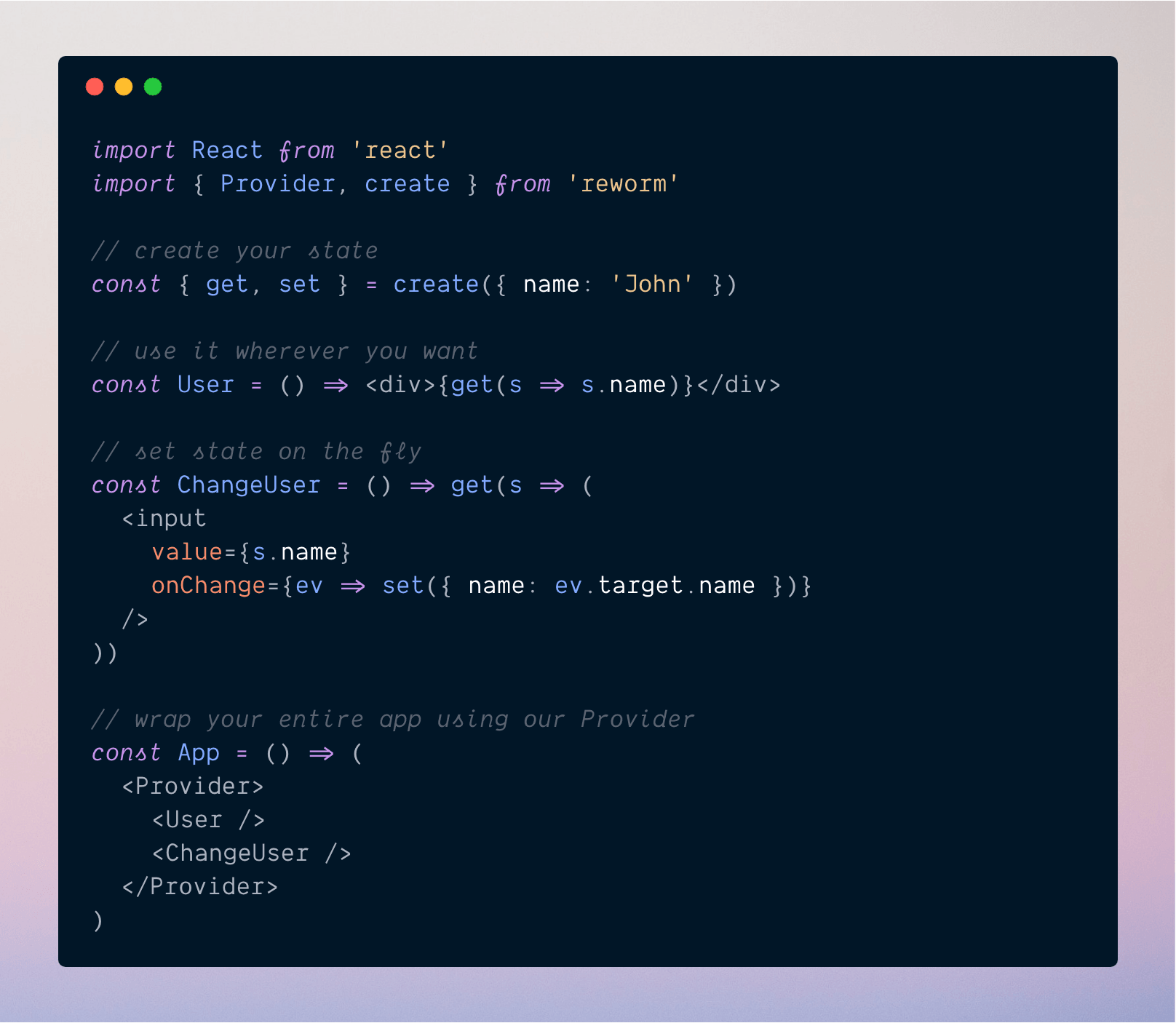
Forget about actions, connections, reducers and a lot of boilerplate to create and manage states. With reworm you can create and manage state as simple as on the image above.
Install reworm using your package manager
$ yarn add reworm
Then just wrap your app with our Provider, create your new state and use it!
import React from 'react'
import { Provider, create } from 'reworm'

const { get } = create({ name: 'John' })

const App = () => (
  <Provider>
    <div>{get(s => s.name)}</div>
  </Provider>
)
Instead of defining actions or something else to change your state, with reworm you just need to use the set method like that:
import React from 'react'
import { Provider, create } from 'reworm'

const { set, get } = create({ name: 'John' })

class App extends React.Component {
  componentDidMount() {
    set(prev => ({ name: 'Peter' + prev.name }))
  }
  render() {
    return (
      <Provider>
        <div>{get(s => s.name)}</div>
      </Provider>
    )
  }
}
Selectors are good because they prevent you from duplicating code. With it you can just create some functions and use them throughout your application.
import React from 'react'
import { Provider, create } from 'reworm'

const { select } = create({ list: ['Peter', 'John'] })

const johnSelector = select(state =>
  state.list.find(user => user.includes('John'))
)

const App = () => (
  <Provider>
    <div>{johnSelector(user => user)}</div>
  </Provider>
)
If you want to listen changes on your state you can use subscribe():
import React from 'react'
import { Provider, create } from 'reworm'

const user = create()

class App extends Component {
  state = {
    name: 'John'
  }

  componentDidMount() {
    user.subscribe(name => this.setState({ name }))
    user.set('Michael')
  }

  render() {
    return <div>Hello {this.state.name}</div>
  }
}
create<T>(initial?: T): StateCreate a new state
get((state: T) => React.ReactNode)Use this method to access your state
set((state: T | (prevState: T) => T) => T)Use this method to set your state
select<S = any>(selector: (state: T) => S) => (fn: GetFn<T>) => React.ReactNodeCreate selectors that can be used with your state and avoid repeating code.
subscribe: (fn: SubscribeFn<T>) => () => voidUse this method to listen state changes
type PrevState<T> = (prevState: T) => T
type GetFn<T> = (state: T) => React.ReactNode
type SubscribeFn<T> = (state: T) => any

interface State<T> {
  get: (fn: GetFn<T>) => React.ReactNode
  set: (next: T | PrevState<T>) => void
  select: <S = any>(
    selector: (state: T) => S
  ) => (fn: GetFn<S>) => React.ReactNode
  subscribe: (fn: SubscribeFn<T>) => () => void
}

function create<T>(initial: T) => State<T>
If you want to contribute to this project, please see our Contributing Guide !
479 followers · starred Aug 2018
144 followers · starred Aug 2018
233 followers · starred Apr 2019
4,124 followers · starred Aug 2018
Forget about actions, connections, reducers and a lot of boilerplate to create and manage states. With reworm you can create and manage state as simple as on the image above.
Install reworm using your package manager
$ yarn add reworm
Then just wrap your app with our Provider, create your new state and use it!
import React from 'react'
import { Provider, create } from 'reworm'

const { get } = create({ name: 'John' })

const App = () => (
  <Provider>
    <div>{get(s => s.name)}</div>
  </Provider>
)
Instead of defining actions or something else to change your state, with reworm you just need to use the set method like that:
import React from 'react'
import { Provider, create } from 'reworm'

const { set, get } = create({ name: 'John' })

class App extends React.Component {
  componentDidMount() {
    set(prev => ({ name: 'Peter' + prev.name }))
  }
  render() {
    return (
      <Provider>
        <div>{get(s => s.name)}</div>
      </Provider>
    )
  }
}
Selectors are good because they prevent you from duplicating code. With it you can just create some functions and use them throughout your application.
import React from 'react'
import { Provider, create } from 'reworm'

const { select } = create({ list: ['Peter', 'John'] })

const johnSelector = select(state =>
  state.list.find(user => user.includes('John'))
)

const App = () => (
  <Provider>
    <div>{johnSelector(user => user)}</div>
  </Provider>
)
If you want to listen changes on your state you can use subscribe():
import React from 'react'
import { Provider, create } from 'reworm'

const user = create()

class App extends Component {
  state = {
    name: 'John'
  }

  componentDidMount() {
    user.subscribe(name => this.setState({ name }))
    user.set('Michael')
  }

  render() {
    return <div>Hello {this.state.name}</div>
  }
}
create<T>(initial?: T): StateCreate a new state
get((state: T) => React.ReactNode)Use this method to access your state
set((state: T | (prevState: T) => T) => T)Use this method to set your state
select<S = any>(selector: (state: T) => S) => (fn: GetFn<T>) => React.ReactNodeCreate selectors that can be used with your state and avoid repeating code.
subscribe: (fn: SubscribeFn<T>) => () => voidUse this method to listen state changes
type PrevState<T> = (prevState: T) => T
type GetFn<T> = (state: T) => React.ReactNode
type SubscribeFn<T> = (state: T) => any

interface State<T> {
  get: (fn: GetFn<T>) => React.ReactNode
  set: (next: T | PrevState<T>) => void
  select: <S = any>(
    selector: (state: T) => S
  ) => (fn: GetFn<S>) => React.ReactNode
  subscribe: (fn: SubscribeFn<T>) => () => void
}

function create<T>(initial: T) => State<T>
If you want to contribute to this project, please see our Contributing Guide !
479 followers · starred Aug 2018
144 followers · starred Aug 2018
233 followers · starred Apr 2019
4,124 followers · starred Aug 2018