Challenge EvalLLM2025 Extraction d'information - approche combinée
Python
0
1 commits
updated Jun 16, 2025
This repository contains our work for the EvalLLM2025 challenge about information extraction on Named Entity Recognition (NER) and Relationship Extraction (RE).
We began with an exploratory data analysis phase to better understand the training dataset.
Then, we worked on two appoaches:
⚠️ Training and test datasets are not provided in the repository. They should be manually added to the data/ folder, in either train_data/ or test_data/, as appropriate.
Data exploration code can be found in the data_exploration/ folder.
cd data_exploration/
conda create -n challenge_evalllm2025 python=3.12.9
conda activate challenge_evalllm2025
pip install -r requirements.txt
python -m spacy download fr_core_news_sm
The Jupyter notebook data_exploration.ipynb can be used to generate statistics on the training dataset (or on the test dataset, although not all images will be generated in that case). The resulting images are saved in the training_data__images/ directory and a .csv file is also generated.
The Python script plot_document_graphes.py can be used to generate a network graph for each event in every document (i.e., one graph per document-event pair). This step is limited to the training dataset, since entities and their labels are not available in the test dataset. The resulting images are saved in the training_data__images/documents_graphes/ directory. A .txt file is also created, containing the number of entities for each event.
Combined approach pipeline can be found in the combined_approach_pipeline/ folder.
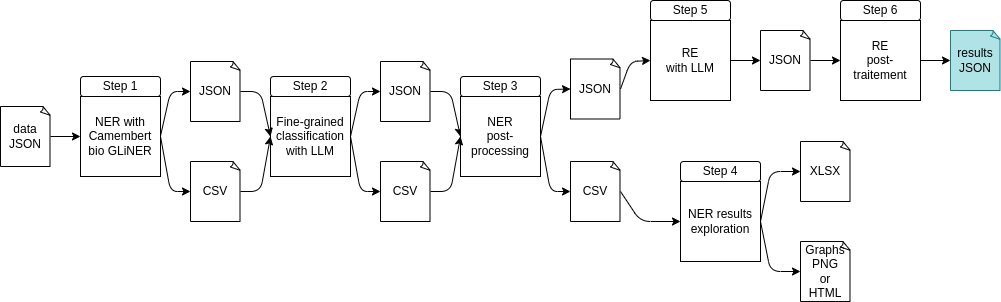
The pipeline will produce logs and will also generate, for each step, temporary files in JSON and CSV format in the predictions path (see the parameter predictions_path in config.yml file). The result of the pipeline is the output of step 6 and can be found in predictions/predictions_{timestamp}/{timestamp}_predictions_last_version.json.
The following steps are performed:
cd combined_approach_pipeline/
conda create -n challenge_evalllm2025 python=3.12.9
conda activate challenge_evalllm2025
pip install -r requirements.txt
All user-configurable parameters are located in the config.yml file and are detailed below:
data_filename (str): data to process (train or test keyword must be in the filename).predictions_path (str): path to save results.fine_grained_classification (bool): CamemBERT bio GLiNER alone or combined with LLM for step 2. If False (only for training dataset), a mapping from expected labels to the simplified label will be performed to estimate the results. If True, CamemBERT bio GLiNER is combined with LLM to refine NER results.ollama_url (str): Ollama url to request.ollama_model_for_ner (str): Ollama model used for NER.ollama_model_for_re (str): Ollama model used for RE.llm_attempts_requests_for_ner (int): number of LLM attemps requests for NER.llm_attempts_requests_for_re (int): number of LLM attemps requests for RE.json_output_step_1 (str): JSON output file of step 1.csv_output_step_1 (str): CSV output file of step 1.json_output_step_2 (str): JSON output file of step 2.csv_output_step_2 (str): CSV output file of step 2.json_output_step_3 (str): JSON output file of step 3.csv_output_step_3 (str): CSV output file of step 3.xlsx_output_step_4 (str): XLSX output file of step 4.graph_step_4 (str): graphs path of step 4 (HTML and PNG).json_output_step_5 (str): JSON output file of step 5.json_output_step_6 (str): JSON output file of step 6 which is the result of the pipeline.labels_version (int): version number of the list of labels (from labels below) for initial NER.labels (dict): a dictionnary containing different lists of labels and their id (for labels_version above).expected_labels_mapping (dict): mapping from expected labels to the simplified labels (used for fine-grained classification on training data without LLM request, only to estimate the results).predicted_labels_mapping (dict): mapping for the non-merged labels (e.g., convert Lieu in LOCATION). This is used for fine-grained classification with LLM request to refine labels.Before running the pipeline, make sure to :
data/ folder, in either train_data/ or test_data/, as appropriate. Make sure that the keyword test or train are in the filename (as the information is used in the code).combined_approach_pipeline/config.yml) with at least:
data_filename argument) ;ollama_url argument) ;ollama_model_for_ner argument) ;ollama_model_for_re argument).conda activate challenge_evalllm2025.Run the pipeline:
python combined_approach_pipeline.py
predictions_path in config.yml file): predictions/predictions_{timestamp}/{timestamp}_predictions_last_version.json.LLM prompts used for fine-grained classification and RE are available in combined_approach_pipeline/get_prompt_for_llm.py file.
Challenge EvalLLM2025 Extraction d'information - approche combinée
Python
0
1 commits
updated Jun 16, 2025
This repository contains our work for the EvalLLM2025 challenge about information extraction on Named Entity Recognition (NER) and Relationship Extraction (RE).
We began with an exploratory data analysis phase to better understand the training dataset.
Then, we worked on two appoaches:
⚠️ Training and test datasets are not provided in the repository. They should be manually added to the data/ folder, in either train_data/ or test_data/, as appropriate.
Data exploration code can be found in the data_exploration/ folder.
cd data_exploration/
conda create -n challenge_evalllm2025 python=3.12.9
conda activate challenge_evalllm2025
pip install -r requirements.txt
python -m spacy download fr_core_news_sm
The Jupyter notebook data_exploration.ipynb can be used to generate statistics on the training dataset (or on the test dataset, although not all images will be generated in that case). The resulting images are saved in the training_data__images/ directory and a .csv file is also generated.
The Python script plot_document_graphes.py can be used to generate a network graph for each event in every document (i.e., one graph per document-event pair). This step is limited to the training dataset, since entities and their labels are not available in the test dataset. The resulting images are saved in the training_data__images/documents_graphes/ directory. A .txt file is also created, containing the number of entities for each event.
Combined approach pipeline can be found in the combined_approach_pipeline/ folder.
The pipeline will produce logs and will also generate, for each step, temporary files in JSON and CSV format in the predictions path (see the parameter predictions_path in config.yml file). The result of the pipeline is the output of step 6 and can be found in predictions/predictions_{timestamp}/{timestamp}_predictions_last_version.json.
The following steps are performed:
cd combined_approach_pipeline/
conda create -n challenge_evalllm2025 python=3.12.9
conda activate challenge_evalllm2025
pip install -r requirements.txt
All user-configurable parameters are located in the config.yml file and are detailed below:
data_filename (str): data to process (train or test keyword must be in the filename).predictions_path (str): path to save results.fine_grained_classification (bool): CamemBERT bio GLiNER alone or combined with LLM for step 2. If False (only for training dataset), a mapping from expected labels to the simplified label will be performed to estimate the results. If True, CamemBERT bio GLiNER is combined with LLM to refine NER results.ollama_url (str): Ollama url to request.ollama_model_for_ner (str): Ollama model used for NER.ollama_model_for_re (str): Ollama model used for RE.llm_attempts_requests_for_ner (int): number of LLM attemps requests for NER.llm_attempts_requests_for_re (int): number of LLM attemps requests for RE.json_output_step_1 (str): JSON output file of step 1.csv_output_step_1 (str): CSV output file of step 1.json_output_step_2 (str): JSON output file of step 2.csv_output_step_2 (str): CSV output file of step 2.json_output_step_3 (str): JSON output file of step 3.csv_output_step_3 (str): CSV output file of step 3.xlsx_output_step_4 (str): XLSX output file of step 4.graph_step_4 (str): graphs path of step 4 (HTML and PNG).json_output_step_5 (str): JSON output file of step 5.json_output_step_6 (str): JSON output file of step 6 which is the result of the pipeline.labels_version (int): version number of the list of labels (from labels below) for initial NER.labels (dict): a dictionnary containing different lists of labels and their id (for labels_version above).expected_labels_mapping (dict): mapping from expected labels to the simplified labels (used for fine-grained classification on training data without LLM request, only to estimate the results).predicted_labels_mapping (dict): mapping for the non-merged labels (e.g., convert Lieu in LOCATION). This is used for fine-grained classification with LLM request to refine labels.Before running the pipeline, make sure to :
data/ folder, in either train_data/ or test_data/, as appropriate. Make sure that the keyword test or train are in the filename (as the information is used in the code).combined_approach_pipeline/config.yml) with at least:
data_filename argument) ;ollama_url argument) ;ollama_model_for_ner argument) ;ollama_model_for_re argument).conda activate challenge_evalllm2025.Run the pipeline:
python combined_approach_pipeline.py
predictions_path in config.yml file): predictions/predictions_{timestamp}/{timestamp}_predictions_last_version.json.LLM prompts used for fine-grained classification and RE are available in combined_approach_pipeline/get_prompt_for_llm.py file.



