The markdown editor that's just a textarea https://overtype.dev
JavaScript
3,707
272 commits
updated Oct 10, 2026
A lightweight markdown editor library with perfect WYSIWYG alignment using an invisible textarea overlay technique. Includes optional toolbar. ~134KB minified with all features.
🎮 Try it out: Interactive demos on overtype.dev
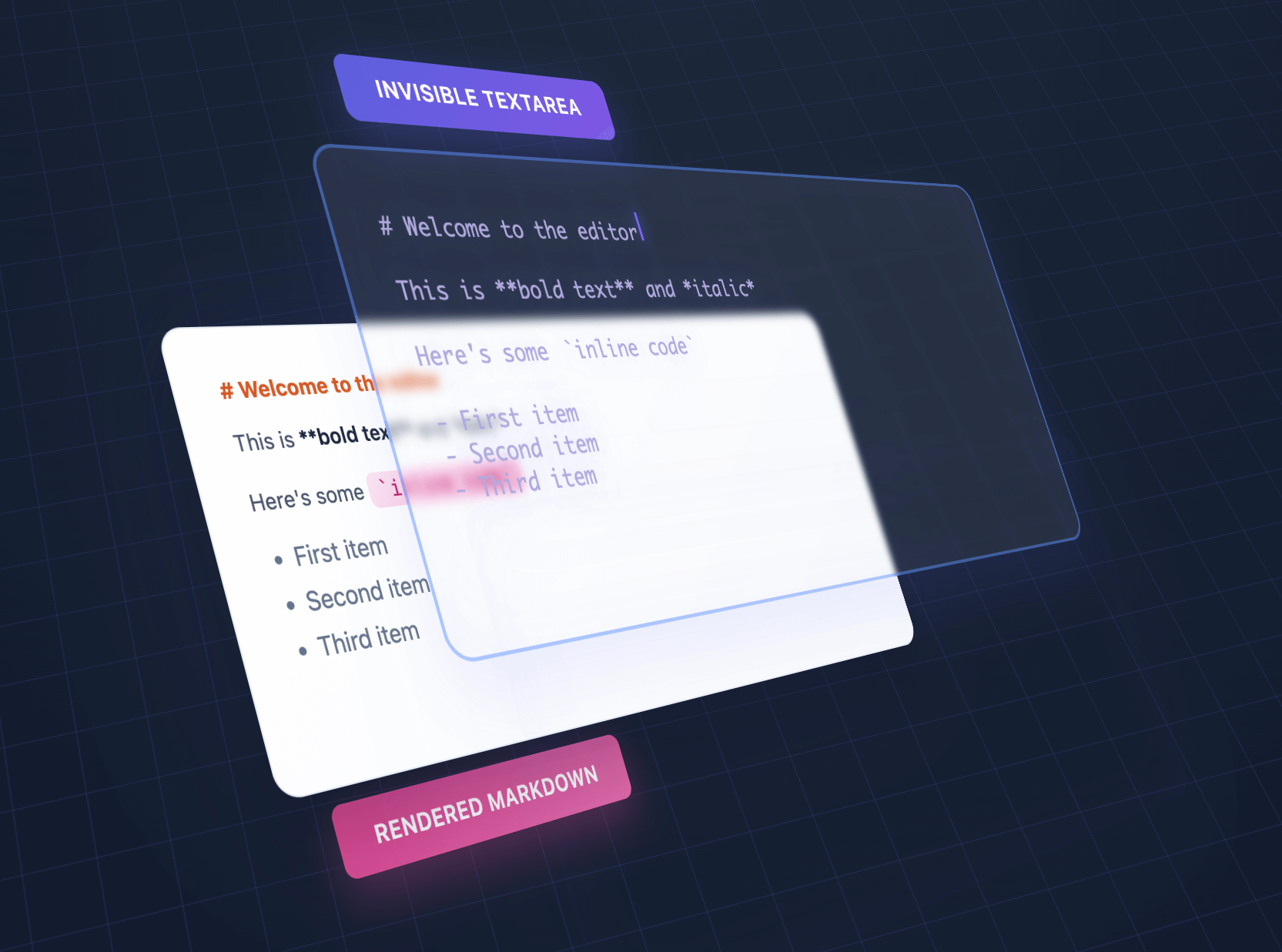
We overlap an invisible textarea on top of styled output, giving the illusion of editing styled text using a plain textarea.
| Feature | OverType | HyperMD | Milkdown | TUI Editor | EasyMDE |
|---|---|---|---|---|---|
| Size | ~134KB | 364.02 KB | 344.51 KB | 560.99 KB | 323.69 KB |
| Dependencies | Bundled | CodeMirror | ProseMirror + plugins | Multiple libs | CodeMirror |
| Setup | Single file | Complex config | Build step required | Complex config | Moderate |
| Approach | Invisible textarea | ContentEditable | ContentEditable | ContentEditable | CodeMirror |
| Mobile | Perfect native | Issues common | Issues common | Issues common | Limited |
| Markdown syntax | Visible | Hidden | Hidden | Toggle | Visible |
| Advanced features | Basic | Full | Full | Full | Moderate |
| Best for | Simple, fast, mobile | Full WYSIWYG | Modern frameworks | Enterprise apps | Classic editing |
Choose OverType when you need:
Choose other editors when you need:
npm install overtype
import OverType from 'overtype';

const [editor] = new OverType('#editor', { value: '# Hello' });
OverType is ESM-first and also ships a CommonJS build, so both styles work:
// ESM — default or named import
import OverType from 'overtype';
import { OverType } from 'overtype';

// CommonJS
const { OverType } = require('overtype');
<script type="module">
  import OverType from 'https://cdn.jsdelivr.net/npm/overtype@latest/dist/overtype.esm.js';
  const [editor] = new OverType('#editor', { value: '# Hello' });
</script>
<script src="https://cdn.jsdelivr.net/npm/overtype@latest/dist/overtype.min.js"></script>
<script>
  const [editor] = new OverType('#editor', { value: '# Hello' });
</script>
// Create a single editor
const [editor] = new OverType('#editor', {
  value: '# Hello World',
  theme: 'solar'
});

// Get/set content
editor.getValue();
editor.setValue('# New Content');

// Change theme for this instance
editor.setTheme('cave');
<div id="editor" style="height: 400px;"></div>

<script>
  const [editor] = new OverType('#editor', {
    placeholder: 'Start typing markdown...',
    value: '# Welcome\n\nStart writing **markdown** here!',
    onChange: (value, instance) => {
      console.log('Content changed:', value);
    }
  });
</script>
// Enable default toolbar with all formatting buttons
const [editor] = new OverType('#editor', {
  toolbar: true,
  value: '# Document\n\nSelect text and use the toolbar!'
});

// Default toolbar: Bold, Italic, Code | Link | H1, H2, H3 | Lists, Tasks | Quote | View Mode
Custom Toolbar (v2.0):
import OverType, { toolbarButtons } from 'overtype';

const [editor] = new OverType('#editor', {
  toolbar: true,
  toolbarButtons: [
    toolbarButtons.bold,
    toolbarButtons.italic,
    toolbarButtons.separator,
    {
      name: 'save',
      icon: '<svg>...</svg>',
      title: 'Save',
      action: ({ editor, getValue }) => {
        localStorage.setItem('draft', getValue());
      }
    }
  ]
});

// Available: bold, italic, code, link, h1, h2, h3, bulletList,
// orderedList, taskList, quote, separator, viewMode
Custom buttons that behave like toggle buttons can provide isActive. When it returns true or false, OverType updates the button’s active class and aria-pressed state:
{
  name: 'customToggle',
  icon: '<svg>...</svg>',
  title: 'Custom Toggle',
  isActive: ({ editor, activeFormats }) => activeFormats.includes('bold'),
  action: ({ editor }) => {
    // Toggle your custom formatting
  }
}
Driving formatting from your own UI:
OverType re-exports the bundled markdown-actions library so you can build a fully custom toolbar (or any UI) without installing or bundling markdown-actions separately:
import OverType, { markdownActions } from 'overtype';

const [editor] = new OverType('#editor');

// Apply formatting to the editor's textarea directly
document.querySelector('#bold-btn').addEventListener('click', () => {
  markdownActions.toggleBold(editor.textarea);
  editor.textarea.focus();
});
Available actions include toggleBold, toggleItalic, toggleCode, insertLink, toggleBulletList, toggleNumberedList, toggleQuote, toggleTaskList, insertHeader, toggleH1/H2/H3, getActiveFormats, hasFormat, expandSelection, and applyCustomFormat. The same namespace is available as window.markdownActions and OverType.markdownActions in script-tag builds.
See examples/custom-toolbar.html for complete examples.
Three modes available via toolbar dropdown or programmatically:
editor.showNormalEditMode();   // Default WYSIWYG editing
editor.showPlainTextarea();    // Raw markdown, no preview
editor.showPreviewMode();      // Read-only preview with clickable links
GitHub-style checkboxes render in preview mode:
const [editor] = new OverType('#editor', {
  value: '- [ ] Todo\n- [x] Done',
  toolbar: true  // Use view mode dropdown to see checkboxes
});

// Edit mode: Shows `- [ ]` and `- [x]` syntax (preserves alignment)
// Preview mode: Renders actual checkbox inputs
import { codeToHtml } from 'shiki';

// Global highlighter (all instances)
OverType.setCodeHighlighter((code, lang) =>
  codeToHtml(code, { lang, theme: 'nord' })
);

// Per-instance override
const [editor] = new OverType('#editor', {
  codeHighlighter: (code, lang) => myHighlighter(code, lang)
});
See docs/SYNTAX_HIGHLIGHTING.md for complete guide.
The toolbar and keyboard shortcuts work together seamlessly:
Collapsed Tab and Shift+Tab follow normal browser focus navigation so keyboard users can leave the editor. Editing shortcuts preserve text selection, allowing you to apply multiple formats quickly.
// Initialize multiple editors at once
const editors = OverType.init('.markdown-editor', {
  theme: 'cave',
  fontSize: '16px'
});

// Each editor is independent
editors.forEach((editor, index) => {
  editor.setValue(`# Editor ${index + 1}`);
});
// Use with form validation
const [editor] = new OverType('#message', {
  placeholder: 'Your message...',
  textareaProps: {
    required: true,
    maxLength: 500,
    name: 'message'
  }
});

// The textarea will work with native form validation
document.querySelector('form').addEventListener('submit', (e) => {
  const content = editor.getValue();
  // Form will automatically validate required field
});
OverType handles paste and drop of files when fileUpload is configured. You upload to your own backend in onInsertFile and return the markdown to insert. When that markdown link is later removed from the editor, onRemoveFile fires so you can clean up the backend file.
const [editor] = new OverType('#editor', {
fileUpload: {
enabled: true,
maxSize: 10 * 1024 * 1024, // 10MB
mimeTypes: ['image/png', 'image/jpeg'], // optional whitelist; empty = accept all
batch: false, // true = one onInsertFile call per drop
// Upload to your backend, return the markdown link to insert
onInsertFile: async (file) => {
const { url } = await uploadToBackend(file);
const isImage = file.type.startsWith('image/');
return isImage ? `` : `[${file.name}](${url})`;
},
// Optional: fires when an inserted link is removed from the editor.
// Useful for deleting orphaned files from storage.
onRemoveFile: ({ url, filename, file }) => {
fetch(`/api/files/${encodeURIComponent(url)}`, { method: 'DELETE' });
}
}
});
onRemoveFile only fires for URLs that OverType originally inserted via onInsertFile. URL edits, manual paste of an existing link, or programmatic edits to non-tracked URLs do not trigger it.
See examples/file-upload.html for a complete working demo.
const [editor] = new OverType('#editor', {
  theme: {
    name: 'my-theme',
    colors: {
      bgPrimary: '#faf0ca',
      bgSecondary: '#ffffff',
      text: '#0d3b66',
      h1: '#f95738',
      h2: '#ee964b',
      h3: '#3d8a51',
      strong: '#ee964b',
      em: '#f95738',
      link: '#0d3b66',
      code: '#0d3b66',
      codeBg: 'rgba(244, 211, 94, 0.2)',
      blockquote: '#5a7a9b',
      hr: '#5a7a9b',
      syntaxMarker: 'rgba(13, 59, 102, 0.52)',
      cursor: '#f95738',
      selection: 'rgba(244, 211, 94, 0.4)'
    }
  }
});
Generate HTML previews or export the rendered content:
const [editor] = new OverType('#editor', {
  value: '# Title\n\n**Bold** text with [links](https://example.com)'
});

// Get the raw markdown
const markdown = editor.getValue();
// Returns: "# Title\n\n**Bold** text with [links](https://example.com)"

// Get rendered HTML with syntax markers (for debugging/inspection)
const html = editor.getRenderedHTML();
// Returns HTML with <span class="syntax-marker"> elements visible

// Get clean HTML for export (no OverType-specific markup)
const cleanHTML = editor.getRenderedHTML({ cleanHTML: true });
// Returns clean HTML suitable for saving/exporting

// Convenience method for clean HTML
const exportHTML = editor.getCleanHTML();
// Same as getRenderedHTML({ cleanHTML: true })

// Get the current preview element's HTML (actual DOM content)
const previewHTML = editor.getPreviewHTML();
// Returns exactly what's shown in the editor's preview layer

// Example: Export clean HTML to server
const htmlToSave = editor.getCleanHTML();  // No syntax markers
// Example: Clone exact preview appearance
document.getElementById('clone').innerHTML = editor.getPreviewHTML();
Enable a built-in stats bar that shows character, word, and line counts:
// Enable stats bar on initialization
const [editor] = new OverType('#editor', {
  showStats: true
});

// Show or hide stats bar dynamically
editor.showStats(true);  // Show
editor.showStats(false); // Hide

// Custom stats format
const [editor] = new OverType('#editor', {
  showStats: true,
  statsFormatter: (stats) => {
    // stats object contains: { chars, words, lines, line, column }
    return `<span>${stats.chars} characters</span>
            <span>${stats.words} words</span>
            <span>${stats.lines} lines</span>
            <span>Line ${stats.line}, Col ${stats.column}</span>`;
  }
});
The stats bar automatically adapts to your theme colors using CSS variables.
function MarkdownEditor({ value, onChange }) {
  const ref = useRef();
  const editorRef = useRef();

  useEffect(() => {
    const [instance] = OverType.init(ref.current, {
      value,
      onChange
    });
    editorRef.current = instance;

    return () => editorRef.current?.destroy();
  }, []);

  useEffect(() => {
    if (editorRef.current && value !== editorRef.current.getValue()) {
      editorRef.current.setValue(value);
    }
  }, [value]);

  return <div ref={ref} style={{ height: '400px' }} />;
}
Import and use the markdown parser without the full editor for server-side rendering, static site generation, or browser extensions:
// Import just the parser
import { MarkdownParser } from 'overtype/parser';

// Parse markdown to HTML
const html = MarkdownParser.parse('# Hello World\n\nThis is **bold** text.');

// Use in Node.js for SSR
app.get('/preview', (req, res) => {
  const markdown = req.body.content;
  const html = MarkdownParser.parse(markdown);
  res.json({ html });
});

// Use in static site generator
const posts = markdownFiles.map(file => ({
  content: MarkdownParser.parse(file.content),
  metadata: file.metadata
}));

// Use in browser extension
chrome.runtime.onMessage.addListener((request, sender, sendResponse) => {
  if (request.markdown) {
    const html = MarkdownParser.parse(request.markdown);
    sendResponse({ html });
  }
});
Benefits:
new OverType(target, options)
Parameters:
target - Selector string, Element, NodeList, or Array of elementsoptions - Configuration object (see below)Returns: Array of OverType instances (always an array, even for single element)
{
  // Typography
  fontSize: '14px',
  lineHeight: 1.6,
  fontFamily: 'monospace',
  padding: '16px',

  // Theme - 'solar', 'cave', or custom theme object
  theme: 'solar',

  // Custom colors (override theme colors)
  colors: {
    h1: '#e63946',
    h2: '#457b9d',
    // ... any color variable
  },

  // Mobile styles (applied at <= 640px)
  mobile: {
    fontSize: '16px',
    padding: '12px',
    lineHeight: 1.5
  },

  // Behavior
  autofocus: false,
  placeholder: 'Start typing...',
  value: '',

  // Auto-resize
  autoResize: false,      // Auto-expand height with content
  minHeight: '100px',     // Minimum height when autoResize is enabled
  maxHeight: null,        // Maximum height (null = unlimited)

  // Native textarea properties
  textareaProps: {
    required: true,
    maxLength: 500,
    name: 'content',
    // Any HTML textarea attribute
  },

  // Toolbar
  toolbar: false,         // Enable/disable toolbar
  toolbarButtons: [],     // Custom button array (v2.0)
                          // Defaults to all built-in buttons when toolbar: true

  // Syntax highlighting
  codeHighlighter: null,  // Function: (code, lang) => html
                          // Overrides global OverType.setCodeHighlighter()

  // Smart lists
  smartLists: true,       // Enable GitHub-style list continuation on Enter

  // Task toggling
  clickToToggleTasks: false,  // Click a task checkbox marker to toggle its state

  // Spellcheck
  spellcheck: false,      // Enable browser spellcheck (disabled by default)

  // Link tooltip
  transformLinkUrl: (url) => url,  // Rewrite the URL shown/opened in the link tooltip (per instance)

  // Stats bar
  showStats: false,       // Enable/disable stats bar
  statsFormatter: (stats) => {  // Custom stats format
    return `${stats.chars} chars | ${stats.words} words`;
  },

  // Callbacks
  onChange: (value, instance) => {},
  onKeydown: (event, instance) => {},
  onFocus: (event, instance) => {},
  onBlur: (event, instance) => {},

  // File upload (paste/drop) — see "File Uploads" section below
  fileUpload: {
    enabled: true,
    maxSize: 10 * 1024 * 1024,                            // bytes (default 10MB)
    mimeTypes: [],                                        // empty = accept all
    batch: false,                                         // single onInsertFile call per drop
    onInsertFile: async (file) => `[${file.name}](url)`,  // required: return inserted markdown
    onRemoveFile: ({ url, filename, file }) => {}         // fires when an inserted link is removed
  }
}
// Get current markdown content
editor.getValue()

// Set markdown content
editor.setValue(markdown)

// Get rendered HTML of the current content
editor.getRenderedHTML()                    // With syntax markers (for debugging)
editor.getRenderedHTML({ cleanHTML: true }) // Clean HTML without OverType markup
editor.getCleanHTML()                       // Alias for getRenderedHTML({ cleanHTML: true })

// Get the current preview element's HTML
editor.getPreviewHTML()            // Actual DOM content from preview layer

// Change theme (instance-specific, overrides global theme)
editor.setTheme('cave')  // Built-in theme name
editor.setTheme(customThemeObject)  // Custom theme

// Set code highlighter (instance-specific)
editor.setCodeHighlighter((code, lang) => highlightedHTML)
editor.setCodeHighlighter(null)  // Disable for this instance

// View modes
editor.showNormalEditMode()   // Switch to normal edit mode (default)
editor.showPlainTextarea()    // Switch to plain textarea mode
editor.showPreviewMode()      // Switch to preview mode

// Focus/blur
editor.focus()
editor.blur()

// Show or hide stats bar
editor.showStats(true)   // Show stats
editor.showStats(false)  // Hide stats

// Check if initialized
editor.isInitialized()

// Re-initialize with new options
editor.reinit(options)

// Destroy the editor
editor.destroy()
// Set global theme (affects all instances without instance themes)
OverType.setTheme('cave')  // Built-in theme
OverType.setTheme(customTheme)  // Custom theme object
OverType.setTheme('solar', { h1: '#custom' })  // Override specific colors

// Set global code highlighter (affects all instances without instance highlighter)
OverType.setCodeHighlighter((code, lang) => highlightedHTML)
OverType.setCodeHighlighter(null)  // Disable global highlighting

// Extend parsing with custom syntax (footnotes, directives, etc.)
// IMPORTANT: You must maintain 1-to-1 character alignment - wrap text, don't change it
// See: https://panphora.github.io/overtype/examples/custom-syntax.html
OverType.setCustomSyntax((html) => {
  return html.replace(/\[\^(\w+)\]/g, '<span class="footnote">$&</span>');
})

// Note: Instance methods override global settings

// Initialize multiple editors (same as constructor)
OverType.init(target, options)

// Initialize with per-element config via data-ot-* attributes
// Uses kebab-case: data-ot-show-stats="true" → showStats: true
// Accepts a selector, Element, NodeList, or Array of elements
OverType.initFromData('.editor', { /* defaults */ })

// Get instance from a selector, Element, NodeList, or Array
// Returns the instance for the first matching element
OverType.getInstance(target)

// Destroy all instances
OverType.destroyAll()

// Access themes
OverType.themes.solar
OverType.themes.cave
| Shortcut | Action |
|---|---|
| Cmd/Ctrl + B | Toggle bold |
| Cmd/Ctrl + I | Toggle italic |
| Cmd/Ctrl + K | Insert link |
| Cmd/Ctrl + Shift + 7 | Toggle numbered list |
| Cmd/Ctrl + Shift + 8 | Toggle bullet list |
| Cmd/Ctrl + ] | Indent current line or selection |
| Cmd/Ctrl + [ | Outdent current line or selection |
| Tab / Shift+Tab | Indent or outdent selected lines |
When no text is selected, Tab and Shift+Tab use normal browser focus navigation.
# H1, ## H2, ### H3**text** or __text__*text* or _text_~~text~~ or ~text~ (GFM)`inline code````language[text](url)- item, * item, 1. item- [ ] todo, - [x] done (GFM, renders in preview mode)> quote---, ***, or ___Note: Syntax remains visible in edit mode (e.g., **bold** shows markers). Use preview mode for full rendering.
OverType provides a fully-featured native Web Component <overtype-editor> with Shadow DOM encapsulation and a declarative HTML API.
Quick example:
<overtype-editor
  value="# Hello OverType!"
  theme="solar"
  height="300px"
  toolbar>
</overtype-editor>
📖 Complete Web Component Documentation
Features include:
Old options removed:
// ❌ No longer supported
{
  customToolbarButtons: [...],
  hideButtons: [...],
  buttonOrder: [...]
}
New approach:
// ✅ v2.0: Single explicit array
import { toolbarButtons } from 'overtype';

{
  toolbar: true,
  toolbarButtons: [
    toolbarButtons.bold,
    toolbarButtons.italic,
    { name: 'custom', icon: '...', action: ({ editor, getValue }) => {} }
  ]
}
If using default toolbar (toolbar: true with no customization), no changes needed.
See examples/custom-toolbar.html for migration examples.
OverType can resume from its own saved DOM, for pages that save themselves (like ClayJS / Hyperclay). Calling new OverType(el) on an element that holds a saved editor keeps the text and rebuilds the toolbar, preview and other UI exactly once.
In a ClayJS page, pass persist: true:
new OverType('#entry', { persist: true, toolbar: true });
With persist, the saved file holds only the text:
<div class="overtype-container" data-theme="solar">
  <div class="overtype-wrapper">
    <textarea class="overtype-input" persist>…your markdown…</textarea>
  </div>
</div>
The textarea gets ClayJS's persist attribute, and the style tag, toolbar, tooltip, stats bar, placeholder and preview are marked clay="editor-ui", so they are never saved and never trigger an autosave. destroy() leaves the container, wrapper and textarea in place, so the editor can be resumed later. When ClayJS live sync merges a change into the textarea, OverType redraws on clay:sync-applied, so collaborators' and agents' edits show without a reload. With autoResize, OverType registers a ClayJS snapshot hook that keeps the editor's inline heights out of the saved file.
Check the examples folder for complete examples:
basic.html - Simple single editormultiple.html - Multiple independent editorscustom-theme.html - Theme customizationcustom-toolbar.html - Custom toolbar buttons (v2.0)dynamic.html - Dynamic creation/destructionDue to the transparent textarea overlay approach, OverType has some intentional design limitations:
Images () are not rendered. Variable-height images would break the character alignment between textarea and preview.
All text must use a monospace font to maintain alignment. Variable-width fonts would cause the textarea cursor position to drift from the visual text position.
All content must use the same font size. Different sizes for headers or other elements would break vertical alignment.
All markdown formatting characters remain visible (e.g., **bold** shows the asterisks). This is intentional - hiding them would break the 1:1 character mapping.
Links are clickable with Cmd/Ctrl+Click only. Direct clicking would interfere with text editing since clicks need to position the cursor in the textarea.
These limitations are what enable OverType's core benefits: perfect native textarea behavior, tiny size, and zero complexity.
When your cursor is inside a [text](url), OverType shows a tooltip to open the link. If you edit a document at a different path or domain than where it's published, relative URLs can point to the wrong place. Pass transformLinkUrl to rewrite the URL shown and opened by the tooltip, per instance. Your markdown text and the rendered preview are left untouched.
const urlPreviewRegExp = [[/^\//, '/preview/'], [/www\./, '']];

const [editor] = new OverType('#editor', {
  transformLinkUrl: (url) => urlPreviewRegExp.reduce((value, re) => value.replace(...re), url)
});
The transformed URL is passed through OverType's URL sanitizer before opening, so the tooltip can never open a dangerous scheme (javascript:, data:, and similar). If your function throws or returns a non-string, the original URL is used.
OverType stays small by leaving optional features to the host app and exposing the public API needed to build them (editor.textarea, onChange, getValue/setValue).
@mention and #issue popups built entirely on the public API, no core changes.# Install dependencies
npm install
# Development build with watch
npm run dev
# Production build
npm run build
# Run tests
npm test
# Check bundle size
npm run size
Requires support for:
OverType uses a unique invisible textarea overlay approach:
Two perfectly aligned layers:
Character-perfect alignment:
Single source of truth:
Use OverType.initFromData() to configure multiple editors via HTML data attributes:
<div class="editor" data-ot-toolbar="true" data-ot-theme="cave"></div>
<div class="editor" data-ot-auto-resize="true" data-ot-min-height="200px"></div>
<div class="editor" data-ot-show-stats="true" data-ot-placeholder="Write here..."></div>

<script>
  OverType.initFromData('.editor', { fontSize: '14px' }); // defaults
</script>
Uses kebab-case attributes that convert to camelCase options (e.g., data-ot-show-stats → showStats).
required, name, etc.)Set textareaProps from HTML in two ways:
<!-- One attribute per prop: data-ot-textarea-<attr> -->
<div class="editor" data-ot-textarea-required data-ot-textarea-name="message"></div>

<!-- Or the whole object as JSON -->
<div class="editor" data-ot-textarea-props='{"required":true,"maxLength":500,"name":"message"}'></div>
Both put a real required/name/etc. attribute on the underlying <textarea>, so the editor participates in native form validation. To make a field optional, omit the attribute (don't set data-ot-textarea-required="false", which still marks it required, the same way the HTML required attribute works).
Any object-valued option can also be passed as JSON (values starting with { or [ are parsed; malformed JSON falls back to the raw string).
Supported: toolbar, theme, value, placeholder, autofocus, auto-resize, min-height, max-height, font-size, line-height, show-stats, smart-lists, show-active-line-raw, textarea-props / textarea-*
Not supported (use JS): toolbarButtons, onChange, onKeydown, onFocus, onBlur, statsFormatter, codeHighlighter, colors, mobile
Special thanks to:
MIT
Contributions are welcome! Please feel free to submit a Pull Request.
Built with the radical idea that sometimes dumb ideas work.
Ready for another radical idea?
Let's remove every layer of the web application stack.
Hyperclay by @panphora allows you to make a web app in a single, portable, self-updating, vanilla HTML file. No frameworks, no build steps, no deployment pipelines. Just a single HTML file that persists its own state and can be edited live.
Think of it as a Google Document for interactive code, where the UI, logic, and data all live in one self-modifying file. Share apps instantly, edit them directly, use them offline.
(top 24 of 80)
3,108 followers · starred Aug 2025
1,854 followers · starred Aug 2025
443 followers · starred Aug 2025
1,718 followers · starred Aug 2025
The markdown editor that's just a textarea https://overtype.dev
JavaScript
3,707
272 commits
updated Oct 10, 2026
A lightweight markdown editor library with perfect WYSIWYG alignment using an invisible textarea overlay technique. Includes optional toolbar. ~134KB minified with all features.
🎮 Try it out: Interactive demos on overtype.dev
We overlap an invisible textarea on top of styled output, giving the illusion of editing styled text using a plain textarea.
| Feature | OverType | HyperMD | Milkdown | TUI Editor | EasyMDE |
|---|---|---|---|---|---|
| Size | ~134KB | 364.02 KB | 344.51 KB | 560.99 KB | 323.69 KB |
| Dependencies | Bundled | CodeMirror | ProseMirror + plugins | Multiple libs | CodeMirror |
| Setup | Single file | Complex config | Build step required | Complex config | Moderate |
| Approach | Invisible textarea | ContentEditable | ContentEditable | ContentEditable | CodeMirror |
| Mobile | Perfect native | Issues common | Issues common | Issues common | Limited |
| Markdown syntax | Visible | Hidden | Hidden | Toggle | Visible |
| Advanced features | Basic | Full | Full | Full | Moderate |
| Best for | Simple, fast, mobile | Full WYSIWYG | Modern frameworks | Enterprise apps | Classic editing |
Choose OverType when you need:
Choose other editors when you need:
npm install overtype
import OverType from 'overtype';

const [editor] = new OverType('#editor', { value: '# Hello' });
OverType is ESM-first and also ships a CommonJS build, so both styles work:
// ESM — default or named import
import OverType from 'overtype';
import { OverType } from 'overtype';

// CommonJS
const { OverType } = require('overtype');
<script type="module">
  import OverType from 'https://cdn.jsdelivr.net/npm/overtype@latest/dist/overtype.esm.js';
  const [editor] = new OverType('#editor', { value: '# Hello' });
</script>
<script src="https://cdn.jsdelivr.net/npm/overtype@latest/dist/overtype.min.js"></script>
<script>
  const [editor] = new OverType('#editor', { value: '# Hello' });
</script>
// Create a single editor
const [editor] = new OverType('#editor', {
  value: '# Hello World',
  theme: 'solar'
});

// Get/set content
editor.getValue();
editor.setValue('# New Content');

// Change theme for this instance
editor.setTheme('cave');
<div id="editor" style="height: 400px;"></div>

<script>
  const [editor] = new OverType('#editor', {
    placeholder: 'Start typing markdown...',
    value: '# Welcome\n\nStart writing **markdown** here!',
    onChange: (value, instance) => {
      console.log('Content changed:', value);
    }
  });
</script>
// Enable default toolbar with all formatting buttons
const [editor] = new OverType('#editor', {
  toolbar: true,
  value: '# Document\n\nSelect text and use the toolbar!'
});

// Default toolbar: Bold, Italic, Code | Link | H1, H2, H3 | Lists, Tasks | Quote | View Mode
Custom Toolbar (v2.0):
import OverType, { toolbarButtons } from 'overtype';

const [editor] = new OverType('#editor', {
  toolbar: true,
  toolbarButtons: [
    toolbarButtons.bold,
    toolbarButtons.italic,
    toolbarButtons.separator,
    {
      name: 'save',
      icon: '<svg>...</svg>',
      title: 'Save',
      action: ({ editor, getValue }) => {
        localStorage.setItem('draft', getValue());
      }
    }
  ]
});

// Available: bold, italic, code, link, h1, h2, h3, bulletList,
// orderedList, taskList, quote, separator, viewMode
Custom buttons that behave like toggle buttons can provide isActive. When it returns true or false, OverType updates the button’s active class and aria-pressed state:
{
  name: 'customToggle',
  icon: '<svg>...</svg>',
  title: 'Custom Toggle',
  isActive: ({ editor, activeFormats }) => activeFormats.includes('bold'),
  action: ({ editor }) => {
    // Toggle your custom formatting
  }
}
Driving formatting from your own UI:
OverType re-exports the bundled markdown-actions library so you can build a fully custom toolbar (or any UI) without installing or bundling markdown-actions separately:
import OverType, { markdownActions } from 'overtype';

const [editor] = new OverType('#editor');

// Apply formatting to the editor's textarea directly
document.querySelector('#bold-btn').addEventListener('click', () => {
  markdownActions.toggleBold(editor.textarea);
  editor.textarea.focus();
});
Available actions include toggleBold, toggleItalic, toggleCode, insertLink, toggleBulletList, toggleNumberedList, toggleQuote, toggleTaskList, insertHeader, toggleH1/H2/H3, getActiveFormats, hasFormat, expandSelection, and applyCustomFormat. The same namespace is available as window.markdownActions and OverType.markdownActions in script-tag builds.
See examples/custom-toolbar.html for complete examples.
Three modes available via toolbar dropdown or programmatically:
editor.showNormalEditMode();   // Default WYSIWYG editing
editor.showPlainTextarea();    // Raw markdown, no preview
editor.showPreviewMode();      // Read-only preview with clickable links
GitHub-style checkboxes render in preview mode:
const [editor] = new OverType('#editor', {
  value: '- [ ] Todo\n- [x] Done',
  toolbar: true  // Use view mode dropdown to see checkboxes
});

// Edit mode: Shows `- [ ]` and `- [x]` syntax (preserves alignment)
// Preview mode: Renders actual checkbox inputs
import { codeToHtml } from 'shiki';

// Global highlighter (all instances)
OverType.setCodeHighlighter((code, lang) =>
  codeToHtml(code, { lang, theme: 'nord' })
);

// Per-instance override
const [editor] = new OverType('#editor', {
  codeHighlighter: (code, lang) => myHighlighter(code, lang)
});
See docs/SYNTAX_HIGHLIGHTING.md for complete guide.
The toolbar and keyboard shortcuts work together seamlessly:
Collapsed Tab and Shift+Tab follow normal browser focus navigation so keyboard users can leave the editor. Editing shortcuts preserve text selection, allowing you to apply multiple formats quickly.
// Initialize multiple editors at once
const editors = OverType.init('.markdown-editor', {
  theme: 'cave',
  fontSize: '16px'
});

// Each editor is independent
editors.forEach((editor, index) => {
  editor.setValue(`# Editor ${index + 1}`);
});
// Use with form validation
const [editor] = new OverType('#message', {
  placeholder: 'Your message...',
  textareaProps: {
    required: true,
    maxLength: 500,
    name: 'message'
  }
});

// The textarea will work with native form validation
document.querySelector('form').addEventListener('submit', (e) => {
  const content = editor.getValue();
  // Form will automatically validate required field
});
OverType handles paste and drop of files when fileUpload is configured. You upload to your own backend in onInsertFile and return the markdown to insert. When that markdown link is later removed from the editor, onRemoveFile fires so you can clean up the backend file.
const [editor] = new OverType('#editor', {
fileUpload: {
enabled: true,
maxSize: 10 * 1024 * 1024, // 10MB
mimeTypes: ['image/png', 'image/jpeg'], // optional whitelist; empty = accept all
batch: false, // true = one onInsertFile call per drop
// Upload to your backend, return the markdown link to insert
onInsertFile: async (file) => {
const { url } = await uploadToBackend(file);
const isImage = file.type.startsWith('image/');
return isImage ? `` : `[${file.name}](${url})`;
},
// Optional: fires when an inserted link is removed from the editor.
// Useful for deleting orphaned files from storage.
onRemoveFile: ({ url, filename, file }) => {
fetch(`/api/files/${encodeURIComponent(url)}`, { method: 'DELETE' });
}
}
});
onRemoveFile only fires for URLs that OverType originally inserted via onInsertFile. URL edits, manual paste of an existing link, or programmatic edits to non-tracked URLs do not trigger it.
See examples/file-upload.html for a complete working demo.
const [editor] = new OverType('#editor', {
  theme: {
    name: 'my-theme',
    colors: {
      bgPrimary: '#faf0ca',
      bgSecondary: '#ffffff',
      text: '#0d3b66',
      h1: '#f95738',
      h2: '#ee964b',
      h3: '#3d8a51',
      strong: '#ee964b',
      em: '#f95738',
      link: '#0d3b66',
      code: '#0d3b66',
      codeBg: 'rgba(244, 211, 94, 0.2)',
      blockquote: '#5a7a9b',
      hr: '#5a7a9b',
      syntaxMarker: 'rgba(13, 59, 102, 0.52)',
      cursor: '#f95738',
      selection: 'rgba(244, 211, 94, 0.4)'
    }
  }
});
Generate HTML previews or export the rendered content:
const [editor] = new OverType('#editor', {
  value: '# Title\n\n**Bold** text with [links](https://example.com)'
});

// Get the raw markdown
const markdown = editor.getValue();
// Returns: "# Title\n\n**Bold** text with [links](https://example.com)"

// Get rendered HTML with syntax markers (for debugging/inspection)
const html = editor.getRenderedHTML();
// Returns HTML with <span class="syntax-marker"> elements visible

// Get clean HTML for export (no OverType-specific markup)
const cleanHTML = editor.getRenderedHTML({ cleanHTML: true });
// Returns clean HTML suitable for saving/exporting

// Convenience method for clean HTML
const exportHTML = editor.getCleanHTML();
// Same as getRenderedHTML({ cleanHTML: true })

// Get the current preview element's HTML (actual DOM content)
const previewHTML = editor.getPreviewHTML();
// Returns exactly what's shown in the editor's preview layer

// Example: Export clean HTML to server
const htmlToSave = editor.getCleanHTML();  // No syntax markers
// Example: Clone exact preview appearance
document.getElementById('clone').innerHTML = editor.getPreviewHTML();
Enable a built-in stats bar that shows character, word, and line counts:
// Enable stats bar on initialization
const [editor] = new OverType('#editor', {
  showStats: true
});

// Show or hide stats bar dynamically
editor.showStats(true);  // Show
editor.showStats(false); // Hide

// Custom stats format
const [editor] = new OverType('#editor', {
  showStats: true,
  statsFormatter: (stats) => {
    // stats object contains: { chars, words, lines, line, column }
    return `<span>${stats.chars} characters</span>
            <span>${stats.words} words</span>
            <span>${stats.lines} lines</span>
            <span>Line ${stats.line}, Col ${stats.column}</span>`;
  }
});
The stats bar automatically adapts to your theme colors using CSS variables.
function MarkdownEditor({ value, onChange }) {
  const ref = useRef();
  const editorRef = useRef();

  useEffect(() => {
    const [instance] = OverType.init(ref.current, {
      value,
      onChange
    });
    editorRef.current = instance;

    return () => editorRef.current?.destroy();
  }, []);

  useEffect(() => {
    if (editorRef.current && value !== editorRef.current.getValue()) {
      editorRef.current.setValue(value);
    }
  }, [value]);

  return <div ref={ref} style={{ height: '400px' }} />;
}
Import and use the markdown parser without the full editor for server-side rendering, static site generation, or browser extensions:
// Import just the parser
import { MarkdownParser } from 'overtype/parser';

// Parse markdown to HTML
const html = MarkdownParser.parse('# Hello World\n\nThis is **bold** text.');

// Use in Node.js for SSR
app.get('/preview', (req, res) => {
  const markdown = req.body.content;
  const html = MarkdownParser.parse(markdown);
  res.json({ html });
});

// Use in static site generator
const posts = markdownFiles.map(file => ({
  content: MarkdownParser.parse(file.content),
  metadata: file.metadata
}));

// Use in browser extension
chrome.runtime.onMessage.addListener((request, sender, sendResponse) => {
  if (request.markdown) {
    const html = MarkdownParser.parse(request.markdown);
    sendResponse({ html });
  }
});
Benefits:
new OverType(target, options)
Parameters:
target - Selector string, Element, NodeList, or Array of elementsoptions - Configuration object (see below)Returns: Array of OverType instances (always an array, even for single element)
{
  // Typography
  fontSize: '14px',
  lineHeight: 1.6,
  fontFamily: 'monospace',
  padding: '16px',

  // Theme - 'solar', 'cave', or custom theme object
  theme: 'solar',

  // Custom colors (override theme colors)
  colors: {
    h1: '#e63946',
    h2: '#457b9d',
    // ... any color variable
  },

  // Mobile styles (applied at <= 640px)
  mobile: {
    fontSize: '16px',
    padding: '12px',
    lineHeight: 1.5
  },

  // Behavior
  autofocus: false,
  placeholder: 'Start typing...',
  value: '',

  // Auto-resize
  autoResize: false,      // Auto-expand height with content
  minHeight: '100px',     // Minimum height when autoResize is enabled
  maxHeight: null,        // Maximum height (null = unlimited)

  // Native textarea properties
  textareaProps: {
    required: true,
    maxLength: 500,
    name: 'content',
    // Any HTML textarea attribute
  },

  // Toolbar
  toolbar: false,         // Enable/disable toolbar
  toolbarButtons: [],     // Custom button array (v2.0)
                          // Defaults to all built-in buttons when toolbar: true

  // Syntax highlighting
  codeHighlighter: null,  // Function: (code, lang) => html
                          // Overrides global OverType.setCodeHighlighter()

  // Smart lists
  smartLists: true,       // Enable GitHub-style list continuation on Enter

  // Task toggling
  clickToToggleTasks: false,  // Click a task checkbox marker to toggle its state

  // Spellcheck
  spellcheck: false,      // Enable browser spellcheck (disabled by default)

  // Link tooltip
  transformLinkUrl: (url) => url,  // Rewrite the URL shown/opened in the link tooltip (per instance)

  // Stats bar
  showStats: false,       // Enable/disable stats bar
  statsFormatter: (stats) => {  // Custom stats format
    return `${stats.chars} chars | ${stats.words} words`;
  },

  // Callbacks
  onChange: (value, instance) => {},
  onKeydown: (event, instance) => {},
  onFocus: (event, instance) => {},
  onBlur: (event, instance) => {},

  // File upload (paste/drop) — see "File Uploads" section below
  fileUpload: {
    enabled: true,
    maxSize: 10 * 1024 * 1024,                            // bytes (default 10MB)
    mimeTypes: [],                                        // empty = accept all
    batch: false,                                         // single onInsertFile call per drop
    onInsertFile: async (file) => `[${file.name}](url)`,  // required: return inserted markdown
    onRemoveFile: ({ url, filename, file }) => {}         // fires when an inserted link is removed
  }
}
// Get current markdown content
editor.getValue()

// Set markdown content
editor.setValue(markdown)

// Get rendered HTML of the current content
editor.getRenderedHTML()                    // With syntax markers (for debugging)
editor.getRenderedHTML({ cleanHTML: true }) // Clean HTML without OverType markup
editor.getCleanHTML()                       // Alias for getRenderedHTML({ cleanHTML: true })

// Get the current preview element's HTML
editor.getPreviewHTML()            // Actual DOM content from preview layer

// Change theme (instance-specific, overrides global theme)
editor.setTheme('cave')  // Built-in theme name
editor.setTheme(customThemeObject)  // Custom theme

// Set code highlighter (instance-specific)
editor.setCodeHighlighter((code, lang) => highlightedHTML)
editor.setCodeHighlighter(null)  // Disable for this instance

// View modes
editor.showNormalEditMode()   // Switch to normal edit mode (default)
editor.showPlainTextarea()    // Switch to plain textarea mode
editor.showPreviewMode()      // Switch to preview mode

// Focus/blur
editor.focus()
editor.blur()

// Show or hide stats bar
editor.showStats(true)   // Show stats
editor.showStats(false)  // Hide stats

// Check if initialized
editor.isInitialized()

// Re-initialize with new options
editor.reinit(options)

// Destroy the editor
editor.destroy()
// Set global theme (affects all instances without instance themes)
OverType.setTheme('cave')  // Built-in theme
OverType.setTheme(customTheme)  // Custom theme object
OverType.setTheme('solar', { h1: '#custom' })  // Override specific colors

// Set global code highlighter (affects all instances without instance highlighter)
OverType.setCodeHighlighter((code, lang) => highlightedHTML)
OverType.setCodeHighlighter(null)  // Disable global highlighting

// Extend parsing with custom syntax (footnotes, directives, etc.)
// IMPORTANT: You must maintain 1-to-1 character alignment - wrap text, don't change it
// See: https://panphora.github.io/overtype/examples/custom-syntax.html
OverType.setCustomSyntax((html) => {
  return html.replace(/\[\^(\w+)\]/g, '<span class="footnote">$&</span>');
})

// Note: Instance methods override global settings

// Initialize multiple editors (same as constructor)
OverType.init(target, options)

// Initialize with per-element config via data-ot-* attributes
// Uses kebab-case: data-ot-show-stats="true" → showStats: true
// Accepts a selector, Element, NodeList, or Array of elements
OverType.initFromData('.editor', { /* defaults */ })

// Get instance from a selector, Element, NodeList, or Array
// Returns the instance for the first matching element
OverType.getInstance(target)

// Destroy all instances
OverType.destroyAll()

// Access themes
OverType.themes.solar
OverType.themes.cave
| Shortcut | Action |
|---|---|
| Cmd/Ctrl + B | Toggle bold |
| Cmd/Ctrl + I | Toggle italic |
| Cmd/Ctrl + K | Insert link |
| Cmd/Ctrl + Shift + 7 | Toggle numbered list |
| Cmd/Ctrl + Shift + 8 | Toggle bullet list |
| Cmd/Ctrl + ] | Indent current line or selection |
| Cmd/Ctrl + [ | Outdent current line or selection |
| Tab / Shift+Tab | Indent or outdent selected lines |
When no text is selected, Tab and Shift+Tab use normal browser focus navigation.
# H1, ## H2, ### H3**text** or __text__*text* or _text_~~text~~ or ~text~ (GFM)`inline code````language[text](url)- item, * item, 1. item- [ ] todo, - [x] done (GFM, renders in preview mode)> quote---, ***, or ___Note: Syntax remains visible in edit mode (e.g., **bold** shows markers). Use preview mode for full rendering.
OverType provides a fully-featured native Web Component <overtype-editor> with Shadow DOM encapsulation and a declarative HTML API.
Quick example:
<overtype-editor
  value="# Hello OverType!"
  theme="solar"
  height="300px"
  toolbar>
</overtype-editor>
📖 Complete Web Component Documentation
Features include:
Old options removed:
// ❌ No longer supported
{
  customToolbarButtons: [...],
  hideButtons: [...],
  buttonOrder: [...]
}
New approach:
// ✅ v2.0: Single explicit array
import { toolbarButtons } from 'overtype';

{
  toolbar: true,
  toolbarButtons: [
    toolbarButtons.bold,
    toolbarButtons.italic,
    { name: 'custom', icon: '...', action: ({ editor, getValue }) => {} }
  ]
}
If using default toolbar (toolbar: true with no customization), no changes needed.
See examples/custom-toolbar.html for migration examples.
OverType can resume from its own saved DOM, for pages that save themselves (like ClayJS / Hyperclay). Calling new OverType(el) on an element that holds a saved editor keeps the text and rebuilds the toolbar, preview and other UI exactly once.
In a ClayJS page, pass persist: true:
new OverType('#entry', { persist: true, toolbar: true });
With persist, the saved file holds only the text:
<div class="overtype-container" data-theme="solar">
  <div class="overtype-wrapper">
    <textarea class="overtype-input" persist>…your markdown…</textarea>
  </div>
</div>
The textarea gets ClayJS's persist attribute, and the style tag, toolbar, tooltip, stats bar, placeholder and preview are marked clay="editor-ui", so they are never saved and never trigger an autosave. destroy() leaves the container, wrapper and textarea in place, so the editor can be resumed later. When ClayJS live sync merges a change into the textarea, OverType redraws on clay:sync-applied, so collaborators' and agents' edits show without a reload. With autoResize, OverType registers a ClayJS snapshot hook that keeps the editor's inline heights out of the saved file.
Check the examples folder for complete examples:
basic.html - Simple single editormultiple.html - Multiple independent editorscustom-theme.html - Theme customizationcustom-toolbar.html - Custom toolbar buttons (v2.0)dynamic.html - Dynamic creation/destructionDue to the transparent textarea overlay approach, OverType has some intentional design limitations:
Images () are not rendered. Variable-height images would break the character alignment between textarea and preview.
All text must use a monospace font to maintain alignment. Variable-width fonts would cause the textarea cursor position to drift from the visual text position.
All content must use the same font size. Different sizes for headers or other elements would break vertical alignment.
All markdown formatting characters remain visible (e.g., **bold** shows the asterisks). This is intentional - hiding them would break the 1:1 character mapping.
Links are clickable with Cmd/Ctrl+Click only. Direct clicking would interfere with text editing since clicks need to position the cursor in the textarea.
These limitations are what enable OverType's core benefits: perfect native textarea behavior, tiny size, and zero complexity.
When your cursor is inside a [text](url), OverType shows a tooltip to open the link. If you edit a document at a different path or domain than where it's published, relative URLs can point to the wrong place. Pass transformLinkUrl to rewrite the URL shown and opened by the tooltip, per instance. Your markdown text and the rendered preview are left untouched.
const urlPreviewRegExp = [[/^\//, '/preview/'], [/www\./, '']];

const [editor] = new OverType('#editor', {
  transformLinkUrl: (url) => urlPreviewRegExp.reduce((value, re) => value.replace(...re), url)
});
The transformed URL is passed through OverType's URL sanitizer before opening, so the tooltip can never open a dangerous scheme (javascript:, data:, and similar). If your function throws or returns a non-string, the original URL is used.
OverType stays small by leaving optional features to the host app and exposing the public API needed to build them (editor.textarea, onChange, getValue/setValue).
@mention and #issue popups built entirely on the public API, no core changes.# Install dependencies
npm install
# Development build with watch
npm run dev
# Production build
npm run build
# Run tests
npm test
# Check bundle size
npm run size
Requires support for:
OverType uses a unique invisible textarea overlay approach:
Two perfectly aligned layers:
Character-perfect alignment:
Single source of truth:
Use OverType.initFromData() to configure multiple editors via HTML data attributes:
<div class="editor" data-ot-toolbar="true" data-ot-theme="cave"></div>
<div class="editor" data-ot-auto-resize="true" data-ot-min-height="200px"></div>
<div class="editor" data-ot-show-stats="true" data-ot-placeholder="Write here..."></div>

<script>
  OverType.initFromData('.editor', { fontSize: '14px' }); // defaults
</script>
Uses kebab-case attributes that convert to camelCase options (e.g., data-ot-show-stats → showStats).
required, name, etc.)Set textareaProps from HTML in two ways:
<!-- One attribute per prop: data-ot-textarea-<attr> -->
<div class="editor" data-ot-textarea-required data-ot-textarea-name="message"></div>

<!-- Or the whole object as JSON -->
<div class="editor" data-ot-textarea-props='{"required":true,"maxLength":500,"name":"message"}'></div>
Both put a real required/name/etc. attribute on the underlying <textarea>, so the editor participates in native form validation. To make a field optional, omit the attribute (don't set data-ot-textarea-required="false", which still marks it required, the same way the HTML required attribute works).
Any object-valued option can also be passed as JSON (values starting with { or [ are parsed; malformed JSON falls back to the raw string).
Supported: toolbar, theme, value, placeholder, autofocus, auto-resize, min-height, max-height, font-size, line-height, show-stats, smart-lists, show-active-line-raw, textarea-props / textarea-*
Not supported (use JS): toolbarButtons, onChange, onKeydown, onFocus, onBlur, statsFormatter, codeHighlighter, colors, mobile
Special thanks to:
MIT
Contributions are welcome! Please feel free to submit a Pull Request.
Built with the radical idea that sometimes dumb ideas work.
Ready for another radical idea?
Let's remove every layer of the web application stack.
Hyperclay by @panphora allows you to make a web app in a single, portable, self-updating, vanilla HTML file. No frameworks, no build steps, no deployment pipelines. Just a single HTML file that persists its own state and can be edited live.
Think of it as a Google Document for interactive code, where the UI, logic, and data all live in one self-modifying file. Share apps instantly, edit them directly, use them offline.
(top 24 of 80)
3,108 followers · starred Aug 2025
1,854 followers · starred Aug 2025
443 followers · starred Aug 2025
1,718 followers · starred Aug 2025