Simple web UI to manage OpenVPN users, their certificates & routes in Linux. While backend is written in Go, frontend is based on Vue.js.
DISCLAIMER! This project was created for experienced users (system administrators) and private (e.g., protected by network policies) environments only. Thus, it is not implemented with security in mind (e.g., it doesn't strictly check all parameters passed by users, etc.). It also relies heavily on files and fails if required files aren't available.
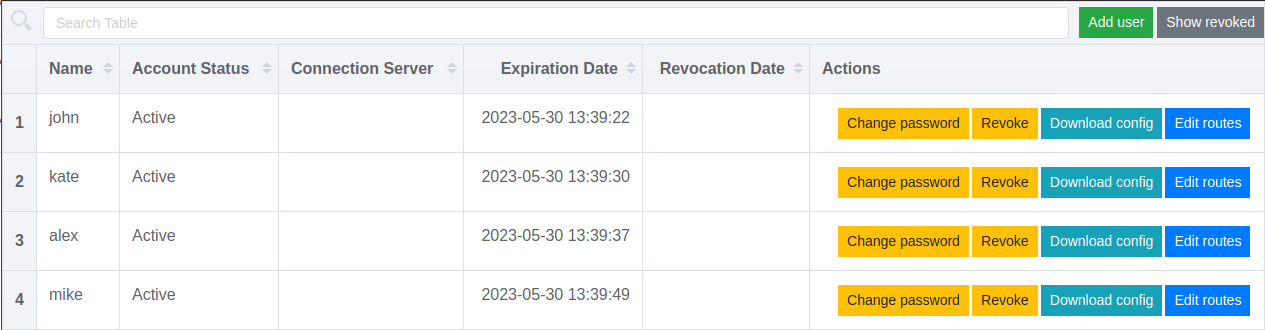
client-config-dir) for each user;remote in the client.conf.tpl template).Managing users in ovpn-admin:
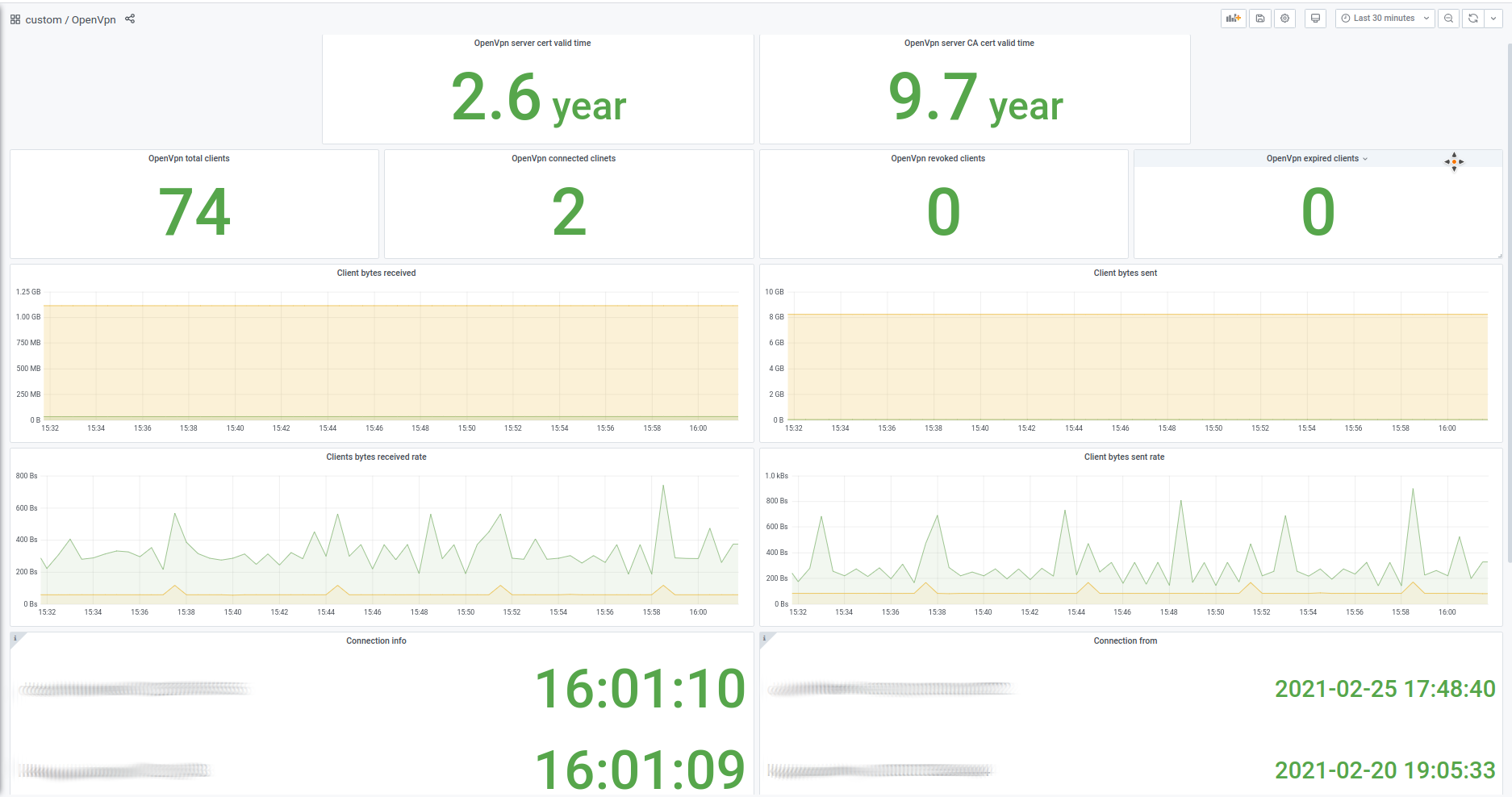
An example of dashboard made using ovpn-admin metrics:
There is a ready-to-use docker-compose.yaml, so you can just change/add values you need and start it with start.sh.
Requirements: You need Docker and docker-compose installed.
Commands to execute:
git clone https://github.com/palark/ovpn-admin.git
cd ovpn-admin
./start.sh
Ready docker images available on Docker Hub
. Tags are simple: $VERSION or latest for ovpn-admin and openvpn-$VERSION or openvpn-latest for openvpn-server
Requirements. You need Linux with the following components installed:
Commands to execute:
git clone https://github.com/palark/ovpn-admin.git
cd ovpn-admin
./bootstrap.sh
./build.sh
./ovpn-admin
(Please don't forget to configure all needed params in advance.)
You can also download and use prebuilt binaries from the releases page — just choose a relevant tar.gz file.
bash, coreutils and easy-rsa, thus Linux systems only are supported at the moment.--auth and --auth.db="/etc/easyrsa/pki/users.db" flags and install openvpn-user. This tool should be available in your $PATH and its binary should be executable (+x).--ccd and --ccd.path="/etc/openvpn/ccd" and plan to use static address setup for users, do not forget to provide --ovpn.network="172.16.100.0/24" with valid openvpn-server network.ovpn-admin/templates/client.conf.tpl and uncomment redirect-gateway def1.--storage.backend=kubernetes.secrets - WIPusage: ovpn-admin [<flags>]
Flags:
--help show context-sensitive help (try also --help-long and --help-man)
--listen.host="0.0.0.0" host for ovpn-admin
(or OVPN_LISTEN_HOST)
--listen.port="8080" port for ovpn-admin
(or OVPN_LISTEN_PORT)
--listen.base-url="/" base URL for ovpn-admin web files
(or $OVPN_LISTEN_BASE_URL)
--role="master" server role, master or slave
(or OVPN_ROLE)
--master.host="http://127.0.0.1"
(or OVPN_MASTER_HOST) URL for the master server
--master.basic-auth.user="" user for master server's Basic Auth
(or OVPN_MASTER_USER)
--master.basic-auth.password=""
(or OVPN_MASTER_PASSWORD) password for master server's Basic Auth
--master.sync-frequency=600 master host data sync frequency in seconds
(or OVPN_MASTER_SYNC_FREQUENCY)
--master.sync-token=TOKEN master host data sync security token
(or OVPN_MASTER_TOKEN)
--ovpn.network="172.16.100.0/24"
(or OVPN_NETWORK) NETWORK/MASK_PREFIX for OpenVPN server
--ovpn.server=HOST:PORT:PROTOCOL ...
(or OVPN_SERVER) HOST:PORT:PROTOCOL for OpenVPN server
can have multiple values
--ovpn.server.behindLB enable if your OpenVPN server is behind Kubernetes
(or OVPN_LB) Service having the LoadBalancer type
--ovpn.service="openvpn-external"
(or OVPN_LB_SERVICE) the name of Kubernetes Service having the LoadBalancer
type if your OpenVPN server is behind it
--mgmt=main=127.0.0.1:8989 ...
(or OVPN_MGMT) ALIAS=HOST:PORT for OpenVPN server mgmt interface;
can have multiple values
--metrics.path="/metrics" URL path for exposing collected metrics
(or OVPN_METRICS_PATH)
--easyrsa.path="./easyrsa/" path to easyrsa dir
(or EASYRSA_PATH)
--easyrsa.index-path="./easyrsa/pki/index.txt"
(or OVPN_INDEX_PATH) path to easyrsa index file
--ccd enable client-config-dir
(or OVPN_CCD)
--ccd.path="./ccd" path to client-config-dir
(or OVPN_CCD_PATH)
--templates.clientconfig-path=""
(or OVPN_TEMPLATES_CC_PATH) path to custom client.conf.tpl
--templates.ccd-path="" path to custom ccd.tpl
(or OVPN_TEMPLATES_CCD_PATH)
--auth.password enable additional password authorization
(or OVPN_AUTH)
--auth.db="./easyrsa/pki/users.db"
(or OVPN_AUTH_DB_PATH) database path for password authorization
--auth.db-init
(or OVPN_AUTH_DB_INIT) enable database init if user db not exists or size is 0
--log.level set log level: trace, debug, info, warn, error (default info)
(or LOG_LEVEL)
--log.format set log format: text, json (default text)
(or LOG_FORMAT)
--storage.backend storage backend: filesystem, kubernetes.secrets (default filesystem)
(or STORAGE_BACKEND)
--version show application version
ovpn-admin was originally created in Flant and used internally for years.
In March 2021, it went public and was still developed in Flant. Namely, @vitaliy-sn created its first version in Python, and @pashcovich rewrote it in Go.
In November 2024, this project was moved to Palark, which is currently responsible for its maintenance and development.
461 followers · starred Sep 2025
97 followers · starred Aug 2023
308 followers · starred May 2025
31 followers · starred Mar 2021
Simple web UI to manage OpenVPN users, their certificates & routes in Linux. While backend is written in Go, frontend is based on Vue.js.
DISCLAIMER! This project was created for experienced users (system administrators) and private (e.g., protected by network policies) environments only. Thus, it is not implemented with security in mind (e.g., it doesn't strictly check all parameters passed by users, etc.). It also relies heavily on files and fails if required files aren't available.
client-config-dir) for each user;remote in the client.conf.tpl template).Managing users in ovpn-admin:
An example of dashboard made using ovpn-admin metrics:
There is a ready-to-use docker-compose.yaml, so you can just change/add values you need and start it with start.sh.
Requirements: You need Docker and docker-compose installed.
Commands to execute:
git clone https://github.com/palark/ovpn-admin.git
cd ovpn-admin
./start.sh
Ready docker images available on Docker Hub
. Tags are simple: $VERSION or latest for ovpn-admin and openvpn-$VERSION or openvpn-latest for openvpn-server
Requirements. You need Linux with the following components installed:
Commands to execute:
git clone https://github.com/palark/ovpn-admin.git
cd ovpn-admin
./bootstrap.sh
./build.sh
./ovpn-admin
(Please don't forget to configure all needed params in advance.)
You can also download and use prebuilt binaries from the releases page — just choose a relevant tar.gz file.
bash, coreutils and easy-rsa, thus Linux systems only are supported at the moment.--auth and --auth.db="/etc/easyrsa/pki/users.db" flags and install openvpn-user. This tool should be available in your $PATH and its binary should be executable (+x).--ccd and --ccd.path="/etc/openvpn/ccd" and plan to use static address setup for users, do not forget to provide --ovpn.network="172.16.100.0/24" with valid openvpn-server network.ovpn-admin/templates/client.conf.tpl and uncomment redirect-gateway def1.--storage.backend=kubernetes.secrets - WIPusage: ovpn-admin [<flags>]
Flags:
--help show context-sensitive help (try also --help-long and --help-man)
--listen.host="0.0.0.0" host for ovpn-admin
(or OVPN_LISTEN_HOST)
--listen.port="8080" port for ovpn-admin
(or OVPN_LISTEN_PORT)
--listen.base-url="/" base URL for ovpn-admin web files
(or $OVPN_LISTEN_BASE_URL)
--role="master" server role, master or slave
(or OVPN_ROLE)
--master.host="http://127.0.0.1"
(or OVPN_MASTER_HOST) URL for the master server
--master.basic-auth.user="" user for master server's Basic Auth
(or OVPN_MASTER_USER)
--master.basic-auth.password=""
(or OVPN_MASTER_PASSWORD) password for master server's Basic Auth
--master.sync-frequency=600 master host data sync frequency in seconds
(or OVPN_MASTER_SYNC_FREQUENCY)
--master.sync-token=TOKEN master host data sync security token
(or OVPN_MASTER_TOKEN)
--ovpn.network="172.16.100.0/24"
(or OVPN_NETWORK) NETWORK/MASK_PREFIX for OpenVPN server
--ovpn.server=HOST:PORT:PROTOCOL ...
(or OVPN_SERVER) HOST:PORT:PROTOCOL for OpenVPN server
can have multiple values
--ovpn.server.behindLB enable if your OpenVPN server is behind Kubernetes
(or OVPN_LB) Service having the LoadBalancer type
--ovpn.service="openvpn-external"
(or OVPN_LB_SERVICE) the name of Kubernetes Service having the LoadBalancer
type if your OpenVPN server is behind it
--mgmt=main=127.0.0.1:8989 ...
(or OVPN_MGMT) ALIAS=HOST:PORT for OpenVPN server mgmt interface;
can have multiple values
--metrics.path="/metrics" URL path for exposing collected metrics
(or OVPN_METRICS_PATH)
--easyrsa.path="./easyrsa/" path to easyrsa dir
(or EASYRSA_PATH)
--easyrsa.index-path="./easyrsa/pki/index.txt"
(or OVPN_INDEX_PATH) path to easyrsa index file
--ccd enable client-config-dir
(or OVPN_CCD)
--ccd.path="./ccd" path to client-config-dir
(or OVPN_CCD_PATH)
--templates.clientconfig-path=""
(or OVPN_TEMPLATES_CC_PATH) path to custom client.conf.tpl
--templates.ccd-path="" path to custom ccd.tpl
(or OVPN_TEMPLATES_CCD_PATH)
--auth.password enable additional password authorization
(or OVPN_AUTH)
--auth.db="./easyrsa/pki/users.db"
(or OVPN_AUTH_DB_PATH) database path for password authorization
--auth.db-init
(or OVPN_AUTH_DB_INIT) enable database init if user db not exists or size is 0
--log.level set log level: trace, debug, info, warn, error (default info)
(or LOG_LEVEL)
--log.format set log format: text, json (default text)
(or LOG_FORMAT)
--storage.backend storage backend: filesystem, kubernetes.secrets (default filesystem)
(or STORAGE_BACKEND)
--version show application version
ovpn-admin was originally created in Flant and used internally for years.
In March 2021, it went public and was still developed in Flant. Namely, @vitaliy-sn created its first version in Python, and @pashcovich rewrote it in Go.
In November 2024, this project was moved to Palark, which is currently responsible for its maintenance and development.
461 followers · starred Sep 2025
97 followers · starred Aug 2023
308 followers · starred May 2025
31 followers · starred Mar 2021



