A modern, lambda-friendly, 120 character Java formatter.
Java
920
2,103 commits
updated Oct 20, 2026





A modern, lambda-friendly, 120 character Java formatter.
It is based on the excellent google-java-format, and benefits from the work of all the original authors. palantir-java-format is available under the same Apache 2.0 License.
Many other languages have already adopted formatters enthusiastically, including typescript (prettier), go (gofmt), rust (rustfmt).
(1) google-java-format output:
private static void configureResolvedVersionsWithVersionMapping(Project project) {
    project.getPluginManager()
            .withPlugin(
                    "maven-publish",
                    plugin -> {
                        project.getExtensions()
                                .getByType(PublishingExtension.class)
                                .getPublications()
                                .withType(MavenPublication.class)
                                .configureEach(
                                        publication ->
                                                publication.versionMapping(
                                                        mapping -> {
                                                            mapping.allVariants(
                                                                    VariantVersionMappingStrategy
                                                                            ::fromResolutionResult);
                                                        }));
                    });
}
(1) palantir-java-format output:
private static void configureResolvedVersionsWithVersionMapping(Project project) {
    project.getPluginManager().withPlugin("maven-publish", plugin -> {
        project.getExtensions()
                .getByType(PublishingExtension.class)
                .getPublications()
                .withType(MavenPublication.class)
                .configureEach(publication -> publication.versionMapping(mapping -> {
                    mapping.allVariants(VariantVersionMappingStrategy::fromResolutionResult);
                }));
    });
}
(2) google-java-format output:
private static GradleException notFound(
        String group, String name, Configuration configuration) {
    String actual =
            configuration.getIncoming().getResolutionResult().getAllComponents().stream()
                    .map(ResolvedComponentResult::getModuleVersion)
                    .map(
                            mvi ->
                                    String.format(
                                            "\t- %s:%s:%s",
                                            mvi.getGroup(), mvi.getName(), mvi.getVersion()))
                    .collect(Collectors.joining("\n"));
    // ...
}
(2) palantir-java-format output:
private static GradleException notFound(String group, String name, Configuration configuration) {
    String actual = configuration.getIncoming().getResolutionResult().getAllComponents().stream()
            .map(ResolvedComponentResult::getModuleVersion)
            .map(mvi -> String.format("\t- %s:%s:%s", mvi.getGroup(), mvi.getName(), mvi.getVersion()))
            .collect(Collectors.joining("\n"));
    // ...
}
Even though PJF sometimes inlines code more than other formatters, reducing what we see as unnecessary breaks that don't help code comprehension, there are also cases where it will split code into more lines too, in order to improve clarity and code reviewability.
One such case is long method chains. Whereas other formatters are content to completely one-line a long method call chain if it fits, it doesn't usually produce a very readable result:
var foo = SomeType.builder().thing1(thing1).thing2(thing2).thing3(thing3).build();
To avoid this edge case, we employ a limit of 80 chars for chained method calls, such that the last method call dot must come before that column, or else the chain is not inlined.
var foo = SomeType.builder()
        .thing1(thing1)
        .thing2(thing2)
        .thing3(thing3)
        .build();
You should apply this plugin to all projects where you want your java code formatted, e.g.
buildscript {
    dependencies {
        classpath 'com.palantir.javaformat:gradle-palantir-java-format:<version>'
    }
}
allprojects {
    apply plugin: 'com.palantir.java-format'
}
Applying this automatically configures IntelliJ, whether you run ./gradlew idea
or import the project directly from IntelliJ, to use the correct version of the formatter
when formatting java code.
./gradlew format can be enabled by using the com.palantir.baseline-format Gradle plugin.
A
palantir-java-format IntelliJ plugin
is available from the plugin repository. To install it, go to your IDE's
settings and select the Plugins category. Click the Marketplace tab, search
for the palantir-java-format plugin, and click the Install button.
The plugin will be disabled by default on new projects, but as mentioned above,
if using the com.palantir.java-format gradle plugin, it will be recommended
in IntelliJ, and automatically configured.
To manually enable it in the current project, go
to File→Settings...→palantir-java-format Settings (or IntelliJ IDEA→Preferences...→Other Settings→palantir-java-format Settings on macOS) and
check the Enable palantir-java-format checkbox.
To enable it by default in new projects, use File→Other Settings→Default Settings....
When enabled, it will replace the normal Reformat Code action, which can be
triggered from the Code menu or with the Ctrl-Alt-L (by default) keyboard
shortcut.
./gradlew :idea-plugin:build./idea-plugin/build/distributions/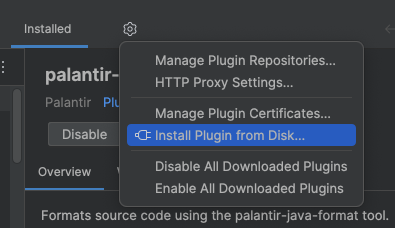
In 1211 we shipped Java 21 support. In order to use the Java 21 formatting capabilities, ensure that either:
palantir.native.formatter=true. This will run the formatter as a native image,This comment explains why we
switched to a native image for the formatter. The startup time for the native image esp. in Intellij is >10x faster than
spinning up a new JVM process that does the formatting.
However, the throughput of running the native image for a large set of files (eg. running ./gradlew spotlessApply) is
considerably slower (eg. 30s using the Java implementation vs 1m20s using the native image implementation). Therefore,
when running the formatter from spotlessApply we will default to using the Java implementation (if the Java version >= 21).
(c) Copyright 2019 Palantir Technologies Inc. All rights reserved.

Licensed under the Apache License, Version 2.0 (the "License"); you may not
use this file except in compliance with the License. You may obtain a copy of
the License at

    http://www.apache.org/licenses/LICENSE-2.0

Unless required by applicable law or agreed to in writing, software
distributed under the License is distributed on an "AS IS" BASIS, WITHOUT
WARRANTIES OR CONDITIONS OF ANY KIND, either express or implied. See the
License for the specific language governing permissions and limitations under
the License.
This is a fork of google-java-format. Original work copyrighted by Google under the same license:
Copyright 2015 Google Inc.

Licensed under the Apache License, Version 2.0 (the "License"); you may not
use this file except in compliance with the License. You may obtain a copy of
the License at

    http://www.apache.org/licenses/LICENSE-2.0

Unless required by applicable law or agreed to in writing, software
distributed under the License is distributed on an "AS IS" BASIS, WITHOUT
WARRANTIES OR CONDITIONS OF ANY KIND, either express or implied. See the
License for the specific language governing permissions and limitations under
the License.
Overall
Maintained
Code review
Latest release
Releases this year
(top 24 of 30)
64 followers · starred Feb 2022
137 followers · starred Jan 2020
106 followers · starred Oct 2023
560 followers · starred Jun 2026
A modern, lambda-friendly, 120 character Java formatter.
Java
920
2,103 commits
updated Oct 20, 2026
A modern, lambda-friendly, 120 character Java formatter.
It is based on the excellent google-java-format, and benefits from the work of all the original authors. palantir-java-format is available under the same Apache 2.0 License.
Many other languages have already adopted formatters enthusiastically, including typescript (prettier), go (gofmt), rust (rustfmt).
(1) google-java-format output:
private static void configureResolvedVersionsWithVersionMapping(Project project) {
    project.getPluginManager()
            .withPlugin(
                    "maven-publish",
                    plugin -> {
                        project.getExtensions()
                                .getByType(PublishingExtension.class)
                                .getPublications()
                                .withType(MavenPublication.class)
                                .configureEach(
                                        publication ->
                                                publication.versionMapping(
                                                        mapping -> {
                                                            mapping.allVariants(
                                                                    VariantVersionMappingStrategy
                                                                            ::fromResolutionResult);
                                                        }));
                    });
}
(1) palantir-java-format output:
private static void configureResolvedVersionsWithVersionMapping(Project project) {
    project.getPluginManager().withPlugin("maven-publish", plugin -> {
        project.getExtensions()
                .getByType(PublishingExtension.class)
                .getPublications()
                .withType(MavenPublication.class)
                .configureEach(publication -> publication.versionMapping(mapping -> {
                    mapping.allVariants(VariantVersionMappingStrategy::fromResolutionResult);
                }));
    });
}
(2) google-java-format output:
private static GradleException notFound(
        String group, String name, Configuration configuration) {
    String actual =
            configuration.getIncoming().getResolutionResult().getAllComponents().stream()
                    .map(ResolvedComponentResult::getModuleVersion)
                    .map(
                            mvi ->
                                    String.format(
                                            "\t- %s:%s:%s",
                                            mvi.getGroup(), mvi.getName(), mvi.getVersion()))
                    .collect(Collectors.joining("\n"));
    // ...
}
(2) palantir-java-format output:
private static GradleException notFound(String group, String name, Configuration configuration) {
    String actual = configuration.getIncoming().getResolutionResult().getAllComponents().stream()
            .map(ResolvedComponentResult::getModuleVersion)
            .map(mvi -> String.format("\t- %s:%s:%s", mvi.getGroup(), mvi.getName(), mvi.getVersion()))
            .collect(Collectors.joining("\n"));
    // ...
}
Even though PJF sometimes inlines code more than other formatters, reducing what we see as unnecessary breaks that don't help code comprehension, there are also cases where it will split code into more lines too, in order to improve clarity and code reviewability.
One such case is long method chains. Whereas other formatters are content to completely one-line a long method call chain if it fits, it doesn't usually produce a very readable result:
var foo = SomeType.builder().thing1(thing1).thing2(thing2).thing3(thing3).build();
To avoid this edge case, we employ a limit of 80 chars for chained method calls, such that the last method call dot must come before that column, or else the chain is not inlined.
var foo = SomeType.builder()
        .thing1(thing1)
        .thing2(thing2)
        .thing3(thing3)
        .build();
You should apply this plugin to all projects where you want your java code formatted, e.g.
buildscript {
    dependencies {
        classpath 'com.palantir.javaformat:gradle-palantir-java-format:<version>'
    }
}
allprojects {
    apply plugin: 'com.palantir.java-format'
}
Applying this automatically configures IntelliJ, whether you run ./gradlew idea
or import the project directly from IntelliJ, to use the correct version of the formatter
when formatting java code.
./gradlew format can be enabled by using the com.palantir.baseline-format Gradle plugin.
A
palantir-java-format IntelliJ plugin
is available from the plugin repository. To install it, go to your IDE's
settings and select the Plugins category. Click the Marketplace tab, search
for the palantir-java-format plugin, and click the Install button.
The plugin will be disabled by default on new projects, but as mentioned above,
if using the com.palantir.java-format gradle plugin, it will be recommended
in IntelliJ, and automatically configured.
To manually enable it in the current project, go
to File→Settings...→palantir-java-format Settings (or IntelliJ IDEA→Preferences...→Other Settings→palantir-java-format Settings on macOS) and
check the Enable palantir-java-format checkbox.
To enable it by default in new projects, use File→Other Settings→Default Settings....
When enabled, it will replace the normal Reformat Code action, which can be
triggered from the Code menu or with the Ctrl-Alt-L (by default) keyboard
shortcut.
./gradlew :idea-plugin:build./idea-plugin/build/distributions/
In 1211 we shipped Java 21 support. In order to use the Java 21 formatting capabilities, ensure that either:
palantir.native.formatter=true. This will run the formatter as a native image,This comment explains why we
switched to a native image for the formatter. The startup time for the native image esp. in Intellij is >10x faster than
spinning up a new JVM process that does the formatting.
However, the throughput of running the native image for a large set of files (eg. running ./gradlew spotlessApply) is
considerably slower (eg. 30s using the Java implementation vs 1m20s using the native image implementation). Therefore,
when running the formatter from spotlessApply we will default to using the Java implementation (if the Java version >= 21).
(c) Copyright 2019 Palantir Technologies Inc. All rights reserved.

Licensed under the Apache License, Version 2.0 (the "License"); you may not
use this file except in compliance with the License. You may obtain a copy of
the License at

    http://www.apache.org/licenses/LICENSE-2.0

Unless required by applicable law or agreed to in writing, software
distributed under the License is distributed on an "AS IS" BASIS, WITHOUT
WARRANTIES OR CONDITIONS OF ANY KIND, either express or implied. See the
License for the specific language governing permissions and limitations under
the License.
This is a fork of google-java-format. Original work copyrighted by Google under the same license:
Copyright 2015 Google Inc.

Licensed under the Apache License, Version 2.0 (the "License"); you may not
use this file except in compliance with the License. You may obtain a copy of
the License at

    http://www.apache.org/licenses/LICENSE-2.0

Unless required by applicable law or agreed to in writing, software
distributed under the License is distributed on an "AS IS" BASIS, WITHOUT
WARRANTIES OR CONDITIONS OF ANY KIND, either express or implied. See the
License for the specific language governing permissions and limitations under
the License.
Overall
Maintained
Code review
Latest release
Releases this year
(top 24 of 30)
64 followers · starred Feb 2022
137 followers · starred Jan 2020
106 followers · starred Oct 2023
560 followers · starred Jun 2026