ForgJs is a javascript lightweight object validator.
See the code
ForgJs is a JavaScript lightweight object validator. Go check the Quick start section and start coding with love ❤️
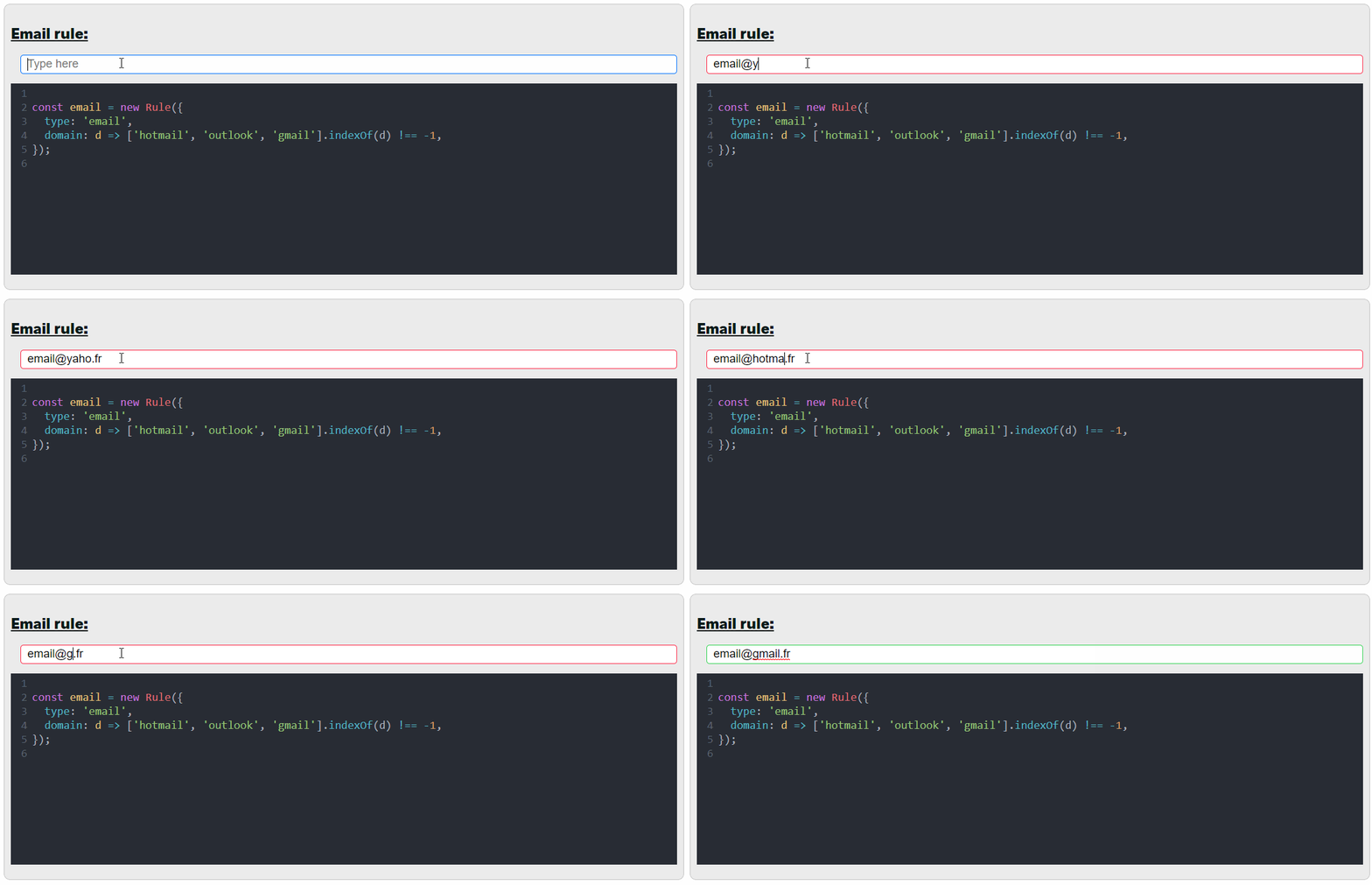
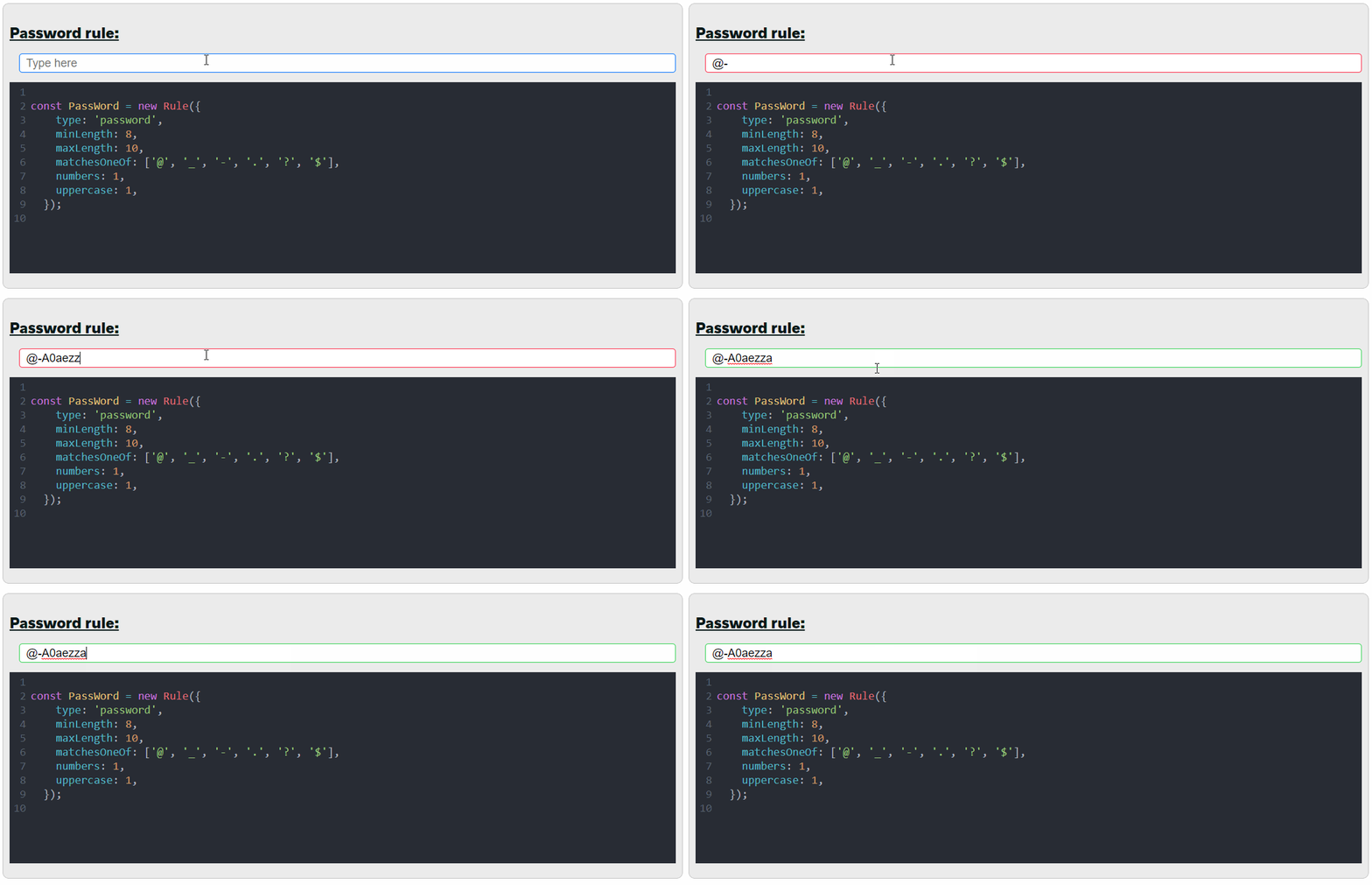
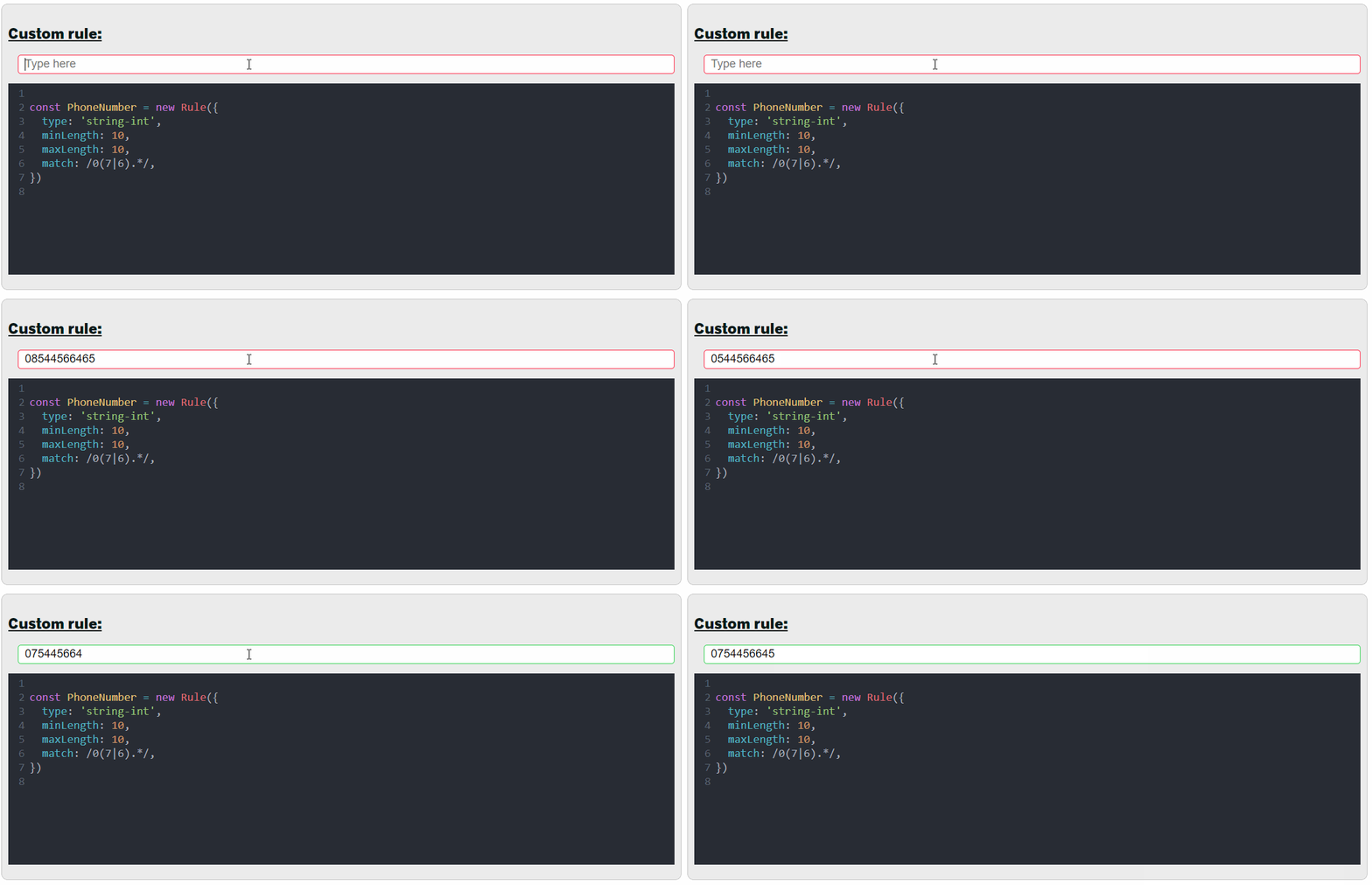
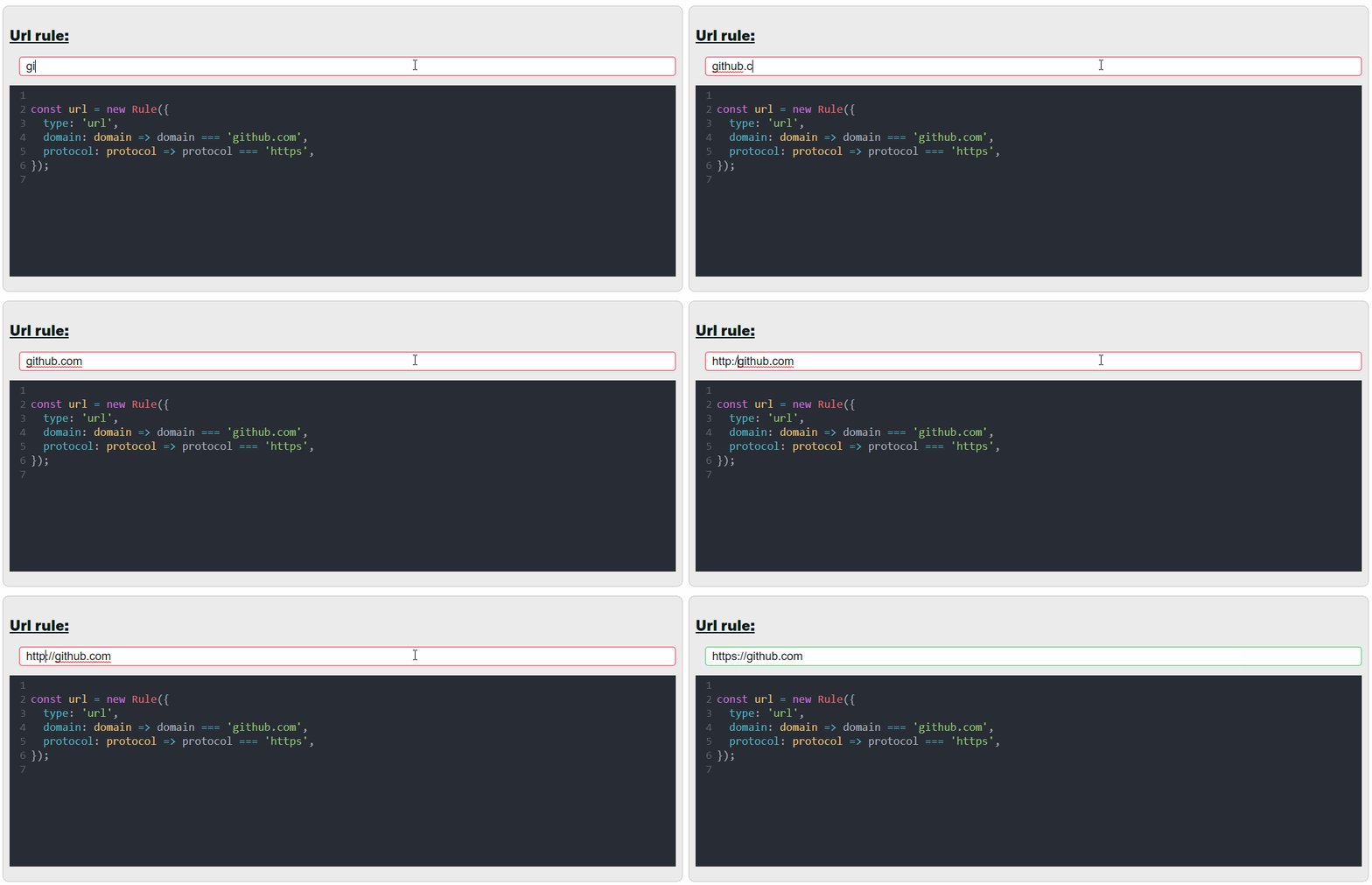
See more live examples here
Install it via npm by running npm i @cesium133/forgjs
  const { Validator, Rule } = require('@cesium133/forgjs');

const emailRule = new Rule({
    type: 'email',
    user: user => user === 'dedede',
    domain: domain => ['outlook', 'gmail', 'yahoo'].indexOf(domain) !== -1,
}, null);

const passwordRule = new Rule({
    type: 'password',
    minLength: 8,
    uppercase: 1,
    numbers: 1,
    matchesOneOf: ['@', '_', '-', '.', '!'],
}, null);

const vComplex = new Validator({
    age: new Rule({ type: 'int', min: 18, max: 99 }),
    dateOfBirth: new Rule({ type: 'date' }),
    array: new Rule({ type: 'array', of: new Rule({ type: 'string' }) }),
    email: emailRule,
    password: passwordRule
});

vComplex.test({
    age: 26,
    dateOfBirth: new Date(1995, 10, 3),
    array: ['1'],
    email: 'dedede@yahoo.fr;',
    password: 'ad1_A@@Axs',
}); /// returns true
You can get custom error messages by doing this:
const vComplexe = new Validator({
    age: new Rule({
      type: 'int', min: 18, max: 99,
    }, 'age must be integer and between 18 and 99'),
    dateOfBirth: new Rule({ type: 'date' }, 'date must be a date'),
  });

  vComplexe.getErrors({
    age: 16,
    dateOfBirth: 123,
  }); // ['age must be integer and between 18 and 99', 'date must be a date']
You can test over multiple arrays using this method:
const vComplexe = new Validator({
    age: new Rule({
      type: 'int', min: 18, max: 99,
    }),
  });

  vComplexe.testAll([{
    age: 19,
  }, {
    age: 16,
  }]);  // returns 1
A Rule object validates a single value, it can be used like this:
  const { Validator, Rule } = require('@cesium133/forgjs');
  const floatRule = new Rule({
    type: 'float',
    min: 100,
  }, null);

  floatRule.test(2.001); /// returns true;
The only required value is type!
You can make a rule by simply passing a string if you only need to check the type :
new Rule('int');
function(user))function(domain)) const emailRule = new Rule({
type: 'email',
user: user => user === 'dedede',
domain: domain => ['outlook', 'gmail', 'yahoo'].indexOf(domain) !== -1,
}, null);
emailRule.test('dedede@gmail.fr'); // returns true
  const passwordRule = new Rule({
    type: 'password',
    minLength: 8,
    uppercase: 1,
    numbers: 1,
    matchesOneOf: ['@', '_', '-', '.', '!'],
  }, null);

  passwordRule.test('@_-bddcd6A'); // returns true
function(protocol))function(domain)) const urlRule = new Rule({
type: 'url',
protocol: prot => prot === 'https',
domain: domain => domain === 'google.fr',
}, null);
urlRule.test('https://google.fr'); // returns true
The of rule checks every element of the array against the rule.
To explain result, what's better than an example:
  const { Validator, Rule } = require('@cesium133/forgjs');

  function someFunctionThatReturnsAnInt(int) {
    return int * 5;
  }

  const functionTest = new Rule({
    type: 'function',
    result: {
      of: 5,
      toBe: new Rule('int'),
    },
  }, null);

  functionTest.test(someFunctionThatReturnsAnInt); /// returns true;
These types 'inherit' from string, they have both the properties, here are some examples:
const stringInt = new Rule({
  type: 'string-int',
  minLength: 2,
  min: 5,
}, null);

stringInt.test(2) // returns false 2 is not a string
stringInt.test('2a') // returns false '2a' is not a int
stringInt.test('2.1') // returns false '2.1' is not a int
stringInt.test('5') // returns false length of '5' is smaller than 2
stringInt.test('50') // returns true
const stringBoolean = new Rule({
  type: 'string-boolean',
  toBe: true
}, null);

stringBoolean.test(true) // returns false true is not a boolean
stringBoolean.test('false') // returns false 'false' is not true
stringBoolean.test('true') // returns true
const stringDate = new Rule({
  type: 'string-date',
  after: new Date(2019, 11, 1),
}, null);

stringDate.test(new Date(2018, 11, 1)) // returns false new Date(2018, 11, 1) is not a string
stringDate.test('some string') // returns false 'some string' is not a valid date
stringDate.test('2018-12-17') // returns false '2018-12-17' is not after new Date(2019, 11, 1)
stringDate.test('2020-01-01') // returns true
Forgjs tries to cast the value to the right type before passing it to the validation function please be careful!
Here is an example where Javascript behaviour makes the test wrong:
const stringDate = new Rule({
  type: 'string-date',
  equal: new Date(2019, 10, 1), // month in js strart at 0
}, null);

stringDate.test('2019-11-01') // returns false
stringDate.test('2019-11-01T00:00') // returns true


// this is because:

new Date(2019, 10, 1) - new Date('2019-11-01') // equals  3600000 thats exactly 1 hour

new Date(2019, 10, 1) - new Date('2019-11-01T00:00') // equals 0
You can check for multiple types with OR or AND operators like this:
  const intRule = new Rule({
    type: 'int|float|number',
  }, null);

  intRule.test(2) // returns true
This means the test should verify the int, float or number rule
  const intRule = new Rule({
    type: 'int&number',
  }, null);
  intRule.test(2.1); // returns false
The result doesn't match the int rule
Every type has these properties:
If optional is set to true the element is optional and an undefined value is considered correct.
Example:
const { Validator, Rule } = require('@cesium133/forgjs');

const intRule = new Rule({
    type: 'int',
    optional: true,
  }, null);
intRule.test(); // returns true
Custom allows you to write your own rule, an example is better than a long explanation:
  const { Validator, Rule } = require('@cesium133/forgjs');

  function isCorrectAge(age, object) {
    if (age === Math.floor((new Date() - object.dateOfBirth) / 1000 / 60 / 60 / 24 / 30 / 12)) {
      return true;
    }
    return false;
  }
  const vComplexe = new Validator({
    age: new Rule({
      type: 'int', min: 18, max: 99, custom: isCorrectAge,
    }),
    dateOfBirth: new Rule({ type: 'date' }),
  });

  vComplexe.test({
    age: 23,
    dateOfBirth: new Date(1995, 10, 3),
    array: ['1'],
  }); // returns true
One of checks if the element is in a array
  const floatRule = new Rule({
    type: 'float',
    oneOf: [3.5, 100.1, 7.2, 0.1],
  }, null);
  floatRule.test(100.1); // returns true
Creating a new type is done using the Rule class like this:
  const { Validator, Rule } = require('@cesium133/forgjs');

  Rule.addCustom('customInteger', {
    min: (val, min) => val - min > 0,
    max: (val, max) => val - max < 0,
    equal: (val, equal) => val === equal,
    type: val => Number.isInteger(val) && val > 0 && val < 100,
  });

  const customInteger = new Rule({
    type: 'customInteger',
    min: 10,
  }, null);

  customInteger.test(11) // returns true

  customInteger.test(200) // returns false
Thank you everyone for contributing to make this code better, if you have suggestions or ideas to improve the code please feel free to leave a comment here #29. Rules:
const someRule= new Rule({
    type: 'yourType',
    prop1: val1,
    prop2: val2, ...
  }, null);

  someRule.test(validValue) // returns true
  someRule.test(invalidValue) // returns false
[ci skip] to your commit messagecode with love ❤️
Follow me on twitter at @forg_js
1,732 followers · starred Dec 2018
1,785 followers · starred Oct 2019
327 followers · starred Dec 2018
375 followers · starred Dec 2018
ForgJs is a javascript lightweight object validator.
See the codeForgJs is a JavaScript lightweight object validator. Go check the Quick start section and start coding with love ❤️
See more live examples here
Install it via npm by running npm i @cesium133/forgjs
  const { Validator, Rule } = require('@cesium133/forgjs');

const emailRule = new Rule({
    type: 'email',
    user: user => user === 'dedede',
    domain: domain => ['outlook', 'gmail', 'yahoo'].indexOf(domain) !== -1,
}, null);

const passwordRule = new Rule({
    type: 'password',
    minLength: 8,
    uppercase: 1,
    numbers: 1,
    matchesOneOf: ['@', '_', '-', '.', '!'],
}, null);

const vComplex = new Validator({
    age: new Rule({ type: 'int', min: 18, max: 99 }),
    dateOfBirth: new Rule({ type: 'date' }),
    array: new Rule({ type: 'array', of: new Rule({ type: 'string' }) }),
    email: emailRule,
    password: passwordRule
});

vComplex.test({
    age: 26,
    dateOfBirth: new Date(1995, 10, 3),
    array: ['1'],
    email: 'dedede@yahoo.fr;',
    password: 'ad1_A@@Axs',
}); /// returns true
You can get custom error messages by doing this:
const vComplexe = new Validator({
    age: new Rule({
      type: 'int', min: 18, max: 99,
    }, 'age must be integer and between 18 and 99'),
    dateOfBirth: new Rule({ type: 'date' }, 'date must be a date'),
  });

  vComplexe.getErrors({
    age: 16,
    dateOfBirth: 123,
  }); // ['age must be integer and between 18 and 99', 'date must be a date']
You can test over multiple arrays using this method:
const vComplexe = new Validator({
    age: new Rule({
      type: 'int', min: 18, max: 99,
    }),
  });

  vComplexe.testAll([{
    age: 19,
  }, {
    age: 16,
  }]);  // returns 1
A Rule object validates a single value, it can be used like this:
  const { Validator, Rule } = require('@cesium133/forgjs');
  const floatRule = new Rule({
    type: 'float',
    min: 100,
  }, null);

  floatRule.test(2.001); /// returns true;
The only required value is type!
You can make a rule by simply passing a string if you only need to check the type :
new Rule('int');
function(user))function(domain)) const emailRule = new Rule({
type: 'email',
user: user => user === 'dedede',
domain: domain => ['outlook', 'gmail', 'yahoo'].indexOf(domain) !== -1,
}, null);
emailRule.test('dedede@gmail.fr'); // returns true
  const passwordRule = new Rule({
    type: 'password',
    minLength: 8,
    uppercase: 1,
    numbers: 1,
    matchesOneOf: ['@', '_', '-', '.', '!'],
  }, null);

  passwordRule.test('@_-bddcd6A'); // returns true
function(protocol))function(domain)) const urlRule = new Rule({
type: 'url',
protocol: prot => prot === 'https',
domain: domain => domain === 'google.fr',
}, null);
urlRule.test('https://google.fr'); // returns true
The of rule checks every element of the array against the rule.
To explain result, what's better than an example:
  const { Validator, Rule } = require('@cesium133/forgjs');

  function someFunctionThatReturnsAnInt(int) {
    return int * 5;
  }

  const functionTest = new Rule({
    type: 'function',
    result: {
      of: 5,
      toBe: new Rule('int'),
    },
  }, null);

  functionTest.test(someFunctionThatReturnsAnInt); /// returns true;
These types 'inherit' from string, they have both the properties, here are some examples:
const stringInt = new Rule({
  type: 'string-int',
  minLength: 2,
  min: 5,
}, null);

stringInt.test(2) // returns false 2 is not a string
stringInt.test('2a') // returns false '2a' is not a int
stringInt.test('2.1') // returns false '2.1' is not a int
stringInt.test('5') // returns false length of '5' is smaller than 2
stringInt.test('50') // returns true
const stringBoolean = new Rule({
  type: 'string-boolean',
  toBe: true
}, null);

stringBoolean.test(true) // returns false true is not a boolean
stringBoolean.test('false') // returns false 'false' is not true
stringBoolean.test('true') // returns true
const stringDate = new Rule({
  type: 'string-date',
  after: new Date(2019, 11, 1),
}, null);

stringDate.test(new Date(2018, 11, 1)) // returns false new Date(2018, 11, 1) is not a string
stringDate.test('some string') // returns false 'some string' is not a valid date
stringDate.test('2018-12-17') // returns false '2018-12-17' is not after new Date(2019, 11, 1)
stringDate.test('2020-01-01') // returns true
Forgjs tries to cast the value to the right type before passing it to the validation function please be careful!
Here is an example where Javascript behaviour makes the test wrong:
const stringDate = new Rule({
  type: 'string-date',
  equal: new Date(2019, 10, 1), // month in js strart at 0
}, null);

stringDate.test('2019-11-01') // returns false
stringDate.test('2019-11-01T00:00') // returns true


// this is because:

new Date(2019, 10, 1) - new Date('2019-11-01') // equals  3600000 thats exactly 1 hour

new Date(2019, 10, 1) - new Date('2019-11-01T00:00') // equals 0
You can check for multiple types with OR or AND operators like this:
  const intRule = new Rule({
    type: 'int|float|number',
  }, null);

  intRule.test(2) // returns true
This means the test should verify the int, float or number rule
  const intRule = new Rule({
    type: 'int&number',
  }, null);
  intRule.test(2.1); // returns false
The result doesn't match the int rule
Every type has these properties:
If optional is set to true the element is optional and an undefined value is considered correct.
Example:
const { Validator, Rule } = require('@cesium133/forgjs');

const intRule = new Rule({
    type: 'int',
    optional: true,
  }, null);
intRule.test(); // returns true
Custom allows you to write your own rule, an example is better than a long explanation:
  const { Validator, Rule } = require('@cesium133/forgjs');

  function isCorrectAge(age, object) {
    if (age === Math.floor((new Date() - object.dateOfBirth) / 1000 / 60 / 60 / 24 / 30 / 12)) {
      return true;
    }
    return false;
  }
  const vComplexe = new Validator({
    age: new Rule({
      type: 'int', min: 18, max: 99, custom: isCorrectAge,
    }),
    dateOfBirth: new Rule({ type: 'date' }),
  });

  vComplexe.test({
    age: 23,
    dateOfBirth: new Date(1995, 10, 3),
    array: ['1'],
  }); // returns true
One of checks if the element is in a array
  const floatRule = new Rule({
    type: 'float',
    oneOf: [3.5, 100.1, 7.2, 0.1],
  }, null);
  floatRule.test(100.1); // returns true
Creating a new type is done using the Rule class like this:
  const { Validator, Rule } = require('@cesium133/forgjs');

  Rule.addCustom('customInteger', {
    min: (val, min) => val - min > 0,
    max: (val, max) => val - max < 0,
    equal: (val, equal) => val === equal,
    type: val => Number.isInteger(val) && val > 0 && val < 100,
  });

  const customInteger = new Rule({
    type: 'customInteger',
    min: 10,
  }, null);

  customInteger.test(11) // returns true

  customInteger.test(200) // returns false
Thank you everyone for contributing to make this code better, if you have suggestions or ideas to improve the code please feel free to leave a comment here #29. Rules:
const someRule= new Rule({
    type: 'yourType',
    prop1: val1,
    prop2: val2, ...
  }, null);

  someRule.test(validValue) // returns true
  someRule.test(invalidValue) // returns false
[ci skip] to your commit messagecode with love ❤️
Follow me on twitter at @forg_js
1,732 followers · starred Dec 2018
1,785 followers · starred Oct 2019
327 followers · starred Dec 2018
375 followers · starred Dec 2018