
LemonBeam turns JavaScript and TypeScript repositories into AI-generated onboarding guides with inline source citations. Available as a web app, CLI, and MCP server.
TypeScript
0
60 commits
updated Sep 24, 2026
See what people are saying
README
LemonBeam 🍋
LemonBeam shines a fresh beam of light on an unfamiliar codebase.
LemonBeam is a source-backed onboarding guide generator for public GitHub repositories. It helps developers understand a JavaScript or TypeScript project by scanning the repository, selecting relevant evidence, and generating a contributor-oriented guide with citations back to the source.
Instead of asking an LLM to reason over an entire repository at once, LemonBeam breaks the repo into meaningful pieces, ranks useful evidence, keeps the prompt within a token budget, and returns a structured guide that new contributors can inspect and verify.
Try LemonBeam
Paste a public GitHub repository URL, enter your OpenRouter API key, and generate a source-backed onboarding guide.
Demo
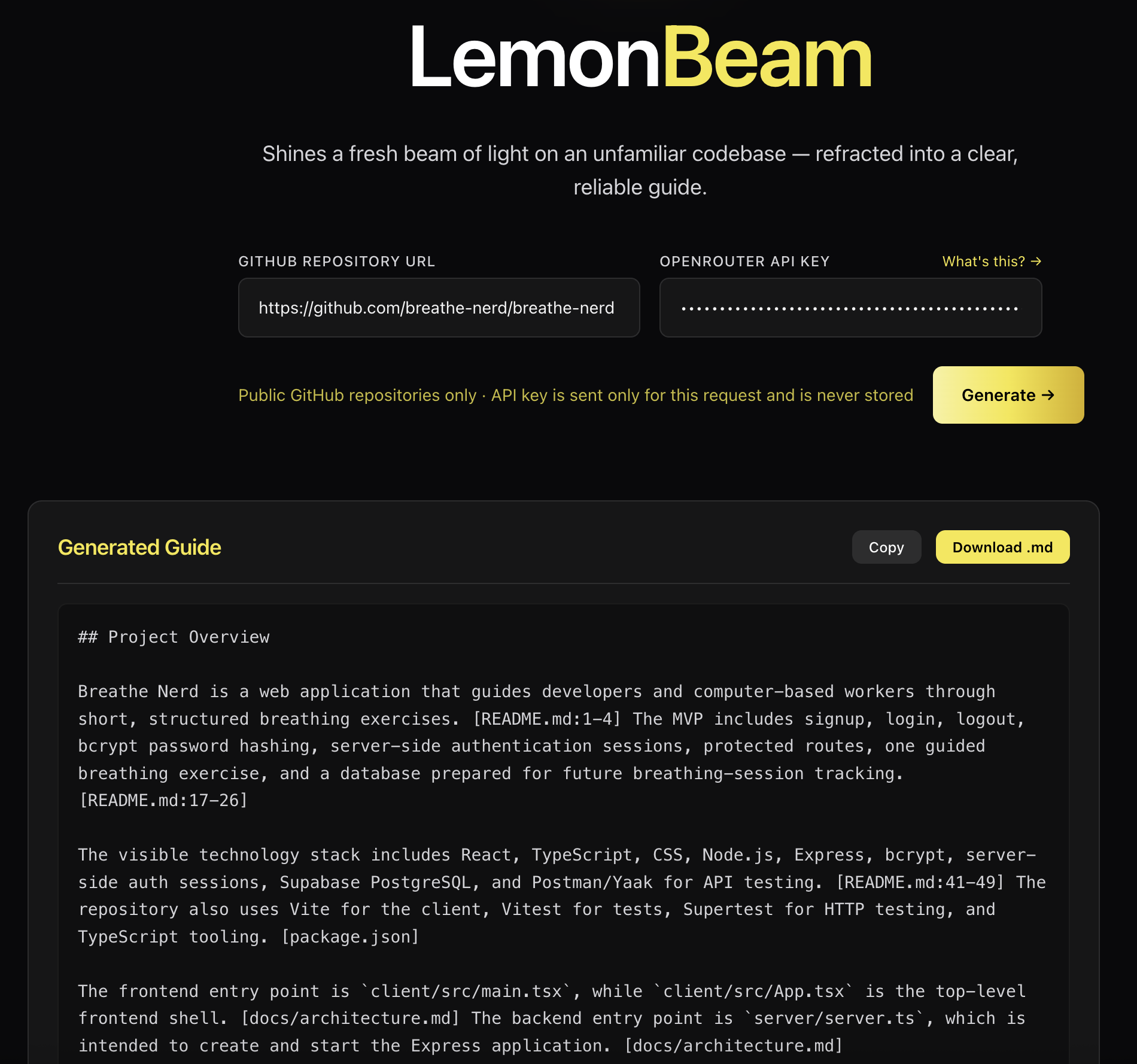
LemonBeam generating a source-backed onboarding guide with inline repository citations.
Watch the LemonBeam demo video
What LemonBeam Generates
LemonBeam produces a fixed-format onboarding guide with sections for:
- Project Overview
- Setup / Installation
- Running Locally
- Project Structure
- Testing
- Uncertainties and Missing Information
Each guide is generated from repository evidence selected for the scan. When LemonBeam cannot confidently analyze something, it reports that uncertainty instead of silently pretending the information was available.
Who It Is For
LemonBeam is built for:
- developers joining an unfamiliar codebase
- open-source contributors deciding where to start
- maintainers who want a quick contributor-facing guide
Why LemonBeam?
Developer onboarding information is often scattered across README files, package scripts, configuration files, source folders, and test suites.
General-purpose AI tools can often produce readable repository summaries, but readable is not always reliable. LemonBeam focuses on making repository guides more:
- grounded — generated from selected repository evidence
- inspectable — connected to source citations
- consistent — returned in a predictable guide format
- bounded — designed to stay within token limits instead of dumping an entire repo into a model
- honest — skipped or excluded evidence is surfaced in the guide
How To Use The Web App
- Open the deployed LemonBeam app.
- Paste a public GitHub repository URL.
- Enter your OpenRouter API key.
- Generate the guide.
- Review the Markdown guide and use the citations to inspect the source files behind the claims.
LemonBeam currently supports public JavaScript and TypeScript GitHub repositories. Private repositories, monorepos, and non-GitHub providers are outside the current launch scope.
Privacy
LemonBeam uses a bring-your-own-key flow. OpenRouter API keys are sent only for the active scan request and are not stored by the frontend.
Current Limitations
- Web app: public GitHub repositories only
- Web app: JavaScript and TypeScript repositories only
- Web app: private repositories are not currently supported
- Web app: monorepos are not currently supported
- Large repositories may have some evidence excluded through token budgeting
Local Development
Prerequisites
- Node.js
- npm
- An OpenRouter API key for guide generation
- A GitHub personal access token is recommended for repository validation rate limits
Install
git clone <repository-url>
cd lemonbeam

npm install

cd frontend
npm install

cd ../backend
npm install
Configure Environment
Create a local backend environment file:
cp backend/.env.example backend/.env
Then update backend/.env as needed:
OPENROUTER_API_KEY=your-openrouter-api-key-here
GITHUB_TOKEN=your-github-token-here
PORT=3000
For the web app, LemonBeam uses a bring-your-own-key flow: the OpenRouter key is normally entered in the UI for each scan and is not stored by the frontend.
Run The App
From the project root:
npm run dev
This starts the frontend and backend development servers together.
You can also run them separately:
npm run dev:frontend
npm run dev:backend
Running Tests
From the project root:
npm test
For watch mode:
npm run test:watch
Frontend linting:
npm run lint
Backend type checking:
cd backend
npm run typecheck
Technology Stack
Frontend
- React
- TypeScript
- Vite
- Tailwind CSS
Backend
- Node.js
- Express
- TypeScript
- GitHub API
- OpenRouter API
- Tree-sitter
- tiktoken
- SQLite schema placeholders for future evidence storage
Optional Local Interfaces
The primary launch experience is the web app, but the repository also includes local interfaces for experimentation.
CLI
LemonBeam can also be run locally as a CLI to scan a project directory and generate an onboarding guide.
1. Configure Your Environment
The simplest way to run the CLI is to pass your OpenRouter key directly with the --key flag when you run the command.
You can also create a .env file in the directory where you plan to run the CLI if you do not want to pass the key every time:
OPENROUTER_API_KEY=your-openrouter-api-key-here
2. Clone, Build, And Link LemonBeam
git clone https://github.com/oslabs-beta/lemonbeam.git
cd lemonbeam
npm install
npm run build
npm link
3. Run The CLI
From the root of the project you want to scan:
lemonbeam --key your-openrouter-api-key-here
If you configured OPENROUTER_API_KEY in .env, you can run:
npx lemonbeam
By default, the CLI scans the current directory. You can also pass a local project path or supported GitHub repository URL.
After the scan finishes, the CLI asks whether to save the generated guide as a Markdown file or print a preview in the terminal.
MCP Server
LemonBeam can also run as a local MCP server, allowing Claude Desktop, Claude Code, or another MCP-compatible client to call LemonBeam as a tool.
1. Build The Server
git clone https://github.com/oslabs-beta/lemonbeam.git
cd lemonbeam
npm install
npm run build
2. Get An API Key
Create an OpenRouter key at openrouter.ai/keys.
3. Add LemonBeam To Your MCP Client
Add this to your MCP client config, replacing the path and key with your local values:
{
  "mcpServers": {
    "lemonbeam": {
      "command": "node",
      "args": ["/absolute/path/to/lemonbeam/dist/mcp/index.js"],
      "env": {
        "OPENROUTER_API_KEY": "your-key-here"
      }
    }
  }
}
Optional: to raise the GitHub rate limit, add "GITHUB_TOKEN": "your_github_personal_access_token" to env. Only add it with a real token — a placeholder value makes every scan fail.
Config locations:
- Claude Desktop: Settings → Developer → Edit Config
- Claude Code:
.mcp.jsonin your project root
After saving the config, fully restart your MCP client. The generate_onboarding_guide tool will then be available.
4. Try It
Ask your assistant:
Generate an onboarding guide for https://github.com/owner/repo
See the in-app MCP setup guide for the walkthrough and troubleshooting notes.
Project Documentation
PROJECT_BRIEF.md— product goals, MVP scope, guide format, user flow, and evaluation planARCHITECTURE.md— system architecture and backend designAPI_CONTRACT.md— frontend/backend API specificationDATABASE.md— SQLite schema notes and lifecycleTESTING.md— testing strategyDECISIONS.md— architectural decisions and rationaleCONTRIBUTING.md— contributor workflowAGENTS.md— instructions for AI coding agents
Get Involved
We welcome contributions to LemonBeam.
-
Fork the repository.
-
Create a feature branch:
git checkout -b feature/your-feature-name -
Make your changes and add or update tests when behavior changes.
-
Commit your work:
git commit -m "Add your feature description" -
Push your branch:
git push origin feature/your-feature-name -
Open a pull request with a clear summary and testing notes.
The LemonBeam team will review your pull request and provide feedback.
Looking Ahead
- Stronger citation validation
- Better uncertainty summaries
- Better error reporting
- Larger repository support
- Broader language support
- Private repository support
License
LemonBeam is open source under the MIT License.
Contributors


Similar repos


Languages
TypeScript
98.1%
CSS
1.1%
LemonBeam turns JavaScript and TypeScript repositories into AI-generated onboarding guides with inline source citations. Available as a web app, CLI, and MCP server.
TypeScript
0
60 commits
updated Sep 24, 2026
See what people are saying
README
LemonBeam 🍋
LemonBeam shines a fresh beam of light on an unfamiliar codebase.
LemonBeam is a source-backed onboarding guide generator for public GitHub repositories. It helps developers understand a JavaScript or TypeScript project by scanning the repository, selecting relevant evidence, and generating a contributor-oriented guide with citations back to the source.
Instead of asking an LLM to reason over an entire repository at once, LemonBeam breaks the repo into meaningful pieces, ranks useful evidence, keeps the prompt within a token budget, and returns a structured guide that new contributors can inspect and verify.
Try LemonBeam
Paste a public GitHub repository URL, enter your OpenRouter API key, and generate a source-backed onboarding guide.
Demo
LemonBeam generating a source-backed onboarding guide with inline repository citations.
Watch the LemonBeam demo video
What LemonBeam Generates
LemonBeam produces a fixed-format onboarding guide with sections for:
- Project Overview
- Setup / Installation
- Running Locally
- Project Structure
- Testing
- Uncertainties and Missing Information
Each guide is generated from repository evidence selected for the scan. When LemonBeam cannot confidently analyze something, it reports that uncertainty instead of silently pretending the information was available.
Who It Is For
LemonBeam is built for:
- developers joining an unfamiliar codebase
- open-source contributors deciding where to start
- maintainers who want a quick contributor-facing guide
Why LemonBeam?
Developer onboarding information is often scattered across README files, package scripts, configuration files, source folders, and test suites.
General-purpose AI tools can often produce readable repository summaries, but readable is not always reliable. LemonBeam focuses on making repository guides more:
- grounded — generated from selected repository evidence
- inspectable — connected to source citations
- consistent — returned in a predictable guide format
- bounded — designed to stay within token limits instead of dumping an entire repo into a model
- honest — skipped or excluded evidence is surfaced in the guide
How To Use The Web App
- Open the deployed LemonBeam app.
- Paste a public GitHub repository URL.
- Enter your OpenRouter API key.
- Generate the guide.
- Review the Markdown guide and use the citations to inspect the source files behind the claims.
LemonBeam currently supports public JavaScript and TypeScript GitHub repositories. Private repositories, monorepos, and non-GitHub providers are outside the current launch scope.
Privacy
LemonBeam uses a bring-your-own-key flow. OpenRouter API keys are sent only for the active scan request and are not stored by the frontend.
Current Limitations
- Web app: public GitHub repositories only
- Web app: JavaScript and TypeScript repositories only
- Web app: private repositories are not currently supported
- Web app: monorepos are not currently supported
- Large repositories may have some evidence excluded through token budgeting
Local Development
Prerequisites
- Node.js
- npm
- An OpenRouter API key for guide generation
- A GitHub personal access token is recommended for repository validation rate limits
Install
git clone <repository-url>
cd lemonbeam

npm install

cd frontend
npm install

cd ../backend
npm install
Configure Environment
Create a local backend environment file:
cp backend/.env.example backend/.env
Then update backend/.env as needed:
OPENROUTER_API_KEY=your-openrouter-api-key-here
GITHUB_TOKEN=your-github-token-here
PORT=3000
For the web app, LemonBeam uses a bring-your-own-key flow: the OpenRouter key is normally entered in the UI for each scan and is not stored by the frontend.
Run The App
From the project root:
npm run dev
This starts the frontend and backend development servers together.
You can also run them separately:
npm run dev:frontend
npm run dev:backend
Running Tests
From the project root:
npm test
For watch mode:
npm run test:watch
Frontend linting:
npm run lint
Backend type checking:
cd backend
npm run typecheck
Technology Stack
Frontend
- React
- TypeScript
- Vite
- Tailwind CSS
Backend
- Node.js
- Express
- TypeScript
- GitHub API
- OpenRouter API
- Tree-sitter
- tiktoken
- SQLite schema placeholders for future evidence storage
Optional Local Interfaces
The primary launch experience is the web app, but the repository also includes local interfaces for experimentation.
CLI
LemonBeam can also be run locally as a CLI to scan a project directory and generate an onboarding guide.
1. Configure Your Environment
The simplest way to run the CLI is to pass your OpenRouter key directly with the --key flag when you run the command.
You can also create a .env file in the directory where you plan to run the CLI if you do not want to pass the key every time:
OPENROUTER_API_KEY=your-openrouter-api-key-here
2. Clone, Build, And Link LemonBeam
git clone https://github.com/oslabs-beta/lemonbeam.git
cd lemonbeam
npm install
npm run build
npm link
3. Run The CLI
From the root of the project you want to scan:
lemonbeam --key your-openrouter-api-key-here
If you configured OPENROUTER_API_KEY in .env, you can run:
npx lemonbeam
By default, the CLI scans the current directory. You can also pass a local project path or supported GitHub repository URL.
After the scan finishes, the CLI asks whether to save the generated guide as a Markdown file or print a preview in the terminal.
MCP Server
LemonBeam can also run as a local MCP server, allowing Claude Desktop, Claude Code, or another MCP-compatible client to call LemonBeam as a tool.
1. Build The Server
git clone https://github.com/oslabs-beta/lemonbeam.git
cd lemonbeam
npm install
npm run build
2. Get An API Key
Create an OpenRouter key at openrouter.ai/keys.
3. Add LemonBeam To Your MCP Client
Add this to your MCP client config, replacing the path and key with your local values:
{
  "mcpServers": {
    "lemonbeam": {
      "command": "node",
      "args": ["/absolute/path/to/lemonbeam/dist/mcp/index.js"],
      "env": {
        "OPENROUTER_API_KEY": "your-key-here"
      }
    }
  }
}
Optional: to raise the GitHub rate limit, add "GITHUB_TOKEN": "your_github_personal_access_token" to env. Only add it with a real token — a placeholder value makes every scan fail.
Config locations:
- Claude Desktop: Settings → Developer → Edit Config
- Claude Code:
.mcp.jsonin your project root
After saving the config, fully restart your MCP client. The generate_onboarding_guide tool will then be available.
4. Try It
Ask your assistant:
Generate an onboarding guide for https://github.com/owner/repo
See the in-app MCP setup guide for the walkthrough and troubleshooting notes.
Project Documentation
PROJECT_BRIEF.md— product goals, MVP scope, guide format, user flow, and evaluation planARCHITECTURE.md— system architecture and backend designAPI_CONTRACT.md— frontend/backend API specificationDATABASE.md— SQLite schema notes and lifecycleTESTING.md— testing strategyDECISIONS.md— architectural decisions and rationaleCONTRIBUTING.md— contributor workflowAGENTS.md— instructions for AI coding agents
Get Involved
We welcome contributions to LemonBeam.
-
Fork the repository.
-
Create a feature branch:
git checkout -b feature/your-feature-name -
Make your changes and add or update tests when behavior changes.
-
Commit your work:
git commit -m "Add your feature description" -
Push your branch:
git push origin feature/your-feature-name -
Open a pull request with a clear summary and testing notes.
The LemonBeam team will review your pull request and provide feedback.
Looking Ahead
- Stronger citation validation
- Better uncertainty summaries
- Better error reporting
- Larger repository support
- Broader language support
- Private repository support
License
LemonBeam is open source under the MIT License.
Similar repos
Contributors
Languages
TypeScript
98.1%
CSS
1.1%