TinyVue is an enterprise-class UI component library of OpenTiny community, support both Vue.js 2 and Vue.js 3, as well as PC and mobile.
See the code

An enterprise-class UI component library, support both Vue.js 2 and Vue.js 3, as well as PC and mobile.

English | 简体中文
🌈 Features:
tiny-vue-skill is a set of skill tools designed for AI coding assistants, enabling them to deeply understand the usage, APIs, and best practices of the TinyVue component library, thereby helping you develop applications with TinyVue more efficiently.
You can install tiny-vue-skill globally using the following command:
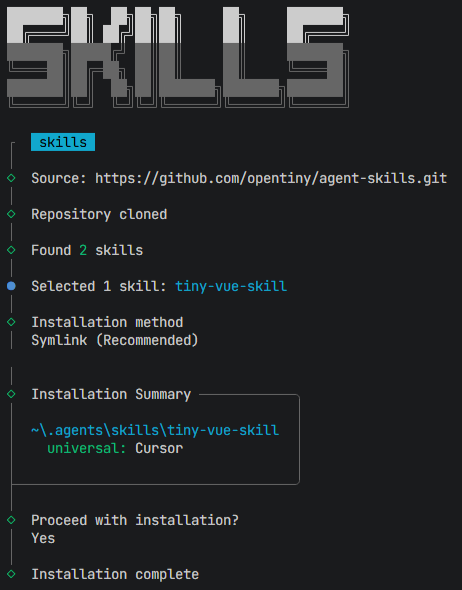
npx skills add opentiny/agent-skills -g --skill tiny-vue-skill --agent cursor
The --agent parameters corresponding to some other AI tools:
| Agent | --agent |
|---|---|
| Amp | amp |
| Antigravity | antigravity |
| Claude Code | claude-code |
| Clawdbot | clawdbot |
| Codex | codex |
| Cursor | cursor |
| Droid | droid |
| Gemini CLI | gemini-cli |
| GitHub Copilot | github-copilot |
| Goose | goose |
| Kilo Code | kilo |
| Kiro CLI | kiro-cli |
| OpenCode | opencode |
| Roo Code | roo |
| Trae | trae |
| Windsurf | windsurf |
Execute the following command to install the TinyVue component library for Vue.js 3.
npm i @opentiny/vue@3
Execute the following command to install the TinyVue component library for Vue.js 2.
npm i @opentiny/vue@2
Then you can use the TinyVue component(such as <tiny-button>) in the App.vue file.
<script lang="ts" setup>
  import { Button as TinyButton } from '@opentiny/vue'
</script>

<template>
  <tiny-button>Tiny Vue</tiny-button>
</template>
git clone git@github.com:opentiny/tiny-vue.git
cd tiny-vue
pnpm i

# Vue.js 3
pnpm dev

# Vue.js 2
pnpm dev2
Open your browser and visit: http://127.0.0.1:7130/
Welcome to join our OpenTiny community!🎉
If you don't know how to start, please read our contributing guide.
opentiny-official and join the technical exchange group.opentiny@googlegroups.comContributors are community members who have 1 or more PR merged in OpenTiny.
Thanks goes to these wonderful people (emoji key):
Thanks to:
TinyVue is an enterprise-class UI component library of OpenTiny community, support both Vue.js 2 and Vue.js 3, as well as PC and mobile.
See the code
An enterprise-class UI component library, support both Vue.js 2 and Vue.js 3, as well as PC and mobile.
English | 简体中文
🌈 Features:
tiny-vue-skill is a set of skill tools designed for AI coding assistants, enabling them to deeply understand the usage, APIs, and best practices of the TinyVue component library, thereby helping you develop applications with TinyVue more efficiently.
You can install tiny-vue-skill globally using the following command:
npx skills add opentiny/agent-skills -g --skill tiny-vue-skill --agent cursor
The --agent parameters corresponding to some other AI tools:
| Agent | --agent |
|---|---|
| Amp | amp |
| Antigravity | antigravity |
| Claude Code | claude-code |
| Clawdbot | clawdbot |
| Codex | codex |
| Cursor | cursor |
| Droid | droid |
| Gemini CLI | gemini-cli |
| GitHub Copilot | github-copilot |
| Goose | goose |
| Kilo Code | kilo |
| Kiro CLI | kiro-cli |
| OpenCode | opencode |
| Roo Code | roo |
| Trae | trae |
| Windsurf | windsurf |
Execute the following command to install the TinyVue component library for Vue.js 3.
npm i @opentiny/vue@3
Execute the following command to install the TinyVue component library for Vue.js 2.
npm i @opentiny/vue@2
Then you can use the TinyVue component(such as <tiny-button>) in the App.vue file.
<script lang="ts" setup>
  import { Button as TinyButton } from '@opentiny/vue'
</script>

<template>
  <tiny-button>Tiny Vue</tiny-button>
</template>
git clone git@github.com:opentiny/tiny-vue.git
cd tiny-vue
pnpm i

# Vue.js 3
pnpm dev

# Vue.js 2
pnpm dev2
Open your browser and visit: http://127.0.0.1:7130/
Welcome to join our OpenTiny community!🎉
If you don't know how to start, please read our contributing guide.
opentiny-official and join the technical exchange group.opentiny@googlegroups.comContributors are community members who have 1 or more PR merged in OpenTiny.
Thanks goes to these wonderful people (emoji key):
Thanks to:



