CORE-V Wally is a configurable RISC-V Processor associated with RISC-V System-on-Chip Design textbook. Contains a 5-stage pipeline, support for A, B, C, D, F, M and Q extensions, and optional caches, BP, FPU, VM/MMU, AHB, RAMs, and peripherals.
SystemVerilog
648
11,164 commits
updated Oct 16, 2026

Wally is a 5-stage pipelined processor configurable to support up through the RVA22 profile, including virtual memory, PMP, and the various privileged modes and CSRs. The rv64gc configuration supports:
Other configurations range down to a minimal RV32E core, and derivative configurations add the Q extension. Wally provides optional caches, branch prediction, and standard RISC-V peripherals (CLINT, PLIC, UART, GPIO). Wally is written in SystemVerilog. It passes the RISC-V Arch Tests and boots Linux on an FPGA. Wally is part of the OpenHW Foundation family of robust open RISC-V cores.
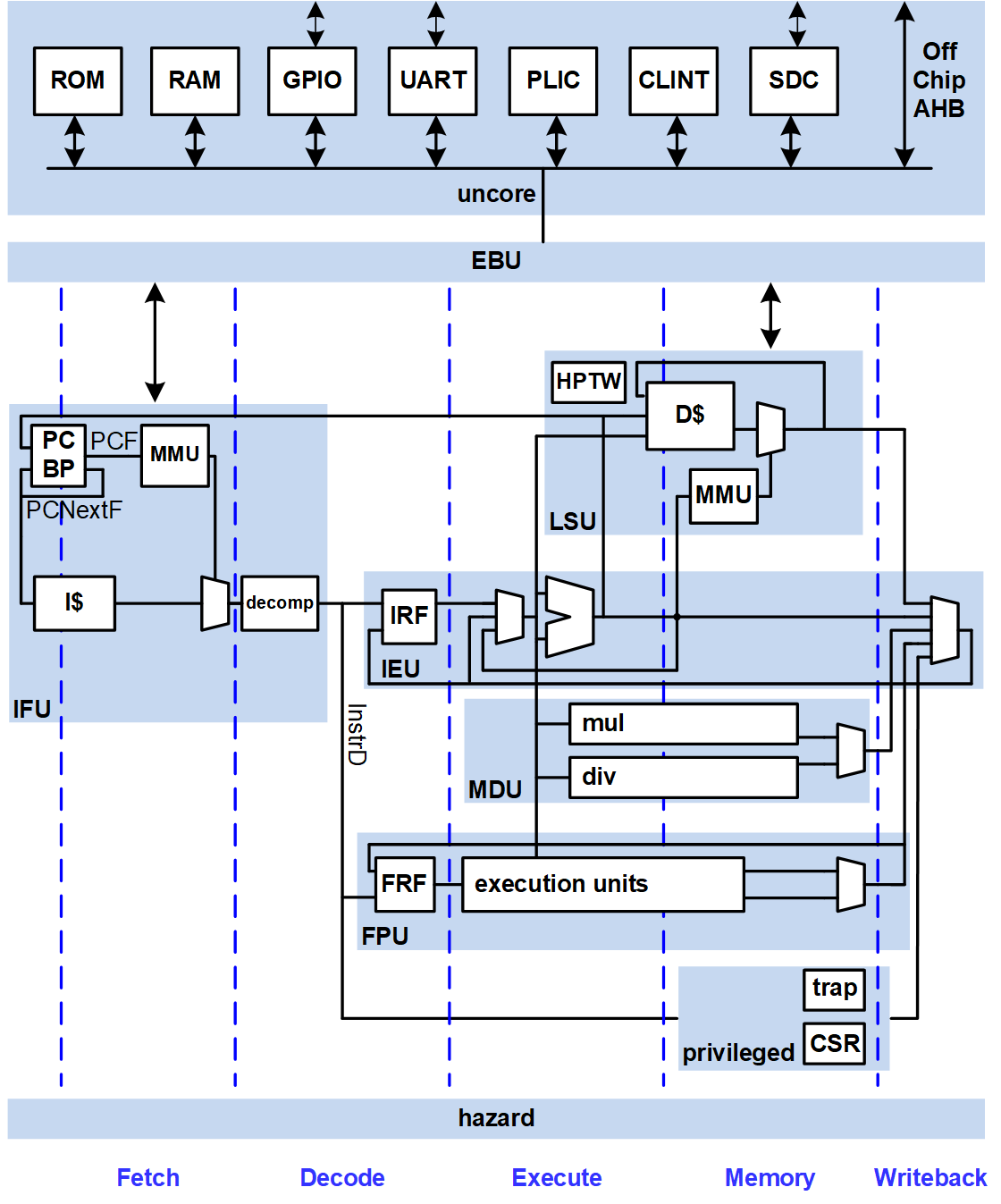
Wally is described in a textbook, RISC-V System-on-Chip Design, by Harris, Stine, Thompson, and Harris. Users should follow the setup instructions below.
Wally is presently at Technology Readiness Level 4, passing the RISC-V compatibility test suite and custom tests, and booting Linux in simulation and on an FPGA. See the Test Plan for details.
New users may wish to do the following setup to access the server via a GUI and use a text editor.
$ git config --global user.name "Ben Bitdiddle"
$ git config --global user.email "[email protected]"
$ git config --global pull.rebase false
Then fork and clone the repo, source setup, make the tests and run regression
<yourgithubid> to your github id.$ git clone --recurse-submodules https://github.com/<yourgithubid>/cvw
$ cd cvw
$ git remote add upstream https://github.com/openhwfoundation/cvw
[!NOTE] If you are installing on a new system without any tools installed, please jump to the next section, Toolchain Installation, then come back here.
PATH and activate the python virtual environment.$ source ./setup.sh
.bashrc or .bash_profile to run the setup script each time you log in.if [ -f ~/cvw/setup.sh ]; then
source ~/cvw/setup.sh
fi
$ cd examples/C/hello
$ make
$ wsim --sim verilator rv64gc --elf hello
Hello Wally!
0 1 2 3 4 5 6 7 8 9
$ spike hello
Hello Wally!
0 1 2 3 4 5 6 7 8 9
$ cd ~/cvw && make --jobs
$ regression-wally
This section describes the open source toolchain installation.
The current version of the toolchain has been tested on Ubuntu (versions 20.04 LTS, 22.04 LTS, 24.04 LTS, and 26.04 LTS), Debian (versions 12 and 13), Red Hat/Rocky/AlmaLinux (versions 8, 9, and 10), SUSE versions 15.6 and 16.0 and Fedora (version 44). Only the latest minor release of each major version is tested.
[!WARNING]
- Ubuntu 22.04 LTS is incompatible with Synopsys Design Compiler.
- Whisper is not installed on Ubuntu 20.04 LTS due to issues compiling the boost libraries.
The toolchain installation script installs the following tools:
Additionally, Buildroot Linux is built for Wally and linux test-vectors are generated for simulation. See the Linux README for more details. This can be skipped using the --no-buildroot flag.
The tools can be installed by running
$ $WALLY/bin/wally-tool-chain-install.sh
If this script is run as root or using sudo, it will also install all of the prerequisite packages using the system package manager. The default installation directory when run in this manner is /opt/riscv.
If a user-level installation is desired, the script can instead be run by any user without sudo and the installation directory will be ~/riscv. In this case, the prerequisite packages must first be installed by running
$ sudo $WALLY/bin/wally-package-install.sh
In either case, the installation directory can be overridden by passing the desired directory as an argument to the installation script. For example,
$ sudo $WALLY/bin/wally-tool-chain-install.sh /home/riscv
See wally-tool-chain-install.sh and the scripts in the $WALLY/bin/installation directory for a detailed description of each component, or to issue the commands one at a time to install on the command line.
[!NOTE] The complete installation process requires ~55 GB of free space. If the
--cleanflag is passed to the installation script then the final consumed space is only ~26 GB. The--cleanflag removes source files and build directories.
$WALLY/setup.sh sources $RISCV/site-setup.sh. If the toolchain was installed in either of the default locations (/opt/riscv or ~/riscv), $RISCV will automatically be set to the correct path when setup.sh is run. If a custom installation directory was used, then $WALLY/setup.sh must be modified to set the correct path.
$RISCV/site-setup.sh allows for customization of the site specific information such as commercial licenses and PATH variables. It is automatically copied into your $RISCV folder when the installation script is run.
Change the following lines to point to the path and license server for your Siemens Questa and Synopsys Design Compiler and VCS installations and license servers. If you only have Questa or VCS, you can still simulate but cannot run logic synthesis. If Questa, VSC, or Design Compiler are already setup on this system then don't set these variables.
export MGLS_LICENSE_FILE=..         # Change this to your Siemens license server
export SNPSLMD_LICENSE_FILE=..      # Change this to your Synopsys license server
export QUESTA_HOME=..               # Change this for your path to Questa
export DC_HOME=..                   # Change this for your path to Synopsys Design Compiler
export VCS_HOME=..                  # Change this for your path to Synopsys VCS
Electronic Design Automation (EDA) tools are vital to implementations of System on Chip architectures as well as validating different designs. Open-source and commercial tools exist for multiple strategies and although the one can spend a lifetime using combinations of different tools, only a small subset of tools is utilized for this text. The tools are chosen because of their ease in access as well as their repeatability for accomplishing many of the tasks utilized to design Wally. It is anticipated that additional tools may be documented later after this is text is published to improve use and access.
Verilator is an open-source Verilog simulator. It is fast and free. Run Wally on the riscv-arch-test suite using Verilator with:
regression-wally
Running code or functional coverage simulations or lock-step presently require commercial tools. Siemens Questa is the primary tool utilized for simulating and validating Wally. Synopsys VCS also can run regression-wally and lock-step simulation. For logic synthesis, you will need Synopsys Design Compiler. Questa and Design Compiler are commercial tools that require an educational or commercial license.
Note: Some EDA tools utilize LM_LICENSE_FILE for their environmental variable to point to their license server. Some operating systems may also utilize MGLS_LICENSE_FILE instead, therefore, it is important to read the user manual on the preferred environmental variable required to point to a user’s license file. Although there are different mechanisms to allow licenses to work, many companies commonly utilize the FlexLM (i.e., Flex-enabled) license server manager that runs off a node locked license.
Although most EDA tools are Linux-friendly, they tend to have issues when not installed on recommended OS flavors. Red Hat Enterprise Linux (and its free Rocky clone) and SUSE Linux products typically tend to be recommended for installing commercial-based EDA tools and are recommended for utilizing complex simulation and architecture exploration.
Siemens Questa simulates behavioral, RTL and gate-level HDL. To install Siemens Questa first go to a web browser and navigate to https://eda.sw.siemens.com/en-US/ic/questa/simulation/advanced-simulator/. Click Sign In and log in with your credentials and the product can easily be downloaded and installed. Some Windows-based installations also require gcc libraries that are typically provided as a compressed zip download through Siemens.
Many commercial synthesis and place and route tools require a common installer. These installers are provided by the EDA vendor and Synopsys has one called Synopsys Installer. To use Synopsys Installer, you will need to acquire a license through Synopsys that is typically Called Synopsys Common Licensing (SCL). Both the Synopsys Installer, license key file, and Design Compiler can all be downloaded through Synopsys Solvnet. First open a web browser, log into Synsopsy Solvnet, and download the installer and Design Compiler installation files. Then, install the Installer.
$ firefox &
/cad/synopsys/Installer_5.4 with 755 permission for cad,/cad/synopsys/downloads and work as user cad from here on$ cd /cad/synopsys/installer_5.4
$ ./SynopsysInstaller_v5.4.run
$ ./installer
/cad/synopsys/downloads, and installation path as /cad/synopsysInstaller can be utilized in graphical or text-based modes. It is far easier to use the text-based installation tool. To install DC, navigate to the location where your downloaded DC files are and type installer. You should be prompted with questions related to where you wish to have your files installed.
The Synopsys Installer automatically installs all downloaded product files into a single top-level target directory. You do not need to specify the installation directory for each product. For example, if you specify /import/programs/synopsys as the target directory, your installation directory structure might look like this after installation:
/import/programs/synopsys/syn/S-2021.06-SP1
[!Note] Although most parts of Wally, including the Questa simulator, will work on most modern Linux platforms, as of 2024, the Synopsys CAD tools for SoC design are only supported on Red Hat Enterprise Linux (or AlmaLinux/Rocky) 8.4+ or 9.1+ or SUSE Linux Enterprise Server (SLES) 15.
The Verilog simulation has been tested with Siemens Questa/ModelSim. This package is available to universities worldwide as part of the Design Verification Bundle through the Siemens Academic Partner Program members for $990/year.
If you want to implement your own version of the chip, your tool and license complexity rises significantly. Logic synthesis uses Synopsys Design Compiler. Placement and routing uses Cadence Innovus. Both Synopsys and Cadence offer their tools at a steep discount to their university program members, but the cost is still several thousand dollars per year. Most research universities with integrated circuit design programs have Siemens, Synopsys, and Cadence licenses. You also need a process design kit (PDK) for a specific integrated circuit technology and its libraries. The open-source Google Skywater 130 nm PDK is sufficient to synthesize the core but lacks memories. Google presently funds some fabrication runs for universities. IMEC and Muse Semiconductor offers full access to multiproject wafer fabrication on the TSMC 28 nm process including logic, I/O, and memory libraries; this involves three non-disclosure agreements. Fabrication costs on the order of $10,000 for a batch of 1 mm2 chips.
Startups can expect to spend more than $1 million on CAD tools to get a chip to market. Commercial CAD tools are not realistically available to individuals without a university or company connection.
If you want to add a cronjob you can do the following:
mutt to send emails through the command linecrontab -e into a terminalregression-wally --nightly --buildroot every day at 21:30 in your local time30 21 * * * curl -L https://raw.githubusercontent.com/openhwfoundation/cvw/refs/heads/main/bin/nightly_build.py | python - --path {PATH_FOR_NIGHTLY_RUNS} --target all --tests all --send_email [email protected],[email protected]
This utility will take up approximately 100 GB on your hard drive. You can also run the script directly from bin/nightly_build.py.
wsim runs one of multiple simulators, Questa, VCS, or Verilator using a specific configuration and one or more ELF files.
The general syntax is
wsim <config> <elf or directory>... [--options]
Every ELF named, and every *.elf found under every directory named, runs back-to-back in a single simulation session.
Tests are self-checking, so the simulation ends with a single summary: SUCCESS! All tests ran without failures. or FAIL: N test programs had errors.
Parameters and options:
-h, --help                                                   show this help message and exit
--elf ELF, -e ELF                                            ELF File name; use if name does not end in .elf
--test {buildroot,fpga,coremark,embench}, -T ...             Special testbench mode
--name NAME, -n NAME                                         Name used for log and coverage database files
--sim {questa,verilator,vcs}, -s {questa,verilator,vcs}      Simulator
--tb {testbench,testbench_fp}, -t {testbench,testbench_fp}   Testbench
--gui, -g                                                    Simulate with GUI
--ccov, -c                                                   Code Coverage
--fcov, -f                                                   Functional Coverage
--args ARGS, -a ARGS                                         Optional arguments passed to simulator via $value$plusargs
--params PARAMS, -p PARAMS                                   Optional top-level parameter overrides of the form param=value
--define DEFINE, -d DEFINE                                   Optional define macros passed to simulator
--vcd, -v                                                    Generate testbench.vcd
--lockstep, -l                                               Run ImperasDV lock, step, and compare.
--lockstepverbose, -lv                                       Run ImperasDV lock, step, and compare with tracing enabled
--rvvi, -r                                                   Simulate rvvi hardware interface and ethernet.
Run a whole directory of RISC-V Architecture Tests in one session with Questa
wsim rv64gc $WALLY/addins/riscv-arch-test/work/cvw-rv64gc/elfs/rv64i/I
Run one ELF in the Questa gui
wsim rv64gc $WALLY/addins/riscv-arch-test/work/cvw-rv64gc/elfs/rv64i/I/I-add-01.elf --gui
Run several ELFs back-to-back with Verilator
wsim rv32gc $WALLY/tests/periph/rv32/WALLY-gpio-01.elf $WALLY/tests/periph/rv32/WALLY-clint-01.elf --sim verilator
Run lockstep against ImperasDV with a single elf file in the gui. Lockstep requires a single elf.
wsim rv64gc $WALLY/addins/riscv-arch-test/work/cvw-rv64gc/elfs/rv64i/I/I-add-01.elf --lockstep --gui
Collect functional coverage over a directory of tests.
wsim rv64gc $WALLY/addins/riscv-arch-test/work/cvw-rv64gc/elfs/priv/Sv --fcov
Run Linux boot simulation in lock step between Wally and ImperasDV
wsim buildroot buildroot --args +INSTR_LIMIT=600000000 --lockstep
See errata.md for errata on the RISC-V System-on-Chip Design textbook.
200 followers · starred Jun 2025
60 followers · starred Sep 2026
143 followers · starred Mar 2025
160 followers · starred May 2023
CORE-V Wally is a configurable RISC-V Processor associated with RISC-V System-on-Chip Design textbook. Contains a 5-stage pipeline, support for A, B, C, D, F, M and Q extensions, and optional caches, BP, FPU, VM/MMU, AHB, RAMs, and peripherals.
SystemVerilog
648
11,164 commits
updated Oct 16, 2026
Wally is a 5-stage pipelined processor configurable to support up through the RVA22 profile, including virtual memory, PMP, and the various privileged modes and CSRs. The rv64gc configuration supports:
Other configurations range down to a minimal RV32E core, and derivative configurations add the Q extension. Wally provides optional caches, branch prediction, and standard RISC-V peripherals (CLINT, PLIC, UART, GPIO). Wally is written in SystemVerilog. It passes the RISC-V Arch Tests and boots Linux on an FPGA. Wally is part of the OpenHW Foundation family of robust open RISC-V cores.
Wally is described in a textbook, RISC-V System-on-Chip Design, by Harris, Stine, Thompson, and Harris. Users should follow the setup instructions below.
Wally is presently at Technology Readiness Level 4, passing the RISC-V compatibility test suite and custom tests, and booting Linux in simulation and on an FPGA. See the Test Plan for details.
New users may wish to do the following setup to access the server via a GUI and use a text editor.
$ git config --global user.name "Ben Bitdiddle"
$ git config --global user.email "[email protected]"
$ git config --global pull.rebase false
Then fork and clone the repo, source setup, make the tests and run regression
<yourgithubid> to your github id.$ git clone --recurse-submodules https://github.com/<yourgithubid>/cvw
$ cd cvw
$ git remote add upstream https://github.com/openhwfoundation/cvw
[!NOTE] If you are installing on a new system without any tools installed, please jump to the next section, Toolchain Installation, then come back here.
PATH and activate the python virtual environment.$ source ./setup.sh
.bashrc or .bash_profile to run the setup script each time you log in.if [ -f ~/cvw/setup.sh ]; then
source ~/cvw/setup.sh
fi
$ cd examples/C/hello
$ make
$ wsim --sim verilator rv64gc --elf hello
Hello Wally!
0 1 2 3 4 5 6 7 8 9
$ spike hello
Hello Wally!
0 1 2 3 4 5 6 7 8 9
$ cd ~/cvw && make --jobs
$ regression-wally
This section describes the open source toolchain installation.
The current version of the toolchain has been tested on Ubuntu (versions 20.04 LTS, 22.04 LTS, 24.04 LTS, and 26.04 LTS), Debian (versions 12 and 13), Red Hat/Rocky/AlmaLinux (versions 8, 9, and 10), SUSE versions 15.6 and 16.0 and Fedora (version 44). Only the latest minor release of each major version is tested.
[!WARNING]
- Ubuntu 22.04 LTS is incompatible with Synopsys Design Compiler.
- Whisper is not installed on Ubuntu 20.04 LTS due to issues compiling the boost libraries.
The toolchain installation script installs the following tools:
Additionally, Buildroot Linux is built for Wally and linux test-vectors are generated for simulation. See the Linux README for more details. This can be skipped using the --no-buildroot flag.
The tools can be installed by running
$ $WALLY/bin/wally-tool-chain-install.sh
If this script is run as root or using sudo, it will also install all of the prerequisite packages using the system package manager. The default installation directory when run in this manner is /opt/riscv.
If a user-level installation is desired, the script can instead be run by any user without sudo and the installation directory will be ~/riscv. In this case, the prerequisite packages must first be installed by running
$ sudo $WALLY/bin/wally-package-install.sh
In either case, the installation directory can be overridden by passing the desired directory as an argument to the installation script. For example,
$ sudo $WALLY/bin/wally-tool-chain-install.sh /home/riscv
See wally-tool-chain-install.sh and the scripts in the $WALLY/bin/installation directory for a detailed description of each component, or to issue the commands one at a time to install on the command line.
[!NOTE] The complete installation process requires ~55 GB of free space. If the
--cleanflag is passed to the installation script then the final consumed space is only ~26 GB. The--cleanflag removes source files and build directories.
$WALLY/setup.sh sources $RISCV/site-setup.sh. If the toolchain was installed in either of the default locations (/opt/riscv or ~/riscv), $RISCV will automatically be set to the correct path when setup.sh is run. If a custom installation directory was used, then $WALLY/setup.sh must be modified to set the correct path.
$RISCV/site-setup.sh allows for customization of the site specific information such as commercial licenses and PATH variables. It is automatically copied into your $RISCV folder when the installation script is run.
Change the following lines to point to the path and license server for your Siemens Questa and Synopsys Design Compiler and VCS installations and license servers. If you only have Questa or VCS, you can still simulate but cannot run logic synthesis. If Questa, VSC, or Design Compiler are already setup on this system then don't set these variables.
export MGLS_LICENSE_FILE=..         # Change this to your Siemens license server
export SNPSLMD_LICENSE_FILE=..      # Change this to your Synopsys license server
export QUESTA_HOME=..               # Change this for your path to Questa
export DC_HOME=..                   # Change this for your path to Synopsys Design Compiler
export VCS_HOME=..                  # Change this for your path to Synopsys VCS
Electronic Design Automation (EDA) tools are vital to implementations of System on Chip architectures as well as validating different designs. Open-source and commercial tools exist for multiple strategies and although the one can spend a lifetime using combinations of different tools, only a small subset of tools is utilized for this text. The tools are chosen because of their ease in access as well as their repeatability for accomplishing many of the tasks utilized to design Wally. It is anticipated that additional tools may be documented later after this is text is published to improve use and access.
Verilator is an open-source Verilog simulator. It is fast and free. Run Wally on the riscv-arch-test suite using Verilator with:
regression-wally
Running code or functional coverage simulations or lock-step presently require commercial tools. Siemens Questa is the primary tool utilized for simulating and validating Wally. Synopsys VCS also can run regression-wally and lock-step simulation. For logic synthesis, you will need Synopsys Design Compiler. Questa and Design Compiler are commercial tools that require an educational or commercial license.
Note: Some EDA tools utilize LM_LICENSE_FILE for their environmental variable to point to their license server. Some operating systems may also utilize MGLS_LICENSE_FILE instead, therefore, it is important to read the user manual on the preferred environmental variable required to point to a user’s license file. Although there are different mechanisms to allow licenses to work, many companies commonly utilize the FlexLM (i.e., Flex-enabled) license server manager that runs off a node locked license.
Although most EDA tools are Linux-friendly, they tend to have issues when not installed on recommended OS flavors. Red Hat Enterprise Linux (and its free Rocky clone) and SUSE Linux products typically tend to be recommended for installing commercial-based EDA tools and are recommended for utilizing complex simulation and architecture exploration.
Siemens Questa simulates behavioral, RTL and gate-level HDL. To install Siemens Questa first go to a web browser and navigate to https://eda.sw.siemens.com/en-US/ic/questa/simulation/advanced-simulator/. Click Sign In and log in with your credentials and the product can easily be downloaded and installed. Some Windows-based installations also require gcc libraries that are typically provided as a compressed zip download through Siemens.
Many commercial synthesis and place and route tools require a common installer. These installers are provided by the EDA vendor and Synopsys has one called Synopsys Installer. To use Synopsys Installer, you will need to acquire a license through Synopsys that is typically Called Synopsys Common Licensing (SCL). Both the Synopsys Installer, license key file, and Design Compiler can all be downloaded through Synopsys Solvnet. First open a web browser, log into Synsopsy Solvnet, and download the installer and Design Compiler installation files. Then, install the Installer.
$ firefox &
/cad/synopsys/Installer_5.4 with 755 permission for cad,/cad/synopsys/downloads and work as user cad from here on$ cd /cad/synopsys/installer_5.4
$ ./SynopsysInstaller_v5.4.run
$ ./installer
/cad/synopsys/downloads, and installation path as /cad/synopsysInstaller can be utilized in graphical or text-based modes. It is far easier to use the text-based installation tool. To install DC, navigate to the location where your downloaded DC files are and type installer. You should be prompted with questions related to where you wish to have your files installed.
The Synopsys Installer automatically installs all downloaded product files into a single top-level target directory. You do not need to specify the installation directory for each product. For example, if you specify /import/programs/synopsys as the target directory, your installation directory structure might look like this after installation:
/import/programs/synopsys/syn/S-2021.06-SP1
[!Note] Although most parts of Wally, including the Questa simulator, will work on most modern Linux platforms, as of 2024, the Synopsys CAD tools for SoC design are only supported on Red Hat Enterprise Linux (or AlmaLinux/Rocky) 8.4+ or 9.1+ or SUSE Linux Enterprise Server (SLES) 15.
The Verilog simulation has been tested with Siemens Questa/ModelSim. This package is available to universities worldwide as part of the Design Verification Bundle through the Siemens Academic Partner Program members for $990/year.
If you want to implement your own version of the chip, your tool and license complexity rises significantly. Logic synthesis uses Synopsys Design Compiler. Placement and routing uses Cadence Innovus. Both Synopsys and Cadence offer their tools at a steep discount to their university program members, but the cost is still several thousand dollars per year. Most research universities with integrated circuit design programs have Siemens, Synopsys, and Cadence licenses. You also need a process design kit (PDK) for a specific integrated circuit technology and its libraries. The open-source Google Skywater 130 nm PDK is sufficient to synthesize the core but lacks memories. Google presently funds some fabrication runs for universities. IMEC and Muse Semiconductor offers full access to multiproject wafer fabrication on the TSMC 28 nm process including logic, I/O, and memory libraries; this involves three non-disclosure agreements. Fabrication costs on the order of $10,000 for a batch of 1 mm2 chips.
Startups can expect to spend more than $1 million on CAD tools to get a chip to market. Commercial CAD tools are not realistically available to individuals without a university or company connection.
If you want to add a cronjob you can do the following:
mutt to send emails through the command linecrontab -e into a terminalregression-wally --nightly --buildroot every day at 21:30 in your local time30 21 * * * curl -L https://raw.githubusercontent.com/openhwfoundation/cvw/refs/heads/main/bin/nightly_build.py | python - --path {PATH_FOR_NIGHTLY_RUNS} --target all --tests all --send_email [email protected],[email protected]
This utility will take up approximately 100 GB on your hard drive. You can also run the script directly from bin/nightly_build.py.
wsim runs one of multiple simulators, Questa, VCS, or Verilator using a specific configuration and one or more ELF files.
The general syntax is
wsim <config> <elf or directory>... [--options]
Every ELF named, and every *.elf found under every directory named, runs back-to-back in a single simulation session.
Tests are self-checking, so the simulation ends with a single summary: SUCCESS! All tests ran without failures. or FAIL: N test programs had errors.
Parameters and options:
-h, --help                                                   show this help message and exit
--elf ELF, -e ELF                                            ELF File name; use if name does not end in .elf
--test {buildroot,fpga,coremark,embench}, -T ...             Special testbench mode
--name NAME, -n NAME                                         Name used for log and coverage database files
--sim {questa,verilator,vcs}, -s {questa,verilator,vcs}      Simulator
--tb {testbench,testbench_fp}, -t {testbench,testbench_fp}   Testbench
--gui, -g                                                    Simulate with GUI
--ccov, -c                                                   Code Coverage
--fcov, -f                                                   Functional Coverage
--args ARGS, -a ARGS                                         Optional arguments passed to simulator via $value$plusargs
--params PARAMS, -p PARAMS                                   Optional top-level parameter overrides of the form param=value
--define DEFINE, -d DEFINE                                   Optional define macros passed to simulator
--vcd, -v                                                    Generate testbench.vcd
--lockstep, -l                                               Run ImperasDV lock, step, and compare.
--lockstepverbose, -lv                                       Run ImperasDV lock, step, and compare with tracing enabled
--rvvi, -r                                                   Simulate rvvi hardware interface and ethernet.
Run a whole directory of RISC-V Architecture Tests in one session with Questa
wsim rv64gc $WALLY/addins/riscv-arch-test/work/cvw-rv64gc/elfs/rv64i/I
Run one ELF in the Questa gui
wsim rv64gc $WALLY/addins/riscv-arch-test/work/cvw-rv64gc/elfs/rv64i/I/I-add-01.elf --gui
Run several ELFs back-to-back with Verilator
wsim rv32gc $WALLY/tests/periph/rv32/WALLY-gpio-01.elf $WALLY/tests/periph/rv32/WALLY-clint-01.elf --sim verilator
Run lockstep against ImperasDV with a single elf file in the gui. Lockstep requires a single elf.
wsim rv64gc $WALLY/addins/riscv-arch-test/work/cvw-rv64gc/elfs/rv64i/I/I-add-01.elf --lockstep --gui
Collect functional coverage over a directory of tests.
wsim rv64gc $WALLY/addins/riscv-arch-test/work/cvw-rv64gc/elfs/priv/Sv --fcov
Run Linux boot simulation in lock step between Wally and ImperasDV
wsim buildroot buildroot --args +INSTR_LIMIT=600000000 --lockstep
See errata.md for errata on the RISC-V System-on-Chip Design textbook.
200 followers · starred Jun 2025
60 followers · starred Sep 2026
143 followers · starred Mar 2025
160 followers · starred May 2023



