
BKN Foundry is the Ontology back-end foundation of OpenBKN. It transforms ontology-driven business semantics into runtime services: data, logic, actions, security governance, and observability.
Go
528
1,328 commits
updated Sep 22, 2026
README

BKN Foundry
中文 | English

OpenBKN is an ontology-driven business knowledge network platform. Through ontology modeling, it turns the data and logic scattered across documents, systems, processes, rules, and expert experience into a business knowledge network that agents can understand, execute, and verify — so agents land accurately, safely, and reliably in real business environments, not just generating answers but continuously creating executable, traceable, and verifiable business value.
BKN Foundry is the technical foundation of OpenBKN, providing that business knowledge network with unified data access, safe execution, and governance.
On this page: 📚 Quick links · 🚀 Quick start · 🛠️ OpenBKN SDK · 🛡️ Administration · 🏗️ BKN Foundry · 📐 BKN Lang · 📊 Benchmarks
Note: BKN Foundry is a backend-only framework — it does not include a web UI. All interactions are through the CLI, SDK, or API.
📚 Quick Links
- 🛠️ OpenBKN SDK - End-user / agent BKN CLI, TypeScript SDK, and the AI agent skill
- 🤝 Contributing - Guidelines for contributing to the project
- 🚢 Deployment - One-click deploy to Kubernetes
- 📘 Documentation - Product documentation and usage guides (EN / 中文)
- 📖 API Reference - OpenAPI docs for every service (YAML source + rendered Markdown / interactive HTML)
- 📦 Samples - Runnable end-to-end walkthroughs, in their own repo
- 🧾 Release Notes - All notable changes
🚀 Quick Start
-
Prerequisites & planning — read the Deployment Guide and satisfy its prerequisites. Linux is the supported target for full installs; macOS local dev (kind) is optional — see Mac install (dev) (中文).
-
Pre-install host check / fix with
preflight.sh(recommended)On the target install host, run a system check before
deploy.sh. It verifies kernel / sysctl / containerd /kubectl/helm/ Node / BKN CLIs and can fix what's missing (each fix is opt-in unless-y):
git clone https://github.com/openbkn-ai/bkn-foundry.git
cd bkn-foundry/deploy
chmod +x preflight.sh deploy.sh onboard.sh

sudo bash ./preflight.sh                # check-only (default)
sudo bash ./preflight.sh --fix          # check + interactive fixes
sudo bash ./preflight.sh --fix -y       # auto-approve every fix
sudo bash ./preflight.sh --list-fixes   # preview which fixes would run, no changes
sudo bash ./preflight.sh --help         # all flags (--role, --skip, --report, --output=json, …)
Exit codes: 0 OK, 1 any FAIL, 2 only WARN. Use --report=/tmp/preflight.txt to keep a full log.
- Run installation scripts:
# (Same deploy/ directory as step 2)

# Install the full BKN Foundry stack
./deploy.sh openbkn install

# Or specify addresses explicitly (skips interactive prompts):
#   --access_address       Address for clients to reach OpenBKN services (can be IP or domain)
#   --api_server_address   IP bound to a local network interface for K8s API server (must be a real NIC IP)
./deploy.sh openbkn install \
  --access_address=<your-ip> \
  --api_server_address=<your-ip>

./deploy.sh --help
- Verify the deployment:
# Check cluster status
kubectl get nodes
kubectl get pods -A

# Check service status
./deploy.sh openbkn status
-
Post-install bootstrap with
onboard.sh(recommended)On the same host as the install (where
kubectlreaches the cluster), run the post-install bootstrap. It (re-runnable) registers an LLM + an embedding, patches the BKN ConfigMaps when the default embedding actually changes, and on a full install also creates the business usertest, assigns every role fromopenbkn admin role list, and switchesopenbknto that user:
cd deploy
sudo bash ./onboard.sh        # interactive; or:  sudo bash ./onboard.sh -y
sudo bash ./onboard.sh --help # all flags (--config=models.yaml, --enable-bkn-search, …)
Why
sudo?onboard.shreads$HOME/.openbkn-ai/config.yaml(written bysudo deploy.shinto/root/.openbkn-ai/) and writes theopenbknauth token to$HOME/.bkn. Running it withoutsudofalls back to the in-repo templatedeploy/conf/config.yamland may resolve a different access URL. macOS dev path (bash deploy/dev/mac.sh onboard) does not needsudo.
Re-runs are safe: existing models / BKN defaults are detected and skipped. For the full sequence, the Mermaid flow, and the openbkn authentication notes (full ISF), see help/en/install.md — Post-install: onboard.sh.
-
Verify API access
BKN Foundry is backend-only and does not provide a web console. On the machine you use to reach the cluster (laptop, bastion, etc.), use the BKN CLI from bkn-sdk: either
npm install -g @openbkn/bkn-sdkornpx openbkn(no global install; see OpenBKN SDK below). Then run:
# Sign in as the user onboard.sh created (default password 111111 unless you overrode it):
openbkn auth login https://<node-ip> -u test -p '<password>' -k

openbkn bkn list
# or with npx instead of a global install:
# npx openbkn auth login https://<node-ip> -k
# npx openbkn bkn list
- View help:
openbkn --help                   # list all commands
openbkn <command> --help         # help for a specific command, e.g. openbkn bkn --help
For full product documentation, see the Documentation (EN / 中文).
After a full install, use the
openbkn adminsubcommands to manage users, organizations, roles, models, and audit logs — see Administration below.
🏗️ BKN Foundry
BKN Foundry is the technical foundation of OpenBKN. It gives the business knowledge network unified data access, safe execution, and governance, so agents connecting to proprietary data get high-quality context and safe, controllable execution.
BKN Foundry addresses two critical pain points when connecting proprietary data with agents:
Context Engineering — High-Quality Context for Agents
In long-running agent scenarios, context inevitably faces explosion, decay, pollution, and high token costs. BKN Foundry addresses these through the Business Knowledge Network:
- Context explosion containment — Multi-source candidates are first organized and aggregated via the BKN semantic network, then unified by Context Loader (recall → coarse ranking → fine ranking) to retain only key evidence and constraints, avoiding massive prompt fragments that cause decision drift. Overall accuracy reaches 93%+.
- Context decay mitigation — Replaces long-text stacking with "real-time facts + evidence citations", keeping reasoning grounded around specific objects and reducing forgetting and hallucination risks in long inputs. Accuracy improves 15%+ over baselines across scenario types.
- Context pollution isolation — Builds precise enterprise digital twins through the BKN network, blocking unreliable content and potential injection risks outside the knowledge and execution boundary, ensuring a clean and controllable reasoning chain.
- Token cost compression — Converts multi-source materials into structured object information fetched on demand (not full-text concatenation), improving information density within the same budget. Token consumption reduced 30%+ while improving accuracy.
Harness Engineering — Safe & Controllable Execution
Beyond "seeing more", Agents must "do it right". BKN Foundry provides constraint engineering capabilities for enterprise-grade safe execution:
- Explainable decisions — Uses "Object → Action → Rule → Constraint" knowledge structures to express business intent graphs, grounding tool invocation and parameter selection to explicit semantic boundaries and rule dependencies, making it clear "why this action was taken".
- Traceable evidence chain — From action intent → knowledge node → data source → mapping/operator → final invocation, full-chain tracing is supported. Entities and relationships can be traced back to source data and active rules, enabling audit and review.
- Controllable execution loop — Unifies identity and access control down to knowledge network object/action permissions, with pre-execution validation, mid-execution policy interception, and post-execution audit logging, achieving "authorizable, approvable, revocable" security loops.
- Risk prevention mechanism — Models risks as "Risk Types" linked to Action Types; performs risk assessment and simulation before execution, with automatic downgrade/blocking/secondary confirmation when thresholds are hit, blocking high-risk actions before they execute.
Core Architecture
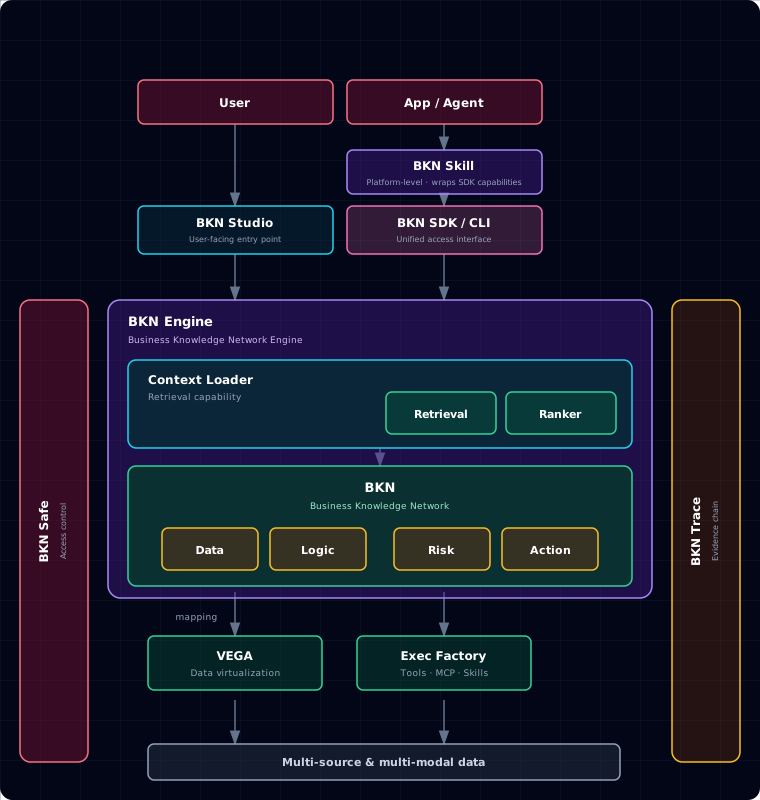
| Component | Description |
|---|---|
| Access layer | BKN SDK / CLI (unified access interface) and BKN Skill (platform-level skill layer wrapping SDK capabilities) — for users, apps, and agents. BKN Studio (the user-facing web console) lives in a separate frontend repo (openbkn-ai/bkn-studio) and is not part of this backend release. |
| BKN Engine | The Business Knowledge Network engine: Context Loader (Retrieval recall + Ranker ordering) over the BKN, which describes the business through four elements — Data / Logic / Risk / Action — and maps concepts down to the execution layer |
| VEGA | Data virtualization — hides differences between underlying multi-source & multi-modal data |
| Exec Factory | Execution factory — orchestrates tools, MCP, and Skills |
| BKN Safe | Access control — unified identity, permissions, and policy entry point; security controls and auditing per business object / action |
| BKN Trace | Evidence chain — traces BKN call chains (intent → knowledge node → data source → mapping / operator); traceable and explainable |
See the full write-up in BKN Reference Architecture.
📐 BKN Lang
BKN Lang is a Markdown-based business knowledge modeling language, designed for human-machine bidirectional friendliness:
- Easy to develop — Based on standard Markdown syntax, eliminating code barriers entirely. Business experts write, read, and modify definitions via WYSIWYG editors, with rapid version diff and collaborative review — modifying system rules is like editing a document.
- Easy to understand — "Object-Relationship-Risk-Action" four-in-one model perfectly maps enterprise business models. Humans read business semantics; Agents parse precise context constraints in real-time. Logic is made explicit, rejecting black boxes, fundamentally reducing LLM reasoning hallucination and logical deviation.
- Easy to integrate — Definitions stored as full-text in specific database fields with no complex underlying table coupling. Context Loader dynamically loads on demand, discarding static hardcoding. Plug-and-play across systems and Agents, flowing as lightweight assets through AI Data Platform.
Key Value Summary
| Metric | Value |
|---|---|
| Scenario Coverage | Q&A, workflow execution, intelligence analysis, decision judgment, exploration |
| TCO Reduction | 70% lower with integrated platform |
| BKN Build Efficiency | 300% improvement in knowledge network construction |
| Token Cost Savings | 50% reduction through context optimization and compression |
🛠️ OpenBKN SDK
Install the SDK on the client
After deploying BKN Foundry, we recommend installing bkn-sdk as your next step. The SDK provides the BKN CLI (the openbkn command) and AI Agent Skills — the primary way to interact with the platform.
bkn-sdk gives AI agents (Claude Code, GPT, custom agents, etc.) access to OpenBKN knowledge networks via the BKN CLI. It also provides Python and TypeScript SDKs for programmatic integration.
Install the CLI with:
npm install -g @openbkn/bkn-sdk
Or run it without a global install:
npx openbkn --help
AI Agent Skills
Install the openbkn skill from bkn-sdk with npx skills:
npx skills add https://github.com/openbkn-ai/bkn-sdk --skill openbkn
openbkn— full OpenBKN APIs and CLI conventions (knowledge networks, agents, models, skills, toolbox, trace) so assistants can operate the platform on your behalf. See skills/openbkn/SKILL.md.
Before using the skill, authenticate with your OpenBKN instance:
openbkn auth login https://your-openbkn-instance.com
Self-signed certificate? If your instance uses a self-signed or untrusted TLS certificate (common for fresh deployments without a CA-issued cert), add
-kto skip certificate verification:openbkn auth login https://your-openbkn-instance.com -k
Headless / no-browser authentication (SSH, CI, containers)
The BKN CLI supports authenticating without a local browser or without pasting callback URLs.
Which option to use
| Your situation | Use | Notes |
|---|---|---|
| Username and password sign-in is available | Method 1 (HTTP, -u / -p) | One command on the host; no need to copy an OAuth callback from elsewhere. |
bkn-sdk is installed (the openbkn command works) | Method 2 (auth export / replay) | After browser login, run openbkn auth export and replay the one-line command on the headless target. |
bkn-sdk is not installed; you usually run npx openbkn | Method 3 (--no-browser) | After signing in on another device, an extra step: copy the full callback URL or only the authorization code (copy code), then paste at Paste URL or code in the headless terminal. |
Method 1 — Username/password HTTP sign-in (fully non-interactive on the host, no browser required)
No Node/Chromium needed — the CLI calls the platform's /oauth2/signin endpoint over HTTPS and stores the returned tokens. Suitable for CI runners, minimal Linux containers, and any host without a browser:
openbkn auth login https://your-instance -u <username> -p <password> -k
-u / -p together select this path automatically (you can also add --http-signin explicitly). If you omit -u / -p, the CLI prompts for them on stdin (password input is hidden on a TTY). The CLI saves tokens under ~/.bkn/ including a refresh_token when the IdP returns one — same auto-refresh behavior as a normal browser login.
Method 2 — Export & replay (bkn-sdk installed; export and replay)
On a machine that has the BKN CLI, sign in with the browser once, then export a one-line command for the headless host — you do not need to transcribe the OAuth callback URL or code in the terminal by hand.
- On a machine with a browser, run
openbkn auth login https://your-instance. After success, export credentials:
openbkn auth export # prints a one-line command you can paste on the headless host
- On the headless host, paste the exported command. It uses
--client-id,--client-secret, and--refresh-tokento exchange tokens and save credentials under~/.bkn/:
openbkn auth login https://your-instance \
  --client-id <ID> --client-secret <SECRET> --refresh-token <TOKEN>
Method 3 — --no-browser (when bkn-sdk is not installed; extra copy/paste of URL or code)
Use this when the CLI is not installed globally and you run via npx openbkn (or similar). Compared with Method 2, you must manually copy the URL or code from the browser after login.
openbkn auth login https://your-instance --no-browser
# or: npx openbkn auth login https://your-instance --no-browser
The CLI prints an OAuth URL instead of opening a local browser window. Open that URL on any device with a browser (phone, laptop, etc.). After login, the browser redirects to a localhost callback — an error page is normal. Copy the full URL from the address bar, or only the authorization code, and paste it at the prompt below (the extra Paste URL or code step):
Open this URL on any device (use a private/incognito window if you need the full sign-in form):

  https://your-instance/oauth2/auth?redirect_uri=...&client_id=...

After login, the browser may show an error page (this is expected if nothing listens on localhost).
Copy the FULL URL from the address bar and paste it here, or paste only the authorization code.

Paste URL or code>
With saved
~/.bkn/sessions, the CLI automatically exchangesrefresh_tokenfor a new access token when it expires — no extra flags needed. You can also set environment variables (BKN_BASE_URL,BKN_TOKEN) instead of persisting credentials to disk.
Full details: bkn-sdk — Authentication. You can also reuse the ~/.bkn/ directory from a machine where the CLI finished login, or set the environment variables above.
CLI
openbkn auth login https://your-openbkn.com -k    # authenticate (-k for self-signed TLS)
openbkn bkn list                                 # list knowledge networks
openbkn bkn search <kn-id> "query"               # semantic search
openbkn --help                                   # all subcommands
TypeScript SDK
Minimal example (after CLI login or equivalent credentials):
import { createClient } from "@openbkn/bkn-sdk";

const bkn = createClient({ baseUrl: "https://your-openbkn.com", token: process.env.BKN_TOKEN });

const networks = await bkn.kn.list({ limit: 10 });
const results  = await bkn.kn.search("<kn-id>", "What risks exist in the supply chain?");
For streaming and the full resource API (bkn.kn, bkn.context, bkn.models, bkn.vega, bkn.admin, …), see the bkn-sdk repository docs and examples.
🛡️ Administration
Platform administration (users, organizations, roles, models, audit) is built into the same openbkn CLI under the openbkn admin subcommands — there is no separate admin tool. Authentication and authorization are always enabled.
openbkn admin org tree                          # list departments
openbkn admin user create --login alice         # initial password generated + returned once (initial_password); forced change at first login
openbkn admin user reset-password -u alice      # admin reset
openbkn admin role list
openbkn admin role add-member <roleId> -u alice
openbkn admin llm add                           # register an LLM
openbkn admin small-model add                   # register an embedding model
openbkn admin audit list --user alice --start 2026-04-01 --end 2026-04-30
openbkn admin call /api/user-management/v1/management/users -X GET   # raw HTTP with auth header
New users created without an explicit password get a randomly generated initial password, returned once in the create response (
initial_password), and must change it on first sign-in. Respect the separation-of-duties built-in accounts (system,admin,security,audit) — operators should use individual accounts, not the sharedadmin.
The openbkn skill (installed above) also covers these admin tasks. Full command tree and security notes: see the bkn-sdk repository docs.
📊 Benchmarks & Experiments
Unstructured Data Q&A — Cross-Platform Comparison
Based on 145 HR scenario samples (resume corpus with 118 multi-format PDFs), covering simple information lookup, cross-section experience analysis, and multi-hop comprehensive reasoning. All platforms used DeepSeek V3.2 + BGE M3-Embedding with identical data sources, tested in Agentic mode.
| Metric | BKN Foundry (v0.3.0) | BiSheng | Dify (v0.15.3) | RAGFlow (v0.17.0) |
|---|---|---|---|---|
| Accuracy | 99.31% (144/145) | 86.90% (126/145) | 96.55% (140/145) | 86.90% (126/145) |
| Avg Latency | 43.69s | 19.52s | 63.82s | 71.56s |
| P90 Latency | 56.92s | 32.53s | 79.15s | 95.37s |
| Avg Token | 21.36K | 4.98K | 36.25K | 16.28K |
BKN Foundry is the only platform that breaks the traditional RAG "performance impossible triangle" — achieving >99% accuracy while keeping inference cost and latency at production-ready levels. Dify trades high token consumption (1.7x) for decent accuracy; BiSheng sacrifices reasoning depth for speed; RAGFlow falls behind on both accuracy and latency.
Ablation Studies — Key Technical Levers
The following ablation experiments identify the contribution of each BKN Foundry component:
Retrieval Depth — Increasing retrieval limit from 10 to 20 raised accuracy from 96.67% to 100%, with only +6.48s latency. Context Loader's semantic reranking and compression enable BKN Foundry to effectively handle the increased context without "Lost in the Middle" effects.
Schema Preloading — With Context Loader preloading the BKN schema:
| Configuration | Accuracy | Avg Steps | Avg Token |
|---|---|---|---|
| Schema preloaded | 100.0% | 3.2 | 20.07K |
| No schema | 93.33% | 5.8 | 38.54K |
Schema provides Agents with a clear "map" of entity relationships, reducing reasoning steps by 44.8% and token consumption by 47.9%.
Tool Curation — Precise tool selection outperforms providing all available tools:
| Configuration | Accuracy | Avg Steps | Avg Token |
|---|---|---|---|
| Full toolset (6 tools) | 75.0% | 7.1 | 42.3K |
| Curated toolset (3 tools) | 100.0% | 2.4 | 12.8K |
With excessive tools, Agents favor "seemingly powerful" broad-search tools whose noise triggers reflection loops and path divergence. Curated tools constrain Agents onto the correct path, achieving one-shot resolution.
Path Guidance — Encoding domain expert experience into executable reasoning templates:
| Configuration | Path Guidance | Tools | Accuracy | Avg Latency | Avg Token |
|---|---|---|---|---|---|
| Explore-kn_search | Yes | 3 | 100.0% | 37.82s | 15,420 |
| No guidance, 2 tools | No | 2 | 100.0% | 53.06s | 23,287 |
| No guidance, 3 tools | No | 3 | 80.0% | 53.28s | 19,870 |
Path guidance tells Agents "how to walk" for efficiency; tool curation "reduces wrong turns" for stability. Combined, they deliver optimal production performance.
Heterogeneous Data Reasoning — F1 Bench
F1 Bench is based on the BIRD test set with the Formula-1 database mixed with 30 unstructured documents, testing Agent capabilities in structured + unstructured heterogeneous data reasoning.
| Metric | BKN Foundry | Dify Retrieval Baseline |
|---|---|---|
| Overall Accuracy | 92.96% | 78.87% |
| SQL Waste Rate | 8.2% | 24.5% |
| SQL Hit Efficiency | 0.226 | 0.137 |
| Total SQL Calls | 292 | 408 |
🤝 Community & contact
| Channel | Link | What it's for |
|---|---|---|
| Discord | discord.gg/YTxDbrfNf | Real-time help, showcases, and announcements. |
| X | @OpenBKN | Follow OpenBKN for release news and project updates. |
License
BKN Foundry is multi-licensed. See the repository license overview and NOTICE for the authoritative per-component and per-file breakdown:
- Components under the Apache License 2.0 remain so.
- OpenBKN net-new files that expressly reference the OpenBKN License use the OpenBKN License, a modified version of Apache License 2.0 with additional conditions.
- BKN Studio and BKN SDK are maintained in separate repositories and are licensed under the License files distributed with those repositories.
The license applicable to each file is stated in that file's header.
Contributors
(top 30 of 36)


Similar repos


Languages
Go
77.5%
Python
17.9%
Shell
3.4%
BKN Foundry is the Ontology back-end foundation of OpenBKN. It transforms ontology-driven business semantics into runtime services: data, logic, actions, security governance, and observability.
Go
528
1,328 commits
updated Sep 22, 2026
README
BKN Foundry
中文 | English
OpenBKN is an ontology-driven business knowledge network platform. Through ontology modeling, it turns the data and logic scattered across documents, systems, processes, rules, and expert experience into a business knowledge network that agents can understand, execute, and verify — so agents land accurately, safely, and reliably in real business environments, not just generating answers but continuously creating executable, traceable, and verifiable business value.
BKN Foundry is the technical foundation of OpenBKN, providing that business knowledge network with unified data access, safe execution, and governance.
On this page: 📚 Quick links · 🚀 Quick start · 🛠️ OpenBKN SDK · 🛡️ Administration · 🏗️ BKN Foundry · 📐 BKN Lang · 📊 Benchmarks
Note: BKN Foundry is a backend-only framework — it does not include a web UI. All interactions are through the CLI, SDK, or API.
📚 Quick Links
- 🛠️ OpenBKN SDK - End-user / agent BKN CLI, TypeScript SDK, and the AI agent skill
- 🤝 Contributing - Guidelines for contributing to the project
- 🚢 Deployment - One-click deploy to Kubernetes
- 📘 Documentation - Product documentation and usage guides (EN / 中文)
- 📖 API Reference - OpenAPI docs for every service (YAML source + rendered Markdown / interactive HTML)
- 📦 Samples - Runnable end-to-end walkthroughs, in their own repo
- 🧾 Release Notes - All notable changes
🚀 Quick Start
-
Prerequisites & planning — read the Deployment Guide and satisfy its prerequisites. Linux is the supported target for full installs; macOS local dev (kind) is optional — see Mac install (dev) (中文).
-
Pre-install host check / fix with
preflight.sh(recommended)On the target install host, run a system check before
deploy.sh. It verifies kernel / sysctl / containerd /kubectl/helm/ Node / BKN CLIs and can fix what's missing (each fix is opt-in unless-y):
git clone https://github.com/openbkn-ai/bkn-foundry.git
cd bkn-foundry/deploy
chmod +x preflight.sh deploy.sh onboard.sh

sudo bash ./preflight.sh                # check-only (default)
sudo bash ./preflight.sh --fix          # check + interactive fixes
sudo bash ./preflight.sh --fix -y       # auto-approve every fix
sudo bash ./preflight.sh --list-fixes   # preview which fixes would run, no changes
sudo bash ./preflight.sh --help         # all flags (--role, --skip, --report, --output=json, …)
Exit codes: 0 OK, 1 any FAIL, 2 only WARN. Use --report=/tmp/preflight.txt to keep a full log.
- Run installation scripts:
# (Same deploy/ directory as step 2)

# Install the full BKN Foundry stack
./deploy.sh openbkn install

# Or specify addresses explicitly (skips interactive prompts):
#   --access_address       Address for clients to reach OpenBKN services (can be IP or domain)
#   --api_server_address   IP bound to a local network interface for K8s API server (must be a real NIC IP)
./deploy.sh openbkn install \
  --access_address=<your-ip> \
  --api_server_address=<your-ip>

./deploy.sh --help
- Verify the deployment:
# Check cluster status
kubectl get nodes
kubectl get pods -A

# Check service status
./deploy.sh openbkn status
-
Post-install bootstrap with
onboard.sh(recommended)On the same host as the install (where
kubectlreaches the cluster), run the post-install bootstrap. It (re-runnable) registers an LLM + an embedding, patches the BKN ConfigMaps when the default embedding actually changes, and on a full install also creates the business usertest, assigns every role fromopenbkn admin role list, and switchesopenbknto that user:
cd deploy
sudo bash ./onboard.sh        # interactive; or:  sudo bash ./onboard.sh -y
sudo bash ./onboard.sh --help # all flags (--config=models.yaml, --enable-bkn-search, …)
Why
sudo?onboard.shreads$HOME/.openbkn-ai/config.yaml(written bysudo deploy.shinto/root/.openbkn-ai/) and writes theopenbknauth token to$HOME/.bkn. Running it withoutsudofalls back to the in-repo templatedeploy/conf/config.yamland may resolve a different access URL. macOS dev path (bash deploy/dev/mac.sh onboard) does not needsudo.
Re-runs are safe: existing models / BKN defaults are detected and skipped. For the full sequence, the Mermaid flow, and the openbkn authentication notes (full ISF), see help/en/install.md — Post-install: onboard.sh.
-
Verify API access
BKN Foundry is backend-only and does not provide a web console. On the machine you use to reach the cluster (laptop, bastion, etc.), use the BKN CLI from bkn-sdk: either
npm install -g @openbkn/bkn-sdkornpx openbkn(no global install; see OpenBKN SDK below). Then run:
# Sign in as the user onboard.sh created (default password 111111 unless you overrode it):
openbkn auth login https://<node-ip> -u test -p '<password>' -k

openbkn bkn list
# or with npx instead of a global install:
# npx openbkn auth login https://<node-ip> -k
# npx openbkn bkn list
- View help:
openbkn --help                   # list all commands
openbkn <command> --help         # help for a specific command, e.g. openbkn bkn --help
For full product documentation, see the Documentation (EN / 中文).
After a full install, use the
openbkn adminsubcommands to manage users, organizations, roles, models, and audit logs — see Administration below.
🏗️ BKN Foundry
BKN Foundry is the technical foundation of OpenBKN. It gives the business knowledge network unified data access, safe execution, and governance, so agents connecting to proprietary data get high-quality context and safe, controllable execution.
BKN Foundry addresses two critical pain points when connecting proprietary data with agents:
Context Engineering — High-Quality Context for Agents
In long-running agent scenarios, context inevitably faces explosion, decay, pollution, and high token costs. BKN Foundry addresses these through the Business Knowledge Network:
- Context explosion containment — Multi-source candidates are first organized and aggregated via the BKN semantic network, then unified by Context Loader (recall → coarse ranking → fine ranking) to retain only key evidence and constraints, avoiding massive prompt fragments that cause decision drift. Overall accuracy reaches 93%+.
- Context decay mitigation — Replaces long-text stacking with "real-time facts + evidence citations", keeping reasoning grounded around specific objects and reducing forgetting and hallucination risks in long inputs. Accuracy improves 15%+ over baselines across scenario types.
- Context pollution isolation — Builds precise enterprise digital twins through the BKN network, blocking unreliable content and potential injection risks outside the knowledge and execution boundary, ensuring a clean and controllable reasoning chain.
- Token cost compression — Converts multi-source materials into structured object information fetched on demand (not full-text concatenation), improving information density within the same budget. Token consumption reduced 30%+ while improving accuracy.
Harness Engineering — Safe & Controllable Execution
Beyond "seeing more", Agents must "do it right". BKN Foundry provides constraint engineering capabilities for enterprise-grade safe execution:
- Explainable decisions — Uses "Object → Action → Rule → Constraint" knowledge structures to express business intent graphs, grounding tool invocation and parameter selection to explicit semantic boundaries and rule dependencies, making it clear "why this action was taken".
- Traceable evidence chain — From action intent → knowledge node → data source → mapping/operator → final invocation, full-chain tracing is supported. Entities and relationships can be traced back to source data and active rules, enabling audit and review.
- Controllable execution loop — Unifies identity and access control down to knowledge network object/action permissions, with pre-execution validation, mid-execution policy interception, and post-execution audit logging, achieving "authorizable, approvable, revocable" security loops.
- Risk prevention mechanism — Models risks as "Risk Types" linked to Action Types; performs risk assessment and simulation before execution, with automatic downgrade/blocking/secondary confirmation when thresholds are hit, blocking high-risk actions before they execute.
Core Architecture
| Component | Description |
|---|---|
| Access layer | BKN SDK / CLI (unified access interface) and BKN Skill (platform-level skill layer wrapping SDK capabilities) — for users, apps, and agents. BKN Studio (the user-facing web console) lives in a separate frontend repo (openbkn-ai/bkn-studio) and is not part of this backend release. |
| BKN Engine | The Business Knowledge Network engine: Context Loader (Retrieval recall + Ranker ordering) over the BKN, which describes the business through four elements — Data / Logic / Risk / Action — and maps concepts down to the execution layer |
| VEGA | Data virtualization — hides differences between underlying multi-source & multi-modal data |
| Exec Factory | Execution factory — orchestrates tools, MCP, and Skills |
| BKN Safe | Access control — unified identity, permissions, and policy entry point; security controls and auditing per business object / action |
| BKN Trace | Evidence chain — traces BKN call chains (intent → knowledge node → data source → mapping / operator); traceable and explainable |
See the full write-up in BKN Reference Architecture.
📐 BKN Lang
BKN Lang is a Markdown-based business knowledge modeling language, designed for human-machine bidirectional friendliness:
- Easy to develop — Based on standard Markdown syntax, eliminating code barriers entirely. Business experts write, read, and modify definitions via WYSIWYG editors, with rapid version diff and collaborative review — modifying system rules is like editing a document.
- Easy to understand — "Object-Relationship-Risk-Action" four-in-one model perfectly maps enterprise business models. Humans read business semantics; Agents parse precise context constraints in real-time. Logic is made explicit, rejecting black boxes, fundamentally reducing LLM reasoning hallucination and logical deviation.
- Easy to integrate — Definitions stored as full-text in specific database fields with no complex underlying table coupling. Context Loader dynamically loads on demand, discarding static hardcoding. Plug-and-play across systems and Agents, flowing as lightweight assets through AI Data Platform.
Key Value Summary
| Metric | Value |
|---|---|
| Scenario Coverage | Q&A, workflow execution, intelligence analysis, decision judgment, exploration |
| TCO Reduction | 70% lower with integrated platform |
| BKN Build Efficiency | 300% improvement in knowledge network construction |
| Token Cost Savings | 50% reduction through context optimization and compression |
🛠️ OpenBKN SDK
Install the SDK on the client
After deploying BKN Foundry, we recommend installing bkn-sdk as your next step. The SDK provides the BKN CLI (the openbkn command) and AI Agent Skills — the primary way to interact with the platform.
bkn-sdk gives AI agents (Claude Code, GPT, custom agents, etc.) access to OpenBKN knowledge networks via the BKN CLI. It also provides Python and TypeScript SDKs for programmatic integration.
Install the CLI with:
npm install -g @openbkn/bkn-sdk
Or run it without a global install:
npx openbkn --help
AI Agent Skills
Install the openbkn skill from bkn-sdk with npx skills:
npx skills add https://github.com/openbkn-ai/bkn-sdk --skill openbkn
openbkn— full OpenBKN APIs and CLI conventions (knowledge networks, agents, models, skills, toolbox, trace) so assistants can operate the platform on your behalf. See skills/openbkn/SKILL.md.
Before using the skill, authenticate with your OpenBKN instance:
openbkn auth login https://your-openbkn-instance.com
Self-signed certificate? If your instance uses a self-signed or untrusted TLS certificate (common for fresh deployments without a CA-issued cert), add
-kto skip certificate verification:openbkn auth login https://your-openbkn-instance.com -k
Headless / no-browser authentication (SSH, CI, containers)
The BKN CLI supports authenticating without a local browser or without pasting callback URLs.
Which option to use
| Your situation | Use | Notes |
|---|---|---|
| Username and password sign-in is available | Method 1 (HTTP, -u / -p) | One command on the host; no need to copy an OAuth callback from elsewhere. |
bkn-sdk is installed (the openbkn command works) | Method 2 (auth export / replay) | After browser login, run openbkn auth export and replay the one-line command on the headless target. |
bkn-sdk is not installed; you usually run npx openbkn | Method 3 (--no-browser) | After signing in on another device, an extra step: copy the full callback URL or only the authorization code (copy code), then paste at Paste URL or code in the headless terminal. |
Method 1 — Username/password HTTP sign-in (fully non-interactive on the host, no browser required)
No Node/Chromium needed — the CLI calls the platform's /oauth2/signin endpoint over HTTPS and stores the returned tokens. Suitable for CI runners, minimal Linux containers, and any host without a browser:
openbkn auth login https://your-instance -u <username> -p <password> -k
-u / -p together select this path automatically (you can also add --http-signin explicitly). If you omit -u / -p, the CLI prompts for them on stdin (password input is hidden on a TTY). The CLI saves tokens under ~/.bkn/ including a refresh_token when the IdP returns one — same auto-refresh behavior as a normal browser login.
Method 2 — Export & replay (bkn-sdk installed; export and replay)
On a machine that has the BKN CLI, sign in with the browser once, then export a one-line command for the headless host — you do not need to transcribe the OAuth callback URL or code in the terminal by hand.
- On a machine with a browser, run
openbkn auth login https://your-instance. After success, export credentials:
openbkn auth export # prints a one-line command you can paste on the headless host
- On the headless host, paste the exported command. It uses
--client-id,--client-secret, and--refresh-tokento exchange tokens and save credentials under~/.bkn/:
openbkn auth login https://your-instance \
  --client-id <ID> --client-secret <SECRET> --refresh-token <TOKEN>
Method 3 — --no-browser (when bkn-sdk is not installed; extra copy/paste of URL or code)
Use this when the CLI is not installed globally and you run via npx openbkn (or similar). Compared with Method 2, you must manually copy the URL or code from the browser after login.
openbkn auth login https://your-instance --no-browser
# or: npx openbkn auth login https://your-instance --no-browser
The CLI prints an OAuth URL instead of opening a local browser window. Open that URL on any device with a browser (phone, laptop, etc.). After login, the browser redirects to a localhost callback — an error page is normal. Copy the full URL from the address bar, or only the authorization code, and paste it at the prompt below (the extra Paste URL or code step):
Open this URL on any device (use a private/incognito window if you need the full sign-in form):

  https://your-instance/oauth2/auth?redirect_uri=...&client_id=...

After login, the browser may show an error page (this is expected if nothing listens on localhost).
Copy the FULL URL from the address bar and paste it here, or paste only the authorization code.

Paste URL or code>
With saved
~/.bkn/sessions, the CLI automatically exchangesrefresh_tokenfor a new access token when it expires — no extra flags needed. You can also set environment variables (BKN_BASE_URL,BKN_TOKEN) instead of persisting credentials to disk.
Full details: bkn-sdk — Authentication. You can also reuse the ~/.bkn/ directory from a machine where the CLI finished login, or set the environment variables above.
CLI
openbkn auth login https://your-openbkn.com -k    # authenticate (-k for self-signed TLS)
openbkn bkn list                                 # list knowledge networks
openbkn bkn search <kn-id> "query"               # semantic search
openbkn --help                                   # all subcommands
TypeScript SDK
Minimal example (after CLI login or equivalent credentials):
import { createClient } from "@openbkn/bkn-sdk";

const bkn = createClient({ baseUrl: "https://your-openbkn.com", token: process.env.BKN_TOKEN });

const networks = await bkn.kn.list({ limit: 10 });
const results  = await bkn.kn.search("<kn-id>", "What risks exist in the supply chain?");
For streaming and the full resource API (bkn.kn, bkn.context, bkn.models, bkn.vega, bkn.admin, …), see the bkn-sdk repository docs and examples.
🛡️ Administration
Platform administration (users, organizations, roles, models, audit) is built into the same openbkn CLI under the openbkn admin subcommands — there is no separate admin tool. Authentication and authorization are always enabled.
openbkn admin org tree                          # list departments
openbkn admin user create --login alice         # initial password generated + returned once (initial_password); forced change at first login
openbkn admin user reset-password -u alice      # admin reset
openbkn admin role list
openbkn admin role add-member <roleId> -u alice
openbkn admin llm add                           # register an LLM
openbkn admin small-model add                   # register an embedding model
openbkn admin audit list --user alice --start 2026-04-01 --end 2026-04-30
openbkn admin call /api/user-management/v1/management/users -X GET   # raw HTTP with auth header
New users created without an explicit password get a randomly generated initial password, returned once in the create response (
initial_password), and must change it on first sign-in. Respect the separation-of-duties built-in accounts (system,admin,security,audit) — operators should use individual accounts, not the sharedadmin.
The openbkn skill (installed above) also covers these admin tasks. Full command tree and security notes: see the bkn-sdk repository docs.
📊 Benchmarks & Experiments
Unstructured Data Q&A — Cross-Platform Comparison
Based on 145 HR scenario samples (resume corpus with 118 multi-format PDFs), covering simple information lookup, cross-section experience analysis, and multi-hop comprehensive reasoning. All platforms used DeepSeek V3.2 + BGE M3-Embedding with identical data sources, tested in Agentic mode.
| Metric | BKN Foundry (v0.3.0) | BiSheng | Dify (v0.15.3) | RAGFlow (v0.17.0) |
|---|---|---|---|---|
| Accuracy | 99.31% (144/145) | 86.90% (126/145) | 96.55% (140/145) | 86.90% (126/145) |
| Avg Latency | 43.69s | 19.52s | 63.82s | 71.56s |
| P90 Latency | 56.92s | 32.53s | 79.15s | 95.37s |
| Avg Token | 21.36K | 4.98K | 36.25K | 16.28K |
BKN Foundry is the only platform that breaks the traditional RAG "performance impossible triangle" — achieving >99% accuracy while keeping inference cost and latency at production-ready levels. Dify trades high token consumption (1.7x) for decent accuracy; BiSheng sacrifices reasoning depth for speed; RAGFlow falls behind on both accuracy and latency.
Ablation Studies — Key Technical Levers
The following ablation experiments identify the contribution of each BKN Foundry component:
Retrieval Depth — Increasing retrieval limit from 10 to 20 raised accuracy from 96.67% to 100%, with only +6.48s latency. Context Loader's semantic reranking and compression enable BKN Foundry to effectively handle the increased context without "Lost in the Middle" effects.
Schema Preloading — With Context Loader preloading the BKN schema:
| Configuration | Accuracy | Avg Steps | Avg Token |
|---|---|---|---|
| Schema preloaded | 100.0% | 3.2 | 20.07K |
| No schema | 93.33% | 5.8 | 38.54K |
Schema provides Agents with a clear "map" of entity relationships, reducing reasoning steps by 44.8% and token consumption by 47.9%.
Tool Curation — Precise tool selection outperforms providing all available tools:
| Configuration | Accuracy | Avg Steps | Avg Token |
|---|---|---|---|
| Full toolset (6 tools) | 75.0% | 7.1 | 42.3K |
| Curated toolset (3 tools) | 100.0% | 2.4 | 12.8K |
With excessive tools, Agents favor "seemingly powerful" broad-search tools whose noise triggers reflection loops and path divergence. Curated tools constrain Agents onto the correct path, achieving one-shot resolution.
Path Guidance — Encoding domain expert experience into executable reasoning templates:
| Configuration | Path Guidance | Tools | Accuracy | Avg Latency | Avg Token |
|---|---|---|---|---|---|
| Explore-kn_search | Yes | 3 | 100.0% | 37.82s | 15,420 |
| No guidance, 2 tools | No | 2 | 100.0% | 53.06s | 23,287 |
| No guidance, 3 tools | No | 3 | 80.0% | 53.28s | 19,870 |
Path guidance tells Agents "how to walk" for efficiency; tool curation "reduces wrong turns" for stability. Combined, they deliver optimal production performance.
Heterogeneous Data Reasoning — F1 Bench
F1 Bench is based on the BIRD test set with the Formula-1 database mixed with 30 unstructured documents, testing Agent capabilities in structured + unstructured heterogeneous data reasoning.
| Metric | BKN Foundry | Dify Retrieval Baseline |
|---|---|---|
| Overall Accuracy | 92.96% | 78.87% |
| SQL Waste Rate | 8.2% | 24.5% |
| SQL Hit Efficiency | 0.226 | 0.137 |
| Total SQL Calls | 292 | 408 |
🤝 Community & contact
| Channel | Link | What it's for |
|---|---|---|
| Discord | discord.gg/YTxDbrfNf | Real-time help, showcases, and announcements. |
| X | @OpenBKN | Follow OpenBKN for release news and project updates. |
License
BKN Foundry is multi-licensed. See the repository license overview and NOTICE for the authoritative per-component and per-file breakdown:
- Components under the Apache License 2.0 remain so.
- OpenBKN net-new files that expressly reference the OpenBKN License use the OpenBKN License, a modified version of Apache License 2.0 with additional conditions.
- BKN Studio and BKN SDK are maintained in separate repositories and are licensed under the License files distributed with those repositories.
The license applicable to each file is stated in that file's header.
Similar repos
Contributors
(top 30 of 36)
Languages
Go
77.5%
Python
17.9%
Shell
3.4%