A feature flag daemon with a Unix philosophy
See the code


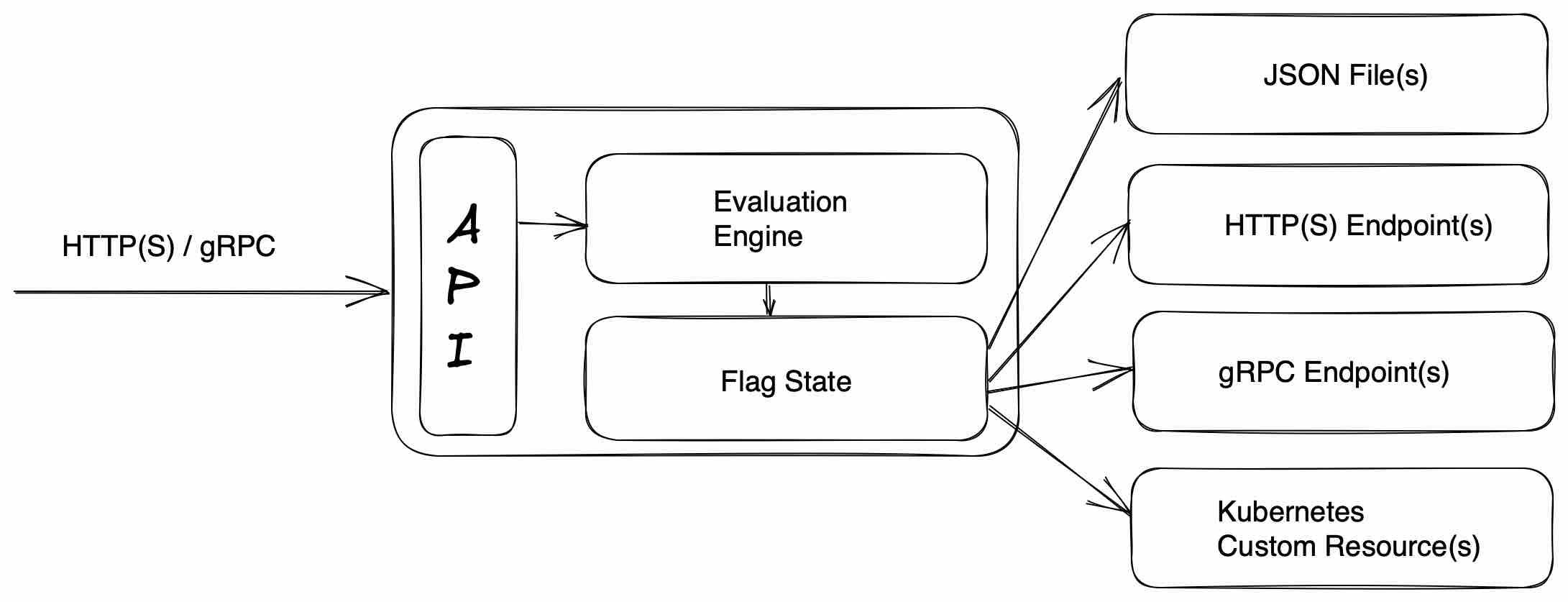
flagd is a feature flag daemon with a Unix philosophy. Think of it as a ready-made, open source, OpenFeature-compliant feature flag backend system.
Experiment with flagd in your browser using the Killercoda tutorial or follow the instructions below to run on your own infrastructure.
flagd can be run as a standalone binary or container. Download and install flagd or run it as a container
Kubernetes-native? flagd can also be run as part of the Kubernetes Operator.
Start flagd:
flagd start \
  --port 8013 \
  --uri https://raw.githubusercontent.com/open-feature/flagd/main/samples/example_flags.flagd.json
Or use docker: Note - In Windows, use WSL system for both the file location and Docker runtime. Mixed file systems don't work and this is a limitation of Docker
docker run \
  --rm -it \
  --name flagd \
  -p 8013:8013 \
  ghcr.io/open-feature/flagd:latest start \
  --uri https://raw.githubusercontent.com/open-feature/flagd/main/samples/example_flags.flagd.json
If you wish, download the file locally to make changes:
wget https://raw.githubusercontent.com/open-feature/flagd/main/samples/example_flags.flagd.json
In local mode, run flagd like this:
flagd start \
  --port 8013 \
  --uri file:./example_flags.flagd.json
Or use docker ( Note - In Windows, this requires WSL system for both the file location and Docker runtime):
docker run \
  --rm -it \
  --name flagd \
  -p 8013:8013 \
  -v $(pwd):/etc/flagd \
  ghcr.io/open-feature/flagd:latest start \
  --uri file:./etc/flagd/example_flags.flagd.json
--uri can be a local file or any remote endpoint. Use file: prefix for local files. eg. --uri file:/path/to/example_flags.flagd.json. gRPC and http have their own requirements. More information can be found here.
Multiple --uri parameters can be specified. In other words, flagd can retrieve flags from multiple sources simultaneously.
Flagd is now ready to perform flag evaluations over either HTTP(s) or gRPC. This example utilizes HTTP via cURL.
Retrieve a String value:
curl -X POST "http://localhost:8013/flagd.evaluation.v1.Service/ResolveString" \
  -d '{"flagKey":"myStringFlag","context":{}}' -H "Content-Type: application/json"
For Windows we recommend using a WSL terminal.
Otherwise, use the following with cmd:
set json={"flagKey":"myStringFlag","context":{}}
curl -i -X POST -H "Content-Type: application/json" -d %json:"=\"% "localhost:8013/flagd.evaluation.v1.Service/ResolveString"
Result:
{
  "value": "val1",
  "reason": "DEFAULT",
  "variant":"key1"
}
Updates to the underlying flag store (e.g. JSON file) are reflected by flagd in realtime. No restart is required.
flagd also supports boolean, integer, float and object flag types.
Now that flagd is running, it is time to integrate it into your application. Do this by using an OpenFeature provider in a language of your choice.
Further documentation including flagd configuration options, fractional evaluation, targeting rules and flag configuration merging strategies can be found at flagd.dev or in this repository.
Interested in contributing? Great, we'd love your help! To get started, take a look at the CONTRIBUTING guide.
We also hold regular community meetings that are open to everyone. Check the OpenFeature community page for all the ways to get involved.
Thanks so much to our contributors.
Made with contrib.rocks.
Overall
Maintained
Code review
Go module
Latest release
Releases this year
499 followers · starred Nov 2025
496 followers · starred Mar 2025
1,055 followers · starred Oct 2025
336 followers · starred Jul 2026
A feature flag daemon with a Unix philosophy
See the code
flagd is a feature flag daemon with a Unix philosophy. Think of it as a ready-made, open source, OpenFeature-compliant feature flag backend system.
Experiment with flagd in your browser using the Killercoda tutorial or follow the instructions below to run on your own infrastructure.
flagd can be run as a standalone binary or container. Download and install flagd or run it as a container
Kubernetes-native? flagd can also be run as part of the Kubernetes Operator.
Start flagd:
flagd start \
  --port 8013 \
  --uri https://raw.githubusercontent.com/open-feature/flagd/main/samples/example_flags.flagd.json
Or use docker: Note - In Windows, use WSL system for both the file location and Docker runtime. Mixed file systems don't work and this is a limitation of Docker
docker run \
  --rm -it \
  --name flagd \
  -p 8013:8013 \
  ghcr.io/open-feature/flagd:latest start \
  --uri https://raw.githubusercontent.com/open-feature/flagd/main/samples/example_flags.flagd.json
If you wish, download the file locally to make changes:
wget https://raw.githubusercontent.com/open-feature/flagd/main/samples/example_flags.flagd.json
In local mode, run flagd like this:
flagd start \
  --port 8013 \
  --uri file:./example_flags.flagd.json
Or use docker ( Note - In Windows, this requires WSL system for both the file location and Docker runtime):
docker run \
  --rm -it \
  --name flagd \
  -p 8013:8013 \
  -v $(pwd):/etc/flagd \
  ghcr.io/open-feature/flagd:latest start \
  --uri file:./etc/flagd/example_flags.flagd.json
--uri can be a local file or any remote endpoint. Use file: prefix for local files. eg. --uri file:/path/to/example_flags.flagd.json. gRPC and http have their own requirements. More information can be found here.
Multiple --uri parameters can be specified. In other words, flagd can retrieve flags from multiple sources simultaneously.
Flagd is now ready to perform flag evaluations over either HTTP(s) or gRPC. This example utilizes HTTP via cURL.
Retrieve a String value:
curl -X POST "http://localhost:8013/flagd.evaluation.v1.Service/ResolveString" \
  -d '{"flagKey":"myStringFlag","context":{}}' -H "Content-Type: application/json"
For Windows we recommend using a WSL terminal.
Otherwise, use the following with cmd:
set json={"flagKey":"myStringFlag","context":{}}
curl -i -X POST -H "Content-Type: application/json" -d %json:"=\"% "localhost:8013/flagd.evaluation.v1.Service/ResolveString"
Result:
{
  "value": "val1",
  "reason": "DEFAULT",
  "variant":"key1"
}
Updates to the underlying flag store (e.g. JSON file) are reflected by flagd in realtime. No restart is required.
flagd also supports boolean, integer, float and object flag types.
Now that flagd is running, it is time to integrate it into your application. Do this by using an OpenFeature provider in a language of your choice.
Further documentation including flagd configuration options, fractional evaluation, targeting rules and flag configuration merging strategies can be found at flagd.dev or in this repository.
Interested in contributing? Great, we'd love your help! To get started, take a look at the CONTRIBUTING guide.
We also hold regular community meetings that are open to everyone. Check the OpenFeature community page for all the ways to get involved.
Thanks so much to our contributors.
Made with contrib.rocks.
Overall
Maintained
Code review
Go module
Latest release
Releases this year
499 followers · starred Nov 2025
496 followers · starred Mar 2025
1,055 followers · starred Oct 2025
336 followers · starred Jul 2026



