
We provide TextEdit, a high-quality, multi-scenario text editing benchmark for generation models.
Python
22
9 commits
updated Mar 16, 2026
README
TextEdit: A High-Quality, Multi-Scenario Text Editing Benchmark for Generation Models


Danni Yang, Sitao Chen, Changyao Tian
If you find our work helpful, please give us a ⭐ or cite our paper. See the InternVL-U technical report appendix for more details.
🎉 News
- [2026/03/06] TextEdit benchmark released. Try it out and see how well your model performs on challenging text editing tasks!
- [2026/03/06] Evaluation code released.
- [2026/03/06] Leaderboard updated with latest models.
📝 Todo
We will release an enhanced version of the TextEdit benchmark next month. Stay tuned!
📖 Introduction
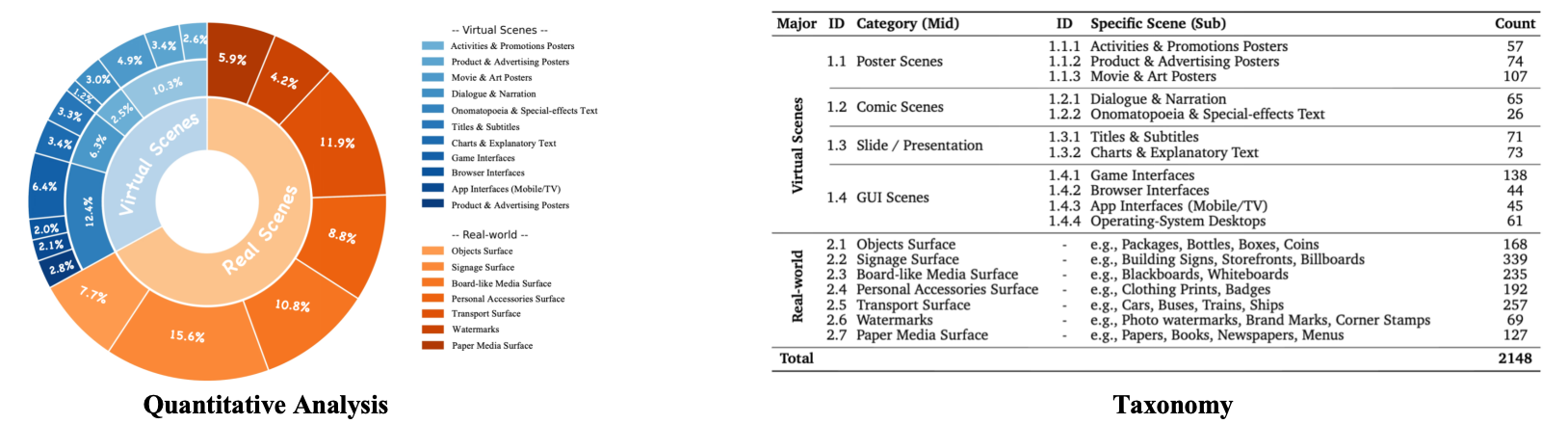 Text editing is a fundamental yet challenging capability for modern image generation and editing models. An increasing number of powerful multimodal generation models, such as Qwen-Image and Nano-Banana-Pro, are emerging with strong text rendering and editing capabilities.
For text editing task, unlike general image editing, text manipulation requires:
Text editing is a fundamental yet challenging capability for modern image generation and editing models. An increasing number of powerful multimodal generation models, such as Qwen-Image and Nano-Banana-Pro, are emerging with strong text rendering and editing capabilities.
For text editing task, unlike general image editing, text manipulation requires:
- Precise spatial alignment
- Font and style consistency
- Background preservation
- Layout-constrained reasoning
We introduce TextEdit, a high-quality, multi-scenario benchmark designed to evaluate fine-grained text editing capabilities in image generation models.
TextEdit covers a diverse set of real-world and virtual scenarios, spanning 18 subcategories with a total of 2,148 high-quality source images and manually annotated edited ground-truth images.
To comprehensively assess model performance, we combine classic OCR, image-fidelity metrics and modern multimodal LLM-based evaluation across target accuracy, text preservation, scene integrity, local realism and visual coherence. This dual-track protocol enables comprehensive assessment.
Our goal is to provide a standardized, realistic, and scalable benchmark for text editing research.
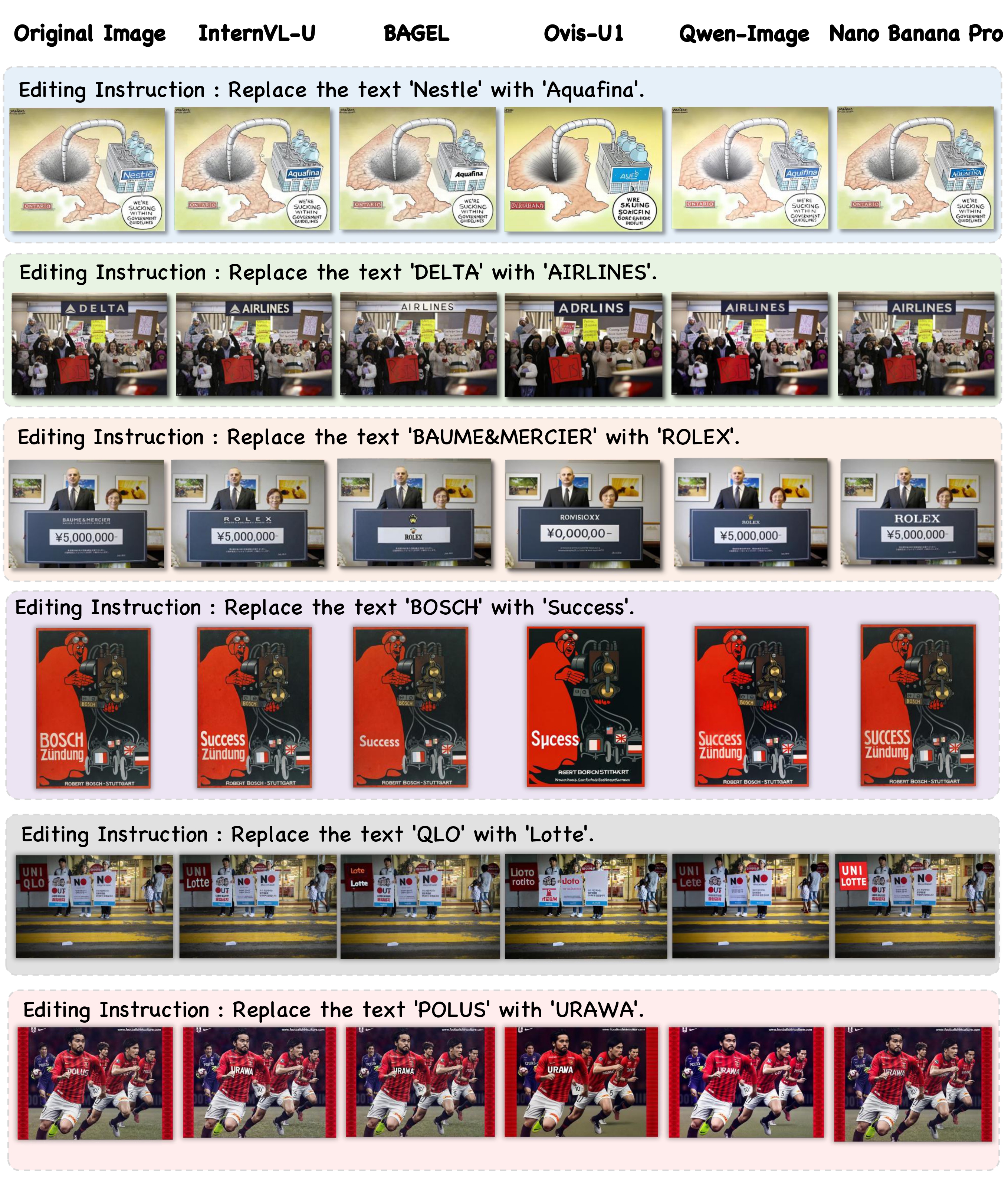
🎨 Visualization Ouput Example
🏆 LeadBoard
📊 Full Benchmark Results
| Models | # Params | Real | Virtual | ||||||||||||
|---|---|---|---|---|---|---|---|---|---|---|---|---|---|---|---|
| OA | OP | OR | F1 | NED | CLIP | AES | OA | OP | OR | F1 | NED | CLIP | AES | ||
| Generation Models | |||||||||||||||
| Qwen-Image-Edit | 20B | 0.75 | 0.68 | 0.66 | 0.67 | 0.71 | 0.75 | 5.72 | 0.78 | 0.75 | 0.73 | 0.74 | 0.75 | 0.81 | 5.21 |
| GPT-Image-1.5 | - | 0.74 | 0.69 | 0.67 | 0.68 | 0.68 | 0.75 | 5.78 | 0.73 | 0.72 | 0.71 | 0.71 | 0.70 | 0.80 | 5.28 |
| Nano Banana Pro | - | 0.77 | 0.72 | 0.70 | 0.71 | 0.72 | 0.75 | 5.79 | 0.80 | 0.78 | 0.77 | 0.78 | 0.78 | 0.81 | 5.28 |
| Unified Models | |||||||||||||||
| Lumina-DiMOO | 8B | 0.22 | 0.23 | 0.19 | 0.20 | 0.19 | 0.69 | 5.53 | 0.22 | 0.25 | 0.21 | 0.22 | 0.20 | 0.72 | 4.76 |
| Ovis-U1 | 2.4B+1.2B | 0.40 | 0.37 | 0.34 | 0.35 | 0.35 | 0.72 | 5.32 | 0.37 | 0.40 | 0.38 | 0.39 | 0.33 | 0.75 | 4.66 |
| BAGEL | 7B+7B | 0.60 | 0.59 | 0.53 | 0.55 | 0.55 | 0.74 | 5.71 | 0.57 | 0.60 | 0.56 | 0.57 | 0.54 | 0.78 | 5.19 |
| InternVL-U | 2B+1.7B | 0.77 | 0.73 | 0.70 | 0.71 | 0.72 | 0.75 | 5.70 | 0.79 | 0.77 | 0.75 | 0.75 | 0.77 | 0.80 | 5.12 |
| Models | # Params | Real | Virtual | ||||||||||
|---|---|---|---|---|---|---|---|---|---|---|---|---|---|
| TA | TP | SI | LR | VC | Avg | TA | TP | SI | LR | VC | Avg | ||
| Generation Models | |||||||||||||
| Qwen-Image-Edit | 20B | 0.92 | 0.82 | 0.75 | 0.57 | 0.80 | 0.77 | 0.57 | 0.79 | 0.92 | 0.80 | 0.77 | 0.77 |
| GPT-Image-1.5 | - | 0.96 | 0.94 | 0.86 | 0.80 | 0.93 | 0.90 | 0.82 | 0.93 | 0.96 | 0.91 | 0.87 | 0.90 |
| Nano Banana Pro | - | 0.96 | 0.95 | 0.85 | 0.88 | 0.93 | 0.91 | 0.87 | 0.92 | 0.96 | 0.94 | 0.89 | 0.92 |
| Unified Models | |||||||||||||
| Lumina-DiMOO | 8B | 0.17 | 0.06 | 0.04 | 0.02 | 0.05 | 0.09 | 0.02 | 0.06 | 0.16 | 0.05 | 0.03 | 0.08 |
| Ovis-U1 | 2.4B+1.2B | 0.31 | 0.12 | 0.12 | 0.07 | 0.18 | 0.18 | 0.06 | 0.16 | 0.31 | 0.14 | 0.13 | 0.19 |
| BAGEL | 7B+7B | 0.68 | 0.60 | 0.38 | 0.35 | 0.56 | 0.53 | 0.38 | 0.51 | 0.68 | 0.62 | 0.42 | 0.54 |
| InternVL-U | 2B+1.7B | 0.94 | 0.90 | 0.71 | 0.80 | 0.80 | 0.88 | 0.87 | 0.86 | 0.91 | 0.82 | 0.62 | 0.83 |
📊 Mini-set Benchmark Results(500 samples)
| Models | # Params | Real | Virtual | ||||||||||||
|---|---|---|---|---|---|---|---|---|---|---|---|---|---|---|---|
| OA | OP | OR | F1 | NED | CLIP | AES | OA | OP | OR | F1 | NED | CLIP | AES | ||
| Generation Models | |||||||||||||||
| Qwen-Image-Edit | 20B | 0.76 | 0.69 | 0.67 | 0.67 | 0.70 | 0.75 | 5.81 | 0.74 | 0.71 | 0.70 | 0.70 | 0.70 | 0.80 | 5.27 |
| GPT-Image-1.5 | - | 0.72 | 0.68 | 0.66 | 0.67 | 0.67 | 0.75 | 5.85 | 0.68 | 0.69 | 0.68 | 0.68 | 0.65 | 0.80 | 5.32 |
| Nano Banana Pro | - | 0.76 | 0.71 | 0.69 | 0.70 | 0.70 | 0.75 | 5.86 | 0.77 | 0.76 | 0.75 | 0.75 | 0.76 | 0.81 | 5.32 |
| Unified Models | |||||||||||||||
| Lumina-DiMOO | 8B | 0.20 | 0.22 | 0.18 | 0.19 | 0.19 | 0.70 | 5.58 | 0.22 | 0.25 | 0.21 | 0.22 | 0.19 | 0.73 | 4.87 |
| Ovis-U1 | 2.4B+1.2B | 0.37 | 0.34 | 0.32 | 0.32 | 0.33 | 0.72 | 5.39 | 0.39 | 0.41 | 0.38 | 0.39 | 0.33 | 0.74 | 4.75 |
| BAGEL | 7B+7B | 0.61 | 0.59 | 0.52 | 0.54 | 0.54 | 0.74 | 5.79 | 0.53 | 0.58 | 0.53 | 0.55 | 0.51 | 0.78 | 5.25 |
| InternVL-U | 2B+1.7B | 0.77 | 0.74 | 0.70 | 0.71 | 0.71 | 0.76 | 5.79 | 0.74 | 0.72 | 0.69 | 0.70 | 0.72 | 0.79 | 5.14 |
| Models | # Params | Real | Virtual | ||||||||||
|---|---|---|---|---|---|---|---|---|---|---|---|---|---|
| TA | TP | SI | LR | VC | Avg | TA | TP | SI | LR | VC | Avg | ||
| Generation Models | |||||||||||||
| Qwen-Image-Edit | 20B | 0.93 | 0.85 | 0.77 | 0.55 | 0.78 | 0.80 | 0.60 | 0.82 | 0.91 | 0.81 | 0.74 | 0.76 |
| GPT-Image-1.5 | - | 0.97 | 0.94 | 0.86 | 0.79 | 0.92 | 0.91 | 0.85 | 0.93 | 0.95 | 0.92 | 0.83 | 0.88 |
| Nano Banana Pro | - | 0.96 | 0.95 | 0.85 | 0.86 | 0.92 | 0.91 | 0.87 | 0.92 | 0.96 | 0.93 | 0.87 | 0.92 |
| Unified Models | |||||||||||||
| Lumina-DiMOO | 8B | 0.16 | 0.04 | 0.04 | 0.02 | 0.06 | 0.08 | 0.02 | 0.05 | 0.19 | 0.07 | 0.03 | 0.10 |
| Ovis-U1 | 2.4B+1.2B | 0.29 | 0.11 | 0.11 | 0.08 | 0.20 | 0.17 | 0.04 | 0.16 | 0.35 | 0.18 | 0.15 | 0.22 |
| BAGEL | 7B+7B | 0.68 | 0.61 | 0.38 | 0.34 | 0.59 | 0.53 | 0.36 | 0.52 | 0.69 | 0.64 | 0.40 | 0.54 |
| InternVL-U | 2B+1.7B | 0.94 | 0.91 | 0.72 | 0.73 | 0.75 | 0.89 | 0.88 | 0.87 | 0.90 | 0.78 | 0.57 | 0.79 |
🛠️ Quick Start
📂 1. Data Preparation
You can download images from this page. The TextEdit benchmark data is organized under data/ by and category:
- Virtual (categories
1.x.x): Synthetic/virtual scene images - Real (categories
2.x): Real-world scene images
Evaluation prompts are provided under eval_prompts/ in two subsets:
| Subset | Directory | Description |
|---|---|---|
| Fullset | eval_prompts/fullset/ | Complete benchmark with all samples |
| Miniset (500) | eval_prompts/miniset/ | 500-sample subset uniformly sampled from the fullset |
Each .jsonl file contains per-sample fields: id, prompt, original_image, gt_image, source_text, target_text, gt_caption.
🤖 2. Model Output Preparation
You need to use your model to perform image editing inference process. Please organize the outputs in the folder structure shown below to facilitate evaluation.
output/
├── internvl-u/                      # Your Model Name
│   ├── 1.1.1                        # Category Name
│       ├── 1007088003726.0.jpg      # Model Output Images
│       ├── 1013932004096.0.jpg
│       ├── ...
│   ├── 1.1.2
│   ├── 1.1.3
│   ├── ...
│   └── 2.7
📏 3. Model Evaluation
3.1 Classic Metrics Evaluation
Classic metrics evaluate text editing quality using OCR-based text accuracy, image-text alignment, and aesthetic quality. All metrics are reported separately for Virtual and Real splits.
Evaluated Metrics
| Abbreviation | Metric | Description |
|---|---|---|
| OA | OCR Accuracy | Whether the target text is correctly rendered in the editing region |
| OP | OCR Precision | Precision of text content (target + background) in the generated image |
| OR | OCR Recall | Recall of text content (target + background) in the generated image |
| F1 | OCR F1 | Harmonic mean of OCR Precision and Recall |
| NED | Normalized Edit Distance | ROI-aware normalized edit distance between target and generated text |
| CLIP | CLIPScore | CLIP-based image-text alignment score |
| AES | Aesthetic Score | Predicted aesthetic quality score of the generated image |
Usage
Evaluation scripts are provided separately for fullset and miniset:
eval_scripts/classic_metrics_eval_full.sh— evaluate on the full benchmarkeval_scripts/classic_metrics_eval_mini.sh— evaluate on the 500-sample miniset
Step 1. Modify the contents of the configure script according to your project directory. (e.g., eval_scripts/classic_metrics_eval_full.sh):
MODELS="model-a,model-b,model-c"                    # Comma-separated list of model names to be evaluated

path="your_project_path_here"
CACHE_DIR="$path/TextEdit/checkpoint"               # Directory for all model checkpoints (OCR, CLIP, etc.)

BENCHMARK_DIR="$path/TextEdit/eval_prompts/fullset"
GT_ROOT_DIR="$path/TextEdit/data"                   # Root path for original & GT images
MODEL_OUTPUT_ROOT="$path/TextEdit/output"           # Root path for model infer outputs
OUTPUT_DIR="$path/TextEdit/result/classic_fullset"  # Evaluation result root path for classic metric
Note: All required model checkpoints (PaddleOCR, CLIP, aesthetic model, etc.) should be placed under the
CACHE_DIRdirectory.
Step 2.Run evaluation shell script to evaluate your model output.
# Fullset evaluation
bash eval_scripts/classic_metrics_eval_full.sh

# Miniset evaluation
bash eval_scripts/classic_metrics_eval_mini.sh
Results are saved as {model_name}.json under the output directory, containing per-sample scores and aggregated metrics for both Virtual and Real splits.
3.2 VLM-based Metrics Evaluation
Our VLM-based evaluation uses Gemini-3-Pro-Preview as an expert judge to score text editing quality across five fine-grained dimensions. The evaluation is a two-step pipeline.
Evaluated Metrics
| Abbreviation | Metric | Description |
|---|---|---|
| TA | Text Accuracy | Spelling correctness and completeness of the target text (1–5) |
| TP | Text Preservation | Preservation of non-target background text (1–5) |
| SI | Scene Integrity | Geometric stability of non-edited background areas (1–5) |
| LR | Local Realism | Inpainting quality, edge cleanness, and seamlessness (1–5) |
| VC | Visual Coherence | Style matching (font, lighting, shadow, texture harmony) (1–5) |
| Avg | Weighted Average | Weighted average of all five dimensions (default weights: 0.4 / 0.3 / 0.1 / 0.1 / 0.1) |
All raw scores (1–5) are normalized to 0–1 for reporting. A cutoff mechanism is available: if TA (Q1) < 4, the remaining dimensions are set to 0, reflecting that a failed text edit invalidates other quality dimensions.
Step 1: Gemini API Evaluation
Send (Original Image, GT Image, Edited Image) triplets to the Gemini API for scoring.
Configure and run eval_scripts/vlm_metrics_eval_step1.sh:
API_KEY="your_gemini_api_key_here"
BASE_URL="your_gemini_api_base_url_here"

python eval_pipeline/vlm_metrics_eval_step1.py \
  --input_data_dir <your_path>/TextEdit/eval_prompts/fullset \
  --model_output_root <your_path>/TextEdit/output \
  --gt_data_root <your_path>/TextEdit/data \
  --output_base_dir <your_path>/TextEdit/result/vlm_gemini_full_answers \
  --model_name "gemini-3-pro-preview" \
  --models "model-a,model-b,model-c" \
  --api_key "$API_KEY" \
  --base_url "$BASE_URL" \
  --num_workers 64
Per-model .jsonl answer files are saved under the output_base_dir.
Step 2: Score Aggregation & Report
Aggregate the per-sample Gemini responses into a final report.
Configure and run eval_scripts/vlm_metrics_eval_step2.sh:
# Fullset report
python eval_pipeline/vlm_metrics_eval_step2.py \
  --answer_dir <your_path>/TextEdit/result/vlm_gemini_full_answers \
  --output_file <your_path>/TextEdit/result/gemini_report_fullset.json \
  --weights 0.4 0.3 0.1 0.1 0.1 \
  --enable_cutoff

# Miniset report
python eval_pipeline/vlm_metrics_eval_step2.py \
  --answer_dir <your_path>/TextEdit/result/vlm_gemini_mini_answers \
  --output_file <your_path>/TextEdit/result/gemini_report_miniset.json \
  --weights 0.4 0.3 0.1 0.1 0.1 \
  --enable_cutoff
Key parameters:
--weights: Weights for Q1–Q5 (default:0.4 0.3 0.1 0.1 0.1).--enable_cutoff: Enable cutoff mechanism — if Q1 < 4, set Q2–Q5 to 0.
The output includes a JSON report, a CSV table, and a Markdown-formatted leaderboard printed to the console.
Citation
If you find our TextEdit Bench useful, please cite our InternVL-U technical report using this BibTeX.
@article{tian2026internvl,
  title={InternVL-U: Democratizing Unified Multimodal Models for Understanding, Reasoning, Generation and Editing},
  author={Tian, Changyao and Yang, Danni and Chen, Guanzhou and Cui, Erfei and Wang, Zhaokai and Duan, Yuchen and Yin, Penghao and Chen, Sitao and Yang, Ganlin and Liu, Mingxin and others},
  journal={arXiv preprint arXiv:2603.09877},
  year={2026}
}
Similar repos




We provide TextEdit, a high-quality, multi-scenario text editing benchmark for generation models.
Python
22
9 commits
updated Mar 16, 2026
README
TextEdit: A High-Quality, Multi-Scenario Text Editing Benchmark for Generation Models
Danni Yang, Sitao Chen, Changyao Tian
If you find our work helpful, please give us a ⭐ or cite our paper. See the InternVL-U technical report appendix for more details.
🎉 News
- [2026/03/06] TextEdit benchmark released. Try it out and see how well your model performs on challenging text editing tasks!
- [2026/03/06] Evaluation code released.
- [2026/03/06] Leaderboard updated with latest models.
📝 Todo
We will release an enhanced version of the TextEdit benchmark next month. Stay tuned!
📖 Introduction
Text editing is a fundamental yet challenging capability for modern image generation and editing models. An increasing number of powerful multimodal generation models, such as Qwen-Image and Nano-Banana-Pro, are emerging with strong text rendering and editing capabilities.
For text editing task, unlike general image editing, text manipulation requires:
- Precise spatial alignment
- Font and style consistency
- Background preservation
- Layout-constrained reasoning
We introduce TextEdit, a high-quality, multi-scenario benchmark designed to evaluate fine-grained text editing capabilities in image generation models.
TextEdit covers a diverse set of real-world and virtual scenarios, spanning 18 subcategories with a total of 2,148 high-quality source images and manually annotated edited ground-truth images.
To comprehensively assess model performance, we combine classic OCR, image-fidelity metrics and modern multimodal LLM-based evaluation across target accuracy, text preservation, scene integrity, local realism and visual coherence. This dual-track protocol enables comprehensive assessment.
Our goal is to provide a standardized, realistic, and scalable benchmark for text editing research.
🎨 Visualization Ouput Example
🏆 LeadBoard
📊 Full Benchmark Results
| Models | # Params | Real | Virtual | ||||||||||||
|---|---|---|---|---|---|---|---|---|---|---|---|---|---|---|---|
| OA | OP | OR | F1 | NED | CLIP | AES | OA | OP | OR | F1 | NED | CLIP | AES | ||
| Generation Models | |||||||||||||||
| Qwen-Image-Edit | 20B | 0.75 | 0.68 | 0.66 | 0.67 | 0.71 | 0.75 | 5.72 | 0.78 | 0.75 | 0.73 | 0.74 | 0.75 | 0.81 | 5.21 |
| GPT-Image-1.5 | - | 0.74 | 0.69 | 0.67 | 0.68 | 0.68 | 0.75 | 5.78 | 0.73 | 0.72 | 0.71 | 0.71 | 0.70 | 0.80 | 5.28 |
| Nano Banana Pro | - | 0.77 | 0.72 | 0.70 | 0.71 | 0.72 | 0.75 | 5.79 | 0.80 | 0.78 | 0.77 | 0.78 | 0.78 | 0.81 | 5.28 |
| Unified Models | |||||||||||||||
| Lumina-DiMOO | 8B | 0.22 | 0.23 | 0.19 | 0.20 | 0.19 | 0.69 | 5.53 | 0.22 | 0.25 | 0.21 | 0.22 | 0.20 | 0.72 | 4.76 |
| Ovis-U1 | 2.4B+1.2B | 0.40 | 0.37 | 0.34 | 0.35 | 0.35 | 0.72 | 5.32 | 0.37 | 0.40 | 0.38 | 0.39 | 0.33 | 0.75 | 4.66 |
| BAGEL | 7B+7B | 0.60 | 0.59 | 0.53 | 0.55 | 0.55 | 0.74 | 5.71 | 0.57 | 0.60 | 0.56 | 0.57 | 0.54 | 0.78 | 5.19 |
| InternVL-U | 2B+1.7B | 0.77 | 0.73 | 0.70 | 0.71 | 0.72 | 0.75 | 5.70 | 0.79 | 0.77 | 0.75 | 0.75 | 0.77 | 0.80 | 5.12 |
| Models | # Params | Real | Virtual | ||||||||||
|---|---|---|---|---|---|---|---|---|---|---|---|---|---|
| TA | TP | SI | LR | VC | Avg | TA | TP | SI | LR | VC | Avg | ||
| Generation Models | |||||||||||||
| Qwen-Image-Edit | 20B | 0.92 | 0.82 | 0.75 | 0.57 | 0.80 | 0.77 | 0.57 | 0.79 | 0.92 | 0.80 | 0.77 | 0.77 |
| GPT-Image-1.5 | - | 0.96 | 0.94 | 0.86 | 0.80 | 0.93 | 0.90 | 0.82 | 0.93 | 0.96 | 0.91 | 0.87 | 0.90 |
| Nano Banana Pro | - | 0.96 | 0.95 | 0.85 | 0.88 | 0.93 | 0.91 | 0.87 | 0.92 | 0.96 | 0.94 | 0.89 | 0.92 |
| Unified Models | |||||||||||||
| Lumina-DiMOO | 8B | 0.17 | 0.06 | 0.04 | 0.02 | 0.05 | 0.09 | 0.02 | 0.06 | 0.16 | 0.05 | 0.03 | 0.08 |
| Ovis-U1 | 2.4B+1.2B | 0.31 | 0.12 | 0.12 | 0.07 | 0.18 | 0.18 | 0.06 | 0.16 | 0.31 | 0.14 | 0.13 | 0.19 |
| BAGEL | 7B+7B | 0.68 | 0.60 | 0.38 | 0.35 | 0.56 | 0.53 | 0.38 | 0.51 | 0.68 | 0.62 | 0.42 | 0.54 |
| InternVL-U | 2B+1.7B | 0.94 | 0.90 | 0.71 | 0.80 | 0.80 | 0.88 | 0.87 | 0.86 | 0.91 | 0.82 | 0.62 | 0.83 |
📊 Mini-set Benchmark Results(500 samples)
| Models | # Params | Real | Virtual | ||||||||||||
|---|---|---|---|---|---|---|---|---|---|---|---|---|---|---|---|
| OA | OP | OR | F1 | NED | CLIP | AES | OA | OP | OR | F1 | NED | CLIP | AES | ||
| Generation Models | |||||||||||||||
| Qwen-Image-Edit | 20B | 0.76 | 0.69 | 0.67 | 0.67 | 0.70 | 0.75 | 5.81 | 0.74 | 0.71 | 0.70 | 0.70 | 0.70 | 0.80 | 5.27 |
| GPT-Image-1.5 | - | 0.72 | 0.68 | 0.66 | 0.67 | 0.67 | 0.75 | 5.85 | 0.68 | 0.69 | 0.68 | 0.68 | 0.65 | 0.80 | 5.32 |
| Nano Banana Pro | - | 0.76 | 0.71 | 0.69 | 0.70 | 0.70 | 0.75 | 5.86 | 0.77 | 0.76 | 0.75 | 0.75 | 0.76 | 0.81 | 5.32 |
| Unified Models | |||||||||||||||
| Lumina-DiMOO | 8B | 0.20 | 0.22 | 0.18 | 0.19 | 0.19 | 0.70 | 5.58 | 0.22 | 0.25 | 0.21 | 0.22 | 0.19 | 0.73 | 4.87 |
| Ovis-U1 | 2.4B+1.2B | 0.37 | 0.34 | 0.32 | 0.32 | 0.33 | 0.72 | 5.39 | 0.39 | 0.41 | 0.38 | 0.39 | 0.33 | 0.74 | 4.75 |
| BAGEL | 7B+7B | 0.61 | 0.59 | 0.52 | 0.54 | 0.54 | 0.74 | 5.79 | 0.53 | 0.58 | 0.53 | 0.55 | 0.51 | 0.78 | 5.25 |
| InternVL-U | 2B+1.7B | 0.77 | 0.74 | 0.70 | 0.71 | 0.71 | 0.76 | 5.79 | 0.74 | 0.72 | 0.69 | 0.70 | 0.72 | 0.79 | 5.14 |
| Models | # Params | Real | Virtual | ||||||||||
|---|---|---|---|---|---|---|---|---|---|---|---|---|---|
| TA | TP | SI | LR | VC | Avg | TA | TP | SI | LR | VC | Avg | ||
| Generation Models | |||||||||||||
| Qwen-Image-Edit | 20B | 0.93 | 0.85 | 0.77 | 0.55 | 0.78 | 0.80 | 0.60 | 0.82 | 0.91 | 0.81 | 0.74 | 0.76 |
| GPT-Image-1.5 | - | 0.97 | 0.94 | 0.86 | 0.79 | 0.92 | 0.91 | 0.85 | 0.93 | 0.95 | 0.92 | 0.83 | 0.88 |
| Nano Banana Pro | - | 0.96 | 0.95 | 0.85 | 0.86 | 0.92 | 0.91 | 0.87 | 0.92 | 0.96 | 0.93 | 0.87 | 0.92 |
| Unified Models | |||||||||||||
| Lumina-DiMOO | 8B | 0.16 | 0.04 | 0.04 | 0.02 | 0.06 | 0.08 | 0.02 | 0.05 | 0.19 | 0.07 | 0.03 | 0.10 |
| Ovis-U1 | 2.4B+1.2B | 0.29 | 0.11 | 0.11 | 0.08 | 0.20 | 0.17 | 0.04 | 0.16 | 0.35 | 0.18 | 0.15 | 0.22 |
| BAGEL | 7B+7B | 0.68 | 0.61 | 0.38 | 0.34 | 0.59 | 0.53 | 0.36 | 0.52 | 0.69 | 0.64 | 0.40 | 0.54 |
| InternVL-U | 2B+1.7B | 0.94 | 0.91 | 0.72 | 0.73 | 0.75 | 0.89 | 0.88 | 0.87 | 0.90 | 0.78 | 0.57 | 0.79 |
🛠️ Quick Start
📂 1. Data Preparation
You can download images from this page. The TextEdit benchmark data is organized under data/ by and category:
- Virtual (categories
1.x.x): Synthetic/virtual scene images - Real (categories
2.x): Real-world scene images
Evaluation prompts are provided under eval_prompts/ in two subsets:
| Subset | Directory | Description |
|---|---|---|
| Fullset | eval_prompts/fullset/ | Complete benchmark with all samples |
| Miniset (500) | eval_prompts/miniset/ | 500-sample subset uniformly sampled from the fullset |
Each .jsonl file contains per-sample fields: id, prompt, original_image, gt_image, source_text, target_text, gt_caption.
🤖 2. Model Output Preparation
You need to use your model to perform image editing inference process. Please organize the outputs in the folder structure shown below to facilitate evaluation.
output/
├── internvl-u/                      # Your Model Name
│   ├── 1.1.1                        # Category Name
│       ├── 1007088003726.0.jpg      # Model Output Images
│       ├── 1013932004096.0.jpg
│       ├── ...
│   ├── 1.1.2
│   ├── 1.1.3
│   ├── ...
│   └── 2.7
📏 3. Model Evaluation
3.1 Classic Metrics Evaluation
Classic metrics evaluate text editing quality using OCR-based text accuracy, image-text alignment, and aesthetic quality. All metrics are reported separately for Virtual and Real splits.
Evaluated Metrics
| Abbreviation | Metric | Description |
|---|---|---|
| OA | OCR Accuracy | Whether the target text is correctly rendered in the editing region |
| OP | OCR Precision | Precision of text content (target + background) in the generated image |
| OR | OCR Recall | Recall of text content (target + background) in the generated image |
| F1 | OCR F1 | Harmonic mean of OCR Precision and Recall |
| NED | Normalized Edit Distance | ROI-aware normalized edit distance between target and generated text |
| CLIP | CLIPScore | CLIP-based image-text alignment score |
| AES | Aesthetic Score | Predicted aesthetic quality score of the generated image |
Usage
Evaluation scripts are provided separately for fullset and miniset:
eval_scripts/classic_metrics_eval_full.sh— evaluate on the full benchmarkeval_scripts/classic_metrics_eval_mini.sh— evaluate on the 500-sample miniset
Step 1. Modify the contents of the configure script according to your project directory. (e.g., eval_scripts/classic_metrics_eval_full.sh):
MODELS="model-a,model-b,model-c"                    # Comma-separated list of model names to be evaluated

path="your_project_path_here"
CACHE_DIR="$path/TextEdit/checkpoint"               # Directory for all model checkpoints (OCR, CLIP, etc.)

BENCHMARK_DIR="$path/TextEdit/eval_prompts/fullset"
GT_ROOT_DIR="$path/TextEdit/data"                   # Root path for original & GT images
MODEL_OUTPUT_ROOT="$path/TextEdit/output"           # Root path for model infer outputs
OUTPUT_DIR="$path/TextEdit/result/classic_fullset"  # Evaluation result root path for classic metric
Note: All required model checkpoints (PaddleOCR, CLIP, aesthetic model, etc.) should be placed under the
CACHE_DIRdirectory.
Step 2.Run evaluation shell script to evaluate your model output.
# Fullset evaluation
bash eval_scripts/classic_metrics_eval_full.sh

# Miniset evaluation
bash eval_scripts/classic_metrics_eval_mini.sh
Results are saved as {model_name}.json under the output directory, containing per-sample scores and aggregated metrics for both Virtual and Real splits.
3.2 VLM-based Metrics Evaluation
Our VLM-based evaluation uses Gemini-3-Pro-Preview as an expert judge to score text editing quality across five fine-grained dimensions. The evaluation is a two-step pipeline.
Evaluated Metrics
| Abbreviation | Metric | Description |
|---|---|---|
| TA | Text Accuracy | Spelling correctness and completeness of the target text (1–5) |
| TP | Text Preservation | Preservation of non-target background text (1–5) |
| SI | Scene Integrity | Geometric stability of non-edited background areas (1–5) |
| LR | Local Realism | Inpainting quality, edge cleanness, and seamlessness (1–5) |
| VC | Visual Coherence | Style matching (font, lighting, shadow, texture harmony) (1–5) |
| Avg | Weighted Average | Weighted average of all five dimensions (default weights: 0.4 / 0.3 / 0.1 / 0.1 / 0.1) |
All raw scores (1–5) are normalized to 0–1 for reporting. A cutoff mechanism is available: if TA (Q1) < 4, the remaining dimensions are set to 0, reflecting that a failed text edit invalidates other quality dimensions.
Step 1: Gemini API Evaluation
Send (Original Image, GT Image, Edited Image) triplets to the Gemini API for scoring.
Configure and run eval_scripts/vlm_metrics_eval_step1.sh:
API_KEY="your_gemini_api_key_here"
BASE_URL="your_gemini_api_base_url_here"

python eval_pipeline/vlm_metrics_eval_step1.py \
  --input_data_dir <your_path>/TextEdit/eval_prompts/fullset \
  --model_output_root <your_path>/TextEdit/output \
  --gt_data_root <your_path>/TextEdit/data \
  --output_base_dir <your_path>/TextEdit/result/vlm_gemini_full_answers \
  --model_name "gemini-3-pro-preview" \
  --models "model-a,model-b,model-c" \
  --api_key "$API_KEY" \
  --base_url "$BASE_URL" \
  --num_workers 64
Per-model .jsonl answer files are saved under the output_base_dir.
Step 2: Score Aggregation & Report
Aggregate the per-sample Gemini responses into a final report.
Configure and run eval_scripts/vlm_metrics_eval_step2.sh:
# Fullset report
python eval_pipeline/vlm_metrics_eval_step2.py \
  --answer_dir <your_path>/TextEdit/result/vlm_gemini_full_answers \
  --output_file <your_path>/TextEdit/result/gemini_report_fullset.json \
  --weights 0.4 0.3 0.1 0.1 0.1 \
  --enable_cutoff

# Miniset report
python eval_pipeline/vlm_metrics_eval_step2.py \
  --answer_dir <your_path>/TextEdit/result/vlm_gemini_mini_answers \
  --output_file <your_path>/TextEdit/result/gemini_report_miniset.json \
  --weights 0.4 0.3 0.1 0.1 0.1 \
  --enable_cutoff
Key parameters:
--weights: Weights for Q1–Q5 (default:0.4 0.3 0.1 0.1 0.1).--enable_cutoff: Enable cutoff mechanism — if Q1 < 4, set Q2–Q5 to 0.
The output includes a JSON report, a CSV table, and a Markdown-formatted leaderboard printed to the console.
Citation
If you find our TextEdit Bench useful, please cite our InternVL-U technical report using this BibTeX.
@article{tian2026internvl,
  title={InternVL-U: Democratizing Unified Multimodal Models for Understanding, Reasoning, Generation and Editing},
  author={Tian, Changyao and Yang, Danni and Chen, Guanzhou and Cui, Erfei and Wang, Zhaokai and Duan, Yuchen and Yin, Penghao and Chen, Sitao and Yang, Ganlin and Liu, Mingxin and others},
  journal={arXiv preprint arXiv:2603.09877},
  year={2026}
}