
Real-time communication tool for interacting with STM32 devices
0
stars
67
commits
Python
primary language
Sep 12, 2026
updated
README
MCUHex SDK
MCUHex SDK is the local backend that connects the MCUHex web app to physical debug probes. It runs on the developer's machine as a lightweight WebSocket server (default ws://127.0.0.1:8765) and exposes a single JSON protocol the web app drives to talk to the target MCU.
Through that protocol the SDK provides:
- Memory access — read and write arbitrary addresses on the target.
- Live signal capture — sample one or more variables/registers at a fixed rate and stream the buffered result back.
- Firmware flashing — program
.elf/.out/ images with live progress, with CMSIS-Pack discovery and install for target support. - Device & target management — enumerate attached probes, auto-select the matching driver, and override the target chip.
It connects to ARM Cortex-M targets over SWD using PyOCD. The SDK also ships as a small tray application for macOS and Windows that manages the server lifecycle and auto-updates. Those binaries are built from this repository by the Release workflow, from the commit the version tag points at, and they are not code-signed, so macOS and Windows warn on first launch. If you would rather not run an unsigned binary, or you are on Linux, see Run from source: it is the same code.
Connectivity Support
[!NOTE] Only the ARM Cortex-M (SWD) path is supported today. Drivers for OCD (STM32G4) and serial transports are out-of-tree and planned for future releases.
| Transport | Targets | Driver | Status |
|---|---|---|---|
| SWD | ARM Cortex-M | PyOCD | ✅ Supported |
| OCD | STM32 family | — | 🚧 Planned |
| Serial / UART | TI C2000, ESP32 / Espressif | — | 🚧 Planned |
✅ Available now · 🚧 On the roadmap — not yet wired in
Run from source
The tray app for macOS and Windows is this same server wrapped in a menu-bar icon. Running from source gives you everything the tray app does, and it is the supported path on Linux, where there is no packaged build.
Requires Python 3.9 or newer. Verified on 3.11, 3.13 and 3.14.
1. Platform prerequisites
Linux (Debian / Ubuntu)
sudo apt install python3-venv libusb-1.0-0 libhidapi-hidraw0
USB debug probes are root-only until a udev rule grants your user access.
Without the rules the probe enumerates but cannot be claimed, and the SDK
reports PERMISSION_DENIED. The rules ship in this repository's udev/
directory (pyOCD's set: ST-Link, CMSIS-DAP and a few others); step 2 installs
them once the repository is cloned. J-Link brings its own rule with SEGGER's
software pack, which it needs on Linux regardless.
If you also use the board's virtual COM port, add yourself to the serial group and log back in:
sudo usermod -aG dialout $USER
macOS (Apple Silicon and Intel)
No extra system packages. libusb-package in requirements.txt carries the
libusb binary, and hidapi ships as a wheel.
Windows (x64)
No extra system packages: libusb and hidapi both install as wheels.
Driver notes per probe:
-
ST-Link — pyOCD reaches it through WinUSB. If STM32CubeIDE or STM32CubeProgrammer is installed, its driver already binds WinUSB and there is nothing to do. Otherwise plug the probe in and, if it does not appear in the device list, open Zadig. It lists the driverless probe on startup (Options → List All Devices only if it is missing). The name comes from the probe itself:
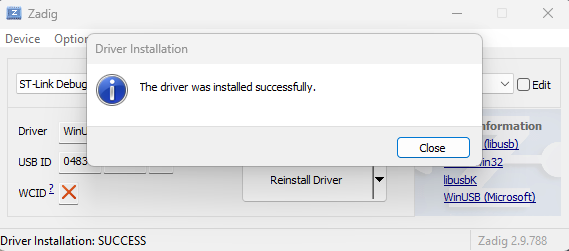
ST-Link Debug (Interface 0)for the ST-Link on a Nucleo or Discovery board,STM32 STLinkfor a stand-alone ST-Link V2 dongle; either way the USB ID column starts with 0483. Make sure the arrow points at WinUSB, click Install Driver, then replug. If you later install ST's tools and they stop seeing this probe, reinstall ST's driver package.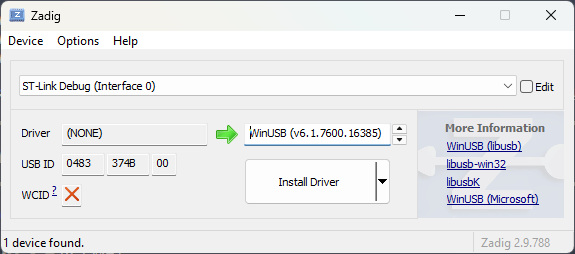
-
J-Link — install the SEGGER J-Link software pack, which provides the driver and the DLL
pylink-squareloads.
2. Install
Linux and macOS
git clone https://github.com/omrdk/mcuhex-sdk.git
cd mcuhex-sdk
python3 -m venv .venv
source .venv/bin/activate
pip install -r requirements.txt
Linux only — install the udev rules, then unplug and replug the probe:
sudo cp udev/*.rules /etc/udev/rules.d/
sudo udevadm control --reload && sudo udevadm trigger
Windows (PowerShell)
git clone https://github.com/omrdk/mcuhex-sdk.git
cd mcuhex-sdk
py -m venv .venv
Set-ExecutionPolicy -ExecutionPolicy RemoteSigned -Scope Process
.venv\Scripts\Activate.ps1
pip install -r requirements.txt
PowerShell refuses to run the activation script under the default execution
policy, with "running scripts is disabled on this system". The line above
lifts that for the current window only — close it and the machine's policy is
untouched. From cmd.exe instead of PowerShell, run .venv\Scripts\activate.bat
and skip that line.
3. Start the server
Connect your probe over USB, then run the same command on every platform:
python server.py --probe PyOCDProbe
Leave the terminal open — this process owns the probe for as long as you are working.
4. Connect from the browser
Open mcuhex.com/monitor. The web app dials
ws://127.0.0.1:8765 by itself, so there is nothing to paste or configure. The
page is served over HTTPS but the socket is plain ws://; browsers allow this
because loopback counts as a trusted origin.
Keep the default port. The web app has no setting for a different one, so a
server started with --port will not be found. If the browser cannot reach a
server that is clearly running, bind the loopback address explicitly:
python server.py --probe PyOCDProbe --host 127.0.0.1
The server only accepts WebSocket handshakes from an allow-list of origins
(desktop/config.py), so no other site you happen to have open can drive your
probe. Clients that send no Origin header at all — the CLI below, the VS Code
extension — are also accepted, which no web page can imitate.
Quick Start
# Mock an ARM Cortex-M device (no hardware needed)
python mock_device.py cortex_m

# Mock with no simulated read delay (instant reads)
python mock_device.py cortex_m --fast

# Real hardware via the PyOCD driver (ARM Cortex-M over SWD)
python mock_device.py -t pyocd

# Run the server directly with a specific probe class
python server.py --probe PyOCDProbe

# Interactive CLI client
python client.py
mock_device.py Launcher
Despite its name, mock_device.py is a universal launcher that starts the server in either Mock mode or Real Hardware mode.
usage: mock_device.py [-h] [-f MOCK_FILE] [-t {mock,pyocd}] [--debug] [-P PORT]
                      [-s SCENARIO] [--fast] ...
                      [{cortex_m}]
| Argument | Description |
|---|---|
{cortex_m} | Device family profile (mock mode): cortex_m (ARM SWD). Sets the simulated device identity. |
-t, --type | Driver type: mock (default, simulation) or pyocd (ARM Cortex-M over SWD). |
-f, --file | Custom file (mock only): path to a JSON symbol/memory file. |
-P, --port | WebSocket server port (default: 8765). |
--fast | Disable the simulated read delay in mock mode (instant reads). |
--debug | Enable verbose logging. |
--mock-wave-freq / --mock-wave-amp | Tune the mock waveform generator (Hz / amplitude). |
--vid / --pid / --manufacturer / --product / --serial / --device-path | Override the simulated USB device descriptors. |
server.py (Direct)
Run the server directly and choose the initial probe class:
python server.py --probe {PyOCDProbe,DummyProbe} [--port 8765] [--debug]
Architecture
server.py               WebSocket server, CommandHandler, ErrorCode, PROBE_MAP
mock_device.py          Universal launcher (mock + real hardware)
client.py               Interactive CLI client

probe/
  debugprobe.py         DebugProbe abstract base
  dummyprobe.py         Mock/simulator + waveform generation + scenario injection
  pyocd_probe.py        PyOCD driver (ARM Cortex-M over SWD)
  remoteprobe.py        Remote proxy
  errors.py             ProbeError

desktop/                pystray tray app, auto-update, build scripts (macOS + Windows)
firmware/               Demo firmware used by the mock profile data
Drivers are loaded individually in probe/__init__.py; a missing native dependency (e.g. serial, pyocd) logs a warning and skips that driver rather than failing the whole import.
WebSocket Protocol
All communication is JSON over a single WebSocket connection. Every request carries a cmd and an optional client-chosen id; the server echoes that id back so the client can match responses to requests.
Message envelopes
// Request  (client → server)
{ "cmd": "<command>", "id": <number>, /* ...command-specific args */ }

// Success response  (server → client)
{ "version": 1, "sdk_version": "x.y.z", "status": 0, "id": <number>, /* ...data */ }

// Error response  (server → client)
{ "version": 1, "sdk_version": "x.y.z", "status": 1, "error_code": "<CODE>", "msg": "<human readable>" }
statusis0on success and1on error.- On error,
error_codeis a stable machine-readable string (see Error codes) andmsgis a human-readable explanation. - Long-running commands (
capture,flash,install_pack) return immediately with an acknowledgement, then push progress/completion messages identified by atypefield (see Async push messages).
Command reference
| Command | Required args | Optional args | Success payload |
|---|---|---|---|
list_devices | — | — | { devices: [...] } (+ demo, demo_registers in demo mode). Each device carries transport and supported; a device that is present but cannot be used also carries reason (driver_missing: on Windows the probe has no WinUSB driver bound, see the Windows notes under Platform prerequisites); connecting to it fails with PROBE_DRIVER_MISSING |
list_probes | — | — | { probes: [...], active_probe } |
set_probe | probe_name | — | { msg } |
enter_demo | — | — | { demo: true, ... } |
get_driver_list | — | — | { drivers: [...] } |
connect | uri | target | { is_open, target? } |
disconnect | — | — | { is_open } |
read | addr, nb | — | { data: "<hex>" } |
write | addr, data (hex) | — | {} (status only) |
calibrate | — | — | { per_read_ms } |
capture | channels, rate_hz, duration_s | — | { msg: "capture_started" } → async capture_complete |
stop_capture | — | — | { msg } |
browse_files | — | directory, extensions | { directory, parent, entries } (restricted to $HOME) |
flash | file_path | chip_erase, verify, no_reset | { msg: "flash_started" } → async flash_progress / flash_complete |
cancel_flash | — | — | { msg } |
search_targets | — | query, limit | { results: [...], total, index_error?, packs_reachable? } → may be preceded by async pack_progress |
install_pack | target | — | { msg } → async pack_progress / pack_complete |
set_target | uri | target | { msg, uri, target? } |
get_target_info_ext | — | — | { target_override, overrides, detected?, memory_map } |
readreturns memory as a hex string;writetakesdataas a hex string.channelsis a list of{ addr, nb, type }objects (see Data encoding fortype).
Examples
// read 4 bytes at 0x20000000
→ { "cmd": "read", "id": 7, "addr": 536870912, "nb": 4 }
← { "version": 1, "sdk_version": "1.2.3", "status": 0, "id": 7, "data": "39300000" }

// connect to a probe that isn't there
→ { "cmd": "connect", "id": 8, "uri": "pyocd:0x0483" }
← { "version": 1, "sdk_version": "1.2.3", "status": 1,
    "error_code": "NO_DEVICES_FOUND", "msg": "No debug probes found" }
Async push messages
These are emitted by the server without a matching request id; clients dispatch on type.
// capture finished — buffered samples streamed back at once
{ "type": "capture_complete", "capture_id": <id>,
  "samples": [[t, v1, v2, ...], ...], "actual_hz": <float>, "total_samples": <int> }

// flash progress (repeated; phase ∈ "erasing" | "programming" | "verifying")
{ "type": "flash_progress", "flash_id": <id>, "phase": "programming", "progress": 0.62 }

// flash finished — success
{ "type": "flash_complete", "flash_id": <id>, "success": true,
  "duration_ms": <int>, "bytes_programmed": <int> }

// flash finished — failure
{ "type": "flash_complete", "flash_id": <id>, "success": false,
  "error_code": "<CODE>", "msg": "<...>" }

// pack index / pack download progress (repeated). Carries `install_id` during
// an install, `search: true` when a search had to download or complete the
// index first; phase ∈ "preparing" | "indexing" | "indexed" | "downloading" | "registering"
{ "type": "pack_progress", "search": true, "phase": "indexing",
  "msg": "Completing pack index (12 of 224)..." }

// pack install finished
{ "type": "pack_complete", "install_id": <id>, "success": <bool>, "target": "<name>",
  "installed": <bool>, "error_code"?: "<CODE>", "msg"?: "<...>" }
search_targets answers from the CMSIS-Pack index. The index is completed
against the vendor's own list before it is trusted; if descriptors are still
missing afterwards the results are served with index_error: "PACK_INDEX_INCOMPLETE",
and an install_pack for a part the index lacks fails with the same code
instead of claiming the part does not exist.
Error codes
error_code values are grouped by category — generic connection (NO_DEVICES_FOUND, DEVICE_BUSY, PERMISSION_DENIED, CONNECT_TIMEOUT, READ_WRITE_FAILED, …), Cortex-M specific (CORTEX_M_DEBUG_PORT_LOCKED, CORTEX_M_SWD_PROTOCOL_ERROR, …), flash operations (FLASH_FILE_NOT_FOUND, FLASH_UNSUPPORTED_FORMAT, FLASH_VERIFICATION_FAILED, CORTEX_M_FLASH_WRITE_PROTECTED, …), and file browse (BROWSE_PERMISSION_DENIED, BROWSE_INVALID_PATH). The authoritative list is ErrorCode in server.py, kept in sync with ConnectionErrorCode on the web-app side. Every user-facing code has a step-by-step guide in the MCUHex troubleshooting catalog.
Data encoding
Values are exchanged as little-endian hex strings. ELF-parser type tags: U08/U16/U32 (unsigned), I08/I16/I32 (signed), F32/F64.
Mock Data Format
When using -f in mock mode, the JSON file defines symbols and initial values:
{
  "lst": [
    { "nam": "myVariable", "adr": "0x20000000", "sze": 4, "val": 12345 }
  ]
}
adr: hex string address.val: (optional) initial integer value loaded into simulated memory.
License
Copyright 2026 Ömer Faruk Dak
Licensed under the Apache License, Version 2.0. See LICENSE for the full text.
Contributors

67 commits
See what people are saying
Similar repos


Languages
Python
98.5%
Real-time communication tool for interacting with STM32 devices
0
stars
67
commits
Python
primary language
Sep 12, 2026
updated
README
MCUHex SDK
MCUHex SDK is the local backend that connects the MCUHex web app to physical debug probes. It runs on the developer's machine as a lightweight WebSocket server (default ws://127.0.0.1:8765) and exposes a single JSON protocol the web app drives to talk to the target MCU.
Through that protocol the SDK provides:
- Memory access — read and write arbitrary addresses on the target.
- Live signal capture — sample one or more variables/registers at a fixed rate and stream the buffered result back.
- Firmware flashing — program
.elf/.out/ images with live progress, with CMSIS-Pack discovery and install for target support. - Device & target management — enumerate attached probes, auto-select the matching driver, and override the target chip.
It connects to ARM Cortex-M targets over SWD using PyOCD. The SDK also ships as a small tray application for macOS and Windows that manages the server lifecycle and auto-updates. Those binaries are built from this repository by the Release workflow, from the commit the version tag points at, and they are not code-signed, so macOS and Windows warn on first launch. If you would rather not run an unsigned binary, or you are on Linux, see Run from source: it is the same code.
Connectivity Support
[!NOTE] Only the ARM Cortex-M (SWD) path is supported today. Drivers for OCD (STM32G4) and serial transports are out-of-tree and planned for future releases.
| Transport | Targets | Driver | Status |
|---|---|---|---|
| SWD | ARM Cortex-M | PyOCD | ✅ Supported |
| OCD | STM32 family | — | 🚧 Planned |
| Serial / UART | TI C2000, ESP32 / Espressif | — | 🚧 Planned |
✅ Available now · 🚧 On the roadmap — not yet wired in
Run from source
The tray app for macOS and Windows is this same server wrapped in a menu-bar icon. Running from source gives you everything the tray app does, and it is the supported path on Linux, where there is no packaged build.
Requires Python 3.9 or newer. Verified on 3.11, 3.13 and 3.14.
1. Platform prerequisites
Linux (Debian / Ubuntu)
sudo apt install python3-venv libusb-1.0-0 libhidapi-hidraw0
USB debug probes are root-only until a udev rule grants your user access.
Without the rules the probe enumerates but cannot be claimed, and the SDK
reports PERMISSION_DENIED. The rules ship in this repository's udev/
directory (pyOCD's set: ST-Link, CMSIS-DAP and a few others); step 2 installs
them once the repository is cloned. J-Link brings its own rule with SEGGER's
software pack, which it needs on Linux regardless.
If you also use the board's virtual COM port, add yourself to the serial group and log back in:
sudo usermod -aG dialout $USER
macOS (Apple Silicon and Intel)
No extra system packages. libusb-package in requirements.txt carries the
libusb binary, and hidapi ships as a wheel.
Windows (x64)
No extra system packages: libusb and hidapi both install as wheels.
Driver notes per probe:
-
ST-Link — pyOCD reaches it through WinUSB. If STM32CubeIDE or STM32CubeProgrammer is installed, its driver already binds WinUSB and there is nothing to do. Otherwise plug the probe in and, if it does not appear in the device list, open Zadig. It lists the driverless probe on startup (Options → List All Devices only if it is missing). The name comes from the probe itself:
ST-Link Debug (Interface 0)for the ST-Link on a Nucleo or Discovery board,STM32 STLinkfor a stand-alone ST-Link V2 dongle; either way the USB ID column starts with 0483. Make sure the arrow points at WinUSB, click Install Driver, then replug. If you later install ST's tools and they stop seeing this probe, reinstall ST's driver package.
-
J-Link — install the SEGGER J-Link software pack, which provides the driver and the DLL
pylink-squareloads.
2. Install
Linux and macOS
git clone https://github.com/omrdk/mcuhex-sdk.git
cd mcuhex-sdk
python3 -m venv .venv
source .venv/bin/activate
pip install -r requirements.txt
Linux only — install the udev rules, then unplug and replug the probe:
sudo cp udev/*.rules /etc/udev/rules.d/
sudo udevadm control --reload && sudo udevadm trigger
Windows (PowerShell)
git clone https://github.com/omrdk/mcuhex-sdk.git
cd mcuhex-sdk
py -m venv .venv
Set-ExecutionPolicy -ExecutionPolicy RemoteSigned -Scope Process
.venv\Scripts\Activate.ps1
pip install -r requirements.txt
PowerShell refuses to run the activation script under the default execution
policy, with "running scripts is disabled on this system". The line above
lifts that for the current window only — close it and the machine's policy is
untouched. From cmd.exe instead of PowerShell, run .venv\Scripts\activate.bat
and skip that line.
3. Start the server
Connect your probe over USB, then run the same command on every platform:
python server.py --probe PyOCDProbe
Leave the terminal open — this process owns the probe for as long as you are working.
4. Connect from the browser
Open mcuhex.com/monitor. The web app dials
ws://127.0.0.1:8765 by itself, so there is nothing to paste or configure. The
page is served over HTTPS but the socket is plain ws://; browsers allow this
because loopback counts as a trusted origin.
Keep the default port. The web app has no setting for a different one, so a
server started with --port will not be found. If the browser cannot reach a
server that is clearly running, bind the loopback address explicitly:
python server.py --probe PyOCDProbe --host 127.0.0.1
The server only accepts WebSocket handshakes from an allow-list of origins
(desktop/config.py), so no other site you happen to have open can drive your
probe. Clients that send no Origin header at all — the CLI below, the VS Code
extension — are also accepted, which no web page can imitate.
Quick Start
# Mock an ARM Cortex-M device (no hardware needed)
python mock_device.py cortex_m

# Mock with no simulated read delay (instant reads)
python mock_device.py cortex_m --fast

# Real hardware via the PyOCD driver (ARM Cortex-M over SWD)
python mock_device.py -t pyocd

# Run the server directly with a specific probe class
python server.py --probe PyOCDProbe

# Interactive CLI client
python client.py
mock_device.py Launcher
Despite its name, mock_device.py is a universal launcher that starts the server in either Mock mode or Real Hardware mode.
usage: mock_device.py [-h] [-f MOCK_FILE] [-t {mock,pyocd}] [--debug] [-P PORT]
                      [-s SCENARIO] [--fast] ...
                      [{cortex_m}]
| Argument | Description |
|---|---|
{cortex_m} | Device family profile (mock mode): cortex_m (ARM SWD). Sets the simulated device identity. |
-t, --type | Driver type: mock (default, simulation) or pyocd (ARM Cortex-M over SWD). |
-f, --file | Custom file (mock only): path to a JSON symbol/memory file. |
-P, --port | WebSocket server port (default: 8765). |
--fast | Disable the simulated read delay in mock mode (instant reads). |
--debug | Enable verbose logging. |
--mock-wave-freq / --mock-wave-amp | Tune the mock waveform generator (Hz / amplitude). |
--vid / --pid / --manufacturer / --product / --serial / --device-path | Override the simulated USB device descriptors. |
server.py (Direct)
Run the server directly and choose the initial probe class:
python server.py --probe {PyOCDProbe,DummyProbe} [--port 8765] [--debug]
Architecture
server.py               WebSocket server, CommandHandler, ErrorCode, PROBE_MAP
mock_device.py          Universal launcher (mock + real hardware)
client.py               Interactive CLI client

probe/
  debugprobe.py         DebugProbe abstract base
  dummyprobe.py         Mock/simulator + waveform generation + scenario injection
  pyocd_probe.py        PyOCD driver (ARM Cortex-M over SWD)
  remoteprobe.py        Remote proxy
  errors.py             ProbeError

desktop/                pystray tray app, auto-update, build scripts (macOS + Windows)
firmware/               Demo firmware used by the mock profile data
Drivers are loaded individually in probe/__init__.py; a missing native dependency (e.g. serial, pyocd) logs a warning and skips that driver rather than failing the whole import.
WebSocket Protocol
All communication is JSON over a single WebSocket connection. Every request carries a cmd and an optional client-chosen id; the server echoes that id back so the client can match responses to requests.
Message envelopes
// Request  (client → server)
{ "cmd": "<command>", "id": <number>, /* ...command-specific args */ }

// Success response  (server → client)
{ "version": 1, "sdk_version": "x.y.z", "status": 0, "id": <number>, /* ...data */ }

// Error response  (server → client)
{ "version": 1, "sdk_version": "x.y.z", "status": 1, "error_code": "<CODE>", "msg": "<human readable>" }
statusis0on success and1on error.- On error,
error_codeis a stable machine-readable string (see Error codes) andmsgis a human-readable explanation. - Long-running commands (
capture,flash,install_pack) return immediately with an acknowledgement, then push progress/completion messages identified by atypefield (see Async push messages).
Command reference
| Command | Required args | Optional args | Success payload |
|---|---|---|---|
list_devices | — | — | { devices: [...] } (+ demo, demo_registers in demo mode). Each device carries transport and supported; a device that is present but cannot be used also carries reason (driver_missing: on Windows the probe has no WinUSB driver bound, see the Windows notes under Platform prerequisites); connecting to it fails with PROBE_DRIVER_MISSING |
list_probes | — | — | { probes: [...], active_probe } |
set_probe | probe_name | — | { msg } |
enter_demo | — | — | { demo: true, ... } |
get_driver_list | — | — | { drivers: [...] } |
connect | uri | target | { is_open, target? } |
disconnect | — | — | { is_open } |
read | addr, nb | — | { data: "<hex>" } |
write | addr, data (hex) | — | {} (status only) |
calibrate | — | — | { per_read_ms } |
capture | channels, rate_hz, duration_s | — | { msg: "capture_started" } → async capture_complete |
stop_capture | — | — | { msg } |
browse_files | — | directory, extensions | { directory, parent, entries } (restricted to $HOME) |
flash | file_path | chip_erase, verify, no_reset | { msg: "flash_started" } → async flash_progress / flash_complete |
cancel_flash | — | — | { msg } |
search_targets | — | query, limit | { results: [...], total, index_error?, packs_reachable? } → may be preceded by async pack_progress |
install_pack | target | — | { msg } → async pack_progress / pack_complete |
set_target | uri | target | { msg, uri, target? } |
get_target_info_ext | — | — | { target_override, overrides, detected?, memory_map } |
readreturns memory as a hex string;writetakesdataas a hex string.channelsis a list of{ addr, nb, type }objects (see Data encoding fortype).
Examples
// read 4 bytes at 0x20000000
→ { "cmd": "read", "id": 7, "addr": 536870912, "nb": 4 }
← { "version": 1, "sdk_version": "1.2.3", "status": 0, "id": 7, "data": "39300000" }

// connect to a probe that isn't there
→ { "cmd": "connect", "id": 8, "uri": "pyocd:0x0483" }
← { "version": 1, "sdk_version": "1.2.3", "status": 1,
    "error_code": "NO_DEVICES_FOUND", "msg": "No debug probes found" }
Async push messages
These are emitted by the server without a matching request id; clients dispatch on type.
// capture finished — buffered samples streamed back at once
{ "type": "capture_complete", "capture_id": <id>,
  "samples": [[t, v1, v2, ...], ...], "actual_hz": <float>, "total_samples": <int> }

// flash progress (repeated; phase ∈ "erasing" | "programming" | "verifying")
{ "type": "flash_progress", "flash_id": <id>, "phase": "programming", "progress": 0.62 }

// flash finished — success
{ "type": "flash_complete", "flash_id": <id>, "success": true,
  "duration_ms": <int>, "bytes_programmed": <int> }

// flash finished — failure
{ "type": "flash_complete", "flash_id": <id>, "success": false,
  "error_code": "<CODE>", "msg": "<...>" }

// pack index / pack download progress (repeated). Carries `install_id` during
// an install, `search: true` when a search had to download or complete the
// index first; phase ∈ "preparing" | "indexing" | "indexed" | "downloading" | "registering"
{ "type": "pack_progress", "search": true, "phase": "indexing",
  "msg": "Completing pack index (12 of 224)..." }

// pack install finished
{ "type": "pack_complete", "install_id": <id>, "success": <bool>, "target": "<name>",
  "installed": <bool>, "error_code"?: "<CODE>", "msg"?: "<...>" }
search_targets answers from the CMSIS-Pack index. The index is completed
against the vendor's own list before it is trusted; if descriptors are still
missing afterwards the results are served with index_error: "PACK_INDEX_INCOMPLETE",
and an install_pack for a part the index lacks fails with the same code
instead of claiming the part does not exist.
Error codes
error_code values are grouped by category — generic connection (NO_DEVICES_FOUND, DEVICE_BUSY, PERMISSION_DENIED, CONNECT_TIMEOUT, READ_WRITE_FAILED, …), Cortex-M specific (CORTEX_M_DEBUG_PORT_LOCKED, CORTEX_M_SWD_PROTOCOL_ERROR, …), flash operations (FLASH_FILE_NOT_FOUND, FLASH_UNSUPPORTED_FORMAT, FLASH_VERIFICATION_FAILED, CORTEX_M_FLASH_WRITE_PROTECTED, …), and file browse (BROWSE_PERMISSION_DENIED, BROWSE_INVALID_PATH). The authoritative list is ErrorCode in server.py, kept in sync with ConnectionErrorCode on the web-app side. Every user-facing code has a step-by-step guide in the MCUHex troubleshooting catalog.
Data encoding
Values are exchanged as little-endian hex strings. ELF-parser type tags: U08/U16/U32 (unsigned), I08/I16/I32 (signed), F32/F64.
Mock Data Format
When using -f in mock mode, the JSON file defines symbols and initial values:
{
  "lst": [
    { "nam": "myVariable", "adr": "0x20000000", "sze": 4, "val": 12345 }
  ]
}
adr: hex string address.val: (optional) initial integer value loaded into simulated memory.
License
Copyright 2026 Ömer Faruk Dak
Licensed under the Apache License, Version 2.0. See LICENSE for the full text.
See what people are saying
Similar repos
Contributors
67 commits
Languages
Python
98.5%