Ground truth for enterprise AI: your AI coding tools, your accounts and every session on your own server, from one web console, CLI or API. Self-hosted, open source.
See the code
Languages: English · Español · 简体中文 · Русский · 日本語 · Deutsch · Français
Run the AI your team already uses, with the same control you have over the rest of your infrastructure.
What it does · Install · Editions · Documentation · Community · olivares.ai




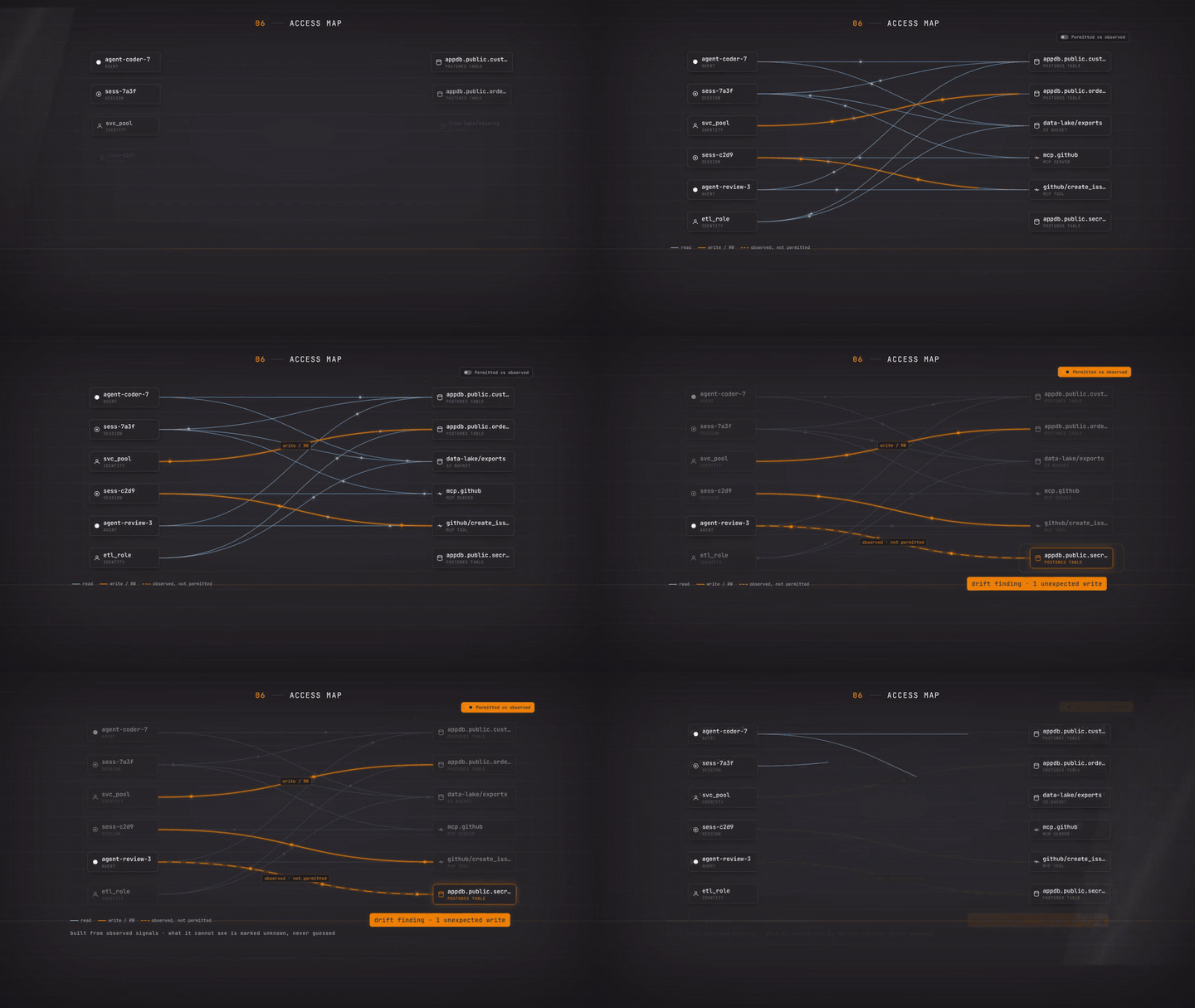
Your developers work with Claude Code and Codex. Agents call MCP servers, models and internal APIs, and scheduled jobs run on their own. Each piece keeps its own logs and its own permissions, so simple questions have no quick answer: which agent changed this file, who approved it, what did AI cost us this month?
Olivares AI answers them in one place. It connects to the agents and tools you already use, shows what each one does, applies your rules before an action runs, and keeps a signed record of everything. It is a single program that runs on your own servers, and the complete product is free and open source.
It works with the tools you already have: Claude Code, Codex, Grok, Cursor, gemini-cli, opencode, OpenHands and local models through Ollama. 32 modules and 136 integrations: every module · every connector.
Community keeps local observability, stored settings and backup export. SIEM/ITSM push, external telemetry delivery and posture export are included in the Business base edition.
Session network isolation covers Claude Code and Codex sessions bound to a provider key. Such a session reaches only its provider's endpoint, through a per-session proxy in its own network namespace, or it does not start. Grok Build, OpenCode and account-login sessions can still reach any host the network permits. See session network isolation before running workloads that require exclusive access to one provider.
Pick one method and copy its block. At the end, olivares quickstart prints the console address and a one-time token to create the first administrator. Every release is signed, and each method verifies what it downloads before it installs it (verify a download yourself).
Linux and macOS, one command. Detects your system, verifies the release, installs only the binary and never uses sudo.
curl -fsSL https://olivares.ai/olivares/install.sh | sh
olivares quickstart
Docker. Multi-arch. Container images are based on Debian 13 slim (with Node.js 24 for the agent tools) and run as a non-root user. It listens on every host interface; put 127.0.0.1: before each -p to keep it local.
docker run -d --name olivares -p 8443:8443 -p 8444:8444 \
  -v olivares-data:/var/lib/olivares \
  docker.io/olivaresai/olivares:0.1 \
  serve --listen :8443 --grpc-listen :8444 --data-dir /var/lib/olivares
Docker Compose. SQLite on one node, with optional Postgres and backups.
git clone --depth 1 https://github.com/olivaresai/olivares.git && cd olivares
docker compose -f deploy/compose/docker-compose.yml up --wait --wait-timeout 120
Sessions work on one host folder: set OLIVARES_PROJECT_DIR to its absolute path before up, and Compose mounts it at /project. On hosts whose AppArmor policy limits user namespaces (Ubuntu 24.04 and later), load the session profile first: see Docker Compose.
Debian and Ubuntu. The package adds a no-login olivares user and a hardened service; you start it.
curl -fsSLO https://github.com/olivaresai/olivares/releases/download/0.1/olivares_0.1_linux_amd64.deb
sudo dpkg -i olivares_0.1_linux_amd64.deb && sudo systemctl enable --now olivares
RHEL, Fedora and SUSE.
curl -fsSLO https://github.com/olivaresai/olivares/releases/download/0.1/olivares_0.1_linux_amd64.rpm
sudo rpm -i olivares_0.1_linux_amd64.rpm && sudo systemctl enable --now olivares
Alpine.
curl -fsSLO https://github.com/olivaresai/olivares/releases/download/0.1/olivares_0.1_linux_amd64.apk
sudo apk add --allow-untrusted olivares_0.1_linux_amd64.apk && sudo rc-service olivares start
On ARM servers, use arm64 instead of amd64. Every file of the release: the release page.
Homebrew. macOS and Linux.
brew install olivaresai/tap/olivares && olivares quickstart
From source. Go 1.26+, Task and pnpm.
git clone --depth 1 https://github.com/olivaresai/olivares.git && cd olivares
task build && ./bin/olivares quickstart
Offline networks: bundle the signed image, chart and verification material, then install air-gapped. Windows has no native build yet: use the Docker image or WSL2. Upgrades and rollback: how-to. Every option in detail: INSTALL.md.
Try it first with demo data, on your machine only (the demo password is public):
olivares serve --seed-demo --insecure --listen 127.0.0.1:8901 --grpc-listen 127.0.0.1:8902 --data-dir "$(mktemp -d)"
Then open http://127.0.0.1:8901.
Helm, the Kubernetes operator, Terraform, appliance and FIPS/STIG deployment artifacts are distributed with Business; air-gapped installation requires Enterprise. See editions.
Community is the complete product, free and open source. Business adds what a company needs to run it in production. Enterprise is for groups with larger or regulated estates.
| Community | Business | Enterprise | |
|---|---|---|---|
| Price | Free, AGPL-3.0 | USD 129/month or USD 1,290/year | Annual contract |
| What you get | The complete product: unlimited users and all four deny-closed enforcement points | Everything in Community, plus Regulated Operations, AI Runtime Security, Compliance Packs and Identity & Scale, the commercial licence, signed updates and email support | Everything in Business, plus more companies, deployments and identity providers, offline mirrors and support terms agreed with you |
| Scope | One active identity provider | One company, one active instance at a time | Agreed in the contract |
Regulated Operations adds regulatory retention floors, legal-hold reconciliation on archives and WORM archives on Azure and GCS. AI Runtime Security adds deeper inspection of what agents send, receive and run. Compliance Packs provide framework assessments, regulatory views, OSCAL export and on-demand HTML/PDF reports, and draft the DORA register of information and the ISO/IEC 42001 pack for your auditor. Identity & Scale connects several identity providers at once and grows with larger deployments.
Compare editions and buy · What each edition includes · What is open and what is commercial
One Go binary with the console built in. It serves a REST API, a gRPC API, the olivares command line. The Terraform provider is distributed with Business. Collectors run inside your network, and data stays in SQLite or PostgreSQL on your servers. How it fits together.
docs.olivares.ai has install guides, a guide for every connector, recipes for common policies and the API reference. Start with What is Olivares AI. What runs today and what is still planned: Honesty & limits. Releases: GitHub · CHANGELOG.md.
On the website: product · solutions · how it works · architecture · security · trust · compare · demo · changelog · status · roadmap · brand · press.
Found a vulnerability? Report it privately through SECURITY.md. Olivares AI records which agent touched which resource, not the content, and opening that record is itself logged. Licences are checked offline; the open-source core never calls us.
Contributions are welcome. CONTRIBUTING.md explains the setup, the sign-off and how connectors fit in. Code of conduct · Support · Governance · Changelog.
Olivares AI is built in the open. If it helps you, sponsor its development on GitHub Sponsors — olivaresai or fran-olivares — or buy us a coffee on Ko-fi. Sponsors who want to be named appear in SUPPORTERS.md. Sponsorship is not a support contract (SUPPORT.md).

The engine, modules and console are AGPL-3.0-only; the SDK, connectors and clients are Apache-2.0. Commercial code is built separately and is not in this repository; commercial licensing: [email protected]. Contributions need a DCO sign-off (git commit -s) and the CLA.
Provided as is, without warranty of any kind and without liability for loss of data, business interruption or lost profits. See
DISCLAIMER.md.

Ground truth for enterprise AI. · olivares.ai · AGPL-3.0 + commercial
Go module
Latest release
Releases this year
Ground truth for enterprise AI: your AI coding tools, your accounts and every session on your own server, from one web console, CLI or API. Self-hosted, open source.
See the code
Languages: English · Español · 简体中文 · Русский · 日本語 · Deutsch · Français
Run the AI your team already uses, with the same control you have over the rest of your infrastructure.
What it does · Install · Editions · Documentation · Community · olivares.ai
Your developers work with Claude Code and Codex. Agents call MCP servers, models and internal APIs, and scheduled jobs run on their own. Each piece keeps its own logs and its own permissions, so simple questions have no quick answer: which agent changed this file, who approved it, what did AI cost us this month?
Olivares AI answers them in one place. It connects to the agents and tools you already use, shows what each one does, applies your rules before an action runs, and keeps a signed record of everything. It is a single program that runs on your own servers, and the complete product is free and open source.
It works with the tools you already have: Claude Code, Codex, Grok, Cursor, gemini-cli, opencode, OpenHands and local models through Ollama. 32 modules and 136 integrations: every module · every connector.
Community keeps local observability, stored settings and backup export. SIEM/ITSM push, external telemetry delivery and posture export are included in the Business base edition.
Session network isolation covers Claude Code and Codex sessions bound to a provider key. Such a session reaches only its provider's endpoint, through a per-session proxy in its own network namespace, or it does not start. Grok Build, OpenCode and account-login sessions can still reach any host the network permits. See session network isolation before running workloads that require exclusive access to one provider.
Pick one method and copy its block. At the end, olivares quickstart prints the console address and a one-time token to create the first administrator. Every release is signed, and each method verifies what it downloads before it installs it (verify a download yourself).
Linux and macOS, one command. Detects your system, verifies the release, installs only the binary and never uses sudo.
curl -fsSL https://olivares.ai/olivares/install.sh | sh
olivares quickstart
Docker. Multi-arch. Container images are based on Debian 13 slim (with Node.js 24 for the agent tools) and run as a non-root user. It listens on every host interface; put 127.0.0.1: before each -p to keep it local.
docker run -d --name olivares -p 8443:8443 -p 8444:8444 \
  -v olivares-data:/var/lib/olivares \
  docker.io/olivaresai/olivares:0.1 \
  serve --listen :8443 --grpc-listen :8444 --data-dir /var/lib/olivares
Docker Compose. SQLite on one node, with optional Postgres and backups.
git clone --depth 1 https://github.com/olivaresai/olivares.git && cd olivares
docker compose -f deploy/compose/docker-compose.yml up --wait --wait-timeout 120
Sessions work on one host folder: set OLIVARES_PROJECT_DIR to its absolute path before up, and Compose mounts it at /project. On hosts whose AppArmor policy limits user namespaces (Ubuntu 24.04 and later), load the session profile first: see Docker Compose.
Debian and Ubuntu. The package adds a no-login olivares user and a hardened service; you start it.
curl -fsSLO https://github.com/olivaresai/olivares/releases/download/0.1/olivares_0.1_linux_amd64.deb
sudo dpkg -i olivares_0.1_linux_amd64.deb && sudo systemctl enable --now olivares
RHEL, Fedora and SUSE.
curl -fsSLO https://github.com/olivaresai/olivares/releases/download/0.1/olivares_0.1_linux_amd64.rpm
sudo rpm -i olivares_0.1_linux_amd64.rpm && sudo systemctl enable --now olivares
Alpine.
curl -fsSLO https://github.com/olivaresai/olivares/releases/download/0.1/olivares_0.1_linux_amd64.apk
sudo apk add --allow-untrusted olivares_0.1_linux_amd64.apk && sudo rc-service olivares start
On ARM servers, use arm64 instead of amd64. Every file of the release: the release page.
Homebrew. macOS and Linux.
brew install olivaresai/tap/olivares && olivares quickstart
From source. Go 1.26+, Task and pnpm.
git clone --depth 1 https://github.com/olivaresai/olivares.git && cd olivares
task build && ./bin/olivares quickstart
Offline networks: bundle the signed image, chart and verification material, then install air-gapped. Windows has no native build yet: use the Docker image or WSL2. Upgrades and rollback: how-to. Every option in detail: INSTALL.md.
Try it first with demo data, on your machine only (the demo password is public):
olivares serve --seed-demo --insecure --listen 127.0.0.1:8901 --grpc-listen 127.0.0.1:8902 --data-dir "$(mktemp -d)"
Then open http://127.0.0.1:8901.
Helm, the Kubernetes operator, Terraform, appliance and FIPS/STIG deployment artifacts are distributed with Business; air-gapped installation requires Enterprise. See editions.
Community is the complete product, free and open source. Business adds what a company needs to run it in production. Enterprise is for groups with larger or regulated estates.
| Community | Business | Enterprise | |
|---|---|---|---|
| Price | Free, AGPL-3.0 | USD 129/month or USD 1,290/year | Annual contract |
| What you get | The complete product: unlimited users and all four deny-closed enforcement points | Everything in Community, plus Regulated Operations, AI Runtime Security, Compliance Packs and Identity & Scale, the commercial licence, signed updates and email support | Everything in Business, plus more companies, deployments and identity providers, offline mirrors and support terms agreed with you |
| Scope | One active identity provider | One company, one active instance at a time | Agreed in the contract |
Regulated Operations adds regulatory retention floors, legal-hold reconciliation on archives and WORM archives on Azure and GCS. AI Runtime Security adds deeper inspection of what agents send, receive and run. Compliance Packs provide framework assessments, regulatory views, OSCAL export and on-demand HTML/PDF reports, and draft the DORA register of information and the ISO/IEC 42001 pack for your auditor. Identity & Scale connects several identity providers at once and grows with larger deployments.
Compare editions and buy · What each edition includes · What is open and what is commercial
One Go binary with the console built in. It serves a REST API, a gRPC API, the olivares command line. The Terraform provider is distributed with Business. Collectors run inside your network, and data stays in SQLite or PostgreSQL on your servers. How it fits together.
docs.olivares.ai has install guides, a guide for every connector, recipes for common policies and the API reference. Start with What is Olivares AI. What runs today and what is still planned: Honesty & limits. Releases: GitHub · CHANGELOG.md.
On the website: product · solutions · how it works · architecture · security · trust · compare · demo · changelog · status · roadmap · brand · press.
Found a vulnerability? Report it privately through SECURITY.md. Olivares AI records which agent touched which resource, not the content, and opening that record is itself logged. Licences are checked offline; the open-source core never calls us.
Contributions are welcome. CONTRIBUTING.md explains the setup, the sign-off and how connectors fit in. Code of conduct · Support · Governance · Changelog.
Olivares AI is built in the open. If it helps you, sponsor its development on GitHub Sponsors — olivaresai or fran-olivares — or buy us a coffee on Ko-fi. Sponsors who want to be named appear in SUPPORTERS.md. Sponsorship is not a support contract (SUPPORT.md).
The engine, modules and console are AGPL-3.0-only; the SDK, connectors and clients are Apache-2.0. Commercial code is built separately and is not in this repository; commercial licensing: [email protected]. Contributions need a DCO sign-off (git commit -s) and the CLA.
Provided as is, without warranty of any kind and without liability for loss of data, business interruption or lost profits. See
DISCLAIMER.md.
Ground truth for enterprise AI. · olivares.ai · AGPL-3.0 + commercial
Go module
Latest release
Releases this year





