
EdgeInfer evaluation build for Windows x64: real-time machine vision on a normal CPU (ONNX Runtime + Intel OpenVINO, no GPU required). Dual-slot YOLOX pipeline; ~6–7 ms ROI on i5-11400. Non-commercial — testing, students, and scientific research only (see LICENSE). Looking for [infer] timings on other CPUs and feedback from global-shutter USB cam
0
stars
3
commits
Sep 8, 2026
updated
README
EdgeInfer
eval build 0.3.14 · Windows x64 · Nim · ONNX Runtime + OpenVINO · ordinary USB camera
I built this for real-time vision on a normal PC (no fancy GPU required).
This drop is an evaluation build: testing, students, research. Not a commercial license. Source stays closed; you get the compiled package.
Download (Windows x64 zip): Releases — eval 0.3.14
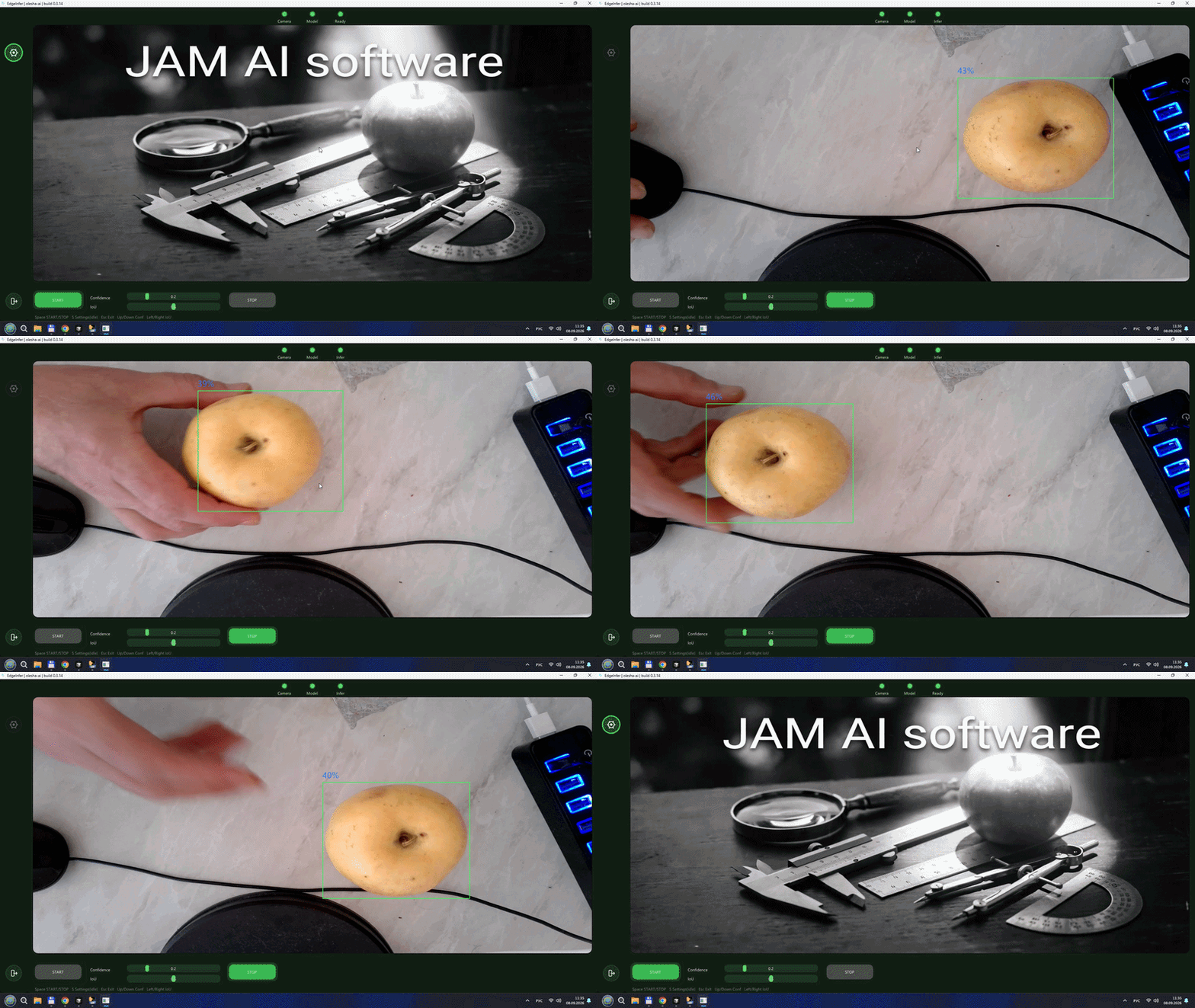
My desk setup — Core i5-11400, cheap rolling-shutter webcam, OpenVINO on CPU:
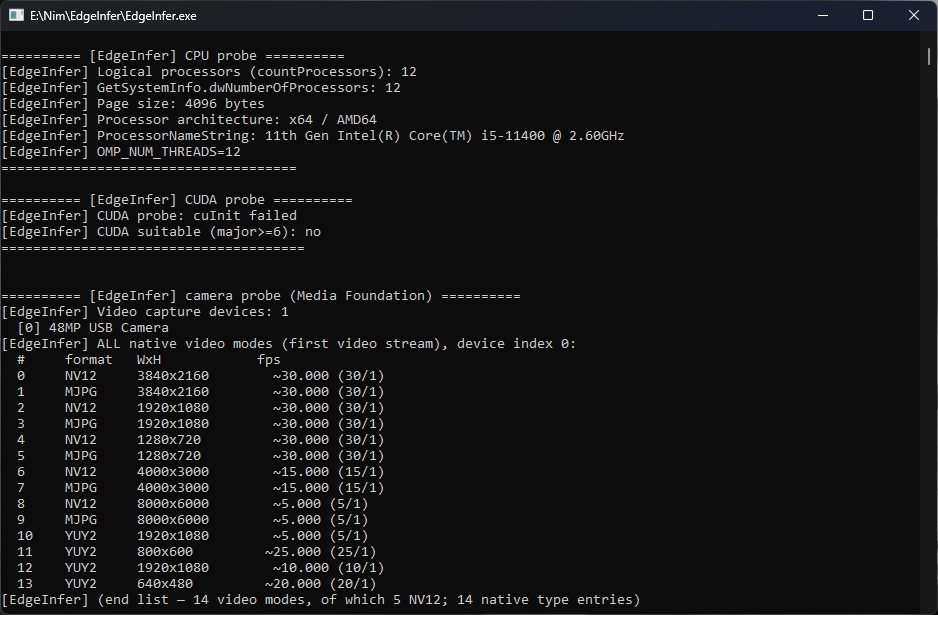
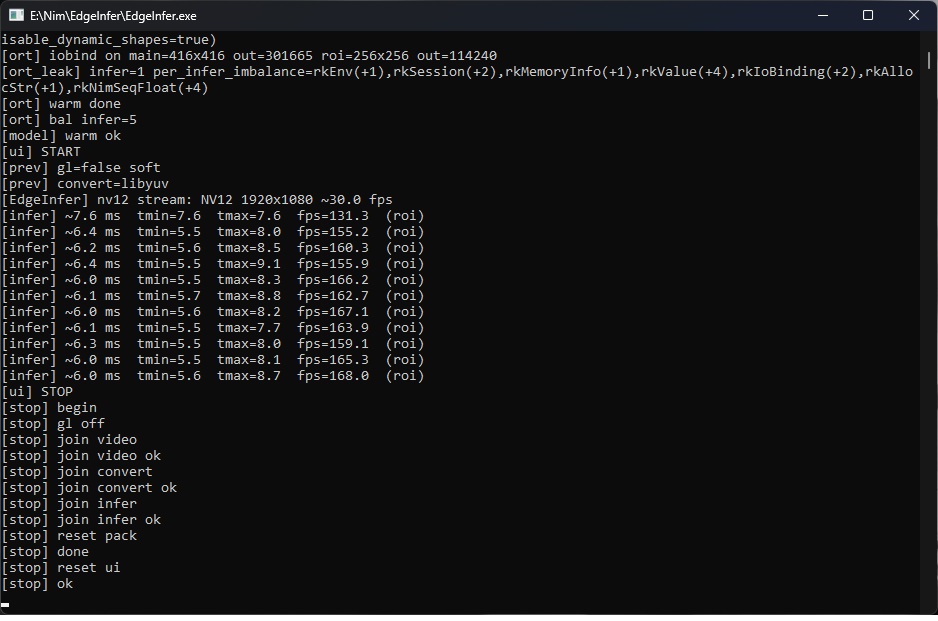
On this machine ROI sits around ~6–7 ms (~130–170 fps class of infer). Camera is ~30 fps, so the bottleneck is the picture, not the net.
Why I’m putting it up
I want numbers from other CPUs. I only have the 11400 here.
If you try it, open an Issue and paste:
- your CPU name
- a few console lines like
[infer] ~6.0 ms … fps=168 (roi) - camera model if you know it
I tested with a normal webcam. Motion blur on fast objects is ugly. If someone has a global shutter USB cam and can run the same build — please tell me what you see. I think boxes will look cleaner; I’d like proof from the field.
Profile: olesha-ai
What it does (short)
USB camera (Media Foundation, NV12) → convert thread (libyuv) for preview → infer thread (letterbox / ROI → ORT + OpenVINO → boxes on UI).
Two tensor slots (example: 416 full + 256 ROI) so we don’t resize the model every frame. UI is ImGui; START / STOP are separate buttons; Space toggles. Settings lock while the stream runs.
Overnight on my box (~10 h): heap flat ~3 MiB, private working set ~182 MiB, millions of infers, no watchdog restart. Your PC may differ — that’s why I want feedback.
Honest corners I won’t hide:
- Switching models on OpenVINO MULTI: we abandon the old session instead of a risky Release (tiny leak on rare switch; no crash). Lines don’t hot-swap models anyway.
- Exit uses
ExitProcessafter a clean shutdown — Windows + Nim/NiGui finalizers otherwise blow up. Fine for an exe. settings.jsonis not encrypted. Advanced is for people who know what they’re doing, not DRM.
Package layout
EdgeInfer.exe | the app |
lib/ | ORT + OpenVINO DLLs |
model/ | ONNX (YOLOX line) |
settings.json | created/updated next to the exe |
licenses/ | keep this — OpenVINO / ORT / YOLOX / … texts |
LICENSE.md | my eval license |
logs/ | only if you turn Memory diag on |
settings.json
Lives next to the exe. Camera, model path, conf/iou, ORT/OV knobs, tensor sizes, etc.
Missing file → defaults; Apply / exit can rewrite it. Better to change via UI (S when idle). Access Key for Advanced is not saved in the file.
logs
Off by default. Console still prints [infer] … — enough for a quick speed check.
For disk logs: Settings → Access Key → Advanced → Memory diag → Apply. Then logs/run.log and logs/mem.log.
Run it
- Get the zip from Releases.
- Unpack somewhere local (not a sync folder if you can help it).
lib/openvino/andmodel/*.onnxmust sit with the exe.- Plug USB cam, start
EdgeInfer.exefrom cmd if you want to see timings. - Wait for Camera / Model / Ready lamps.
- START or Space. STOP or Space again. Esc asks before quit.
Keys: Space start/stop · S settings (idle) · Esc exit · arrows conf/iou.
Don’t hammer Space during warmup. Give START a second before STOP.
Needs Win10/11 x64 and a UVC camera MF can see. Win N may need Media Feature Pack.
License
See LICENSE.md.
Allowed: test, teach, research, send me feedback.
Not allowed under this paper: commercial / factory production use.
This is not a commercial license. If you ever need that, we talk separately.
Third-party (important)
I did not invent OpenVINO or ONNX Runtime. EdgeInfer is my glue: capture, dual-slot pipeline, UI, memory discipline.
| Intel OpenVINO | their runtime (Apache 2.0) | openvino |
| ONNX Runtime | MIT | onnxruntime |
| YOLOX weights | upstream / Megvii line | YOLOX |
| Nim, ImGui, GLFW, libyuv | as usual | see licenses/ |
Not affiliated with Intel, Microsoft, or Megvii. Names are trademarks of their owners — used only to say what we link against. Full texts are in licenses/ (don’t strip that folder from the zip).
olesha-ai · eval only · tell me your CPU numbers
Contributors

3 commits
See what people are saying
Similar repos


EdgeInfer evaluation build for Windows x64: real-time machine vision on a normal CPU (ONNX Runtime + Intel OpenVINO, no GPU required). Dual-slot YOLOX pipeline; ~6–7 ms ROI on i5-11400. Non-commercial — testing, students, and scientific research only (see LICENSE). Looking for [infer] timings on other CPUs and feedback from global-shutter USB cam
0
stars
3
commits
Sep 8, 2026
updated
README
EdgeInfer
eval build 0.3.14 · Windows x64 · Nim · ONNX Runtime + OpenVINO · ordinary USB camera
I built this for real-time vision on a normal PC (no fancy GPU required).
This drop is an evaluation build: testing, students, research. Not a commercial license. Source stays closed; you get the compiled package.
Download (Windows x64 zip): Releases — eval 0.3.14
My desk setup — Core i5-11400, cheap rolling-shutter webcam, OpenVINO on CPU:
On this machine ROI sits around ~6–7 ms (~130–170 fps class of infer). Camera is ~30 fps, so the bottleneck is the picture, not the net.
Why I’m putting it up
I want numbers from other CPUs. I only have the 11400 here.
If you try it, open an Issue and paste:
- your CPU name
- a few console lines like
[infer] ~6.0 ms … fps=168 (roi) - camera model if you know it
I tested with a normal webcam. Motion blur on fast objects is ugly. If someone has a global shutter USB cam and can run the same build — please tell me what you see. I think boxes will look cleaner; I’d like proof from the field.
Profile: olesha-ai
What it does (short)
USB camera (Media Foundation, NV12) → convert thread (libyuv) for preview → infer thread (letterbox / ROI → ORT + OpenVINO → boxes on UI).
Two tensor slots (example: 416 full + 256 ROI) so we don’t resize the model every frame. UI is ImGui; START / STOP are separate buttons; Space toggles. Settings lock while the stream runs.
Overnight on my box (~10 h): heap flat ~3 MiB, private working set ~182 MiB, millions of infers, no watchdog restart. Your PC may differ — that’s why I want feedback.
Honest corners I won’t hide:
- Switching models on OpenVINO MULTI: we abandon the old session instead of a risky Release (tiny leak on rare switch; no crash). Lines don’t hot-swap models anyway.
- Exit uses
ExitProcessafter a clean shutdown — Windows + Nim/NiGui finalizers otherwise blow up. Fine for an exe. settings.jsonis not encrypted. Advanced is for people who know what they’re doing, not DRM.
Package layout
EdgeInfer.exe | the app |
lib/ | ORT + OpenVINO DLLs |
model/ | ONNX (YOLOX line) |
settings.json | created/updated next to the exe |
licenses/ | keep this — OpenVINO / ORT / YOLOX / … texts |
LICENSE.md | my eval license |
logs/ | only if you turn Memory diag on |
settings.json
Lives next to the exe. Camera, model path, conf/iou, ORT/OV knobs, tensor sizes, etc.
Missing file → defaults; Apply / exit can rewrite it. Better to change via UI (S when idle). Access Key for Advanced is not saved in the file.
logs
Off by default. Console still prints [infer] … — enough for a quick speed check.
For disk logs: Settings → Access Key → Advanced → Memory diag → Apply. Then logs/run.log and logs/mem.log.
Run it
- Get the zip from Releases.
- Unpack somewhere local (not a sync folder if you can help it).
lib/openvino/andmodel/*.onnxmust sit with the exe.- Plug USB cam, start
EdgeInfer.exefrom cmd if you want to see timings. - Wait for Camera / Model / Ready lamps.
- START or Space. STOP or Space again. Esc asks before quit.
Keys: Space start/stop · S settings (idle) · Esc exit · arrows conf/iou.
Don’t hammer Space during warmup. Give START a second before STOP.
Needs Win10/11 x64 and a UVC camera MF can see. Win N may need Media Feature Pack.
License
See LICENSE.md.
Allowed: test, teach, research, send me feedback.
Not allowed under this paper: commercial / factory production use.
This is not a commercial license. If you ever need that, we talk separately.
Third-party (important)
I did not invent OpenVINO or ONNX Runtime. EdgeInfer is my glue: capture, dual-slot pipeline, UI, memory discipline.
| Intel OpenVINO | their runtime (Apache 2.0) | openvino |
| ONNX Runtime | MIT | onnxruntime |
| YOLOX weights | upstream / Megvii line | YOLOX |
| Nim, ImGui, GLFW, libyuv | as usual | see licenses/ |
Not affiliated with Intel, Microsoft, or Megvii. Names are trademarks of their owners — used only to say what we link against. Full texts are in licenses/ (don’t strip that folder from the zip).
olesha-ai · eval only · tell me your CPU numbers
See what people are saying
Similar repos
Contributors
3 commits