
High-performance Windows GUI generator written in Nim for creating synthetic DPM training datasets and YOLO (ABB/OBB) annotations
0
6 commits
updated Oct 1, 2026
See what people are saying
README
Synthetic DPM Code Generator (v1.1.0)
A Windows GUI utility for generating synthetic training datasets and YOLO-compatible annotations (ABB/OBB) for Data Matrix / Direct Part Marking (DPM) style patterns. It simulates industrial needle-peening marks and surface defects.
Changelog from v1.0.2: Boosting mode for Stage-2 classifier training (logs/features.csv), strike-force defect, version bump.
Downstream inference / training project that uses this generator’s data:
olesha-ai/yolox-dmc-inference
Technical Status & Security Notice
- Distribution: This repository distributes only a pre-compiled Windows portable binary (
generate_dmc.exe) via the Releases tab. - Source Code: The source code is currently private as it is part of a broader proprietary research framework.
- VirusTotal Result: 6 / 69 flags (Heuristic / ML False Positives)
Why are there 6 flags? (False Positives Explanation)
The executable is compiled natively using the Nim programming language. Nim binaries without a commercial extended validation (EV) digital certificate regularly trigger automated Machine Learning (ML) heuristic rules in specific scanners:
- Microsoft (Trojan:Win32/Wacatac.C!ml): The
!mlsuffix explicitly indicates a Machine Learning automated guess, not a signature match. Windows Defender flags new, unsigned independent binaries by default. - CrowdStrike Falcon / Symantec / Elastic: These are static AI-driven enterprise scanners flagging the high-performance compiler structure of Nim as "suspicious" due to lack of global reputation metadata.
- Clean Verdicts: Industry-standard engines including Kaspersky, BitDefender, ESET-NOD32, Avast, and Malwarebytes flag the file as completely clean.
If you prefer not to run independent closed-source binaries directly on your host machine, we recommend running the application within an isolated Windows Sandbox or a dedicated Virtual Machine (VM).
Interface & Output Samples
GUI Window Overview (1.png) | Sample Generated Pattern (2.png) |
|---|---|
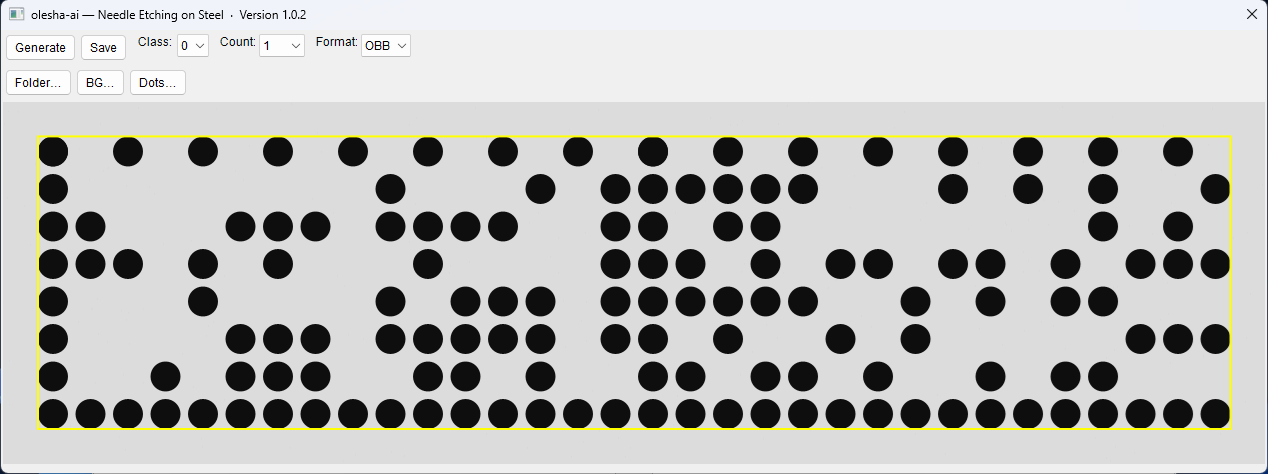 | 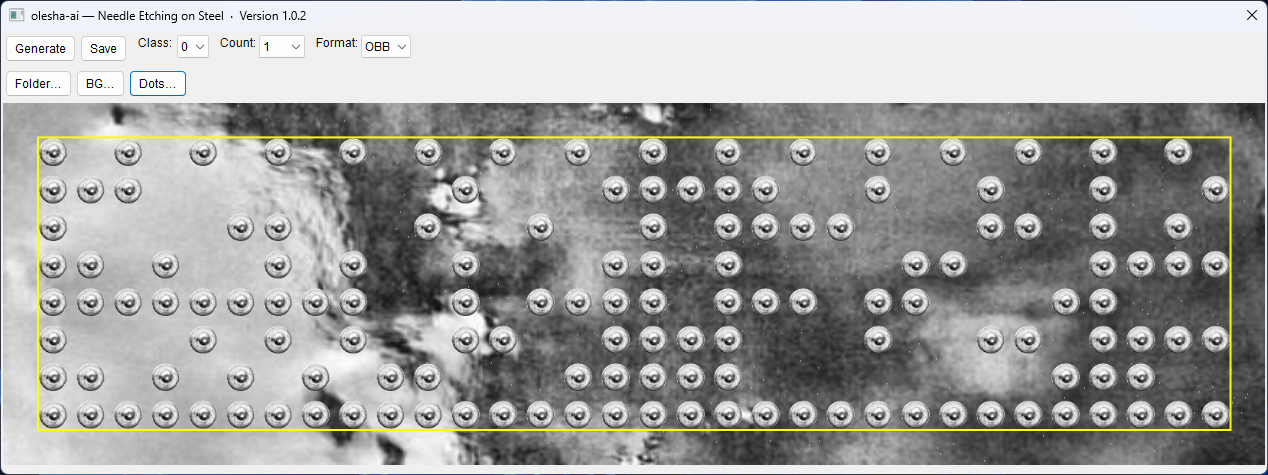 |
Note: 1.png shows the control layout and preview. 2.png is an exported grayscale JPEG with defect simulation applied.
Core Functionality
What it does
- DPM Layout Logic: Procedural geometric patterns modeled after ECC200 Data Matrix codes (fixed L-frame + randomized filling dots). It does not encode a real serial number bitstream.
- YOLO-Ready Export: Saves 600×200 grayscale JPEGs with matching
.txtlabels (OBB or ABB). - Defect Modeling: Squash, tilt, jitter, missing dots, strike-force variation, and small/big points. Class 1 (Bad) applies two different defects at once.
- Boosting (optional): When the Boosting checkbox is enabled, each saved sample also appends a feature row for training a second-stage classifier (LightGBM / tabular model). See below.
Package Properties
- Portable: Single
.exe. No installer, no registry changes. - Storage: Creates
images/next to the exe on first save. - Boosting log: Creates
logs/features.csv(append-only) when Boosting is on.
Dual Rendering Modes
-
Mode A — Pure Synthetic (default on launch)
No assets required. Procedural gray steel fill, light scratch noise, vector circles. Background and dot gray levels randomize on each Generate. -
Mode B — Photo Compositing
- BG… — folder of steel / surface photos (
.jpg,.jpeg,.png,.bmp) - Dots… — folder of single needle-impact sprites (transparent PNG recommended)
Folder choices are session-only; next launch starts again in Mode A.
- BG… — folder of steel / surface photos (
Boosting / Stage-2 features
Optional checkbox in the GUI. Off by default.
When Boosting is checked and you press Save, for every exported image the tool also:
- Converts the render to grayscale
- Letterboxes to 500×144
- Applies CLAHE (tile 8, clip 40)
- Extracts 23 LBP / gradient features (same layout as the inference Stage-2 pipeline)
- Appends one line to
<exe_dir>/logs/features.csv
CSV format (no header, ; separator, 6 decimal places):
class;f0;f1;…;f22
class is 0 (Good) or 1 (Bad). This file is meant for training the second model used in yolox-dmc-inference (cat_model / LightGBM path).
JPEG + YOLO labels are still written as usual; Boosting only adds the CSV side channel.
Annotation & Output Specs
Export directory: <exe_dir>/images/
- Good:
Good_etch_<timestamp>_<index>.jpg+.txt - Bad:
Bad_etch_<timestamp>_<index>.jpg+.txt
Label syntax (normalized 0…1, 6 decimals)
- OBB:
class x1 y1 x2 y2 x3 y3 x4 y4 - ABB:
class cx cy w h
Preview uses a yellow box for guidance only — it is not burned into saved images.
Configuration Controls
Preview scale is fixed at 5×.
- Generate — new pattern
- Save — batch export (progress on the button:
n/N) - Class —
0Good /1Bad (Bad = two-defect combo) - Count — 1 / 50 / 100 / 500
- Format — OBB (default) or ABB
- Boosting — append Stage-2 features to
logs/features.csv - Folder… — save directory (default:
imagesnext to the exe) - BG… / Dots… — Mode B asset folders
Window title: olesha-ai — Needle Etching on Steel · Version 1.1.0
Technical Requirements
- OS: Windows 10 / 11 x64
- CPU: AVX2 (Intel Haswell / AMD Zen 1 or newer, roughly 2017+)
Asset Prompts (promts/)
Starter prompt texts for building your own Mode B textures in diffusion tools (Midjourney, Stable Diffusion, etc.):
promts/promtFON.txt— steel backgroundspromts/promtDot.txt— needle dots (white background helps PNG cutout)
These are examples only — not a full asset pack. Generate images yourself, then point BG… / Dots… at your folders.
Related
- Inference / PoC that trains on this generator’s synthetic data: yolox-dmc-inference
Terms of Use
Distributed strictly for educational, academic, and non-commercial personal research. Commercial use, commercial model training on generated datasets, and redistribution of the binary are prohibited under LICENSE.md.
Similar repos


High-performance Windows GUI generator written in Nim for creating synthetic DPM training datasets and YOLO (ABB/OBB) annotations
0
6 commits
updated Oct 1, 2026
See what people are saying
README
Synthetic DPM Code Generator (v1.1.0)
A Windows GUI utility for generating synthetic training datasets and YOLO-compatible annotations (ABB/OBB) for Data Matrix / Direct Part Marking (DPM) style patterns. It simulates industrial needle-peening marks and surface defects.
Changelog from v1.0.2: Boosting mode for Stage-2 classifier training (logs/features.csv), strike-force defect, version bump.
Downstream inference / training project that uses this generator’s data:
olesha-ai/yolox-dmc-inference
Technical Status & Security Notice
- Distribution: This repository distributes only a pre-compiled Windows portable binary (
generate_dmc.exe) via the Releases tab. - Source Code: The source code is currently private as it is part of a broader proprietary research framework.
- VirusTotal Result: 6 / 69 flags (Heuristic / ML False Positives)
Why are there 6 flags? (False Positives Explanation)
The executable is compiled natively using the Nim programming language. Nim binaries without a commercial extended validation (EV) digital certificate regularly trigger automated Machine Learning (ML) heuristic rules in specific scanners:
- Microsoft (Trojan:Win32/Wacatac.C!ml): The
!mlsuffix explicitly indicates a Machine Learning automated guess, not a signature match. Windows Defender flags new, unsigned independent binaries by default. - CrowdStrike Falcon / Symantec / Elastic: These are static AI-driven enterprise scanners flagging the high-performance compiler structure of Nim as "suspicious" due to lack of global reputation metadata.
- Clean Verdicts: Industry-standard engines including Kaspersky, BitDefender, ESET-NOD32, Avast, and Malwarebytes flag the file as completely clean.
If you prefer not to run independent closed-source binaries directly on your host machine, we recommend running the application within an isolated Windows Sandbox or a dedicated Virtual Machine (VM).
Interface & Output Samples
GUI Window Overview (1.png) | Sample Generated Pattern (2.png) |
|---|---|
| |
Note: 1.png shows the control layout and preview. 2.png is an exported grayscale JPEG with defect simulation applied.
Core Functionality
What it does
- DPM Layout Logic: Procedural geometric patterns modeled after ECC200 Data Matrix codes (fixed L-frame + randomized filling dots). It does not encode a real serial number bitstream.
- YOLO-Ready Export: Saves 600×200 grayscale JPEGs with matching
.txtlabels (OBB or ABB). - Defect Modeling: Squash, tilt, jitter, missing dots, strike-force variation, and small/big points. Class 1 (Bad) applies two different defects at once.
- Boosting (optional): When the Boosting checkbox is enabled, each saved sample also appends a feature row for training a second-stage classifier (LightGBM / tabular model). See below.
Package Properties
- Portable: Single
.exe. No installer, no registry changes. - Storage: Creates
images/next to the exe on first save. - Boosting log: Creates
logs/features.csv(append-only) when Boosting is on.
Dual Rendering Modes
-
Mode A — Pure Synthetic (default on launch)
No assets required. Procedural gray steel fill, light scratch noise, vector circles. Background and dot gray levels randomize on each Generate. -
Mode B — Photo Compositing
- BG… — folder of steel / surface photos (
.jpg,.jpeg,.png,.bmp) - Dots… — folder of single needle-impact sprites (transparent PNG recommended)
Folder choices are session-only; next launch starts again in Mode A.
- BG… — folder of steel / surface photos (
Boosting / Stage-2 features
Optional checkbox in the GUI. Off by default.
When Boosting is checked and you press Save, for every exported image the tool also:
- Converts the render to grayscale
- Letterboxes to 500×144
- Applies CLAHE (tile 8, clip 40)
- Extracts 23 LBP / gradient features (same layout as the inference Stage-2 pipeline)
- Appends one line to
<exe_dir>/logs/features.csv
CSV format (no header, ; separator, 6 decimal places):
class;f0;f1;…;f22
class is 0 (Good) or 1 (Bad). This file is meant for training the second model used in yolox-dmc-inference (cat_model / LightGBM path).
JPEG + YOLO labels are still written as usual; Boosting only adds the CSV side channel.
Annotation & Output Specs
Export directory: <exe_dir>/images/
- Good:
Good_etch_<timestamp>_<index>.jpg+.txt - Bad:
Bad_etch_<timestamp>_<index>.jpg+.txt
Label syntax (normalized 0…1, 6 decimals)
- OBB:
class x1 y1 x2 y2 x3 y3 x4 y4 - ABB:
class cx cy w h
Preview uses a yellow box for guidance only — it is not burned into saved images.
Configuration Controls
Preview scale is fixed at 5×.
- Generate — new pattern
- Save — batch export (progress on the button:
n/N) - Class —
0Good /1Bad (Bad = two-defect combo) - Count — 1 / 50 / 100 / 500
- Format — OBB (default) or ABB
- Boosting — append Stage-2 features to
logs/features.csv - Folder… — save directory (default:
imagesnext to the exe) - BG… / Dots… — Mode B asset folders
Window title: olesha-ai — Needle Etching on Steel · Version 1.1.0
Technical Requirements
- OS: Windows 10 / 11 x64
- CPU: AVX2 (Intel Haswell / AMD Zen 1 or newer, roughly 2017+)
Asset Prompts (promts/)
Starter prompt texts for building your own Mode B textures in diffusion tools (Midjourney, Stable Diffusion, etc.):
promts/promtFON.txt— steel backgroundspromts/promtDot.txt— needle dots (white background helps PNG cutout)
These are examples only — not a full asset pack. Generate images yourself, then point BG… / Dots… at your folders.
Related
- Inference / PoC that trains on this generator’s synthetic data: yolox-dmc-inference
Terms of Use
Distributed strictly for educational, academic, and non-commercial personal research. Commercial use, commercial model training on generated datasets, and redistribution of the binary are prohibited under LICENSE.md.