Cute Animated Button written in Swift.
It could be just right for favorite buttons!

Add the following line to your Cartfile:
github "okmr-d/DOFavoriteButton"
Add the following line to your Podfile:
pod 'DOFavoriteButton'
Just drag DOFavoriteButton.swift to your project.

let button = DOFavoriteButton(frame: CGRectMake(0, 0, 44, 44), image: UIImage(named: "star.png"))
self.view.addSubview(button)
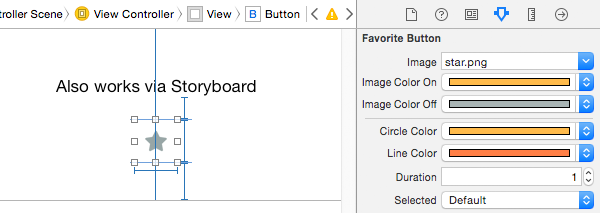
Add Button object and set Custom Class DOFavoriteButton
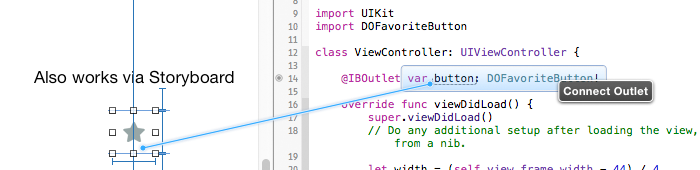
Connect Outlet
button.addTarget(self, action: Selector("tapped:"), forControlEvents: .TouchUpInside)
func tapped(sender: DOFavoriteButton) {
    if sender.selected {
        // deselect
        sender.deselect()
    } else {
        // select with animation
        sender.select()
    }
}
You can change button color & animation duration:
button.imageColorOff = UIColor.brownColor()
button.imageColorOn = UIColor.redColor()
button.circleColor = UIColor.greenColor()
button.lineColor = UIColor.blueColor()
button.duration = 3.0 // default: 1.0
Result:
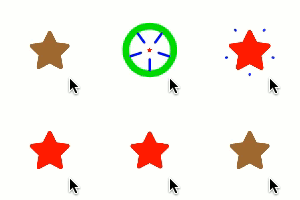
There is a demo project added to this repository, so you can see how it works.
DOFavoriteButton was inspired by Twitter's iOS App.
This software is released under the MIT License.
646 followers · starred Nov 2016
3,226 followers · starred Jul 2015
52 followers · starred Jan 2018
331 followers · starred Aug 2015
Cute Animated Button written in Swift.
It could be just right for favorite buttons!
Add the following line to your Cartfile:
github "okmr-d/DOFavoriteButton"
Add the following line to your Podfile:
pod 'DOFavoriteButton'
Just drag DOFavoriteButton.swift to your project.
let button = DOFavoriteButton(frame: CGRectMake(0, 0, 44, 44), image: UIImage(named: "star.png"))
self.view.addSubview(button)
Add Button object and set Custom Class DOFavoriteButton
Connect Outlet
button.addTarget(self, action: Selector("tapped:"), forControlEvents: .TouchUpInside)
func tapped(sender: DOFavoriteButton) {
    if sender.selected {
        // deselect
        sender.deselect()
    } else {
        // select with animation
        sender.select()
    }
}
You can change button color & animation duration:
button.imageColorOff = UIColor.brownColor()
button.imageColorOn = UIColor.redColor()
button.circleColor = UIColor.greenColor()
button.lineColor = UIColor.blueColor()
button.duration = 3.0 // default: 1.0
Result:
There is a demo project added to this repository, so you can see how it works.
DOFavoriteButton was inspired by Twitter's iOS App.
This software is released under the MIT License.
646 followers · starred Nov 2016
3,226 followers · starred Jul 2015
52 followers · starred Jan 2018
331 followers · starred Aug 2015