A Powerline-style, Git-aware fish theme optimized for awesome.
Shell
1,529
437 commits
updated May 20, 2026
bobthefish is a Powerline-style, Git-aware fish theme optimized for awesome.



Be sure to have Oh My Fish installed. Then just:
omf install bobthefish
You will need a Powerline-patched font for this to work, unless you enable the compatibility fallback option:
set -g theme_powerline_fonts no
I recommend picking one of these. For more advanced awesome, install a nerd fonts patched font, and enable nerd fonts support:
set -g theme_nerd_fonts yes
This theme is based loosely on agnoster.
!)⦸)$)%)User@Host (unless you're the default user)set -x VIRTUAL_ENV_DISABLE_PROMPT 1 master) or detached head (
➦ d0dfd9b)*)…)~)$)-)+)±)*)…)!)You can override theme defaults in a Fish config file (for example ~/.config/fish/conf.d/bobthefish.fish):
set -g theme_nerd_fonts yes
set -g theme_color_scheme dark
set -g theme_display_user ssh
set -g default_user bobthecow
See (many) more options below.
set -g theme_display_vi yesBy default the vi mode indicator will be shown if vi or hybrid key bindings are enabled. Use no to always hide the indicator, or yes to always show the indicator.
set -g theme_show_exit_status yesUse yes to show any non-zero exit code next to the exclamation mark.
set -g theme_display_jobs_verbose yesUse yes to display the number of currently running background jobs next to the percent sign.
set -g theme_display_user yesSet to yes to always display the username, to ssh to display only when an SSH session is active, or to no to never display the username.
set -g default_user your_normal_userIf a default_user is provided, the username will only be shown when it differs from the default.
set -g theme_display_sudo_user yesIf set to yes, displays the sudoer's username in a root shell. For example, when calling sudo -s with this option set to yes, the user who called sudo -s will be displayed.
set -g theme_display_hostname yesSet to yes to always display the hostname, to ssh to display only when an SSH session is active, or to no to never display the hostname.
set -g fish_prompt_pwd_dir_length 1Bobthefish respects the Fish $fish_prompt_pwd_dir_length setting to abbreviate the prompt path; set to 0 to show the full path, 1 (default) to show only the first character of each parent directory name, or any other number to show up to that many characters.
set -g theme_project_dir_length 1The same as $fish_prompt_pwd_dir_length, but for the path relative to the current project root. Defaults to 0; set to any other number to show an abbreviated path.
set -g theme_show_project_parent noUse no to only show the project directory name, and not its parent path, when inside a project.
set -g theme_newline_cursor yesUse yes to place the cursor on the next line, rather than the same line as the prompt. Setting this to clean instead of yes suppresses the caret on the new line.
set -g theme_newline_prompt "\$"Use a custom prompt with newline cursor. By default this is the chevron right glyph or > when powerline fonts are disabled.
set -g theme_avoid_ambiguous_glyphs yesYou probably don't need this option, unless your terminal doesn't like Unicode. Setting to yes will avoid ambiguous-width characters in an attempt to
set -g theme_powerline_fonts noBobthefish really likes Powerline-enhanced fonts. If you can't make that work, set to no to use plaintext fallbacks.
set -g theme_nerd_fonts yesBobthefish likes Nerd Fonts even better! Use yes if you've got Nerd Font capable fonts.
set -g theme_color_scheme darkSee below for all the color scheming you can handle.
set -g theme_display_screen noUse no to disable screen session information.
set -g theme_display_vagrant yesThis feature is disabled by default, use yes to display Vagrant status in your prompt. Please note that only the VirtualBox and VMWare providers are supported.
set -g theme_display_docker_machine noUse no to disable the current Docker machine name.
set -g theme_display_ruby noUse no to disable Ruby version information. By default, the Ruby version is displayed unless it's your system Ruby version.
set -g theme_display_virtualenv noUse no to disable Python version information. By default, the Python version is shown when it's interesting, along with the Virtualenv or Conda environmenmt.
set -g theme_display_go verboseUse no to disable the Go version information. Set to verbose to show both the required and current Go version.
set -g theme_display_node yesThis feature is disabled by default. Use yes, display the version if an .nvmrc, .node-version or package.json file is found in the parent path. Set to always to always display the current NPM, NVM or FNM node version.
set -g theme_display_nix noUse no to disable Nix environment information.
set -g theme_display_k8s_context yesThis feature is disabled by default. Use yes to show the current Kubernetes context (> kubectl config current-context).
set -g theme_display_k8s_namespace yesThis feature is disabled by default. Use yes to show the current Kubernetes namespace.
set -g theme_display_aws_vault_profile yesThis feature is disabled by default. Use yes to show the currently executing AWS Vault profile.
set -g theme_display_git noUse no to disable Git integration. If you're doing this for performance reasons, try some of the options below before disabling it entirely!
set -g theme_display_git_dirty noUse no to hide Git dirty state. Set the Git bash.showDirtyState option on a per-repository basis to disable it just for especially large repos.
set -g theme_display_git_dirty_verbose yesThis feature is disabled by default. Use yes to show more verbose dirty state information.
set -g theme_display_git_untracked noUse no to hide Git untracked file state. Set the Git bash.showUntrackedFiles option on a per-repository basis to disable it just for especially large repos.
set -g theme_display_git_ahead_verbose yesThis feature is disabled by default. Use yes to show more verbose ahead/behind state information.
set -g theme_display_git_stashed_verbose yesThis feature is disabled by default. Use yes to show more verbose stashed state information.
set -g theme_display_git_default_branch yesBy default, Bobthefish hides the default branch name (e.g. main or master). Use yes to always show these branche names.
set -g theme_git_default_branches main trunkBy default, Bobthefish hides default branch names (e.g. main or master). To hide other branch names, you can set a custom default branch name via the init.defaultBranch Git config option, or override the list entirely.
set -g theme_use_abbreviated_branch_name yesThis feature is disabled by default. Use yes to truncate extremely long Git branch names.
set -g theme_git_worktree_support yesIf you do any Git worktree shenanigans, setting this to yes will fix incorrect project-relative paths. If you don't do any Git worktree shenanigans, leave it disabled. It's faster this way :)
set -g theme_display_hg yesThis feature is disabled by default. Use yes to enable Mercurial support in Bobthefish. If you don't use Mercurial, leave it disabled because it's ... not fast.
set -g theme_display_fossil yesThis feature is also disabled by default. It should be faster than Mercurial, but if you aren't using Fossil it's safe to leave disabled.
set -g theme_vcs_ignore_paths /some/path /some/other/path{foo,bar}Ignore project paths for Git or Mercurial. Supports glob patterns.
The right prompt can be configured with the following options, or overridden entirely by supplying your own fish_right_prompt function.
set -g theme_display_dateUse no to disable the date in the right prompt.
set -g theme_date_format +%cCustomize date formatting. See man date for more information.
set -g theme_date_timezone America/Los_AngelesSupply a TZ argument variable for date formatting. See man date for more information.
set -g theme_display_cmd_duration noUse no to disable command duration in the right prompt.
set -g theme_title_display_process yesThis feature is disabled by default. Use yes to show current process name in the terminal title.
set -g theme_title_display_path noUse no to hide current working directory from the terminal title.
set -g theme_title_display_user yesUse yes to show the current user in the tab title (unless you're the default user).
set -g theme_title_use_abbreviated_path noBy default, directory names will be abbreviated in the terminal title, for example ~ instead of $HOME and /u/local instead of /usr/local. Set to no to always show full paths in the title.
 |  |
|---|---|
 |  |
 |  |
 |  |
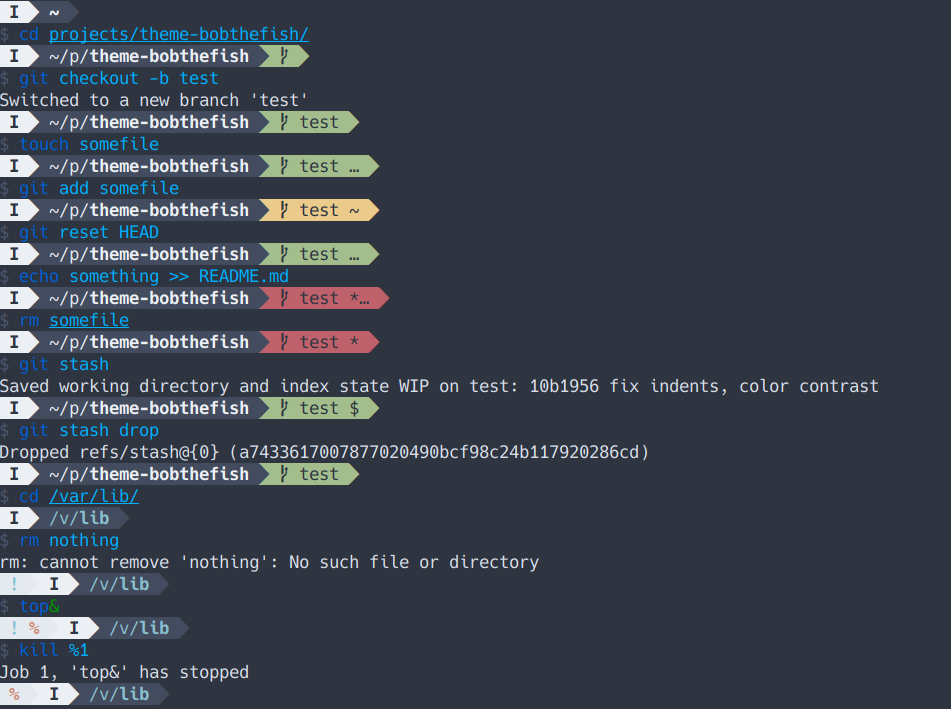 |  |
You can use the function bobthefish_display_colors to preview the prompts in
any color scheme.
Set theme_color_scheme in a terminal session or in your fish startup files to
one of the following options to change the prompt colors.
dark. The default bobthefish theme.light. A lighter version of the default theme.solarized (or solarized-dark), solarized-light. Dark and light variants
of Solarized.base16 (or base16-dark), base16-light. Dark and light variants of the
default Base16 theme.zenburn. An adaptation of Zenburn.gruvbox, gruvbox-light. An adaptation of gruvbox dark and light variants.dracula. An adaptation of dracula.nord. An adaptation of nord.catpuccin-latte, catpuccin-frappe, catpuccin-macchiato, catpuccin-mocha. Adaptations of the Cattpuccin themes.Some of these may not look right if your terminal does not support 24 bit color,
in which case you can try one of the terminal schemes (below). However, if
you're using Solarized, Base16 (default), or Zenburn in your terminal and the
terminal does support 24 bit color, the built in schemes will look nicer.
There are several scheme that use whichever colors you currently have loaded into your terminal. The advantage of using the schemes that fall through to the terminal colors is that they automatically adapt to something acceptable whenever you change the 16 colors in your terminal profile.
terminal (or terminal-dark or terminal-dark-black)terminal-dark-white. Same as terminal, but use white as the foreground
color on top of colored segments (in case your colors are very dark).terminal-light (or terminal-light-white)terminal-light-black. Same as terminal-light, but use black as the
foreground color on top of colored segments (in case your colors are very
bright).For some terminal themes, like dark base16 themes, the path segments in the
prompt will be indistinguishable from the background. In those cases, try one of
the following variations; they are identical to the terminal schemes except
for using bright black (brgrey) and dull white (grey) in the place of black
and bright white.
terminal2 (or terminal2-dark or terminal2-dark-black)terminal2-dark-whiteterminal2-light (or terminal2-light-white)terminal2-light-blackTo override the colors provided by a theme, set up a bobthefish_colors function in your configuration (config.fish or otherwise):
function bobthefish_colors -S -d 'Define a custom bobthefish color scheme'

  # optionally include a base color scheme...
  ___bobthefish_colors default

  # then override everything you want! note that these must be defined with `set -x`
  set -x color_initial_segment_exit     ffffff ce000f --bold
  set -x color_initial_segment_private  ffffff 255e87
  set -x color_initial_segment_su       ffffff 189303 --bold
  set -x color_initial_segment_jobs     ffffff 255e87 --bold
  set -x color_path                     333333 999999
  set -x color_path_basename            333333 ffffff --bold
  set -x color_path_nowrite             660000 cc9999
  set -x color_path_nowrite_basename    660000 cc9999 --bold
  set -x color_repo                     addc10 0c4801
  set -x color_repo_work_tree           333333 ffffff --bold
  set -x color_repo_dirty               ce000f ffffff
  set -x color_repo_staged              f6b117 3a2a03
  set -x color_vi_mode_default          999999 333333 --bold
  set -x color_vi_mode_insert           189303 333333 --bold
  set -x color_vi_mode_visual           f6b117 3a2a03 --bold
  set -x color_vagrant                  48b4fb ffffff --bold
  set -x color_aws_vault
  set -x color_aws_vault_expired
  set -x color_username                 cccccc 255e87 --bold
  set -x color_hostname                 cccccc 255e87
  set -x color_rvm                      af0000 cccccc --bold
  set -x color_virtualfish              005faf cccccc --bold
  set -x color_virtualgo                005faf cccccc --bold
  set -x color_desk                     005faf cccccc --bold
  set -x color_nix                      005faf cccccc --bold
end
You can disable the theme default greeting, vi mode prompt, right prompt, or title entirely — or override with your own — by adding custom functions to ~/.config/fish/functions:
~/.config/fish/functions/fish_greeting.fish~/.config/fish/functions/fish_mode_prompt.fish~/.config/fish/functions/fish_right_prompt.fish~/.config/fish/functions/fish_title.fishTo disable them completely, use an empty function:
function fish_right_prompt; end
… Or copy one from your favorite theme, make up something of your own, or copy/paste a bobthefish default function and modify it to your taste!
function fish_greeting
  set_color $fish_color_autosuggestion
  echo "I'm completely operational, and all my circuits are functioning perfectly."
  set_color normal
end
47 followers · starred Jan 2018
903 followers · starred Mar 2023
71 followers · starred Jul 2018
50 followers · starred Jan 2025
A Powerline-style, Git-aware fish theme optimized for awesome.
Shell
1,529
437 commits
updated May 20, 2026
bobthefish is a Powerline-style, Git-aware fish theme optimized for awesome.
Be sure to have Oh My Fish installed. Then just:
omf install bobthefish
You will need a Powerline-patched font for this to work, unless you enable the compatibility fallback option:
set -g theme_powerline_fonts no
I recommend picking one of these. For more advanced awesome, install a nerd fonts patched font, and enable nerd fonts support:
set -g theme_nerd_fonts yes
This theme is based loosely on agnoster.
!)⦸)$)%)User@Host (unless you're the default user)set -x VIRTUAL_ENV_DISABLE_PROMPT 1 master) or detached head (➦ d0dfd9b)*)…)~)$)-)+)±)*)…)!)You can override theme defaults in a Fish config file (for example ~/.config/fish/conf.d/bobthefish.fish):
set -g theme_nerd_fonts yes
set -g theme_color_scheme dark
set -g theme_display_user ssh
set -g default_user bobthecow
See (many) more options below.
set -g theme_display_vi yesBy default the vi mode indicator will be shown if vi or hybrid key bindings are enabled. Use no to always hide the indicator, or yes to always show the indicator.
set -g theme_show_exit_status yesUse yes to show any non-zero exit code next to the exclamation mark.
set -g theme_display_jobs_verbose yesUse yes to display the number of currently running background jobs next to the percent sign.
set -g theme_display_user yesSet to yes to always display the username, to ssh to display only when an SSH session is active, or to no to never display the username.
set -g default_user your_normal_userIf a default_user is provided, the username will only be shown when it differs from the default.
set -g theme_display_sudo_user yesIf set to yes, displays the sudoer's username in a root shell. For example, when calling sudo -s with this option set to yes, the user who called sudo -s will be displayed.
set -g theme_display_hostname yesSet to yes to always display the hostname, to ssh to display only when an SSH session is active, or to no to never display the hostname.
set -g fish_prompt_pwd_dir_length 1Bobthefish respects the Fish $fish_prompt_pwd_dir_length setting to abbreviate the prompt path; set to 0 to show the full path, 1 (default) to show only the first character of each parent directory name, or any other number to show up to that many characters.
set -g theme_project_dir_length 1The same as $fish_prompt_pwd_dir_length, but for the path relative to the current project root. Defaults to 0; set to any other number to show an abbreviated path.
set -g theme_show_project_parent noUse no to only show the project directory name, and not its parent path, when inside a project.
set -g theme_newline_cursor yesUse yes to place the cursor on the next line, rather than the same line as the prompt. Setting this to clean instead of yes suppresses the caret on the new line.
set -g theme_newline_prompt "\$"Use a custom prompt with newline cursor. By default this is the chevron right glyph or > when powerline fonts are disabled.
set -g theme_avoid_ambiguous_glyphs yesYou probably don't need this option, unless your terminal doesn't like Unicode. Setting to yes will avoid ambiguous-width characters in an attempt to
set -g theme_powerline_fonts noBobthefish really likes Powerline-enhanced fonts. If you can't make that work, set to no to use plaintext fallbacks.
set -g theme_nerd_fonts yesBobthefish likes Nerd Fonts even better! Use yes if you've got Nerd Font capable fonts.
set -g theme_color_scheme darkSee below for all the color scheming you can handle.
set -g theme_display_screen noUse no to disable screen session information.
set -g theme_display_vagrant yesThis feature is disabled by default, use yes to display Vagrant status in your prompt. Please note that only the VirtualBox and VMWare providers are supported.
set -g theme_display_docker_machine noUse no to disable the current Docker machine name.
set -g theme_display_ruby noUse no to disable Ruby version information. By default, the Ruby version is displayed unless it's your system Ruby version.
set -g theme_display_virtualenv noUse no to disable Python version information. By default, the Python version is shown when it's interesting, along with the Virtualenv or Conda environmenmt.
set -g theme_display_go verboseUse no to disable the Go version information. Set to verbose to show both the required and current Go version.
set -g theme_display_node yesThis feature is disabled by default. Use yes, display the version if an .nvmrc, .node-version or package.json file is found in the parent path. Set to always to always display the current NPM, NVM or FNM node version.
set -g theme_display_nix noUse no to disable Nix environment information.
set -g theme_display_k8s_context yesThis feature is disabled by default. Use yes to show the current Kubernetes context (> kubectl config current-context).
set -g theme_display_k8s_namespace yesThis feature is disabled by default. Use yes to show the current Kubernetes namespace.
set -g theme_display_aws_vault_profile yesThis feature is disabled by default. Use yes to show the currently executing AWS Vault profile.
set -g theme_display_git noUse no to disable Git integration. If you're doing this for performance reasons, try some of the options below before disabling it entirely!
set -g theme_display_git_dirty noUse no to hide Git dirty state. Set the Git bash.showDirtyState option on a per-repository basis to disable it just for especially large repos.
set -g theme_display_git_dirty_verbose yesThis feature is disabled by default. Use yes to show more verbose dirty state information.
set -g theme_display_git_untracked noUse no to hide Git untracked file state. Set the Git bash.showUntrackedFiles option on a per-repository basis to disable it just for especially large repos.
set -g theme_display_git_ahead_verbose yesThis feature is disabled by default. Use yes to show more verbose ahead/behind state information.
set -g theme_display_git_stashed_verbose yesThis feature is disabled by default. Use yes to show more verbose stashed state information.
set -g theme_display_git_default_branch yesBy default, Bobthefish hides the default branch name (e.g. main or master). Use yes to always show these branche names.
set -g theme_git_default_branches main trunkBy default, Bobthefish hides default branch names (e.g. main or master). To hide other branch names, you can set a custom default branch name via the init.defaultBranch Git config option, or override the list entirely.
set -g theme_use_abbreviated_branch_name yesThis feature is disabled by default. Use yes to truncate extremely long Git branch names.
set -g theme_git_worktree_support yesIf you do any Git worktree shenanigans, setting this to yes will fix incorrect project-relative paths. If you don't do any Git worktree shenanigans, leave it disabled. It's faster this way :)
set -g theme_display_hg yesThis feature is disabled by default. Use yes to enable Mercurial support in Bobthefish. If you don't use Mercurial, leave it disabled because it's ... not fast.
set -g theme_display_fossil yesThis feature is also disabled by default. It should be faster than Mercurial, but if you aren't using Fossil it's safe to leave disabled.
set -g theme_vcs_ignore_paths /some/path /some/other/path{foo,bar}Ignore project paths for Git or Mercurial. Supports glob patterns.
The right prompt can be configured with the following options, or overridden entirely by supplying your own fish_right_prompt function.
set -g theme_display_dateUse no to disable the date in the right prompt.
set -g theme_date_format +%cCustomize date formatting. See man date for more information.
set -g theme_date_timezone America/Los_AngelesSupply a TZ argument variable for date formatting. See man date for more information.
set -g theme_display_cmd_duration noUse no to disable command duration in the right prompt.
set -g theme_title_display_process yesThis feature is disabled by default. Use yes to show current process name in the terminal title.
set -g theme_title_display_path noUse no to hide current working directory from the terminal title.
set -g theme_title_display_user yesUse yes to show the current user in the tab title (unless you're the default user).
set -g theme_title_use_abbreviated_path noBy default, directory names will be abbreviated in the terminal title, for example ~ instead of $HOME and /u/local instead of /usr/local. Set to no to always show full paths in the title.
| |
|---|---|
| |
| |
| |
| |
You can use the function bobthefish_display_colors to preview the prompts in
any color scheme.
Set theme_color_scheme in a terminal session or in your fish startup files to
one of the following options to change the prompt colors.
dark. The default bobthefish theme.light. A lighter version of the default theme.solarized (or solarized-dark), solarized-light. Dark and light variants
of Solarized.base16 (or base16-dark), base16-light. Dark and light variants of the
default Base16 theme.zenburn. An adaptation of Zenburn.gruvbox, gruvbox-light. An adaptation of gruvbox dark and light variants.dracula. An adaptation of dracula.nord. An adaptation of nord.catpuccin-latte, catpuccin-frappe, catpuccin-macchiato, catpuccin-mocha. Adaptations of the Cattpuccin themes.Some of these may not look right if your terminal does not support 24 bit color,
in which case you can try one of the terminal schemes (below). However, if
you're using Solarized, Base16 (default), or Zenburn in your terminal and the
terminal does support 24 bit color, the built in schemes will look nicer.
There are several scheme that use whichever colors you currently have loaded into your terminal. The advantage of using the schemes that fall through to the terminal colors is that they automatically adapt to something acceptable whenever you change the 16 colors in your terminal profile.
terminal (or terminal-dark or terminal-dark-black)terminal-dark-white. Same as terminal, but use white as the foreground
color on top of colored segments (in case your colors are very dark).terminal-light (or terminal-light-white)terminal-light-black. Same as terminal-light, but use black as the
foreground color on top of colored segments (in case your colors are very
bright).For some terminal themes, like dark base16 themes, the path segments in the
prompt will be indistinguishable from the background. In those cases, try one of
the following variations; they are identical to the terminal schemes except
for using bright black (brgrey) and dull white (grey) in the place of black
and bright white.
terminal2 (or terminal2-dark or terminal2-dark-black)terminal2-dark-whiteterminal2-light (or terminal2-light-white)terminal2-light-blackTo override the colors provided by a theme, set up a bobthefish_colors function in your configuration (config.fish or otherwise):
function bobthefish_colors -S -d 'Define a custom bobthefish color scheme'

  # optionally include a base color scheme...
  ___bobthefish_colors default

  # then override everything you want! note that these must be defined with `set -x`
  set -x color_initial_segment_exit     ffffff ce000f --bold
  set -x color_initial_segment_private  ffffff 255e87
  set -x color_initial_segment_su       ffffff 189303 --bold
  set -x color_initial_segment_jobs     ffffff 255e87 --bold
  set -x color_path                     333333 999999
  set -x color_path_basename            333333 ffffff --bold
  set -x color_path_nowrite             660000 cc9999
  set -x color_path_nowrite_basename    660000 cc9999 --bold
  set -x color_repo                     addc10 0c4801
  set -x color_repo_work_tree           333333 ffffff --bold
  set -x color_repo_dirty               ce000f ffffff
  set -x color_repo_staged              f6b117 3a2a03
  set -x color_vi_mode_default          999999 333333 --bold
  set -x color_vi_mode_insert           189303 333333 --bold
  set -x color_vi_mode_visual           f6b117 3a2a03 --bold
  set -x color_vagrant                  48b4fb ffffff --bold
  set -x color_aws_vault
  set -x color_aws_vault_expired
  set -x color_username                 cccccc 255e87 --bold
  set -x color_hostname                 cccccc 255e87
  set -x color_rvm                      af0000 cccccc --bold
  set -x color_virtualfish              005faf cccccc --bold
  set -x color_virtualgo                005faf cccccc --bold
  set -x color_desk                     005faf cccccc --bold
  set -x color_nix                      005faf cccccc --bold
end
You can disable the theme default greeting, vi mode prompt, right prompt, or title entirely — or override with your own — by adding custom functions to ~/.config/fish/functions:
~/.config/fish/functions/fish_greeting.fish~/.config/fish/functions/fish_mode_prompt.fish~/.config/fish/functions/fish_right_prompt.fish~/.config/fish/functions/fish_title.fishTo disable them completely, use an empty function:
function fish_right_prompt; end
… Or copy one from your favorite theme, make up something of your own, or copy/paste a bobthefish default function and modify it to your taste!
function fish_greeting
  set_color $fish_color_autosuggestion
  echo "I'm completely operational, and all my circuits are functioning perfectly."
  set_color normal
end
47 followers · starred Jan 2018
903 followers · starred Mar 2023
71 followers · starred Jul 2018
50 followers · starred Jan 2025