Durable & Deterministic Workflow Engine
See the code Obelisk
A deterministic workflow runtime built on the WASM Component Model.
[!WARNING] Pre-release: Expect changes in CLI, gRPC, WIT, and database schema.
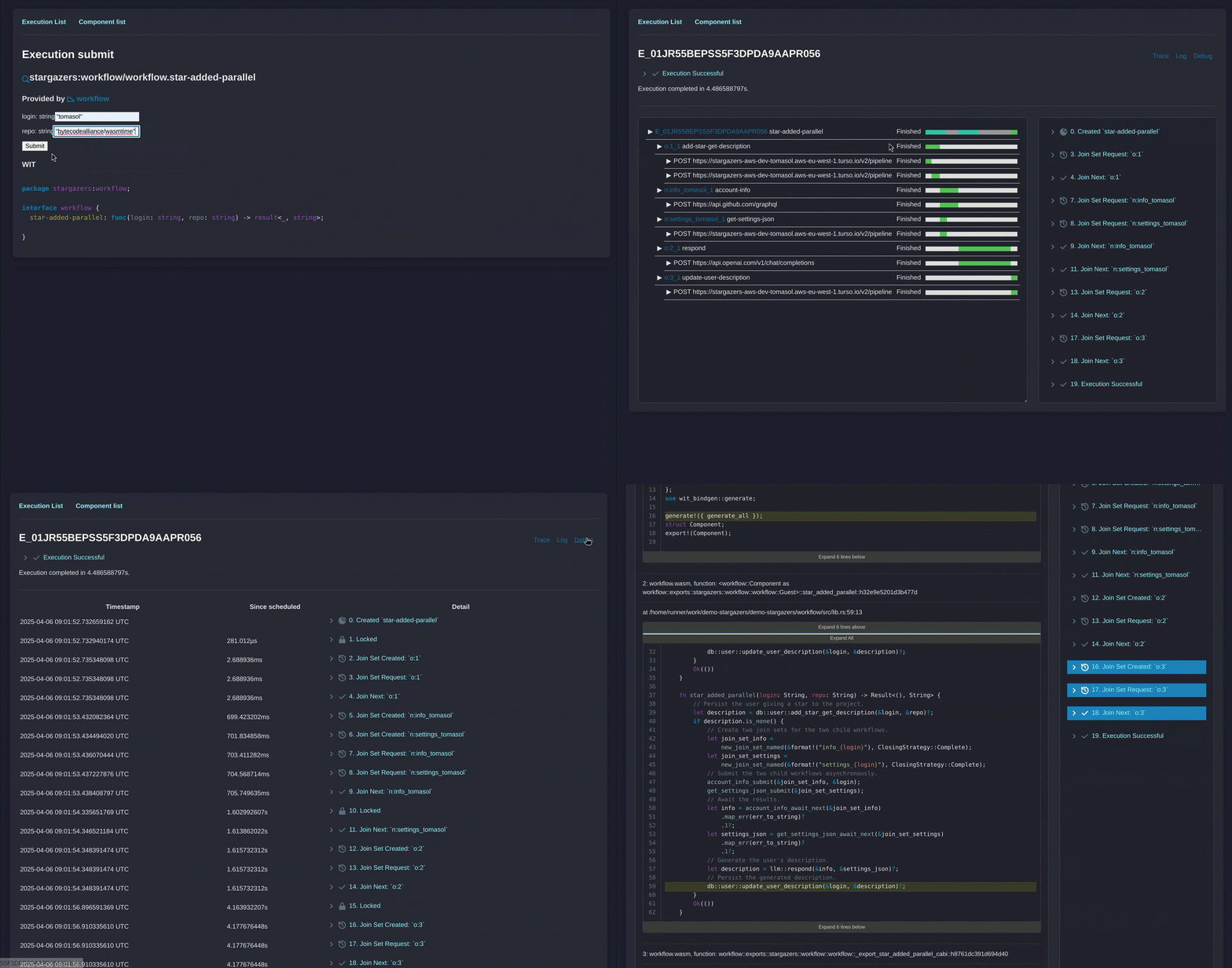
The Stargazers app features:
Obelisk fly.io deployment tool features:
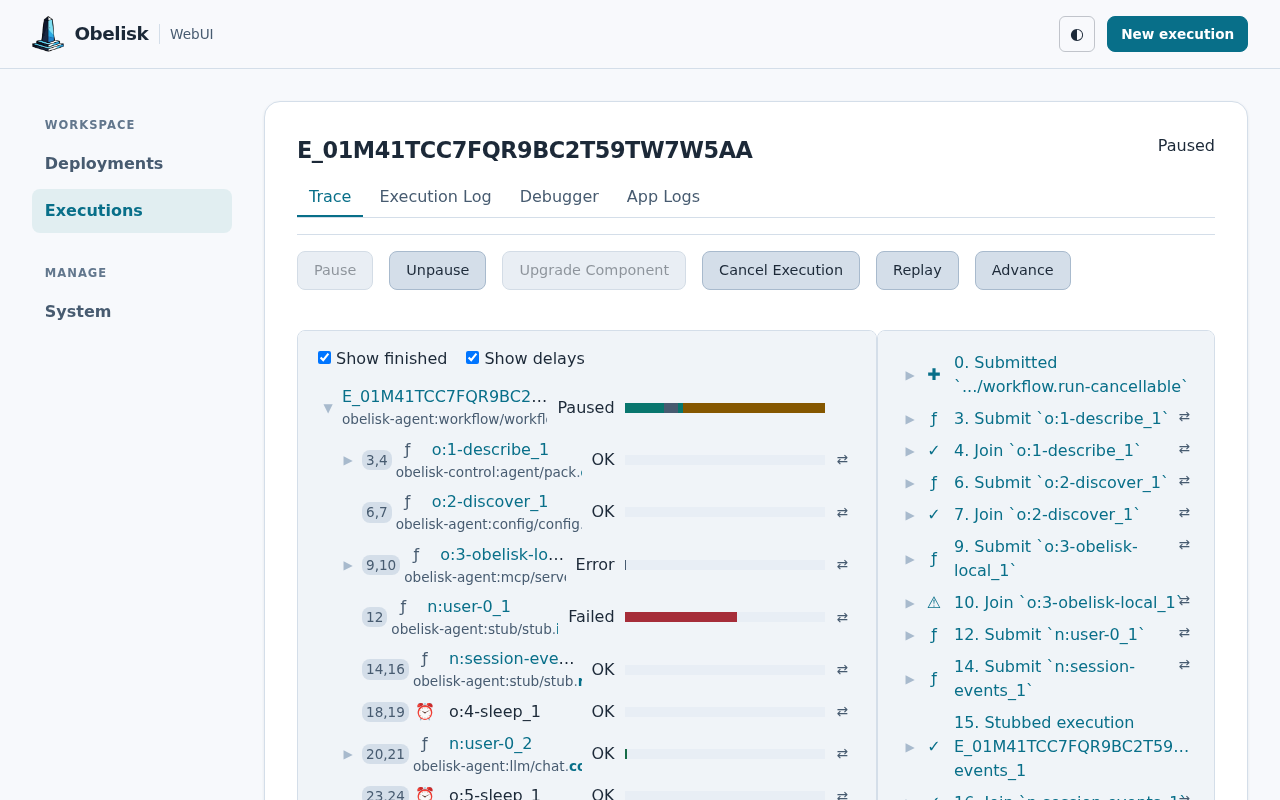
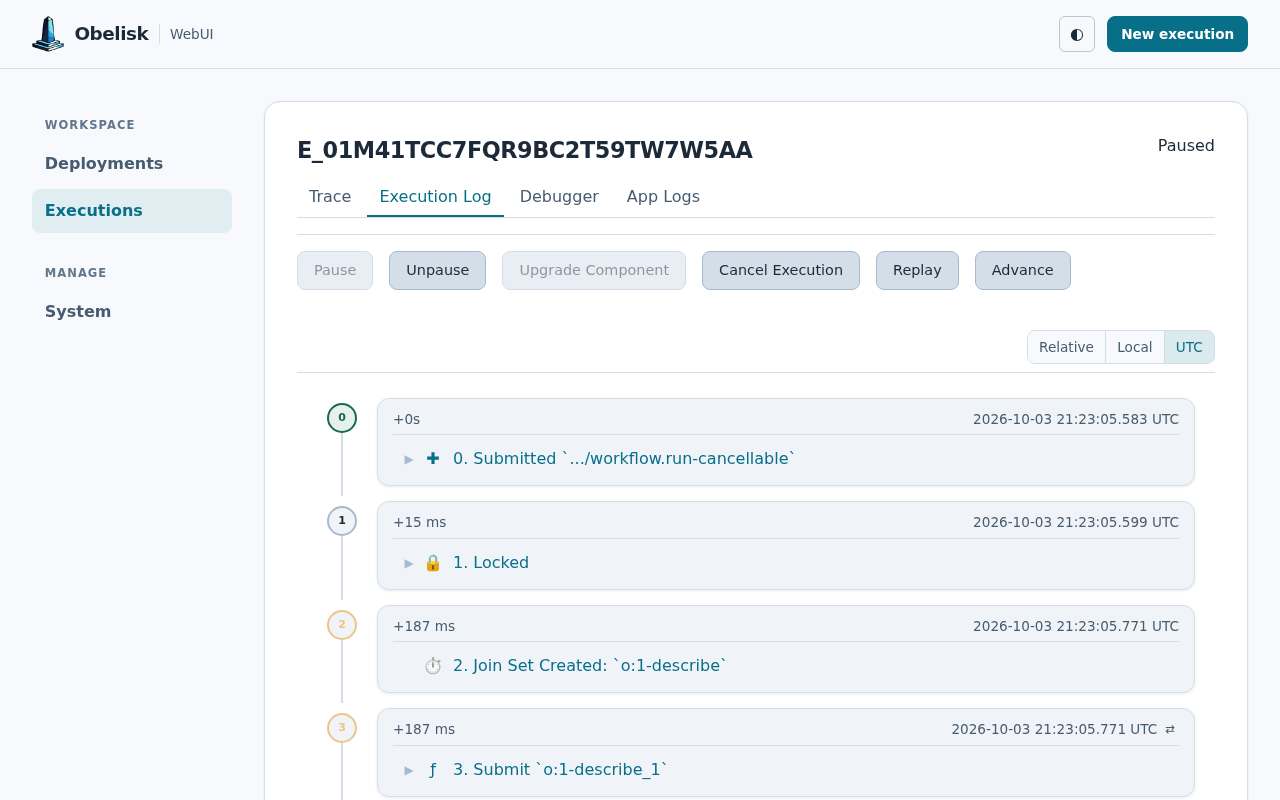
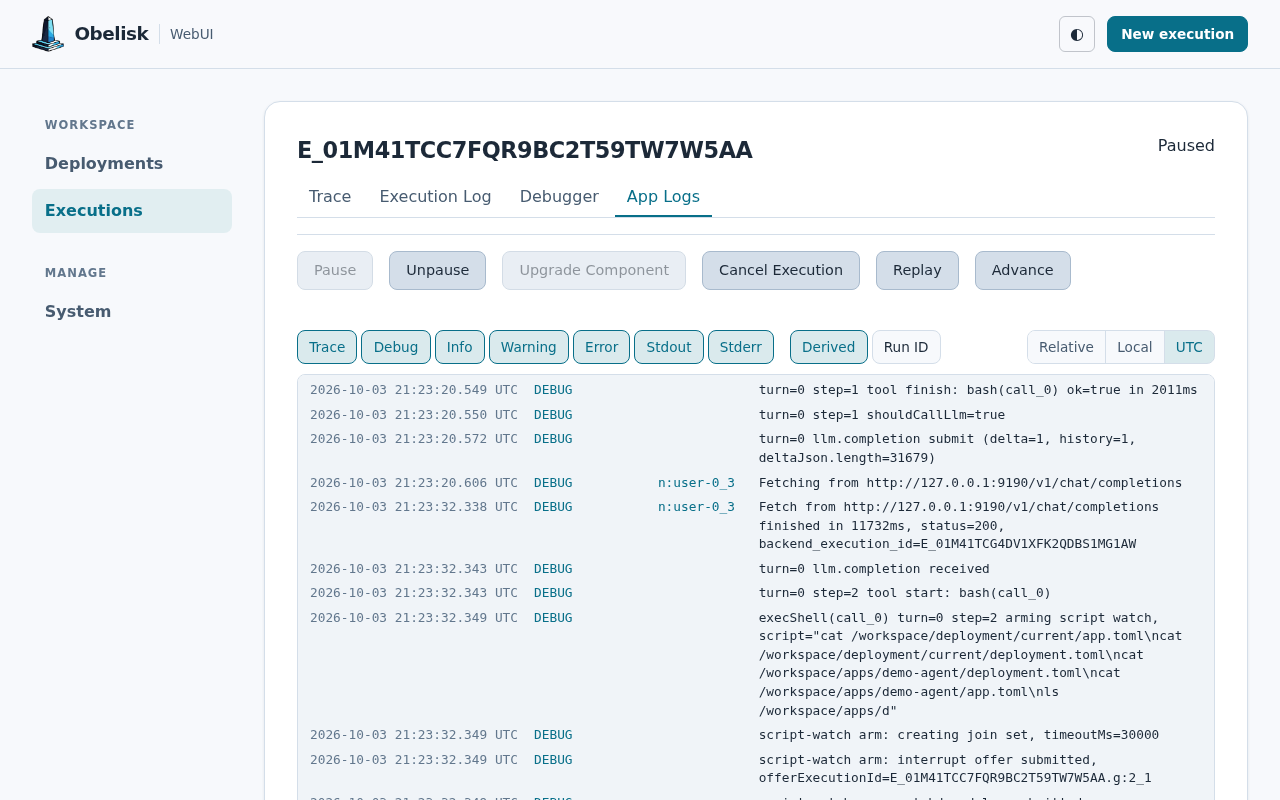
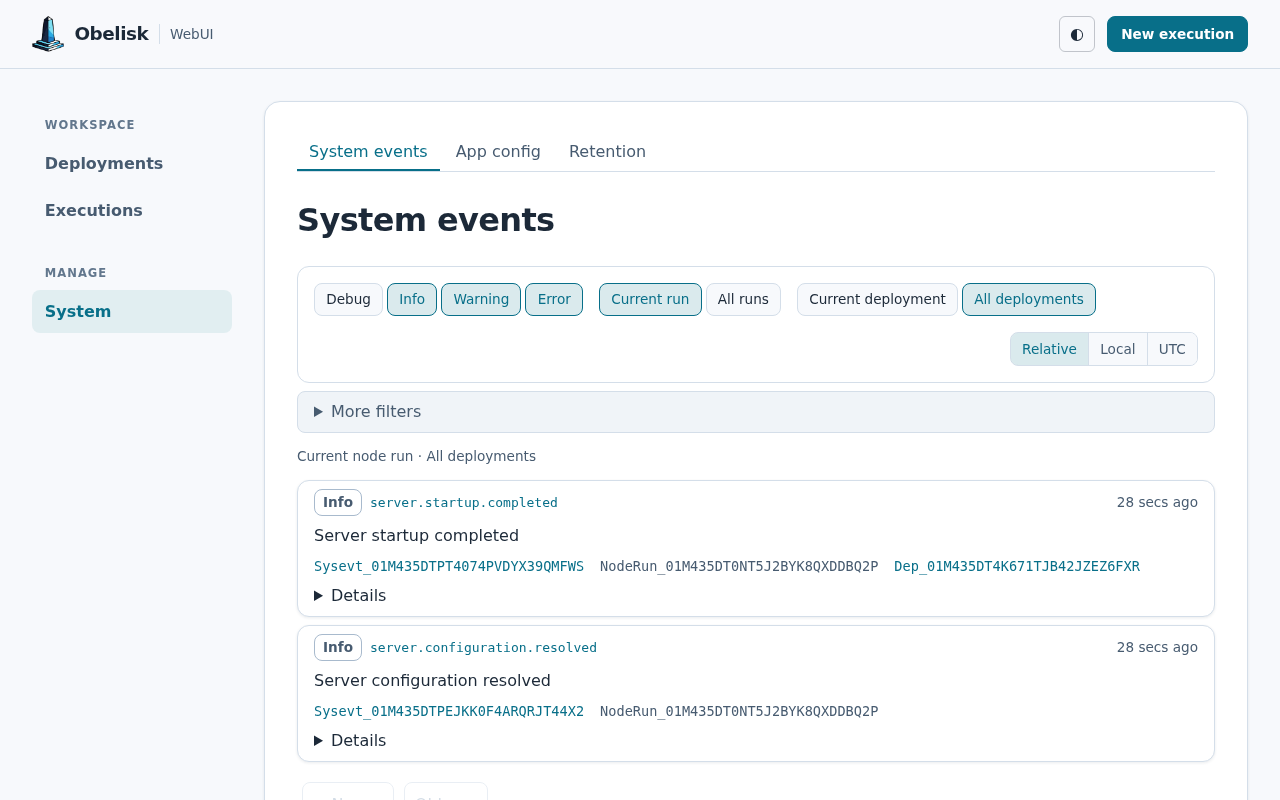
Every release binary includes the Web UI, served at
http://localhost:8080 by default. Explore deployments and component dependencies, inspect
execution traces, replay workflows, and browse recorded events and application logs.
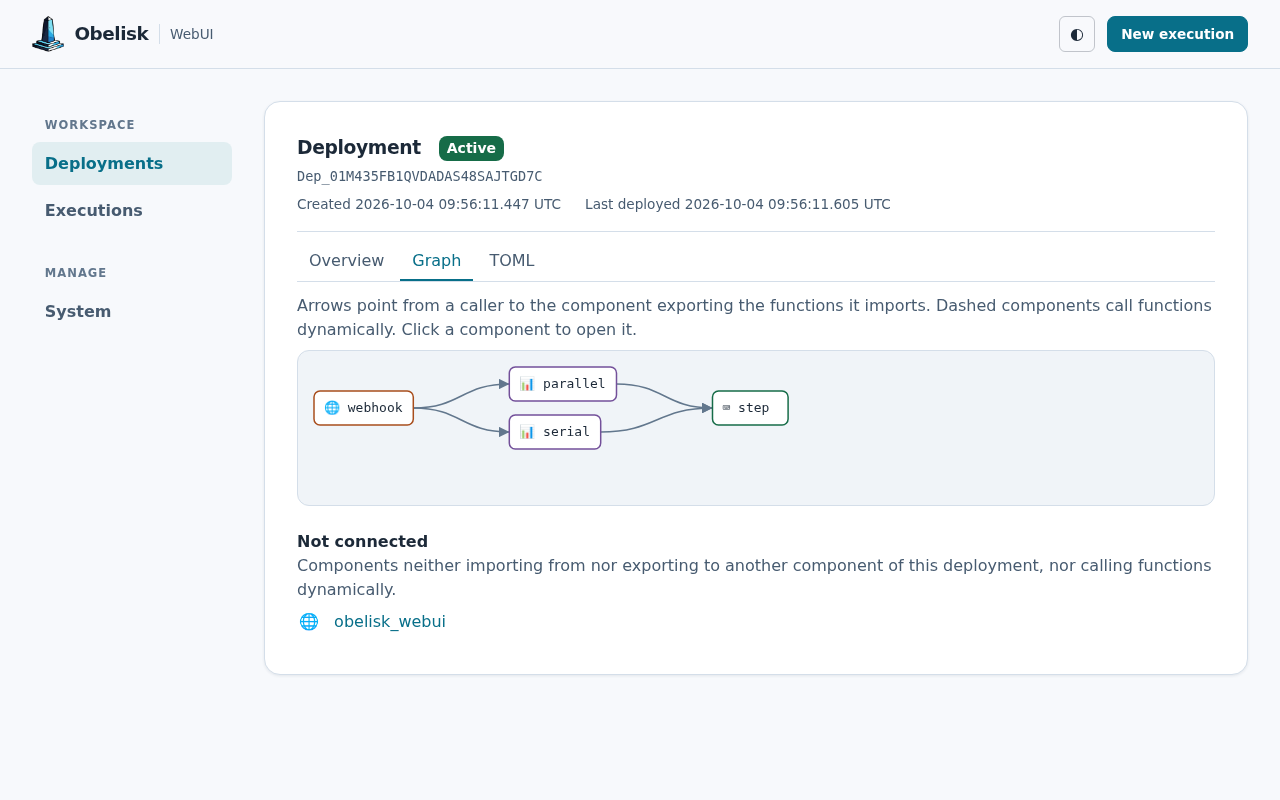
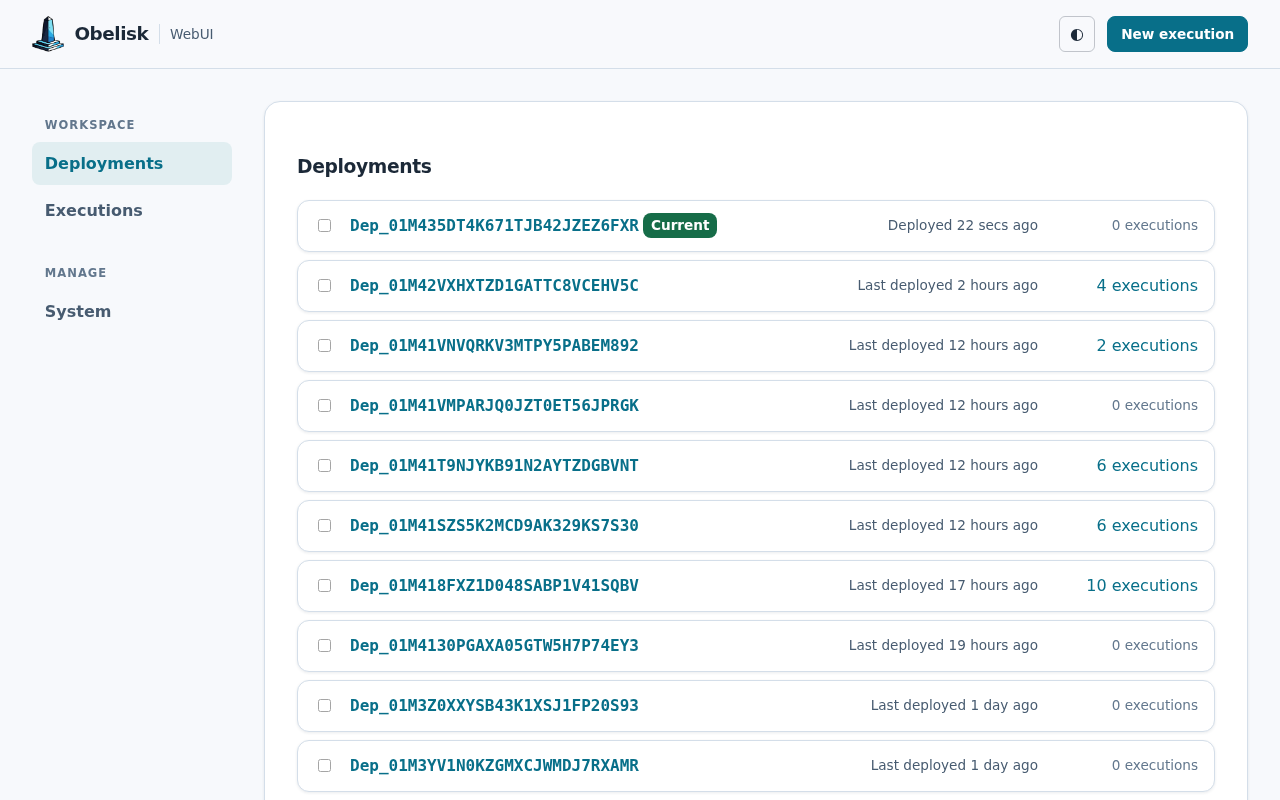
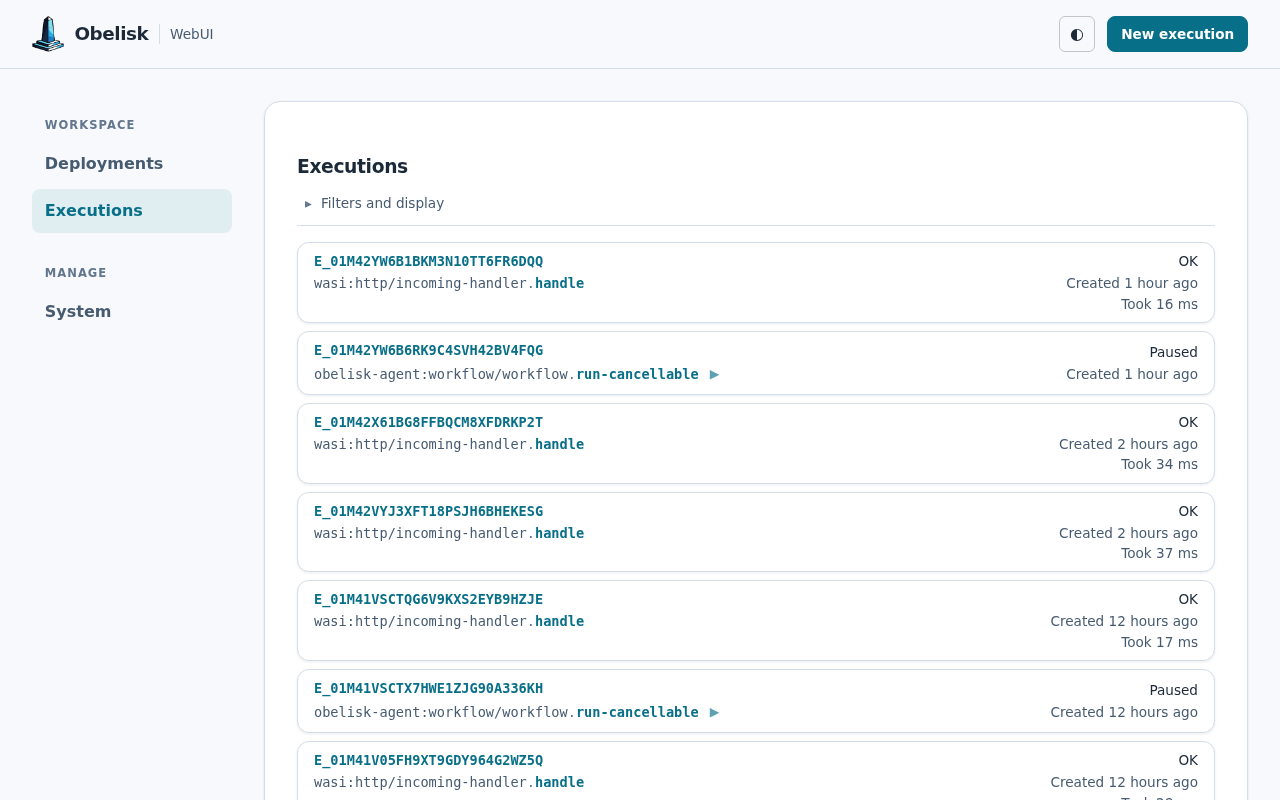
The deployment graph below shows the demo-tutorial app running on Obelisk 0.42.0. The other screenshots show a real workflow-agent session:
obelisk command.curl -L --tlsv1.2 -sSf https://raw.githubusercontent.com/obeli-sk/obelisk/main/download.sh | bash
# or a specific release tag:
curl -L --tlsv1.2 -sSf https://raw.githubusercontent.com/obeli-sk/obelisk/main/download.sh | bash -s -- vX.Y.Z
# Use host's network. Ports 8080 (web) and 5005 (grpc) will be bound to 127.0.0.1
mkdir config
docker run getobelisk/obelisk generate server-config > config/server.toml
docker run \
  --net=host \
  -e OBELISK_APP_NAME=example-app \
  -v $(pwd)/config:/config \
  getobelisk/obelisk \
  server run --server-config /config/server.toml

# Forward ports explicitly
docker run \
  -p 8080:8080 -e 'OBELISK__webui__listening_addr=0.0.0.0:8080' \
  -p 5005:5005 -e 'OBELISK__api__listening_addr=0.0.0.0:5005' \
  -e OBELISK_APP_NAME=example-app \
  -v $(pwd)/config:/config \
  getobelisk/obelisk \
  server run --server-config /config/server.toml

# Share the cache directory from host
docker run --net=host \
  -u $(id -u):$(id -g) \
  -v $(pwd)/config:/config \
  -e OBELISK_APP_NAME=example-app \
  -e 'OBELISK__WASM__CACHE_DIRECTORY=/cache/obelisk/wasm' \
  -v ~/.cache/obelisk/wasm:/cache/obelisk/wasm \
  getobelisk/obelisk \
  server run --server-config /config/server.toml
Requires protoc.
cargo install --locked --git https://github.com/obeli-sk/obelisk --branch latest obelisk
Using Nix, with prebuilt Linux binaries from the obeli-sk Cachix cache:
nix run github:obeli-sk/obelisk/latest
For more options see Installation.
The server defaults to a 1 MiB compact JSON-encoded limit for each newly
persisted execution parameter array, result, stub result, persisted history
value, or failure diagnostic. Self-hosted operators can set a positive value in
server.toml:
[limits]
max_persisted_value_size_bytes = 1048576
Each top-level execution snapshots the effective limit. Child and scheduled
executions inherit it, so a configuration change applies only to new execution
trees and cannot change replay behavior. Existing databases require no schema
migration: executions created by older releases retain their legacy unlimited
contract. max_transport_message_size_bytes (also under [limits], defaulting to
512 MiB) is a separate, larger transport safeguard bounding a single gRPC message
or REST request body, and does not relax the persisted-value limit.
Check out the Getting Started Guide for details.
OBELISK_APP_NAME=example-app obelisk server run --deployment deployment-testing-wasm-oci.toml
See deployment-testing-vm.toml for the runnable
example, setup commands, and architecture notes.
docker run -it --rm \
  --name obelisk-postgres \
  -e POSTGRES_PASSWORD=postgres \
  -p 5432:5432 \
  postgres:18

# export env vars if .envrc is not used
export POSTGRES_HOST="localhost"
export POSTGRES_USER="postgres"
export POSTGRES_PASSWORD="postgres"
export POSTGRES_DATABASE="obelisk"

OBELISK_APP_NAME=example-app obelisk server run --server-config server-postgres.toml --deployment deployment-testing-wasm-oci.toml
obelisk component list
# Call fibonacci(10) activity from the workflow 500 times in series.
obelisk execution submit testing:fibo-workflow/workflow.fiboa '[10, 500]' --follow
CLI result payloads (IDs, JSON, generated configuration, source files, and execution
logs) go to stdout. Human-readable tables, progress, and confirmations go to
stderr. Use --json for structured results. Deployment submit, apply, and
enqueue print the deployment ID on success, or a JSON string with --json.
Execution pause, unpause, cancel, and upgrade return an {"ok": "outcome"} object
with --json.
Execution --json follow modes emit NDJSON: one complete, compact JSON object per
line, flushed as it arrives. submit --follow emits the submission response then
the final result; submit --follow-logs includes log records between them.
status --follow emits status records, while result --follow emits only the
final result. Finite queries retain their JSON objects or arrays; execution logs
use NDJSON with or without --follow.
Manage apps through an Obelisk cloud provisioner using obelisk cloud.
export OBELISK_CLOUD_API_URL=...
export OBELISK_CLOUD_API_TOKEN=...
obelisk generate new
obelisk cloud app deploy
obelisk cloud app status
obelisk cloud app endpoint
obelisk cloud app deployment apply
obelisk cloud app execution list
obelisk cloud app component list
cloud app deployment, cloud app execution, cloud app component, and cloud app admin
share the direct API commands and output formats. They use
OBELISK_CLOUD_API_URL and OBELISK_CLOUD_API_TOKEN, with the app selected by
--app, OBELISK_APP_NAME, or app_name in ./app.toml, in that order.
The CLI discovers the app's API URL through the provisioner, then connects directly
with the cloud bearer token.
Visit localhost:8080 to manage components, functions and execution history.
This project has a roadmap and features are added in a certain order. Discuss features via GitHub Discussions before contributing. A Contributor License Agreement is required.
Set up dependencies via Nix:
cp .envrc-example .envrc
$EDITOR .envrc
direnv allow
# If direnv is not available use `nix develop`
Or manually install dependencies (see dev-deps.txt).
Run the program:
cargo run --release
See DEVELOPMENT.md for repository structure, build instructions, testing, code patterns, and contribution conventions.
Postgres must be running. See .envrc-example for how to set up the environment variables.
Quick start:
cp .envrc-example .envrc && $EDITOR .envrc && direnv allow
cargo run --release
./scripts/test.sh
This project (all files and folders except as noted below) is licensed under the GNU Affero General Public License version 3.
The following subfolders are licensed under the MIT License:
wit/ – see LICENSE-MITproto/ – see LICENSE-MITThe runtime includes functionality that may generate new "extension" WIT files. These generated files are typically based on a combination of user-provided WIT files and the base WIT definitions found in the MIT-licensed wit/ directory.
Users are free to use, modify, and distribute these generated WIT files under the terms of the MIT License, for example, to allow other WASM components to interact via these extended interfaces.
(top 24 of 53)
53,334 followers · starred May 2026
936 followers · starred Jun 2026
4,600 followers · starred Jun 2026
170 followers · starred Jun 2026
Durable & Deterministic Workflow Engine
See the code Obelisk
A deterministic workflow runtime built on the WASM Component Model.
[!WARNING] Pre-release: Expect changes in CLI, gRPC, WIT, and database schema.
The Stargazers app features:
Obelisk fly.io deployment tool features:
Every release binary includes the Web UI, served at
http://localhost:8080 by default. Explore deployments and component dependencies, inspect
execution traces, replay workflows, and browse recorded events and application logs.
The deployment graph below shows the demo-tutorial app running on Obelisk 0.42.0. The other screenshots show a real workflow-agent session:
obelisk command.curl -L --tlsv1.2 -sSf https://raw.githubusercontent.com/obeli-sk/obelisk/main/download.sh | bash
# or a specific release tag:
curl -L --tlsv1.2 -sSf https://raw.githubusercontent.com/obeli-sk/obelisk/main/download.sh | bash -s -- vX.Y.Z
# Use host's network. Ports 8080 (web) and 5005 (grpc) will be bound to 127.0.0.1
mkdir config
docker run getobelisk/obelisk generate server-config > config/server.toml
docker run \
  --net=host \
  -e OBELISK_APP_NAME=example-app \
  -v $(pwd)/config:/config \
  getobelisk/obelisk \
  server run --server-config /config/server.toml

# Forward ports explicitly
docker run \
  -p 8080:8080 -e 'OBELISK__webui__listening_addr=0.0.0.0:8080' \
  -p 5005:5005 -e 'OBELISK__api__listening_addr=0.0.0.0:5005' \
  -e OBELISK_APP_NAME=example-app \
  -v $(pwd)/config:/config \
  getobelisk/obelisk \
  server run --server-config /config/server.toml

# Share the cache directory from host
docker run --net=host \
  -u $(id -u):$(id -g) \
  -v $(pwd)/config:/config \
  -e OBELISK_APP_NAME=example-app \
  -e 'OBELISK__WASM__CACHE_DIRECTORY=/cache/obelisk/wasm' \
  -v ~/.cache/obelisk/wasm:/cache/obelisk/wasm \
  getobelisk/obelisk \
  server run --server-config /config/server.toml
Requires protoc.
cargo install --locked --git https://github.com/obeli-sk/obelisk --branch latest obelisk
Using Nix, with prebuilt Linux binaries from the obeli-sk Cachix cache:
nix run github:obeli-sk/obelisk/latest
For more options see Installation.
The server defaults to a 1 MiB compact JSON-encoded limit for each newly
persisted execution parameter array, result, stub result, persisted history
value, or failure diagnostic. Self-hosted operators can set a positive value in
server.toml:
[limits]
max_persisted_value_size_bytes = 1048576
Each top-level execution snapshots the effective limit. Child and scheduled
executions inherit it, so a configuration change applies only to new execution
trees and cannot change replay behavior. Existing databases require no schema
migration: executions created by older releases retain their legacy unlimited
contract. max_transport_message_size_bytes (also under [limits], defaulting to
512 MiB) is a separate, larger transport safeguard bounding a single gRPC message
or REST request body, and does not relax the persisted-value limit.
Check out the Getting Started Guide for details.
OBELISK_APP_NAME=example-app obelisk server run --deployment deployment-testing-wasm-oci.toml
See deployment-testing-vm.toml for the runnable
example, setup commands, and architecture notes.
docker run -it --rm \
  --name obelisk-postgres \
  -e POSTGRES_PASSWORD=postgres \
  -p 5432:5432 \
  postgres:18

# export env vars if .envrc is not used
export POSTGRES_HOST="localhost"
export POSTGRES_USER="postgres"
export POSTGRES_PASSWORD="postgres"
export POSTGRES_DATABASE="obelisk"

OBELISK_APP_NAME=example-app obelisk server run --server-config server-postgres.toml --deployment deployment-testing-wasm-oci.toml
obelisk component list
# Call fibonacci(10) activity from the workflow 500 times in series.
obelisk execution submit testing:fibo-workflow/workflow.fiboa '[10, 500]' --follow
CLI result payloads (IDs, JSON, generated configuration, source files, and execution
logs) go to stdout. Human-readable tables, progress, and confirmations go to
stderr. Use --json for structured results. Deployment submit, apply, and
enqueue print the deployment ID on success, or a JSON string with --json.
Execution pause, unpause, cancel, and upgrade return an {"ok": "outcome"} object
with --json.
Execution --json follow modes emit NDJSON: one complete, compact JSON object per
line, flushed as it arrives. submit --follow emits the submission response then
the final result; submit --follow-logs includes log records between them.
status --follow emits status records, while result --follow emits only the
final result. Finite queries retain their JSON objects or arrays; execution logs
use NDJSON with or without --follow.
Manage apps through an Obelisk cloud provisioner using obelisk cloud.
export OBELISK_CLOUD_API_URL=...
export OBELISK_CLOUD_API_TOKEN=...
obelisk generate new
obelisk cloud app deploy
obelisk cloud app status
obelisk cloud app endpoint
obelisk cloud app deployment apply
obelisk cloud app execution list
obelisk cloud app component list
cloud app deployment, cloud app execution, cloud app component, and cloud app admin
share the direct API commands and output formats. They use
OBELISK_CLOUD_API_URL and OBELISK_CLOUD_API_TOKEN, with the app selected by
--app, OBELISK_APP_NAME, or app_name in ./app.toml, in that order.
The CLI discovers the app's API URL through the provisioner, then connects directly
with the cloud bearer token.
Visit localhost:8080 to manage components, functions and execution history.
This project has a roadmap and features are added in a certain order. Discuss features via GitHub Discussions before contributing. A Contributor License Agreement is required.
Set up dependencies via Nix:
cp .envrc-example .envrc
$EDITOR .envrc
direnv allow
# If direnv is not available use `nix develop`
Or manually install dependencies (see dev-deps.txt).
Run the program:
cargo run --release
See DEVELOPMENT.md for repository structure, build instructions, testing, code patterns, and contribution conventions.
Postgres must be running. See .envrc-example for how to set up the environment variables.
Quick start:
cp .envrc-example .envrc && $EDITOR .envrc && direnv allow
cargo run --release
./scripts/test.sh
This project (all files and folders except as noted below) is licensed under the GNU Affero General Public License version 3.
The following subfolders are licensed under the MIT License:
wit/ – see LICENSE-MITproto/ – see LICENSE-MITThe runtime includes functionality that may generate new "extension" WIT files. These generated files are typically based on a combination of user-provided WIT files and the base WIT definitions found in the MIT-licensed wit/ directory.
Users are free to use, modify, and distribute these generated WIT files under the terms of the MIT License, for example, to allow other WASM components to interact via these extended interfaces.
(top 24 of 53)
53,334 followers · starred May 2026
936 followers · starred Jun 2026
4,600 followers · starred Jun 2026
170 followers · starred Jun 2026