


A collection of utilities for analyzing, visualizing, and managing Microsoft Sysmon logs — designed for security analysts, DFIR specialists, and threat hunters.
Sysmon View has been rewritten from the ground up as a fully open-source desktop application — a long-requested change by the community. Built with Electron + React + TypeScript, the entire codebase is now open and free of commercial dependencies.
Key improvements:
Sysmon View helps track and visualize Sysmon logs by logically grouping and correlating events. It uses executables, session GUIDs, event creation times, and more to organize data into multiple views.
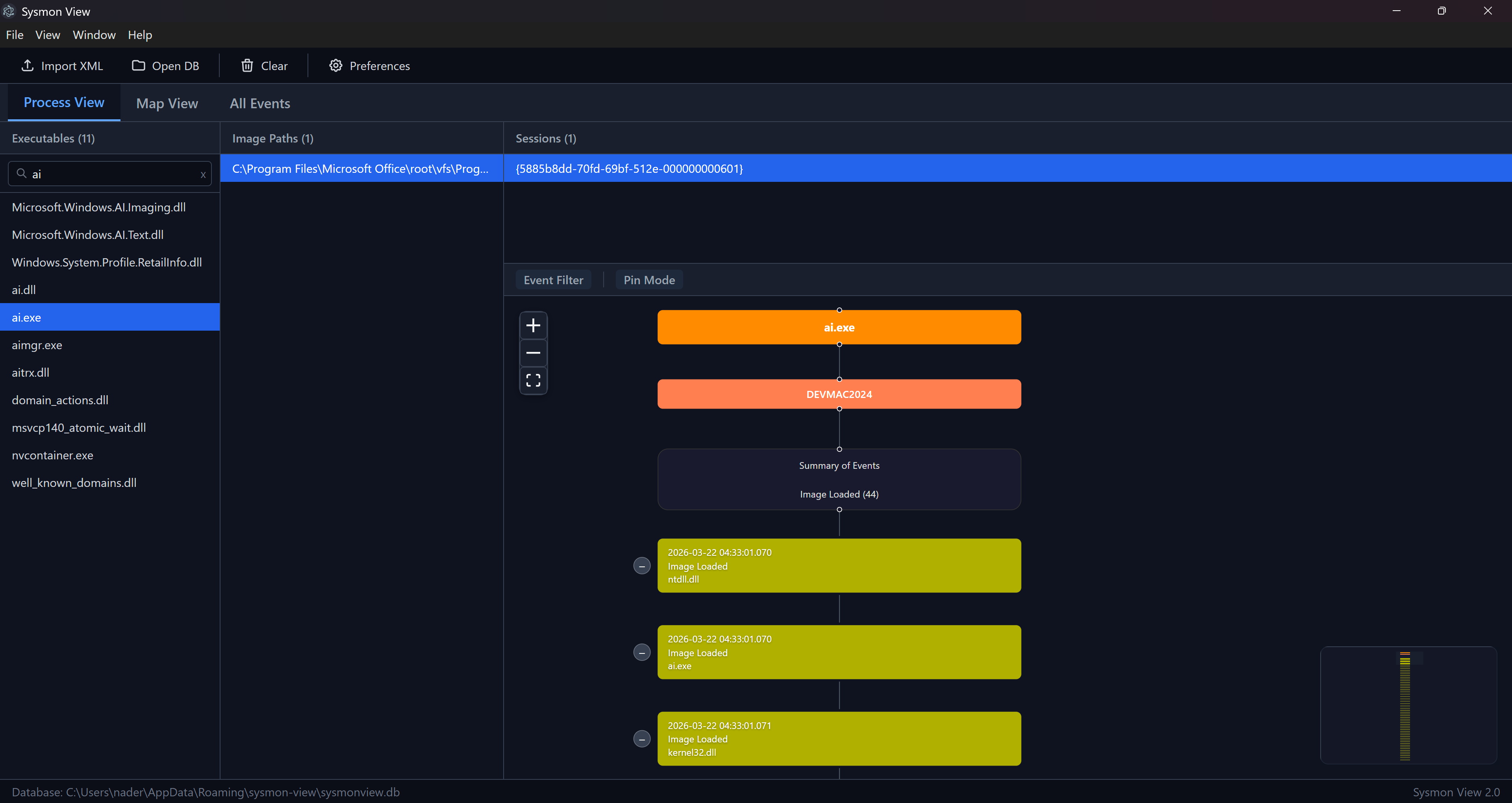
Summarizes run sessions per process GUID and shows correlated events in an interactive session diagram. Each node represents a Sysmon event, color-coded by type, displaying the field of interest (command lines, network connections, loaded images, registry keys, etc.).
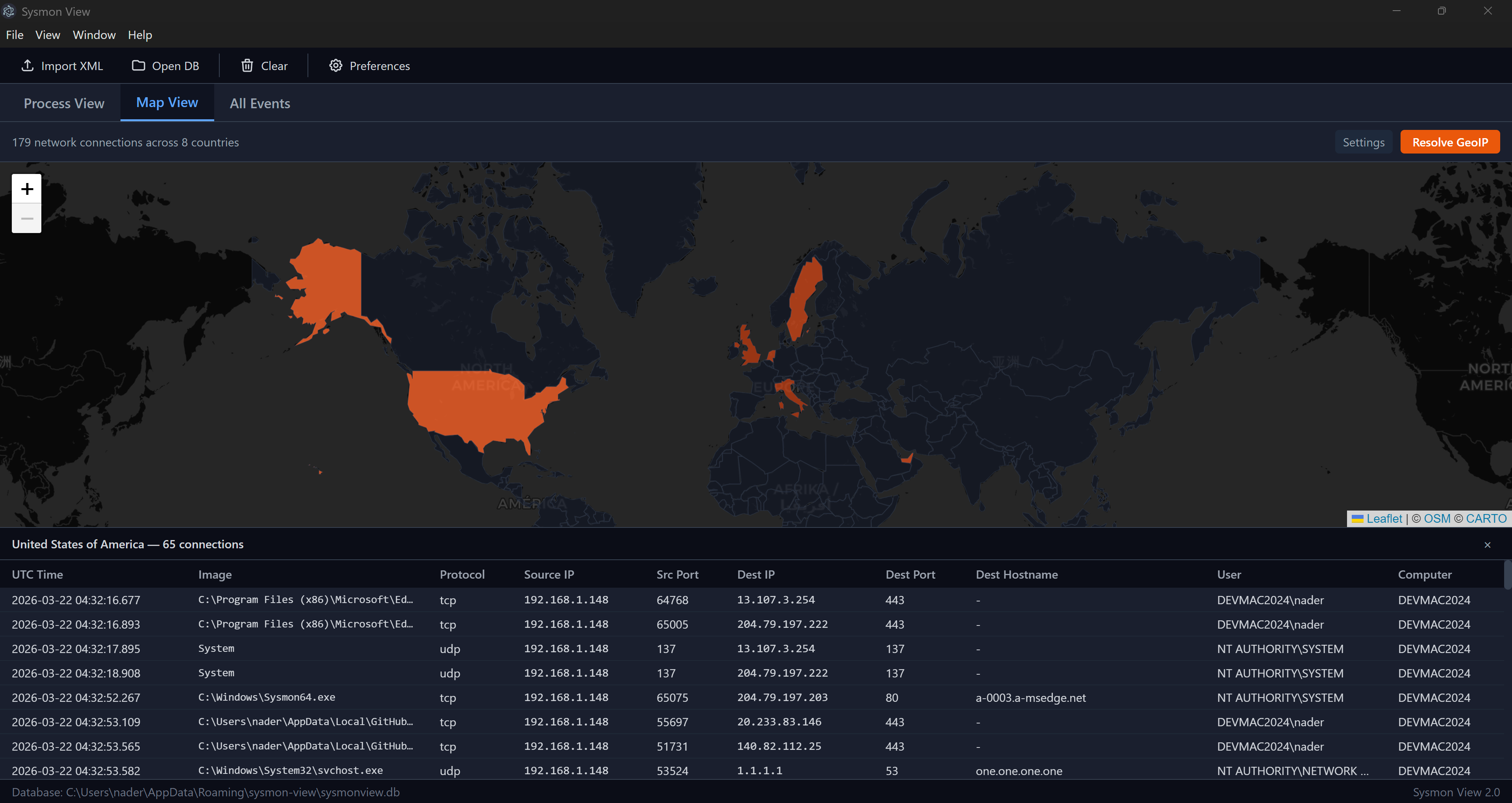
Geo-locates network destinations using configurable GeoIP providers and plots them on an interactive map. Click any marker to pivot into correlated events for that destination.
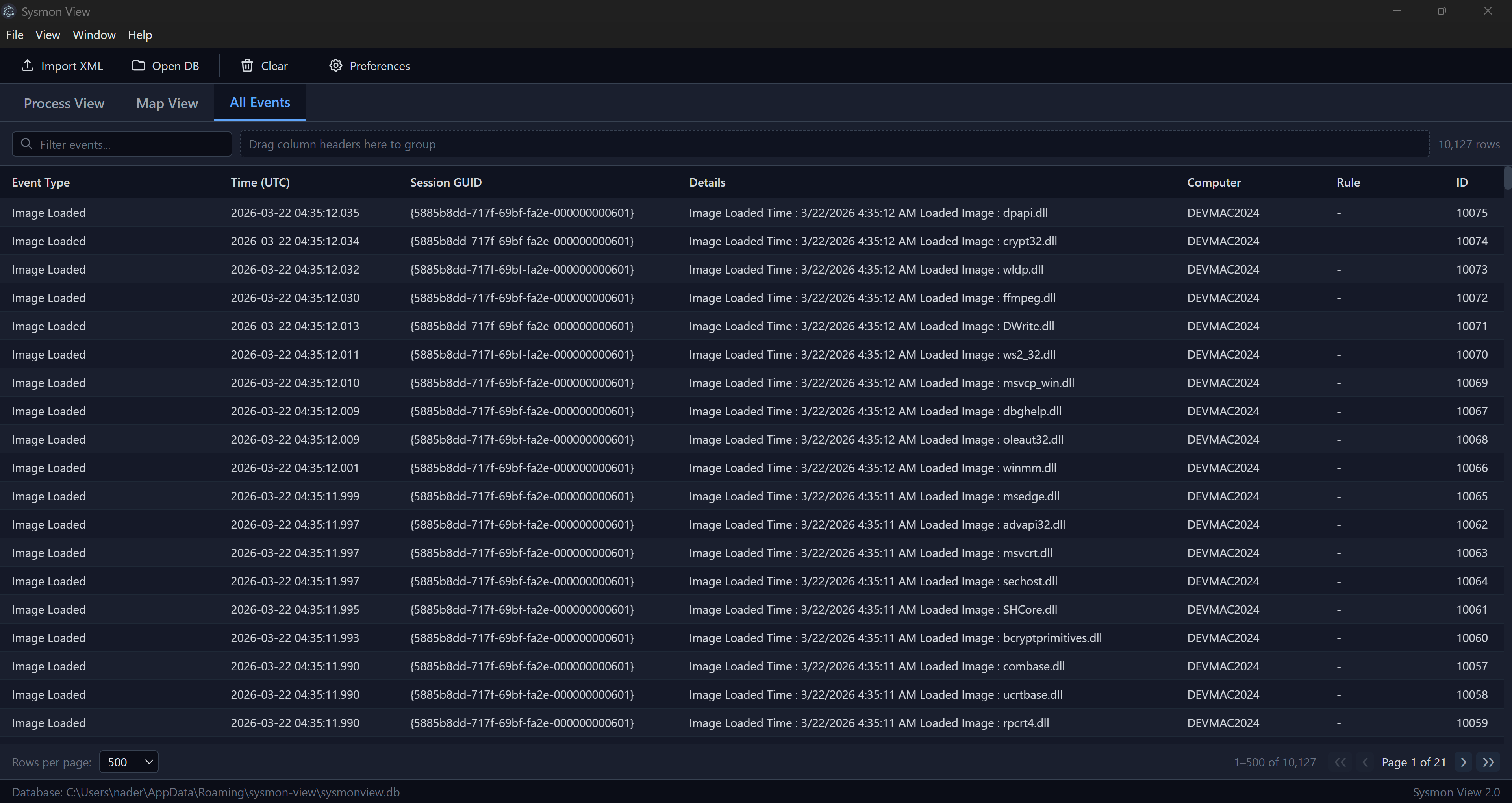
Full search through all collected data with server-side pagination for large datasets. Supports hierarchical grouping — drag column headers to the group zone to organize by machine, event type, session GUID, or any combination.
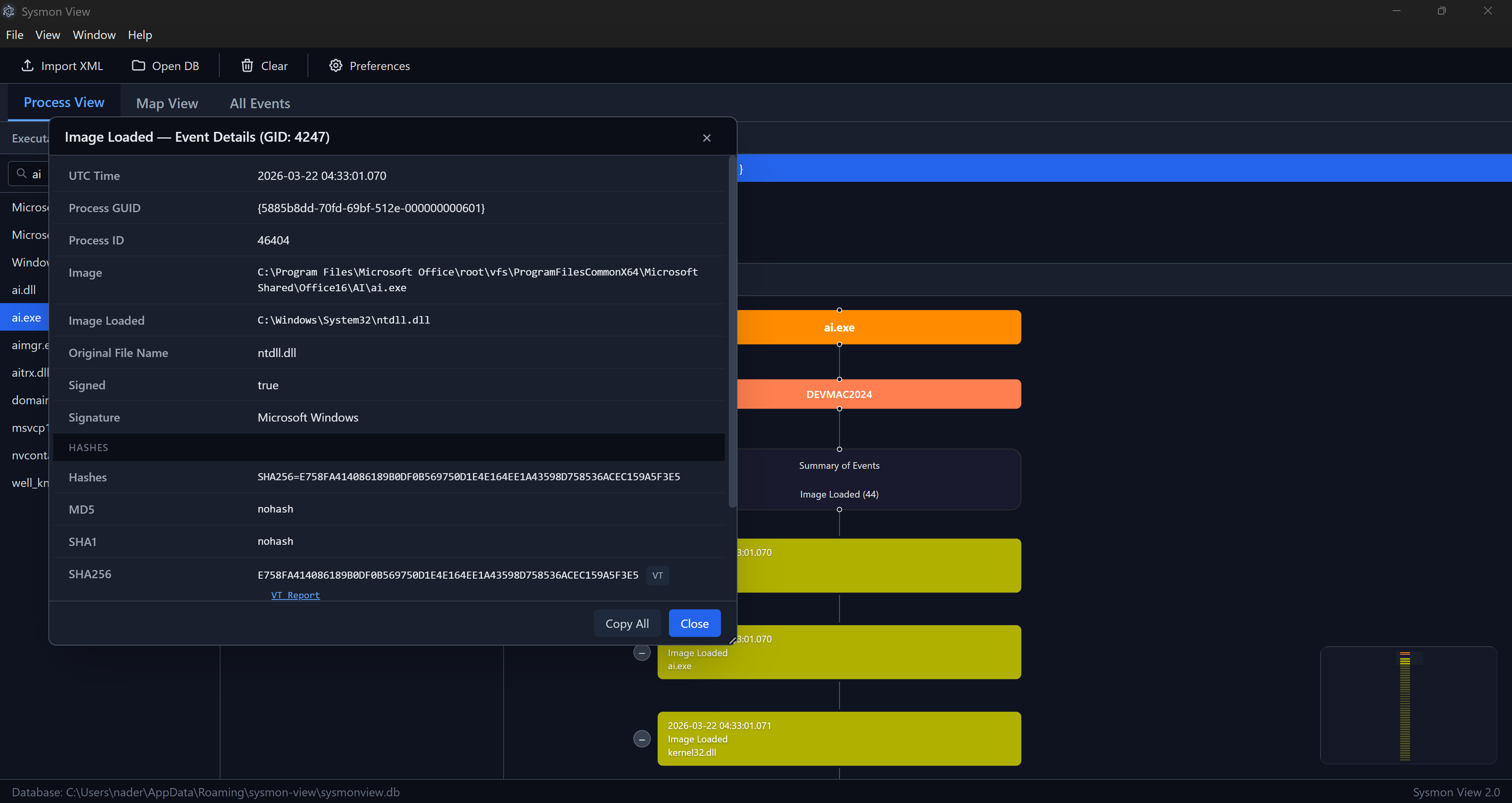
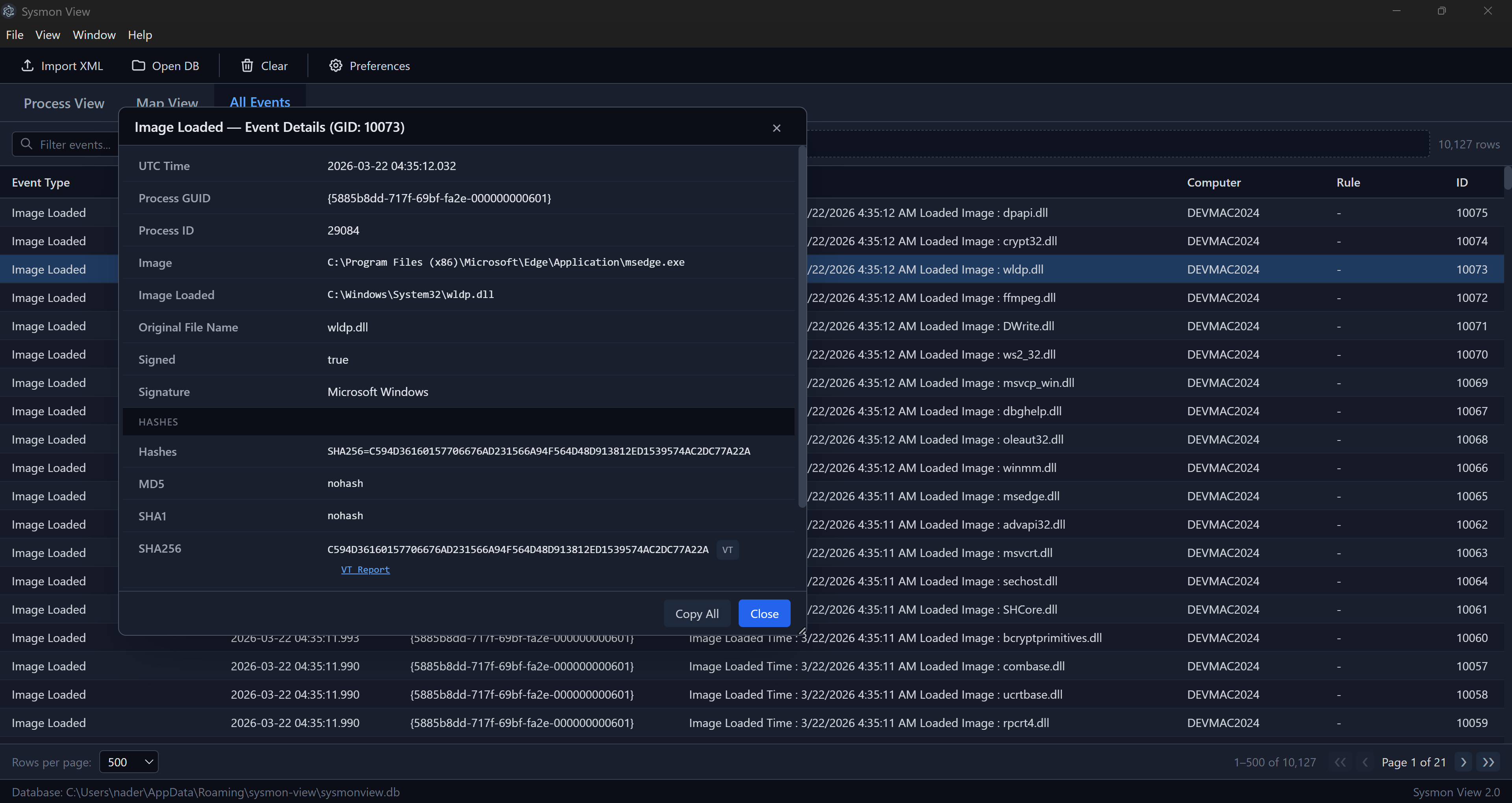
Double-click any event to open a detail panel showing all fields from the event-specific table. Includes direct links to VirusTotal reports for hashes (MD5, SHA1, SHA256) and IP addresses.
Download the latest release from the Releases page:
Sysmon View Setup x.x.x.exe (recommended)SysmonView-x.x.x-portable.exe (no installation required)Export Sysmon events to XML using WEVTUtil:
WEVTUtil query-events "Microsoft-Windows-Sysmon/Operational" /format:xml /e:sysmonview > eventlog.xml
The database is stored under your user application data folder and can be shared or backed up.
git clone https://github.com/nshalabi/SysmonTools.git
cd SysmonTools/SysmonView
npm install
npm run dev
cd SysmonTools/SysmonView
npm install
npm run build
The installer and portable executable will be generated in the SysmonView/release/ directory.
Previous versions of Sysmon Tools are archived in the Legacy/ directory:
These tools are provided as-is for reference. New versions may be added to this repository as they are rewritten.
Sysmon View is built with open-source libraries including React, Electron, React Flow, TanStack Table, Leaflet, sql.js, and others. See THIRD_PARTY_NOTICES.md for the full list with license details.
If you find Sysmon Tools useful in your work, consider supporting its continued development:
Your support helps keep the project maintained, open source, and free for the community.
This project is licensed under the GNU General Public License v3.0.
For issues or feature requests, please open an issue.
163 followers · starred Aug 2026
317 followers · starred Aug 2021
146 followers · starred Jun 2019
80 followers · starred Mar 2022
A collection of utilities for analyzing, visualizing, and managing Microsoft Sysmon logs — designed for security analysts, DFIR specialists, and threat hunters.
Sysmon View has been rewritten from the ground up as a fully open-source desktop application — a long-requested change by the community. Built with Electron + React + TypeScript, the entire codebase is now open and free of commercial dependencies.
Key improvements:
Sysmon View helps track and visualize Sysmon logs by logically grouping and correlating events. It uses executables, session GUIDs, event creation times, and more to organize data into multiple views.
Summarizes run sessions per process GUID and shows correlated events in an interactive session diagram. Each node represents a Sysmon event, color-coded by type, displaying the field of interest (command lines, network connections, loaded images, registry keys, etc.).
Geo-locates network destinations using configurable GeoIP providers and plots them on an interactive map. Click any marker to pivot into correlated events for that destination.
Full search through all collected data with server-side pagination for large datasets. Supports hierarchical grouping — drag column headers to the group zone to organize by machine, event type, session GUID, or any combination.
Double-click any event to open a detail panel showing all fields from the event-specific table. Includes direct links to VirusTotal reports for hashes (MD5, SHA1, SHA256) and IP addresses.
Download the latest release from the Releases page:
Sysmon View Setup x.x.x.exe (recommended)SysmonView-x.x.x-portable.exe (no installation required)Export Sysmon events to XML using WEVTUtil:
WEVTUtil query-events "Microsoft-Windows-Sysmon/Operational" /format:xml /e:sysmonview > eventlog.xml
The database is stored under your user application data folder and can be shared or backed up.
git clone https://github.com/nshalabi/SysmonTools.git
cd SysmonTools/SysmonView
npm install
npm run dev
cd SysmonTools/SysmonView
npm install
npm run build
The installer and portable executable will be generated in the SysmonView/release/ directory.
Previous versions of Sysmon Tools are archived in the Legacy/ directory:
These tools are provided as-is for reference. New versions may be added to this repository as they are rewritten.
Sysmon View is built with open-source libraries including React, Electron, React Flow, TanStack Table, Leaflet, sql.js, and others. See THIRD_PARTY_NOTICES.md for the full list with license details.
If you find Sysmon Tools useful in your work, consider supporting its continued development:
Your support helps keep the project maintained, open source, and free for the community.
This project is licensed under the GNU General Public License v3.0.
For issues or feature requests, please open an issue.
163 followers · starred Aug 2026
317 followers · starred Aug 2021
146 followers · starred Jun 2019
80 followers · starred Mar 2022



