
Build agents to automate any background task; works with your ChatGPT/Claude subscription.
See the codeSee what people are saying
README

Describe an agent. Watch it get built. Let it run.
Open-source workflow automation with AI agents at the core — a visual
canvas, ~160 integrations, and coding agents that can actually use your tools.
Website · Docs · Self-hosting · Discord · Contributing








Quick start
One line:
# macOS / Linux / WSL2 -- needs Docker: https://docs.docker.com/get-docker/
curl -fsSL https://noclick.com/install.sh | sh
# Windows PowerShell -- installs Docker Desktop itself; Windows restarts once
# the first time, and the installer continues after you sign back in
irm https://noclick.com/install.ps1 | iex
Already have Docker, Node.js 18+ and Git? The launcher the Windows installer hands off to runs everywhere:
npx noclick
Or by hand — the same thing, visibly:
git clone --branch <tag> https://github.com/noclickapp/noclick.git && cd noclick
./scripts/noclick-setup.sh
NOCLICK_VERSION=<version> docker compose up -d
Each installer path fetches the latest release's source, generates this
instance's secrets — including the credential-encryption key, which is kept
across re-runs — and pulls that release's images: about 1.5 GB to download the first time,
and nothing is compiled on your machine. Re-running updates in place. Pin a
release with NOCLICK_REF=<tag> from the
releases page;
NOCLICK_REF=main runs the development line. The frontend image is built for
the default local URLs, so an install with other public URLs builds that one
image itself, and NOCLICK_BUILD=1 builds everything from the checkout. Every
installer option is documented at the top of install.sh and
install.ps1.
Then open the editor at http://localhost:3000.
What is NoClick?
NoClick lets you build automations on a visual canvas and run them on triggers — webhooks, schedules, inbound email, or chat messages from Slack, WhatsApp and friends. What makes it different is the agent layer: an AI agent node can drive real coding harnesses (Claude Code, Codex, opencode, hermes, OpenClaw) and call your connected integrations as tools, so an agent can read a Linear issue, work in a git repo, and post the result back to Slack.
This repository is the whole platform, open source under the AGPL: the workflow engine, every integration node, the React editor, the realtime collaboration layer, the AI workflow builder, and an MCP server. It's the same code that runs noclick.com, and it runs end to end on your own machine with nothing held back.
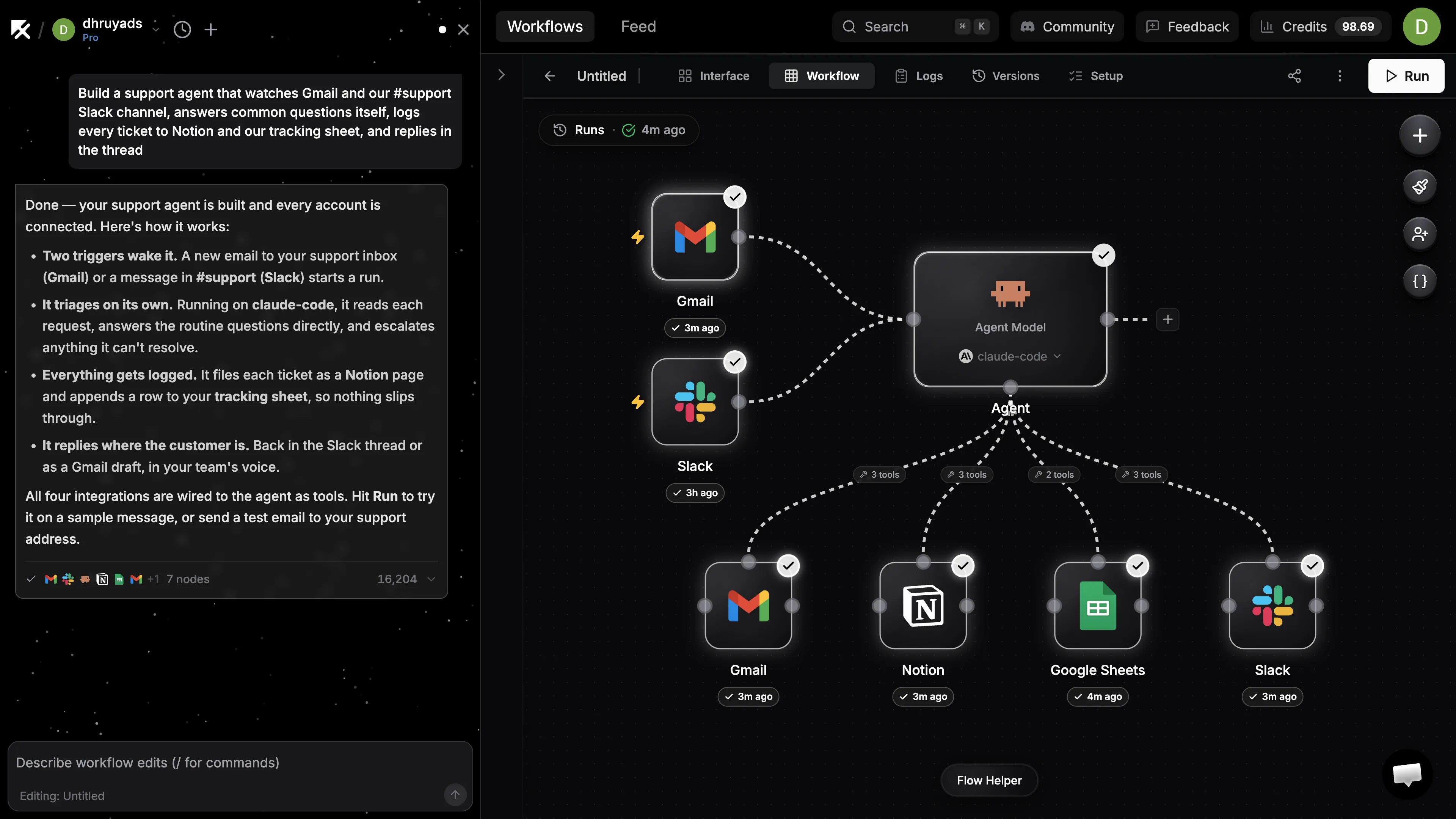
What you can build
- Automations on a canvas — chain ~160 integrations (Slack, Gmail, Notion, Linear, HubSpot, Stripe, Postgres, Google Sheets, …) with branching, iteration, filters, and code nodes.
- Triggers — webhooks, cron schedules, inbound email, and app events from Slack/Discord/HubSpot; channel-style agents that reply where they're spoken to, with as many triggers per workflow as you need.
- AI agents with real tools — wire integration nodes into an agent's tool handle and it can call those operations directly. Agent nodes run either in-process (any OpenAI/Anthropic/OpenRouter-compatible model) or as a coding harness using your own installed CLI.
- Interfaces — publish a form, dashboard, or chat over any workflow.
- Build with AI — describe what you want and the builder assembles the workflow on the canvas. It's also exposed over MCP, so you can point Claude Code (or any MCP client) at your instance and have it build for you.
How it works
- Describe it. Type what you want into the builder — or point any MCP client at your instance and let your coding agent do the describing.
- The builder assembles it. Nodes appear on the canvas wired to real operations, asking only for what it genuinely needs: credentials, and the choices only you can make.
- It runs on triggers. A message arrives, a webhook fires, a schedule ticks — the workflow executes, agents call their tools, and results land where you told them to. Every run records its tool calls, timings, and the agent's response, so you can see exactly what happened.
Self-hosting
The installer above is the fast path. For a real deployment — your own Postgres, object storage, OAuth apps for integrations, model providers, and the environment variables each side needs — read the self-hosting guide.
The deploy buttons above ask for nothing: Railway and Render create a Postgres
database next to the reviewed release image (DigitalOcean binds a managed
cluster named noclick-db you create first), and the instance does the rest on
first boot — it runs its own auth layer, prepares the database, and generates
its own keys. Railway uses railway.template.json,
Render render.yaml, DigitalOcean
.do/deploy.template.yaml, and Fly
fly.toml. See the
hosted deployment guide for
what each one provisions and where its secrets live.
Releases are what you run: main moves with every upstream merge, tags are
deliberate cuts, and each tag publishes images to GHCR so the compose stack
pulls rather than builds. Pin with NOCLICK_VERSION.
Developing from source
Prerequisites: Docker, the Supabase CLI, Python 3.12 (3.13 isn't supported yet — some pinned wheels don't build on it), Node.js 20 or newer, and pnpm 10.34.4 (or npm for running package scripts).
pip install -r requirements.txt
make local
That boots everything on your machine — a local Supabase (Postgres, auth, storage), the backend, and the frontend — and prints a URL. Sign up with any email; local auth confirms instantly. No cloud account, no API keys required to get to a running canvas.
# Backend
cd backend && python server.py       # or: uvicorn server:web_app
pytest                               # test suite

# Frontend
cd frontend && npm run dev
npm run typecheck && npm run build && npm test

# Database migrations
cd infra && supabase migration up --local
Architecture
| Path | What lives there |
|---|---|
backend/nodes/ | Every integration node — one module per service, self-describing config schemas |
backend/wss/ | Socket.IO event layer: handlers, typed events, the workflow execution engine |
backend/coder/workflow/ | The XML workflow DSL, graph state, and the AI builder |
backend/mcp_server.py | MCP server exposing workflow construction to any MCP client |
backend/utils/ | Shared services: webhooks, credentials, storage, relay, cron |
frontend/app/ | Remix + Vite app: ReactFlow canvas, config panels, interface builder |
infra/supabase/ | Database migrations |
sdk/ | The noclick TypeScript SDK for embedding published workflows |
Node config UIs are generated from the backend's Pydantic models, so adding an integration is mostly writing one Python module — the editor picks it up.
NoClick Cloud
noclick.com is the hosted platform. It runs this engine plus managed infrastructure: retained agent runtimes so turns resume instantly, scaled webhook and cron delivery, additional hosted builder capabilities, and managed storage and email. Self-hosted and cloud share the same workflow format, so workflows move between them unchanged, and the cloud's operational layer is what funds the open-source engine.
Contributing
Issues and pull requests are welcome. Adding an integration node is the easiest
place to start: copy the closest existing node in backend/nodes/, register it
in backend/nodes/core/registry.py, and the config UI generates itself.
CONTRIBUTING.md covers the architecture you need to know
and the conventions this codebase enforces. AGENTS.md / CLAUDE.md carry the
same guidance for coding agents, so pointing Claude Code or Codex at a checkout
gets you working changes rather than plausible-looking ones.
Come say hello in Discord — it's the fastest way to get a question answered.
License
NoClick Community is open source under the GNU Affero General Public License,
version 3 (AGPL-3.0-only). Run it, change it, and self-host it,
at work or anywhere else. The one condition worth knowing before you fork: if
you modify NoClick and let other people use your modified version over a
network, you must offer them its source under the same license. That is what
keeps NoClick and its forks open.
The SDKs in sdk/typescript and
sdk/python are Apache-2.0, so the components,
external apps, and scripts you build against them carry no AGPL obligation,
and neither does anything that talks to NoClick over its HTTP or MCP API.
Workflows, functions, and components you author with NoClick are yours: the
license covers NoClick itself, not what you make with it.
Need NoClick under other terms, such as embedding it in a product you don't want to open-source? Commercial licenses are available from legal@noclick.com. Names and logos are covered by the trademark policy, not the license. Releases up to v0.2.12 remain available under the Sustainable Use License 1.0 they shipped with. This section is a summary; LICENSE is the authority.
Similar repos


Languages
Python
76.6%
TypeScript
22.5%
Build agents to automate any background task; works with your ChatGPT/Claude subscription.
See the codeSee what people are saying
README
Describe an agent. Watch it get built. Let it run.
Open-source workflow automation with AI agents at the core — a visual
canvas, ~160 integrations, and coding agents that can actually use your tools.
Website · Docs · Self-hosting · Discord · Contributing
Quick start
One line:
# macOS / Linux / WSL2 -- needs Docker: https://docs.docker.com/get-docker/
curl -fsSL https://noclick.com/install.sh | sh
# Windows PowerShell -- installs Docker Desktop itself; Windows restarts once
# the first time, and the installer continues after you sign back in
irm https://noclick.com/install.ps1 | iex
Already have Docker, Node.js 18+ and Git? The launcher the Windows installer hands off to runs everywhere:
npx noclick
Or by hand — the same thing, visibly:
git clone --branch <tag> https://github.com/noclickapp/noclick.git && cd noclick
./scripts/noclick-setup.sh
NOCLICK_VERSION=<version> docker compose up -d
Each installer path fetches the latest release's source, generates this
instance's secrets — including the credential-encryption key, which is kept
across re-runs — and pulls that release's images: about 1.5 GB to download the first time,
and nothing is compiled on your machine. Re-running updates in place. Pin a
release with NOCLICK_REF=<tag> from the
releases page;
NOCLICK_REF=main runs the development line. The frontend image is built for
the default local URLs, so an install with other public URLs builds that one
image itself, and NOCLICK_BUILD=1 builds everything from the checkout. Every
installer option is documented at the top of install.sh and
install.ps1.
Then open the editor at http://localhost:3000.
What is NoClick?
NoClick lets you build automations on a visual canvas and run them on triggers — webhooks, schedules, inbound email, or chat messages from Slack, WhatsApp and friends. What makes it different is the agent layer: an AI agent node can drive real coding harnesses (Claude Code, Codex, opencode, hermes, OpenClaw) and call your connected integrations as tools, so an agent can read a Linear issue, work in a git repo, and post the result back to Slack.
This repository is the whole platform, open source under the AGPL: the workflow engine, every integration node, the React editor, the realtime collaboration layer, the AI workflow builder, and an MCP server. It's the same code that runs noclick.com, and it runs end to end on your own machine with nothing held back.
What you can build
- Automations on a canvas — chain ~160 integrations (Slack, Gmail, Notion, Linear, HubSpot, Stripe, Postgres, Google Sheets, …) with branching, iteration, filters, and code nodes.
- Triggers — webhooks, cron schedules, inbound email, and app events from Slack/Discord/HubSpot; channel-style agents that reply where they're spoken to, with as many triggers per workflow as you need.
- AI agents with real tools — wire integration nodes into an agent's tool handle and it can call those operations directly. Agent nodes run either in-process (any OpenAI/Anthropic/OpenRouter-compatible model) or as a coding harness using your own installed CLI.
- Interfaces — publish a form, dashboard, or chat over any workflow.
- Build with AI — describe what you want and the builder assembles the workflow on the canvas. It's also exposed over MCP, so you can point Claude Code (or any MCP client) at your instance and have it build for you.
How it works
- Describe it. Type what you want into the builder — or point any MCP client at your instance and let your coding agent do the describing.
- The builder assembles it. Nodes appear on the canvas wired to real operations, asking only for what it genuinely needs: credentials, and the choices only you can make.
- It runs on triggers. A message arrives, a webhook fires, a schedule ticks — the workflow executes, agents call their tools, and results land where you told them to. Every run records its tool calls, timings, and the agent's response, so you can see exactly what happened.
Self-hosting
The installer above is the fast path. For a real deployment — your own Postgres, object storage, OAuth apps for integrations, model providers, and the environment variables each side needs — read the self-hosting guide.
The deploy buttons above ask for nothing: Railway and Render create a Postgres
database next to the reviewed release image (DigitalOcean binds a managed
cluster named noclick-db you create first), and the instance does the rest on
first boot — it runs its own auth layer, prepares the database, and generates
its own keys. Railway uses railway.template.json,
Render render.yaml, DigitalOcean
.do/deploy.template.yaml, and Fly
fly.toml. See the
hosted deployment guide for
what each one provisions and where its secrets live.
Releases are what you run: main moves with every upstream merge, tags are
deliberate cuts, and each tag publishes images to GHCR so the compose stack
pulls rather than builds. Pin with NOCLICK_VERSION.
Developing from source
Prerequisites: Docker, the Supabase CLI, Python 3.12 (3.13 isn't supported yet — some pinned wheels don't build on it), Node.js 20 or newer, and pnpm 10.34.4 (or npm for running package scripts).
pip install -r requirements.txt
make local
That boots everything on your machine — a local Supabase (Postgres, auth, storage), the backend, and the frontend — and prints a URL. Sign up with any email; local auth confirms instantly. No cloud account, no API keys required to get to a running canvas.
# Backend
cd backend && python server.py       # or: uvicorn server:web_app
pytest                               # test suite

# Frontend
cd frontend && npm run dev
npm run typecheck && npm run build && npm test

# Database migrations
cd infra && supabase migration up --local
Architecture
| Path | What lives there |
|---|---|
backend/nodes/ | Every integration node — one module per service, self-describing config schemas |
backend/wss/ | Socket.IO event layer: handlers, typed events, the workflow execution engine |
backend/coder/workflow/ | The XML workflow DSL, graph state, and the AI builder |
backend/mcp_server.py | MCP server exposing workflow construction to any MCP client |
backend/utils/ | Shared services: webhooks, credentials, storage, relay, cron |
frontend/app/ | Remix + Vite app: ReactFlow canvas, config panels, interface builder |
infra/supabase/ | Database migrations |
sdk/ | The noclick TypeScript SDK for embedding published workflows |
Node config UIs are generated from the backend's Pydantic models, so adding an integration is mostly writing one Python module — the editor picks it up.
NoClick Cloud
noclick.com is the hosted platform. It runs this engine plus managed infrastructure: retained agent runtimes so turns resume instantly, scaled webhook and cron delivery, additional hosted builder capabilities, and managed storage and email. Self-hosted and cloud share the same workflow format, so workflows move between them unchanged, and the cloud's operational layer is what funds the open-source engine.
Contributing
Issues and pull requests are welcome. Adding an integration node is the easiest
place to start: copy the closest existing node in backend/nodes/, register it
in backend/nodes/core/registry.py, and the config UI generates itself.
CONTRIBUTING.md covers the architecture you need to know
and the conventions this codebase enforces. AGENTS.md / CLAUDE.md carry the
same guidance for coding agents, so pointing Claude Code or Codex at a checkout
gets you working changes rather than plausible-looking ones.
Come say hello in Discord — it's the fastest way to get a question answered.
License
NoClick Community is open source under the GNU Affero General Public License,
version 3 (AGPL-3.0-only). Run it, change it, and self-host it,
at work or anywhere else. The one condition worth knowing before you fork: if
you modify NoClick and let other people use your modified version over a
network, you must offer them its source under the same license. That is what
keeps NoClick and its forks open.
The SDKs in sdk/typescript and
sdk/python are Apache-2.0, so the components,
external apps, and scripts you build against them carry no AGPL obligation,
and neither does anything that talks to NoClick over its HTTP or MCP API.
Workflows, functions, and components you author with NoClick are yours: the
license covers NoClick itself, not what you make with it.
Need NoClick under other terms, such as embedding it in a product you don't want to open-source? Commercial licenses are available from legal@noclick.com. Names and logos are covered by the trademark policy, not the license. Releases up to v0.2.12 remain available under the Sustainable Use License 1.0 they shipped with. This section is a summary; LICENSE is the authority.
Similar repos
Languages
Python
76.6%
TypeScript
22.5%