
Ghidra Wasm plugin with disassembly and decompilation support
Java
410
234 commits
updated Dec 15, 2025
README
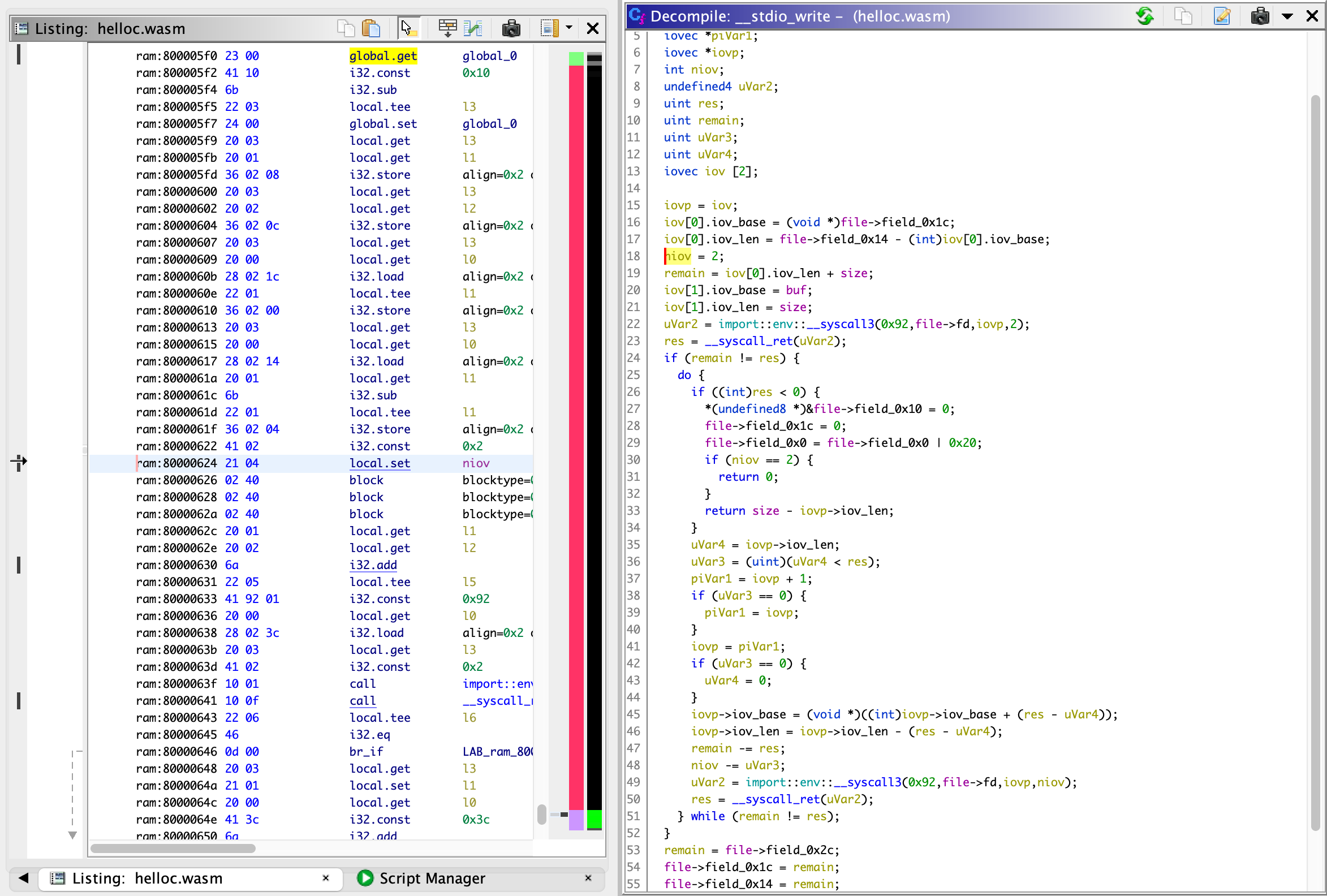
Module to load WebAssembly files into Ghidra, supporting disassembly and decompilation.
Features
- Support for all WebAssembly 1.0 opcodes
- Cross-references for function calls and branches
- Cross-references for table entries and globals containing function pointers
- Recovery of the C stack, when the stack pointer is stored in a global variable (typical for compilers like Emscripten)
Installing
Prebuilt Extension
The easiest way to install the plugin is as a Ghidra extension. Grab a
release that is
compatible with your version of Ghidra - for example, if you're using Ghidra
12.0, download the file beginning with ghidra_12.0_PUBLIC. You don't need
to unzip the file: simply launch Ghidra, go to "File -> Install Extensions",
select the + icon, and select the zip file. Restart Ghidra to load the extension
and you should be good to go. Note: if you upgrade your version of Ghidra,
you will need to upgrade your plugin too.
Custom Build
If there is no release for your version of Ghidra, or you want to install a modified version, you may build and install from source instead. You'll need Gradle and a Java compiler. Run the following commands from the root of this repository:
export GHIDRA_INSTALL_DIR=<path to Ghidra install directory>
gradle buildExtension
GHIDRA_INSTALL_DIR should be the directory that contains the Ghidra
installation, i.e. the directory containing Extensions, Ghidra, ghidraRun,
support and so on.
If all goes well, the zipped plugin will be placed in the dist directory and
can be installed using "File -> Install Extensions" as before.
Tips
- Many Wasm programs, especially those compiled by Emscripten or Clang, use a global variable to store the C stack pointer. This plugin will attempt to automatically detect the C stack pointer during analysis; if it fails, you may need to set it yourself before performing initial analysis by setting the "C Stack Pointer" in the Wasm Pre-Analyzer settings.
- By default, the C stack is assumed to grow in the negative direction, i.e.
towards smaller addresses. However, compilers are actually free to choose either
stack direction, and both positive and negative-growing stacks have been
observed in real-world samples. If your C stack grows upwards (e.g. indicated by
an add operation to the C stack pointer in the function prologue rather than a
subtract), select the
pos-stackcompiler when importing the file, or viaSet Language...on an existing file in the project window. - Emscripten will usually translate function pointer calls into calls to
exported
dyncall_functions, which take a call-type-specific index as the first parameter. The index is used to index a sub-section of the main function table (table0) to find the function to call. The included scriptanalyze_dyncalls.pycan analyze thedyncall_functions, extract the indices, and rename referenced functions according to their call type and function index (which will often serve as function pointer values in memory). This can be used to resolve function pointer references, for example. - Element segments may be passive, or have offset expressions that depend on
imported globals. In this case, the element segments are not automatically
loaded to the table. You can manually load these segments by calling
WasmLoader.loadElementsToTable. For example, to load element segment #0 to table #1 at offset 2 in Python:
from wasm import WasmLoader
from wasm.analysis import WasmAnalysis
from ghidra.util.task import ConsoleTaskMonitor
monitor = ConsoleTaskMonitor()
WasmLoader.loadElementsToTable(currentProgram, WasmAnalysis.getState(currentProgram).module, 0, 1, 2, monitor)
- Similarly, data segments can be manually loaded as well. For example, to load data segment #5 to memory #0 at offset 0x1000, do the following in Python:
from wasm import WasmLoader
from wasm.analysis import WasmAnalysis
from ghidra.util.task import ConsoleTaskMonitor
monitor = ConsoleTaskMonitor()
WasmLoader.loadDataToMemory(currentProgram, WasmAnalysis.getState(currentProgram).module, 5, 0, 0x1000, monitor)
Limitations and Known Bugs
- Currently, inlining functions (via marking them "In Line") is not supported and will confuse the decompiler. This is because the inlined function's references to stack and local variables will affect the caller. I tried to solve this limitation by injecting code to save and restore stack and locals on function entry/exit, but ran into a Ghidra limitation - the decompiler does not inject "uponentry" Pcode into inlined functions.
- Currently, there is no way to change the C stack pointer after initial analysis (attempting to re-analyze the program with a new C stack pointer will not change anything).
- Initial analysis and disassembly can be very slow. This is primarily because Ghidra is quite slow at setting large numbers of context registers.
- Multiple return values are untested and will probably not work.
Internals
This module uses a pre-analyzer (WasmPreAnalyzer) to analyze all functions and opcodes, providing contextual information to the SLEIGH disassembler to enable correct disassembly (for example, operand sizes when they depend on the types in the value stack, branch target addresses, etc). In order to support recovery of the C stack, this module converts Wasm stack operations into operations on a register file. This frees up the decompiler's stack analysis to focus on the behaviour of the C stack, since the decompiler only supports a single stack. Additionally, parameter passing and returns are handled by virtual input/output registers which are copied to/from the stack and locals registers via Pcode injection.
Four different types of "registers" are defined: input (iN), output (oN), stack (sN) and locals (lN). Of these, only the locals will be visible in the disassembly; stack registers will appear in the PCode, and input/output registers will appear in function types.
Acknowledgements
- This plugin borrows loader functionality from this repo: https://github.com/andr3colonel/ghidra_wasm
- This plugin was directly based on https://github.com/garrettgu10/ghidra-wasm-plugin
Significant stargazers

2,800 followers · starred Mar 2022

881 followers · starred Sep 2021

27 followers · starred May 2023

109 followers · starred Jan 2023
Similar repos


Languages
Java
88.4%
Python
9.3%
HTML
2.3%
Ghidra Wasm plugin with disassembly and decompilation support
Java
410
234 commits
updated Dec 15, 2025
README
Module to load WebAssembly files into Ghidra, supporting disassembly and decompilation.
Features
- Support for all WebAssembly 1.0 opcodes
- Cross-references for function calls and branches
- Cross-references for table entries and globals containing function pointers
- Recovery of the C stack, when the stack pointer is stored in a global variable (typical for compilers like Emscripten)
Installing
Prebuilt Extension
The easiest way to install the plugin is as a Ghidra extension. Grab a
release that is
compatible with your version of Ghidra - for example, if you're using Ghidra
12.0, download the file beginning with ghidra_12.0_PUBLIC. You don't need
to unzip the file: simply launch Ghidra, go to "File -> Install Extensions",
select the + icon, and select the zip file. Restart Ghidra to load the extension
and you should be good to go. Note: if you upgrade your version of Ghidra,
you will need to upgrade your plugin too.
Custom Build
If there is no release for your version of Ghidra, or you want to install a modified version, you may build and install from source instead. You'll need Gradle and a Java compiler. Run the following commands from the root of this repository:
export GHIDRA_INSTALL_DIR=<path to Ghidra install directory>
gradle buildExtension
GHIDRA_INSTALL_DIR should be the directory that contains the Ghidra
installation, i.e. the directory containing Extensions, Ghidra, ghidraRun,
support and so on.
If all goes well, the zipped plugin will be placed in the dist directory and
can be installed using "File -> Install Extensions" as before.
Tips
- Many Wasm programs, especially those compiled by Emscripten or Clang, use a global variable to store the C stack pointer. This plugin will attempt to automatically detect the C stack pointer during analysis; if it fails, you may need to set it yourself before performing initial analysis by setting the "C Stack Pointer" in the Wasm Pre-Analyzer settings.
- By default, the C stack is assumed to grow in the negative direction, i.e.
towards smaller addresses. However, compilers are actually free to choose either
stack direction, and both positive and negative-growing stacks have been
observed in real-world samples. If your C stack grows upwards (e.g. indicated by
an add operation to the C stack pointer in the function prologue rather than a
subtract), select the
pos-stackcompiler when importing the file, or viaSet Language...on an existing file in the project window. - Emscripten will usually translate function pointer calls into calls to
exported
dyncall_functions, which take a call-type-specific index as the first parameter. The index is used to index a sub-section of the main function table (table0) to find the function to call. The included scriptanalyze_dyncalls.pycan analyze thedyncall_functions, extract the indices, and rename referenced functions according to their call type and function index (which will often serve as function pointer values in memory). This can be used to resolve function pointer references, for example. - Element segments may be passive, or have offset expressions that depend on
imported globals. In this case, the element segments are not automatically
loaded to the table. You can manually load these segments by calling
WasmLoader.loadElementsToTable. For example, to load element segment #0 to table #1 at offset 2 in Python:
from wasm import WasmLoader
from wasm.analysis import WasmAnalysis
from ghidra.util.task import ConsoleTaskMonitor
monitor = ConsoleTaskMonitor()
WasmLoader.loadElementsToTable(currentProgram, WasmAnalysis.getState(currentProgram).module, 0, 1, 2, monitor)
- Similarly, data segments can be manually loaded as well. For example, to load data segment #5 to memory #0 at offset 0x1000, do the following in Python:
from wasm import WasmLoader
from wasm.analysis import WasmAnalysis
from ghidra.util.task import ConsoleTaskMonitor
monitor = ConsoleTaskMonitor()
WasmLoader.loadDataToMemory(currentProgram, WasmAnalysis.getState(currentProgram).module, 5, 0, 0x1000, monitor)
Limitations and Known Bugs
- Currently, inlining functions (via marking them "In Line") is not supported and will confuse the decompiler. This is because the inlined function's references to stack and local variables will affect the caller. I tried to solve this limitation by injecting code to save and restore stack and locals on function entry/exit, but ran into a Ghidra limitation - the decompiler does not inject "uponentry" Pcode into inlined functions.
- Currently, there is no way to change the C stack pointer after initial analysis (attempting to re-analyze the program with a new C stack pointer will not change anything).
- Initial analysis and disassembly can be very slow. This is primarily because Ghidra is quite slow at setting large numbers of context registers.
- Multiple return values are untested and will probably not work.
Internals
This module uses a pre-analyzer (WasmPreAnalyzer) to analyze all functions and opcodes, providing contextual information to the SLEIGH disassembler to enable correct disassembly (for example, operand sizes when they depend on the types in the value stack, branch target addresses, etc). In order to support recovery of the C stack, this module converts Wasm stack operations into operations on a register file. This frees up the decompiler's stack analysis to focus on the behaviour of the C stack, since the decompiler only supports a single stack. Additionally, parameter passing and returns are handled by virtual input/output registers which are copied to/from the stack and locals registers via Pcode injection.
Four different types of "registers" are defined: input (iN), output (oN), stack (sN) and locals (lN). Of these, only the locals will be visible in the disassembly; stack registers will appear in the PCode, and input/output registers will appear in function types.
Acknowledgements
- This plugin borrows loader functionality from this repo: https://github.com/andr3colonel/ghidra_wasm
- This plugin was directly based on https://github.com/garrettgu10/ghidra-wasm-plugin
Similar repos
Significant stargazers
2,800 followers · starred Mar 2022
881 followers · starred Sep 2021
27 followers · starred May 2023
109 followers · starred Jan 2023
Languages
Java
88.4%
Python
9.3%
HTML
2.3%