Yet another Nix CLI helper. [Maintainers=@NotAShelf, @faukah]
Rust
3,286
1,351 commits
updated Oct 11, 2026



NH is a modern helper utility that aims to consolidate and reimplement some of the commands and interfaces from various tools within the Nix/NixOS ecosystem. Our goal is to provide a cohesive, easily-understandable interface with more features, better ergonomics and at many times better speed. In addition to acting as a super-convenient, all-in-one utility that reimplements well-known and commonly used Nix commands, NH is a pretty tool that brings together relevant 3rd party projects that you might be familiar with.
To get started with NH, skip to the Usage section.
os, home, darwin, search,
clean) exposes granular subcommands and flags for fine-tuned control.nh clean extends nix-collect-garbage
with gcroot cleanup, profile targeting, and time-based retention.nh os and similar commands display build
trees for clear dependency tracking.NH is an unified CLI, meaning it aims to bring together core platform support into a single, convenient utility. For the time being, this appears in NH's interface as support for NixOS (first-class), Home Manager and Nix-Darwin. We hope to provide a familiar, convenient and good looking interface for users of any and all of those projects.
The familiar interface of NH should not be seen as a weakness, however, as NH is NOT a nixos-rebuild wrapper, and is not constrained by the limits of such tools. Simply put, our goal is to implement not only what is available but instead go above and beyond to implement additional commands and flags to improve the experience provided by the default tools. Which is to say plumbing and sane defaults matter. You get to enjoy the very tools that you are accustomed to, with the benefits of a faster and safer language.
[!IMPORTANT] Future goals of NH include providing support for lower-levels tools, such as
nixos-install, andnixos-generate-configto become a drop-in replacement for most critical tools with the benefits of Rust. If you would like to provide feedback and create feature requests, those are welcome over at the Discussions and Issues tabs respectively.

NH is packaged in nixpkgs, and is available under both nixpkgs stable and nixpkgs unstable. Outside of extreme circumstances, all updates will be backported to the stable branch. Refer to the installation section for more details. Make sure you submit an update request in Nixpkgs if the package is outdated.
The latest, tagged version is available in Nixpkgs as NH stable. This is recommended for most users, as tagged releases will usually undergo more testing. This repository also provides the latest development version of NH, which you can get from the flake outputs.
nix shell nixpkgs#nh # stable
nix shell github:nix-community/nh # dev
You can try NH in a Nix shell today, no setup required!
We provide a NixOS module that integrates nh clean as a service. To enable it,
set the following configuration:
{
  programs.nh = {
    enable = true;
    clean.enable = true;
    clean.extraArgs = "--keep-since 4d --keep 3";
    flake = "/home/user/my-nixos-config"; # sets NH_OS_FLAKE variable for you
  };
}
[!TIP] As of 4.0, NH fully supports both Nix flakes and classical NixOS configurations via channels or manual dependency pinning and the such. Please consider the new API mature, but somewhat experimental as it is a new addition. Remember to report any bugs!
- For flakes, the command is
nh os switch /path/to/flake- For a classical configuration:
nh os switch -f '<nixpkgs/nixos>', ornh os switch -f '<nixpkgs/nixos>' -- -I nixos-config=/path/to/configuration.nixif using a different location than the default.
You might want to check nh os --help or man 1 nh for other values and the
defaults from environment variables.
NH is capable of detecting which specialisation you are running, so it runs the
proper activation script. To do so, you need to give NH some information of the
spec that is currently running by writing its name to /etc/specialisation. The
config would look like this:
{config, pkgs, ...}: {
  specialisation."foo".configuration = {
    environment.etc."specialisation".text = "foo";
    # ..rest of config
  };

  specialisation."bar".configuration = {
    environment.etc."specialisation".text = "bar";
    # ..rest of config
  };
}
Home specialisations are read from ~/.local/share/home-manager/specialisation.
The config would look like this:
{config, pkgs, ...}: {
  specialisation."foo".configuration = {
    xdg.dataFile."home-manager/specialisation".text = "foo";
    # ..rest of config
  };

  specialisation."bar".configuration = {
    xdg.dataFile."home-manager/specialisation".text = "bar";
    # ..rest of config
  };
}
One of the features and the core principles of NH is to provide a clean, uniform
and intuitive CLI for its users. The nh command offers several subcommands,
all with their extensive CLI flags for extensive configuration.
[!TIP] NH supports various flags, environment variables and setup options to provide the best possible user experience. See the
--helppage for individual subcommands, orman 1 nhfor more information on each subcommand with examples. You may also use the relevant platform module, such as the NixOS module available in Nixpkgs, to customize it for your system as described in the installation section.
Under the nh command, there are two types of commands that you'll be
interested in:
Global subcommands implement functionality around core Nix commands. As it stands, we provide a better search and better garbage collection experience, done so with two subcommands provided out of the box.
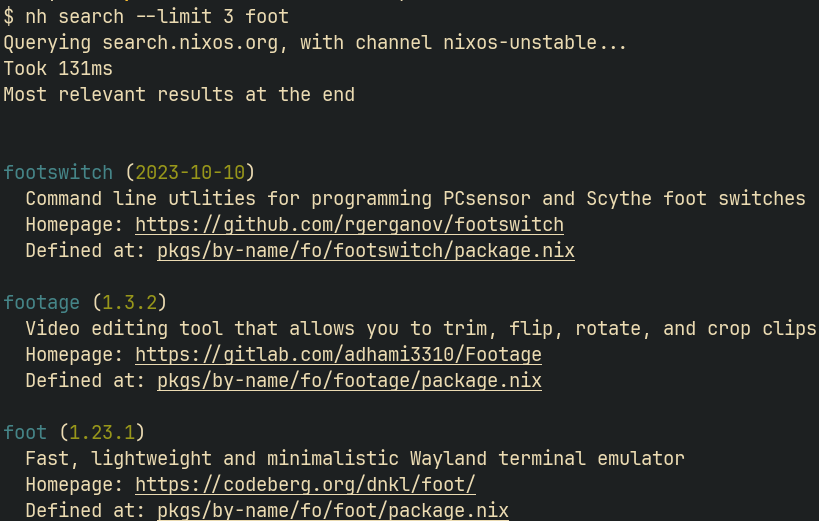
nh searchWe provide a super-fast search tool for Nix packages and NixOS/Home Manager
options (powered by an Elasticsearch client against search.nixos.org), offline
search against local SPAM databases, and Nixpkgs pull request and issue
search. All available as nh search!
The command exposes several explicit subcommands and a convenient shorthand:
| Invocation | What it does |
|---|---|
nh search <query> | Shorthand; searches packages by default (see NH_DEFAULT_SEARCH.) |
nh search packages <query> | Search Nixpkgs packages via https://search.nixos.org elasticsearch API. |
nh search options [--scope=<SCOPE>] <query> | Search NixOS/Home Manager/nix-darwin options (--scope: nixpkgs, home-manager, nix-darwin, all.) |
nh search offline --db <PATH> <query> | Search a local SPAM database without network access. Generated DBs can be found here. |
nh search prs [--days <DAYS>] <query> | Search Nixpkgs pull requests and show branch reachability for merged PRs. Defaults to updates in the last 15 days. |
nh search issues [--days <DAYS>] <query> | Search Nixpkgs issues, excluding pull requests. Defaults to updates in the last 15 days. |
--json is shared by all search modes. --limit, --channel, and
--platforms are available on the modes that use them and on the shorthand
form. nh search prs and nh search issues use GH_TOKEN for GitHub
authentication. If GH_TOKEN is unset, NH reads the token from
NH_GITHUB_TOKEN_FILE, or from $XDG_STATE_HOME/nh/github-token falling back
to ~/.local/state/nh/github-token. If no token is found in an interactive
terminal, NH prompts for one and saves it to that token file.
nh cleanReimplementation of nix-collect-garbage that also collects gcroots with
various options for fine-graining what is kept, and additional context before
the cleanup process to let you know what is to be cleaned.
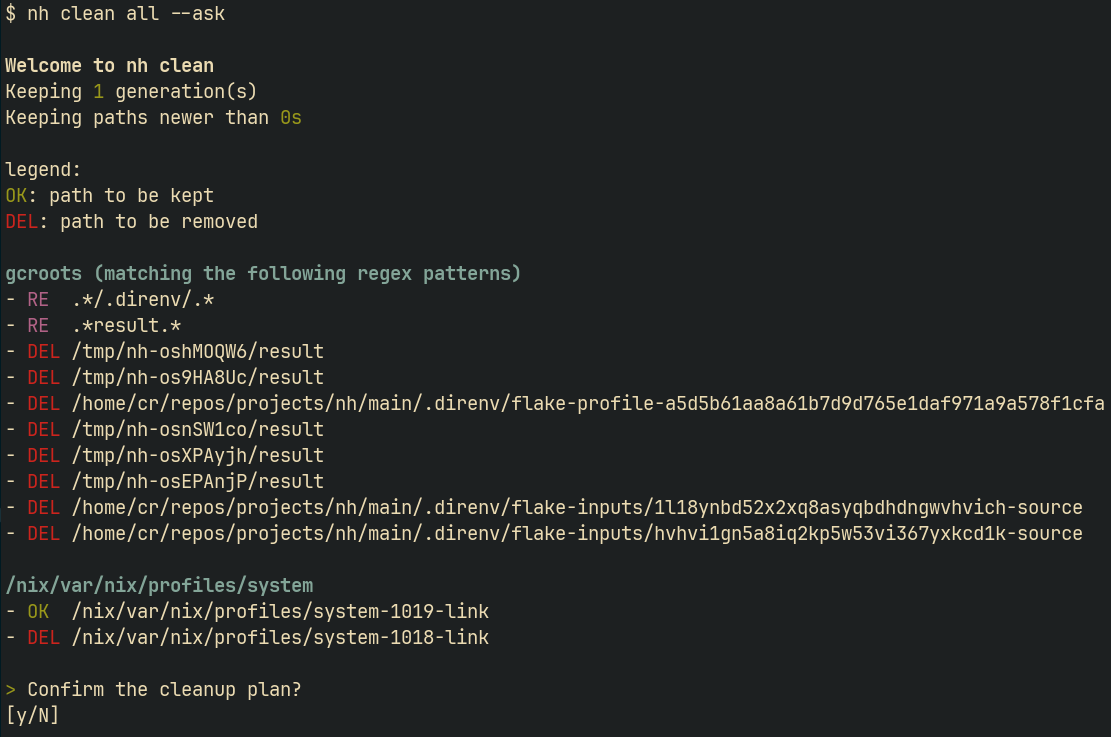
[!NOTE] By default
nh cleanwill automatically clean up your gcroots directory, which will remove all your built result and direnv directories.Use
--no-gcrootsto skip all gcroot cleanup, or--no-direnvto preserve direnv gcroots while still cleaning everything else.
Platform specific subcommands are those that implement CLI utilities for NixOS, Home Manager and Nix-Darwin.
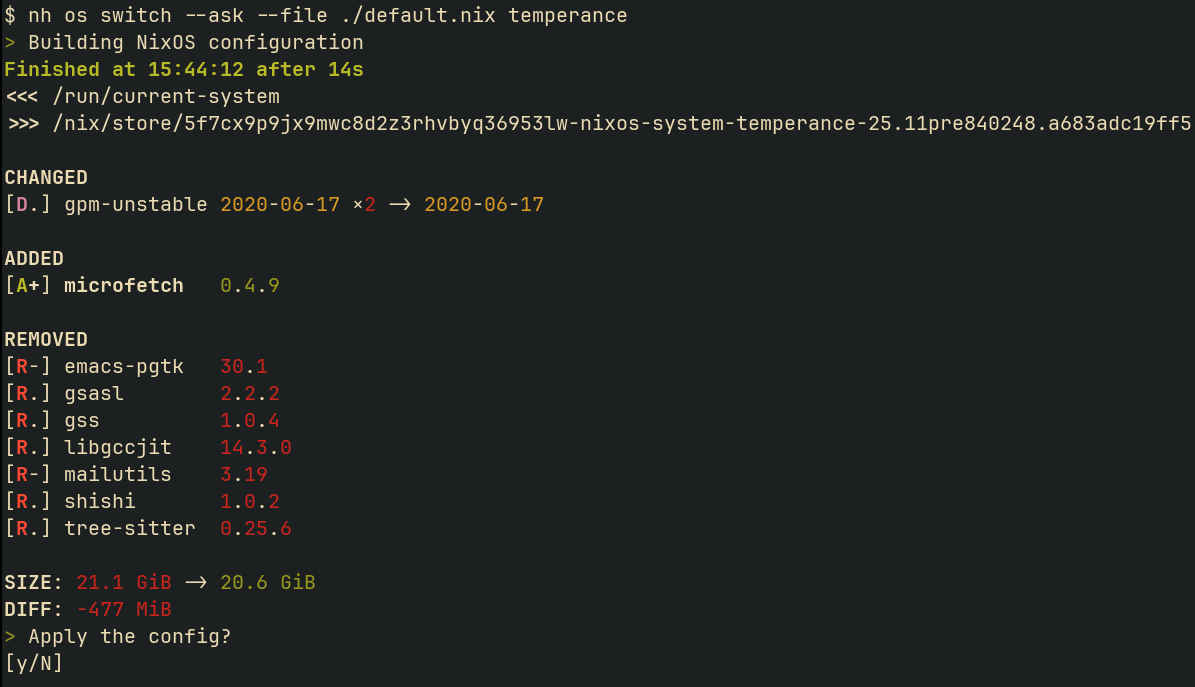
nh osThe nh os subcommand reimplements the Python script, nixos-rebuild-ng, 1
from ground up with the addition of:
and other additional changes to make the UI more intuitive, from supporting environment variables to additional safeguards. Is this all? No, more is to come.
nh homeThe nh home subcommand reimplements the home-manager script, with the same
additions as nh os.
nh darwinLast but not least, the nh darwin subcommand is a pure-rust reimplementation
of the darwin-rebuild script featuring the same additions as nh os and
nh home.
| Platform | Old Command (Without NH) | New Command (With NH) |
|---|---|---|
| NixOS | nixos-rebuild switch --flake .#myHost | nh os switch . -H myHost |
| Darwin | darwin-rebuild switch --flake .#myHost | nh darwin switch . -H myHost |
| Home Manager | home-manager switch --flake .#myHost | nh home switch . -c myHome |
If the NH_FLAKE variable is set, NH allows omitting the path to your flake.
This is done automatically in the modules for NH in the NixOS and Home-Manager
modules if programs.nh.flake is set.
NH also allows omitting the hostname (-H) for NixOS/Darwin and the
configuration (-c) parameters when it can be autodiscovered on the system. For
example, if NH_FLAKE or NH_OS_FLAKE is set you may simply run nh os switch
with no additional arguments, and it will automatically resolve
nixosConfigurations.<myHost>.
Additionally, NH also allows omitting the path to your non-flake nix config. You
can specify the Nix file and Nix attribute path with the NH_FILE and
NH_ATTRP environment variables. If NH_FILE and NH_ATTRP are both set,
nh os switch effectively evaluates $NH_FILE#$NH_ATTRP.
NH supports several environment variables to control command behaviour. Some of the common variables that you may encounter or choose to employ are as follows:
NIX_SSHOPTS, NIX_CONFIG, NIX_REMOTE, NIX_SSL_CERT_FILE and
NIX_USER_CONF_FILES are forwarded in all Nix commands with environment
isolation. NH_SSHOPTS takes precedence over NIX_SSHOPTS when both are set.NIX_SUDOOPTS - Extra sudo arguments forwarded to the sudo invocation;
supported for nixos-rebuild compatibility. NH_SUDOOPTS takes precedence when
both are set.NIXOS_INSTALL_BOOTLOADER
switch-to-configuration, which handles the
system switching behind the scenes. If true, switch-to-configuration
will call the necessary script to force installation of your bootloader.
This behaviour can also be replicated by passing --install-bootloader to
nh os switch and nh os boot commands.NIXOS_NO_CHECK - Forwarded to switch-to-configuration during activation.
Inhibits certain NixOS service checks.NH_ASK
1, true, yes, or on, asks for
confirmation before applying supported operations. Falsy values such as 0,
false, no, or off disable it. Equivalent to --ask.NH_NOM
nix-output-monitor (nom) is used. Without it, nom runs only
when stdout is a terminal, and stays off when stdout is a pipe or file, such
as in CI or under an agent. Set to 1, true, yes, or on to force nom
on, or 0, false, no, or off to force it off. --no-nom still takes
precedence.NH_NO_CHECKS
NH_FLAKE
flake.nix used by
NH when running flake-based commands. Historically FLAKE was used; NH will
migrate FLAKE into NH_FLAKE if present and the specific NH_*_FLAKE
vars are not set.NH_OS_FLAKE, NH_HOME_FLAKE, NH_DARWIN_FLAKE
os, home, and darwin commands
respectively. If present they take precedence over NH_FLAKE.NH_SUDO_ASKPASS
SUDO_ASKPASS when NH self-elevates with sudo.
If set and sudo is used for elevation, NH will pass -A to sudo and set
SUDO_ASKPASS accordingly.NH_SUDOOPTS
sudo invocation when NH elevates
privileges. Accepts the same shell-quoted format as NIX_SUDOOPTS, which it
takes precedence over.NH_SSHOPTS
NIX_SSHOPTS,
which it takes precedence over.NH_PRESERVE_ENV
"0" to disable preservation, "1" to force
preservation. If unset, preservation defaults to enabled.NH_SHOW_ACTIVATION_LOGS
"1" will show the full activation logs,
which is useful for debugging activation failures. Supported on all
platforms (NixOS, Home Manager, and Darwin).NH_CONTINUE_ON_ACTIVATION_FAILURE
nh os switch, activation runs before the new generation is added to
the bootloader. By default a failed activation aborts the switch, so the
generation is not added to the bootloader. Setting this to "1" (or passing
--continue-on-activation-failure) continues to the bootloader step
regardless, so the generation is still bootable on next reboot.NH_LOG
tracing_subscriber env filters (for example: nh=trace).NH_CONFIG
$XDG_CONFIG_HOME/nh/config.toml, falling back to
~/.config/nh/config.toml.GH_TOKEN
nh search prs and nh search issues. If set, this
takes priority over any token file.NH_GITHUB_TOKEN_FILE
nh search prs and
nh search issues when GH_TOKEN is unset. If unset, NH uses
$XDG_STATE_HOME/nh/github-token, falling back to
~/.local/state/nh/github-token. Tokens entered through the interactive
prompt are saved to this file with user-only permissions.NH_SEARCH_CHANNEL
nh search packages and nh search options
(e.g. nixos-unstable, nixos-24.11). Overridden per-invocation by
--channel.NH_SEARCH_JSON
nh search outputs results as raw JSON instead
of the formatted display. Equivalent to --json.NH_SEARCH_PLATFORM
--platforms.NH_DEFAULT_SEARCH
nh search <query> shorthand when no subcommand
is given. Accepted values: packages (default), options (uses scope
all). Equivalent to --default-search.NH_SEARCH_BACKEND_VERSION
nh search packages
and nh search options. By default nh queries the newest index available
for the channel, falling back to the version bundled with nh if that cannot
be determined. Use this to pin a specific index. Equivalent to
--backend-version.NH_SEARCH_BACKEND_FALLBACKS
1, so nh retries the next version
once before failing. Equivalent to --backend-version-fallbacks.NH_OFFLINE_DB
nh search offline. Each path is treated as a separate database. Equivalent
to passing --db multiple times. Example:
NH_OFFLINE_DB=/var/cache/spam/nixpkgs.db:/var/cache/spam/hm.db.NH_NOM
nom (nix-output-monitor) should be enabled for the build
processes. Equivalent of --no-nom.NH_REMOTE_CLEANUP
NH_ are explicitly propagated by NH
to commands when appropriate, i.e., in environment isolation.FLAKE is present and none of the
command-specific NH_*_FLAKE variables exist, NH will set NH_FLAKE from
FLAKE and emit a warning recommending migration to NH_FLAKE. FLAKE will
be removed in the future versions of NH.Q: Does NH wrap the CLIs that I typically use?
A: No, all of the commands use Nix directly, and they do not consume the typical CLI utilities. NH is slowly converting existing tools that are invoked via shell to native Rust libraries to get safer integration and slightly better performance.
Contributions are always welcome. To get started, just clone the repository and
run nix develop. We also provide a .envrc for Direnv users, who may use
direnv allow to enter a shell with the necessary dependencies.
NH is written in the Rust programming language, and consists of two modules. The
core of NH is found in the src directory, and is separated into different
modules. Some of the critical modules that you may want to be aware of are
nh::commands for command interfaces, nh::checks for pre-startup checks and
nh::util to store shared logic. Platform-specific logic is placed in the
appropriate platform module, such as nh::nixos or nh::darwin with generic
helpers placed in nh::util.
The xtask directory contains the cargo-xtask tasks used by NH, used to
generate manpages and possibly more in the future.
Once your changes are complete, please remember to run just fix to apply
general formatter and linter rules that will be expected by the CI.
You will also want to update the changelog with sufficient amount of information to detail the new behaviour before you create your changes.
This might seem daunting, but it isn't. Even if you don't meet those requirements, you'll be gently nudged to make your changes. Friendly contributions are always welcome.
NH has had a long history, and it has grown a lot over the years. I, NotAShelf, would first like to extend my thanks to ViperML for his immense efforts as the creator and the first maintainer of NH. I have recently taken over NH, but none of this would be possible without him.
Next, I would like to thank the tools we run under the hood. The visualization of upgrade diffs are provided by the dix crate, which is created by my good friend faukah. Compared to the previous diffing utility, nvd, dix is more than twice as fast and has been a blessing to NH's diffing experience. Thank you!
nix-output-monitor, is also a very good utility worth a mention, which NH uses under the hood for the pretty tree of builds. A big shoutout to nix-output-monitor for providing many NH users such as myself with pretty build visuals.
I also would like to extend my thanks to the many Rust crates that power NH under the hood and give it its signature UX. Without the beautiful Rust ecosystem, NH could not be where it is.
Last but not least I would like to thank... YOU! Thank you to everyone who has contributed to NH, talked about NH or criticized NH to allow further improvement. NH would not be where it is without you.
(top 24 of 229)
2,592 followers · starred Oct 2024
536 followers · starred May 2025
376 followers · starred Oct 2026
96 followers · starred Mar 2025
Yet another Nix CLI helper. [Maintainers=@NotAShelf, @faukah]
Rust
3,286
1,351 commits
updated Oct 11, 2026
NH is a modern helper utility that aims to consolidate and reimplement some of the commands and interfaces from various tools within the Nix/NixOS ecosystem. Our goal is to provide a cohesive, easily-understandable interface with more features, better ergonomics and at many times better speed. In addition to acting as a super-convenient, all-in-one utility that reimplements well-known and commonly used Nix commands, NH is a pretty tool that brings together relevant 3rd party projects that you might be familiar with.
To get started with NH, skip to the Usage section.
os, home, darwin, search,
clean) exposes granular subcommands and flags for fine-tuned control.nh clean extends nix-collect-garbage
with gcroot cleanup, profile targeting, and time-based retention.nh os and similar commands display build
trees for clear dependency tracking.NH is an unified CLI, meaning it aims to bring together core platform support into a single, convenient utility. For the time being, this appears in NH's interface as support for NixOS (first-class), Home Manager and Nix-Darwin. We hope to provide a familiar, convenient and good looking interface for users of any and all of those projects.
The familiar interface of NH should not be seen as a weakness, however, as NH is NOT a nixos-rebuild wrapper, and is not constrained by the limits of such tools. Simply put, our goal is to implement not only what is available but instead go above and beyond to implement additional commands and flags to improve the experience provided by the default tools. Which is to say plumbing and sane defaults matter. You get to enjoy the very tools that you are accustomed to, with the benefits of a faster and safer language.
[!IMPORTANT] Future goals of NH include providing support for lower-levels tools, such as
nixos-install, andnixos-generate-configto become a drop-in replacement for most critical tools with the benefits of Rust. If you would like to provide feedback and create feature requests, those are welcome over at the Discussions and Issues tabs respectively.
NH is packaged in nixpkgs, and is available under both nixpkgs stable and nixpkgs unstable. Outside of extreme circumstances, all updates will be backported to the stable branch. Refer to the installation section for more details. Make sure you submit an update request in Nixpkgs if the package is outdated.
The latest, tagged version is available in Nixpkgs as NH stable. This is recommended for most users, as tagged releases will usually undergo more testing. This repository also provides the latest development version of NH, which you can get from the flake outputs.
nix shell nixpkgs#nh # stable
nix shell github:nix-community/nh # dev
You can try NH in a Nix shell today, no setup required!
We provide a NixOS module that integrates nh clean as a service. To enable it,
set the following configuration:
{
  programs.nh = {
    enable = true;
    clean.enable = true;
    clean.extraArgs = "--keep-since 4d --keep 3";
    flake = "/home/user/my-nixos-config"; # sets NH_OS_FLAKE variable for you
  };
}
[!TIP] As of 4.0, NH fully supports both Nix flakes and classical NixOS configurations via channels or manual dependency pinning and the such. Please consider the new API mature, but somewhat experimental as it is a new addition. Remember to report any bugs!
- For flakes, the command is
nh os switch /path/to/flake- For a classical configuration:
nh os switch -f '<nixpkgs/nixos>', ornh os switch -f '<nixpkgs/nixos>' -- -I nixos-config=/path/to/configuration.nixif using a different location than the default.
You might want to check nh os --help or man 1 nh for other values and the
defaults from environment variables.
NH is capable of detecting which specialisation you are running, so it runs the
proper activation script. To do so, you need to give NH some information of the
spec that is currently running by writing its name to /etc/specialisation. The
config would look like this:
{config, pkgs, ...}: {
  specialisation."foo".configuration = {
    environment.etc."specialisation".text = "foo";
    # ..rest of config
  };

  specialisation."bar".configuration = {
    environment.etc."specialisation".text = "bar";
    # ..rest of config
  };
}
Home specialisations are read from ~/.local/share/home-manager/specialisation.
The config would look like this:
{config, pkgs, ...}: {
  specialisation."foo".configuration = {
    xdg.dataFile."home-manager/specialisation".text = "foo";
    # ..rest of config
  };

  specialisation."bar".configuration = {
    xdg.dataFile."home-manager/specialisation".text = "bar";
    # ..rest of config
  };
}
One of the features and the core principles of NH is to provide a clean, uniform
and intuitive CLI for its users. The nh command offers several subcommands,
all with their extensive CLI flags for extensive configuration.
[!TIP] NH supports various flags, environment variables and setup options to provide the best possible user experience. See the
--helppage for individual subcommands, orman 1 nhfor more information on each subcommand with examples. You may also use the relevant platform module, such as the NixOS module available in Nixpkgs, to customize it for your system as described in the installation section.
Under the nh command, there are two types of commands that you'll be
interested in:
Global subcommands implement functionality around core Nix commands. As it stands, we provide a better search and better garbage collection experience, done so with two subcommands provided out of the box.
nh searchWe provide a super-fast search tool for Nix packages and NixOS/Home Manager
options (powered by an Elasticsearch client against search.nixos.org), offline
search against local SPAM databases, and Nixpkgs pull request and issue
search. All available as nh search!
The command exposes several explicit subcommands and a convenient shorthand:
| Invocation | What it does |
|---|---|
nh search <query> | Shorthand; searches packages by default (see NH_DEFAULT_SEARCH.) |
nh search packages <query> | Search Nixpkgs packages via https://search.nixos.org elasticsearch API. |
nh search options [--scope=<SCOPE>] <query> | Search NixOS/Home Manager/nix-darwin options (--scope: nixpkgs, home-manager, nix-darwin, all.) |
nh search offline --db <PATH> <query> | Search a local SPAM database without network access. Generated DBs can be found here. |
nh search prs [--days <DAYS>] <query> | Search Nixpkgs pull requests and show branch reachability for merged PRs. Defaults to updates in the last 15 days. |
nh search issues [--days <DAYS>] <query> | Search Nixpkgs issues, excluding pull requests. Defaults to updates in the last 15 days. |
--json is shared by all search modes. --limit, --channel, and
--platforms are available on the modes that use them and on the shorthand
form. nh search prs and nh search issues use GH_TOKEN for GitHub
authentication. If GH_TOKEN is unset, NH reads the token from
NH_GITHUB_TOKEN_FILE, or from $XDG_STATE_HOME/nh/github-token falling back
to ~/.local/state/nh/github-token. If no token is found in an interactive
terminal, NH prompts for one and saves it to that token file.
nh cleanReimplementation of nix-collect-garbage that also collects gcroots with
various options for fine-graining what is kept, and additional context before
the cleanup process to let you know what is to be cleaned.
[!NOTE] By default
nh cleanwill automatically clean up your gcroots directory, which will remove all your built result and direnv directories.Use
--no-gcrootsto skip all gcroot cleanup, or--no-direnvto preserve direnv gcroots while still cleaning everything else.
Platform specific subcommands are those that implement CLI utilities for NixOS, Home Manager and Nix-Darwin.
nh osThe nh os subcommand reimplements the Python script, nixos-rebuild-ng, 1
from ground up with the addition of:
and other additional changes to make the UI more intuitive, from supporting environment variables to additional safeguards. Is this all? No, more is to come.
nh homeThe nh home subcommand reimplements the home-manager script, with the same
additions as nh os.
nh darwinLast but not least, the nh darwin subcommand is a pure-rust reimplementation
of the darwin-rebuild script featuring the same additions as nh os and
nh home.
| Platform | Old Command (Without NH) | New Command (With NH) |
|---|---|---|
| NixOS | nixos-rebuild switch --flake .#myHost | nh os switch . -H myHost |
| Darwin | darwin-rebuild switch --flake .#myHost | nh darwin switch . -H myHost |
| Home Manager | home-manager switch --flake .#myHost | nh home switch . -c myHome |
If the NH_FLAKE variable is set, NH allows omitting the path to your flake.
This is done automatically in the modules for NH in the NixOS and Home-Manager
modules if programs.nh.flake is set.
NH also allows omitting the hostname (-H) for NixOS/Darwin and the
configuration (-c) parameters when it can be autodiscovered on the system. For
example, if NH_FLAKE or NH_OS_FLAKE is set you may simply run nh os switch
with no additional arguments, and it will automatically resolve
nixosConfigurations.<myHost>.
Additionally, NH also allows omitting the path to your non-flake nix config. You
can specify the Nix file and Nix attribute path with the NH_FILE and
NH_ATTRP environment variables. If NH_FILE and NH_ATTRP are both set,
nh os switch effectively evaluates $NH_FILE#$NH_ATTRP.
NH supports several environment variables to control command behaviour. Some of the common variables that you may encounter or choose to employ are as follows:
NIX_SSHOPTS, NIX_CONFIG, NIX_REMOTE, NIX_SSL_CERT_FILE and
NIX_USER_CONF_FILES are forwarded in all Nix commands with environment
isolation. NH_SSHOPTS takes precedence over NIX_SSHOPTS when both are set.NIX_SUDOOPTS - Extra sudo arguments forwarded to the sudo invocation;
supported for nixos-rebuild compatibility. NH_SUDOOPTS takes precedence when
both are set.NIXOS_INSTALL_BOOTLOADER
switch-to-configuration, which handles the
system switching behind the scenes. If true, switch-to-configuration
will call the necessary script to force installation of your bootloader.
This behaviour can also be replicated by passing --install-bootloader to
nh os switch and nh os boot commands.NIXOS_NO_CHECK - Forwarded to switch-to-configuration during activation.
Inhibits certain NixOS service checks.NH_ASK
1, true, yes, or on, asks for
confirmation before applying supported operations. Falsy values such as 0,
false, no, or off disable it. Equivalent to --ask.NH_NOM
nix-output-monitor (nom) is used. Without it, nom runs only
when stdout is a terminal, and stays off when stdout is a pipe or file, such
as in CI or under an agent. Set to 1, true, yes, or on to force nom
on, or 0, false, no, or off to force it off. --no-nom still takes
precedence.NH_NO_CHECKS
NH_FLAKE
flake.nix used by
NH when running flake-based commands. Historically FLAKE was used; NH will
migrate FLAKE into NH_FLAKE if present and the specific NH_*_FLAKE
vars are not set.NH_OS_FLAKE, NH_HOME_FLAKE, NH_DARWIN_FLAKE
os, home, and darwin commands
respectively. If present they take precedence over NH_FLAKE.NH_SUDO_ASKPASS
SUDO_ASKPASS when NH self-elevates with sudo.
If set and sudo is used for elevation, NH will pass -A to sudo and set
SUDO_ASKPASS accordingly.NH_SUDOOPTS
sudo invocation when NH elevates
privileges. Accepts the same shell-quoted format as NIX_SUDOOPTS, which it
takes precedence over.NH_SSHOPTS
NIX_SSHOPTS,
which it takes precedence over.NH_PRESERVE_ENV
"0" to disable preservation, "1" to force
preservation. If unset, preservation defaults to enabled.NH_SHOW_ACTIVATION_LOGS
"1" will show the full activation logs,
which is useful for debugging activation failures. Supported on all
platforms (NixOS, Home Manager, and Darwin).NH_CONTINUE_ON_ACTIVATION_FAILURE
nh os switch, activation runs before the new generation is added to
the bootloader. By default a failed activation aborts the switch, so the
generation is not added to the bootloader. Setting this to "1" (or passing
--continue-on-activation-failure) continues to the bootloader step
regardless, so the generation is still bootable on next reboot.NH_LOG
tracing_subscriber env filters (for example: nh=trace).NH_CONFIG
$XDG_CONFIG_HOME/nh/config.toml, falling back to
~/.config/nh/config.toml.GH_TOKEN
nh search prs and nh search issues. If set, this
takes priority over any token file.NH_GITHUB_TOKEN_FILE
nh search prs and
nh search issues when GH_TOKEN is unset. If unset, NH uses
$XDG_STATE_HOME/nh/github-token, falling back to
~/.local/state/nh/github-token. Tokens entered through the interactive
prompt are saved to this file with user-only permissions.NH_SEARCH_CHANNEL
nh search packages and nh search options
(e.g. nixos-unstable, nixos-24.11). Overridden per-invocation by
--channel.NH_SEARCH_JSON
nh search outputs results as raw JSON instead
of the formatted display. Equivalent to --json.NH_SEARCH_PLATFORM
--platforms.NH_DEFAULT_SEARCH
nh search <query> shorthand when no subcommand
is given. Accepted values: packages (default), options (uses scope
all). Equivalent to --default-search.NH_SEARCH_BACKEND_VERSION
nh search packages
and nh search options. By default nh queries the newest index available
for the channel, falling back to the version bundled with nh if that cannot
be determined. Use this to pin a specific index. Equivalent to
--backend-version.NH_SEARCH_BACKEND_FALLBACKS
1, so nh retries the next version
once before failing. Equivalent to --backend-version-fallbacks.NH_OFFLINE_DB
nh search offline. Each path is treated as a separate database. Equivalent
to passing --db multiple times. Example:
NH_OFFLINE_DB=/var/cache/spam/nixpkgs.db:/var/cache/spam/hm.db.NH_NOM
nom (nix-output-monitor) should be enabled for the build
processes. Equivalent of --no-nom.NH_REMOTE_CLEANUP
NH_ are explicitly propagated by NH
to commands when appropriate, i.e., in environment isolation.FLAKE is present and none of the
command-specific NH_*_FLAKE variables exist, NH will set NH_FLAKE from
FLAKE and emit a warning recommending migration to NH_FLAKE. FLAKE will
be removed in the future versions of NH.Q: Does NH wrap the CLIs that I typically use?
A: No, all of the commands use Nix directly, and they do not consume the typical CLI utilities. NH is slowly converting existing tools that are invoked via shell to native Rust libraries to get safer integration and slightly better performance.
Contributions are always welcome. To get started, just clone the repository and
run nix develop. We also provide a .envrc for Direnv users, who may use
direnv allow to enter a shell with the necessary dependencies.
NH is written in the Rust programming language, and consists of two modules. The
core of NH is found in the src directory, and is separated into different
modules. Some of the critical modules that you may want to be aware of are
nh::commands for command interfaces, nh::checks for pre-startup checks and
nh::util to store shared logic. Platform-specific logic is placed in the
appropriate platform module, such as nh::nixos or nh::darwin with generic
helpers placed in nh::util.
The xtask directory contains the cargo-xtask tasks used by NH, used to
generate manpages and possibly more in the future.
Once your changes are complete, please remember to run just fix to apply
general formatter and linter rules that will be expected by the CI.
You will also want to update the changelog with sufficient amount of information to detail the new behaviour before you create your changes.
This might seem daunting, but it isn't. Even if you don't meet those requirements, you'll be gently nudged to make your changes. Friendly contributions are always welcome.
NH has had a long history, and it has grown a lot over the years. I, NotAShelf, would first like to extend my thanks to ViperML for his immense efforts as the creator and the first maintainer of NH. I have recently taken over NH, but none of this would be possible without him.
Next, I would like to thank the tools we run under the hood. The visualization of upgrade diffs are provided by the dix crate, which is created by my good friend faukah. Compared to the previous diffing utility, nvd, dix is more than twice as fast and has been a blessing to NH's diffing experience. Thank you!
nix-output-monitor, is also a very good utility worth a mention, which NH uses under the hood for the pretty tree of builds. A big shoutout to nix-output-monitor for providing many NH users such as myself with pretty build visuals.
I also would like to extend my thanks to the many Rust crates that power NH under the hood and give it its signature UX. Without the beautiful Rust ecosystem, NH could not be where it is.
Last but not least I would like to thank... YOU! Thank you to everyone who has contributed to NH, talked about NH or criticized NH to allow further improvement. NH would not be where it is without you.
(top 24 of 229)
2,592 followers · starred Oct 2024
536 followers · starred May 2025
376 followers · starred Oct 2026
96 followers · starred Mar 2025



