
neo.js is an artificial neural network library written from scratch in vanila (pure) JavaScript.
JavaScript
0
1 commits
updated Sep 19, 2026
See what people are saying (1)
README
neo.js
neo.js is an artificial neural network library written from scratch in vanila (pure) JavaScript.
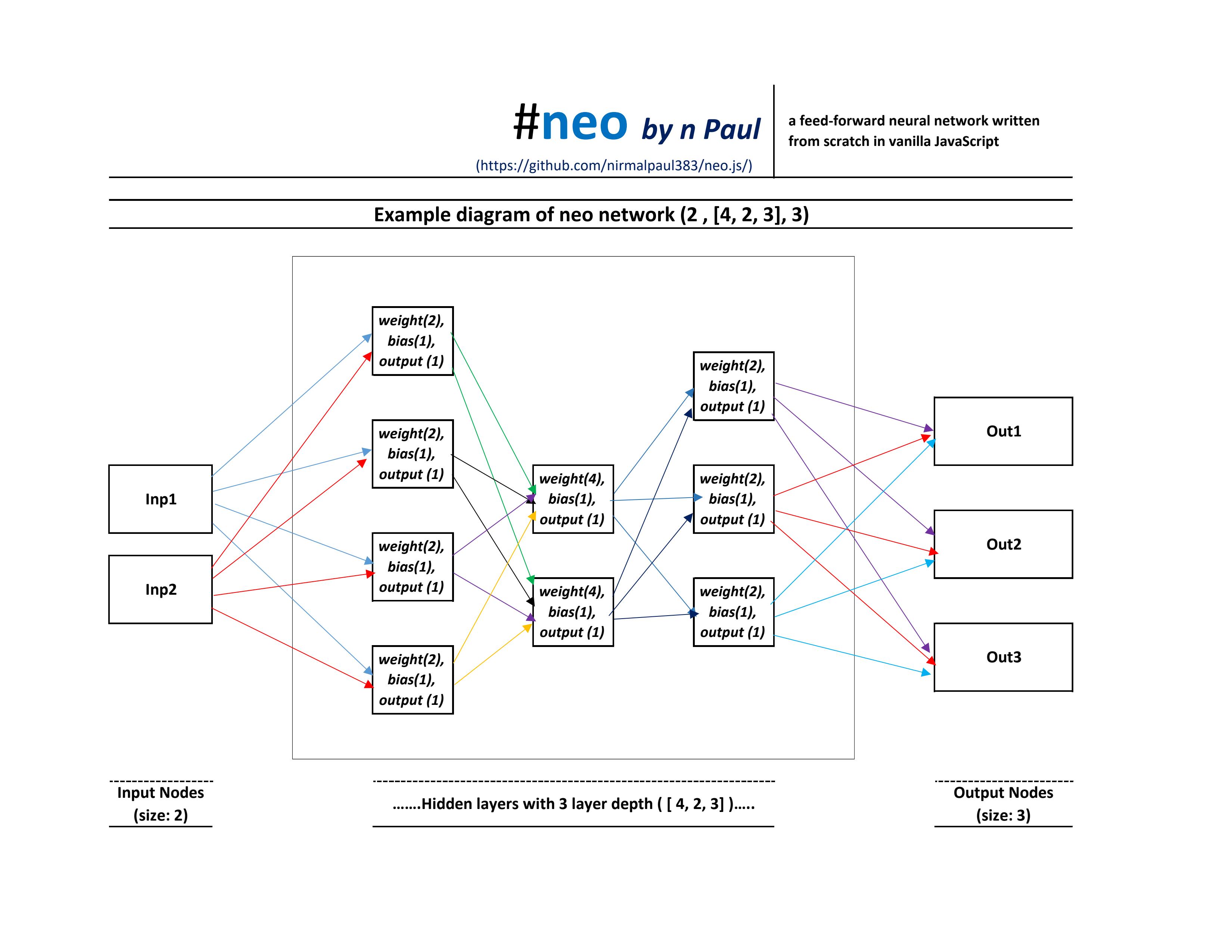
Build the neural network using .build ([structure]), train the model using .train(traning_Datasets) , run the model using .run([actual_Datasets]) , save the model using .save ( ) and load a pre-trained model using .load (neo_model_data) method.
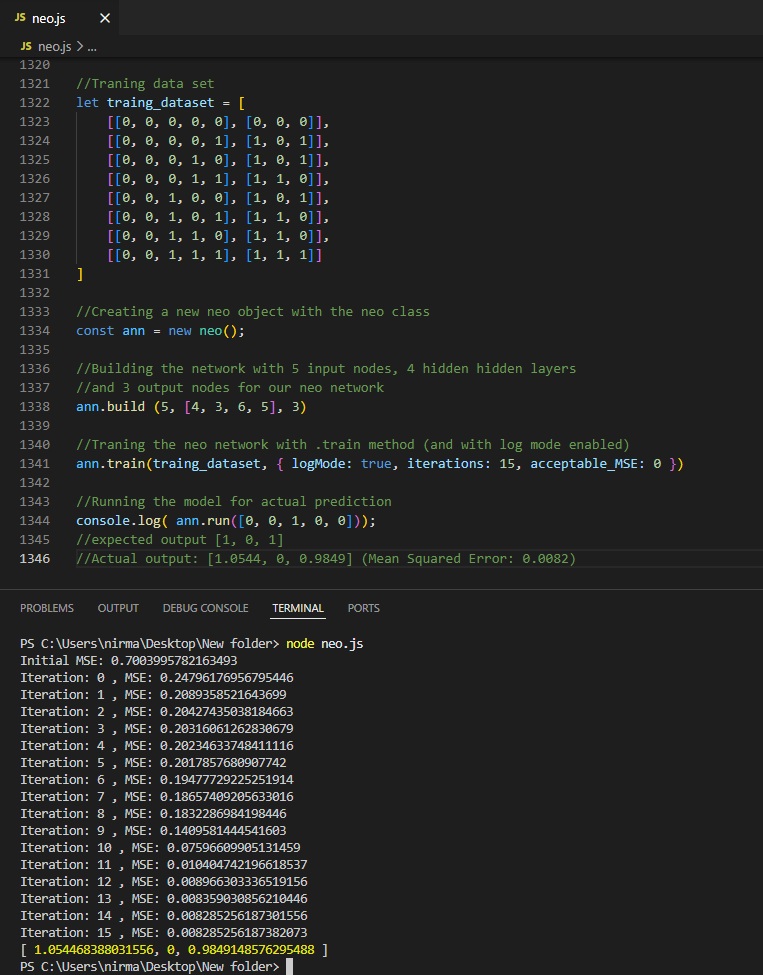
Tables of contents
- What's new
- How to include neo.js library in your project
- How to use this library
- APIs (methods and properties)
- License
- My other projects
What's new
-
v1.0.0
- Supports feed-forward neural network architecture.
- Supports customizable network structure with specified input and output nodes, hidden layers, and neurons per layer.
- Supports 5 activation functions:
sigmoidreluleaky-relutanhlinear
- Supports for configuration of activation function for hidden layers and output layer separately.
- Supports adjustable learning step.
- Supports various training options for customizing the training process:
LogModeIterationsacceptable_MSE
- Provides detailed training information during the traning(
let info = .train ()) - Supports for storing it's model data into text data using the built-in
.save ()method for future use. - Supports for loading a previously saved or a pre-trained model data using the built-in
.load ()method.
⬆ Back to the Tables of Contents ⬆
How to include neo.js library in your project?
To use this library, firstly, you need to link neo.js to your project. You can do that by using two ways:
- Download / Clone and Use: Download or clone the repository and use the neo.js file in your project.
- Use via CDN:
- Use the library directly via CDN using the following script tag:
https://cdn.jsdelivr.net/gh/nirmalpaul383/neo.js/neo.js - For using it in browser/webpage you can use
<script src="https://cdn.jsdelivr.net/gh/nirmalpaul383/neo.js/neo.js"></script>
- Use the library directly via CDN using the following script tag:
⬆ Back to the Tables of Contents ⬆
How to use this library?
For example: teaching our neo network to learn the behavior of a XOR gate.
XOR (for two input) outputs: 1 only when its two inputs are different or else outputs 0
//For example: teaching our neo network to learn the behavior of a XOR gate
//XOR (for two input) outputs: 1 only when its two inputs are different or else outputs 0

//Traning data sets for XOR (2 input and 1 output)
const training_data_arry = [
  [ [0, 0],  [0] ] ,
  [ [0, 1],  [1] ] ,
  [ [1, 0],  [1] ] ,
  [ [1, 1],  [0] ]
];
Step 1, Creating a new neo () object:
Creating a new neo object: After including the neo.js , you will need to create a new neo object using the neo class :
//After including the neo.js

//Creating a new neo object with the neo class
const neo_net = new neo();
Step 2, Building the network:
After creating a new neo object you will need to build a neo network structure with .build ( ) method that suits the neural network application:
//For a XOR gate where input nodes = 2, output nodes = 1:

//Building a neo network structure with 2 input node, 3 hidden layers (with respectively 6 , 4 and 5 neo cores (neurons) in its hidden layer) and 1 output node
neo_net.build (2, [6, 4, 5], 1);
Step 3, Training for a better model:
The next step is to train the model of the neo network using the .train () method
//For traning the neo network with .train () method
neo_net.train(training_data_arry);
Step 4, Running the model:
For running the neo network the .run () method can be used
//For running the neo network with .run () method and output to the console
console.log(neo_net.run([0,1])); //in my case the Output is: 0.9380

//For running the neo network with .run () method and output to the console
console.log(neo_net.run([0,0])); //in my case the Output is: 0

//For running the neo network with .run () method and output to the console
console.log(neo_net.run([1,1])); //in my case the Output is: 0.0211
Note: The output may vary each time after the model is trained. To reproduce the same output, save a trained model by using the
.save()method and load it using.load()method.
⬆ Back to the Tables of Contents ⬆
APIs (methods and properties)
A neo network objects has various methods and properties for doing various things.
.build () method
.build () method creates the structure for neo network (input layer's nodes, hidden layers's nodes and output layer's nodes). It takes 3 parameters:
-
Parameter 1 (for defining input layer): Expects the number of desired nodes in the input layer.
-
Parameter 2 (for defining hidden layers): Expects array with the elements containing the number in its each element. The each element 's number defines that the how many nodes is desired in each hidden layer and the length of this array represents the number of desired hidden layers in the network.
-
Parameter 3 (for defining output layer): Expects the number desired nodes in the output layer.
//Building a neo network structure with 4 input node, 4 hidden layers (with respectively 10 , 5, 15 and 20 neo cores (neurons) in its hidden layer) and 2 output nodes
neo_net.build (4, [10, 5, 15, 20], 2);
[NOTE] : The
.build ()method can be used for creating as many input nodes, hidden layers, hidden-layer nodes, and output nodes as desired. However, adding more nodes and hidden layers makes the network more complex and may require more time to train.
.config property
The neo network object has a .config property for configuring various setting for the neo network:
-
hidden_Activation: This parameter can be used for specifying the activation function for the hidden layer 's neo cores (/ neurons).
'sigmoid','relu','leaky-relu','tanh'and'linear'option can be specifed ; default is'relu' -
output_Activation: This parameter can be used for specifying the activation function for the output layer 's neo cores (/ neurons).
'sigmoid','relu','leaky-relu','tanh'and'linear'option can be specifed ; default is'relu' -
learning_Step: This parameter specifies the learning step of the neo network durning the traning. A lower learning step means neo network can learn more accurately but may require more training time. A larger learning step means neo network can learn more quickly but may reduce the accuracy. Default is0.1 -
alpha: This parameter can be used for specifying the alpha value for leaky-relu activation function. Default value is0.01
//Changing the learning_step setting in the neo network object
neo_net.config.learning_Step = 0.03
.train () method
Training of a neural network is a computationally expensive task and may take some time and system resources, depending on the complexity of the neo network structure and the size of the training dataset array.
- Training dataset array: The training dataset array contains the input data (s) and their corresponding expected output value(s) in array format. More data sets means more accurate model , but may requirs more time to train.
Each data set contains an input array with its corresponding output array:
//For example: A student Performance traning data sets with 4 input and 2 output
const stdnts_prfrmnce_dataSets = [

  //[  [input-1, input-2, input-3,..., input-n] , [output-1, output-2, ...output-n] ] ---> General structure for traning dataset

  //Inputs: study hours, attendance, assignments completed, previous score
  //Outputs: Exam score, pass (1) or fail (0)
  [ [2, 60, 5, 45],   [50, 0] ] ,  //Dataset 1
  [ [5, 80, 8, 65],   [72, 1] ] ,  //Dataset 2
  [ [6, 77, 7, 85],   [85, 1] ] ,  //Dataset 3
  [ [8, 95, 5, 80],   [87, 1] ] ,  //Dataset 4
  [ [8, 50, 3, 45],   [42, 0] ] ,  //Dataset 5
  [ [9, 65, 9, 55],   [60, 0] ]    //Dataset 6

]
.train ()method: The.train()method of the neo class object can be used to train it's model and produce a better model for more accurate predictions using a training dataset array.
It supports a optional option object parameter for configuring the training process:
//Traning the neo network using the train method
neo_net.train( stdnts_prfrmnce_dataSets , {

   logMode: true, //If true the current MSE willl be log throughout every iterations (default is false).

   iterations: 650, //Specifies the maximum times the optimise () method should be called (iteration count). More iteration means more accurate neo network but takes more time to be trained (default is 500).

   acceptable_MSE: 0.008  //Specifies the maximum acceptable Mean Squared Error (MSE). Training will be stoped when the calculated MSE is less than or equal to this value (default is 0.01)

});
- Return value of the .train () method: The .train () method returns a information string regarding the training:
//Traning the neo network using the train method
let train_info = neo_net.train(stdnts_prfrmnce_dataSets);

console.log (train_info);
//Outputs:
//
// Iterations: 650 ; Traning time: 11467.8663 ms;
// Initial MSE: 35766.52587242568; Final MSE: 0.16878662959244073;
// Error (MSE) Reduction: 35766.35708579609 ; Error (MSE) Reduction (%): 99.99952808771478 % ;
// (approx) Time takes (in ms) / iteration : 17.64287123076923 ms ;
// (approx) Iteration completed / time (in ms) :  0.05668011668395541 Numbers
.run () method
The neo network can produce outputs based on it's network model data.
.run()method can be used for running the current neo network model data and making the output(s) value in a array format:
//For storing the actual input_data for testing the model
let input_data_arry = [6, 77, 7, 85];

//For running the neo network and storing the result into the result variable
let result = neo_net.run( input_data_arry ); //expected output: [85, 1]

//For outputing the prediction to the console
console.log(result); //Actual output: [ 84.9950, 1.0073 ]
.save () and the .load() method
The trained model of the neo network can be stored as a string using the .save() method. The .load() method can then use this string data to restore the network and the model whenever needed.
This is especially useful for preserving models that require significant time to train, allowing those to be re-used later without having to re-train the network from the scratch.
.save()method:
//For storing the model data into a string
let model_for_XOR = neo_net.save();

//It is basically a text based custom format where the ";" works as the data separator
.load()method:
//For creating another object with the neo class
const another_neo_obj = new neo();

//After storing the neo network 's model as a string representation
//For loading the previously saved model data into the newly created neo object
another_neo_obj.load(model_for_XOR);

//For testing the newly created neo object with the same actual data
console.log(another_neo_obj.run(input_data_arry)); //Outputs: [ 84.9950, 1.0073 ]  (Outputs are same as the neo_net)
Note: You can store this model data into a file and load it later using:
Bloband<input type="file">in web browser / runtime.fs.writeFile()andfs.readFile()in Node.js.Bun.write()andBun.file()in Bun runtime.
⬆ Back to the Tables of Contents ⬆
License:
neo.js is originally written by me (N Paul) and it is licensed under the GNU General Public License v3.0 (GPLv3) .
Additionally, while not legally required, I kindly request that if you use, modify, or distribute this project, please give credit to the original author name, Nirmal Paul (N Paul) (https://github.com/nirmalpaul383).
I have dedicated significant time for developing this project, ensuring that every line of code is clean, well-structured, and easy to understand. Your acknowledgment of the original authorship is greatly appreciated.
⬆ Back to the Tables of Contents ⬆
My other projects
If you think that the neo.js is a useful project, please consider giving a star ☆ to the neo.js project on the GitHub.
You can find my other open source projects:
ViewPoint.js: A Math expression parser and evaluator with support of runtime data-type checking written in native JS.MathPad+: MathPad+ is a lightweight mathematical expression playground powered by the ViewPoint evaluator.Voice Ccommands: A customizable Voice Assistant that supports installable custom commands / functions via Voice Command Loader (.vcl) files. Users can extend its functionality by creating their own commands using JavaScript and distributing them through .vcl files.WebCell-Web-SpreadSheet: A web SpreadSheet project written in web language (html, css and JavaScript). It can be run completely offline.- and more from my github profile
⬆ Back to the Tables of Contents ⬆
Contributors

1 commits
Similar repos


Languages
JavaScript
100.0%
neo.js is an artificial neural network library written from scratch in vanila (pure) JavaScript.
JavaScript
0
1 commits
updated Sep 19, 2026
See what people are saying (1)
README
neo.js
neo.js is an artificial neural network library written from scratch in vanila (pure) JavaScript.
Build the neural network using .build ([structure]), train the model using .train(traning_Datasets) , run the model using .run([actual_Datasets]) , save the model using .save ( ) and load a pre-trained model using .load (neo_model_data) method.
Tables of contents
- What's new
- How to include neo.js library in your project
- How to use this library
- APIs (methods and properties)
- License
- My other projects
What's new
-
v1.0.0
- Supports feed-forward neural network architecture.
- Supports customizable network structure with specified input and output nodes, hidden layers, and neurons per layer.
- Supports 5 activation functions:
sigmoidreluleaky-relutanhlinear
- Supports for configuration of activation function for hidden layers and output layer separately.
- Supports adjustable learning step.
- Supports various training options for customizing the training process:
LogModeIterationsacceptable_MSE
- Provides detailed training information during the traning(
let info = .train ()) - Supports for storing it's model data into text data using the built-in
.save ()method for future use. - Supports for loading a previously saved or a pre-trained model data using the built-in
.load ()method.
⬆ Back to the Tables of Contents ⬆
How to include neo.js library in your project?
To use this library, firstly, you need to link neo.js to your project. You can do that by using two ways:
- Download / Clone and Use: Download or clone the repository and use the neo.js file in your project.
- Use via CDN:
- Use the library directly via CDN using the following script tag:
https://cdn.jsdelivr.net/gh/nirmalpaul383/neo.js/neo.js - For using it in browser/webpage you can use
<script src="https://cdn.jsdelivr.net/gh/nirmalpaul383/neo.js/neo.js"></script>
- Use the library directly via CDN using the following script tag:
⬆ Back to the Tables of Contents ⬆
How to use this library?
For example: teaching our neo network to learn the behavior of a XOR gate.
XOR (for two input) outputs: 1 only when its two inputs are different or else outputs 0
//For example: teaching our neo network to learn the behavior of a XOR gate
//XOR (for two input) outputs: 1 only when its two inputs are different or else outputs 0

//Traning data sets for XOR (2 input and 1 output)
const training_data_arry = [
  [ [0, 0],  [0] ] ,
  [ [0, 1],  [1] ] ,
  [ [1, 0],  [1] ] ,
  [ [1, 1],  [0] ]
];
Step 1, Creating a new neo () object:
Creating a new neo object: After including the neo.js , you will need to create a new neo object using the neo class :
//After including the neo.js

//Creating a new neo object with the neo class
const neo_net = new neo();
Step 2, Building the network:
After creating a new neo object you will need to build a neo network structure with .build ( ) method that suits the neural network application:
//For a XOR gate where input nodes = 2, output nodes = 1:

//Building a neo network structure with 2 input node, 3 hidden layers (with respectively 6 , 4 and 5 neo cores (neurons) in its hidden layer) and 1 output node
neo_net.build (2, [6, 4, 5], 1);
Step 3, Training for a better model:
The next step is to train the model of the neo network using the .train () method
//For traning the neo network with .train () method
neo_net.train(training_data_arry);
Step 4, Running the model:
For running the neo network the .run () method can be used
//For running the neo network with .run () method and output to the console
console.log(neo_net.run([0,1])); //in my case the Output is: 0.9380

//For running the neo network with .run () method and output to the console
console.log(neo_net.run([0,0])); //in my case the Output is: 0

//For running the neo network with .run () method and output to the console
console.log(neo_net.run([1,1])); //in my case the Output is: 0.0211
Note: The output may vary each time after the model is trained. To reproduce the same output, save a trained model by using the
.save()method and load it using.load()method.
⬆ Back to the Tables of Contents ⬆
APIs (methods and properties)
A neo network objects has various methods and properties for doing various things.
.build () method
.build () method creates the structure for neo network (input layer's nodes, hidden layers's nodes and output layer's nodes). It takes 3 parameters:
-
Parameter 1 (for defining input layer): Expects the number of desired nodes in the input layer.
-
Parameter 2 (for defining hidden layers): Expects array with the elements containing the number in its each element. The each element 's number defines that the how many nodes is desired in each hidden layer and the length of this array represents the number of desired hidden layers in the network.
-
Parameter 3 (for defining output layer): Expects the number desired nodes in the output layer.
//Building a neo network structure with 4 input node, 4 hidden layers (with respectively 10 , 5, 15 and 20 neo cores (neurons) in its hidden layer) and 2 output nodes
neo_net.build (4, [10, 5, 15, 20], 2);
[NOTE] : The
.build ()method can be used for creating as many input nodes, hidden layers, hidden-layer nodes, and output nodes as desired. However, adding more nodes and hidden layers makes the network more complex and may require more time to train.
.config property
The neo network object has a .config property for configuring various setting for the neo network:
-
hidden_Activation: This parameter can be used for specifying the activation function for the hidden layer 's neo cores (/ neurons).
'sigmoid','relu','leaky-relu','tanh'and'linear'option can be specifed ; default is'relu' -
output_Activation: This parameter can be used for specifying the activation function for the output layer 's neo cores (/ neurons).
'sigmoid','relu','leaky-relu','tanh'and'linear'option can be specifed ; default is'relu' -
learning_Step: This parameter specifies the learning step of the neo network durning the traning. A lower learning step means neo network can learn more accurately but may require more training time. A larger learning step means neo network can learn more quickly but may reduce the accuracy. Default is0.1 -
alpha: This parameter can be used for specifying the alpha value for leaky-relu activation function. Default value is0.01
//Changing the learning_step setting in the neo network object
neo_net.config.learning_Step = 0.03
.train () method
Training of a neural network is a computationally expensive task and may take some time and system resources, depending on the complexity of the neo network structure and the size of the training dataset array.
- Training dataset array: The training dataset array contains the input data (s) and their corresponding expected output value(s) in array format. More data sets means more accurate model , but may requirs more time to train.
Each data set contains an input array with its corresponding output array:
//For example: A student Performance traning data sets with 4 input and 2 output
const stdnts_prfrmnce_dataSets = [

  //[  [input-1, input-2, input-3,..., input-n] , [output-1, output-2, ...output-n] ] ---> General structure for traning dataset

  //Inputs: study hours, attendance, assignments completed, previous score
  //Outputs: Exam score, pass (1) or fail (0)
  [ [2, 60, 5, 45],   [50, 0] ] ,  //Dataset 1
  [ [5, 80, 8, 65],   [72, 1] ] ,  //Dataset 2
  [ [6, 77, 7, 85],   [85, 1] ] ,  //Dataset 3
  [ [8, 95, 5, 80],   [87, 1] ] ,  //Dataset 4
  [ [8, 50, 3, 45],   [42, 0] ] ,  //Dataset 5
  [ [9, 65, 9, 55],   [60, 0] ]    //Dataset 6

]
.train ()method: The.train()method of the neo class object can be used to train it's model and produce a better model for more accurate predictions using a training dataset array.
It supports a optional option object parameter for configuring the training process:
//Traning the neo network using the train method
neo_net.train( stdnts_prfrmnce_dataSets , {

   logMode: true, //If true the current MSE willl be log throughout every iterations (default is false).

   iterations: 650, //Specifies the maximum times the optimise () method should be called (iteration count). More iteration means more accurate neo network but takes more time to be trained (default is 500).

   acceptable_MSE: 0.008  //Specifies the maximum acceptable Mean Squared Error (MSE). Training will be stoped when the calculated MSE is less than or equal to this value (default is 0.01)

});
- Return value of the .train () method: The .train () method returns a information string regarding the training:
//Traning the neo network using the train method
let train_info = neo_net.train(stdnts_prfrmnce_dataSets);

console.log (train_info);
//Outputs:
//
// Iterations: 650 ; Traning time: 11467.8663 ms;
// Initial MSE: 35766.52587242568; Final MSE: 0.16878662959244073;
// Error (MSE) Reduction: 35766.35708579609 ; Error (MSE) Reduction (%): 99.99952808771478 % ;
// (approx) Time takes (in ms) / iteration : 17.64287123076923 ms ;
// (approx) Iteration completed / time (in ms) :  0.05668011668395541 Numbers
.run () method
The neo network can produce outputs based on it's network model data.
.run()method can be used for running the current neo network model data and making the output(s) value in a array format:
//For storing the actual input_data for testing the model
let input_data_arry = [6, 77, 7, 85];

//For running the neo network and storing the result into the result variable
let result = neo_net.run( input_data_arry ); //expected output: [85, 1]

//For outputing the prediction to the console
console.log(result); //Actual output: [ 84.9950, 1.0073 ]
.save () and the .load() method
The trained model of the neo network can be stored as a string using the .save() method. The .load() method can then use this string data to restore the network and the model whenever needed.
This is especially useful for preserving models that require significant time to train, allowing those to be re-used later without having to re-train the network from the scratch.
.save()method:
//For storing the model data into a string
let model_for_XOR = neo_net.save();

//It is basically a text based custom format where the ";" works as the data separator
.load()method:
//For creating another object with the neo class
const another_neo_obj = new neo();

//After storing the neo network 's model as a string representation
//For loading the previously saved model data into the newly created neo object
another_neo_obj.load(model_for_XOR);

//For testing the newly created neo object with the same actual data
console.log(another_neo_obj.run(input_data_arry)); //Outputs: [ 84.9950, 1.0073 ]  (Outputs are same as the neo_net)
Note: You can store this model data into a file and load it later using:
Bloband<input type="file">in web browser / runtime.fs.writeFile()andfs.readFile()in Node.js.Bun.write()andBun.file()in Bun runtime.
⬆ Back to the Tables of Contents ⬆
License:
neo.js is originally written by me (N Paul) and it is licensed under the GNU General Public License v3.0 (GPLv3) .
Additionally, while not legally required, I kindly request that if you use, modify, or distribute this project, please give credit to the original author name, Nirmal Paul (N Paul) (https://github.com/nirmalpaul383).
I have dedicated significant time for developing this project, ensuring that every line of code is clean, well-structured, and easy to understand. Your acknowledgment of the original authorship is greatly appreciated.
⬆ Back to the Tables of Contents ⬆
My other projects
If you think that the neo.js is a useful project, please consider giving a star ☆ to the neo.js project on the GitHub.
You can find my other open source projects:
ViewPoint.js: A Math expression parser and evaluator with support of runtime data-type checking written in native JS.MathPad+: MathPad+ is a lightweight mathematical expression playground powered by the ViewPoint evaluator.Voice Ccommands: A customizable Voice Assistant that supports installable custom commands / functions via Voice Command Loader (.vcl) files. Users can extend its functionality by creating their own commands using JavaScript and distributing them through .vcl files.WebCell-Web-SpreadSheet: A web SpreadSheet project written in web language (html, css and JavaScript). It can be run completely offline.- and more from my github profile
⬆ Back to the Tables of Contents ⬆
Similar repos
Contributors
1 commits
Languages
JavaScript
100.0%